Math Pre-Calculus 11
Content Connections in Blackboard Learn


         Sonya Fern, Math Teacher
        Dal Little, DL Support Teacher
Agenda
1. Describe the process of embedding a Content Connections
   (CC) math course into a Learning Management System -
   Blackboard Learn (Bb).
   a. Example course: Pre-Calculus 11
   b. WestShore Centre currently has the following CC courses in Blackboard:
      AWM 10, AWM 11, FMP 10, FOM 11, PreC 11, PreC 12

1. Show file structure on the server and HTML code on the page
2. Compare the user interface in both CC and Bb
3. Describe the benefits of combining CC math courses in Bb
   LMS
Context of WestShore Centre

WestShore staff agreed to a standard look and feel for all courses
   Students are accustomed to navigating between different courses with
   same structure and expectations, all within Blackboard Learn

School-wide Orientation for How to use the Blackboard LMS
Why? Content Connections in Blackboard
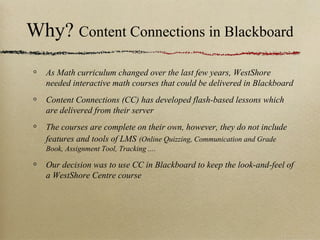
  As Math curriculum changed over the last few years, WestShore
  needed interactive math courses that could be delivered in Blackboard
  Content Connections (CC) has developed flash-based lessons which
  are delivered from their server
  The courses are complete on their own, however, they do not include
  features and tools of LMS (Online Quizzing, Communication and Grade
  Book, Assignment Tool, Tracking ....

  Our decision was to use CC in Blackboard to keep the look-and-feel of
  a WestShore Centre course
Content Connections Courses


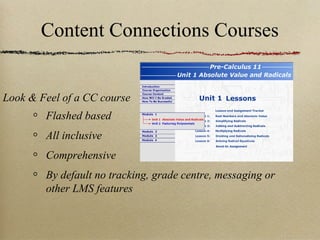
Look & Feel of a CC course
        Flashed based
        All inclusive
        Comprehensive
        By default no tracking, grade centre, messaging or
        other LMS features
Development Steps
Overview: Process of embedding the content & tests into the course shell
Step 1 - Empty course shell
Step 2 - Created folders for units with lessons
           Generic in structure with sequentially numbered file names with
           corresponding sequence in html code

Step 3 - Interface: Build a Bb Interface i.e. Table of Contents
Step 4 - Import exams and assignments
Step 5 - Build and configure Blackboard Grade Center
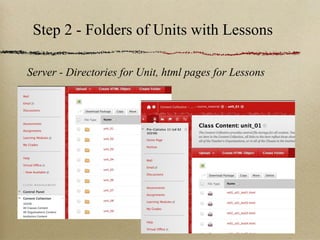
Step 2 - Folders of Units with Lessons

Server - Directories for Unit, html pages for Lessons
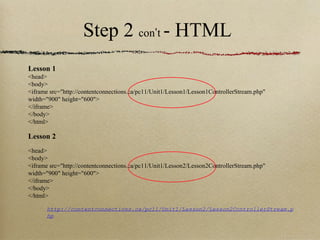
Step 2 con’t - HTML
Lesson 1
<head>
<body>
<iframe src="http://contentconnections.ca/pc11/Unit1/Lesson1/Lesson1ControllerStream.php"
width="900" height="600">
</iframe>
</body>
</html>

Lesson 2
<head>
<body>
<iframe src="http://contentconnections.ca/pc11/Unit1/Lesson2/Lesson2ControllerStream.php"
width="900" height="600">
</iframe>
</body>
</html>

       http://contentconnections.ca/pc11/Unit1/Lesson2/Lesson2ControllerStream.p
       hp
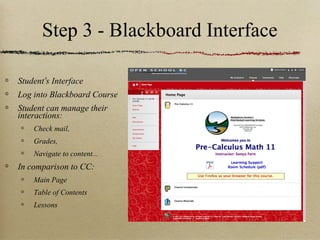
Step 3 - Blackboard Interface

Student’s Interface
Log into Blackboard Course
Student can manage their
interactions:
    Check mail,
    Grades,
    Navigate to content...
In comparison to CC:
    Main Page
    Table of Contents
    Lessons
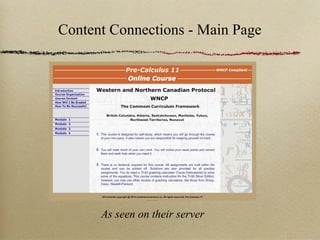
Content Connections - Main Page


      As seen on their server
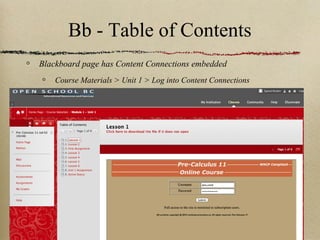
Bb - Table of Contents
Blackboard page has Content Connections embedded
    Course Materials > Unit 1 > Log into Content Connections
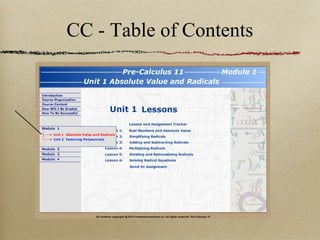
CC - Table of Contents
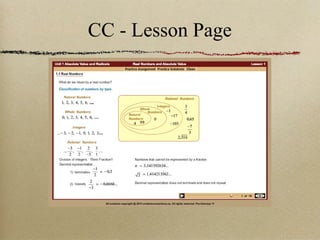
CC - Lesson Page
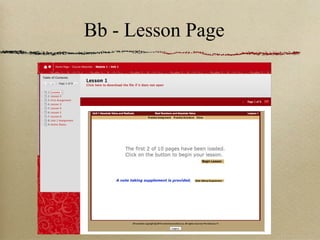
Bb - Lesson Page
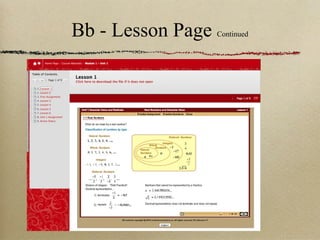
Bb - Lesson Page   Continued
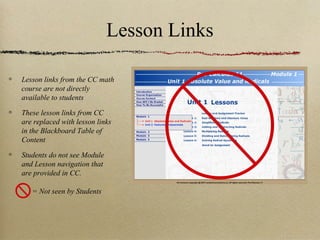
Lesson Links

Lesson links from the CC math
course are not directly
available to students

These lesson links from CC
are replaced with lesson links
in the Blackboard Table of
Content

Students do not see Module
and Lesson navigation that
are provided in CC.

   = Not seen by Students
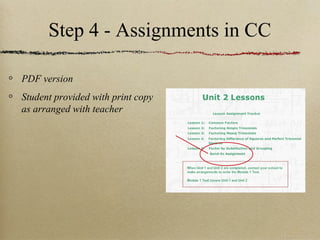
Step 4 - Assignments in CC

PDF version
Student provided with print copy
as arranged with teacher
Step 4 - Assignments in Bb
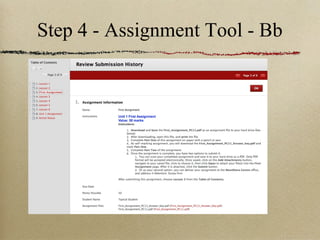
Use the Assignment Tool in LMS
Flexibility for assignment submission
   Drop off in paper - 25%

   Scan and attach to assignment page - 50%

   Photograph with camera and submit - 5%

   Fax and snail-mail to school - 20%

No excuse for not submitting.
Options for all students who wish to proceed!
Without an LMS student-teacher interactions are paper-
based only
Step 4 - Assignment Tool - Bb
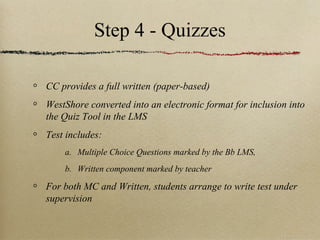
Step 4 - Quizzes

CC provides a full written (paper-based)
WestShore converted into an electronic format for inclusion into
the Quiz Tool in the LMS
Test includes:
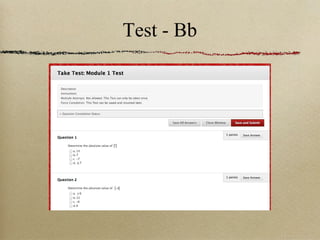
    a. Multiple Choice Questions marked by the Bb LMS,
    b. Written component marked by teacher

For both MC and Written, students arrange to write test under
supervision
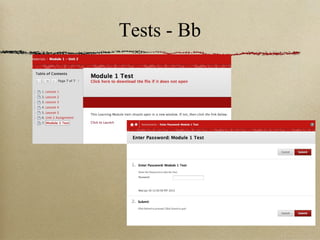
Tests - Bb
Test - Bb
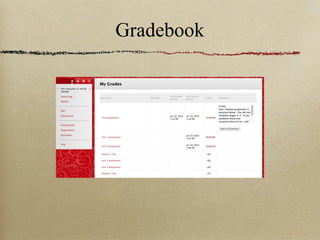
Gradebook
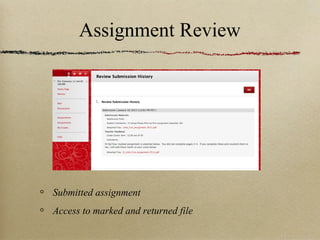
Assignment Review


Submitted assignment
Access to marked and returned file
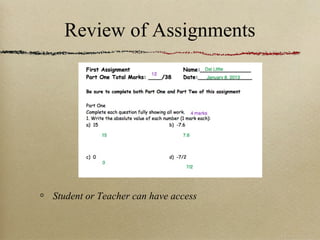
Review of Assignments


Student or Teacher can have access
Mail


Use LMS Mail messaging for 90% of communications
Keeps ongoing record of who said what and when
Benefits of Blackboard use


Provides a consistent look and feel for all courses
Provides a consistent tracking system throughout the school
Provides a familiar set of online tools:
    Online Quizzing, Communication and Grade Book, Assignment Tool ....

Consistent navigation allows students to easily work between
all their courses.
School-wide Orientation for “How to use the Blackboard LMS”
and “How to work as an Online Student”
Thank you

If interested in a copy of a Bb course shell for the Math course using CC content,
                                       contact:
                         Sonya Fern - sfern@sd62.bc.ca or
                           Dal Little - dlittle@sd62.bc.ca

Content Connections Math in Blackboard Learn

  • 1.
    Math Pre-Calculus 11 ContentConnections in Blackboard Learn Sonya Fern, Math Teacher Dal Little, DL Support Teacher
  • 2.
    Agenda 1. Describe theprocess of embedding a Content Connections (CC) math course into a Learning Management System - Blackboard Learn (Bb). a. Example course: Pre-Calculus 11 b. WestShore Centre currently has the following CC courses in Blackboard: AWM 10, AWM 11, FMP 10, FOM 11, PreC 11, PreC 12 1. Show file structure on the server and HTML code on the page 2. Compare the user interface in both CC and Bb 3. Describe the benefits of combining CC math courses in Bb LMS
  • 3.
    Context of WestShoreCentre WestShore staff agreed to a standard look and feel for all courses Students are accustomed to navigating between different courses with same structure and expectations, all within Blackboard Learn School-wide Orientation for How to use the Blackboard LMS
  • 4.
    Why? Content Connectionsin Blackboard As Math curriculum changed over the last few years, WestShore needed interactive math courses that could be delivered in Blackboard Content Connections (CC) has developed flash-based lessons which are delivered from their server The courses are complete on their own, however, they do not include features and tools of LMS (Online Quizzing, Communication and Grade Book, Assignment Tool, Tracking .... Our decision was to use CC in Blackboard to keep the look-and-feel of a WestShore Centre course
  • 5.
    Content Connections Courses Look& Feel of a CC course Flashed based All inclusive Comprehensive By default no tracking, grade centre, messaging or other LMS features
  • 6.
    Development Steps Overview: Processof embedding the content & tests into the course shell Step 1 - Empty course shell Step 2 - Created folders for units with lessons Generic in structure with sequentially numbered file names with corresponding sequence in html code Step 3 - Interface: Build a Bb Interface i.e. Table of Contents Step 4 - Import exams and assignments Step 5 - Build and configure Blackboard Grade Center
  • 7.
    Step 2 -Folders of Units with Lessons Server - Directories for Unit, html pages for Lessons
  • 8.
    Step 2 con’t- HTML Lesson 1 <head> <body> <iframe src="http://contentconnections.ca/pc11/Unit1/Lesson1/Lesson1ControllerStream.php" width="900" height="600"> </iframe> </body> </html> Lesson 2 <head> <body> <iframe src="http://contentconnections.ca/pc11/Unit1/Lesson2/Lesson2ControllerStream.php" width="900" height="600"> </iframe> </body> </html> http://contentconnections.ca/pc11/Unit1/Lesson2/Lesson2ControllerStream.p hp
  • 9.
    Step 3 -Blackboard Interface Student’s Interface Log into Blackboard Course Student can manage their interactions: Check mail, Grades, Navigate to content... In comparison to CC: Main Page Table of Contents Lessons
  • 10.
    Content Connections -Main Page As seen on their server
  • 11.
    Bb - Tableof Contents Blackboard page has Content Connections embedded Course Materials > Unit 1 > Log into Content Connections
  • 12.
    CC - Tableof Contents
  • 13.
  • 14.
  • 15.
    Bb - LessonPage Continued
  • 16.
    Lesson Links Lesson linksfrom the CC math course are not directly available to students These lesson links from CC are replaced with lesson links in the Blackboard Table of Content Students do not see Module and Lesson navigation that are provided in CC. = Not seen by Students
  • 17.
    Step 4 -Assignments in CC PDF version Student provided with print copy as arranged with teacher
  • 18.
    Step 4 -Assignments in Bb Use the Assignment Tool in LMS Flexibility for assignment submission Drop off in paper - 25% Scan and attach to assignment page - 50% Photograph with camera and submit - 5% Fax and snail-mail to school - 20% No excuse for not submitting. Options for all students who wish to proceed! Without an LMS student-teacher interactions are paper- based only
  • 19.
    Step 4 -Assignment Tool - Bb
  • 20.
    Step 4 -Quizzes CC provides a full written (paper-based) WestShore converted into an electronic format for inclusion into the Quiz Tool in the LMS Test includes: a. Multiple Choice Questions marked by the Bb LMS, b. Written component marked by teacher For both MC and Written, students arrange to write test under supervision
  • 21.
  • 22.
  • 23.
  • 24.
  • 25.
    Review of Assignments Studentor Teacher can have access
  • 26.
    Mail Use LMS Mailmessaging for 90% of communications Keeps ongoing record of who said what and when
  • 27.
    Benefits of Blackboarduse Provides a consistent look and feel for all courses Provides a consistent tracking system throughout the school Provides a familiar set of online tools: Online Quizzing, Communication and Grade Book, Assignment Tool .... Consistent navigation allows students to easily work between all their courses. School-wide Orientation for “How to use the Blackboard LMS” and “How to work as an Online Student”
  • 28.
    Thank you If interestedin a copy of a Bb course shell for the Math course using CC content, contact: Sonya Fern - sfern@sd62.bc.ca or Dal Little - dlittle@sd62.bc.ca

Editor's Notes

  • #2 I am Dal. I have been involved with Distributed L for about 15 years. Currently I still teach a course or two, but I am main the Distributed and Blended Learning support person for staff and students at the WestShore Center for the Sooke School District. As the support person, I troubleshoot when online issues surface and when not putting out fires, I work with staff to help design and develop some made in Sooke templates and content. Sonya teaching for 25 yrs the last 7 years in DL. I teach all the math online courses from gr 10-12 and math DH
  • #3 Onkar form Surrey Connect - 3:00 pm paekside
  • #5 Complete CC but no management log, record and communicate Wanted Bb look and feel Able to link in a appropriate lessons areas Include all the tools
  • #7 Once we did the process once, we were able to copy and paste much of the work, with only small change to esnure link grab right content Dreamweaver was handy to make global changes. Bb allows for WebDAV directly into the server which faster process Sonya knew the structure and how it worked. Respondus was used to convert some exams into the Bb friendly format
  • #9 Show student how to collapse the Course Menu Embedding with iFrame html tags
  • #10 Use comparison of Tools available in Bb and Standardized look-and-feel Access to teachers in Learning Support Room Combining of CC with Bb
  • #11 Command, Shift, Tab to move to another app Great layout for a stand alone, but needed to Bb layout
  • #12 Emphasizing how CC fits into a Bb frame with TOOLS available for students and teacher Select Course Materials, Unit 1 and this is what you see. We ran into trouble with Security Setting on IE , Firefox simplified access Username - Password same for both, case sensitive in CC
  • #13 Module to Units to click on a Lesson Good navigation structure Great access to content, we need tools to help manage relationship with student
  • #14 lesson page from CC is also what students now see in and work with
  • #15 Show student how to collapse the Course Menu Click on Begin Lesson
  • #16 Student can navigate using the Bb ToC Student still have full access to the CC course, just managed in Bb
  • #17 Emphasize how the Bb design is different than CC
  • #21 Respondus used to import as many as possible
  • #24 Click on 12 coloured mark to see the submission All comment are visible