Introduction to Blackboard 9 Course & Content Management  System
General Points
General Points Blackboard has become one of the College's most  important tools to support academic technology
General Points Blackboard has become one of the College's most  important tools to support academic technology 90% of classes have Blackboard sites
General Points Blackboard has become one of the College's most  important tools to support academic technology 90% of classes have Blackboard sites 2000 to 4000 users are accessing the system at any given time
General Points Blackboard has become one of the College's most  important tools to support academic technology 90% of classes have Blackboard sites 2000 to 4000 users are accessing the system at any given time With so many people using Blackboard 8, the new interface in Blackboard 9 will necessitate a large-scale effort by IT to ensure a smooth transition
Blackboard 9 Benefits
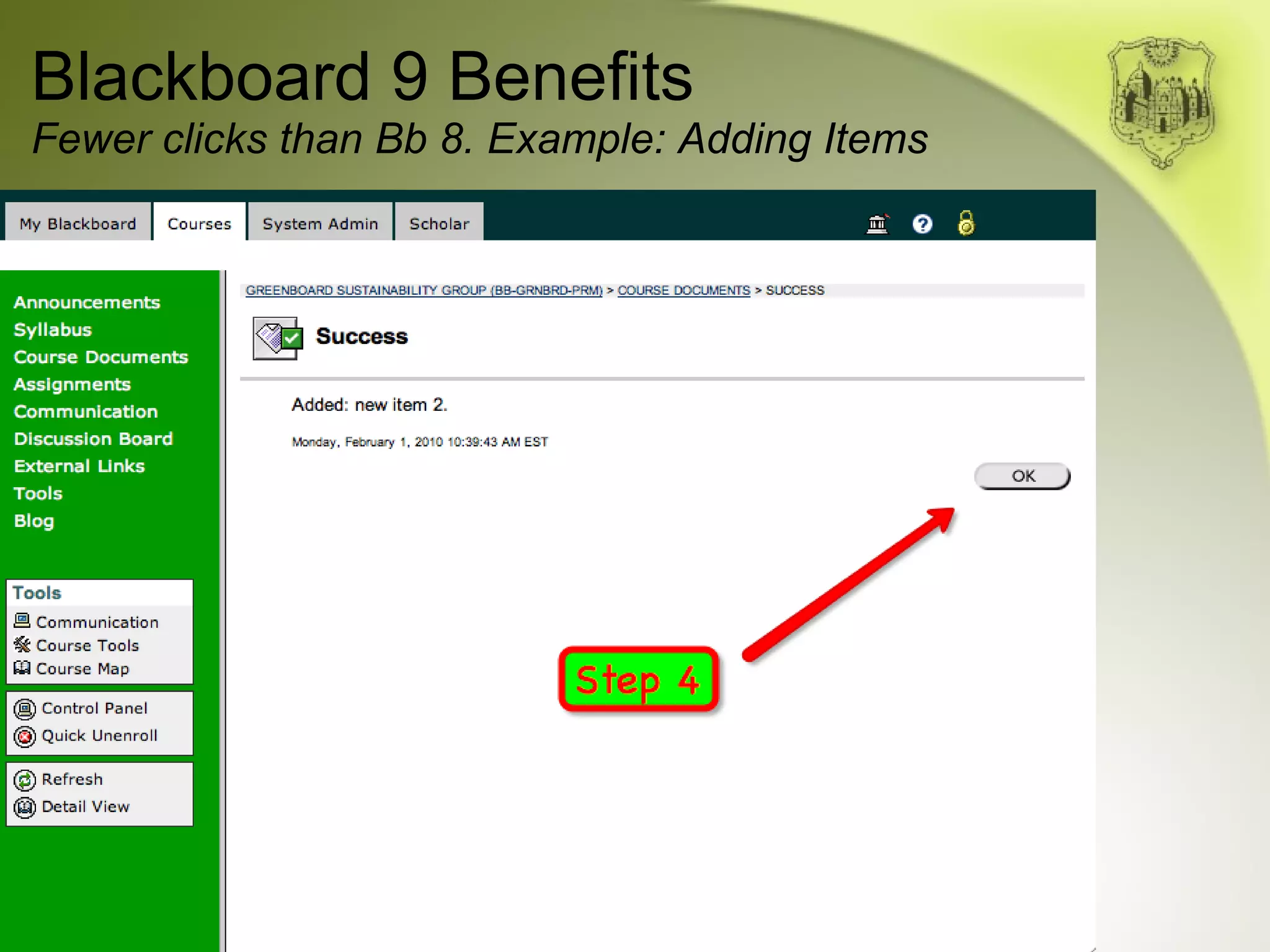
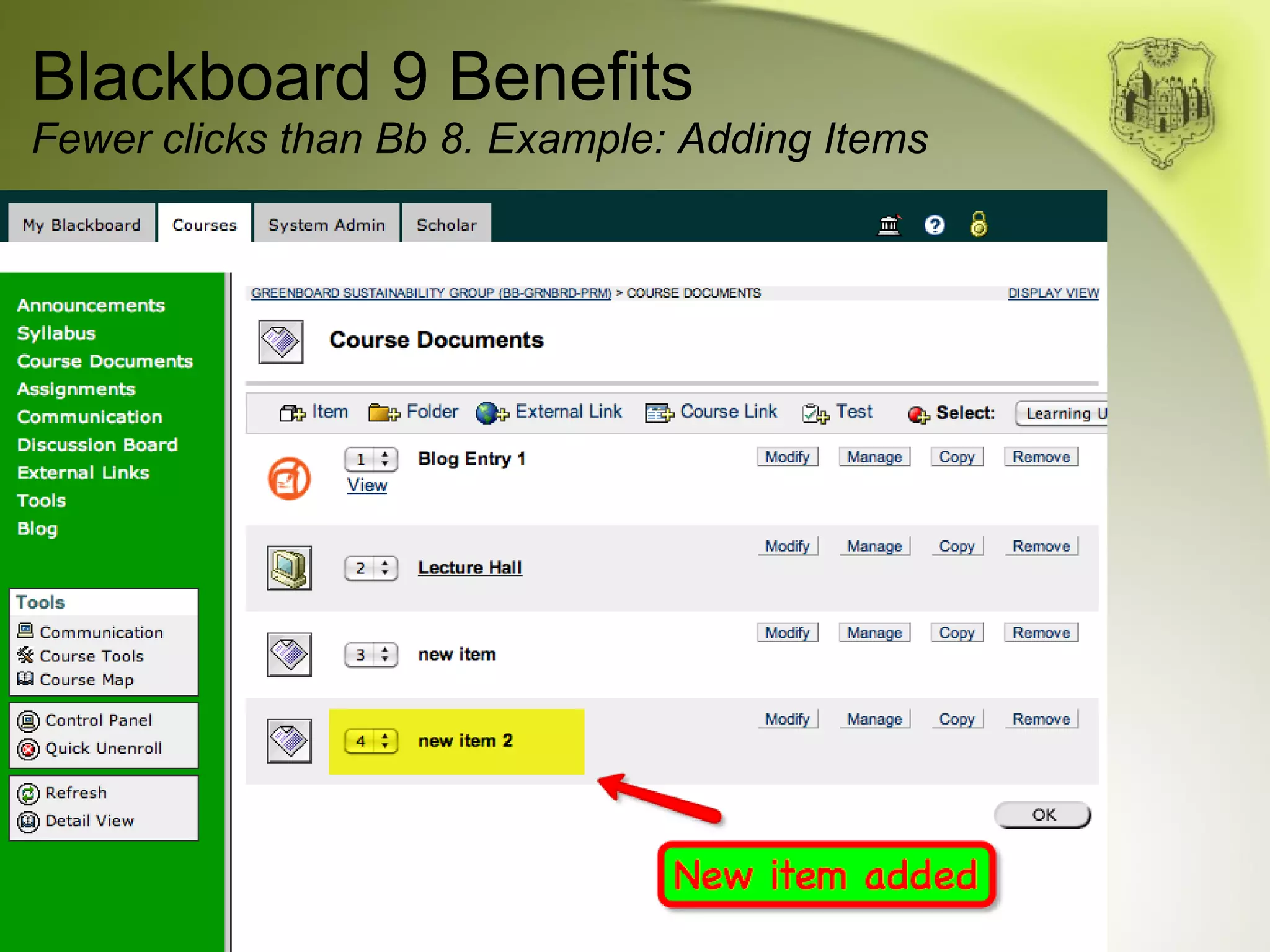
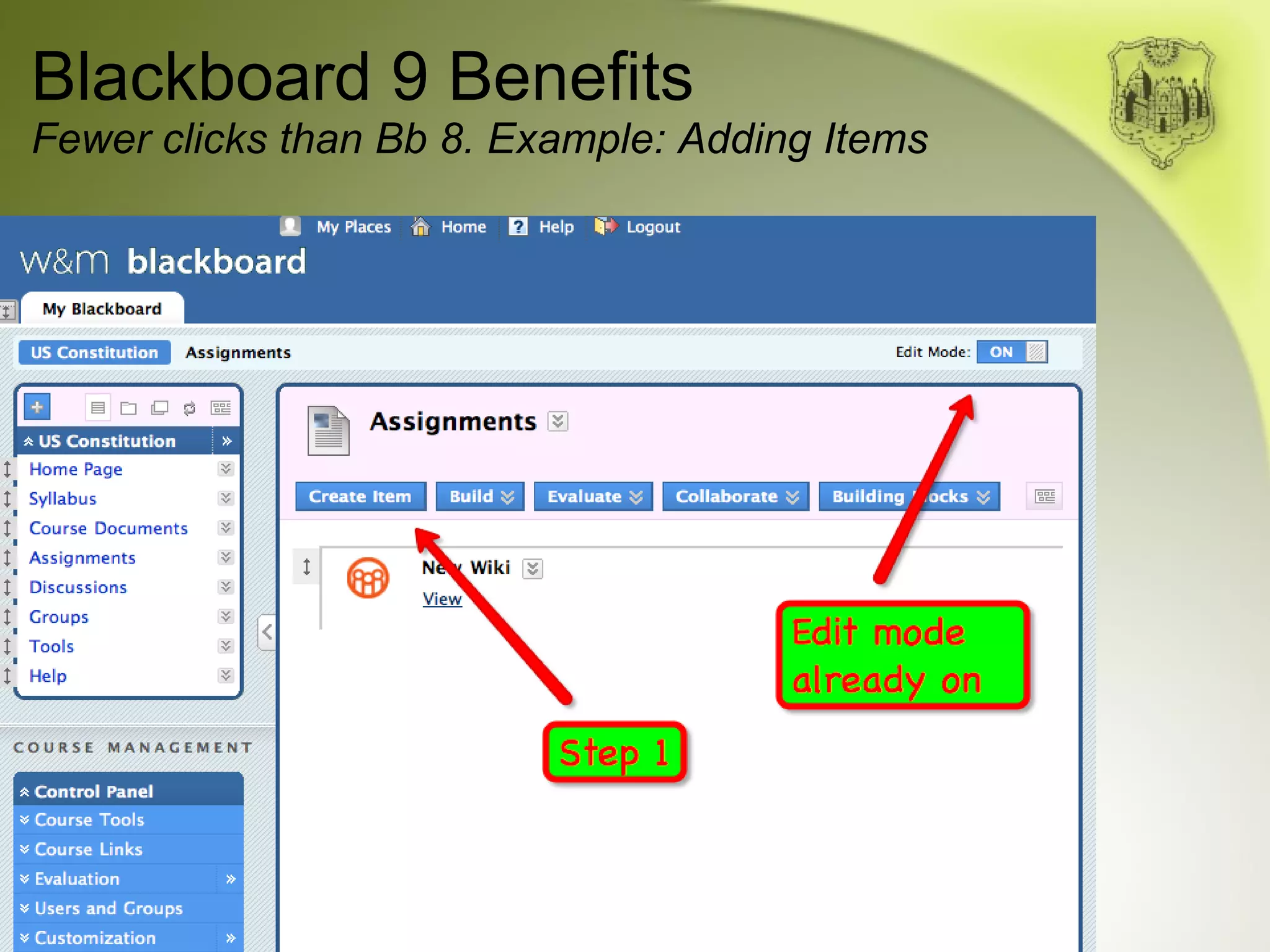
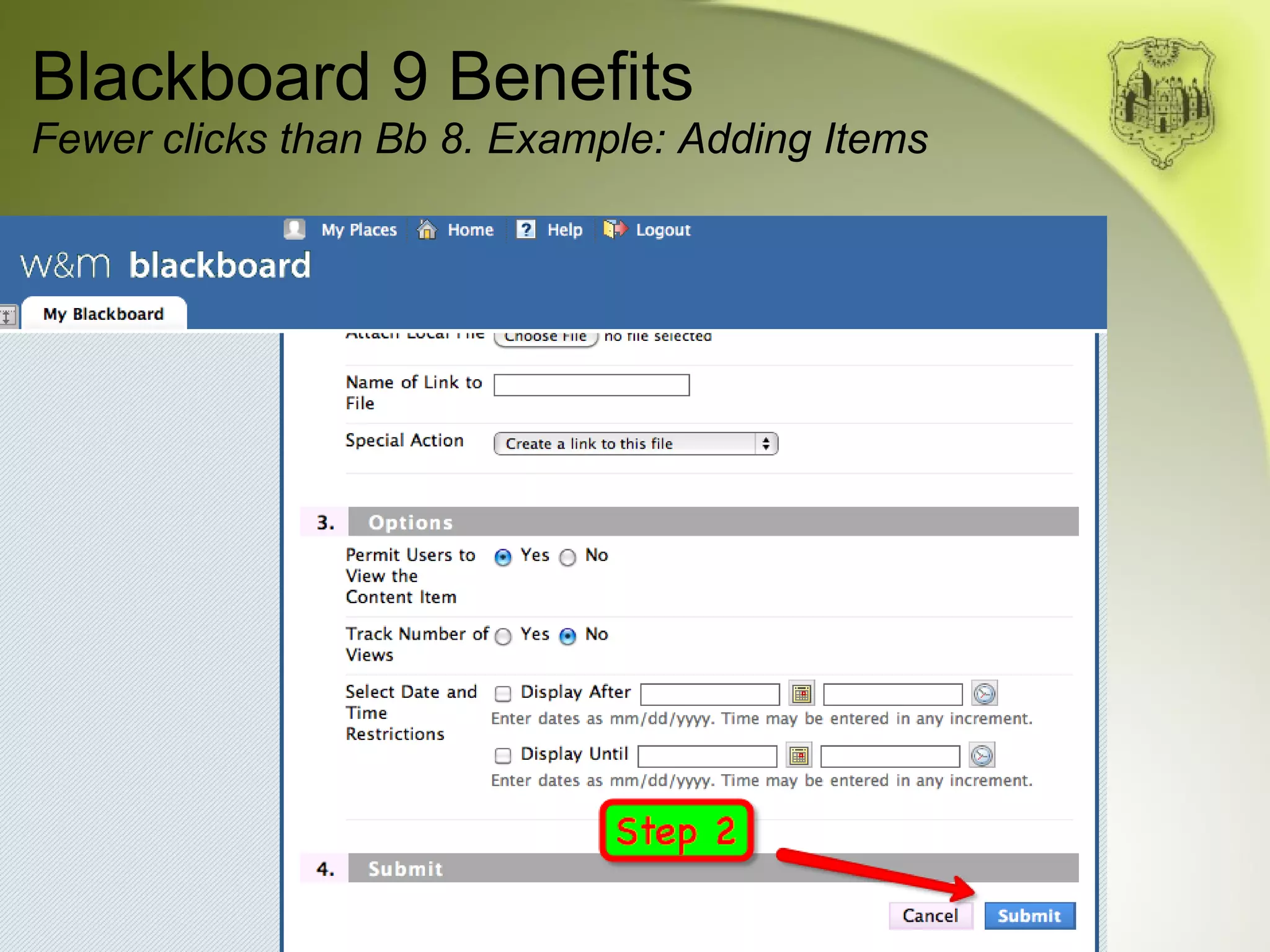
Blackboard 9 Benefits Fewer clicks to accomplish common tasks; useless  clicks have been eliminated
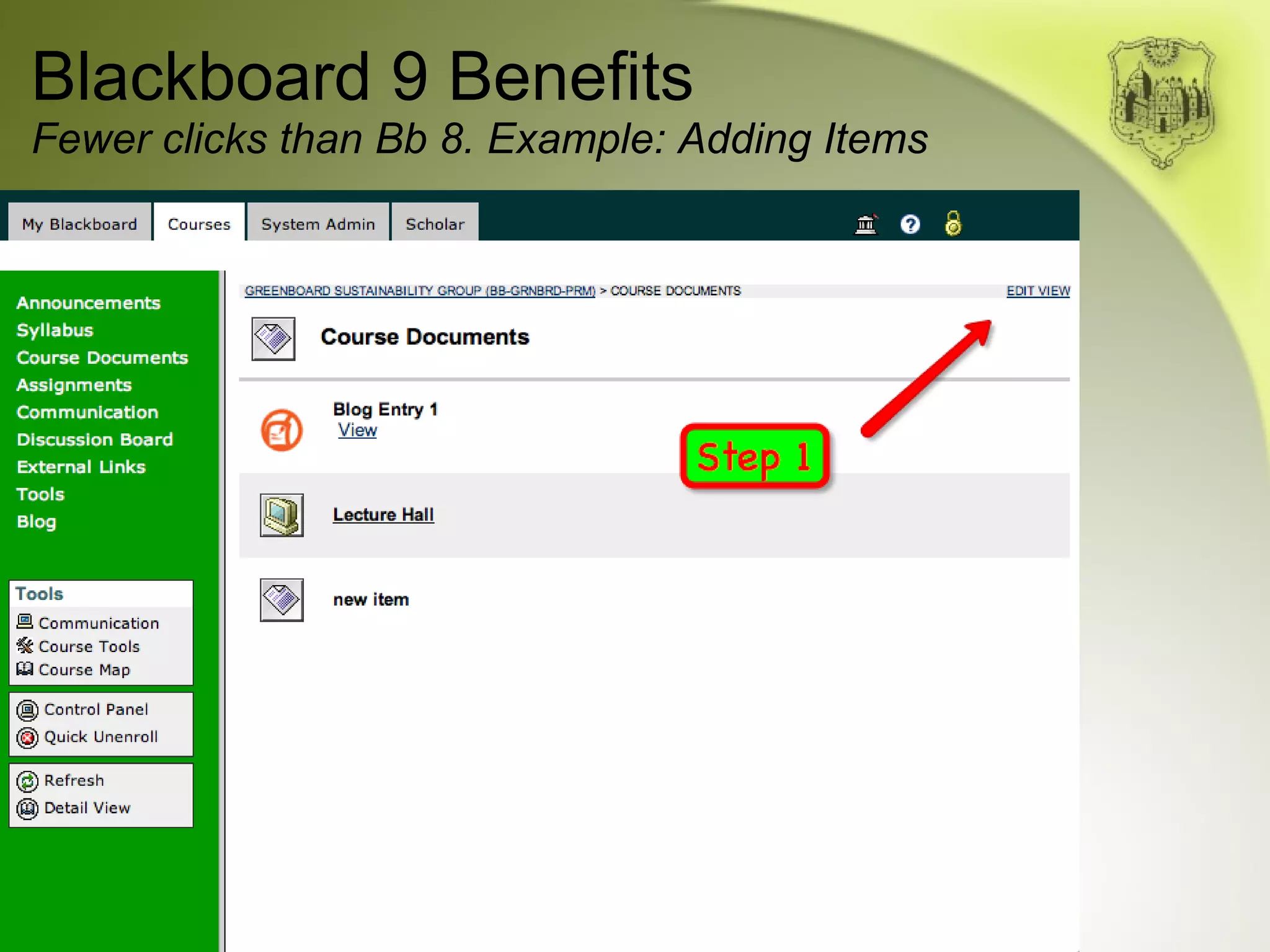
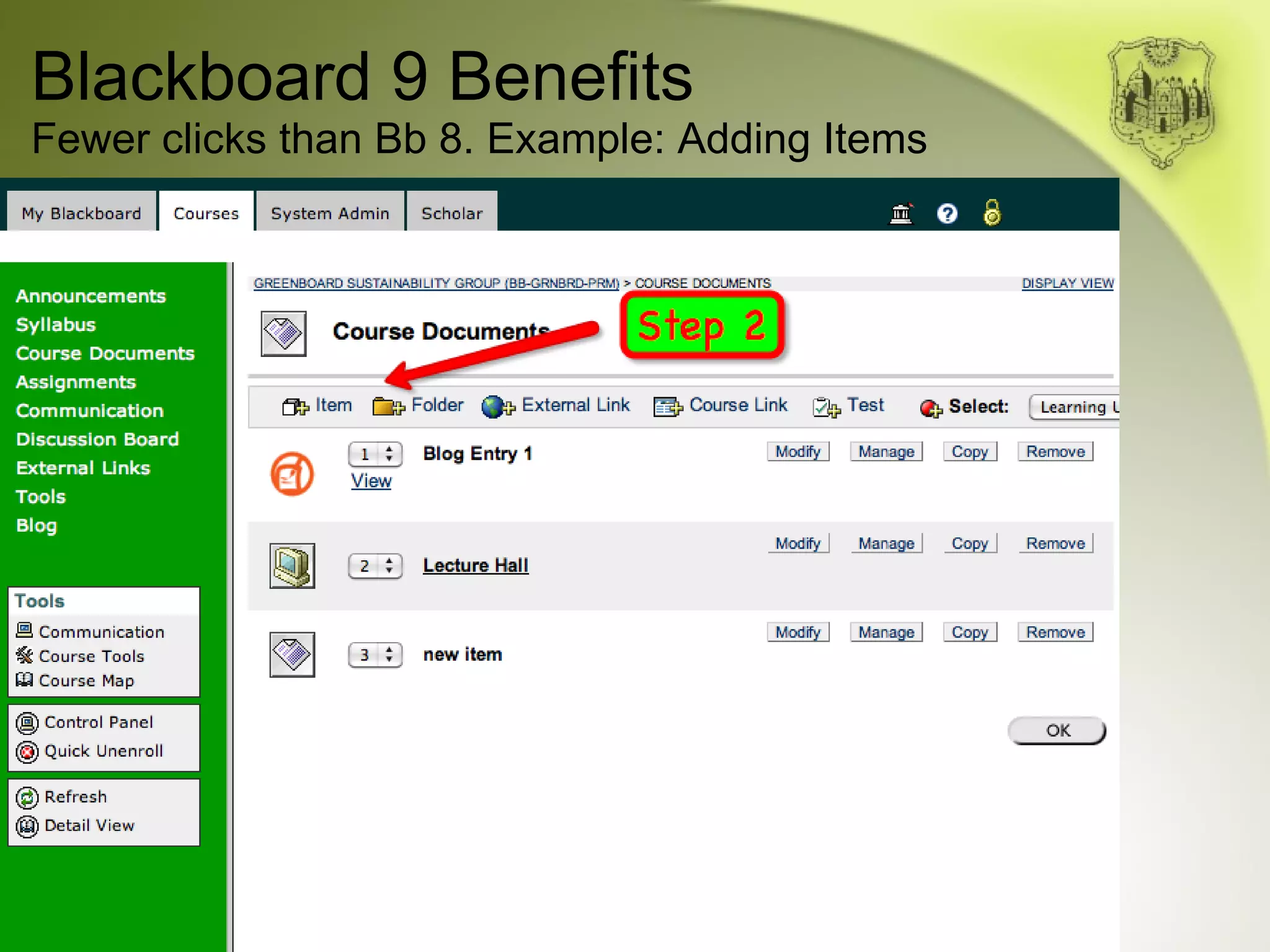
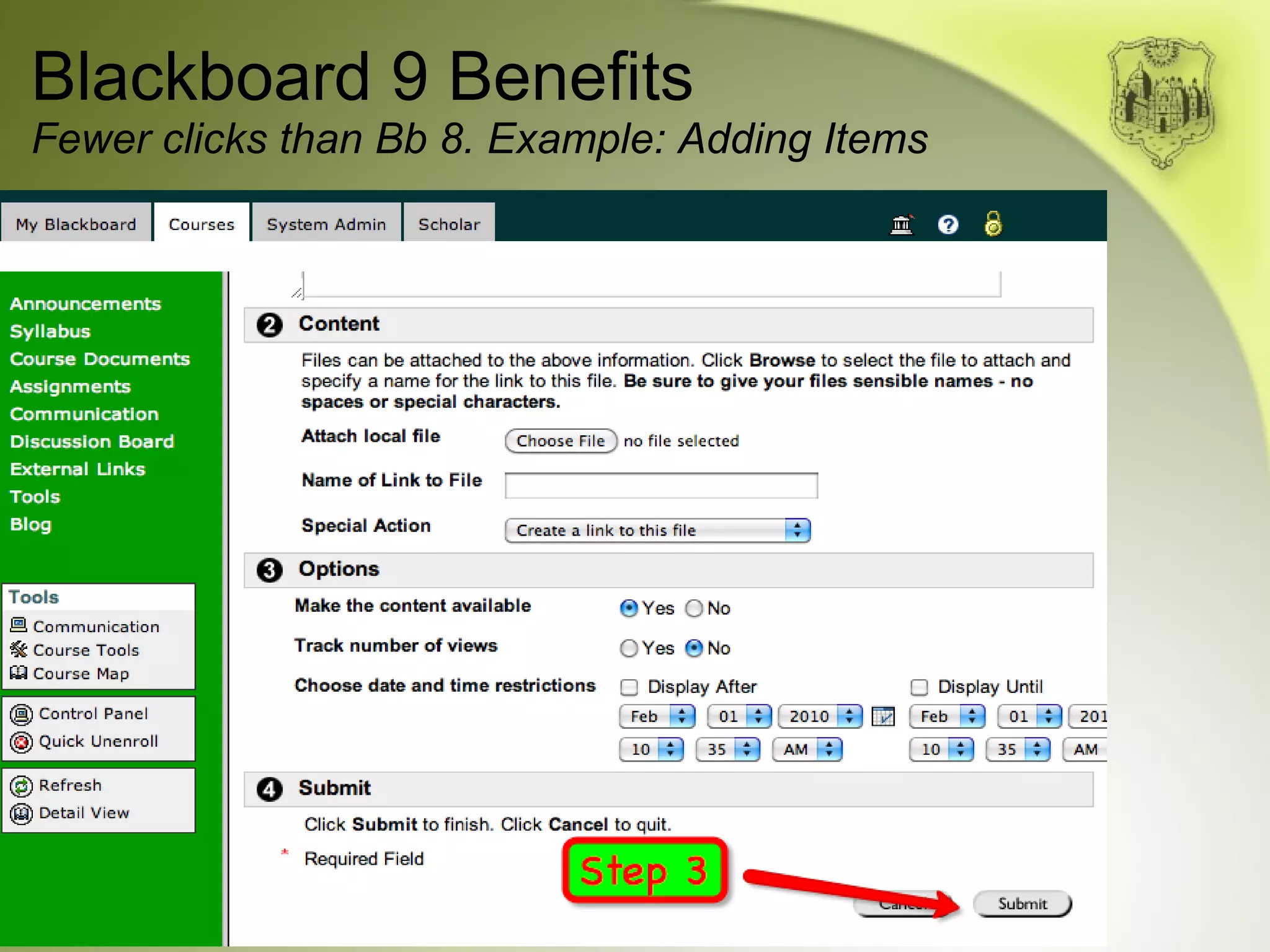
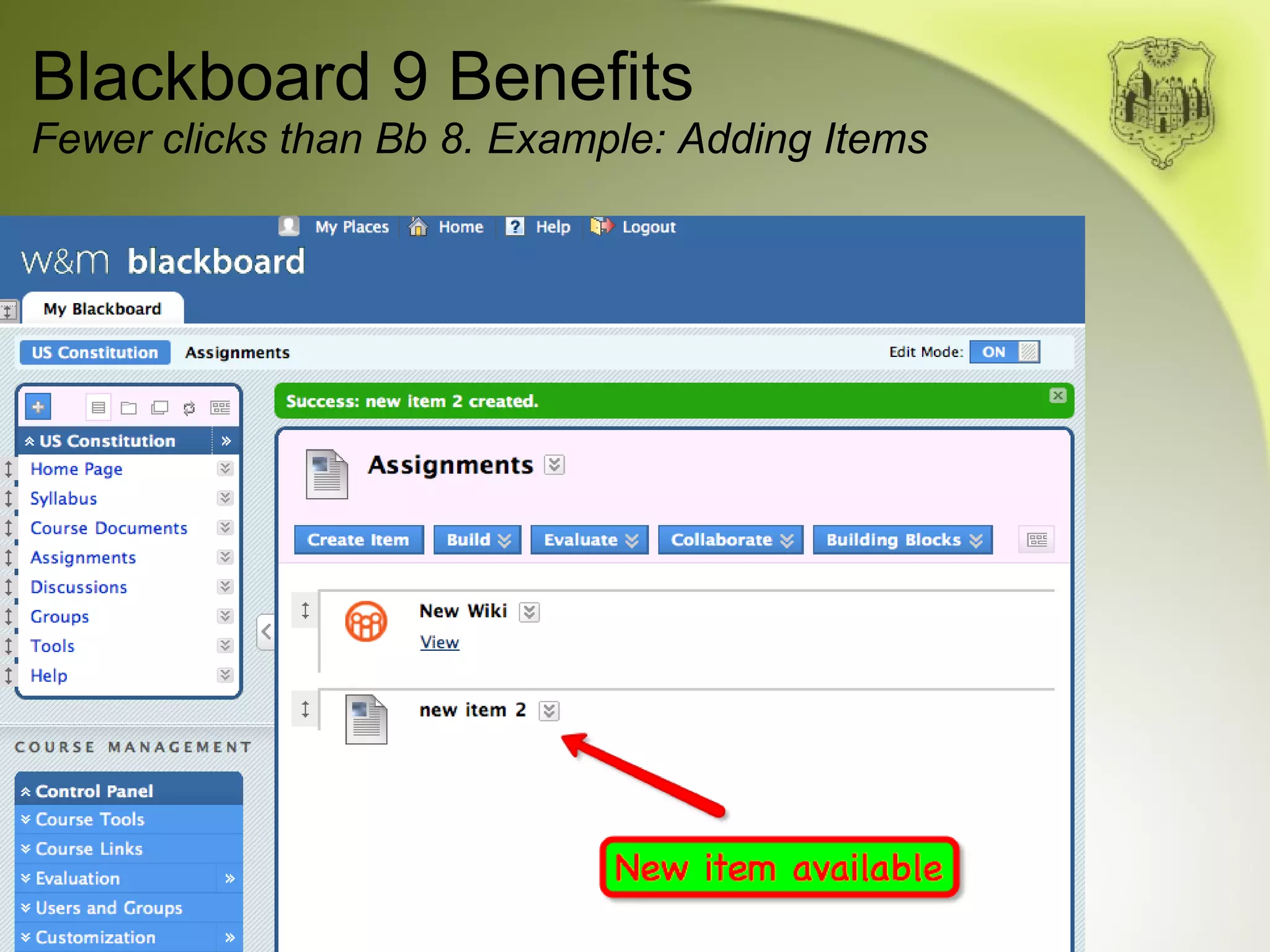
Blackboard 9 Benefits Fewer clicks than Bb 8. Example: Adding Items
Blackboard 9 Benefits Fewer clicks to accomplish common tasks; useless  clicks have been eliminated
Blackboard 9 Benefits Fewer clicks to accomplish common tasks; useless  clicks have been eliminated More intuitive interface. Blogs, wikis, tests, assignments, etc. are easier to create
Blackboard 9 Benefits Fewer clicks to accomplish common tasks; useless  clicks have been eliminated More intuitive interface. Blogs, wikis, tests, assignments, etc. are easier to create Grade Center functionality improved. Group assignments and grading now possible
Blackboard 9 Benefits Fewer clicks to accomplish common tasks; useless  clicks have been eliminated More intuitive interface. Blogs, wikis, tests, assignments, etc. are easier to create Grade Center functionality improved. Group assignments and grading now possible Better multimedia integration. Youtube videos and other media now easily embedded
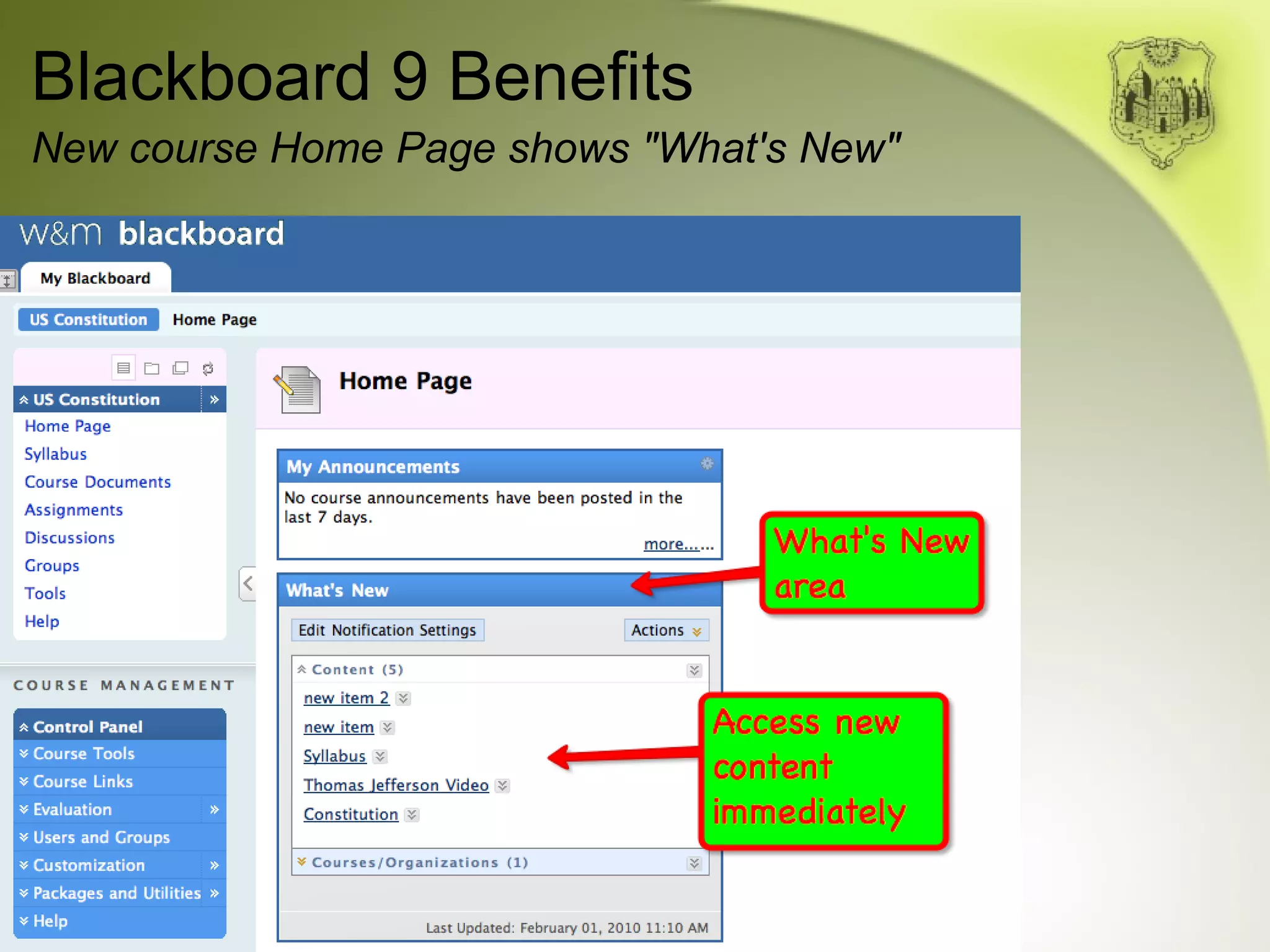
Blackboard 9 Benefits Fewer clicks to accomplish common tasks; useless  clicks have been eliminated More intuitive interface. Blogs, wikis, tests, assignments, etc. are easier to create Grade Center functionality improved. Group assignments and grading now possible Better multimedia integration. Youtube videos and other media now easily embedded New course "Home Page" allows users to easily see and navigate to newly posted materials
Blackboard 9 Benefits New course Home Page shows "What's New"
Blackboard 9 Benefits Fewer clicks to accomplish common tasks; useless  clicks have been eliminated More intuitive interface. Blogs, wikis, tests, assignments, etc. are easier to create Grade Center functionality improved. Group assignments and grading now possible Better multimedia integration. Youtube videos and other media now easily embedded New course "Home Page" allows users to easily see and navigate to newly posted materials
Blackboard 9 Benefits, cont'd. Streamlined, easier to navigate user interface
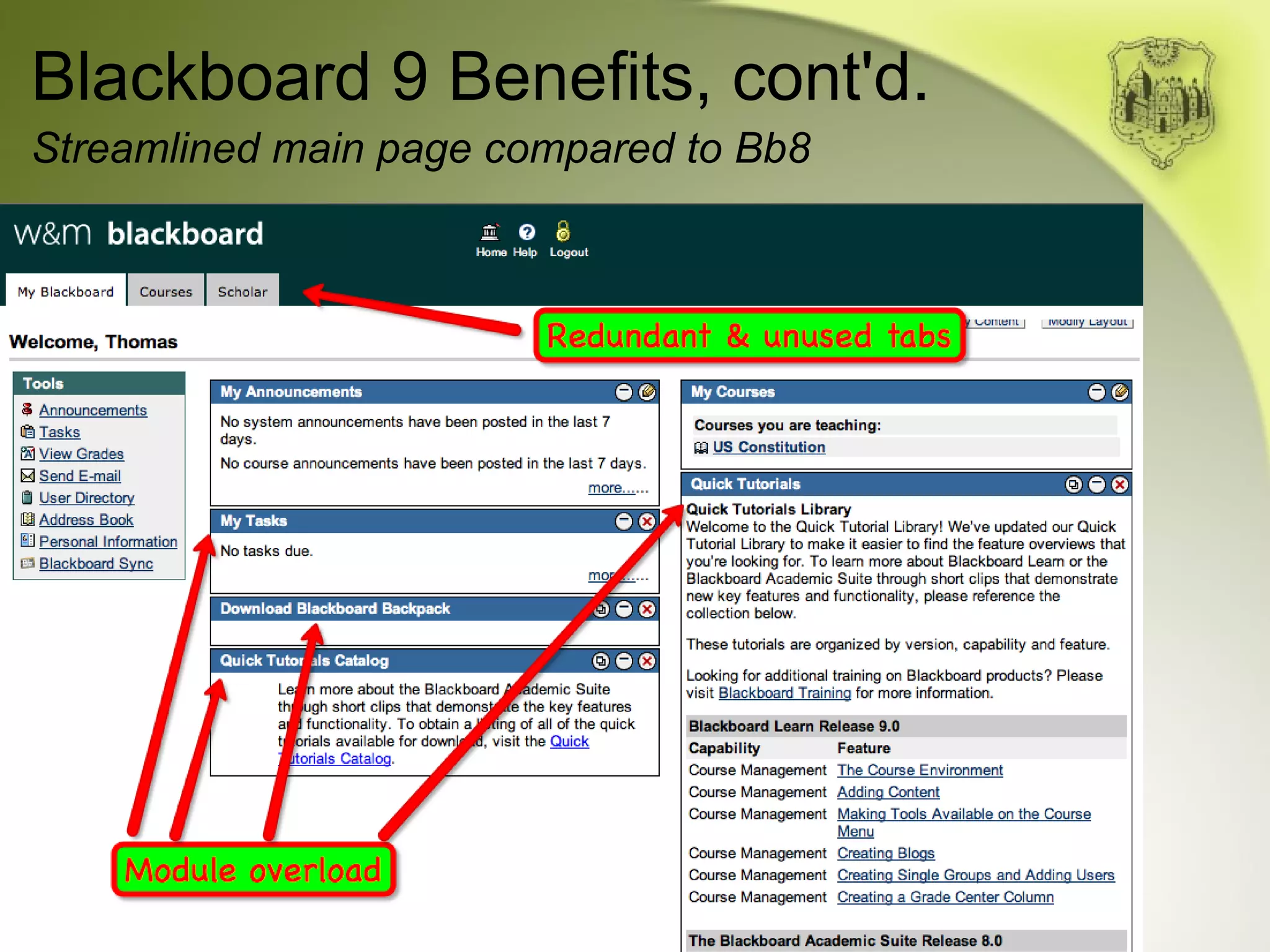
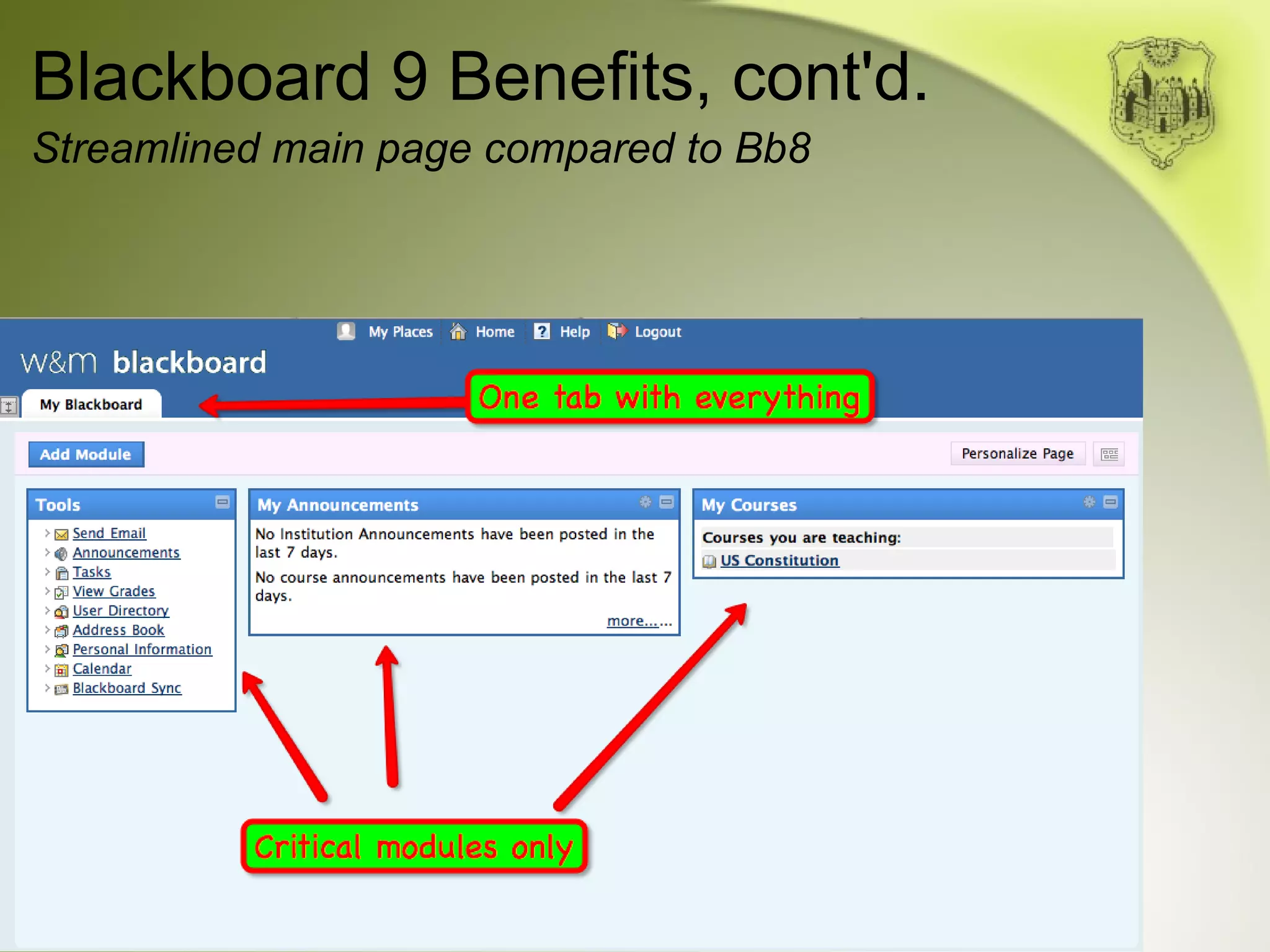
Blackboard 9 Benefits, cont'd. Streamlined main page compared to Bb8
Blackboard 9 Benefits, cont'd. Streamlined, easier to navigate user interface
Blackboard 9 Benefits, cont'd. Streamlined, easier to navigate user interface As with any piece of software, the release of a new version means reduced support for previous versions. We are already experiencing problems and browser difficulties in Blackboard 8 which have resulted in frustration for our users.
Preparing for the change
Preparing for the change IT is continuing to test and refine our implementation  of the software
Preparing for the change IT is continuing to test and refine our implementation  of the software Brief orientations for departments and programs to highlight the importance of becoming familiar with the new software
Preparing for the change IT is continuing to test and refine our implementation  of the software Brief orientations for departments and programs to highlight the importance of becoming familiar with the new software Ongoing classes for beginners and more advanced users
Preparing for the change IT is continuing to test and refine our implementation  of the software Brief orientations for departments and programs to highlight the importance of becoming familiar with the new software Ongoing classes for beginners and more advanced users Hands-on workshops this semester focus on helping faculty members transition to the new version
Preparing for the change IT is continuing to test and refine our implementation  of the software Brief orientations for departments and programs to highlight the importance of becoming familiar with the new software Ongoing classes for beginners and more advanced users Hands-on workshops this semester focus on helping faculty members transition to the new version Online tutorials for self-guided instruction
Preparing for the change IT is continuing to test and refine our implementation  of the software Brief orientations for departments and programs to highlight the importance of becoming familiar with the new software Ongoing classes for beginners and more advanced users Hands-on workshops this semester focus on helping faculty members transition to the new version Online tutorials for self-guided instruction One-on-one assistance will be available as always
Online Tutorial Sample
Timetable
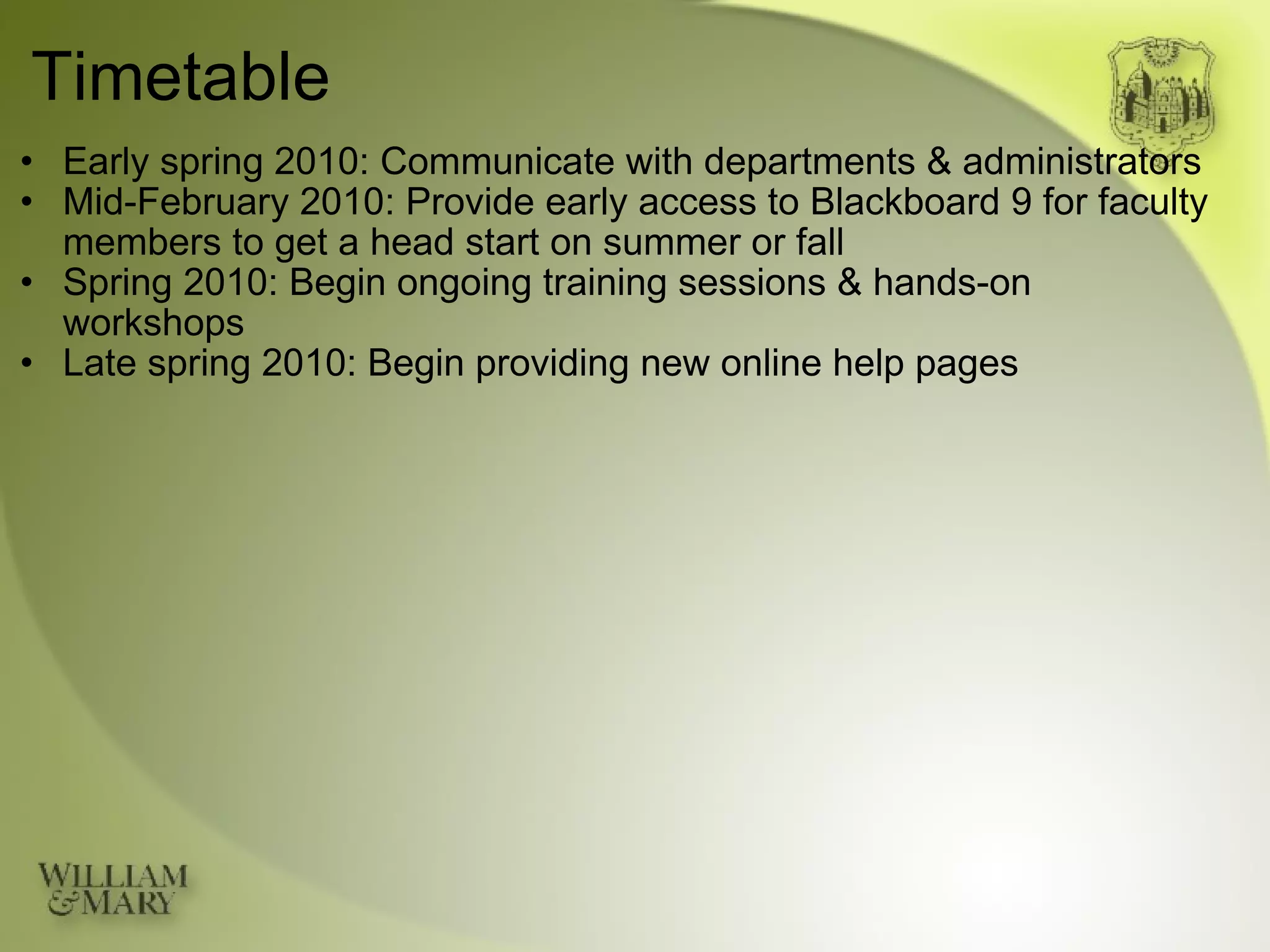
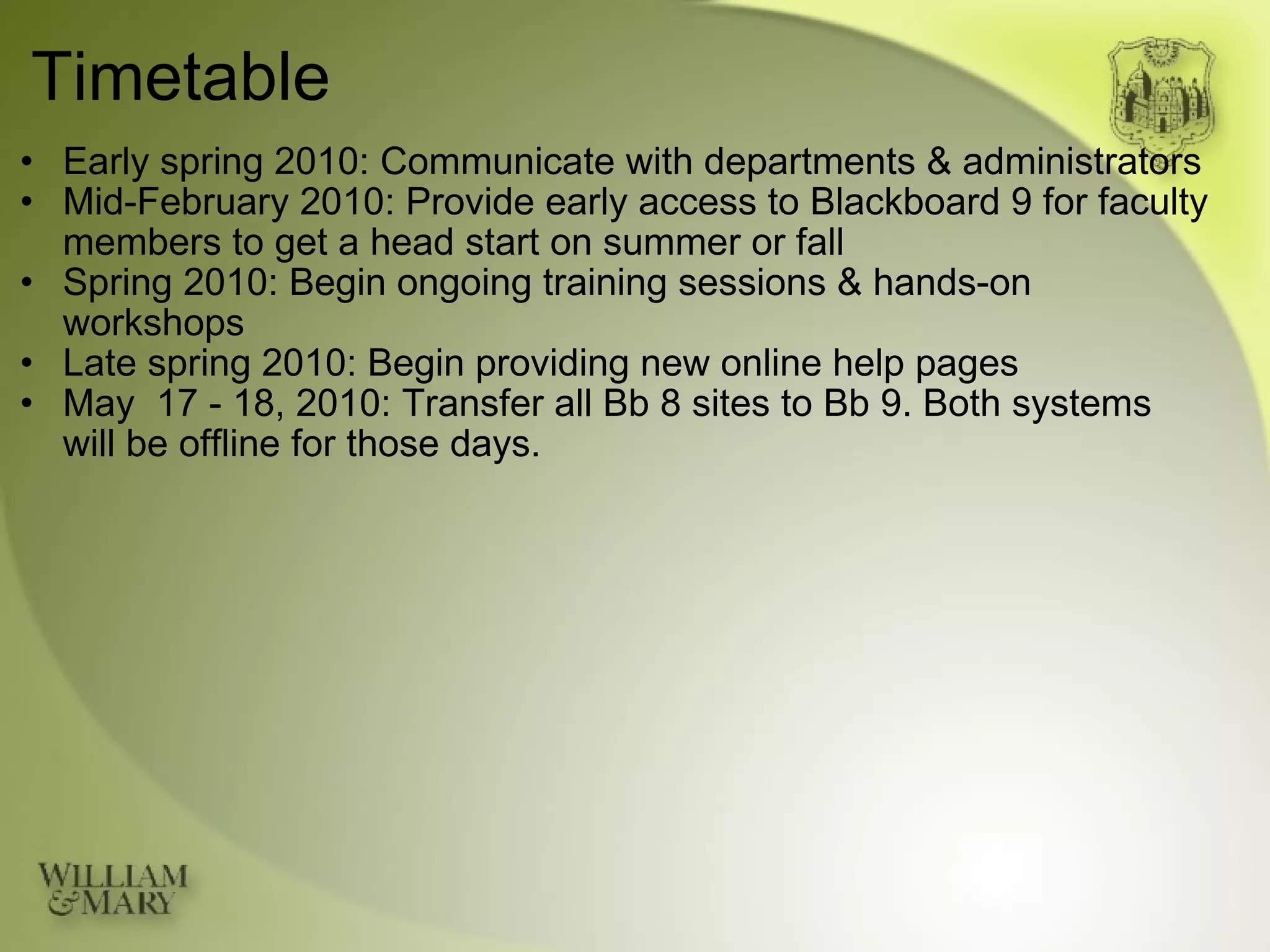
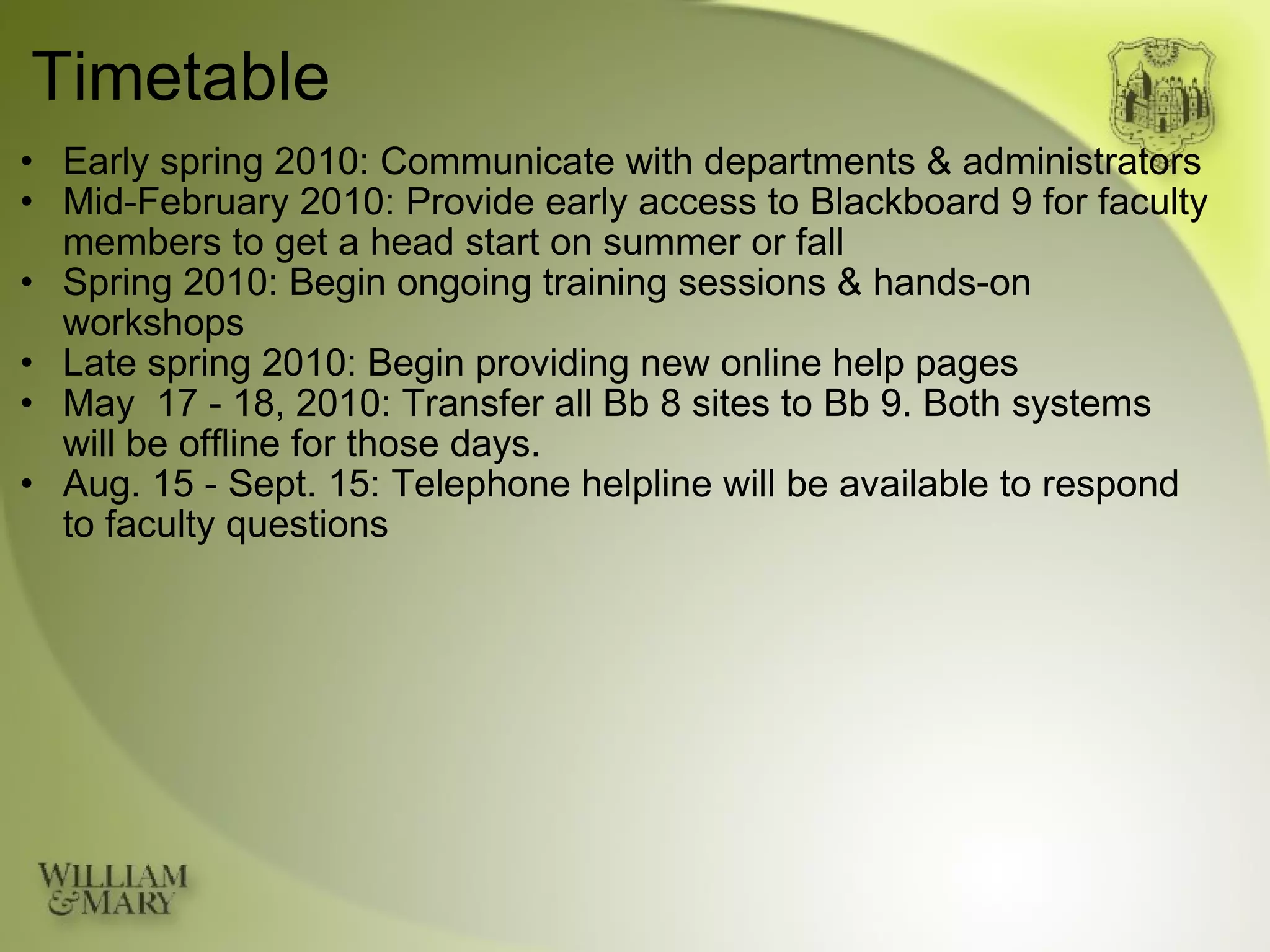
Timetable Early spring 2010: Communicate with departments & administrators
Timetable Early spring 2010: Communicate with departments & administrators Mid-February 2010: Provide early access to Blackboard 9 for faculty members to get a head start on summer or fall
Timetable Early spring 2010: Communicate with departments & administrators Mid-February 2010: Provide early access to Blackboard 9 for faculty members to get a head start on summer or fall Spring 2010: Begin ongoing training sessions & hands-on workshops
Timetable Early spring 2010: Communicate with departments & administrators Mid-February 2010: Provide early access to Blackboard 9 for faculty members to get a head start on summer or fall Spring 2010: Begin ongoing training sessions & hands-on workshops Late spring 2010: Begin providing new online help pages
Timetable Early spring 2010: Communicate with departments & administrators Mid-February 2010: Provide early access to Blackboard 9 for faculty members to get a head start on summer or fall Spring 2010: Begin ongoing training sessions & hands-on workshops Late spring 2010: Begin providing new online help pages May  17 - 18, 2010: Transfer all Bb 8 sites to Bb 9. Both systems will be offline for those days.
Timetable Early spring 2010: Communicate with departments & administrators Mid-February 2010: Provide early access to Blackboard 9 for faculty members to get a head start on summer or fall Spring 2010: Begin ongoing training sessions & hands-on workshops Late spring 2010: Begin providing new online help pages May  17 - 18, 2010: Transfer all Bb 8 sites to Bb 9. Both systems will be offline for those days. Aug. 15 - Sept. 15: Telephone helpline will be available to respond to faculty questions
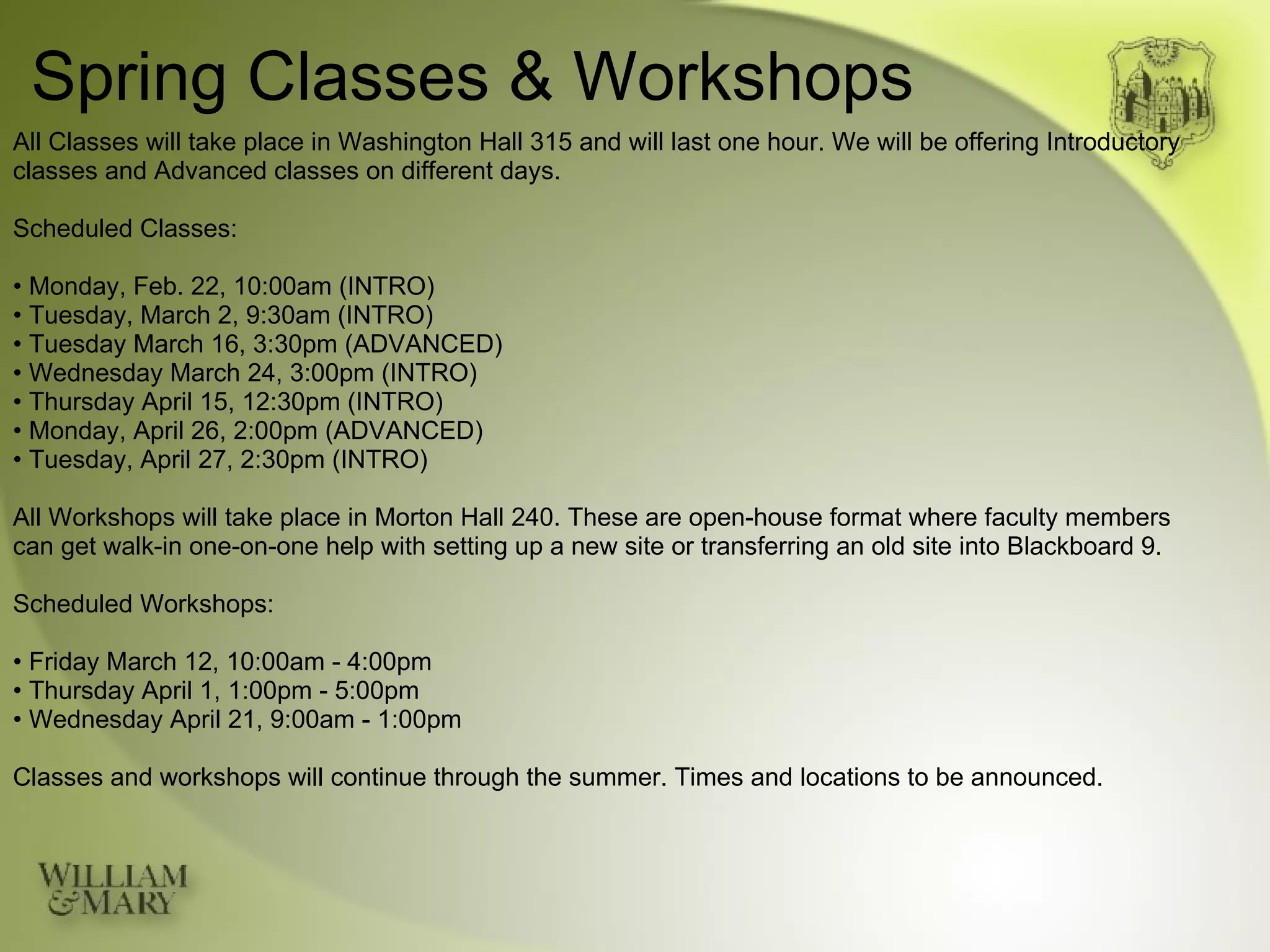
Spring Classes & Workshops All Classes will take place in Washington Hall 315 and will last one hour. We will be offering Introductory classes and Advanced classes on different days. Scheduled Classes: •  Monday, Feb. 22, 10:00am (INTRO) •  Tuesday, March 2, 9:30am (INTRO) •  Tuesday March 16, 3:30pm (ADVANCED) •  Wednesday March 24, 3:00pm (INTRO) •  Thursday April 15, 12:30pm (INTRO) •  Monday, April 26, 2:00pm (ADVANCED) •  Tuesday, April 27, 2:30pm (INTRO) All Workshops will take place in Morton Hall 240. These are open-house format where faculty members can get walk-in one-on-one help with setting up a new site or transferring an old site into Blackboard 9. Scheduled Workshops: •  Friday March 12, 10:00am - 4:00pm •  Thursday April 1, 1:00pm - 5:00pm •  Wednesday April 21, 9:00am - 1:00pm Classes and workshops will continue through the summer. Times and locations to be announced.
Contacts Gene Roche Director of AIS Jones Hall Room 106-B Email: earoch@wm.edu Phone: 757.221.1879 Departmental / School Contacts: Mike Blum (Humanities) Washington Hall 202 Email: mxblum@wm.edu Phone: 757.221.7550 Tammy Thrift (Social Sciences) Morton Hall 240 Email: tmthri@wm.edu Phone: 757.221.1577 Pablo Yanez (Sciences) ISC Email: pxyane@wm.edu Phone: 757.221.2647 Mark Eaton (School of Ed.) Jones Hall 335 Email: mxeato@wm.edu Phone: 757.221.1127 Jessica Hughes (Law School) Marshall-Wythe 219 Email: jphugh@wm.edu Phone: 757.221.1591 Terry Trojak (School of Business) Mason School Email: terry.trojak@mason.wm.edu Phone: 757.221.1575

Blackboard 9 Preview

  • 1.
    Introduction to Blackboard9 Course & Content Management  System
  • 2.
  • 3.
    General Points Blackboardhas become one of the College's most  important tools to support academic technology
  • 4.
    General Points Blackboardhas become one of the College's most  important tools to support academic technology 90% of classes have Blackboard sites
  • 5.
    General Points Blackboardhas become one of the College's most  important tools to support academic technology 90% of classes have Blackboard sites 2000 to 4000 users are accessing the system at any given time
  • 6.
    General Points Blackboardhas become one of the College's most  important tools to support academic technology 90% of classes have Blackboard sites 2000 to 4000 users are accessing the system at any given time With so many people using Blackboard 8, the new interface in Blackboard 9 will necessitate a large-scale effort by IT to ensure a smooth transition
  • 7.
  • 8.
    Blackboard 9 BenefitsFewer clicks to accomplish common tasks; useless clicks have been eliminated
  • 9.
    Blackboard 9 BenefitsFewer clicks than Bb 8. Example: Adding Items
  • 10.
    Blackboard 9 BenefitsFewer clicks than Bb 8. Example: Adding Items
  • 11.
    Blackboard 9 BenefitsFewer clicks than Bb 8. Example: Adding Items
  • 12.
    Blackboard 9 BenefitsFewer clicks than Bb 8. Example: Adding Items
  • 13.
    Blackboard 9 BenefitsFewer clicks than Bb 8. Example: Adding Items
  • 14.
    Blackboard 9 BenefitsFewer clicks than Bb 8. Example: Adding Items
  • 15.
    Blackboard 9 BenefitsFewer clicks than Bb 8. Example: Adding Items
  • 16.
    Blackboard 9 BenefitsFewer clicks than Bb 8. Example: Adding Items
  • 17.
    Blackboard 9 BenefitsFewer clicks to accomplish common tasks; useless clicks have been eliminated
  • 18.
    Blackboard 9 BenefitsFewer clicks to accomplish common tasks; useless clicks have been eliminated More intuitive interface. Blogs, wikis, tests, assignments, etc. are easier to create
  • 19.
    Blackboard 9 BenefitsFewer clicks to accomplish common tasks; useless clicks have been eliminated More intuitive interface. Blogs, wikis, tests, assignments, etc. are easier to create Grade Center functionality improved. Group assignments and grading now possible
  • 20.
    Blackboard 9 BenefitsFewer clicks to accomplish common tasks; useless clicks have been eliminated More intuitive interface. Blogs, wikis, tests, assignments, etc. are easier to create Grade Center functionality improved. Group assignments and grading now possible Better multimedia integration. Youtube videos and other media now easily embedded
  • 21.
    Blackboard 9 BenefitsFewer clicks to accomplish common tasks; useless clicks have been eliminated More intuitive interface. Blogs, wikis, tests, assignments, etc. are easier to create Grade Center functionality improved. Group assignments and grading now possible Better multimedia integration. Youtube videos and other media now easily embedded New course "Home Page" allows users to easily see and navigate to newly posted materials
  • 22.
    Blackboard 9 BenefitsNew course Home Page shows "What's New"
  • 23.
    Blackboard 9 BenefitsFewer clicks to accomplish common tasks; useless clicks have been eliminated More intuitive interface. Blogs, wikis, tests, assignments, etc. are easier to create Grade Center functionality improved. Group assignments and grading now possible Better multimedia integration. Youtube videos and other media now easily embedded New course "Home Page" allows users to easily see and navigate to newly posted materials
  • 24.
    Blackboard 9 Benefits,cont'd. Streamlined, easier to navigate user interface
  • 25.
    Blackboard 9 Benefits,cont'd. Streamlined main page compared to Bb8
  • 26.
    Blackboard 9 Benefits,cont'd. Streamlined main page compared to Bb8
  • 27.
    Blackboard 9 Benefits,cont'd. Streamlined, easier to navigate user interface
  • 28.
    Blackboard 9 Benefits,cont'd. Streamlined, easier to navigate user interface As with any piece of software, the release of a new version means reduced support for previous versions. We are already experiencing problems and browser difficulties in Blackboard 8 which have resulted in frustration for our users.
  • 29.
  • 30.
    Preparing for thechange IT is continuing to test and refine our implementation  of the software
  • 31.
    Preparing for thechange IT is continuing to test and refine our implementation  of the software Brief orientations for departments and programs to highlight the importance of becoming familiar with the new software
  • 32.
    Preparing for thechange IT is continuing to test and refine our implementation  of the software Brief orientations for departments and programs to highlight the importance of becoming familiar with the new software Ongoing classes for beginners and more advanced users
  • 33.
    Preparing for thechange IT is continuing to test and refine our implementation  of the software Brief orientations for departments and programs to highlight the importance of becoming familiar with the new software Ongoing classes for beginners and more advanced users Hands-on workshops this semester focus on helping faculty members transition to the new version
  • 34.
    Preparing for thechange IT is continuing to test and refine our implementation  of the software Brief orientations for departments and programs to highlight the importance of becoming familiar with the new software Ongoing classes for beginners and more advanced users Hands-on workshops this semester focus on helping faculty members transition to the new version Online tutorials for self-guided instruction
  • 35.
    Preparing for thechange IT is continuing to test and refine our implementation  of the software Brief orientations for departments and programs to highlight the importance of becoming familiar with the new software Ongoing classes for beginners and more advanced users Hands-on workshops this semester focus on helping faculty members transition to the new version Online tutorials for self-guided instruction One-on-one assistance will be available as always
  • 36.
  • 37.
  • 38.
    Timetable Early spring2010: Communicate with departments & administrators
  • 39.
    Timetable Early spring2010: Communicate with departments & administrators Mid-February 2010: Provide early access to Blackboard 9 for faculty members to get a head start on summer or fall
  • 40.
    Timetable Early spring2010: Communicate with departments & administrators Mid-February 2010: Provide early access to Blackboard 9 for faculty members to get a head start on summer or fall Spring 2010: Begin ongoing training sessions & hands-on workshops
  • 41.
    Timetable Early spring2010: Communicate with departments & administrators Mid-February 2010: Provide early access to Blackboard 9 for faculty members to get a head start on summer or fall Spring 2010: Begin ongoing training sessions & hands-on workshops Late spring 2010: Begin providing new online help pages
  • 42.
    Timetable Early spring2010: Communicate with departments & administrators Mid-February 2010: Provide early access to Blackboard 9 for faculty members to get a head start on summer or fall Spring 2010: Begin ongoing training sessions & hands-on workshops Late spring 2010: Begin providing new online help pages May  17 - 18, 2010: Transfer all Bb 8 sites to Bb 9. Both systems will be offline for those days.
  • 43.
    Timetable Early spring2010: Communicate with departments & administrators Mid-February 2010: Provide early access to Blackboard 9 for faculty members to get a head start on summer or fall Spring 2010: Begin ongoing training sessions & hands-on workshops Late spring 2010: Begin providing new online help pages May  17 - 18, 2010: Transfer all Bb 8 sites to Bb 9. Both systems will be offline for those days. Aug. 15 - Sept. 15: Telephone helpline will be available to respond to faculty questions
  • 44.
    Spring Classes &Workshops All Classes will take place in Washington Hall 315 and will last one hour. We will be offering Introductory classes and Advanced classes on different days. Scheduled Classes: • Monday, Feb. 22, 10:00am (INTRO) • Tuesday, March 2, 9:30am (INTRO) • Tuesday March 16, 3:30pm (ADVANCED) • Wednesday March 24, 3:00pm (INTRO) • Thursday April 15, 12:30pm (INTRO) • Monday, April 26, 2:00pm (ADVANCED) • Tuesday, April 27, 2:30pm (INTRO) All Workshops will take place in Morton Hall 240. These are open-house format where faculty members can get walk-in one-on-one help with setting up a new site or transferring an old site into Blackboard 9. Scheduled Workshops: • Friday March 12, 10:00am - 4:00pm • Thursday April 1, 1:00pm - 5:00pm • Wednesday April 21, 9:00am - 1:00pm Classes and workshops will continue through the summer. Times and locations to be announced.
  • 45.
    Contacts Gene RocheDirector of AIS Jones Hall Room 106-B Email: earoch@wm.edu Phone: 757.221.1879 Departmental / School Contacts: Mike Blum (Humanities) Washington Hall 202 Email: mxblum@wm.edu Phone: 757.221.7550 Tammy Thrift (Social Sciences) Morton Hall 240 Email: tmthri@wm.edu Phone: 757.221.1577 Pablo Yanez (Sciences) ISC Email: pxyane@wm.edu Phone: 757.221.2647 Mark Eaton (School of Ed.) Jones Hall 335 Email: mxeato@wm.edu Phone: 757.221.1127 Jessica Hughes (Law School) Marshall-Wythe 219 Email: jphugh@wm.edu Phone: 757.221.1591 Terry Trojak (School of Business) Mason School Email: terry.trojak@mason.wm.edu Phone: 757.221.1575