Delivering applications
with Azure RemoteApp
Rasmus Hald [Microsoft] - @RasmusHaldDK
Tweet and win an Ignite 2016 ticket #itproceed
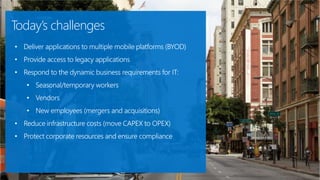
• Deliver applications to multiple mobile platforms (BYOD)
• Provide access to legacy applications
• Respond to the dynamic business requirements for IT:
• Seasonal/temporary workers
• Vendors
• New employees (mergers and acquisitions)
• Reduce infrastructure costs (move CAPEX to OPEX)
• Protect corporate resources and ensure compliance
Today’s challenges
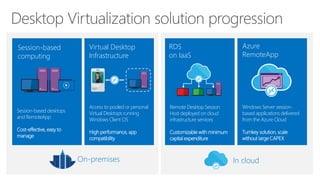
On-premises In cloud
Remote Desktop Session
Host deployed on cloud
infrastructure services
Customizable with minimum
capital expenditure
RDS
on IaaS
Session-based desktops
and RemoteApp
Cost-effective, easy to
manage
Session-based
computing
Access to pooled or personal
Virtual Desktops running
Windows Client OS
High performance, app
compatibility
Virtual Desktop
Infrastructure
User
Windows Server session-
based applications delivered
from the Azure Cloud
Turnkey solution, scale
without large CAPEX
Azure
RemoteApp
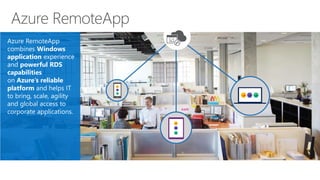
Azure RemoteApp
combines Windows
application experience
and powerful RDS
capabilities
on Azure’s reliable
platform and helps IT
to bring, scale, agility
and global access to
corporate applications.
Demo #1
User experience
-Windows
-IOS
-Android
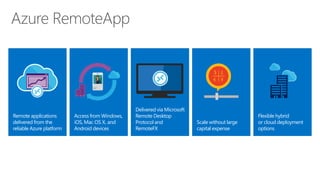
Remote applications
delivered from the
reliable Azure platform
Delivered via Microsoft
Remote Desktop
Protocol and
RemoteFX
Scale without large
capital expense
Access from Windows,
iOS, Mac OS X, and
Android devices
Flexible hybrid
or cloud deployment
options
Demo #2
Publishing apps
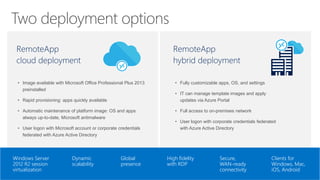
RemoteApp
cloud deployment
• Image available with Microsoft Office Professional Plus 2013
preinstalled
• Rapid provisioning: apps quickly available
• Automatic maintenance of platform image: OS and apps
always up-to-date, Microsoft antimalware
• User logon with Microsoft account or corporate credentials
federated with Azure Active Directory
RemoteApp
hybrid deployment
• Fully customizable apps, OS, and settings
• IT can manage template images and apply
updates via Azure Portal
• Full access to on-premises network
• User logon with corporate credentials federated
with Azure Active Directory
Windows Server
2012 R2 session
virtualization
Dynamic
scalability
Global
presence
High fidelity
with RDP
Secure,
WAN-ready
connectivity
Clients for
Windows, Mac,
iOS, Android
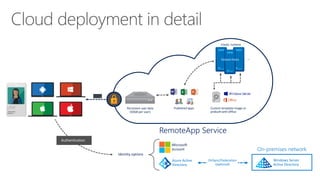
RemoteApp Service
Published apps
Microsoft
account
Identity options
RDP
Elastic runtime
…
DirSync/Federation
(optional)
Persistent user data
(50GB per user)
Custom template image or
prebuilt with Office
On-premises network
Windows Server
Active Directory
Azure Active
Directory
Authentication
User
Demo #3
Cloud Deployment
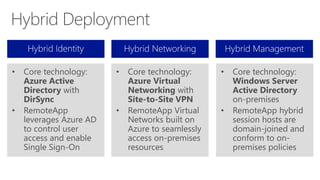
• Core technology:
Azure Virtual
Networking with
Site-to-Site VPN
• RemoteApp Virtual
Networks built on
Azure to seamlessly
access on-premises
resources
• Core technology:
Azure Active
Directory with
DirSync
• RemoteApp
leverages Azure AD
to control user
access and enable
Single Sign-On
• Core technology:
Windows Server
Active Directory
on-premises
• RemoteApp hybrid
session hosts are
domain-joined and
conform to on-
premises policies
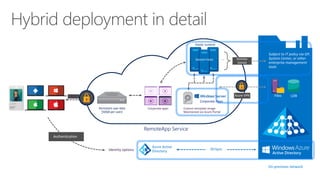
RemoteApp Service
Identity options
Authentication
RDP
Domain
Joined
On-premises network
Subject to IT policy via GP,
System Center, or other
enterprise management
tools
DirSync
User
Persistent user data
(50GB per user)
Elastic runtime
…
Azure VPN
Custom template image
Maintained via Azure Portal
Corporate Apps
Corporate apps
Azure Active
Directory
Demo #4
Hybrid Deployment
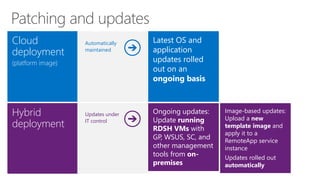
Cloud
deployment
(platform image)
Latest OS and
application
updates rolled
out on an
ongoing basis
Hybrid
deployment
Ongoing updates:
Update running
RDSH VMs with
GP, WSUS, SC, and
other management
tools from on-
premises
Image-based updates:
Upload a new
template image and
apply it to a
RemoteApp service
instance
Updates rolled out
automatically
Automatically
maintained
Updates under
IT control
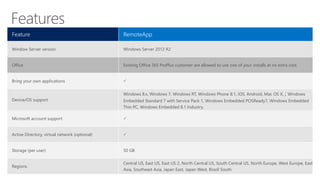
Feature RemoteApp
Window Server version Windows Server 2012 R2
Office Existing Office 365 ProPlus customer are allowed to use one of your installs at no extra cost.
Bring your own applications 
Device/OS support
Windows 8.x, Windows 7, Windows RT, Windows Phone 8.1, iOS, Android, Mac OS X, ; Windows
Embedded Standard 7 with Service Pack 1, Windows Embedded POSReady7, Windows Embedded
Thin PC, Windows Embedded 8.1 Industry.
Microsoft account support 
Active Directory, virtual network (optional) 
Storage (per user) 50 GB
Regions
Central US, East US, East US 2, North Central US, South Central US, North Europe, West Europe, East
Asia, Southeast Asia, Japan East, Japan West, Brazil South
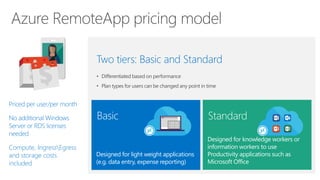
Priced per user/per month
No additional Windows
Server or RDS licenses
needed
Compute, IngressEgress
and storage costs
included
• Differentiated based on performance
• Plan types for users can be changed any point in time
Two tiers: Basic and Standard
Designed for light weight applications
(e.g. data entry, expense reporting)
Basic
Designed for knowledge workers or
information workers to use
Productivity applications such as
Microsoft Office
Standard
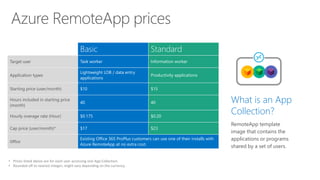
Basic Standard
Target user Task worker Information worker
Application types
Lightweight LOB / data entry
applications
Productivity applications
Starting price (user/month) $10 $15
Hours included in starting price
(month)
40 40
Hourly overage rate (Hour) $0.175 $0.20
Cap price (user/month)* $17 $23
Office
Existing Office 365 ProPlus customers can use one of their installs with
Azure RemoteApp at no extra cost.
• Prices listed above are for each user accessing one App Collection.
• Rounded off to nearest integer; might vary depending on the currency.
What is an App
Collection?
RemoteApp template
image that contains the
applications or programs
shared by a set of users.
Hours of use
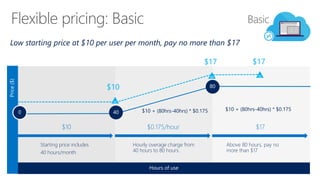
Low starting price at $10 per user per month, pay no more than $17
Price($)
Hourly overage charge from
40 hours to 80 hours.
80
$0.175/hour
Above 80 hours, pay no
more than $17
$17
Starting price includes
40 hours/month
400
$10
Basic
$10
$17
$10 + (80hrs-40hrs) * $0.175 $10 + (80hrs-40hrs) * $0.175
$17
Hours of use
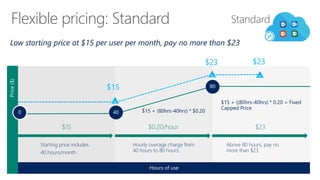
Price($)
Hourly overage charge from
40 hours to 80 hours.
80
$0.20/hour $23
Starting price includes
40 hours/month
400
$15
Standard
$15
$23
$15 + (80hrs-40hrs) * $0.20
$15 + ((80hrs-40hrs) * 0.20 = Fixed
Capped Price
Above 80 hours, pay no
more than $23
Low starting price at $15 per user per month, pay no more than $23
$23
Reach Out
@RasmusHaldDK
RasmusH@microsoft.com
And win a Lumia 635
Feedback form will be sent to you by email
Give me feedback
Follow Technet Belgium
@technetbelux
Subscribe to the TechNet newsletter
aka.ms/benews
Be the first to know
Thank you!
Belgiums’ biggest IT PRO Conference

ITPROCEED_WorkplaceMobility_Delivering applications with Azure RemoteApp

  • 1.
    Delivering applications with AzureRemoteApp Rasmus Hald [Microsoft] - @RasmusHaldDK Tweet and win an Ignite 2016 ticket #itproceed
  • 2.
    • Deliver applicationsto multiple mobile platforms (BYOD) • Provide access to legacy applications • Respond to the dynamic business requirements for IT: • Seasonal/temporary workers • Vendors • New employees (mergers and acquisitions) • Reduce infrastructure costs (move CAPEX to OPEX) • Protect corporate resources and ensure compliance Today’s challenges
  • 3.
    On-premises In cloud RemoteDesktop Session Host deployed on cloud infrastructure services Customizable with minimum capital expenditure RDS on IaaS Session-based desktops and RemoteApp Cost-effective, easy to manage Session-based computing Access to pooled or personal Virtual Desktops running Windows Client OS High performance, app compatibility Virtual Desktop Infrastructure User Windows Server session- based applications delivered from the Azure Cloud Turnkey solution, scale without large CAPEX Azure RemoteApp
  • 4.
    Azure RemoteApp combines Windows applicationexperience and powerful RDS capabilities on Azure’s reliable platform and helps IT to bring, scale, agility and global access to corporate applications.
  • 5.
  • 6.
    Remote applications delivered fromthe reliable Azure platform Delivered via Microsoft Remote Desktop Protocol and RemoteFX Scale without large capital expense Access from Windows, iOS, Mac OS X, and Android devices Flexible hybrid or cloud deployment options
  • 7.
  • 8.
    RemoteApp cloud deployment • Imageavailable with Microsoft Office Professional Plus 2013 preinstalled • Rapid provisioning: apps quickly available • Automatic maintenance of platform image: OS and apps always up-to-date, Microsoft antimalware • User logon with Microsoft account or corporate credentials federated with Azure Active Directory RemoteApp hybrid deployment • Fully customizable apps, OS, and settings • IT can manage template images and apply updates via Azure Portal • Full access to on-premises network • User logon with corporate credentials federated with Azure Active Directory Windows Server 2012 R2 session virtualization Dynamic scalability Global presence High fidelity with RDP Secure, WAN-ready connectivity Clients for Windows, Mac, iOS, Android
  • 9.
    RemoteApp Service Published apps Microsoft account Identityoptions RDP Elastic runtime … DirSync/Federation (optional) Persistent user data (50GB per user) Custom template image or prebuilt with Office On-premises network Windows Server Active Directory Azure Active Directory Authentication User
  • 10.
  • 11.
    • Core technology: AzureVirtual Networking with Site-to-Site VPN • RemoteApp Virtual Networks built on Azure to seamlessly access on-premises resources • Core technology: Azure Active Directory with DirSync • RemoteApp leverages Azure AD to control user access and enable Single Sign-On • Core technology: Windows Server Active Directory on-premises • RemoteApp hybrid session hosts are domain-joined and conform to on- premises policies
  • 12.
    RemoteApp Service Identity options Authentication RDP Domain Joined On-premisesnetwork Subject to IT policy via GP, System Center, or other enterprise management tools DirSync User Persistent user data (50GB per user) Elastic runtime … Azure VPN Custom template image Maintained via Azure Portal Corporate Apps Corporate apps Azure Active Directory
  • 13.
  • 14.
    Cloud deployment (platform image) Latest OSand application updates rolled out on an ongoing basis Hybrid deployment Ongoing updates: Update running RDSH VMs with GP, WSUS, SC, and other management tools from on- premises Image-based updates: Upload a new template image and apply it to a RemoteApp service instance Updates rolled out automatically Automatically maintained Updates under IT control
  • 15.
    Feature RemoteApp Window Serverversion Windows Server 2012 R2 Office Existing Office 365 ProPlus customer are allowed to use one of your installs at no extra cost. Bring your own applications  Device/OS support Windows 8.x, Windows 7, Windows RT, Windows Phone 8.1, iOS, Android, Mac OS X, ; Windows Embedded Standard 7 with Service Pack 1, Windows Embedded POSReady7, Windows Embedded Thin PC, Windows Embedded 8.1 Industry. Microsoft account support  Active Directory, virtual network (optional)  Storage (per user) 50 GB Regions Central US, East US, East US 2, North Central US, South Central US, North Europe, West Europe, East Asia, Southeast Asia, Japan East, Japan West, Brazil South
  • 16.
    Priced per user/permonth No additional Windows Server or RDS licenses needed Compute, IngressEgress and storage costs included • Differentiated based on performance • Plan types for users can be changed any point in time Two tiers: Basic and Standard Designed for light weight applications (e.g. data entry, expense reporting) Basic Designed for knowledge workers or information workers to use Productivity applications such as Microsoft Office Standard
  • 17.
    Basic Standard Target userTask worker Information worker Application types Lightweight LOB / data entry applications Productivity applications Starting price (user/month) $10 $15 Hours included in starting price (month) 40 40 Hourly overage rate (Hour) $0.175 $0.20 Cap price (user/month)* $17 $23 Office Existing Office 365 ProPlus customers can use one of their installs with Azure RemoteApp at no extra cost. • Prices listed above are for each user accessing one App Collection. • Rounded off to nearest integer; might vary depending on the currency. What is an App Collection? RemoteApp template image that contains the applications or programs shared by a set of users.
  • 18.
    Hours of use Lowstarting price at $10 per user per month, pay no more than $17 Price($) Hourly overage charge from 40 hours to 80 hours. 80 $0.175/hour Above 80 hours, pay no more than $17 $17 Starting price includes 40 hours/month 400 $10 Basic $10 $17 $10 + (80hrs-40hrs) * $0.175 $10 + (80hrs-40hrs) * $0.175 $17
  • 19.
    Hours of use Price($) Hourlyoverage charge from 40 hours to 80 hours. 80 $0.20/hour $23 Starting price includes 40 hours/month 400 $15 Standard $15 $23 $15 + (80hrs-40hrs) * $0.20 $15 + ((80hrs-40hrs) * 0.20 = Fixed Capped Price Above 80 hours, pay no more than $23 Low starting price at $15 per user per month, pay no more than $23 $23
  • 20.
  • 21.
    And win aLumia 635 Feedback form will be sent to you by email Give me feedback
  • 22.
    Follow Technet Belgium @technetbelux Subscribeto the TechNet newsletter aka.ms/benews Be the first to know
  • 23.
  • 24.
    Belgiums’ biggest ITPRO Conference