Internal Use
Segmentation on
Azure Platform
From principle to
practice
Internal Use
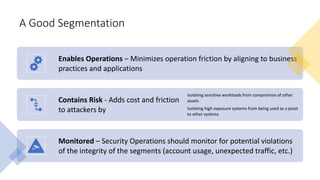
A Good Segmentation
Enables Operations – Minimizes operation friction by aligning to business
practices and applications
Contains Risk - Adds cost and friction
to attackers by
Isolating sensitive workloads from compromise of other
assets
Isolating high exposure systems from being used as a pivot
to other systems
Monitored – Security Operations should monitor for potential violations
of the integrity of the segments (account usage, unexpected traffic, etc.)
Internal Use
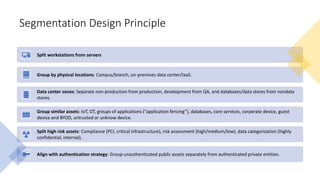
Segmentation Design Principle
Split workstations from servers
Group by physical locations: Campus/branch, on-premises data center/IaaS.
Data center zones: Separate non-production from production, development from QA, and databases/data stores from nondata
stores.
Group similar assets: IoT, OT, groups of applications (“application fencing”), databases, core services, corperate device, guest
device and BYOD, untrusted or unknow device.
Split high risk assets: Compliance (PCI, critical infrastructure), risk assessment (high/medium/low), data categorization (highly
confidential, internal).
Align with authentication strategy: Group unauthenticated public assets separately from authenticated private entities.
Internal Use
Azure segmentation options
Internal Use
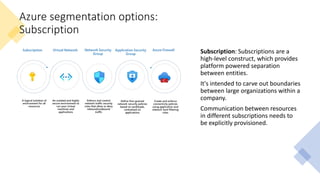
Azure segmentation options:
Subscription
Subscription: Subscriptions are a
high-level construct, which provides
platform powered separation
between entities.
It's intended to carve out boundaries
between large organizations within a
company.
Communication between resources
in different subscriptions needs to
be explicitly provisioned.
Internal Use
Azure segmentation options:
Virtual Network
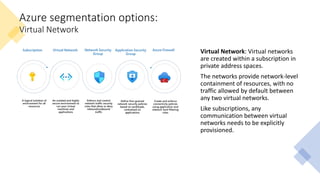
Virtual Network: Virtual networks
are created within a subscription in
private address spaces.
The networks provide network-level
containment of resources, with no
traffic allowed by default between
any two virtual networks.
Like subscriptions, any
communication between virtual
networks needs to be explicitly
provisioned.
Internal Use
Azure segmentation options:
Network Security Groups
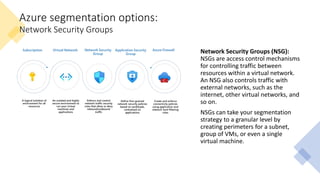
Network Security Groups (NSG):
NSGs are access control mechanisms
for controlling traffic between
resources within a virtual network.
An NSG also controls traffic with
external networks, such as the
internet, other virtual networks, and
so on.
NSGs can take your segmentation
strategy to a granular level by
creating perimeters for a subnet,
group of VMs, or even a single
virtual machine.
Internal Use
Azure segmentation options:
Application Security Groups
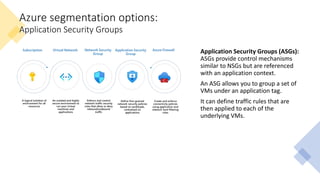
Application Security Groups (ASGs):
ASGs provide control mechanisms
similar to NSGs but are referenced
with an application context.
An ASG allows you to group a set of
VMs under an application tag.
It can define traffic rules that are
then applied to each of the
underlying VMs.
Internal Use
Azure segmentation options:
Azure Firewall
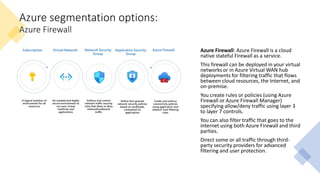
Azure Firewall: Azure Firewall is a cloud
native stateful Firewall as a service.
This firewall can be deployed in your virtual
networks or in Azure Virtual WAN hub
deployments for filtering traffic that flows
between cloud resources, the Internet, and
on-premise.
You create rules or policies (using Azure
Firewall or Azure Firewall Manager)
specifying allow/deny traffic using layer 3
to layer 7 controls.
You can also filter traffic that goes to the
internet using both Azure Firewall and third
parties.
Direct some or all traffic through third-
party security providers for advanced
filtering and user protection.
Internal Use
Hub-spoke architecture
Internal Use
Hub-spoke network topology in Azure :
Use cases
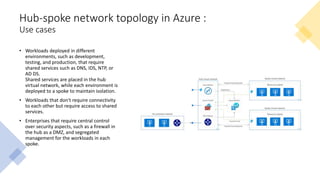
• Workloads deployed in different
environments, such as development,
testing, and production, that require
shared services such as DNS, IDS, NTP, or
AD DS.
Shared services are placed in the hub
virtual network, while each environment is
deployed to a spoke to maintain isolation.
• Workloads that don't require connectivity
to each other but require access to shared
services.
• Enterprises that require central control
over security aspects, such as a firewall in
the hub as a DMZ, and segregated
management for the workloads in each
spoke.
Internal Use
Hub-spoke network topology in Azure :
Architecture
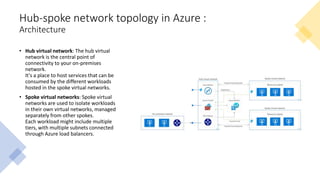
• Hub virtual network: The hub virtual
network is the central point of
connectivity to your on-premises
network.
It's a place to host services that can be
consumed by the different workloads
hosted in the spoke virtual networks.
• Spoke virtual networks: Spoke virtual
networks are used to isolate workloads
in their own virtual networks, managed
separately from other spokes.
Each workload might include multiple
tiers, with multiple subnets connected
through Azure load balancers.
Internal Use
Hub-spoke network topology in Azure:
Operational considerations
Network monitoring
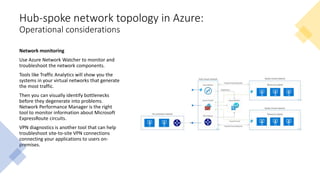
Use Azure Network Watcher to monitor and
troubleshoot the network components.
Tools like Traffic Analytics will show you the
systems in your virtual networks that generate
the most traffic.
Then you can visually identify bottlenecks
before they degenerate into problems.
Network Performance Manager is the right
tool to monitor information about Microsoft
ExpressRoute circuits.
VPN diagnostics is another tool that can help
troubleshoot site-to-site VPN connections
connecting your applications to users on-
premises.
Internal Use
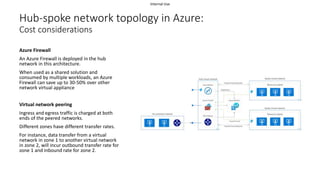
Hub-spoke network topology in Azure:
Cost considerations
Azure Firewall
An Azure Firewall is deployed in the hub
network in this architecture.
When used as a shared solution and
consumed by multiple workloads, an Azure
Firewall can save up to 30-50% over other
network virtual appliance
Virtual network peering
Ingress and egress traffic is charged at both
ends of the peered networks.
Different zones have different transfer rates.
For instance, data transfer from a virtual
network in zone 1 to another virtual network
in zone 2, will incur outbound transfer rate for
zone 1 and inbound rate for zone 2.
Internal Use
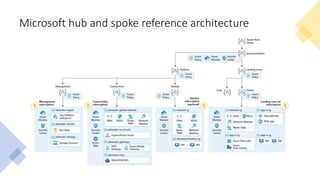
Microsoft hub and spoke reference architecture
Internal Use
By segmentation design
principle
Azure segmentation design
Internal Use
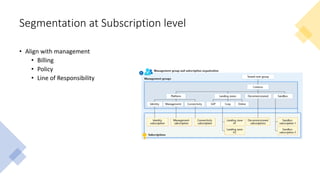
Segmentation at Subscription level
• Align with management
• Billing
• Policy
• Line of Responsibility
Internal Use
Segmentation at VNet level
• Split Clients from Servers
• Cloud virtual desktop infrastructure (VDI):
• Azure Virtual Desktop
• Citrix Virtual App and Desktop
• VMWare Horizon Cloud
• Cloud PC:
• Windows 365 Desktop
• Point to Site (P2S) VPN
• Group by physical location: Azure region
• Split non-production from production
• Non-production and production
• Dev, test and production
Internal Use
Segmentation at VNet level (2)
• Separate high potential impact and/or a high potential exposure to risk applications
• High potential impact:
• Business critical data – Applications that process or store information, which would cause significant negative
business or mission impact if an assurance of confidentiality, integrity, or availability is lost.
• Regulated data – Applications that handle monetary instruments and sensitive personal information regulated by
standards. For example, payment card industry (PCI) and Health Information Portability and Accountability Act
(HIPAA).
• Business critical availability – Applications whose functionality is critical to organizations business mission such as
production lines generating revenue, devices, or services critical to life and safety, and other critical functions.
• Significant Access – Applications which have access to systems with a high potential impact through technical
• Stored Credentials or keys/certificates that grant access to the data/service
• Permissions granted via access control lists or other means
• High exposure to attacks:
• Applications that are easily accessible to attackers such as web applications on the open internet.
• Legacy applications can also be higher exposure as attackers and penetration testers frequently target them because
they know these legacy applications often have vulnerabilities that are difficult to fix.
Internal Use
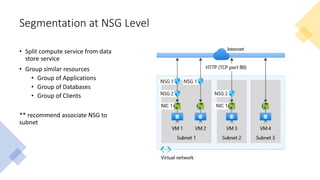
Segmentation at NSG Level
• Split compute service from data
store service
• Group similar resources
• Group of Applications
• Group of Databases
• Group of Clients
** recommend associate NSG to
subnet
Internal Use
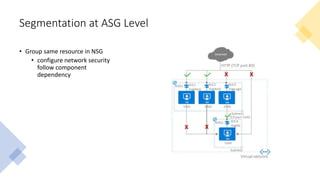
Segmentation at ASG Level
• Group same resource in NSG
• configure network security
follow component
dependency
Internal Use
Q&A
Internal Use
Reference
• Gartner, The 6 Principles of Successful Network Segmentation Strategies. https://www.gartner.com/document/4002289
• Gartner, Segmentation or Isolation: Implementing Best Practices for Connecting ‘All’ Devices. https://www.gartner.com/document/3969768
• Microsoft, Segmentation strategies – Azure Architecture Center | Microsoft Docs. https://docs.microsoft.com/en-
us/azure/architecture/framework/security/design-segmentation
• Microsoft, Implement network segmentation patterns on Azure – Azure Architecture Center | Microsoft Docs. https://docs.microsoft.com/en-
us/azure/architecture/framework/security/design-network-segmentation
• Microsoft, Application classification for security – Azure Architecture Center | Microsoft Docs. https://docs.microsoft.com/en-
us/azure/architecture/framework/security/design-apps-considerations
• Microsoft, Hub-spoke network topology in Azure – Azure Reference Architecture | Microsoft Docs. https://docs.microsoft.com/en-
us/azure/architecture/reference-architectures/hybrid-networking/hub-spoke
• Microsoft, Management group and subscription organization – Cloud Adoption Framework | Microsoft Docs. https://docs.microsoft.com/en-
us/azure/cloud-adoption-framework/ready/enterprise-scale/management-group-and-subscription-organization
• Microsoft, Azure virtual network| Microsoft Docs. https://docs.microsoft.com/en-us/azure/virtual-network/virtual-networks-overview
• Microsoft, Azure network security group overview | Microsoft Docs. https://docs.microsoft.com/en-us/azure/virtual-network/network-security-groups-
overview
• Microsoft, Azure application security group overview | Microsoft Docs. https://docs.microsoft.com/en-us/azure/virtual-network/application-security-groups
• Azure, Deploy Enterprise-Scale with hub and spoke architecture. https://github.com/Azure/Enterprise-
Scale/blob/main/docs/reference/adventureworks/README.md

Segmentation on azure platform

  • 1.
    Internal Use Segmentation on AzurePlatform From principle to practice
  • 2.
    Internal Use A GoodSegmentation Enables Operations – Minimizes operation friction by aligning to business practices and applications Contains Risk - Adds cost and friction to attackers by Isolating sensitive workloads from compromise of other assets Isolating high exposure systems from being used as a pivot to other systems Monitored – Security Operations should monitor for potential violations of the integrity of the segments (account usage, unexpected traffic, etc.)
  • 3.
    Internal Use Segmentation DesignPrinciple Split workstations from servers Group by physical locations: Campus/branch, on-premises data center/IaaS. Data center zones: Separate non-production from production, development from QA, and databases/data stores from nondata stores. Group similar assets: IoT, OT, groups of applications (“application fencing”), databases, core services, corperate device, guest device and BYOD, untrusted or unknow device. Split high risk assets: Compliance (PCI, critical infrastructure), risk assessment (high/medium/low), data categorization (highly confidential, internal). Align with authentication strategy: Group unauthenticated public assets separately from authenticated private entities.
  • 4.
  • 5.
    Internal Use Azure segmentationoptions: Subscription Subscription: Subscriptions are a high-level construct, which provides platform powered separation between entities. It's intended to carve out boundaries between large organizations within a company. Communication between resources in different subscriptions needs to be explicitly provisioned.
  • 6.
    Internal Use Azure segmentationoptions: Virtual Network Virtual Network: Virtual networks are created within a subscription in private address spaces. The networks provide network-level containment of resources, with no traffic allowed by default between any two virtual networks. Like subscriptions, any communication between virtual networks needs to be explicitly provisioned.
  • 7.
    Internal Use Azure segmentationoptions: Network Security Groups Network Security Groups (NSG): NSGs are access control mechanisms for controlling traffic between resources within a virtual network. An NSG also controls traffic with external networks, such as the internet, other virtual networks, and so on. NSGs can take your segmentation strategy to a granular level by creating perimeters for a subnet, group of VMs, or even a single virtual machine.
  • 8.
    Internal Use Azure segmentationoptions: Application Security Groups Application Security Groups (ASGs): ASGs provide control mechanisms similar to NSGs but are referenced with an application context. An ASG allows you to group a set of VMs under an application tag. It can define traffic rules that are then applied to each of the underlying VMs.
  • 9.
    Internal Use Azure segmentationoptions: Azure Firewall Azure Firewall: Azure Firewall is a cloud native stateful Firewall as a service. This firewall can be deployed in your virtual networks or in Azure Virtual WAN hub deployments for filtering traffic that flows between cloud resources, the Internet, and on-premise. You create rules or policies (using Azure Firewall or Azure Firewall Manager) specifying allow/deny traffic using layer 3 to layer 7 controls. You can also filter traffic that goes to the internet using both Azure Firewall and third parties. Direct some or all traffic through third- party security providers for advanced filtering and user protection.
  • 10.
  • 11.
    Internal Use Hub-spoke networktopology in Azure : Use cases • Workloads deployed in different environments, such as development, testing, and production, that require shared services such as DNS, IDS, NTP, or AD DS. Shared services are placed in the hub virtual network, while each environment is deployed to a spoke to maintain isolation. • Workloads that don't require connectivity to each other but require access to shared services. • Enterprises that require central control over security aspects, such as a firewall in the hub as a DMZ, and segregated management for the workloads in each spoke.
  • 12.
    Internal Use Hub-spoke networktopology in Azure : Architecture • Hub virtual network: The hub virtual network is the central point of connectivity to your on-premises network. It's a place to host services that can be consumed by the different workloads hosted in the spoke virtual networks. • Spoke virtual networks: Spoke virtual networks are used to isolate workloads in their own virtual networks, managed separately from other spokes. Each workload might include multiple tiers, with multiple subnets connected through Azure load balancers.
  • 13.
    Internal Use Hub-spoke networktopology in Azure: Operational considerations Network monitoring Use Azure Network Watcher to monitor and troubleshoot the network components. Tools like Traffic Analytics will show you the systems in your virtual networks that generate the most traffic. Then you can visually identify bottlenecks before they degenerate into problems. Network Performance Manager is the right tool to monitor information about Microsoft ExpressRoute circuits. VPN diagnostics is another tool that can help troubleshoot site-to-site VPN connections connecting your applications to users on- premises.
  • 14.
    Internal Use Hub-spoke networktopology in Azure: Cost considerations Azure Firewall An Azure Firewall is deployed in the hub network in this architecture. When used as a shared solution and consumed by multiple workloads, an Azure Firewall can save up to 30-50% over other network virtual appliance Virtual network peering Ingress and egress traffic is charged at both ends of the peered networks. Different zones have different transfer rates. For instance, data transfer from a virtual network in zone 1 to another virtual network in zone 2, will incur outbound transfer rate for zone 1 and inbound rate for zone 2.
  • 15.
    Internal Use Microsoft huband spoke reference architecture
  • 16.
    Internal Use By segmentationdesign principle Azure segmentation design
  • 17.
    Internal Use Segmentation atSubscription level • Align with management • Billing • Policy • Line of Responsibility
  • 18.
    Internal Use Segmentation atVNet level • Split Clients from Servers • Cloud virtual desktop infrastructure (VDI): • Azure Virtual Desktop • Citrix Virtual App and Desktop • VMWare Horizon Cloud • Cloud PC: • Windows 365 Desktop • Point to Site (P2S) VPN • Group by physical location: Azure region • Split non-production from production • Non-production and production • Dev, test and production
  • 19.
    Internal Use Segmentation atVNet level (2) • Separate high potential impact and/or a high potential exposure to risk applications • High potential impact: • Business critical data – Applications that process or store information, which would cause significant negative business or mission impact if an assurance of confidentiality, integrity, or availability is lost. • Regulated data – Applications that handle monetary instruments and sensitive personal information regulated by standards. For example, payment card industry (PCI) and Health Information Portability and Accountability Act (HIPAA). • Business critical availability – Applications whose functionality is critical to organizations business mission such as production lines generating revenue, devices, or services critical to life and safety, and other critical functions. • Significant Access – Applications which have access to systems with a high potential impact through technical • Stored Credentials or keys/certificates that grant access to the data/service • Permissions granted via access control lists or other means • High exposure to attacks: • Applications that are easily accessible to attackers such as web applications on the open internet. • Legacy applications can also be higher exposure as attackers and penetration testers frequently target them because they know these legacy applications often have vulnerabilities that are difficult to fix.
  • 20.
    Internal Use Segmentation atNSG Level • Split compute service from data store service • Group similar resources • Group of Applications • Group of Databases • Group of Clients ** recommend associate NSG to subnet
  • 21.
    Internal Use Segmentation atASG Level • Group same resource in NSG • configure network security follow component dependency
  • 22.
  • 23.
    Internal Use Reference • Gartner,The 6 Principles of Successful Network Segmentation Strategies. https://www.gartner.com/document/4002289 • Gartner, Segmentation or Isolation: Implementing Best Practices for Connecting ‘All’ Devices. https://www.gartner.com/document/3969768 • Microsoft, Segmentation strategies – Azure Architecture Center | Microsoft Docs. https://docs.microsoft.com/en- us/azure/architecture/framework/security/design-segmentation • Microsoft, Implement network segmentation patterns on Azure – Azure Architecture Center | Microsoft Docs. https://docs.microsoft.com/en- us/azure/architecture/framework/security/design-network-segmentation • Microsoft, Application classification for security – Azure Architecture Center | Microsoft Docs. https://docs.microsoft.com/en- us/azure/architecture/framework/security/design-apps-considerations • Microsoft, Hub-spoke network topology in Azure – Azure Reference Architecture | Microsoft Docs. https://docs.microsoft.com/en- us/azure/architecture/reference-architectures/hybrid-networking/hub-spoke • Microsoft, Management group and subscription organization – Cloud Adoption Framework | Microsoft Docs. https://docs.microsoft.com/en- us/azure/cloud-adoption-framework/ready/enterprise-scale/management-group-and-subscription-organization • Microsoft, Azure virtual network| Microsoft Docs. https://docs.microsoft.com/en-us/azure/virtual-network/virtual-networks-overview • Microsoft, Azure network security group overview | Microsoft Docs. https://docs.microsoft.com/en-us/azure/virtual-network/network-security-groups- overview • Microsoft, Azure application security group overview | Microsoft Docs. https://docs.microsoft.com/en-us/azure/virtual-network/application-security-groups • Azure, Deploy Enterprise-Scale with hub and spoke architecture. https://github.com/Azure/Enterprise- Scale/blob/main/docs/reference/adventureworks/README.md