Module Title: TOOLS OF THE ASSESSMENT SYSTEM
Module Content: STRUCTURED SYSTEMS ANALYSIS
Developer: Ms. Eliza M. Pascual
Specific Learning Objectives
1
Identify the tools that a systems analyst
could use.
2 Describe and differentiate each tool.
3 Use the appropriate tool for a certain
and different situation.
8 System model
9 Tools of structured analysis
a Modeling system functions (DFD, System Flowchart)
b Modeling stored data (ERD,Data Dictionary)
c Modeling program structure (VTOC, IPO, Program Flowchart )
d Other modeling tools (The Gantt chart, Warnier-
Orr diagram, Nassi-Schneiderman chart, Nassi-
Schneiderman chart, State transition diagram
and Decision tables)
Systems Analysis
It is the most crucial phase in the developments of the system.
General Design Detailed Design
Structured Systems Analysis
technique for systems analysis that covers all activities from
initial understanding of the problem through to
specification and high-level design of the software system.
Systems Model
process of developing abstract models of a system, with each
model presenting a different view or perspective of that system.
1 Models of the existing system are used
during requirements engineering. 2 Models of the new system are used
during requirements engineering.
Modelling Systems Functions
1 Data Flow Diagram 2 SYSTEM FLOW CHART
1 Data Flow Diagram : PROCESS
2 Data Flow Diagram : DATA FLOWS
3 Data Flow Diagram : DATA STORES
4 Data Flow Diagram : EXTERNAL ENTITIES
5 Data Flow Diagram : CONTEXT DIAGRAM
1 Data Flow Diagram
0
COURSE
REGISTRATION
SYSTEM
ACAD
DEPT.
SCHEDULE DATA
ACAD
DEPT.
ENROLLMENT REQUEST
SCHEDULE
CLASS LIST
FACULTY
MEMBERS
Guidelines for drawing DFDs
Completeness Consistency Timing Iterative
Development
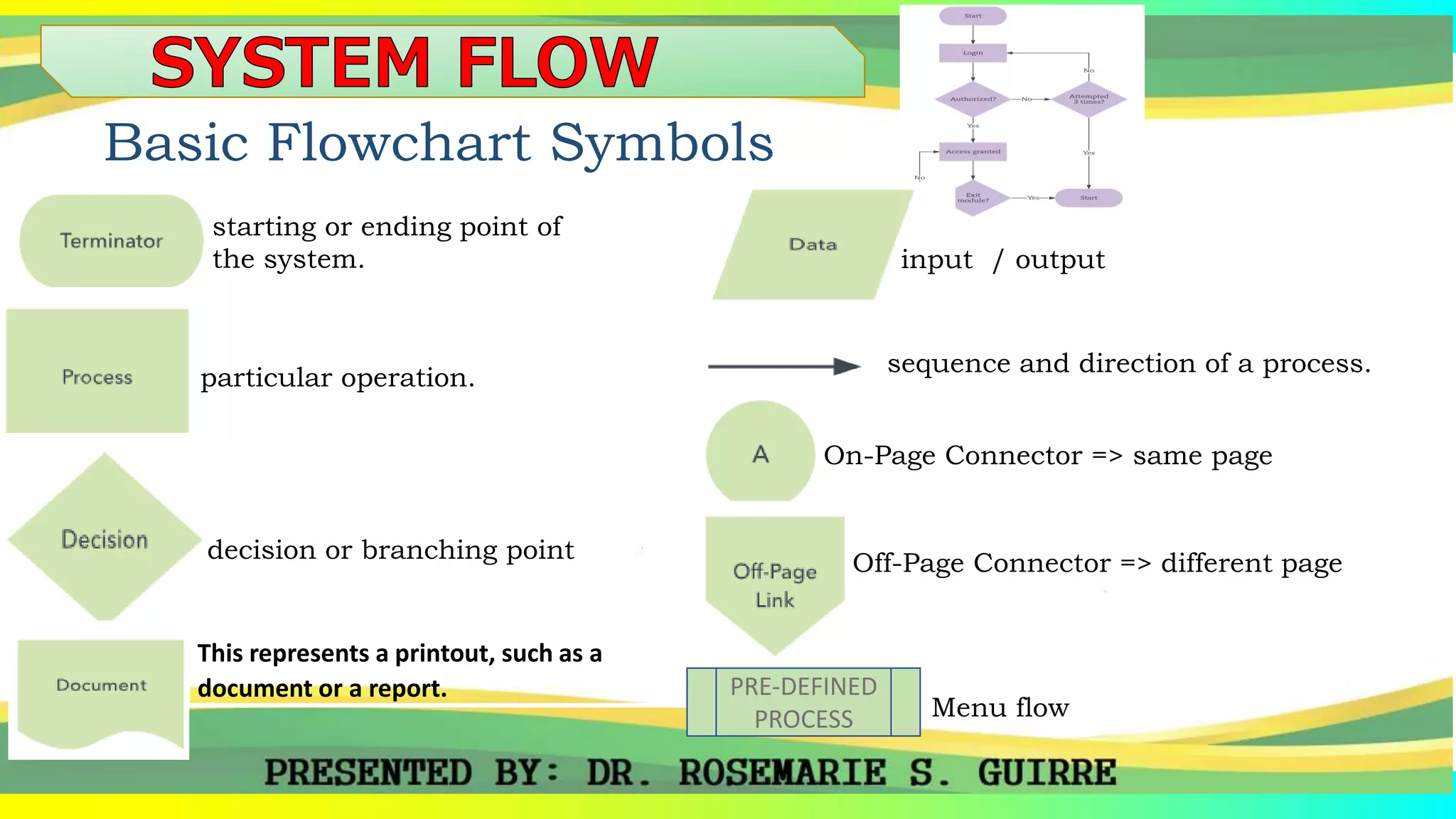
Basic Flowchart Symbols
starting or ending point of
the system.
particular operation.
decision or branching point
This represents a printout, such as a
document or a report.
input / output
sequence and direction of a process.
On-Page Connector => same page
Off-Page Connector => different page
PRE-DEFINED
PROCESS Menu flow
Basic Flowchart Symbols
Figure 1.1 Log-in Page
START
LOGIN
AUTHORIZED
Accessed
Granted
NO
3 ATTEMPTS
EXIT MODULE
YES
NO
END
YES
YES
NO
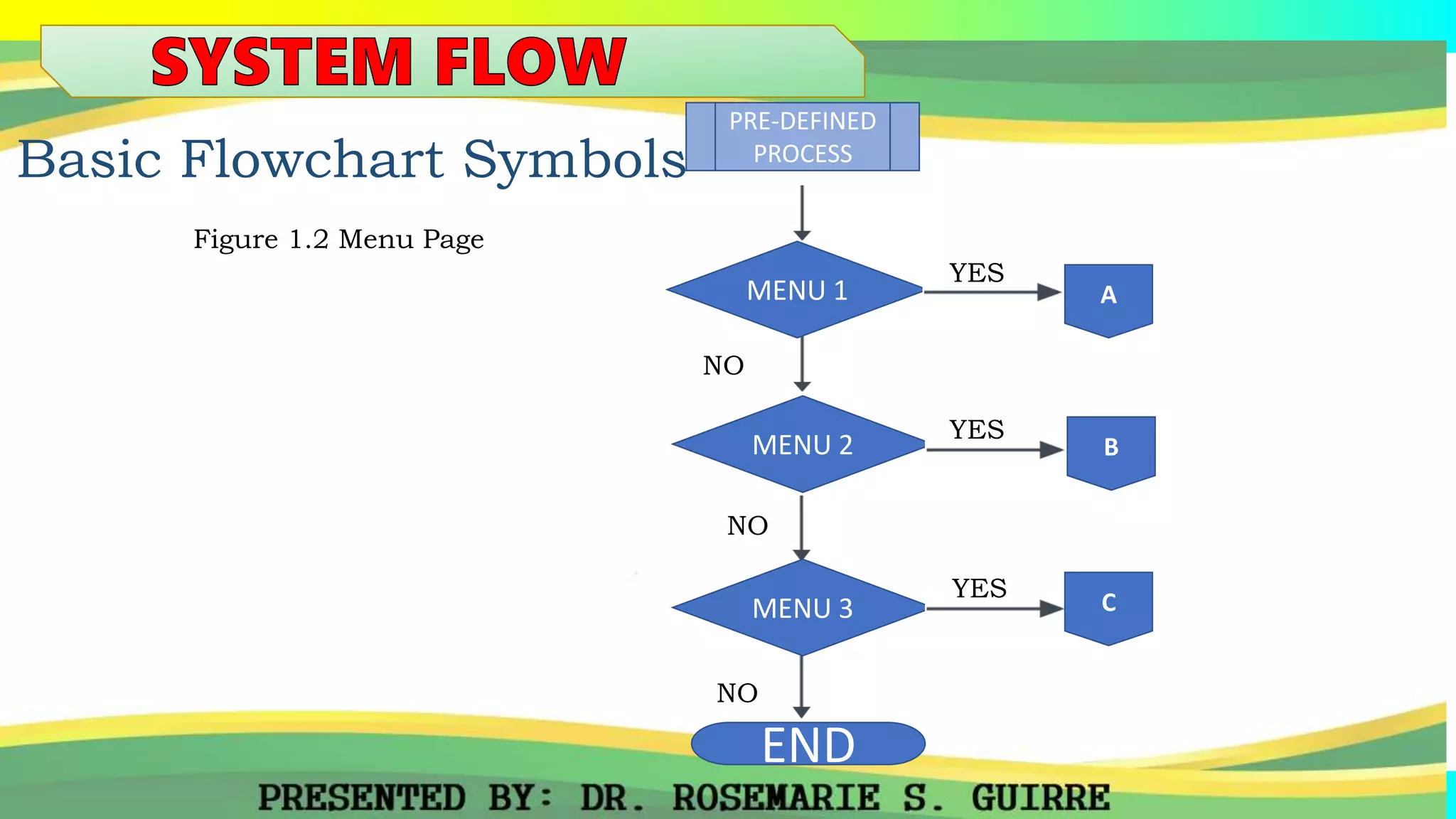
Basic Flowchart Symbols
Figure 1.2 Menu Page
MENU 2
NO
MENU 3
YES
END
MENU 1
PRE-DEFINED
PROCESS
NO
NO
B
A
C
YES
YES
Figure 1.3 VTOC
The input-process-output (IPO) model is a widely used approach in
systems analysis and software engineering for describing the
structure of an information processing program or other process.
Figure 1.4 IPO
diagram that uses
a set of standard
graphic symbols
to represent the
sequence of coded
instructions fed
into a computer
Figure 1.5 PROGRAM FLOW
commonly used is
project management,
is one of the most
popular and useful
ways of showing
activities (tasks or
events) displayed
against time.
Figure 1.5 GANTT CHART
System
Flow
Program
Flow
THANKYOU

ISAD 313-3_ SYSTEM FLOW.pptx

  • 1.
    Module Title: TOOLSOF THE ASSESSMENT SYSTEM Module Content: STRUCTURED SYSTEMS ANALYSIS Developer: Ms. Eliza M. Pascual
  • 2.
    Specific Learning Objectives 1 Identifythe tools that a systems analyst could use. 2 Describe and differentiate each tool. 3 Use the appropriate tool for a certain and different situation.
  • 3.
    8 System model 9Tools of structured analysis a Modeling system functions (DFD, System Flowchart) b Modeling stored data (ERD,Data Dictionary) c Modeling program structure (VTOC, IPO, Program Flowchart ) d Other modeling tools (The Gantt chart, Warnier- Orr diagram, Nassi-Schneiderman chart, Nassi- Schneiderman chart, State transition diagram and Decision tables)
  • 4.
    Systems Analysis It isthe most crucial phase in the developments of the system. General Design Detailed Design Structured Systems Analysis technique for systems analysis that covers all activities from initial understanding of the problem through to specification and high-level design of the software system.
  • 5.
    Systems Model process ofdeveloping abstract models of a system, with each model presenting a different view or perspective of that system. 1 Models of the existing system are used during requirements engineering. 2 Models of the new system are used during requirements engineering. Modelling Systems Functions 1 Data Flow Diagram 2 SYSTEM FLOW CHART
  • 6.
    1 Data FlowDiagram : PROCESS 2 Data Flow Diagram : DATA FLOWS 3 Data Flow Diagram : DATA STORES 4 Data Flow Diagram : EXTERNAL ENTITIES 5 Data Flow Diagram : CONTEXT DIAGRAM
  • 7.
    1 Data FlowDiagram 0 COURSE REGISTRATION SYSTEM ACAD DEPT. SCHEDULE DATA ACAD DEPT. ENROLLMENT REQUEST SCHEDULE CLASS LIST FACULTY MEMBERS
  • 8.
    Guidelines for drawingDFDs Completeness Consistency Timing Iterative Development
  • 9.
    Basic Flowchart Symbols startingor ending point of the system. particular operation. decision or branching point This represents a printout, such as a document or a report. input / output sequence and direction of a process. On-Page Connector => same page Off-Page Connector => different page PRE-DEFINED PROCESS Menu flow
  • 10.
    Basic Flowchart Symbols Figure1.1 Log-in Page START LOGIN AUTHORIZED Accessed Granted NO 3 ATTEMPTS EXIT MODULE YES NO END YES YES NO
  • 11.
    Basic Flowchart Symbols Figure1.2 Menu Page MENU 2 NO MENU 3 YES END MENU 1 PRE-DEFINED PROCESS NO NO B A C YES YES
  • 13.
  • 14.
    The input-process-output (IPO)model is a widely used approach in systems analysis and software engineering for describing the structure of an information processing program or other process. Figure 1.4 IPO
  • 15.
    diagram that uses aset of standard graphic symbols to represent the sequence of coded instructions fed into a computer Figure 1.5 PROGRAM FLOW
  • 16.
    commonly used is projectmanagement, is one of the most popular and useful ways of showing activities (tasks or events) displayed against time. Figure 1.5 GANTT CHART
  • 17.
  • 18.
  • 22.

Editor's Notes

  • #2 SPECIFIC LEARNING OBJECTIVES:  At the end of this module you MUST be able to:
  • #3 SPECIFIC LEARNING OBJECTIVES:  At the end of this module you MUST be able to:
  • #4 SPECIFIC LEARNING OBJECTIVES:  At the end of this module you MUST be able to:
  • #5 It is the most crucial phase in the developments of the system. It has two stages: General Design Detailed Design
  • #6 System modeling is the process of developing abstract models of a system, with each model presenting a different view or perspective of that system. System modeling has generally come to mean representing the system using some kind of graphical notation, which is now almost always based on notations in the Unified Modeling Language (UML). However, it is also possible to develop formal (mathematical) models of a system, usually as a detailed system specification. Models are used during the requirements engineering process to help derive the requirements for a system, during the design process to describe the system to engineers implementing the system and after the implementation to document the system’s structure and operation. You may develop models of both existing system and the system to be developed: Models of the existing system are used during requirements engineering. They help clarify what the existing system does and can be used as basis for discussing its strengths and weaknesses. These then lead to requirements for the new system. Models of the new system are used during requirements engineering to help explain the proposed requirements of the other system stakeholders. Engineers use these models to discuss design proposals and to document the system for implementation. In a model-driven engineering process, it is possible to generate a complete or partial system implementation from the system model. The most important aspect of a system model is that it leaves out detail. A model is an abstraction of the system being studied rather than an alternative representation of that system. Ideally, a representation of a system should maintain all the information about the entity being represented but unfortunately, the real world is utterly complex so weed to simplify. An abstraction consciously simplifies and picks out the most evident characteristics. There are four important types of system models: context models, interaction models, structural and behavioral models. Context models. This normally show that the system’s environment contains other systems but the types of relationships between the systems of the environment and the system that is being specified are not shown. That is why it is common to created some models describing business processes showing what activities humans or automated processes will execute. Interaction models. All systems involve interaction of some kind. This can be user interaction, which involves user inputs and outputs, interaction between the system being developed and other systems or interaction between the components of the system. Modeling user interaction is important as it helps to identify user requirements. Modeling system to system interaction highlights the communication problems that may rise. Structural models of software display the organization of a system in terms of the components that make up that system and their relationships. Structural models may be static models, which show the structure of the system design or dynamic models, which show the organization of the systems when it is executing. Behavioral models. These are models of the dynamic behavior of the system as it is executing. They show what happens or what is supposed to happen when a system responds to a stimulus from its environment. You can think of these stimuli as being two types: Data. Some data arrives that has to be processed by the system. Events. Some event happens that triggers system processing. Events may have associated data but this is not always the case.
  • #10 The terminator symbol represents the starting or ending point of the system. A box indicates some particular operation. A diamond represents a decision or branching point. Lines coming out from the diamond indicates indifferent possible situations, leading to different sub-processes. This represents a printout, such as a document or a report. It represents information entering or leaving the system. An input might be an order from a customer. Output can be a product to be delivered. Line represent the flow of the sequence and direction of a process. This On-Page reference contains a letter inside which indicates that the flow continues on a matching symbol containing the same letter somewhere else on the same page. The Off-Page reference contains a letter inside which indicates that the flow continues on a matching symbol containing the same letter somewhere else on a different page.
  • #11 The terminator symbol represents the starting or ending point of the system. A box indicates some particular operation. A diamond represents a decision or branching point. Lines coming out from the diamond indicates indifferent possible situations, leading to different sub-processes. This represents a printout, such as a document or a report. It represents information entering or leaving the system. An input might be an order from a customer. Output can be a product to be delivered. Line represent the flow of the sequence and direction of a process. This On-Page reference contains a letter inside which indicates that the flow continues on a matching symbol containing the same letter somewhere else on the same page. The Off-Page reference contains a letter inside which indicates that the flow continues on a matching symbol containing the same letter somewhere else on a different page.
  • #12 The terminator symbol represents the starting or ending point of the system. A box indicates some particular operation. A diamond represents a decision or branching point. Lines coming out from the diamond indicates indifferent possible situations, leading to different sub-processes. This represents a printout, such as a document or a report. It represents information entering or leaving the system. An input might be an order from a customer. Output can be a product to be delivered. Line represent the flow of the sequence and direction of a process. This On-Page reference contains a letter inside which indicates that the flow continues on a matching symbol containing the same letter somewhere else on the same page. The Off-Page reference contains a letter inside which indicates that the flow continues on a matching symbol containing the same letter somewhere else on a different page.
  • #14 A visual table of contents is a hierarchical diagram that shows the breakdown of a system to its lowest manageable parts. It is a top-down modular design tool, constructed of rectangles (that represents the different modules in a system) and lines that connect them. The lines explain the connection and/or ownership between the different modules among the system just like in an organizational chart. Those diagrams are used to present all parts in a system and the way they are arranged in it. A hierarchy chart starts with the name of the system as a single entity and through a drill-down list all different parts of this entity. It is used for describing the structure of a whole along with all its parts which are small enough to be understood by a human brain.
  • #15 A visual table of contents is a hierarchical diagram that shows the breakdown of a system to its lowest manageable parts. It is a top-down modular design tool, constructed of rectangles (that represents the different modules in a system) and lines that connect them. The lines explain the connection and/or ownership between the different modules among the system just like in an organizational chart. Those diagrams are used to present all parts in a system and the way they are arranged in it. A hierarchy chart starts with the name of the system as a single entity and through a drill-down list all different parts of this entity. It is used for describing the structure of a whole along with all its parts which are small enough to be understood by a human brain.
  • #16 Program flowchart is a diagram that uses a set of standard graphic symbols to represent the sequence of coded instructions fed into a computer, enabling it to perform specified logical and arithmetical operations. It is a great tool to improve work efficiency. There are four basic symbols in program flowchart, start, process, decision and end. Each symbol represents a piece of the code written for the program. Some of the basic symbols used in system flowchart is similar with program flowchart.
  • #17 A Gantt chart, commonly used is project management, is one of the most popular and useful ways of showing activities (tasks or events) displayed against time. On the left of the chart is a list of the activities and along the top is a suitable time scale. Each activity is represented by a bar; the position and length of the bar reflects the start date, duration and end date of the activity. This allows you to see at a glance:
  • #18 1. Structured Systems Analysis 2.
  • #19 1. Structured Systems Analysis 2.
  • #20 1. Structured Systems Analysis 2.
  • #21 1. Structured Systems Analysis 2.
  • #22 1. Structured Systems Analysis 2.