How have we used the Ipads in
        Geography?
Year 10 - Coasts
Reading photos effectively
• The students used Popplet to annotate photos and create
  links between the photos.
• Photos where placed in a Year 10 folder which we
  created on our dropbox account. Students could then
  download them to the photo file on the Ipad. Once in the
  photo file on the Ipad, the students could open them in
  Popplet.
• *Their work can sent to their e-mail address.
• You can also create flow diagrams
   using Popplet.
Year 10 - Coasts
• The students created a video on the Great Barrier Reef using
  imovie. They incorporated key facts, covered the issues it
  faces and how it is managed.
• They saved images from the web on to the Ipad and then they
  uploaded them into imovie. They added a voice over on
  imovie or added text to the images/music.
• If you don’t save it as HD, it is
  possible to upload small videos of
   up to 3mins on to dropbox.
Year 10 - Coasts
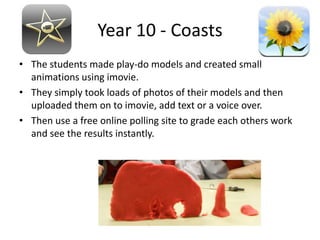
• The students made play-do models and created small
  animations using imovie.
• They simply took loads of photos of their models and then
  uploaded them on to imovie, add text or a voice over.
• Then use a free online polling site to grade each others work
  and see the results instantly.
Year 10 Coasts
• Igeology app to investigate the geology which
  has created concordant and discordant
  coastlines. Just zoom down, click on the area
  and it will provide info on the rock type.
Year 13
• Independent research using Safari, Hitpad app
  and OECD factbook.
• When students search in Hitpad, results are
  displayed for videos, photos, tweets, as well as
  the usual links.
Hazards apps
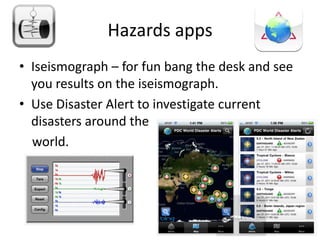
• Iseismograph – for fun bang the desk and see
  you results on the iseismograph.
• Use Disaster Alert to investigate current
  disasters around the
  world.
Year 8 – Woodland Reserve
                    Investigation
•   The students took photos of different biotic and abiotic components with the
    camera.
•   They made notes on docs to go ( word doc).
•   They used the leaf snap app to take photos of leaves & find out the type of leaf.
•   They could have record their notes using audiboo if they preferred.
•   I had created folders for each group on drop box and once back in the classroom,
    they could upload their notes and photos to the geography drop box account so
    they could access and work on it at home.
Year 8 – Dry /Wet worlds
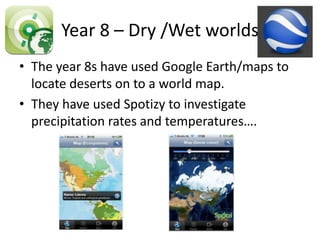
• The year 8s have used Google Earth/maps to
  locate deserts on to a world map.
• They have used Spotizy to investigate
  precipitation rates and temperatures….
Year 12 Fieldwork
• All student surveys were placed in dropbox and
  then downloaded into docs to go, so students
  could fill out on the Ipad. Made collating a lot
  easier, also all results could be added to the drop
  box folder once in school so students could
  access at home or e-mailed.
• Photos taken & 360° panoramas with photosynth
  app.
• Video of high street transect, which could be later
  annotated.
• Audio summary of the site with audioboo.
Year 9 Fair Trade Chocolate.
• Students will use imovie to make TV adverts – one to
  raise the awareness of fair trade & one to advertise
  their chocolate bar. They may also use the Ipads to
  video and take photos.
• They may also use Strip designer app for adverts or
  sketch using the Ipad.
• They will use safari to access web to use free logo
  design sites, research current fair trade products and
  also to set up their blog.
• Their group work can be stored
• on drop box and accessed from
• home.
Useful apps for viewing students work
              in school
• Prezi viewer.
• Slide shark app allows you to view ppt for free.
An app that has it all!
              Smart note
• Through smart note students can take notes,
  sketch, annotate photos and create a audio
  recording ………..
River app
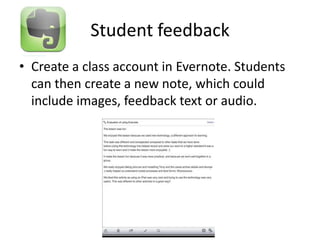
Student feedback
• Create a class account in Evernote. Students
  can then create a new note, which could
  include images, feedback text or audio.
Record creations step by step –
         drawings and audio
• Educreations
Year 8 Coasts trip
•   Audio recording of sites – audioboo.
•   Recording sheets in docs to go.
•   Photos & 360°.
•   Decibel app – record noise level.
•   Drop box – all group work placed in a folder so
    can access at home.

Ipads in geography

  • 1.
    How have weused the Ipads in Geography?
  • 2.
    Year 10 -Coasts Reading photos effectively • The students used Popplet to annotate photos and create links between the photos. • Photos where placed in a Year 10 folder which we created on our dropbox account. Students could then download them to the photo file on the Ipad. Once in the photo file on the Ipad, the students could open them in Popplet. • *Their work can sent to their e-mail address. • You can also create flow diagrams using Popplet.
  • 3.
    Year 10 -Coasts • The students created a video on the Great Barrier Reef using imovie. They incorporated key facts, covered the issues it faces and how it is managed. • They saved images from the web on to the Ipad and then they uploaded them into imovie. They added a voice over on imovie or added text to the images/music. • If you don’t save it as HD, it is possible to upload small videos of up to 3mins on to dropbox.
  • 4.
    Year 10 -Coasts • The students made play-do models and created small animations using imovie. • They simply took loads of photos of their models and then uploaded them on to imovie, add text or a voice over. • Then use a free online polling site to grade each others work and see the results instantly.
  • 5.
    Year 10 Coasts •Igeology app to investigate the geology which has created concordant and discordant coastlines. Just zoom down, click on the area and it will provide info on the rock type.
  • 6.
    Year 13 • Independentresearch using Safari, Hitpad app and OECD factbook. • When students search in Hitpad, results are displayed for videos, photos, tweets, as well as the usual links.
  • 7.
    Hazards apps • Iseismograph– for fun bang the desk and see you results on the iseismograph. • Use Disaster Alert to investigate current disasters around the world.
  • 8.
    Year 8 –Woodland Reserve Investigation • The students took photos of different biotic and abiotic components with the camera. • They made notes on docs to go ( word doc). • They used the leaf snap app to take photos of leaves & find out the type of leaf. • They could have record their notes using audiboo if they preferred. • I had created folders for each group on drop box and once back in the classroom, they could upload their notes and photos to the geography drop box account so they could access and work on it at home.
  • 9.
    Year 8 –Dry /Wet worlds • The year 8s have used Google Earth/maps to locate deserts on to a world map. • They have used Spotizy to investigate precipitation rates and temperatures….
  • 10.
    Year 12 Fieldwork •All student surveys were placed in dropbox and then downloaded into docs to go, so students could fill out on the Ipad. Made collating a lot easier, also all results could be added to the drop box folder once in school so students could access at home or e-mailed. • Photos taken & 360° panoramas with photosynth app. • Video of high street transect, which could be later annotated. • Audio summary of the site with audioboo.
  • 11.
    Year 9 FairTrade Chocolate. • Students will use imovie to make TV adverts – one to raise the awareness of fair trade & one to advertise their chocolate bar. They may also use the Ipads to video and take photos. • They may also use Strip designer app for adverts or sketch using the Ipad. • They will use safari to access web to use free logo design sites, research current fair trade products and also to set up their blog. • Their group work can be stored • on drop box and accessed from • home.
  • 12.
    Useful apps forviewing students work in school • Prezi viewer. • Slide shark app allows you to view ppt for free.
  • 13.
    An app thathas it all! Smart note • Through smart note students can take notes, sketch, annotate photos and create a audio recording ………..
  • 14.
  • 15.
    Student feedback • Createa class account in Evernote. Students can then create a new note, which could include images, feedback text or audio.
  • 16.
    Record creations stepby step – drawings and audio • Educreations
  • 17.
    Year 8 Coaststrip • Audio recording of sites – audioboo. • Recording sheets in docs to go. • Photos & 360°. • Decibel app – record noise level. • Drop box – all group work placed in a folder so can access at home.