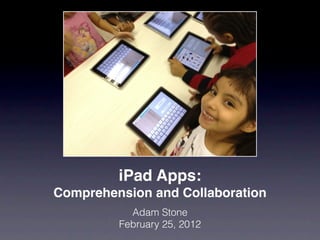
iPad Apps:
Comprehension and Collaboration
           Adam Stone
         February 25, 2012
Two Things...
1. Backchannel at TodaysMeet: go to
   todaysmeet.com/csun

2. Take a photo of this slide!


 www.foundinblank.com
 adamstone@gmail.com
About Me
• From San Diego, CA

• RIT, UCSD (M.A. in ASL/English Bilingual Ed.)

• 1st Grade Teacher at P.S. 347 The ASL and
  English Lower School

   www.47lowerschool.org

• iPads at 347
What is an iPad?
Why iPads?
   Pros:
Why iPads?
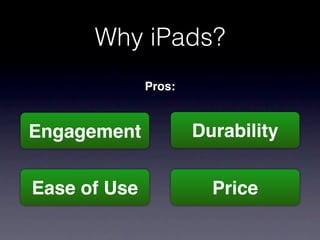
              Pros:


Engagement            Durability


Ease of Use             Price
Why iPads?
   Cons:
Why iPads?
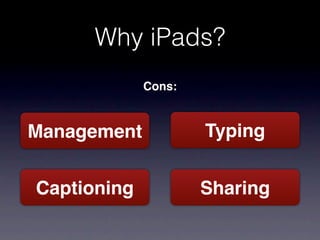
             Cons:


Management           Typing


Captioning           Sharing
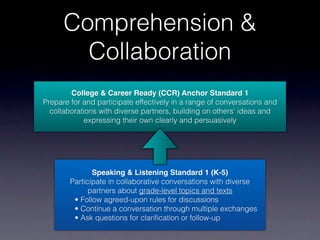
Comprehension &
        Collaboration
        College & Career Ready (CCR) Anchor Standard 1
Prepare for and participate effectively in a range of conversations and
  collaborations with diverse partners, building on others' ideas and
            expressing their own clearly and persuasively


               Speaking & Listening Standard 1 (K-5)
        Participate in collaborative conversations with diverse
              partners about grade-level topics and texts
         • Follow agreed-upon rules for discussions
         • Continue a conversation through multiple exchanges
         • Ask questions for clarification or follow-up
Common Core
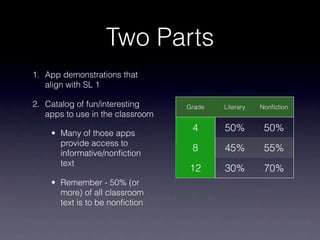
Two Parts
1. App demonstrations that
   align with SL 1

2. Catalog of fun/interesting     Grade   Literary   Nonfiction
   apps to use in the classroom

    • Many of those apps
                                   4      50%         50%
      provide access to
      informative/nonfiction
                                   8      45%         55%
      text
                                  12      30%         70%
    • Remember - 50% (or
      more) of all classroom
      text is to be nonfiction
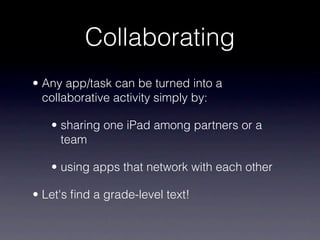
Collaborating
• Any app/task can be turned into a
  collaborative activity simply by:

   • sharing one iPad among partners or a
     team

   • using apps that network with each other

• Let's find a grade-level text!
FaceTime


          Alternatives:
Google Hangout (Google App), Skype
iMessage
Dropbox

                       File Sharing

                       Video Library


             Alternatives:
Evernote - especially for shared research
Whiteboard Lite


                   Alternatives:
Doodle Buddy, Scribble Press (neither do networking)
Lino
VoiceThread
Making Videos


iMovie   8mm HD   CollabraCam
Writing Responses


Pages   Scribble Press   ComicBook!
e-Dioramas


Puppet Pals HD   ToonTastic
More Apps


• Now let's look at more apps!

• Categorized by subject
Books


iBooks    Kindle   Free Books
Books


MeeGenius    Comics   JibJab Jr.
Reference


Google   Google Earth


Qwiki      Nations
Science


Science 360     NASA    Era of Dino
Science


Project Noah   HowStuffWorks   SkySafari
Math


Math Board   CalcBot   McGraw-Hill
                       Math Apps
Demonstration


Educreations   BoardCam
Miscellaneous


GeoPop        Doodle Buddy


Toy Story   Rainbow Sentences
Miscellaneous


TeachMe   Big Words   PBSKids
Last But Not Least


     Find My iPhone
Review

• Turn anything into a collaborative activity by:

   • sharing one iPad among partners or a
     team

   • using apps that network with each other

iPad Apps: Collaboration & Comprehension

Editor's Notes

  • #2 \n\n
  • #3 Introduce TodaysMeet\n\nTake a picture of this. \n
  • #4 \n\n
  • #5 \n\n
  • #6 Engagement: \nKids are just naturally fascinated with the iPad. It's a digital tool. We're teaching digital natives. \n\nDurability:\nNo moving parts. Hard to break. Long battery life. Easy to charge.\n\nEase of Use:\nJust install an app. Apps take care of file management - there's no need to learn how to "save" to a specific part of the computer. Very forgiving for mistakes - and parental controls can be customized so you can't delete apps or change system settings. \n\nPrice:\nIt's half the price of a Mac laptop. Means you can get twice as many iPads as you can get laptops.\n
  • #7 Management:\nApp management can be complicated if you're managing many iPads - installing apps on each is not easy! Or changing settings, things like that. Enterprise tools haven't matured yet. \n\nTyping:\nTyping is harder on iPads (and it's different than keyboards). Easier to make mistakes, and students need to learn to use the autocorrect system.\n\nCaptioning:\nYouTube, Hulu, etc. have captioning on PCs but not on iPads. Still catching up.\n\nSharing:\nIt's a bit tougher to get things "off" the iPad - can via e-mail, iCloud, Dropbox. But some apps don't work with certain solutions (e.g. Pages and Dropbox)\n
  • #8 See how the beginning grade level standards evolve to become the CCR anchor standard. \n\nWe want students to engage in:\n-collaborative conversations\n-with diverse partners\n-about grade-level topics and texts\n\n\n\n
  • #9 Common core app!\n
  • #10 Non-fiction text\n
  • #11 Take photographs of \n\nCOVER\nFirst two or three pages\n
  • #12 for 1:1\niCloud can be useful here if you're using a lot of iPads - sync contacts\n\nyou need to set up rules - ask before facetiming so you don't interrupt other people who are trying to facetime or do other work on their ipads\n\nfor 1:many, try Google Hangouts. Accessible via the Google app\n\nSkype is a good solution if you want to call other people who don't have iOS devices\n
  • #13 iMessage - can be 1:1 or 1:many \n\nYou can send videos, text, pictures. \n
  • #14 Dropbox useful for two things:\n\nFile sharing - you can upload photos, screenshots, videos to Dropbox\n\nVideo library - host a library of ASL videos\n
  • #15 Whiteboard\n\nYou can do networked, real-time whiteboard drawing with somebody else (as many as you want, actually)\n
  • #16 Using the groups feature in Lino, you can have many people post to the same bulletin board - they can post photos, make color-coded stickies for types of reactions, things like that...\n
  • #17 VoiceThread - great for voice-overs, ASL-overs, or responses to text/books\n
  • #18 Many ways to make videos. \n\nI believe video is an important literacy tool - look how many young people now create and share videos on their mobile phones, YouTube, etc. \n\nSome argue that knowing how to shoot, edit, publish a video is equally as important as writing a paper\n\niMovie is a must-use. \n\n8mm HD is a fun tool \n\nCollabraCam - havne't tried it but if you've got lots of iOS devices try it!\n
  • #19 Pages is the best word processor for iPad so far. \n\nScribble Press is amazing! Drawing, making books, sharing on a gallery, even publishing it!!\n\nComicBook! - my MA thesis was focused on comic books. I think they are wonderful literacy tools for children and especially for D/HH children--the pictures supplement the text. Enable students to make their own comic books!\n
  • #20 "Puppet shows" - unfortunately they only use voiceovers but students could use "silent shows" and narrate them live in ASL\n
  • #21 \n\n
  • #22 both iBooks and Kindle offer access to lots of free ebooks, and there's another eBook app just for free books. Check them out, they're all free anyway. \n
  • #23 MeeGenius is what I use with my students - it has read aloud features. Also can sync them across several iPads so you only buy a book once\n\nComics\n\nJibJab - you put yourself in the book!\n
  • #24 Google - great for searching images too!\nGoogle Earth - very captivating\n\nQwiki - a quick, narrated story about a topic. Good starting point for a research project (but the info is from Wikipedia)\n\nNations - like an atlas of all the countries on Earth\n
  • #25 Science 360 - app with lots of science videos and articles. the videos are not captioned.\n\nNASA - fun app\n\nEra of Dino - quick search through dinosaurs\n
  • #26 Project Noah - take pictures of organisms and people will tell you what it is!\n\nHow Stuff Works - articles and videos, like Science 360\n\nSkySafari - astronomy app\n
  • #27 MathBoard - quiz app. Can use with a projector and show class how to solve problems. \n\nCalcbot - one of many many calculator apps\n\nMcGraw-Hill makes lots of math game apps\n
  • #28 Educreations - you can create your own video lessons. Caveat - voice-over only. They will see if they can add video support in a later version. You could make quick math lessons and the kids can watch them at home or on their own later to review. Like Khan Academy (which is totally captioned!)\n\nBoardCam - like a document camera or ELMO but you can draw on it, make labels and even make short recorded videos\n
  • #29 \n\n
  • #30 TeachMe - all-inclusive app by grade level, tests sight words, spelling, math, etc, self-directed\n\nBig Words\n\nPBS Kids - great videos, educational. Not CC. \n
  • #31 Find My iPhone - turn this on for ALL iOS devices (it's also part of iCloud).\n
  • #32 \n\n