Web 2.0
Interactive Web


  Collaboration
 Communication
   Imagination
Presenters:
Sarah Wentworth; K-12 Library Media Specialist
 Kathleen Bishop; K-12 Technology Coordinator

      Greenville Consolidated School

              Fans of Web 2.0
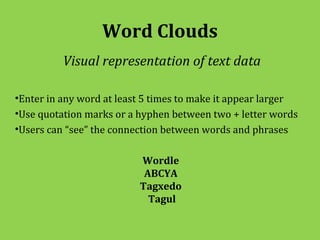
Word Clouds
          Visual representation of text data

•Enter in any word at least 5 times to make it appear larger
•Use quotation marks or a hyphen between two + letter words
•Users can “see” the connection between words and phrases

                          Wordle
                           ABCYA
                          Tagxedo
                            Tagul
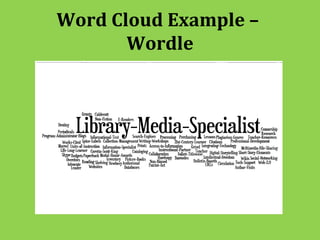
Word Cloud Example –
       Wordle
Graphic Organizer
 Visual representations of knowledge, concepts, or ideas

•Allows users to break down concepts
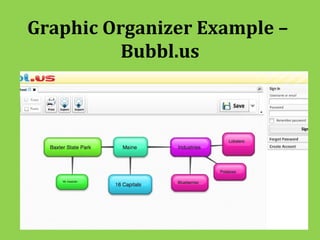
•Create a “main idea” bubble and then hook on connecting ideas
•Access bookmarks/favorites from any computer
•Design interactive slideshows

                          Bubbl.us
                         Spicy Nodes
                            Diigo
                           Popplet
                            Prezi
Graphic Organizer Example –
          Bubbl.us
Digital Storytelling
 Creative form using online tools to bring stories to life

•Computer-based images or PDF of scanned self-
illustrations
•Compatible with most word-processing
•Uses recorded narration
•Generally stories are 2-10 minutes long

                        Storybird
                       Storyjumper
A/V & Visual
    Create and share multimedia posters online


•Text, photos, videos, graphics, sounds, drawings, data files
•Great for presentations, book reports, and research projects

                           Gloster
                          Audioboo
Blog
 Online journal that may contain links to outside sites
•Personal use – thoughts, feelings, daily encounters
•Classroom use – ongoing and upcoming projects
•“Follow” other users with same/interesting lifestyles
•40 characters in length to unlimited space to write

                        Tumblr
                       WordPress
                        Twitter
Website/Webpage
   Design entire website with interactive tabs and
links and/or single webpage to showcase materials

•User-friendly
•Easy to navigate
•Step-by-step tutorials/instructions
•Personal use and/or educational purpose

                     Weebly
                    Wiki Spaces
                       Webs
Comic Strips
       Creative expressions to tell a story

•Great for writing dialog between characters
•Various settings and scenes to select from
•Interactive feedback from teachers to students

                     Pixton
                     Bitstips
                  ToonDooSpaces
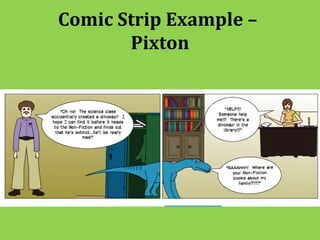
Comic Strip Example –
       Pixton
Homework Tools & Resources
   From citation generators to digital dropboxes
•Create MLA and APA citation for bibliographies
•Web-based word processing in “real-time”
•Apps that organize assignments and due-dates
•Apps that allow for collaboration between student and teachers
•Access materials from anywhere using digital dropbox

                           Easybib
                         Primary Pad
                         MyHomework
                          Teachers.io
                           Evernote
                           Dropbox
Quiz & Term Paper Resources
 Study guides and tools for students and teachers
•Content subject/core areas
•AP curriculum/classes
•User-generated materials
•Flashcards, vocabulary, multiple choice, essays
•Plagiarism detection device
                          Quizlet
                           Quia
                          QuizStar
                          Turnitin
Videoconferencing
   Face-to-face video/audio chat in “real time”
•Free subscription – no calling plan needed
•Single and multiple video calls
•Long-distance learning
•Collaboration

                        Skype
                      FaceTime
                   Google Video Chat
                     OoVoo Chat
Interactive Screenshots
Capture anything you see on your computer screen

•Capture an image to share
•Create a video with voice narration
•Upload to Screencast.com, Flicker, and YouTube
•Great tool for providing step-by-step instructions

                          Jing
Wrap Up
 Web 2.0 tools and resources are at our fingertips

•Mac and PC compatible programs
•Easy to navigate through
•Upload to social networking sites
•Builds communication and collaboration
•Limitless imagination of creativity
•K-12 user friendly
•Provides long-distance learning possibilities
The End
• Questions

• Exploration

Web20 pptswkb

  • 1.
    Web 2.0 Interactive Web Collaboration Communication Imagination
  • 2.
    Presenters: Sarah Wentworth; K-12Library Media Specialist Kathleen Bishop; K-12 Technology Coordinator Greenville Consolidated School Fans of Web 2.0
  • 3.
    Word Clouds Visual representation of text data •Enter in any word at least 5 times to make it appear larger •Use quotation marks or a hyphen between two + letter words •Users can “see” the connection between words and phrases Wordle ABCYA Tagxedo Tagul
  • 4.
  • 5.
    Graphic Organizer Visualrepresentations of knowledge, concepts, or ideas •Allows users to break down concepts •Create a “main idea” bubble and then hook on connecting ideas •Access bookmarks/favorites from any computer •Design interactive slideshows Bubbl.us Spicy Nodes Diigo Popplet Prezi
  • 6.
  • 7.
    Digital Storytelling Creativeform using online tools to bring stories to life •Computer-based images or PDF of scanned self- illustrations •Compatible with most word-processing •Uses recorded narration •Generally stories are 2-10 minutes long Storybird Storyjumper
  • 8.
    A/V & Visual Create and share multimedia posters online •Text, photos, videos, graphics, sounds, drawings, data files •Great for presentations, book reports, and research projects Gloster Audioboo
  • 9.
    Blog Online journalthat may contain links to outside sites •Personal use – thoughts, feelings, daily encounters •Classroom use – ongoing and upcoming projects •“Follow” other users with same/interesting lifestyles •40 characters in length to unlimited space to write Tumblr WordPress Twitter
  • 10.
    Website/Webpage Design entire website with interactive tabs and links and/or single webpage to showcase materials •User-friendly •Easy to navigate •Step-by-step tutorials/instructions •Personal use and/or educational purpose Weebly Wiki Spaces Webs
  • 11.
    Comic Strips Creative expressions to tell a story •Great for writing dialog between characters •Various settings and scenes to select from •Interactive feedback from teachers to students Pixton Bitstips ToonDooSpaces
  • 12.
  • 13.
    Homework Tools &Resources From citation generators to digital dropboxes •Create MLA and APA citation for bibliographies •Web-based word processing in “real-time” •Apps that organize assignments and due-dates •Apps that allow for collaboration between student and teachers •Access materials from anywhere using digital dropbox Easybib Primary Pad MyHomework Teachers.io Evernote Dropbox
  • 14.
    Quiz & TermPaper Resources Study guides and tools for students and teachers •Content subject/core areas •AP curriculum/classes •User-generated materials •Flashcards, vocabulary, multiple choice, essays •Plagiarism detection device Quizlet Quia QuizStar Turnitin
  • 15.
    Videoconferencing Face-to-face video/audio chat in “real time” •Free subscription – no calling plan needed •Single and multiple video calls •Long-distance learning •Collaboration Skype FaceTime Google Video Chat OoVoo Chat
  • 16.
    Interactive Screenshots Capture anythingyou see on your computer screen •Capture an image to share •Create a video with voice narration •Upload to Screencast.com, Flicker, and YouTube •Great tool for providing step-by-step instructions Jing
  • 17.
    Wrap Up Web2.0 tools and resources are at our fingertips •Mac and PC compatible programs •Easy to navigate through •Upload to social networking sites •Builds communication and collaboration •Limitless imagination of creativity •K-12 user friendly •Provides long-distance learning possibilities
  • 18.