The iPad Field Trip
                    Collaboration with
Dana Len
                        iBooks Author
Douglas Kiang
The Problem
Claremont Colleges Digital Library
Our Solution
A Journey in Three Parts


Part I: The Project
Part II: The Tools
Part III: The Takeaways
                      Sample the book:
                      tinyurl.com/kiangETT
                                  http://www.flickr.com/photos/semeraro/
Part I: The Project

          Reading

          Research

       Assessment
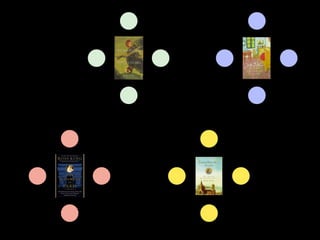
Book Group Reports
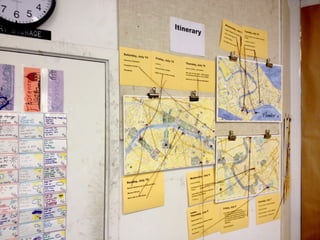
Rome     Florence


Venice   Paris
Corkulous
    (free)
Idea Sketch
free
Museum-Specific Apps
Part I: The Project

          Reading

          Research

       Assessment
Research

• Capture and publish the collective
  knowledge of the class
• Allow creativity in how this is expressed
• Speedy and easy recording of thoughts
Part I: The Project

          Reading

          Research

       Assessment
Assessment

• Benchmarks for good collaboration
• Self-reporting
• Individual conferences
The iBook’s approach turned out to be a
fantastic way for me to learn, because it
was structured individual research that
still catered to the group.


             Every day I was able to read what we
             were going to do the next day, so I
             could be more prepared.


 This course fit every learning style, and
 since I am a bit of everything, I loved it.
The majority of the learning was done
by ourselves. We taught each other
everything we needed to know for the
trip. It’s definitely not what I’m used to
—learning by myself and becoming
sort of a teacher—but it was easy to
adjust to. It was effective and
definitely hands-on.
A Journey in Three Parts


Part I: The Project
Part II: The Tools
Part III: The Takeaways

                          http://www.flickr.com/photos/semeraro/
Which is More Important?
    Portability                        Layout


Reader controls text size    Author controls text size

Text reflows around images   Text stays where you put it
Best reading experience      Smaller screens may have
on all devices               to scroll to see everything
Readable on multiple devices   iPad and iPhone only

Supports text, audio, video    Supports rich media and
                               interactivity


        Book Creator                 iBooks Author
iBooks Author
Start with a template.


Add text, photos, and video.


Add interactive widgets.


Live preview on iPad.
Start with a template.
Add text, photos, and video.
Gallery        Media


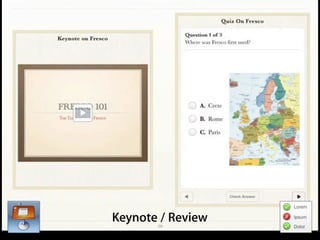
                                Review         Keynote

Add interactive widgets.

                           Interactive Image     3D


                                HTML
Interactive Image
Gallery
Media
Keynote / Review
Proofs sent directly to
each iPad


Each group views
the “dailies”


Cross-pollination of ideas
Editable source file    Non-editable
Open in iBooks Author   Can be e-mailed or put into
and Export to iPad      DropBox to open on iPad
myBook.iba   myBook.zip
How to transfer large files
               AirDrop   DropBox     Flash Drive Hard Drive
Recommended
Maximum File   100 MB    500 MB         1 GB             5 GB
    Size


  Speed         Slow*     Slow*          Fast          Very fast

Simultaneous
  Transfer      Yes*       Yes*           No              No


   Cost         Free       Free      $10 - $50       $50 - $150

                              *Depends on network speed and bandwidth
Multiple chapters can be dragged into one document.
Suggestions

•   Scaffold research
•   Start with a common template
•   Frequent sharing between groups
•   Keep images and videos small
Traveling
with iPads
The iPad Field Trip

One device to:

    Review
    information

    Phone home

    Find their way

    Document their
    experience
Review information
Phone Home
Find Their Way
Document Their Experience
A Journey in Three Parts


Part I: The Project
Part II: The Tools
Part III: The Takeaways

                          http://www.flickr.com/photos/semeraro/
Takeaways
Book Creator
$4.99
Book Creator Demo
Takeaways

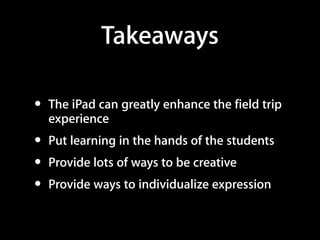
•   The iPad can greatly enhance the field trip
    experience
•   Put learning in the hands of the students
•   Provide lots of ways to be creative
•   Provide ways to individualize expression
Takeaways

•   Use iBooks Author to pull together rich media
    from the research and easily share with
    students
•   Use the iPad to review on the field trip and
    document what they are experiencing at the
    same time.
Thank you!
  Grazie!
  Merci!
  Gratias

The iPad Field Trip: Collaboration with iBooks Author

  • 1.
    The iPad FieldTrip Collaboration with Dana Len iBooks Author Douglas Kiang
  • 2.
  • 3.
  • 4.
  • 7.
    A Journey inThree Parts Part I: The Project Part II: The Tools Part III: The Takeaways Sample the book: tinyurl.com/kiangETT http://www.flickr.com/photos/semeraro/
  • 8.
    Part I: TheProject Reading Research Assessment
  • 11.
  • 13.
    Rome Florence Venice Paris
  • 14.
    Corkulous (free)
  • 15.
  • 16.
  • 17.
    Part I: TheProject Reading Research Assessment
  • 18.
    Research • Capture andpublish the collective knowledge of the class • Allow creativity in how this is expressed • Speedy and easy recording of thoughts
  • 31.
    Part I: TheProject Reading Research Assessment
  • 32.
    Assessment • Benchmarks forgood collaboration • Self-reporting • Individual conferences
  • 35.
    The iBook’s approachturned out to be a fantastic way for me to learn, because it was structured individual research that still catered to the group. Every day I was able to read what we were going to do the next day, so I could be more prepared. This course fit every learning style, and since I am a bit of everything, I loved it.
  • 36.
    The majority ofthe learning was done by ourselves. We taught each other everything we needed to know for the trip. It’s definitely not what I’m used to —learning by myself and becoming sort of a teacher—but it was easy to adjust to. It was effective and definitely hands-on.
  • 37.
    A Journey inThree Parts Part I: The Project Part II: The Tools Part III: The Takeaways http://www.flickr.com/photos/semeraro/
  • 38.
    Which is MoreImportant? Portability Layout Reader controls text size Author controls text size Text reflows around images Text stays where you put it Best reading experience Smaller screens may have on all devices to scroll to see everything
  • 39.
    Readable on multipledevices iPad and iPhone only Supports text, audio, video Supports rich media and interactivity Book Creator iBooks Author
  • 40.
  • 41.
    Start with atemplate. Add text, photos, and video. Add interactive widgets. Live preview on iPad.
  • 42.
    Start with atemplate.
  • 43.
  • 45.
    Gallery Media Review Keynote Add interactive widgets. Interactive Image 3D HTML
  • 46.
  • 47.
  • 48.
  • 49.
  • 50.
    Proofs sent directlyto each iPad Each group views the “dailies” Cross-pollination of ideas
  • 51.
    Editable source file Non-editable Open in iBooks Author Can be e-mailed or put into and Export to iPad DropBox to open on iPad
  • 52.
    myBook.iba myBook.zip
  • 53.
    How to transferlarge files AirDrop DropBox Flash Drive Hard Drive Recommended Maximum File 100 MB 500 MB 1 GB 5 GB Size Speed Slow* Slow* Fast Very fast Simultaneous Transfer Yes* Yes* No No Cost Free Free $10 - $50 $50 - $150 *Depends on network speed and bandwidth
  • 54.
    Multiple chapters canbe dragged into one document.
  • 55.
    Suggestions • Scaffold research • Start with a common template • Frequent sharing between groups • Keep images and videos small
  • 57.
  • 58.
    The iPad FieldTrip One device to: Review information Phone home Find their way Document their experience
  • 59.
  • 60.
  • 61.
  • 62.
  • 63.
    A Journey inThree Parts Part I: The Project Part II: The Tools Part III: The Takeaways http://www.flickr.com/photos/semeraro/
  • 64.
  • 68.
  • 69.
  • 70.
    Takeaways • The iPad can greatly enhance the field trip experience • Put learning in the hands of the students • Provide lots of ways to be creative • Provide ways to individualize expression
  • 71.
    Takeaways • Use iBooks Author to pull together rich media from the research and easily share with students • Use the iPad to review on the field trip and document what they are experiencing at the same time.
  • 72.
    Thank you! Grazie! Merci! Gratias