iPad Academy for Beginners 
Part Communication 
& Collaboration 
Martin Cisneros 
2 
Academic Technology Specialist 
mcisneros@sccoe.org 
Apps
iPad Academy for Beginners 
Martin Cisneros 
Academic Technology Specialist 
mcisneros@sccoe.org 
Part Communication 
& Collaboration 
2 
Apps 
Get Preso @ bit.ly/iPad4Beg2 
bit.ly/iPad4Beg2G
Day 1 Day 2 Day 3 
Communication & Collaboration Curation & Creation Tools 
Tools 
Getting to Know Your iPad & 
Productivity Tools 
IPAD ACADEMY AGENDA 
Join us as we hosts iPad Academy for the Beginner! Integrating iPads into your curriculum is easier than ever - it's just about 
knowing where to start and how to find the good stuff! In our sessions, we will start with the basics, then move on to how it 
can improve your productivity and effectively improve student learning. Each session will focus on one particular area. You'll 
be shown how to use the apps in practical ways at a pace that is right for you! You can feel comfortable knowing that when 
you walk away from this academy, you will be armed with a toolbox of resources and skills to help foster creativity and 
increase student learning. Look forward to an Advanced iPad Academy in Spring 2015!
GET THE PRESO @ bit.ly/iPadAB 
bit.ly/iPadAB 
or 
bit.ly/iPadABG
iPad Academy for Beginners Pt 2: Communication & Collaboration Apps
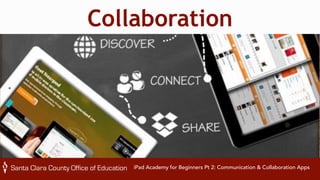
Collaboration 
iPad Academy for Beginners Pt 2: Communication & Collaboration Apps
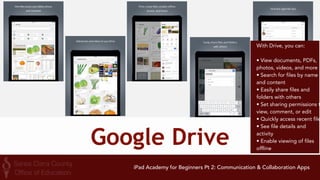
Google Drive 
With Drive, you can: 
• View documents, PDFs, 
photos, videos, and more 
• Search for files by name 
and content 
• Easily share files and 
folders with others 
• Set sharing permissions to 
view, comment, or edit 
• Quickly access recent files 
• See file details and 
activity 
• Enable viewing of files 
offline 
iPad Academy for Beginners Pt 2: Communication & Collaboration Apps
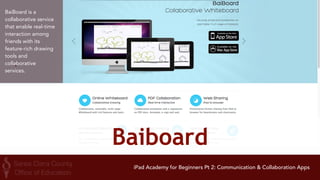
Baiboard 
BaiBoard is a 
collaborative service 
that enable real-time 
interaction among 
friends with its 
feature-rich drawing 
tools and 
collaborative 
services. 
iPad Academy for Beginners Pt 2: Communication & Collaboration Apps
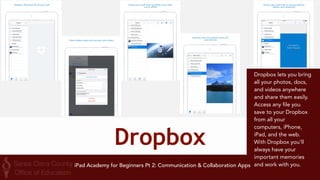
Dropbox 
Dropbox lets you bring 
all your photos, docs, 
and videos anywhere 
and share them easily. 
Access any file you 
save to your Dropbox 
from all your 
computers, iPhone, 
iPad, and the web. 
With Dropbox you’ll 
always have your 
important memories 
iPad Academy for Beginners Pt 2: Communication & Collaboration Apps and work with you.
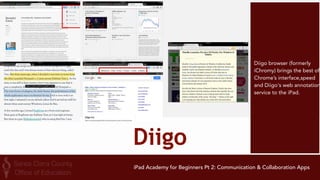
Diigo 
Diigo browser (formerly 
iChromy) brings the best of 
Chrome’s interface,speed 
and Diigo's web annotation 
service to the iPad. 
iPad Academy for Beginners Pt 2: Communication & Collaboration Apps
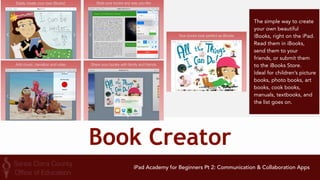
Book Creator 
The simple way to create 
your own beautiful 
iBooks, right on the iPad. 
Read them in iBooks, 
send them to your 
friends, or submit them 
to the iBooks Store. 
Ideal for children’s picture 
books, photo books, art 
books, cook books, 
manuals, textbooks, and 
the list goes on. 
iPad Academy for Beginners Pt 2: Communication & Collaboration Apps
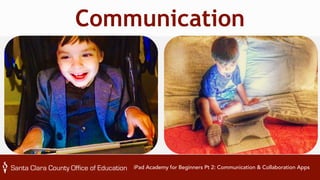
Communication 
iPad Academy for Beginners Pt 2: Communication & Collaboration Apps
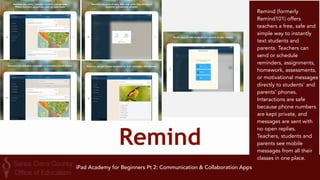
Remind 
Remind (formerly 
Remind101) offers 
teachers a free, safe and 
simple way to instantly 
text students and 
parents. Teachers can 
send or schedule 
reminders, assignments, 
homework, assessments, 
or motivational messages 
directly to students' and 
parents' phones. 
Interactions are safe 
because phone numbers 
are kept private, and 
messages are sent with 
no open replies. 
Teachers, students and 
parents see mobile 
messages from all their 
classes in one place. 
iPad Academy for Beginners Pt 2: Communication & Collaboration Apps
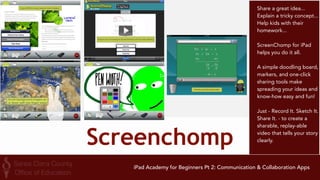
Screenchomp 
Share a great idea... 
Explain a tricky concept... 
Help kids with their 
homework... 
ScreenChomp for iPad 
helps you do it all. 
A simple doodling board, 
markers, and one-click 
sharing tools make 
spreading your ideas and 
know-how easy and fun! 
Just - Record It. Sketch It. 
Share It. - to create a 
sharable, replay-able 
video that tells your story 
clearly. 
iPad Academy for Beginners Pt 2: Communication & Collaboration Apps
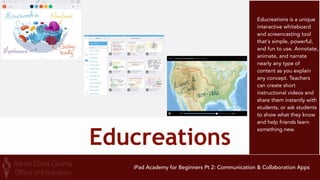
Educreations 
Educreations is a unique 
interactive whiteboard 
and screencasting tool 
that's simple, powerful, 
and fun to use. Annotate, 
animate, and narrate 
nearly any type of 
content as you explain 
any concept. Teachers 
can create short 
instructional videos and 
share them instantly with 
students, or ask students 
to show what they know 
and help friends learn 
something new. 
iPad Academy for Beginners Pt 2: Communication & Collaboration Apps
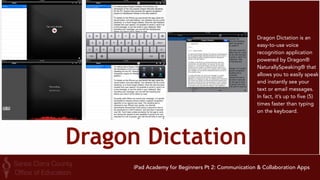
Dragon Dictation 
Dragon Dictation is an 
easy-to-use voice 
recognition application 
powered by Dragon® 
NaturallySpeaking® that 
allows you to easily speak 
and instantly see your 
text or email messages. 
In fact, it’s up to five (5) 
times faster than typing 
on the keyboard. 
iPad Academy for Beginners Pt 2: Communication & Collaboration Apps
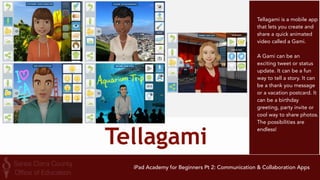
Tellagami 
Tellagami is a mobile app 
that lets you create and 
share a quick animated 
video called a Gami. 
A Gami can be an 
exciting tweet or status 
update. It can be a fun 
way to tell a story. It can 
be a thank you message 
or a vacation postcard. It 
can be a birthday 
greeting, party invite or 
cool way to share photos. 
The possibilities are 
endless! 
iPad Academy for Beginners Pt 2: Communication & Collaboration Apps
QUESTION TIME
Tune In Next 
Time! 
Pt 3 
Curation & 
Creation Tools 
iPad Academy for Beginners Pt 2: Communication & Collaboration Apps
20 
MART I N 
RICARDO 
CISNEROS 
ACADEMIC 
T ECHNOLOGY 
SPECIAL I ST 
E: 
mcisneros@sccoe.org 
Web: 
sccoe.org/edtech 
G+: 
google.@TheTechProfe com/+MarHnCisneros 
@sccoetech 
iPad 
Academy 
for 
Beginners

iPad Academy for Beginners Part 2

  • 1.
    iPad Academy forBeginners Part Communication & Collaboration Martin Cisneros 2 Academic Technology Specialist mcisneros@sccoe.org Apps
  • 2.
    iPad Academy forBeginners Martin Cisneros Academic Technology Specialist mcisneros@sccoe.org Part Communication & Collaboration 2 Apps Get Preso @ bit.ly/iPad4Beg2 bit.ly/iPad4Beg2G
  • 3.
    Day 1 Day2 Day 3 Communication & Collaboration Curation & Creation Tools Tools Getting to Know Your iPad & Productivity Tools IPAD ACADEMY AGENDA Join us as we hosts iPad Academy for the Beginner! Integrating iPads into your curriculum is easier than ever - it's just about knowing where to start and how to find the good stuff! In our sessions, we will start with the basics, then move on to how it can improve your productivity and effectively improve student learning. Each session will focus on one particular area. You'll be shown how to use the apps in practical ways at a pace that is right for you! You can feel comfortable knowing that when you walk away from this academy, you will be armed with a toolbox of resources and skills to help foster creativity and increase student learning. Look forward to an Advanced iPad Academy in Spring 2015!
  • 4.
    GET THE PRESO@ bit.ly/iPadAB bit.ly/iPadAB or bit.ly/iPadABG
  • 5.
    iPad Academy forBeginners Pt 2: Communication & Collaboration Apps
  • 6.
    Collaboration iPad Academyfor Beginners Pt 2: Communication & Collaboration Apps
  • 7.
    Google Drive WithDrive, you can: • View documents, PDFs, photos, videos, and more • Search for files by name and content • Easily share files and folders with others • Set sharing permissions to view, comment, or edit • Quickly access recent files • See file details and activity • Enable viewing of files offline iPad Academy for Beginners Pt 2: Communication & Collaboration Apps
  • 8.
    Baiboard BaiBoard isa collaborative service that enable real-time interaction among friends with its feature-rich drawing tools and collaborative services. iPad Academy for Beginners Pt 2: Communication & Collaboration Apps
  • 9.
    Dropbox Dropbox letsyou bring all your photos, docs, and videos anywhere and share them easily. Access any file you save to your Dropbox from all your computers, iPhone, iPad, and the web. With Dropbox you’ll always have your important memories iPad Academy for Beginners Pt 2: Communication & Collaboration Apps and work with you.
  • 10.
    Diigo Diigo browser(formerly iChromy) brings the best of Chrome’s interface,speed and Diigo's web annotation service to the iPad. iPad Academy for Beginners Pt 2: Communication & Collaboration Apps
  • 11.
    Book Creator Thesimple way to create your own beautiful iBooks, right on the iPad. Read them in iBooks, send them to your friends, or submit them to the iBooks Store. Ideal for children’s picture books, photo books, art books, cook books, manuals, textbooks, and the list goes on. iPad Academy for Beginners Pt 2: Communication & Collaboration Apps
  • 12.
    Communication iPad Academyfor Beginners Pt 2: Communication & Collaboration Apps
  • 13.
    Remind Remind (formerly Remind101) offers teachers a free, safe and simple way to instantly text students and parents. Teachers can send or schedule reminders, assignments, homework, assessments, or motivational messages directly to students' and parents' phones. Interactions are safe because phone numbers are kept private, and messages are sent with no open replies. Teachers, students and parents see mobile messages from all their classes in one place. iPad Academy for Beginners Pt 2: Communication & Collaboration Apps
  • 14.
    Screenchomp Share agreat idea... Explain a tricky concept... Help kids with their homework... ScreenChomp for iPad helps you do it all. A simple doodling board, markers, and one-click sharing tools make spreading your ideas and know-how easy and fun! Just - Record It. Sketch It. Share It. - to create a sharable, replay-able video that tells your story clearly. iPad Academy for Beginners Pt 2: Communication & Collaboration Apps
  • 15.
    Educreations Educreations isa unique interactive whiteboard and screencasting tool that's simple, powerful, and fun to use. Annotate, animate, and narrate nearly any type of content as you explain any concept. Teachers can create short instructional videos and share them instantly with students, or ask students to show what they know and help friends learn something new. iPad Academy for Beginners Pt 2: Communication & Collaboration Apps
  • 16.
    Dragon Dictation DragonDictation is an easy-to-use voice recognition application powered by Dragon® NaturallySpeaking® that allows you to easily speak and instantly see your text or email messages. In fact, it’s up to five (5) times faster than typing on the keyboard. iPad Academy for Beginners Pt 2: Communication & Collaboration Apps
  • 17.
    Tellagami Tellagami isa mobile app that lets you create and share a quick animated video called a Gami. A Gami can be an exciting tweet or status update. It can be a fun way to tell a story. It can be a thank you message or a vacation postcard. It can be a birthday greeting, party invite or cool way to share photos. The possibilities are endless! iPad Academy for Beginners Pt 2: Communication & Collaboration Apps
  • 18.
  • 19.
    Tune In Next Time! Pt 3 Curation & Creation Tools iPad Academy for Beginners Pt 2: Communication & Collaboration Apps
  • 20.
    20 MART IN RICARDO CISNEROS ACADEMIC T ECHNOLOGY SPECIAL I ST E: mcisneros@sccoe.org Web: sccoe.org/edtech G+: google.@TheTechProfe com/+MarHnCisneros @sccoetech iPad Academy for Beginners