Ed What Oh?
2012 MCCE Tech Summit
Puzzle of Social Media

 Please match your puzzle pieces with your peers

 Once in your group discuss the implications of your
  statistic
Old School
           Communication
 Now please share with your group member the
  following:
   Name
   Where you work & what you do
   What social media tools do you currently use
How do I fit?

 Shelly Stanton

 Business Education at BWHS

 Member of amazing PD (TILT, FEFE)

 Twitter, FB, Edmodo, Pinterest
Organic Group

 Collection of content or people

 Led by users

 Control shifts among moderator and users

 Content changes based on member needs


                    -Drupal, 2011
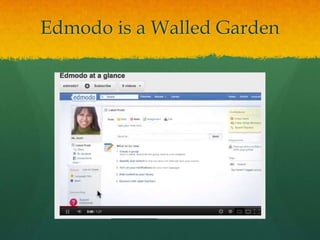
Edmodo is a Walled Garden
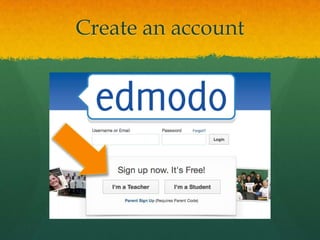
Create an account
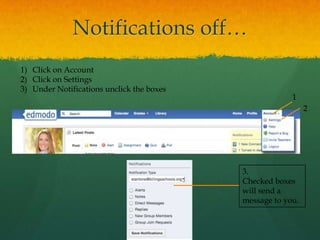
Notifications off…
1) Click on Account
2) Click on Settings
3) Under Notifications unclick the boxes
                                                        1
                                                             2


                                           3.
                                           Checked boxes
                                           will send a
                                           message to you.
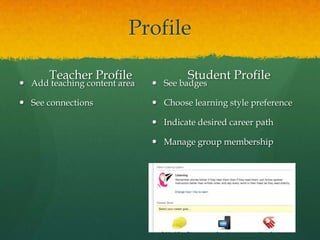
Profile

       Teacher Profile                Student Profile
 Add teaching content area    See badges

 See connections              Choose learning style preference

                               Indicate desired career path

                               Manage group membership
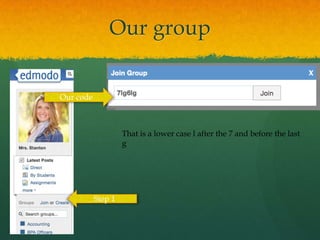
Our group


Our code


                    That is a lower case l after the 7 and before the last
                    g


           Step 1
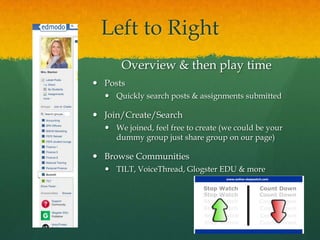
Left to Right
      Overview & then play time
 Posts
   Quickly search posts & assignments submitted

 Join/Create/Search
   We joined, feel free to create (we could be your
    dummy group just share group on our page)

 Browse Communities
   TILT, VoiceThread, Glogster EDU & more
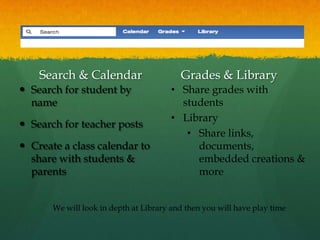
Search & Calendar                     Grades & Library
 Search for student by                • Share grades with
  name                                   students
                                       • Library
 Search for teacher posts
                                          • Share links,
 Create a class calendar to                documents,
  share with students &                     embedded creations &
  parents                                   more


       We will look in depth at Library and then you will have play time
Search, Calendar, Grades,
         Library
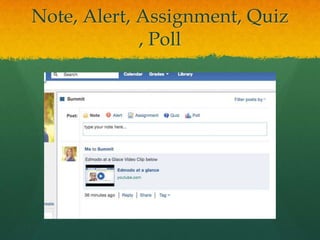
Note, Alert, Assignment, Quiz
             , Poll
Note, Alert, Assignment,
       Quiz, Poll
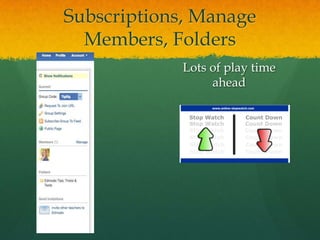
Subscriptions, Manage
  Members, Folders
            Lots of play time
                 ahead
Questions, Ideas &
   Reflection
      Thank you!

Summit edmodo

  • 1.
    Ed What Oh? 2012MCCE Tech Summit
  • 2.
    Puzzle of SocialMedia  Please match your puzzle pieces with your peers  Once in your group discuss the implications of your statistic
  • 3.
    Old School Communication  Now please share with your group member the following:  Name  Where you work & what you do  What social media tools do you currently use
  • 4.
    How do Ifit?  Shelly Stanton  Business Education at BWHS  Member of amazing PD (TILT, FEFE)  Twitter, FB, Edmodo, Pinterest
  • 5.
    Organic Group  Collectionof content or people  Led by users  Control shifts among moderator and users  Content changes based on member needs -Drupal, 2011
  • 6.
    Edmodo is aWalled Garden
  • 7.
  • 8.
    Notifications off… 1) Clickon Account 2) Click on Settings 3) Under Notifications unclick the boxes 1 2 3. Checked boxes will send a message to you.
  • 9.
    Profile Teacher Profile Student Profile  Add teaching content area  See badges  See connections  Choose learning style preference  Indicate desired career path  Manage group membership
  • 10.
    Our group Our code That is a lower case l after the 7 and before the last g Step 1
  • 11.
    Left to Right Overview & then play time  Posts  Quickly search posts & assignments submitted  Join/Create/Search  We joined, feel free to create (we could be your dummy group just share group on our page)  Browse Communities  TILT, VoiceThread, Glogster EDU & more
  • 12.
    Search & Calendar Grades & Library  Search for student by • Share grades with name students • Library  Search for teacher posts • Share links,  Create a class calendar to documents, share with students & embedded creations & parents more We will look in depth at Library and then you will have play time
  • 13.
  • 14.
  • 15.
  • 16.
    Subscriptions, Manage Members, Folders Lots of play time ahead
  • 17.
    Questions, Ideas & Reflection Thank you!