Teaching with
the iPad
Chuck Konkol
The hardest thing about learning something new is
that first step. You have had the iPad for awhile now
and deep down you know you could be using it as a
tool in the classroom but you didn’t know where to
start. Hopefully, this session will inspire to take that
first step into using your iPad in the classroom.
As a college professor of mine used to say, “Diligence
breeds success”!
About Me
Theology degree from Central Bible
College
Master degree in Computer Science/
Communication
Developer, Author, Trainer, Teacher
Husband, Father, Papa
Theological Geek
Me and the iPad
September 2010
Evolution of the iPad
Teachers and iPads
Students and iPads
Training for teachers to use iPads in
classroom
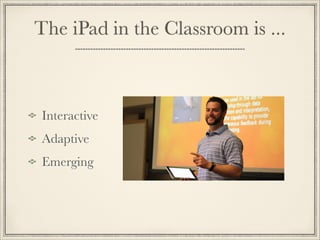
The iPad in the Classroom is ...
Interactive
Adaptive
Emerging
...Interactive
Digital Whiteboard - faculty can walk around the room and
allow students to interact with a whiteboard activity by
taking pictures of student work or importing student work
as students submit via Dropbox.
Photo / Video / Audio - faculty can record video and
annotate pictures while on a field trip. In addition, faculty
can embed audio into students papers for a more personal
feedback.
Animation - New interactive textbooks allow the text to
come alive using video, 3d animation, audio, and dynamic
textbook updates through the apple bookstore.
...Adaptive
Accessibility - iPads fits teacher and student lifestyles.
Learners have access to the world 24/7.
Creativity - Tens of thousands educational apps that
expand learn in and out of classroom
Learning Styles - cognitive, kinesthetic, and affective
through the rich array of media available
Learning disabilities - The iPad is being used more than
any other device in the area of special needs education.
http://www.apple.com/education/special-education/
...Adaptive
...Emerging


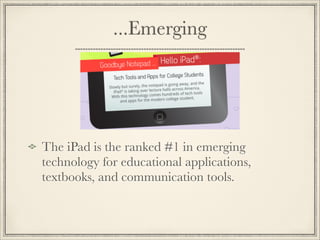
The iPad is the ranked #1 in emerging
technology for educational applications,
textbooks, and communication tools.
Textbooks
All major publishers have worked with Apple in
the K-12 market and are beginning the college
market.
Teachers currently have the ability to create their
own textbook for the iPad using Apple iAuthor.
Textbooks are dynamically updated as textbook is
modified on the Apple Store. No longer having
to wait until next book version for latest data.
Textbooks
Hundreds of High Schools, Colleges and
Universities (2-4 year) now require iPads for
teachers and students to use iPads.
According to the American Graduate Initiative
Community Colleges are to graduate 5,000,000
more graduates. iPads will help us get there!
RVC had an iPad Pilot Program for Fall 2013
semester.
The iPad Initiative
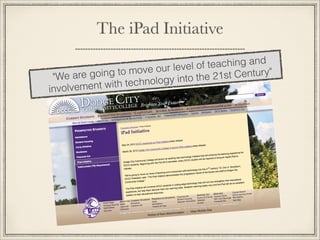
The iPad Initiative
"We are going to move our level of teaching and
involvement with technology into the 21st Century"
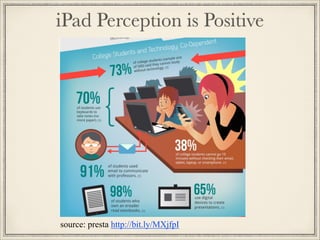
source: presta http://bit.ly/MXjfpI
iPad Perception is Positive
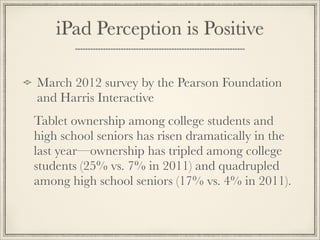
March 2012 survey by the Pearson Foundation
and Harris Interactive
Tablet ownership among college students and
high school seniors has risen dramatically in the
last year—ownership has tripled among college
students (25% vs. 7% in 2011) and quadrupled
among high school seniors (17% vs. 4% in 2011).
iPad Perception is Positive
The survey reveals that more students are reading
digital books, and that a majority of college
students (63%) and high school seniors (69%)
believe that tablets will effectively replace textbooks
within the next five years.
One of the biggest reasons tablets are so popular
on college campuses is the fact that they give
students convenient access to digital textbooks,
or e-books, whether they are pursuing classroom-
based or online education.
iPad Perception is Positive
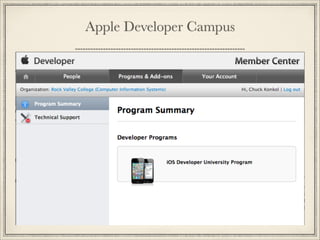
Apple Developer Campus
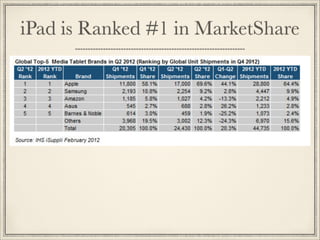
iPad is Ranked #1 in MarketShare
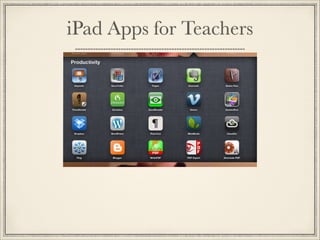
iPad Apps for Teachers
Categories
Classroom Productivity
Presentation
Collaboration
Polls and Assessments
Video Creation
Screencast Creation

Classroom Tools
Grading
• iAnnotate - markup papers with notes and audio
comments. Hundreds of dollars cheaper than
Adobe Pro.
• Teacher’s Assistant Pro - keep track of all your
students progress and easily connect to parents.
• Moxtra - annotate with audio/text/video

Classroom Tools
Edit and Create MS Office Documents
Microsoft
PowerPoint
Excel
• CloudOn
• Uses DropBox
• Can open from email attachment and reply with edits

Presentation
Keynote - Apple presentation app
Prezi - Cool, online presentation. Recently
added app for iPad to create/edit.
Explain Everything - import PPT, Key, PDF and
other file types. Add webpages, images, videos.
Record voice and screen actions. Allow export to
Camera Roll, YouTube, Dropbox, Google
Drive, WebDav, etc.
Collaboration
ShowMe Interactive WhiteBoard - Record drawings/
math/illustrations and share via YouTube.
Group Board - Real-time simple drawing/chat
collaboration tool.
Moxtra - New app on the block. Creator is ex CEO of
WebEx. The Binder idea came from daughter of developer.
Users have the ability to add files from PC/Mac computer,
Web sites, web page clips, blank pages, camera, photos, and
video. Moxtra works with all popular cloud drives. Live
collaboration also can occur via any web browser. 


Polls and Assessments
Polls
Impromptu, instant results. Great to see where students are
on any giving topic.
Assessments
Test prep, quick quizzes, instant results
• Socrative - student response system that empowers teachers
to engage their classrooms through a series of educational
exercises and games via smartphones, laptops, and tablets.

Video Creation
Utilize the HD video camera of the iPad to record
:
Class field trips
Treasure hunts
Interviews
Student feedback

Screencasts
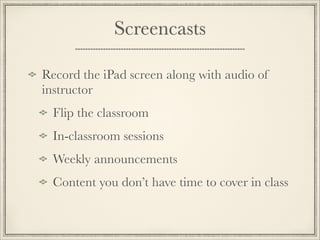
Record the iPad screen along with audio of
instructor
Flip the classroom
In-classroom sessions
Weekly announcements
Content you don’t have time to cover in class

Screencasts
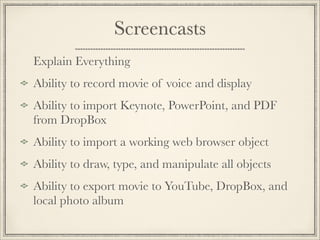
Explain Everything
Ability to record movie of voice and display
Ability to import Keynote, PowerPoint, and PDF
from DropBox
Ability to import a working web browser object
Ability to draw, type, and manipulate all objects
Ability to export movie to YouTube, DropBox, and
local photo album
Screencasts
Explain Everything - Record exactly what you
did in class or in your office for students to view
over and over again.
iPad Cost
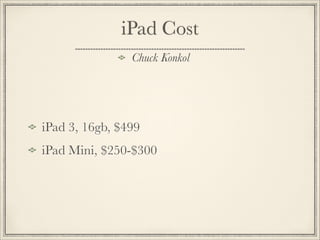
iPad 3, 16gb, $499
iPad Mini, $250-$300
Chuck Konkol
iPad Funding
Federal Grants
Corporate Grants
Self Purchase
Perkins
• Perkins currently provides more than $1.2
billion in federal support for career and
technical education programs.
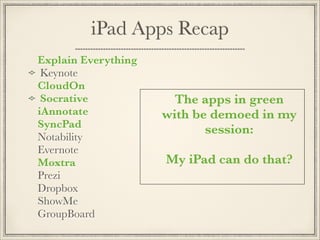
iPad Apps Recap
Explain Everything
Keynote
CloudOn
Socrative
iAnnotate
SyncPad
Notability
Evernote
Moxtra
Prezi
Dropbox
ShowMe
GroupBoard
The apps in green
with be demoed in my
session:

My iPad can do that?
Thank You
http://ckonkol.com/ipad-helps/
Resource link to view this session,
iPad resources and more

Teaching with the iPad

  • 1.
  • 2.
    The hardest thingabout learning something new is that first step. You have had the iPad for awhile now and deep down you know you could be using it as a tool in the classroom but you didn’t know where to start. Hopefully, this session will inspire to take that first step into using your iPad in the classroom. As a college professor of mine used to say, “Diligence breeds success”!
  • 3.
    About Me Theology degreefrom Central Bible College Master degree in Computer Science/ Communication Developer, Author, Trainer, Teacher Husband, Father, Papa Theological Geek
  • 4.
    Me and theiPad September 2010 Evolution of the iPad Teachers and iPads Students and iPads Training for teachers to use iPads in classroom
  • 5.
    The iPad inthe Classroom is ... Interactive Adaptive Emerging
  • 6.
    ...Interactive Digital Whiteboard -faculty can walk around the room and allow students to interact with a whiteboard activity by taking pictures of student work or importing student work as students submit via Dropbox. Photo / Video / Audio - faculty can record video and annotate pictures while on a field trip. In addition, faculty can embed audio into students papers for a more personal feedback. Animation - New interactive textbooks allow the text to come alive using video, 3d animation, audio, and dynamic textbook updates through the apple bookstore.
  • 7.
    ...Adaptive Accessibility - iPadsfits teacher and student lifestyles. Learners have access to the world 24/7. Creativity - Tens of thousands educational apps that expand learn in and out of classroom Learning Styles - cognitive, kinesthetic, and affective through the rich array of media available Learning disabilities - The iPad is being used more than any other device in the area of special needs education. http://www.apple.com/education/special-education/
  • 8.
  • 9.
    ...Emerging The iPad isthe ranked #1 in emerging technology for educational applications, textbooks, and communication tools.
  • 10.
    Textbooks All major publishershave worked with Apple in the K-12 market and are beginning the college market. Teachers currently have the ability to create their own textbook for the iPad using Apple iAuthor. Textbooks are dynamically updated as textbook is modified on the Apple Store. No longer having to wait until next book version for latest data.
  • 11.
  • 12.
    Hundreds of HighSchools, Colleges and Universities (2-4 year) now require iPads for teachers and students to use iPads. According to the American Graduate Initiative Community Colleges are to graduate 5,000,000 more graduates. iPads will help us get there! RVC had an iPad Pilot Program for Fall 2013 semester. The iPad Initiative
  • 13.
    The iPad Initiative "Weare going to move our level of teaching and involvement with technology into the 21st Century"
  • 14.
  • 15.
    iPad Perception isPositive March 2012 survey by the Pearson Foundation and Harris Interactive Tablet ownership among college students and high school seniors has risen dramatically in the last year—ownership has tripled among college students (25% vs. 7% in 2011) and quadrupled among high school seniors (17% vs. 4% in 2011).
  • 16.
    iPad Perception isPositive The survey reveals that more students are reading digital books, and that a majority of college students (63%) and high school seniors (69%) believe that tablets will effectively replace textbooks within the next five years.
  • 17.
    One of thebiggest reasons tablets are so popular on college campuses is the fact that they give students convenient access to digital textbooks, or e-books, whether they are pursuing classroom- based or online education. iPad Perception is Positive
  • 18.
  • 19.
    iPad is Ranked#1 in MarketShare
  • 20.
    iPad Apps forTeachers
  • 21.
    Categories Classroom Productivity Presentation Collaboration Polls andAssessments Video Creation Screencast Creation

  • 22.
    Classroom Tools Grading • iAnnotate- markup papers with notes and audio comments. Hundreds of dollars cheaper than Adobe Pro. • Teacher’s Assistant Pro - keep track of all your students progress and easily connect to parents. • Moxtra - annotate with audio/text/video

  • 23.
    Classroom Tools Edit andCreate MS Office Documents Microsoft PowerPoint Excel • CloudOn • Uses DropBox • Can open from email attachment and reply with edits

  • 24.
    Presentation Keynote - Applepresentation app Prezi - Cool, online presentation. Recently added app for iPad to create/edit. Explain Everything - import PPT, Key, PDF and other file types. Add webpages, images, videos. Record voice and screen actions. Allow export to Camera Roll, YouTube, Dropbox, Google Drive, WebDav, etc.
  • 25.
    Collaboration ShowMe Interactive WhiteBoard- Record drawings/ math/illustrations and share via YouTube. Group Board - Real-time simple drawing/chat collaboration tool. Moxtra - New app on the block. Creator is ex CEO of WebEx. The Binder idea came from daughter of developer. Users have the ability to add files from PC/Mac computer, Web sites, web page clips, blank pages, camera, photos, and video. Moxtra works with all popular cloud drives. Live collaboration also can occur via any web browser. 
 

  • 26.
    Polls and Assessments Polls Impromptu,instant results. Great to see where students are on any giving topic. Assessments Test prep, quick quizzes, instant results • Socrative - student response system that empowers teachers to engage their classrooms through a series of educational exercises and games via smartphones, laptops, and tablets.

  • 27.
    Video Creation Utilize theHD video camera of the iPad to record : Class field trips Treasure hunts Interviews Student feedback

  • 28.
    Screencasts Record the iPadscreen along with audio of instructor Flip the classroom In-classroom sessions Weekly announcements Content you don’t have time to cover in class

  • 29.
    Screencasts Explain Everything Ability torecord movie of voice and display Ability to import Keynote, PowerPoint, and PDF from DropBox Ability to import a working web browser object Ability to draw, type, and manipulate all objects Ability to export movie to YouTube, DropBox, and local photo album
  • 30.
    Screencasts Explain Everything -Record exactly what you did in class or in your office for students to view over and over again.
  • 31.
    iPad Cost iPad 3,16gb, $499 iPad Mini, $250-$300 Chuck Konkol
  • 32.
    iPad Funding Federal Grants CorporateGrants Self Purchase Perkins • Perkins currently provides more than $1.2 billion in federal support for career and technical education programs.
  • 33.
    iPad Apps Recap ExplainEverything Keynote CloudOn Socrative iAnnotate SyncPad Notability Evernote Moxtra Prezi Dropbox ShowMe GroupBoard The apps in green with be demoed in my session: My iPad can do that?
  • 34.
    Thank You http://ckonkol.com/ipad-helps/ Resource linkto view this session, iPad resources and more