Sales and Inventory
Management System
Introduction
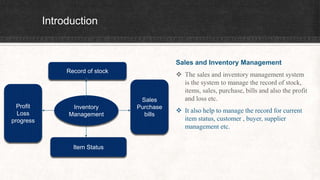
Sales and Inventory Management
 The sales and inventory management system
is the system to manage the record of stock,
items, sales, purchase, bills and also the profit
and loss etc.
 It also help to manage the record for current
item status, customer , buyer, supplier
management etc.
Inventory
Management
Record of stock
Profit
Loss
progress
Item Status
Sales
Purchase
bills
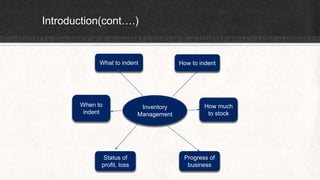
Introduction(cont….)
Inventory
Management
What to indent
When to
indent
Status of
profit, loss
How much
to stock
Progress of
business
How to indent
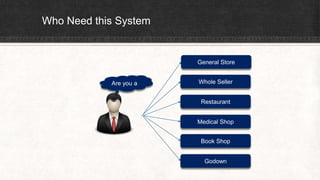
Who Need this System
Are you a
General Store
Whole Seller
Restaurant
Medical Shop
Book Shop
Godown
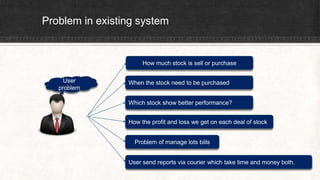
Problem in existing system
User
problem
How much stock is sell or purchase
When the stock need to be purchased
Which stock show better performance?
How the profit and loss we get on each deal of stock
Problem of manage lots biils
User send reports via courier which take time and money both.
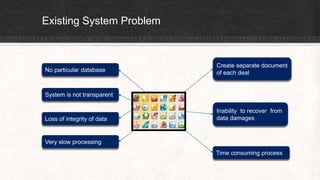
Existing System Problem
Create separate document
of each dealNo particular database
System is not transparent
Inability to recover from
data damagesLoss of integrity of data
Very slow processing
Time consuming process
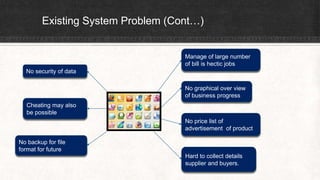
Existing System Problem (Cont…)
Manage of large number
of bill is hectic jobs
No graphical over view
of business progress
No price list of
advertisement of product
Hard to collect details
supplier and buyers.
No security of data
Cheating may also
be possible
No backup for file
format for future
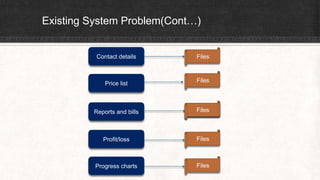
Existing System Problem(Cont…)
Contact details
Price list
Reports and bills
Profit/loss
Progress charts
Files
Files
Files
Files
Files
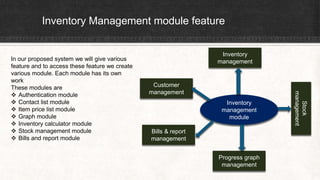
Inventory Management module feature
Inventory
management
module
Inventory
management
Stock
management
Customer
management
Bills & report
management
Progress graph
management
In our proposed system we will give various
feature and to access these feature we create
various module. Each module has its own
work
These modules are
 Authentication module
 Contact list module
 Item price list module
 Graph module
 Inventory calculator module
 Stock management module
 Bills and report module
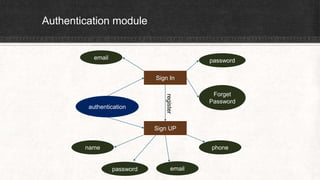
Authentication module
authentication
Sign In
Sign UP
name phone
emailpassword
email password
register
Forget
Password
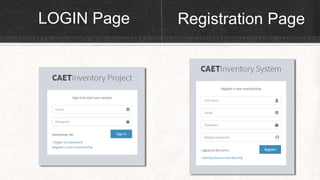
LOGIN Page Registration Page
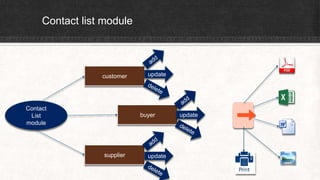
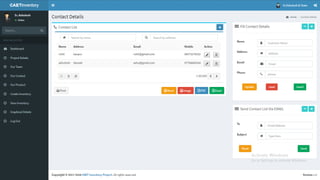
Contact list module
Contact
List
module
customer
buyer
supplier
update
update
update
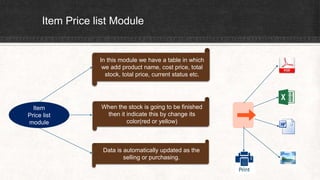
Item Price list Module
Item
Price list
module
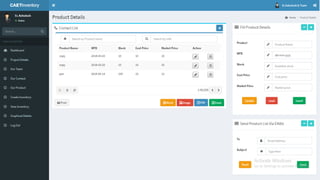
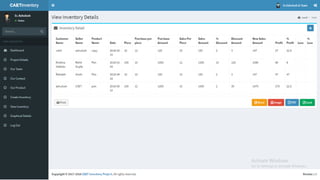
In this module we have a table in which
we add product name, cost price, total
stock, total price, current status etc.
When the stock is going to be finished
then it indicate this by change its
color(red or yellow)
Data is automatically updated as the
selling or purchasing.
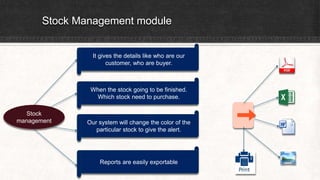
Stock Management module
Stock
management
It gives the details like who are our
customer, who are buyer.
When the stock going to be finished.
Which stock need to purchase.
Our system will change the color of the
particular stock to give the alert.
Reports are easily exportable
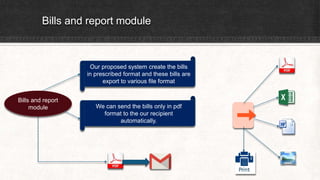
Bills and report module
Bills and report
module
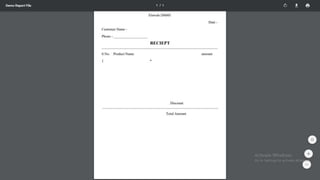
Our proposed system create the bills
in prescribed format and these bills are
export to various file format
We can send the bills only in pdf
format to the our recipient
automatically.
Graphical Module
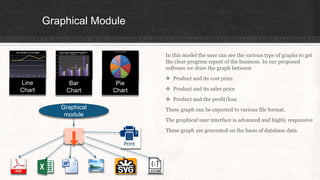
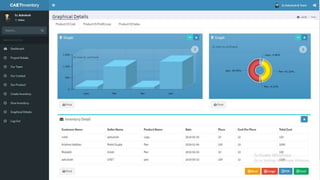
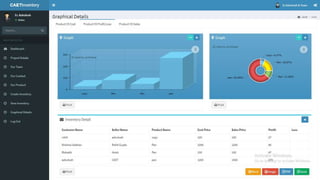
In this model the user can see the various type of graphs to get
the clear progress report of the business. In our proposed
software we draw the graph between
 Product and its cost price
 Product and its sales price
 Product and the profit/loss
These graph can be exported to various file format.
The graphical user interface is advanced and highly responsive
These graph are generated on the basis of database data.
Bar
Chart
Pie
Chart
Line
Chart
Graphical
module
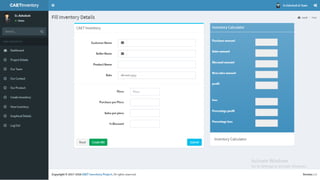
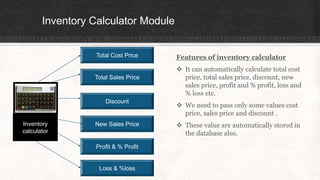
Inventory Calculator Module
Features of inventory calculator
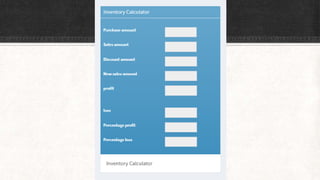
 It can automatically calculate total cost
price, total sales price, discount, new
sales price, profit and % profit, loss and
% loss etc.
 We need to pass only some values cost
price, sales price and discount .
 These value are automatically stored in
the database also.
Inventory
calculator
Total Cost Price
Total Sales Price
Discount
New Sales Price
Profit & % Profit
Loss & %loss
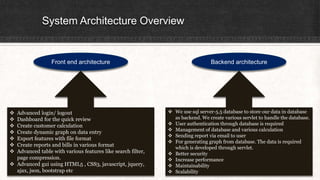
System Architecture Overview
Front end architecture Backend architecture
 Advanced login/ logout
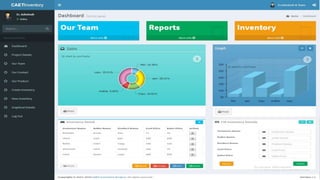
 Dashboard for the quick review
 Create customer calculation
 Create dynamic graph on data entry
 Export features with file format
 Create reports and bills in various format
 Advanced table with various features like search filter,
page compression.
 Advanced gui using HTML5 , CSS3, javascript, jquery,
ajax, json, bootstrap etc
 We use sql server-5.5 database to store our data in database
as backend. We create various servlet to handle the database.
 User authentication through database is required
 Management of database and various calculation
 Sending report via email to user
 For generating graph from database. The data is required
which is developed through servlet.
 Better security
 Increase performance
 Maintainability
 Scalability
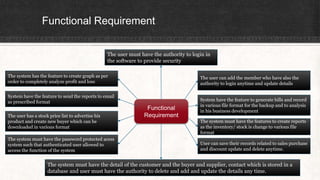
Functional Requirement
Functional
Requirement
The user can add the member who have also the
authority to login anytime and update details
The user must have the authority to login in
the software to provide security
System have the feature to generate bills and record
in various file format for the backup and to analysis
in his business development
The system must have the features to create reports
as the inventory/ stock is change to various file
format
User can save their records related to sales purchase
and discount update and delete anytime.
The system must have the detail of the customer and the buyer and supplier, contact which is stored in a
database and user must have the authority to delete and add and update the details any time.
The system has the feature to create graph as per
order to completely analyze profit and loss
System have the feature to send the reports to email
as prescribed format
The user has a stock price list to advertise his
product and create new buyer which can be
downloaded in various format
The system must have the password protected acess
system such that authenticated user allowed to
access the function of the system
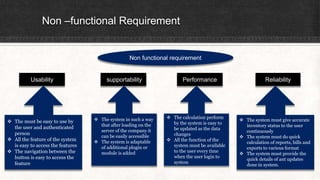
Non –functional Requirement
Non functional requirement
Usability supportability Performance Reliability
 The must be easy to use by
the user and authenticated
person
 All the feature of the system
is easy to access the features
 The navigation between the
button is easy to access the
feature
 The calculation perform
by the system is easy to
be updated as the data
changes
 All the function of the
system must be available
to the user every time
when the user login to
system
 The system in such a way
that after loading on the
server of the company it
can be easily accessible
 The system is adaptable
of additional plugin or
module is added
 The system must give accurate
inventory status to the user
continuously
 The system must do quick
calculation of reports, bills and
exports to various format
 The system must provide the
quick details of ant updates
done in system.
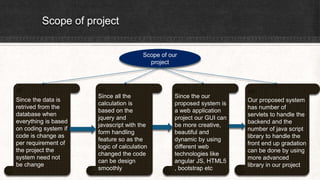
Scope of project
Scope of our
project
Since the data is
retrived from the
database when
everything is based
on coding system if
code is change as
per requirement of
the project the
system need not
be change
Since all the
calculation is
based on the
jquery and
javascript with the
form handling
feature so as the
logic of calculation
changed the code
can be design
smoothly
Since the our
proposed system is
a web application
project our GUI can
be more creative,
beautiful and
dynamic by using
different web
technologies like
angular JS, HTML5
, bootstrap etc
Our proposed system
has number of
servlets to handle the
backend and the
number of java script
library to handle the
front end up gradation
can be done by using
more advanced
library in our project
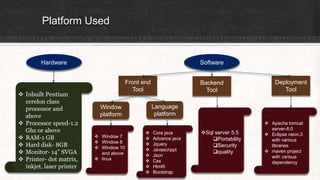
Platform Used
Hardware Software
 Inbuilt Pentium
cerelon class
processor and
above
 Processor speed-1.2
Ghz or above
 RAM-1 GB
 Hard disk- 8GB
 Monitor- 14” SVGA
 Printer- dot matrix,
inkjet, laser printer
Front end
Tool
Backend
Tool
Deployment
Tool
Window
platform
Language
platform
Sql server 5.5
Portability
Security
quality
 Core java
 Advance java
 Jquery
 Javascrippt
 Json
 Css
 Html5
 Bootstrap
 Window 7
 Window 8
 Window 10
and above
 linux
 Apache tomcat
server-8.0
 Eclipse neon.3
with various
libraries
 maven project
with various
dependency
Inventory management application

Inventory management application

  • 1.
  • 2.
    Introduction Sales and InventoryManagement  The sales and inventory management system is the system to manage the record of stock, items, sales, purchase, bills and also the profit and loss etc.  It also help to manage the record for current item status, customer , buyer, supplier management etc. Inventory Management Record of stock Profit Loss progress Item Status Sales Purchase bills
  • 3.
    Introduction(cont….) Inventory Management What to indent Whento indent Status of profit, loss How much to stock Progress of business How to indent
  • 4.
    Who Need thisSystem Are you a General Store Whole Seller Restaurant Medical Shop Book Shop Godown
  • 5.
    Problem in existingsystem User problem How much stock is sell or purchase When the stock need to be purchased Which stock show better performance? How the profit and loss we get on each deal of stock Problem of manage lots biils User send reports via courier which take time and money both.
  • 6.
    Existing System Problem Createseparate document of each dealNo particular database System is not transparent Inability to recover from data damagesLoss of integrity of data Very slow processing Time consuming process
  • 7.
    Existing System Problem(Cont…) Manage of large number of bill is hectic jobs No graphical over view of business progress No price list of advertisement of product Hard to collect details supplier and buyers. No security of data Cheating may also be possible No backup for file format for future
  • 8.
    Existing System Problem(Cont…) Contactdetails Price list Reports and bills Profit/loss Progress charts Files Files Files Files Files
  • 9.
    Inventory Management modulefeature Inventory management module Inventory management Stock management Customer management Bills & report management Progress graph management In our proposed system we will give various feature and to access these feature we create various module. Each module has its own work These modules are  Authentication module  Contact list module  Item price list module  Graph module  Inventory calculator module  Stock management module  Bills and report module
  • 10.
    Authentication module authentication Sign In SignUP name phone emailpassword email password register Forget Password
  • 11.
  • 13.
  • 15.
    Item Price listModule Item Price list module In this module we have a table in which we add product name, cost price, total stock, total price, current status etc. When the stock is going to be finished then it indicate this by change its color(red or yellow) Data is automatically updated as the selling or purchasing.
  • 17.
    Stock Management module Stock management Itgives the details like who are our customer, who are buyer. When the stock going to be finished. Which stock need to purchase. Our system will change the color of the particular stock to give the alert. Reports are easily exportable
  • 19.
    Bills and reportmodule Bills and report module Our proposed system create the bills in prescribed format and these bills are export to various file format We can send the bills only in pdf format to the our recipient automatically.
  • 22.
    Graphical Module In thismodel the user can see the various type of graphs to get the clear progress report of the business. In our proposed software we draw the graph between  Product and its cost price  Product and its sales price  Product and the profit/loss These graph can be exported to various file format. The graphical user interface is advanced and highly responsive These graph are generated on the basis of database data. Bar Chart Pie Chart Line Chart Graphical module
  • 26.
    Inventory Calculator Module Featuresof inventory calculator  It can automatically calculate total cost price, total sales price, discount, new sales price, profit and % profit, loss and % loss etc.  We need to pass only some values cost price, sales price and discount .  These value are automatically stored in the database also. Inventory calculator Total Cost Price Total Sales Price Discount New Sales Price Profit & % Profit Loss & %loss
  • 28.
    System Architecture Overview Frontend architecture Backend architecture  Advanced login/ logout  Dashboard for the quick review  Create customer calculation  Create dynamic graph on data entry  Export features with file format  Create reports and bills in various format  Advanced table with various features like search filter, page compression.  Advanced gui using HTML5 , CSS3, javascript, jquery, ajax, json, bootstrap etc  We use sql server-5.5 database to store our data in database as backend. We create various servlet to handle the database.  User authentication through database is required  Management of database and various calculation  Sending report via email to user  For generating graph from database. The data is required which is developed through servlet.  Better security  Increase performance  Maintainability  Scalability
  • 29.
    Functional Requirement Functional Requirement The usercan add the member who have also the authority to login anytime and update details The user must have the authority to login in the software to provide security System have the feature to generate bills and record in various file format for the backup and to analysis in his business development The system must have the features to create reports as the inventory/ stock is change to various file format User can save their records related to sales purchase and discount update and delete anytime. The system must have the detail of the customer and the buyer and supplier, contact which is stored in a database and user must have the authority to delete and add and update the details any time. The system has the feature to create graph as per order to completely analyze profit and loss System have the feature to send the reports to email as prescribed format The user has a stock price list to advertise his product and create new buyer which can be downloaded in various format The system must have the password protected acess system such that authenticated user allowed to access the function of the system
  • 30.
    Non –functional Requirement Nonfunctional requirement Usability supportability Performance Reliability  The must be easy to use by the user and authenticated person  All the feature of the system is easy to access the features  The navigation between the button is easy to access the feature  The calculation perform by the system is easy to be updated as the data changes  All the function of the system must be available to the user every time when the user login to system  The system in such a way that after loading on the server of the company it can be easily accessible  The system is adaptable of additional plugin or module is added  The system must give accurate inventory status to the user continuously  The system must do quick calculation of reports, bills and exports to various format  The system must provide the quick details of ant updates done in system.
  • 31.
    Scope of project Scopeof our project Since the data is retrived from the database when everything is based on coding system if code is change as per requirement of the project the system need not be change Since all the calculation is based on the jquery and javascript with the form handling feature so as the logic of calculation changed the code can be design smoothly Since the our proposed system is a web application project our GUI can be more creative, beautiful and dynamic by using different web technologies like angular JS, HTML5 , bootstrap etc Our proposed system has number of servlets to handle the backend and the number of java script library to handle the front end up gradation can be done by using more advanced library in our project
  • 32.
    Platform Used Hardware Software Inbuilt Pentium cerelon class processor and above  Processor speed-1.2 Ghz or above  RAM-1 GB  Hard disk- 8GB  Monitor- 14” SVGA  Printer- dot matrix, inkjet, laser printer Front end Tool Backend Tool Deployment Tool Window platform Language platform Sql server 5.5 Portability Security quality  Core java  Advance java  Jquery  Javascrippt  Json  Css  Html5  Bootstrap  Window 7  Window 8  Window 10 and above  linux  Apache tomcat server-8.0  Eclipse neon.3 with various libraries  maven project with various dependency