1 | P a g e
IndependentUniversity,Bangladesh
Department of Computer Science & Engineering
UndergraduateInternship Project
Topic: Inventory Management System
This ProjectIs Submitted By
Md. Al-Mahmud
ID: 1421675
Date: 20-11-2018
Submitted To Supervisor
Radiah Haque
Lecturer
Department of Computer Science & Engineering
2 | P a g e
INTRODUCTION
My project “Inventory Management System” is an online software application which fulfills the
requirement of a typical stock analysis in this company. It provides the interface to users in a
graphical way to manage the daily transactions as well as historical data. Also provides the
management repots like monthly inwards, monthly deliveries and monthly returns. In this
software they can add supplier, edit or delete supplier depends on their need. They can see and
keep track of their cost of different type of product.
For the user interface I use HTML, CSS, JavaScript and jQuery and for the backend I use PHP
programming language and the software used MySQL database for storing information and other
information’s. They can also generate weekly, monthly, yearly report based on their needs. This
will reduce the current manual paper work. This way the information will store in the central
database so anyone who has accessed to this system can access it. The inventory can be accessed
from anywhere with the help of internet. As there is an option for backup file so the company no
needs to worry about their data to loss.
BACKGROUND OF THE PROJECT
The current situation is that if my company buys something like computer, printer or other
materials for the organization a basic resource requirement list must be maintained manually by
the staff. To keep track of their inventory levels they must calculate a list of the product utilized
during a course of time, calculate and analyze the requirements for the future, and place their
next order to the vendors if needed. This process takes up a lot of time and human effort and is
also prone to human error. This is the current situation of the company facing regarding
inventory management system. It takes up a lot of time to manually keep track to sales and place
correct orders to vendors, wasting useful labor in trivial works. So, the company wants to build
their own inventory management system to solve the current problem they are facing. So, in this
project, a central system will be developed for the company by providing an efficient interface
for managing their inventory.
3 | P a g e
BACKGROUND OF THE ORGANIZATION
Digital dream is a leading software product and services company in Bangladesh. Since 2017,
Digital dream has successful track record of delivering innovative and cost-effective technical
services to customers in both Corporate and public sectors undertakings.
The story of Digital dream is as powerful as the story of its country of origin- Bangladesh.
Established with the mission to maintain the status of leading software solution provider
ensuring benefit of customers, shareholders and employees, Digital dream vision to deliver
quality solutions to build The Digital Delta powered by innovation and guided by integrity. Like
the remarkable growth of the economy of Bangladesh, Digital dream has also wondered its
clients and stakeholders with amazing results, by building world-class capacity to deliver world-
wide solutions. With operation spanning across three continents, Digital dream is now a global
solution provider.
Since 2017, Digital dream has successful track record of delivering innovative and cost-effective
technical services to customers in both corporate and public sectors undertakings. Our customer
includes number of Fortune 500 companies and offering mission critical public services IT
services like e-Payment, Customs House Automation, Port IT operation (CTMS), automation of
commercial banks, touching millions of lives. As a company, we have contributed significantly
to the digitalization of Bangladesh by designing and implementing critical projects. Digital
dream also touched the lifestyle of the rural population of Bangladesh by offering comprehensive
solution for the world famous Micro Credit Solution of Bangladesh.
MISSION
To empower organization through products and services based on their perfect need with a view
to fabricate information perfectly and build fastest communication. We understand that long-
term success is beyond making great products.
Emphasizes are
4 | P a g e
 Business Solution
 Customized software
 Perfect information
 Faster communication
 Long-term benefit
 Common bond and trust
 Teamwork
VISION
Devote our-self in faster infrastructure development for helping business to enjoy the benefits of
globalization through any sorts of automation.
Area of Specification
Technology is changing dramatically; with the advent of information technology global business
is changing drastically. No body survives except those who are adjustable to the change.
Now to coup up with this rapid change, we are developing our organization through IT solutions.
We ensure the best possible solution by providing the following.
 Develop software on Database, Application & Graphics
 Network Solutions
 Corporate Reengineering
 MIS Consultancy
 e-Commerce Solutions
GOAL OF THE PROJECT
The main goal of this project is listed below:
i. Efficient tracking of the inventory can be done using the system.
ii. No chance of losing information or data.
5 | P a g e
iii. Inventory can be added and remove easily through the system.
iv. It reduces time and paper since all the data is recorded electronically in the system rather
than using files as a result searching information about a product becomes way too easy.
v. The inventory is always up to date in the system.
vi. Loss of inventory from the warehouse can be avoided.
vii. The inventory can be accessed from anywhere with the help of internet.
viii. Huge amount of data can be monitored in the system.
ix. Chances of error are reduced since the inventory list is not monitored by hand. This
ensures accuracy in the system.
x. This system ensures that all orders, reports and other documents relating to inventory are
uniform in their presentation, regardless of who has created them. This improves the
consistency in the system.
OBJECTIVE OF THE PROJECT
i. To keep inventory at sufficiently high level to perform production and sales activities
smoothly.
ii. To minimize investment in inventory at minimum level to maximize profitability.
iii. To ensure that the supply of raw material & finished goods will remain continuous so that
production process is not halted and demands of customers are duly met.
iv. To minimize carrying cost of inventory.
v. To keep investment in inventory at optimum level.
vi. To reduce the losses of theft, obsolescence & wastage etc.
vii. To make arrangement for sale of slow moving items.
viii. To produce simple not complexity system.
ix. To create a backup of files in every successful operation.
x. To spend less time in searching and retrieving of information.
xi. To maintain the complete inventory records of stock, receipt, details of purchasers and
sellers for a department store.
6 | P a g e
IDENTIFY PROBLEM AND OPPORTUNITY
PROBLEM
i. It is bit tough to validate all the information correctly.
ii. Information might get hacked.
iii. Power loss or loss of internet or network connectivity can render the system to be
temporarily useless.
iv. Server might get crash or could be down as well.
OPPORTUNITICS
i. Saves a lot of time for all the users in the system.
ii. Can be accessed easily form anywhere with the help of Internet.
iii. Goods can be select easily with one click.
iv. Different categories of goods can be selected at a time.
v. Records and information of the goods will be shown in the system.
EXISTING SYSTEM OVERVIEW
As we know the manual processing is quite tedious, time consuming, less accurate in comparison
to computerized processing. Obviously, the present system is not is exception consultant
encountering all the above problems.
i. Time consuming.
ii. It is very tedious.
iii. All information is not placed separately.
iv. Lot of paper work.
v. Slow data processing.
vi. Not user-friendly environment.
vii. It is difficult to found records due file management system.
PROPOSED SYSTEM OVERVIEW
In new computerized system I tried to give these facilities.
7 | P a g e
i. Manually system changes into computerized system.
ii. Friendly user interface.
iii. Time saving.
iv. Save paper work.
v. Connecting to database so we use different type of queries, data report.
PRODUCT DESCRIPTION
Effective inventory management is all about knowing what is on hand, where it is in use, and
how much finished product results. Inventory management is the process of efficiently
overseeing the constant flow of units into and out of an existing inventory. This process usually
involves controlling the transfer in of units in order to prevent the inventory from becoming too
high or dwindling to levels that could put the operation of the company into jeopardy. Its three
main areas of concern are:
Acquisition:
Acquisition procedures are established to assist personnel in procurement of software and
hardware products. Its main purpose is to ensure that proper justifications are performed and that
financial guidelines are followed.
Redeployment:
Redeployment procedures are responsible for ensuring that assets are tracked when moved from
one location to another and that budgetary considerations are adjusted as needed. Should a
product be moved in conjunction with its original owner then the Inventory System is updated
to reflect the new location. Should a product location and owner change, then the Inventory
System must be updated to reflect the new owner and their location. In this case, the old product
is deleted from the original owner's budget and added to the new owner's budget.
8 | P a g e
Termination:
Termination is responsible for deleting the asset from the inventory when it is discontinued or
replaced. The owner's budget will be updated to reflect the asset termination and the asset will no
longer be listed when location reports are generated.
The project is about developing such online based inventory management system that will have
an inventory database by which, the company can control the inventories of all the warehouses
and all the dealers will be allowed to know about the inventories of other dealers through the
database and can place orders and complete purchasing among them using the database. The
focus of the project is to reduce the time for ordering products which are consumed in bulk, and
a dealer tries to find product by calling the other dealers one by one. That is another aim is also
to eliminate the chance of having wrong products in the order line of which there are chances of
happening when the orders are getting placed through the phone. Also, the project is to optimize
the documentation processes of the product, to organize the products in the warehouse more
thoroughly, to control the products storage, transfers, and purchases more easily. The two
primary deliverables are the web site and the database.
9 | P a g e
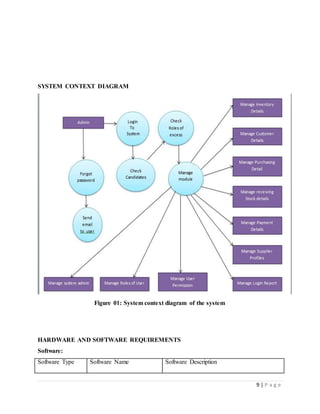
SYSTEM CONTEXT DIAGRAM
Figure 01: System context diagram of the system
HARDWARE AND SOFTWARE REQUIREMENTS
Software:
Software Type Software Name Software Description
10 | P a g e
Operating System Windows 10/8/7, Linux Environment or platform in which the system
will run.
Web Browsers Chrome/Mozilla Firefox The browser which will be used by the user to
have access to the system.
Database software MySQL server This software will provide a storage space for
system to store the information of the
inventory.
Developing
software
Sublime text, Atom This is an editor where the programmer and
designer will work to write code, script and
make design.
Hardware:
i. Processor (CPU): Intel Pentium or Dual Core or Intel Core i3-i7 processors or higher.
ii. RAM: Minimum 2 GB RAM or Maximum 8 GB or higher.
iii. Storage: 500 GB or higher storage hard disk or higher.
iv. Monitor/Display: 15" LCD monitor.
PROGRAMMING LANGUAGE
PHP
PHP is a programming language which is web-based language. PHP contains features similar to
another web language.
Features
 Strong Exceptions Handling.
 Suited well for building Web services.
 The language is intended for use in developing software component suitable for
deployment in distributed environments.
For developing this project, we also use some other language like HTML, CSS, JavaScript,
jQuery, Ajax, AngularJS and MySQL database.
11 | P a g e
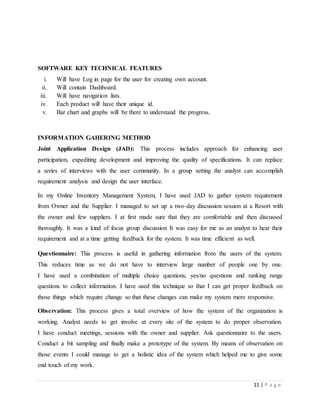
SOFTWARE KEY TECHNICAL FEATURES
i. Will have Log in page for the user for creating own account.
ii. Will contain Dashboard.
iii. Will have navigation lists.
iv. Each product will have their unique id.
v. Bar chart and graphs will be there to understand the progress.
INFORMATION GAHERING METHOD
Joint Application Design (JAD): This process includes approach for enhancing user
participation, expediting development and improving the quality of specifications. It can replace
a series of interviews with the user community. In a group setting the analyst can accomplish
requirement analysis and design the user interface.
In my Online Inventory Management System, I have used JAD to gather system requirement
from Owner and the Supplier. I managed to set up a two-day discussion session at a Resort with
the owner and few suppliers. I at first made sure that they are comfortable and then discussed
thoroughly. It was a kind of focus group discussion It was easy for me as an analyst to hear their
requirement and at a time getting feedback for the system. It was time efficient as well.
Questionnaire: This process is useful in gathering information from the users of the system.
This reduces time as we do not have to interview large number of people one by one.
I have used a combination of multiple choice questions, yes/no questions and ranking range
questions to collect information. I have used this technique so that I can get proper feedback on
those things which require change so that these changes can make my system more responsive.
Observation: This process gives a total overview of how the system of the organization is
working. Analyst needs to get involve at every site of the system to do proper observation.
I have conduct meetings, sessions with the owner and supplier. Ask questionnaire to the users.
Conduct a bit sampling and finally make a prototype of the system. By means of observation on
those events I could manage to get a holistic idea of the system which helped me to give some
end touch of my work.
12 | P a g e
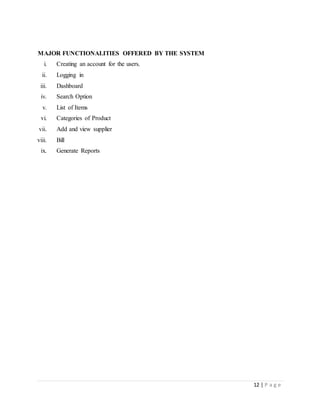
MAJOR FUNCTIONALITIES OFFERED BY THE SYSTEM
i. Creating an account for the users.
ii. Logging in
iii. Dashboard
iv. Search Option
v. List of Items
vi. Categories of Product
vii. Add and view supplier
viii. Bill
ix. Generate Reports
13 | P a g e
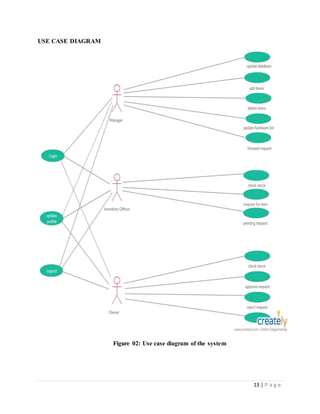
USE CASE DIAGRAM
Figure 02: Use case diagram of the system
14 | P a g e
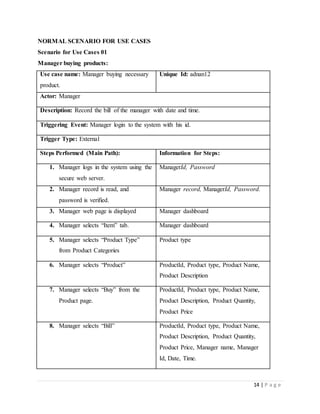
NORMAL SCENARIO FOR USE CASES
Scenario for Use Cases 01
Manager buying products:
Use case name: Manager buying necessary
product.
Unique Id: adnan12
Actor: Manager
Description: Record the bill of the manager with date and time.
Triggering Event: Manager login to the system with his id.
Trigger Type: External
Steps Performed (Main Path): Information for Steps:
1. Manager logs in the system using the
secure web server.
ManagerId, Password
2. Manager record is read, and
password is verified.
Manager record, ManagerId, Password.
3. Manager web page is displayed Manager dashboard
4. Manager selects “Item” tab. Manager dashboard
5. Manager selects “Product Type”
from Product Categories
Product type
6. Manager selects “Product” ProductId, Product type, Product Name,
Product Description
7. Manager selects “Buy” from the
Product page.
ProductId, Product type, Product Name,
Product Description, Product Quantity,
Product Price
8. Manager selects “Bill” ProductId, Product type, Product Name,
Product Description, Product Quantity,
Product Price, Manager name, Manager
Id, Date, Time.
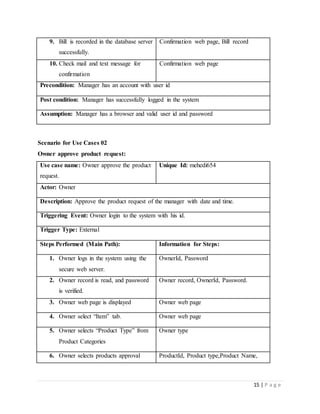
15 | P a g e
9. Bill is recorded in the database server
successfully.
Confirmation web page, Bill record
10. Check mail and text message for
confirmation
Confirmation web page
Precondition: Manager has an account with user id
Post condition: Manager has successfully logged in the system
Assumption: Manager has a browser and valid user id and password
Scenario for Use Cases 02
Owner approve product request:
Use case name: Owner approve the product
request.
Unique Id: mehedi654
Actor: Owner
Description: Approve the product request of the manager with date and time.
Triggering Event: Owner login to the system with his id.
Trigger Type: External
Steps Performed (Main Path): Information for Steps:
1. Owner logs in the system using the
secure web server.
OwnerId, Password
2. Owner record is read, and password
is verified.
Owner record, OwnerId, Password.
3. Owner web page is displayed Owner web page
4. Owner select “Item” tab. Owner web page
5. Owner selects “Product Type” from
Product Categories
Owner type
6. Owner selects products approval ProductId, Product type,Product Name,
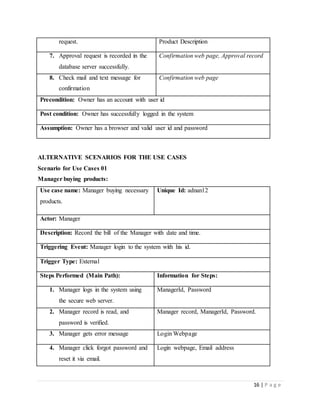
16 | P a g e
request. Product Description
7. Approval request is recorded in the
database server successfully.
Confirmation web page, Approval record
8. Check mail and text message for
confirmation
Confirmation web page
Precondition: Owner has an account with user id
Post condition: Owner has successfully logged in the system
Assumption: Owner has a browser and valid user id and password
ALTERNATIVE SCENARIOS FOR THE USE CASES
Scenario for Use Cases 01
Manager buying products:
Use case name: Manager buying necessary
products.
Unique Id: adnan12
Actor: Manager
Description: Record the bill of the Manager with date and time.
Triggering Event: Manager login to the system with his id.
Trigger Type: External
Steps Performed (Main Path): Information for Steps:
1. Manager logs in the system using
the secure web server.
ManagerId, Password
2. Manager record is read, and
password is verified.
Manager record, ManagerId, Password.
3. Manager gets error message Login Webpage
4. Manager click forgot password and
reset it via email.
Login webpage, Email address
17 | P a g e
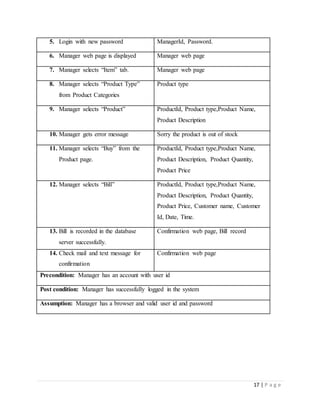
5. Login with new password ManagerId, Password.
6. Manager web page is displayed Manager web page
7. Manager selects “Item” tab. Manager web page
8. Manager selects “Product Type”
from Product Categories
Product type
9. Manager selects “Product” ProductId, Product type,Product Name,
Product Description
10. Manager gets error message Sorry the product is out of stock
11. Manager selects “Buy” from the
Product page.
ProductId, Product type,Product Name,
Product Description, Product Quantity,
Product Price
12. Manager selects “Bill” ProductId, Product type,Product Name,
Product Description, Product Quantity,
Product Price, Customer name, Customer
Id, Date, Time.
13. Bill is recorded in the database
server successfully.
Confirmation web page, Bill record
14. Check mail and text message for
confirmation
Confirmation web page
Precondition: Manager has an account with user id
Post condition: Manager has successfully logged in the system
Assumption: Manager has a browser and valid user id and password
18 | P a g e
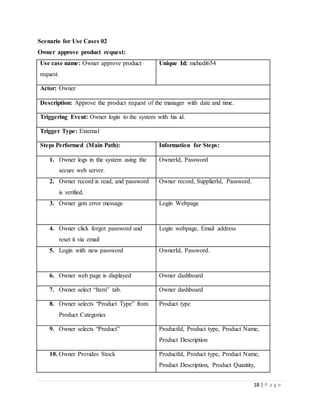
Scenario for Use Cases 02
Owner approve product request:
Use case name: Owner approve product
request.
Unique Id: mehedi654
Actor: Owner
Description: Approve the product request of the manager with date and time.
Triggering Event: Owner login to the system with his id.
Trigger Type: External
Steps Performed (Main Path): Information for Steps:
1. Owner logs in the system using the
secure web server.
OwnerId, Password
2. Owner record is read, and password
is verified.
Owner record, SupplierId, Password.
3. Owner gets error message Login Webpage
4. Owner click forgot password and
reset it via email
Login webpage, Email address
5. Login with new password OwnerId, Password.
6. Owner web page is displayed Owner dashboard
7. Owner select “Item” tab. Owner dashboard
8. Owner selects “Product Type” from
Product Categories
Product type
9. Owner selects “Product” ProductId, Product type, Product Name,
Product Description
10. Owner Provides Stock ProductId, Product type, Product Name,
Product Description, Product Quantity,
19 | P a g e
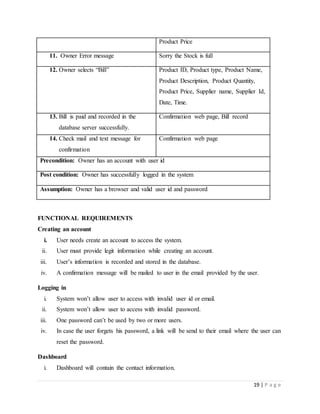
Product Price
11. Owner Error message Sorry the Stock is full
12. Owner selects “Bill” Product ID, Product type, Product Name,
Product Description, Product Quantity,
Product Price, Supplier name, Supplier Id,
Date, Time.
13. Bill is paid and recorded in the
database server successfully.
Confirmation web page, Bill record
14. Check mail and text message for
confirmation
Confirmation web page
Precondition: Owner has an account with user id
Post condition: Owner has successfully logged in the system
Assumption: Owner has a browser and valid user id and password
FUNCTIONAL REQUIREMENTS
Creating an account
i. User needs create an account to access the system.
ii. User must provide legit information while creating an account.
iii. User’s information is recorded and stored in the database.
iv. A confirmation message will be mailed to user in the email provided by the user.
Logging in
i. System won’t allow user to access with invalid user id or email.
ii. System won’t allow user to access with invalid password.
iii. One password can’t be used by two or more users.
iv. In case the user forgets his password, a link will be send to their email where the user can
reset the password.
Dashboard
i. Dashboard will contain the contact information.
20 | P a g e
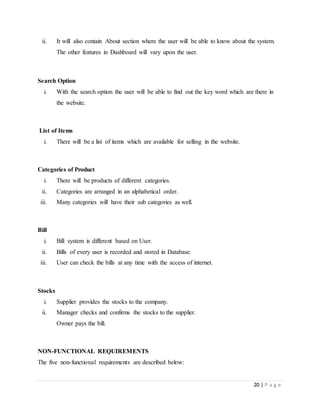
ii. It will also contain About section where the user will be able to know about the system.
The other features in Dashboard will vary upon the user.
Search Option
i. With the search option the user will be able to find out the key word which are there in
the website.
List of Items
i. There will be a list of items which are available for selling in the website.
Categories of Product
i. There will be products of different categories.
ii. Categories are arranged in an alphabetical order.
iii. Many categories will have their sub categories as well.
Bill
i. Bill system is different based on User.
ii. Bills of every user is recorded and stored in Database.
iii. User can check the bills at any time with the access of internet.
Stocks
i. Supplier provides the stocks to the company.
ii. Manager checks and confirms the stocks to the supplier.
Owner pays the bill.
NON-FUNCTIONAL REQUIREMENTS
The five non-functional requirements are described below:
21 | P a g e
1. Security: The system must have protection from all the unauthorized users by using a unique
username and password. This system is also show error if the username or password is incorrect.
2. Performance: The system is supposed to respond in less than 2 seconds. The time system is
required to process and response. All the functions of the system must be available to the user
every time the system is turned on.
3. Availability: In the inventory management system the user must have to use it during
operating hours.
4. Usability: The system should be user friendly and should require least effort to operate. The
menus of the system must be easily navigating by the users with buttons that are easy to
understand.
5. Supportability: The system is designed such that it works even on systems having the
minimum configuration. The system is adaptable even if additional plugins or modules are added
at a later point.

Inventory management System

  • 1.
    1 | Pa g e IndependentUniversity,Bangladesh Department of Computer Science & Engineering UndergraduateInternship Project Topic: Inventory Management System This ProjectIs Submitted By Md. Al-Mahmud ID: 1421675 Date: 20-11-2018 Submitted To Supervisor Radiah Haque Lecturer Department of Computer Science & Engineering
  • 2.
    2 | Pa g e INTRODUCTION My project “Inventory Management System” is an online software application which fulfills the requirement of a typical stock analysis in this company. It provides the interface to users in a graphical way to manage the daily transactions as well as historical data. Also provides the management repots like monthly inwards, monthly deliveries and monthly returns. In this software they can add supplier, edit or delete supplier depends on their need. They can see and keep track of their cost of different type of product. For the user interface I use HTML, CSS, JavaScript and jQuery and for the backend I use PHP programming language and the software used MySQL database for storing information and other information’s. They can also generate weekly, monthly, yearly report based on their needs. This will reduce the current manual paper work. This way the information will store in the central database so anyone who has accessed to this system can access it. The inventory can be accessed from anywhere with the help of internet. As there is an option for backup file so the company no needs to worry about their data to loss. BACKGROUND OF THE PROJECT The current situation is that if my company buys something like computer, printer or other materials for the organization a basic resource requirement list must be maintained manually by the staff. To keep track of their inventory levels they must calculate a list of the product utilized during a course of time, calculate and analyze the requirements for the future, and place their next order to the vendors if needed. This process takes up a lot of time and human effort and is also prone to human error. This is the current situation of the company facing regarding inventory management system. It takes up a lot of time to manually keep track to sales and place correct orders to vendors, wasting useful labor in trivial works. So, the company wants to build their own inventory management system to solve the current problem they are facing. So, in this project, a central system will be developed for the company by providing an efficient interface for managing their inventory.
  • 3.
    3 | Pa g e BACKGROUND OF THE ORGANIZATION Digital dream is a leading software product and services company in Bangladesh. Since 2017, Digital dream has successful track record of delivering innovative and cost-effective technical services to customers in both Corporate and public sectors undertakings. The story of Digital dream is as powerful as the story of its country of origin- Bangladesh. Established with the mission to maintain the status of leading software solution provider ensuring benefit of customers, shareholders and employees, Digital dream vision to deliver quality solutions to build The Digital Delta powered by innovation and guided by integrity. Like the remarkable growth of the economy of Bangladesh, Digital dream has also wondered its clients and stakeholders with amazing results, by building world-class capacity to deliver world- wide solutions. With operation spanning across three continents, Digital dream is now a global solution provider. Since 2017, Digital dream has successful track record of delivering innovative and cost-effective technical services to customers in both corporate and public sectors undertakings. Our customer includes number of Fortune 500 companies and offering mission critical public services IT services like e-Payment, Customs House Automation, Port IT operation (CTMS), automation of commercial banks, touching millions of lives. As a company, we have contributed significantly to the digitalization of Bangladesh by designing and implementing critical projects. Digital dream also touched the lifestyle of the rural population of Bangladesh by offering comprehensive solution for the world famous Micro Credit Solution of Bangladesh. MISSION To empower organization through products and services based on their perfect need with a view to fabricate information perfectly and build fastest communication. We understand that long- term success is beyond making great products. Emphasizes are
  • 4.
    4 | Pa g e  Business Solution  Customized software  Perfect information  Faster communication  Long-term benefit  Common bond and trust  Teamwork VISION Devote our-self in faster infrastructure development for helping business to enjoy the benefits of globalization through any sorts of automation. Area of Specification Technology is changing dramatically; with the advent of information technology global business is changing drastically. No body survives except those who are adjustable to the change. Now to coup up with this rapid change, we are developing our organization through IT solutions. We ensure the best possible solution by providing the following.  Develop software on Database, Application & Graphics  Network Solutions  Corporate Reengineering  MIS Consultancy  e-Commerce Solutions GOAL OF THE PROJECT The main goal of this project is listed below: i. Efficient tracking of the inventory can be done using the system. ii. No chance of losing information or data.
  • 5.
    5 | Pa g e iii. Inventory can be added and remove easily through the system. iv. It reduces time and paper since all the data is recorded electronically in the system rather than using files as a result searching information about a product becomes way too easy. v. The inventory is always up to date in the system. vi. Loss of inventory from the warehouse can be avoided. vii. The inventory can be accessed from anywhere with the help of internet. viii. Huge amount of data can be monitored in the system. ix. Chances of error are reduced since the inventory list is not monitored by hand. This ensures accuracy in the system. x. This system ensures that all orders, reports and other documents relating to inventory are uniform in their presentation, regardless of who has created them. This improves the consistency in the system. OBJECTIVE OF THE PROJECT i. To keep inventory at sufficiently high level to perform production and sales activities smoothly. ii. To minimize investment in inventory at minimum level to maximize profitability. iii. To ensure that the supply of raw material & finished goods will remain continuous so that production process is not halted and demands of customers are duly met. iv. To minimize carrying cost of inventory. v. To keep investment in inventory at optimum level. vi. To reduce the losses of theft, obsolescence & wastage etc. vii. To make arrangement for sale of slow moving items. viii. To produce simple not complexity system. ix. To create a backup of files in every successful operation. x. To spend less time in searching and retrieving of information. xi. To maintain the complete inventory records of stock, receipt, details of purchasers and sellers for a department store.
  • 6.
    6 | Pa g e IDENTIFY PROBLEM AND OPPORTUNITY PROBLEM i. It is bit tough to validate all the information correctly. ii. Information might get hacked. iii. Power loss or loss of internet or network connectivity can render the system to be temporarily useless. iv. Server might get crash or could be down as well. OPPORTUNITICS i. Saves a lot of time for all the users in the system. ii. Can be accessed easily form anywhere with the help of Internet. iii. Goods can be select easily with one click. iv. Different categories of goods can be selected at a time. v. Records and information of the goods will be shown in the system. EXISTING SYSTEM OVERVIEW As we know the manual processing is quite tedious, time consuming, less accurate in comparison to computerized processing. Obviously, the present system is not is exception consultant encountering all the above problems. i. Time consuming. ii. It is very tedious. iii. All information is not placed separately. iv. Lot of paper work. v. Slow data processing. vi. Not user-friendly environment. vii. It is difficult to found records due file management system. PROPOSED SYSTEM OVERVIEW In new computerized system I tried to give these facilities.
  • 7.
    7 | Pa g e i. Manually system changes into computerized system. ii. Friendly user interface. iii. Time saving. iv. Save paper work. v. Connecting to database so we use different type of queries, data report. PRODUCT DESCRIPTION Effective inventory management is all about knowing what is on hand, where it is in use, and how much finished product results. Inventory management is the process of efficiently overseeing the constant flow of units into and out of an existing inventory. This process usually involves controlling the transfer in of units in order to prevent the inventory from becoming too high or dwindling to levels that could put the operation of the company into jeopardy. Its three main areas of concern are: Acquisition: Acquisition procedures are established to assist personnel in procurement of software and hardware products. Its main purpose is to ensure that proper justifications are performed and that financial guidelines are followed. Redeployment: Redeployment procedures are responsible for ensuring that assets are tracked when moved from one location to another and that budgetary considerations are adjusted as needed. Should a product be moved in conjunction with its original owner then the Inventory System is updated to reflect the new location. Should a product location and owner change, then the Inventory System must be updated to reflect the new owner and their location. In this case, the old product is deleted from the original owner's budget and added to the new owner's budget.
  • 8.
    8 | Pa g e Termination: Termination is responsible for deleting the asset from the inventory when it is discontinued or replaced. The owner's budget will be updated to reflect the asset termination and the asset will no longer be listed when location reports are generated. The project is about developing such online based inventory management system that will have an inventory database by which, the company can control the inventories of all the warehouses and all the dealers will be allowed to know about the inventories of other dealers through the database and can place orders and complete purchasing among them using the database. The focus of the project is to reduce the time for ordering products which are consumed in bulk, and a dealer tries to find product by calling the other dealers one by one. That is another aim is also to eliminate the chance of having wrong products in the order line of which there are chances of happening when the orders are getting placed through the phone. Also, the project is to optimize the documentation processes of the product, to organize the products in the warehouse more thoroughly, to control the products storage, transfers, and purchases more easily. The two primary deliverables are the web site and the database.
  • 9.
    9 | Pa g e SYSTEM CONTEXT DIAGRAM Figure 01: System context diagram of the system HARDWARE AND SOFTWARE REQUIREMENTS Software: Software Type Software Name Software Description
  • 10.
    10 | Pa g e Operating System Windows 10/8/7, Linux Environment or platform in which the system will run. Web Browsers Chrome/Mozilla Firefox The browser which will be used by the user to have access to the system. Database software MySQL server This software will provide a storage space for system to store the information of the inventory. Developing software Sublime text, Atom This is an editor where the programmer and designer will work to write code, script and make design. Hardware: i. Processor (CPU): Intel Pentium or Dual Core or Intel Core i3-i7 processors or higher. ii. RAM: Minimum 2 GB RAM or Maximum 8 GB or higher. iii. Storage: 500 GB or higher storage hard disk or higher. iv. Monitor/Display: 15" LCD monitor. PROGRAMMING LANGUAGE PHP PHP is a programming language which is web-based language. PHP contains features similar to another web language. Features  Strong Exceptions Handling.  Suited well for building Web services.  The language is intended for use in developing software component suitable for deployment in distributed environments. For developing this project, we also use some other language like HTML, CSS, JavaScript, jQuery, Ajax, AngularJS and MySQL database.
  • 11.
    11 | Pa g e SOFTWARE KEY TECHNICAL FEATURES i. Will have Log in page for the user for creating own account. ii. Will contain Dashboard. iii. Will have navigation lists. iv. Each product will have their unique id. v. Bar chart and graphs will be there to understand the progress. INFORMATION GAHERING METHOD Joint Application Design (JAD): This process includes approach for enhancing user participation, expediting development and improving the quality of specifications. It can replace a series of interviews with the user community. In a group setting the analyst can accomplish requirement analysis and design the user interface. In my Online Inventory Management System, I have used JAD to gather system requirement from Owner and the Supplier. I managed to set up a two-day discussion session at a Resort with the owner and few suppliers. I at first made sure that they are comfortable and then discussed thoroughly. It was a kind of focus group discussion It was easy for me as an analyst to hear their requirement and at a time getting feedback for the system. It was time efficient as well. Questionnaire: This process is useful in gathering information from the users of the system. This reduces time as we do not have to interview large number of people one by one. I have used a combination of multiple choice questions, yes/no questions and ranking range questions to collect information. I have used this technique so that I can get proper feedback on those things which require change so that these changes can make my system more responsive. Observation: This process gives a total overview of how the system of the organization is working. Analyst needs to get involve at every site of the system to do proper observation. I have conduct meetings, sessions with the owner and supplier. Ask questionnaire to the users. Conduct a bit sampling and finally make a prototype of the system. By means of observation on those events I could manage to get a holistic idea of the system which helped me to give some end touch of my work.
  • 12.
    12 | Pa g e MAJOR FUNCTIONALITIES OFFERED BY THE SYSTEM i. Creating an account for the users. ii. Logging in iii. Dashboard iv. Search Option v. List of Items vi. Categories of Product vii. Add and view supplier viii. Bill ix. Generate Reports
  • 13.
    13 | Pa g e USE CASE DIAGRAM Figure 02: Use case diagram of the system
  • 14.
    14 | Pa g e NORMAL SCENARIO FOR USE CASES Scenario for Use Cases 01 Manager buying products: Use case name: Manager buying necessary product. Unique Id: adnan12 Actor: Manager Description: Record the bill of the manager with date and time. Triggering Event: Manager login to the system with his id. Trigger Type: External Steps Performed (Main Path): Information for Steps: 1. Manager logs in the system using the secure web server. ManagerId, Password 2. Manager record is read, and password is verified. Manager record, ManagerId, Password. 3. Manager web page is displayed Manager dashboard 4. Manager selects “Item” tab. Manager dashboard 5. Manager selects “Product Type” from Product Categories Product type 6. Manager selects “Product” ProductId, Product type, Product Name, Product Description 7. Manager selects “Buy” from the Product page. ProductId, Product type, Product Name, Product Description, Product Quantity, Product Price 8. Manager selects “Bill” ProductId, Product type, Product Name, Product Description, Product Quantity, Product Price, Manager name, Manager Id, Date, Time.
  • 15.
    15 | Pa g e 9. Bill is recorded in the database server successfully. Confirmation web page, Bill record 10. Check mail and text message for confirmation Confirmation web page Precondition: Manager has an account with user id Post condition: Manager has successfully logged in the system Assumption: Manager has a browser and valid user id and password Scenario for Use Cases 02 Owner approve product request: Use case name: Owner approve the product request. Unique Id: mehedi654 Actor: Owner Description: Approve the product request of the manager with date and time. Triggering Event: Owner login to the system with his id. Trigger Type: External Steps Performed (Main Path): Information for Steps: 1. Owner logs in the system using the secure web server. OwnerId, Password 2. Owner record is read, and password is verified. Owner record, OwnerId, Password. 3. Owner web page is displayed Owner web page 4. Owner select “Item” tab. Owner web page 5. Owner selects “Product Type” from Product Categories Owner type 6. Owner selects products approval ProductId, Product type,Product Name,
  • 16.
    16 | Pa g e request. Product Description 7. Approval request is recorded in the database server successfully. Confirmation web page, Approval record 8. Check mail and text message for confirmation Confirmation web page Precondition: Owner has an account with user id Post condition: Owner has successfully logged in the system Assumption: Owner has a browser and valid user id and password ALTERNATIVE SCENARIOS FOR THE USE CASES Scenario for Use Cases 01 Manager buying products: Use case name: Manager buying necessary products. Unique Id: adnan12 Actor: Manager Description: Record the bill of the Manager with date and time. Triggering Event: Manager login to the system with his id. Trigger Type: External Steps Performed (Main Path): Information for Steps: 1. Manager logs in the system using the secure web server. ManagerId, Password 2. Manager record is read, and password is verified. Manager record, ManagerId, Password. 3. Manager gets error message Login Webpage 4. Manager click forgot password and reset it via email. Login webpage, Email address
  • 17.
    17 | Pa g e 5. Login with new password ManagerId, Password. 6. Manager web page is displayed Manager web page 7. Manager selects “Item” tab. Manager web page 8. Manager selects “Product Type” from Product Categories Product type 9. Manager selects “Product” ProductId, Product type,Product Name, Product Description 10. Manager gets error message Sorry the product is out of stock 11. Manager selects “Buy” from the Product page. ProductId, Product type,Product Name, Product Description, Product Quantity, Product Price 12. Manager selects “Bill” ProductId, Product type,Product Name, Product Description, Product Quantity, Product Price, Customer name, Customer Id, Date, Time. 13. Bill is recorded in the database server successfully. Confirmation web page, Bill record 14. Check mail and text message for confirmation Confirmation web page Precondition: Manager has an account with user id Post condition: Manager has successfully logged in the system Assumption: Manager has a browser and valid user id and password
  • 18.
    18 | Pa g e Scenario for Use Cases 02 Owner approve product request: Use case name: Owner approve product request. Unique Id: mehedi654 Actor: Owner Description: Approve the product request of the manager with date and time. Triggering Event: Owner login to the system with his id. Trigger Type: External Steps Performed (Main Path): Information for Steps: 1. Owner logs in the system using the secure web server. OwnerId, Password 2. Owner record is read, and password is verified. Owner record, SupplierId, Password. 3. Owner gets error message Login Webpage 4. Owner click forgot password and reset it via email Login webpage, Email address 5. Login with new password OwnerId, Password. 6. Owner web page is displayed Owner dashboard 7. Owner select “Item” tab. Owner dashboard 8. Owner selects “Product Type” from Product Categories Product type 9. Owner selects “Product” ProductId, Product type, Product Name, Product Description 10. Owner Provides Stock ProductId, Product type, Product Name, Product Description, Product Quantity,
  • 19.
    19 | Pa g e Product Price 11. Owner Error message Sorry the Stock is full 12. Owner selects “Bill” Product ID, Product type, Product Name, Product Description, Product Quantity, Product Price, Supplier name, Supplier Id, Date, Time. 13. Bill is paid and recorded in the database server successfully. Confirmation web page, Bill record 14. Check mail and text message for confirmation Confirmation web page Precondition: Owner has an account with user id Post condition: Owner has successfully logged in the system Assumption: Owner has a browser and valid user id and password FUNCTIONAL REQUIREMENTS Creating an account i. User needs create an account to access the system. ii. User must provide legit information while creating an account. iii. User’s information is recorded and stored in the database. iv. A confirmation message will be mailed to user in the email provided by the user. Logging in i. System won’t allow user to access with invalid user id or email. ii. System won’t allow user to access with invalid password. iii. One password can’t be used by two or more users. iv. In case the user forgets his password, a link will be send to their email where the user can reset the password. Dashboard i. Dashboard will contain the contact information.
  • 20.
    20 | Pa g e ii. It will also contain About section where the user will be able to know about the system. The other features in Dashboard will vary upon the user. Search Option i. With the search option the user will be able to find out the key word which are there in the website. List of Items i. There will be a list of items which are available for selling in the website. Categories of Product i. There will be products of different categories. ii. Categories are arranged in an alphabetical order. iii. Many categories will have their sub categories as well. Bill i. Bill system is different based on User. ii. Bills of every user is recorded and stored in Database. iii. User can check the bills at any time with the access of internet. Stocks i. Supplier provides the stocks to the company. ii. Manager checks and confirms the stocks to the supplier. Owner pays the bill. NON-FUNCTIONAL REQUIREMENTS The five non-functional requirements are described below:
  • 21.
    21 | Pa g e 1. Security: The system must have protection from all the unauthorized users by using a unique username and password. This system is also show error if the username or password is incorrect. 2. Performance: The system is supposed to respond in less than 2 seconds. The time system is required to process and response. All the functions of the system must be available to the user every time the system is turned on. 3. Availability: In the inventory management system the user must have to use it during operating hours. 4. Usability: The system should be user friendly and should require least effort to operate. The menus of the system must be easily navigating by the users with buttons that are easy to understand. 5. Supportability: The system is designed such that it works even on systems having the minimum configuration. The system is adaptable even if additional plugins or modules are added at a later point.