A project on
‘ Shop Management System ’
Tanjarul Islam Mishu
[@tanjarul26]
Dept. of CSE
J.K.K.N.I.U
Introduction
Languages & Tools
Features.
Overview Of Project.
Schema Diagram
Software Model
Physical description
Experience Future plan
Conclusion
Roadmap
 By using this software, A shop owner can store and sell
his/her product to/from the shop. The software will handle
the procedure needs to store, sell, profit loss calculation,
store records of sale and store of products.
Objective :
 To maintain a shop’s transaction in Computerized System.
 To give a shop owner a better facility.
 To analysis several part of business.
 To inform the owner about the storage of product.
Introduction
 C#.NET
 SQL
 SQL Server 2012
 Visual Studio 2012
 SQL Server Management Studio
 Crystal Report
Languages & Tools
 Login Facility [Starting the software]
• Admin Login
• Seller Login
 Login & Logout Facility [Main Window]
• Admin Login
• Seller Login
• Display the logged username
• A logout Button
Features
 Selling Items
 Undo Last Selling/Transaction
 Search Sale History
 Showing Important Messages
 Showing Software’s Current Status
 A Timer
Features
 Summary Tab of selling
• Total consumer in a day
• Total Selling Amount
• Maximum Sold Item & it’s amount
• Most Item Seller & Transaction
 Managing Vendors
 Managing Items
 Managing Seller Information
Features
 Purchasing Items
 Stock Monitor of Items
 Warning List Monitor
 Manage Warning List
 Daily Status Checker
 Monthly Status Checker
Features
Overview
Shop Management
System
Admin / Seller Admin Only
Manage Vendor
Manage Unit
Manage Item
Manage Warning List
Sell Items
Search Sale
Stock Monitor
Payment
Undo Sale Daily Status Checker
Monthly Status CheckerGenerate Invoice
Schema Diagram
Software Model
The methodology, we used to develop this system is
Incremental Model.
The Development of Project is included system planning
requirement analysis, system design, programming,
system testing and evaluation of the project in
weekly basis.
Physical Description Of The Project
.
 First Login Window
Enter Username And Password.
If wrong value is entered, it
shows error message.
Otherwise, it runs the Main
Window.
.
 First Login Window
If a Seller tries to login as admin, It suggests to login as seller.
.
 Main Window
After Successful Login, The Main Window will be shown
.
 Managing Vendors
First work of admin is to add, delete or modify Vendors of items.
.
 Managing Vendors
In this window, admin can add new vendor, modify existing vendors information
and can delete if need. Search Field helps to find the vendors easily.
.
 Managing Items
In this window, admin can add new item, modify existing item’s information
and can delete if need. Search Field helps to find the items easily.
.
 Managing Items
It also shows last inserted inserted Item.
.
 Managing Sellers
In this window, admin can add new seller, modify existing seller’s information
and can delete if need. Search Field helps to find the seller easily.
.
 Managing Unit
In this window, admin can add new unit of Item, modify existing unit information
and can delete if need. Search Field helps to find the unit.
 Managing Warning List
In this window, admin can set information about the storage capacity
to generate messages for each product.
.
 Purchasing Items
In this window, admin can purchase new items for shop.
Just select the item and Quantity of it.
.
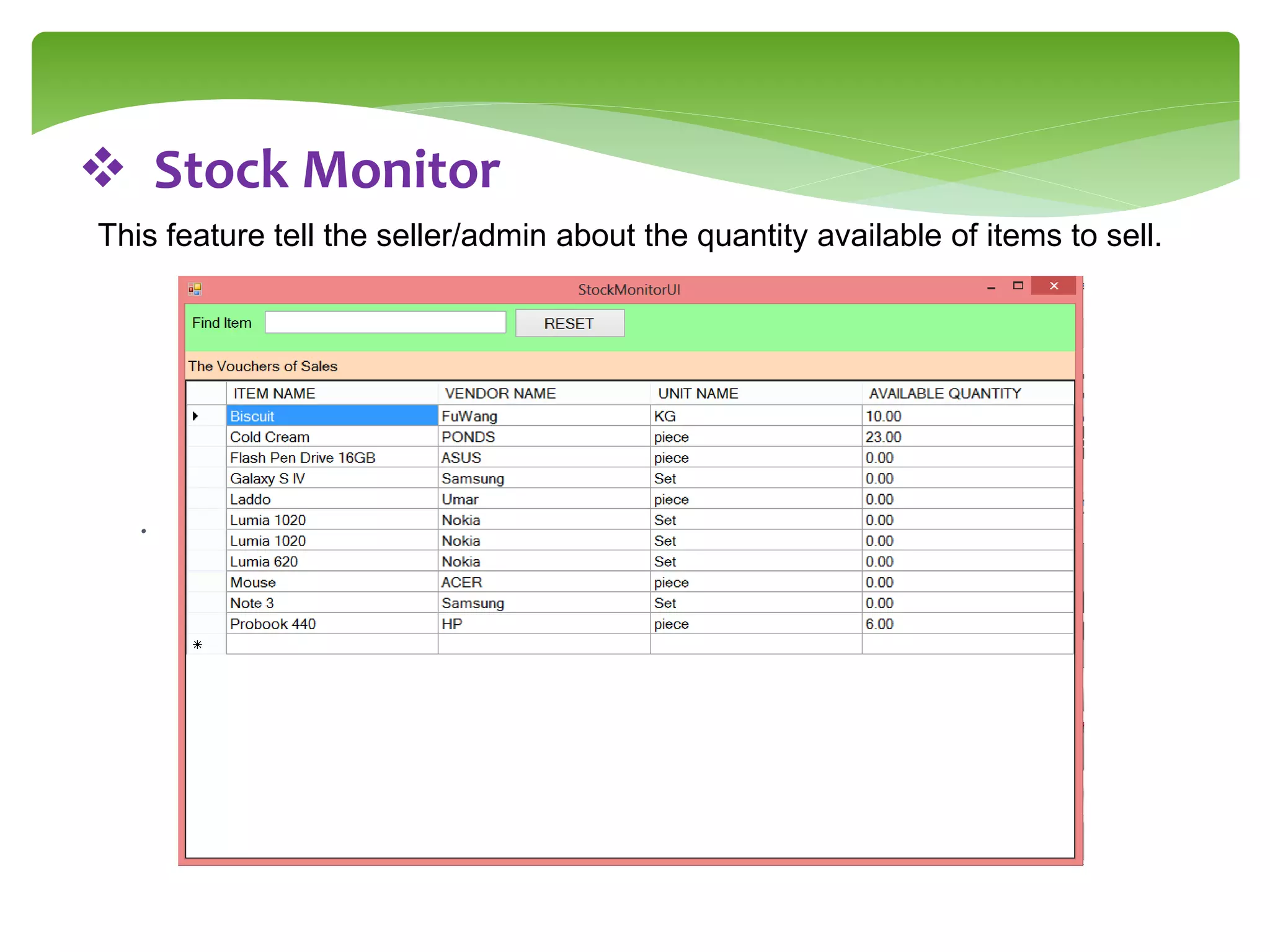
 Stock Monitor
This feature tell the seller/admin about the quantity available of items to sell.
.
 Sell Items
This window is used to sell items.
It has seller name automatically taken from the login information.
When selecting item for selling, its corresponding data ie, unit,
Available quantity to sell, Selling price has been displayed.
The ADD button add the item to the selling items list. The delete
can remove it.
Total cost show the total cost of the items.
.
 Sell Items
.
 Generating Invoice
.
 Payment Area
Here, Seller receive money from the Buyer of the products.
The cost will be showed automatically.
‘PAY HERE’ confirms the payment and Save database to
be commit .
‘UNDO SALE’ will rollback the database, and the status of
The software.
.
 Payment Area
.
 LAST SALE INFORMATION
This option shows the Last Sale Information.
• Amount
• Seller Name
• Item Types
• Payment Status
• Voucher No.
• Time
.
 LAST SALE INFORMATION
.
 LAST SALE INFORMATION
If the seller click on the ‘PAY HERE’ Button, The ‘Payment Status’
Is updated to ‘YES’.
IF click on ‘UNDO SALE’ , the LAST SALE INFORMATION shows
previous status.
.
 LAST SALE INFORMATION
PAY HERE
UNDO SALE
.
 STATUS BAR
.
 SEARCH SALE HISTORY
It will show the previous sale information with voucher.
The list of items sold in the voucher is also will be displayed,
When click on the row of the first window
.
 SEARCH SALE HISTORY
.
 Summary Tab of selling
It will show all such information :
• Total consumer in a day
• Total Selling Amount
• Maximum Sold Item & it’s amount
• Most Item Seller & Transaction
.
 Easy Access Button
.
 Easy LOGIN/LOGOUT option
There is easy option to login and logout in Main window.
It requires no restart of the software
.
 IMPORTANT MESSAGES
This option will show messages like headlines about the stock.
.
 TIMER LABEL
This Label shows Current Date & Time like Digital Watch.
Throughout the entire project we have learned:
 Programming skill, system
design skill, and Software Development Model.
 How Create a Software Combining small programs
Experience
In future, our aim to develop it for maintain a shopping
market in actual field and extends the system with
Credit Card and Laser Product Detection System
Future plan
 This software is successfully done to maintain a
shop’s transaction.
 The project is completed that follow the Incremental
Model.
Conclusion
books.google.com
Pro C# 5.0 and the .NET 4.5 Framework
by Andrew Troelsen
Stackoverflow.com
Tutorialspoint.com
Reference
Shop management system

Shop management system

  • 1.
    A project on ‘Shop Management System ’ Tanjarul Islam Mishu [@tanjarul26] Dept. of CSE J.K.K.N.I.U
  • 2.
    Introduction Languages & Tools Features. OverviewOf Project. Schema Diagram Software Model Physical description Experience Future plan Conclusion Roadmap
  • 3.
     By usingthis software, A shop owner can store and sell his/her product to/from the shop. The software will handle the procedure needs to store, sell, profit loss calculation, store records of sale and store of products. Objective :  To maintain a shop’s transaction in Computerized System.  To give a shop owner a better facility.  To analysis several part of business.  To inform the owner about the storage of product. Introduction
  • 4.
     C#.NET  SQL SQL Server 2012  Visual Studio 2012  SQL Server Management Studio  Crystal Report Languages & Tools
  • 5.
     Login Facility[Starting the software] • Admin Login • Seller Login  Login & Logout Facility [Main Window] • Admin Login • Seller Login • Display the logged username • A logout Button Features
  • 6.
     Selling Items Undo Last Selling/Transaction  Search Sale History  Showing Important Messages  Showing Software’s Current Status  A Timer Features
  • 7.
     Summary Tabof selling • Total consumer in a day • Total Selling Amount • Maximum Sold Item & it’s amount • Most Item Seller & Transaction  Managing Vendors  Managing Items  Managing Seller Information Features
  • 8.
     Purchasing Items Stock Monitor of Items  Warning List Monitor  Manage Warning List  Daily Status Checker  Monthly Status Checker Features
  • 9.
    Overview Shop Management System Admin /Seller Admin Only Manage Vendor Manage Unit Manage Item Manage Warning List Sell Items Search Sale Stock Monitor Payment Undo Sale Daily Status Checker Monthly Status CheckerGenerate Invoice
  • 10.
  • 11.
    Software Model The methodology,we used to develop this system is Incremental Model. The Development of Project is included system planning requirement analysis, system design, programming, system testing and evaluation of the project in weekly basis.
  • 12.
  • 13.
    .  First LoginWindow Enter Username And Password. If wrong value is entered, it shows error message. Otherwise, it runs the Main Window.
  • 14.
    .  First LoginWindow If a Seller tries to login as admin, It suggests to login as seller.
  • 15.
    .  Main Window AfterSuccessful Login, The Main Window will be shown
  • 16.
    .  Managing Vendors Firstwork of admin is to add, delete or modify Vendors of items.
  • 17.
    .  Managing Vendors Inthis window, admin can add new vendor, modify existing vendors information and can delete if need. Search Field helps to find the vendors easily.
  • 18.
    .  Managing Items Inthis window, admin can add new item, modify existing item’s information and can delete if need. Search Field helps to find the items easily.
  • 19.
    .  Managing Items Italso shows last inserted inserted Item.
  • 20.
    .  Managing Sellers Inthis window, admin can add new seller, modify existing seller’s information and can delete if need. Search Field helps to find the seller easily.
  • 21.
    .  Managing Unit Inthis window, admin can add new unit of Item, modify existing unit information and can delete if need. Search Field helps to find the unit.
  • 22.
     Managing WarningList In this window, admin can set information about the storage capacity to generate messages for each product.
  • 23.
    .  Purchasing Items Inthis window, admin can purchase new items for shop. Just select the item and Quantity of it.
  • 24.
    .  Stock Monitor Thisfeature tell the seller/admin about the quantity available of items to sell.
  • 25.
    .  Sell Items Thiswindow is used to sell items. It has seller name automatically taken from the login information. When selecting item for selling, its corresponding data ie, unit, Available quantity to sell, Selling price has been displayed. The ADD button add the item to the selling items list. The delete can remove it. Total cost show the total cost of the items.
  • 26.
  • 27.
  • 28.
    .  Payment Area Here,Seller receive money from the Buyer of the products. The cost will be showed automatically. ‘PAY HERE’ confirms the payment and Save database to be commit . ‘UNDO SALE’ will rollback the database, and the status of The software.
  • 29.
  • 30.
    .  LAST SALEINFORMATION This option shows the Last Sale Information. • Amount • Seller Name • Item Types • Payment Status • Voucher No. • Time
  • 31.
    .  LAST SALEINFORMATION
  • 32.
    .  LAST SALEINFORMATION If the seller click on the ‘PAY HERE’ Button, The ‘Payment Status’ Is updated to ‘YES’. IF click on ‘UNDO SALE’ , the LAST SALE INFORMATION shows previous status.
  • 33.
    .  LAST SALEINFORMATION PAY HERE UNDO SALE
  • 34.
  • 35.
    .  SEARCH SALEHISTORY It will show the previous sale information with voucher. The list of items sold in the voucher is also will be displayed, When click on the row of the first window
  • 36.
  • 37.
    .  Summary Tabof selling It will show all such information : • Total consumer in a day • Total Selling Amount • Maximum Sold Item & it’s amount • Most Item Seller & Transaction
  • 38.
  • 39.
    .  Easy LOGIN/LOGOUToption There is easy option to login and logout in Main window. It requires no restart of the software
  • 40.
    .  IMPORTANT MESSAGES Thisoption will show messages like headlines about the stock.
  • 41.
    .  TIMER LABEL ThisLabel shows Current Date & Time like Digital Watch.
  • 42.
    Throughout the entireproject we have learned:  Programming skill, system design skill, and Software Development Model.  How Create a Software Combining small programs Experience
  • 43.
    In future, ouraim to develop it for maintain a shopping market in actual field and extends the system with Credit Card and Laser Product Detection System Future plan
  • 44.
     This softwareis successfully done to maintain a shop’s transaction.  The project is completed that follow the Incremental Model. Conclusion
  • 45.
    books.google.com Pro C# 5.0and the .NET 4.5 Framework by Andrew Troelsen Stackoverflow.com Tutorialspoint.com Reference