Introduction to Android
     Development
WHO WE ARE

Eugeniu Arbuleac                          Andrei Catinean
@arbuleac                                             @electryc
arbuleac.ev@gmail.com                andrei.catinean@gmail.com
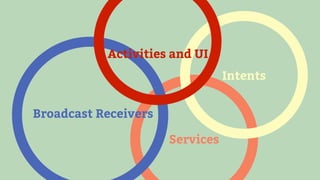
Activities and UI
                                 Intents


Broadcast Receivers

                      Services
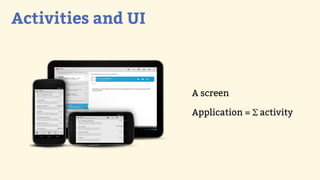
Activities and UI
Activities and UI


                    A screen

                    Application = Σ activity
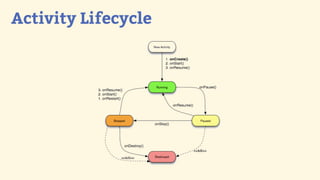
Activity Lifecycle
Activity Lifecycle


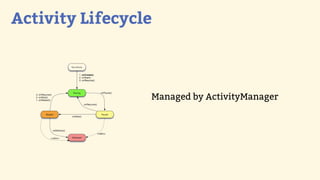
                 Managed by ActivityManager
Activity Lifecycle


         $

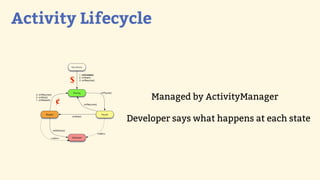
     ¢             Managed by ActivityManager

              Developer says what happens at each state
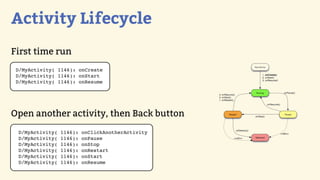
Activity Lifecycle
First time run
 D/MyActivity( 1146): onCreate
 D/MyActivity( 1146): onStart
 D/MyActivity( 1146): onResume


Open another activity, then Back button
 D/MyActivity(   1146):   onClickAnotherActivity
 D/MyActivity(   1146):   onPause
 D/MyActivity(   1146):   onStop
 D/MyActivity(   1146):   onRestart
 D/MyActivity(   1146):   onStart
 D/MyActivity(   1146):   onResume
Activity Lifecycle
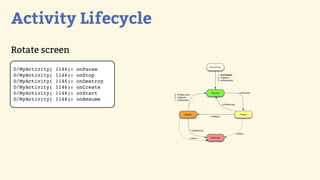
Rotate screen
D/MyActivity(   1146):   onPause
D/MyActivity(   1146):   onStop
D/MyActivity(   1146):   onDestroy
D/MyActivity(   1146):   onCreate
D/MyActivity(   1146):   onStart
D/MyActivity(   1146):   onResume
Activity Lifecycle
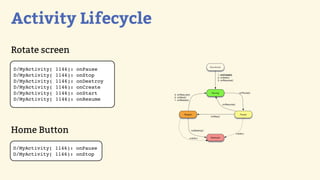
Rotate screen
D/MyActivity(   1146):   onPause
D/MyActivity(   1146):   onStop
D/MyActivity(   1146):   onDestroy
D/MyActivity(   1146):   onCreate
D/MyActivity(   1146):   onStart
D/MyActivity(   1146):   onResume


Home Button
D/MyActivity( 1146): onPause
D/MyActivity( 1146): onStop
Activity Lifecycle
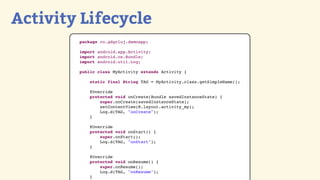
        package ro.gdgcluj.demoapp;

        import android.app.Activity;
        import android.os.Bundle;
        import android.util.Log;

        public class MyActivity extends Activity {

            static final String TAG = MyActivity.class.getSimpleName();

            @Override
            protected void onCreate(Bundle savedInstanceState) {
                super.onCreate(savedInstanceState);
                setContentView(R.layout.activity_my);
                Log.d(TAG, "onCreate");
            }

            @Override
            protected void onStart() {
                super.onStart();
                Log.d(TAG, "onStart");
            }

            @Override
            protected void onResume() {
                super.onResume();
                Log.d(TAG, "onResume");
            }
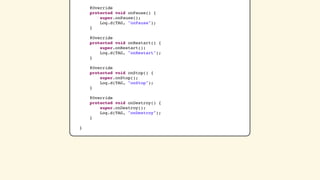
@Override
    protected void onPause() {
        super.onPause();
        Log.d(TAG, "onPause");
    }

    @Override
    protected void onRestart() {
        super.onRestart();
        Log.d(TAG, "onRestart");
    }

    @Override
    protected void onStop() {
        super.onStop();
        Log.d(TAG, "onStop");
    }

    @Override
    protected void onDestroy() {
        super.onDestroy();
        Log.d(TAG, "onDestroy");
    }

}
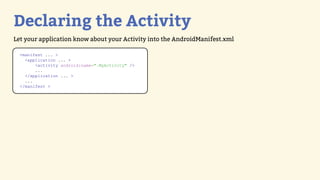
Declaring the Activity
Let your application know about your Activity into the AndroidManifest.xml

  <manifest ... >
    <application ... >
        <activity android:name=".MyActivity" />
        ...
    </application ... >
    ...
  </manifest >
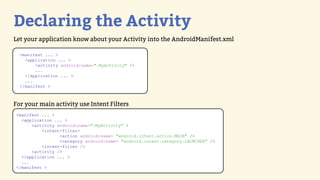
Declaring the Activity
Let your application know about your Activity into the AndroidManifest.xml

  <manifest ... >
    <application ... >
        <activity android:name=".MyActivity" />
        ...
    </application ... >
    ...
  </manifest >


For your main activity use Intent Filters
<manifest ... >
  <application ... >
      <activity android:name=".MyActivity" >
          <intent-filter>
                 <action android:name= "android.intent.action.MAIN" />
                 <category android:name= "android.intent.category.LAUNCHER" />
          <intent-filter />
      <activity />
  </application ... >
  ...
</manifest >
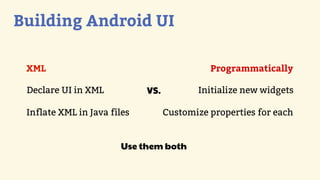
Building Android UI

 XML

 Declare UI in XML

 Inflate XML in Java files
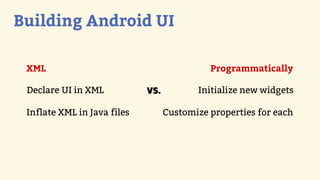
Building Android UI

 XML                                         Programmatically

 Declare UI in XML           VS.          Initialize new widgets

 Inflate XML in Java files         Customize properties for each
Building Android UI

 XML                                         Programmatically

 Declare UI in XML           VS.          Initialize new widgets

 Inflate XML in Java files         Customize properties for each


                       Use them both
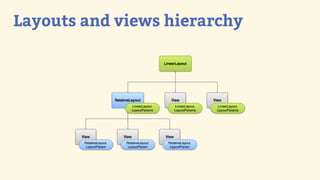
Layouts and views hierarchy
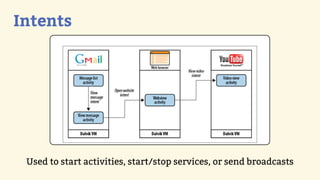
Intents
Intents


 Used to start activities, start/stop services, or send broadcasts
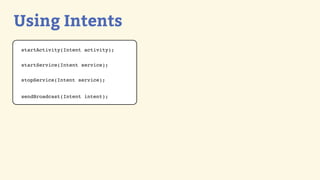
Using Intents
startActivity(Intent activity);


startService(Intent service);


stopService(Intent service);


sendBroadcast(Intent intent);
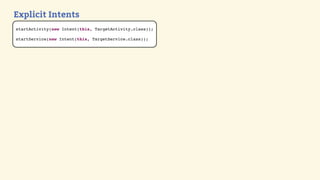
Explicit Intents
startActivity(new Intent(this, TargetActivity.class));

startService(new Intent(this, TargetService.class));
Explicit Intents
startActivity(new Intent(this, TargetActivity.class));

startService(new Intent(this, TargetService.class));


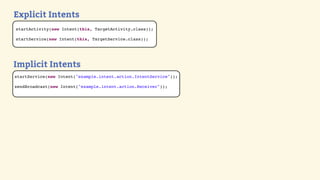
Implicit Intents
startService(new Intent("example.intent.action.IntentService"));

sendBroadcast(new Intent("example.intent.action.Receiver"));
Explicit Intents
startActivity(new Intent(this, TargetActivity.class));

startService(new Intent(this, TargetService.class));


Implicit Intents
startService(new Intent("example.intent.action.IntentService"));

sendBroadcast(new Intent("example.intent.action.Receiver"));


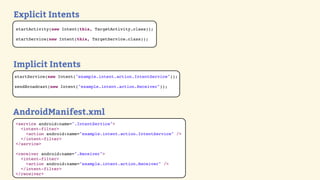
AndroidManifest.xml
<service android:name=".IntentService">
  <intent-filter>
    <action android:name="example.intent.action.IntentService" />
  </intent-filter>
</service>

<receiver android:name=".Receiver">
  <intent-filter>
    <action android:name="example.intent.action.Receiver" />
  </intent-filter>
</receiver>
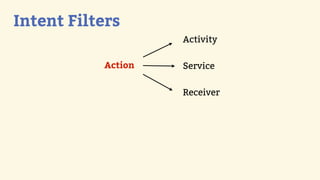
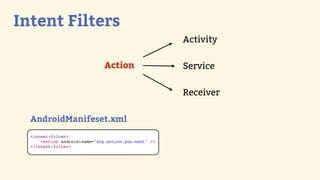
Intent Filters
                    Activity

           Action   Service

                    Receiver
Intent Filters
                                                      Activity

                               Action                 Service

                                                      Receiver

  AndroidManifeset.xml
  <intent-filter>
      <action android:name="any.action.you.want" />
  </intent-filter>
Services
Services

  Run in background

  Don’t have UI

  Run on the UI thread
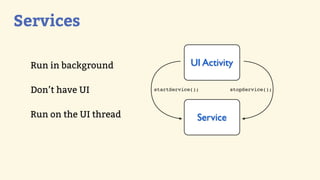
Services

  Run in background                  UI Activity

  Don’t have UI          startService();         stopService();


  Run on the UI thread                 Service
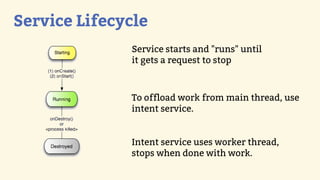
Service Lifecycle
              Service starts and "runs" until
              it gets a request to stop


              To offload work from main thread, use
              intent service.


              Intent service uses worker thread,
              stops when done with work.
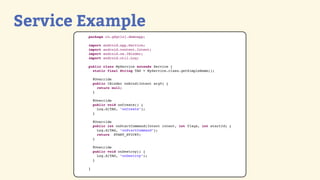
Service Example
        package ro.gdgcluj.demoapp;

        import   android.app.Service;
        import   android.content.Intent;
        import   android.os.IBinder;
        import   android.util.Log;

        public class MyService extends Service {
          static final String TAG = MyService.class.getSimpleName();

            @Override
            public IBinder onBind(Intent arg0) {
              return null;
            }

            @Override
            public void onCreate() {
              Log.d(TAG, "onCreate");
            }

            @Override
            public int onStartCommand(Intent intent, int flags, int startId) {
              Log.d(TAG, "onStartCommand");
              return START_STICKY;
            }

            @Override
            public void onDestroy() {
              Log.d(TAG, "onDestroy");
            }

        }
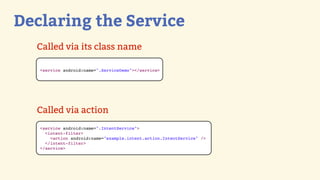
Declaring the Service
  Called via its class name

   <service android:name=".ServiceDemo"></service>


  Called via action
   <service android:name=".IntentService">
     <intent-filter>
       <action android:name="example.intent.action.IntentService" />
     </intent-filter>
   </service>
Broadcast Receivers
Broadcast Receivers
   Intent based publish-subscribe mechanism

   Listening system events: incoming calls, SMS messages a.o.
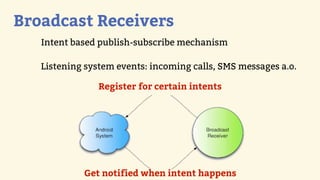
Broadcast Receivers
   Intent based publish-subscribe mechanism

   Listening system events: incoming calls, SMS messages a.o.

                Register for certain intents


            Get notified when intent happens
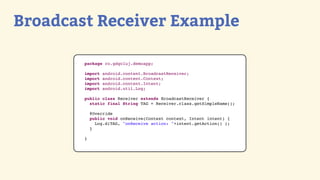
Broadcast Receiver Example

        package ro.gdgcluj.demoapp;

        import   android.content.BroadcastReceiver;
        import   android.content.Context;
        import   android.content.Intent;
        import   android.util.Log;

        public class Receiver extends BroadcastReceiver {
          static final String TAG = Receiver.class.getSimpleName();

            @Override
            public void onReceive(Context context, Intent intent) {
              Log.d(TAG, "onReceive action: "+intent.getAction() );
            }

        }
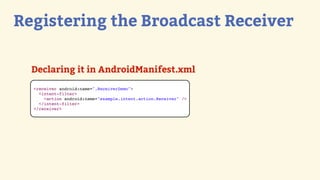
Registering the Broadcast Receiver

  Declaring it in AndroidManifest.xml
  <receiver android:name=".ReceiverDemo">
    <intent-filter>
      <action android:name="example.intent.action.Receiver" />
    </intent-filter>
  </receiver>
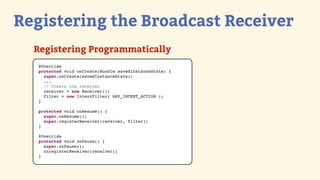
Registering the Broadcast Receiver
  Registering Programmatically
   @Override
   protected void onCreate(Bundle savedInstanceState) {
     super.onCreate(savedInstanceState);
     ...
     // Create the receiver
     receiver = new Receiver();
     filter = new IntentFilter( ANY_INTENT_ACTION );
   }

   protected void onResume() {
     super.onResume();
     super.registerReceiver(receiver, filter);
   }

   @Override
   protected void onPause() {
     super.onPause();
     unregisterReceiver(receiver);
   }
That’s all!

Questions
THANK YOU

Eugeniu Arbuleac                         Andrei Catinean
@arbuleac                                            @electryc
arbuleac.ev@gmail.com               andrei.catinean@gmail.com

Introduction toandroid

  • 1.
  • 2.
    WHO WE ARE EugeniuArbuleac Andrei Catinean @arbuleac @electryc arbuleac.ev@gmail.com andrei.catinean@gmail.com
  • 3.
    Activities and UI Intents Broadcast Receivers Services
  • 4.
  • 5.
    Activities and UI A screen Application = Σ activity
  • 6.
  • 7.
    Activity Lifecycle Managed by ActivityManager
  • 8.
    Activity Lifecycle $ ¢ Managed by ActivityManager Developer says what happens at each state
  • 9.
    Activity Lifecycle First timerun D/MyActivity( 1146): onCreate D/MyActivity( 1146): onStart D/MyActivity( 1146): onResume Open another activity, then Back button D/MyActivity( 1146): onClickAnotherActivity D/MyActivity( 1146): onPause D/MyActivity( 1146): onStop D/MyActivity( 1146): onRestart D/MyActivity( 1146): onStart D/MyActivity( 1146): onResume
  • 10.
    Activity Lifecycle Rotate screen D/MyActivity( 1146): onPause D/MyActivity( 1146): onStop D/MyActivity( 1146): onDestroy D/MyActivity( 1146): onCreate D/MyActivity( 1146): onStart D/MyActivity( 1146): onResume
  • 11.
    Activity Lifecycle Rotate screen D/MyActivity( 1146): onPause D/MyActivity( 1146): onStop D/MyActivity( 1146): onDestroy D/MyActivity( 1146): onCreate D/MyActivity( 1146): onStart D/MyActivity( 1146): onResume Home Button D/MyActivity( 1146): onPause D/MyActivity( 1146): onStop
  • 12.
    Activity Lifecycle package ro.gdgcluj.demoapp; import android.app.Activity; import android.os.Bundle; import android.util.Log; public class MyActivity extends Activity { static final String TAG = MyActivity.class.getSimpleName(); @Override protected void onCreate(Bundle savedInstanceState) { super.onCreate(savedInstanceState); setContentView(R.layout.activity_my); Log.d(TAG, "onCreate"); } @Override protected void onStart() { super.onStart(); Log.d(TAG, "onStart"); } @Override protected void onResume() { super.onResume(); Log.d(TAG, "onResume"); }
  • 13.
    @Override protected void onPause() { super.onPause(); Log.d(TAG, "onPause"); } @Override protected void onRestart() { super.onRestart(); Log.d(TAG, "onRestart"); } @Override protected void onStop() { super.onStop(); Log.d(TAG, "onStop"); } @Override protected void onDestroy() { super.onDestroy(); Log.d(TAG, "onDestroy"); } }
  • 14.
    Declaring the Activity Letyour application know about your Activity into the AndroidManifest.xml <manifest ... > <application ... > <activity android:name=".MyActivity" /> ... </application ... > ... </manifest >
  • 15.
    Declaring the Activity Letyour application know about your Activity into the AndroidManifest.xml <manifest ... > <application ... > <activity android:name=".MyActivity" /> ... </application ... > ... </manifest > For your main activity use Intent Filters <manifest ... > <application ... > <activity android:name=".MyActivity" > <intent-filter> <action android:name= "android.intent.action.MAIN" /> <category android:name= "android.intent.category.LAUNCHER" /> <intent-filter /> <activity /> </application ... > ... </manifest >
  • 16.
    Building Android UI XML Declare UI in XML Inflate XML in Java files
  • 17.
    Building Android UI XML Programmatically Declare UI in XML VS. Initialize new widgets Inflate XML in Java files Customize properties for each
  • 18.
    Building Android UI XML Programmatically Declare UI in XML VS. Initialize new widgets Inflate XML in Java files Customize properties for each Use them both
  • 19.
  • 20.
  • 21.
    Intents Used tostart activities, start/stop services, or send broadcasts
  • 22.
    Using Intents startActivity(Intent activity); startService(Intentservice); stopService(Intent service); sendBroadcast(Intent intent);
  • 23.
    Explicit Intents startActivity(new Intent(this,TargetActivity.class)); startService(new Intent(this, TargetService.class));
  • 24.
    Explicit Intents startActivity(new Intent(this,TargetActivity.class)); startService(new Intent(this, TargetService.class)); Implicit Intents startService(new Intent("example.intent.action.IntentService")); sendBroadcast(new Intent("example.intent.action.Receiver"));
  • 25.
    Explicit Intents startActivity(new Intent(this,TargetActivity.class)); startService(new Intent(this, TargetService.class)); Implicit Intents startService(new Intent("example.intent.action.IntentService")); sendBroadcast(new Intent("example.intent.action.Receiver")); AndroidManifest.xml <service android:name=".IntentService"> <intent-filter> <action android:name="example.intent.action.IntentService" /> </intent-filter> </service> <receiver android:name=".Receiver"> <intent-filter> <action android:name="example.intent.action.Receiver" /> </intent-filter> </receiver>
  • 26.
    Intent Filters Activity Action Service Receiver
  • 27.
    Intent Filters Activity Action Service Receiver AndroidManifeset.xml <intent-filter> <action android:name="any.action.you.want" /> </intent-filter>
  • 28.
  • 29.
    Services Runin background Don’t have UI Run on the UI thread
  • 30.
    Services Runin background UI Activity Don’t have UI startService(); stopService(); Run on the UI thread Service
  • 31.
    Service Lifecycle Service starts and "runs" until it gets a request to stop To offload work from main thread, use intent service. Intent service uses worker thread, stops when done with work.
  • 32.
    Service Example package ro.gdgcluj.demoapp; import android.app.Service; import android.content.Intent; import android.os.IBinder; import android.util.Log; public class MyService extends Service { static final String TAG = MyService.class.getSimpleName(); @Override public IBinder onBind(Intent arg0) { return null; } @Override public void onCreate() { Log.d(TAG, "onCreate"); } @Override public int onStartCommand(Intent intent, int flags, int startId) { Log.d(TAG, "onStartCommand"); return START_STICKY; } @Override public void onDestroy() { Log.d(TAG, "onDestroy"); } }
  • 33.
    Declaring the Service Called via its class name <service android:name=".ServiceDemo"></service> Called via action <service android:name=".IntentService"> <intent-filter> <action android:name="example.intent.action.IntentService" /> </intent-filter> </service>
  • 34.
  • 35.
    Broadcast Receivers Intent based publish-subscribe mechanism Listening system events: incoming calls, SMS messages a.o.
  • 36.
    Broadcast Receivers Intent based publish-subscribe mechanism Listening system events: incoming calls, SMS messages a.o. Register for certain intents Get notified when intent happens
  • 37.
    Broadcast Receiver Example package ro.gdgcluj.demoapp; import android.content.BroadcastReceiver; import android.content.Context; import android.content.Intent; import android.util.Log; public class Receiver extends BroadcastReceiver { static final String TAG = Receiver.class.getSimpleName(); @Override public void onReceive(Context context, Intent intent) { Log.d(TAG, "onReceive action: "+intent.getAction() ); } }
  • 38.
    Registering the BroadcastReceiver Declaring it in AndroidManifest.xml <receiver android:name=".ReceiverDemo"> <intent-filter> <action android:name="example.intent.action.Receiver" /> </intent-filter> </receiver>
  • 39.
    Registering the BroadcastReceiver Registering Programmatically @Override protected void onCreate(Bundle savedInstanceState) { super.onCreate(savedInstanceState); ... // Create the receiver receiver = new Receiver(); filter = new IntentFilter( ANY_INTENT_ACTION ); } protected void onResume() { super.onResume(); super.registerReceiver(receiver, filter); } @Override protected void onPause() { super.onPause(); unregisterReceiver(receiver); }
  • 40.
  • 41.
    THANK YOU Eugeniu Arbuleac Andrei Catinean @arbuleac @electryc arbuleac.ev@gmail.com andrei.catinean@gmail.com