State Management
in Android Applications
Gabor Varadi
@zhuinden
What is the problem, and why are we
solving it?
Core App Quality Guidelines
From https://developer.android.com/docs/quality-guidelines/core-app-quality#fn
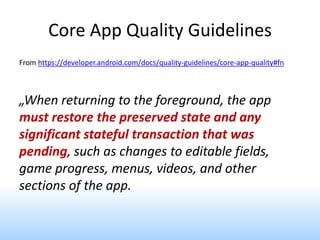
„When returning to the foreground, the app
must restore the preserved state and any
significant stateful transaction that was
pending, such as changes to editable fields,
game progress, menus, videos, and other
sections of the app.
How to induce process death?
• Step 1: put app in background with HOME
• Step 2: press „Terminate application”
• Step 3: restart app from launcher
For apps you don’t own
https://play.google.com/store/apps/details?id=me.empirical.android.application.fillme
mory&hl=en
Common mistakes
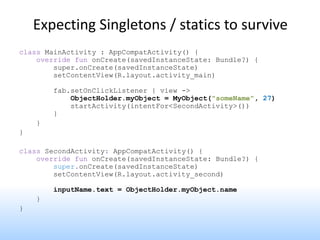
Expecting Singletons / statics to survive
class MainActivity : AppCompatActivity() {
override fun onCreate(savedInstanceState: Bundle?) {
super.onCreate(savedInstanceState)
setContentView(R.layout.activity_main)
fab.setOnClickListener { view ->
ObjectHolder.myObject = MyObject("someName", 27)
startActivity(intentFor<SecondActivity>())
}
}
}
class SecondActivity: AppCompatActivity() {
override fun onCreate(savedInstanceState: Bundle?) {
super.onCreate(savedInstanceState)
setContentView(R.layout.activity_second)
inputName.text = ObjectHolder.myObject.name
}
}
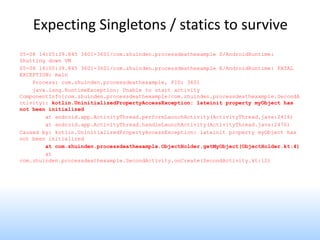
05-08 14:05:39.845 3601-3601/com.zhuinden.processdeathexample D/AndroidRuntime:
Shutting down VM
05-08 14:05:39.845 3601-3601/com.zhuinden.processdeathexample E/AndroidRuntime: FATAL
EXCEPTION: main
Process: com.zhuinden.processdeathexample, PID: 3601
java.lang.RuntimeException: Unable to start activity
ComponentInfo{com.zhuinden.processdeathexample/com.zhuinden.processdeathexample.SecondA
ctivity}: kotlin.UninitializedPropertyAccessException: lateinit property myObject has
not been initialized
at android.app.ActivityThread.performLaunchActivity(ActivityThread.java:2416)
at android.app.ActivityThread.handleLaunchActivity(ActivityThread.java:2476)
Caused by: kotlin.UninitializedPropertyAccessException: lateinit property myObject has
not been initialized
at com.zhuinden.processdeathexample.ObjectHolder.getMyObject(ObjectHolder.kt:4)
at
com.zhuinden.processdeathexample.SecondActivity.onCreate(SecondActivity.kt:12)
Expecting Singletons / statics to survive
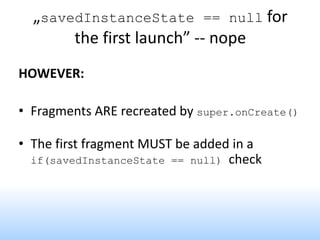
„savedInstanceState == null for
the first launch”?
override fun onCreate(savedInstanceState: Bundle?) {
super.onCreate(savedInstanceState);
// „don’t refetch data after rotation”
if (savedInstanceState == null) {
loadData();
}
// ...
}
„savedInstanceState == null for
the first launch”-- nope
„savedInstanceState == null for
the first launch”-- nope
„savedInstanceState == null for
the first launch” -- nope
HOWEVER:
• Fragments ARE recreated by super.onCreate()
• The first fragment MUST be added in a
if(savedInstanceState == null) check
FragmentPagerAdapter.getItem()?
private fun initFragment() {
homeFragment = HomeScreenFragment.newInstance()
incidentFragment = IncidentFragment.newInstance()
weatherFragment = WeatherFragment.newInstance()
val fm = supportFragmentManager
viewPager.adapter = object: FragmentPagerAdapter(fm) {
override fun getItem(position: Int): Fragment =
when (position) {
0 -> homeFragment
1 -> incidentFragment
2 -> weatherFragment
}
}
}
Should probably be „createFragment”
Process: XXXXXX, PID: 3192 kotlin.UninitializedPropertyAccessException:
lateinit property has not been initialized
at xxx.ui.IncidentScreenFragment.showData(IncidentScreenFragment.kt:78)
at xxx.ui.home.HomeActivity.filterData(HomeActivity.kt:110)
Should probably be „createFragment”
Fixed version:
viewPager.adapter = object: FragmentPagerAdapter(fm) {
override fun getItem(position: Int): Fragment =
when (position) {
0 -> HomeFragment.newInstance()
1 -> IncidentFragment.newInstance()
2 -> WeatherFragment.newInstance()
}
}
Don’t trust savedInstanceState after
Fragment.onCreate
• The savedInstanceState inside
onCreateView and after can be out of date
• onSaveInstanceState to Bundle is not called
when a Fragment is detach()/attach()ed
Will Jetpack help me?
Jetpack: Saving UI states
What needs to be persisted?
• Navigation state is already managed by the
system on Android out of the box*
– Empty ctor + using intent extras / fragment arguments
• Screen state is partially managed by the system
– Views with IDs have their state persisted
– Complex state (f.ex. RecyclerView selection) are not
persisted automatically
– Dynamically added views should be recreatable
Example for saving/restoring state
override fun onCreate(savedInstanceState: Bundle?) {
super.onCreate(savedInstanceState)
if (savedInstanceState != null) {
selectedSportId = savedInstanceState.getLong("selectedSportId")
selectedPosition = savedInstanceState.getInt("selectedPosition")
selectedTags.clear()
selectedTags.addAll(
savedInstanceState.getStringArrayList("selectedTags"))
}
}
override fun onSaveInstanceState(outState: Bundle) {
super.onSaveInstanceState(outState)
outState.putLong("selectedSportId", selectedSportId)
outState.putInt("selectedPosition", selectedPosition)
outState.putStringArrayList("selectedTags", ArrayList(selectedTags))
}
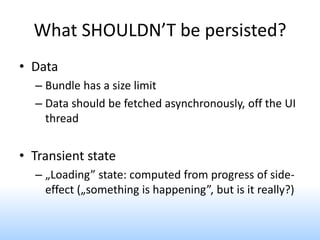
What SHOULDN’T be persisted?
• Data
– Bundle has a size limit
– Data should be fetched asynchronously, off the UI
thread
• Transient state
– „Loading” state: computed from progress of side-
effect („something is happening”, but is it really?)
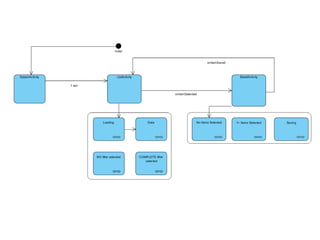
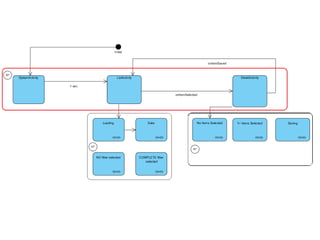
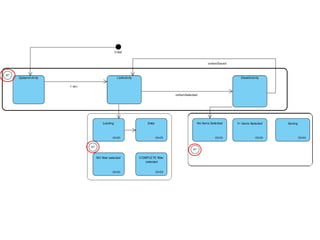
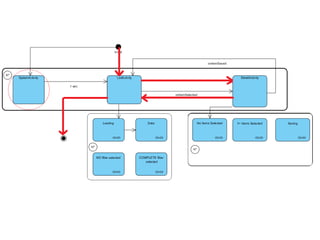
Single object state?
Single object state!
@Parcelize
data class PersonViewState(
// loading should come from elsewhere
val personFilter: String = "",
val unhandledError: ErrorType? = null // enum or sealed class
): Parcelable
...but is this really necessary?
Loading data
• Asynchronous loading should either begin on
initialization, or when observed
• Jetpack: store LiveData inside ViewModel, and expose
it to observers – fetch begins when observed
• Data can be loaded via a Transformation chain from a
MutableLiveData that stores the state – changes trigger
new data load
• Note: LiveData is analogous with BehaviorRelay
Saving state of a ViewModel
class MainViewModel: ViewModel() {
private val _selectedPosition = MutableLiveData<Int>()
fun saveState(bundle: Bundle) {
bundle.putInt("selectedPosition", _selectedPosition.value)
}
fun restoreState(bundle: Bundle) {
_selectedPosition.value = bundle.getInt("selectedPosition")
}
}
class MainActivity : AppCompatActivity() {
private lateinit var viewModel: MainViewModel
override fun onCreate(savedInstanceState: Bundle?) {
super.onCreate(savedInstanceState)
setContentView(R.layout.activity_main)
viewModel = ViewModelProviders.of(this, object: ViewModelProvider.Factory {
override fun <T : ViewModel?> create(modelClass: Class<T>): T =
MainViewModel().let { viewModel ->
savedInstanceState?.getBundle("viewModelState")?.let { bundle ->
viewModel.restoreState(bundle)
}
} as T
}).get(MainViewModel::class.java)
...
}
override fun onSaveInstanceState(outState: Bundle) {
super.onSaveInstanceState(outState)
val viewModelState = Bundle().also { bundle ->
viewModel.saveState(bundle)
}
outState.putBundle("viewModelState", viewModelState)
}
}
Jetpack: SavedState
private val mainViewModel by viewModels { ... }
class MainViewModel(
private val sportDao: SportDao
private val handle: SavedStateHandle
): ViewModel() {
private val _selectedSportId = handle.getLiveData("selectedSportId")
private val _selectedPosition = handle.getLiveData("selectedPosition")
val sport = _selectedSportId.switchMap { sportDao.getSport(it) }
val selectedPosition: LiveData<Int>
get() = _selectedPosition
}
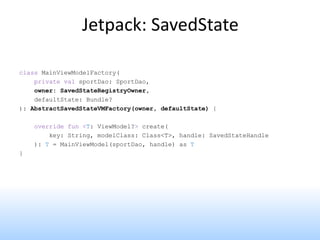
Jetpack: SavedState
class MainViewModelFactory(
private val sportDao: SportDao,
owner: SavedStateRegistryOwner,
defaultState: Bundle?
): AbstractSavedStateVMFactory(owner, defaultState) {
override fun <T: ViewModel?> create(
key: String, modelClass: Class<T>, handle: SavedStateHandle
): T = MainViewModel(sportDao, handle) as T
}
DEMO?
Talks to watch
Fred Porciúncula: A Dagger Journey
https://www.youtube.com/watch?v=9fn5s8_CYJI
Fun with LiveData (Android Dev Summit '18)
https://www.youtube.com/watch?v=2rO4r-JOQtA
Google I/O Day 2: What’s new in Architecture
Components
https://www.youtube.com/watch?v=Qxj2eBmXLHg&list=PLOU2XLYxms
ILVTiOlMJdo7RQS55jYhsMi&index=29
Thank you for your attention!
Q/A?

State management in android applications

  • 1.
    State Management in AndroidApplications Gabor Varadi @zhuinden
  • 2.
    What is theproblem, and why are we solving it?
  • 8.
    Core App QualityGuidelines From https://developer.android.com/docs/quality-guidelines/core-app-quality#fn „When returning to the foreground, the app must restore the preserved state and any significant stateful transaction that was pending, such as changes to editable fields, game progress, menus, videos, and other sections of the app.
  • 9.
    How to induceprocess death? • Step 1: put app in background with HOME • Step 2: press „Terminate application” • Step 3: restart app from launcher
  • 10.
    For apps youdon’t own https://play.google.com/store/apps/details?id=me.empirical.android.application.fillme mory&hl=en
  • 11.
  • 12.
    Expecting Singletons /statics to survive class MainActivity : AppCompatActivity() { override fun onCreate(savedInstanceState: Bundle?) { super.onCreate(savedInstanceState) setContentView(R.layout.activity_main) fab.setOnClickListener { view -> ObjectHolder.myObject = MyObject("someName", 27) startActivity(intentFor<SecondActivity>()) } } } class SecondActivity: AppCompatActivity() { override fun onCreate(savedInstanceState: Bundle?) { super.onCreate(savedInstanceState) setContentView(R.layout.activity_second) inputName.text = ObjectHolder.myObject.name } }
  • 13.
    05-08 14:05:39.845 3601-3601/com.zhuinden.processdeathexampleD/AndroidRuntime: Shutting down VM 05-08 14:05:39.845 3601-3601/com.zhuinden.processdeathexample E/AndroidRuntime: FATAL EXCEPTION: main Process: com.zhuinden.processdeathexample, PID: 3601 java.lang.RuntimeException: Unable to start activity ComponentInfo{com.zhuinden.processdeathexample/com.zhuinden.processdeathexample.SecondA ctivity}: kotlin.UninitializedPropertyAccessException: lateinit property myObject has not been initialized at android.app.ActivityThread.performLaunchActivity(ActivityThread.java:2416) at android.app.ActivityThread.handleLaunchActivity(ActivityThread.java:2476) Caused by: kotlin.UninitializedPropertyAccessException: lateinit property myObject has not been initialized at com.zhuinden.processdeathexample.ObjectHolder.getMyObject(ObjectHolder.kt:4) at com.zhuinden.processdeathexample.SecondActivity.onCreate(SecondActivity.kt:12) Expecting Singletons / statics to survive
  • 14.
    „savedInstanceState == nullfor the first launch”? override fun onCreate(savedInstanceState: Bundle?) { super.onCreate(savedInstanceState); // „don’t refetch data after rotation” if (savedInstanceState == null) { loadData(); } // ... }
  • 15.
    „savedInstanceState == nullfor the first launch”-- nope
  • 16.
    „savedInstanceState == nullfor the first launch”-- nope
  • 17.
    „savedInstanceState == nullfor the first launch” -- nope HOWEVER: • Fragments ARE recreated by super.onCreate() • The first fragment MUST be added in a if(savedInstanceState == null) check
  • 18.
    FragmentPagerAdapter.getItem()? private fun initFragment(){ homeFragment = HomeScreenFragment.newInstance() incidentFragment = IncidentFragment.newInstance() weatherFragment = WeatherFragment.newInstance() val fm = supportFragmentManager viewPager.adapter = object: FragmentPagerAdapter(fm) { override fun getItem(position: Int): Fragment = when (position) { 0 -> homeFragment 1 -> incidentFragment 2 -> weatherFragment } } }
  • 19.
    Should probably be„createFragment” Process: XXXXXX, PID: 3192 kotlin.UninitializedPropertyAccessException: lateinit property has not been initialized at xxx.ui.IncidentScreenFragment.showData(IncidentScreenFragment.kt:78) at xxx.ui.home.HomeActivity.filterData(HomeActivity.kt:110)
  • 20.
    Should probably be„createFragment” Fixed version: viewPager.adapter = object: FragmentPagerAdapter(fm) { override fun getItem(position: Int): Fragment = when (position) { 0 -> HomeFragment.newInstance() 1 -> IncidentFragment.newInstance() 2 -> WeatherFragment.newInstance() } }
  • 21.
    Don’t trust savedInstanceStateafter Fragment.onCreate • The savedInstanceState inside onCreateView and after can be out of date • onSaveInstanceState to Bundle is not called when a Fragment is detach()/attach()ed
  • 22.
  • 25.
  • 26.
    What needs tobe persisted? • Navigation state is already managed by the system on Android out of the box* – Empty ctor + using intent extras / fragment arguments • Screen state is partially managed by the system – Views with IDs have their state persisted – Complex state (f.ex. RecyclerView selection) are not persisted automatically – Dynamically added views should be recreatable
  • 27.
    Example for saving/restoringstate override fun onCreate(savedInstanceState: Bundle?) { super.onCreate(savedInstanceState) if (savedInstanceState != null) { selectedSportId = savedInstanceState.getLong("selectedSportId") selectedPosition = savedInstanceState.getInt("selectedPosition") selectedTags.clear() selectedTags.addAll( savedInstanceState.getStringArrayList("selectedTags")) } } override fun onSaveInstanceState(outState: Bundle) { super.onSaveInstanceState(outState) outState.putLong("selectedSportId", selectedSportId) outState.putInt("selectedPosition", selectedPosition) outState.putStringArrayList("selectedTags", ArrayList(selectedTags)) }
  • 28.
    What SHOULDN’T bepersisted? • Data – Bundle has a size limit – Data should be fetched asynchronously, off the UI thread • Transient state – „Loading” state: computed from progress of side- effect („something is happening”, but is it really?)
  • 29.
  • 30.
    Single object state! @Parcelize dataclass PersonViewState( // loading should come from elsewhere val personFilter: String = "", val unhandledError: ErrorType? = null // enum or sealed class ): Parcelable ...but is this really necessary?
  • 31.
    Loading data • Asynchronousloading should either begin on initialization, or when observed • Jetpack: store LiveData inside ViewModel, and expose it to observers – fetch begins when observed • Data can be loaded via a Transformation chain from a MutableLiveData that stores the state – changes trigger new data load • Note: LiveData is analogous with BehaviorRelay
  • 32.
    Saving state ofa ViewModel class MainViewModel: ViewModel() { private val _selectedPosition = MutableLiveData<Int>() fun saveState(bundle: Bundle) { bundle.putInt("selectedPosition", _selectedPosition.value) } fun restoreState(bundle: Bundle) { _selectedPosition.value = bundle.getInt("selectedPosition") } }
  • 33.
    class MainActivity :AppCompatActivity() { private lateinit var viewModel: MainViewModel override fun onCreate(savedInstanceState: Bundle?) { super.onCreate(savedInstanceState) setContentView(R.layout.activity_main) viewModel = ViewModelProviders.of(this, object: ViewModelProvider.Factory { override fun <T : ViewModel?> create(modelClass: Class<T>): T = MainViewModel().let { viewModel -> savedInstanceState?.getBundle("viewModelState")?.let { bundle -> viewModel.restoreState(bundle) } } as T }).get(MainViewModel::class.java) ... } override fun onSaveInstanceState(outState: Bundle) { super.onSaveInstanceState(outState) val viewModelState = Bundle().also { bundle -> viewModel.saveState(bundle) } outState.putBundle("viewModelState", viewModelState) } }
  • 34.
    Jetpack: SavedState private valmainViewModel by viewModels { ... } class MainViewModel( private val sportDao: SportDao private val handle: SavedStateHandle ): ViewModel() { private val _selectedSportId = handle.getLiveData("selectedSportId") private val _selectedPosition = handle.getLiveData("selectedPosition") val sport = _selectedSportId.switchMap { sportDao.getSport(it) } val selectedPosition: LiveData<Int> get() = _selectedPosition }
  • 35.
    Jetpack: SavedState class MainViewModelFactory( privateval sportDao: SportDao, owner: SavedStateRegistryOwner, defaultState: Bundle? ): AbstractSavedStateVMFactory(owner, defaultState) { override fun <T: ViewModel?> create( key: String, modelClass: Class<T>, handle: SavedStateHandle ): T = MainViewModel(sportDao, handle) as T }
  • 36.
  • 37.
    Talks to watch FredPorciúncula: A Dagger Journey https://www.youtube.com/watch?v=9fn5s8_CYJI Fun with LiveData (Android Dev Summit '18) https://www.youtube.com/watch?v=2rO4r-JOQtA Google I/O Day 2: What’s new in Architecture Components https://www.youtube.com/watch?v=Qxj2eBmXLHg&list=PLOU2XLYxms ILVTiOlMJdo7RQS55jYhsMi&index=29
  • 38.
    Thank you foryour attention! Q/A?