OSLL


Hello Android
         Vasily Romanikhin


                                     1
       vasily.romanikhin@gmail.com
                   
Table of content
●   About Android
●   Android Architecture
●   Application Fundamentals
       ●   Activity, Service,  ContentProvider, 
            BroadcastReceiver, Intent classes 
●   Application Resources
●   User Interface
●   Software for developing
●   Practice                      
                                                   2
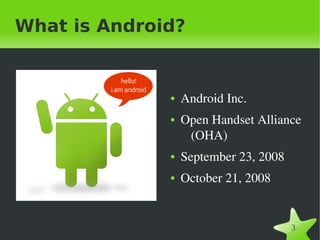
What is Android?


                 ●   Android Inc.
                 ●   Open Handset Alliance 
                      (OHA)
                 ●   September 23, 2008
                 ●   October 21, 2008


                                          3
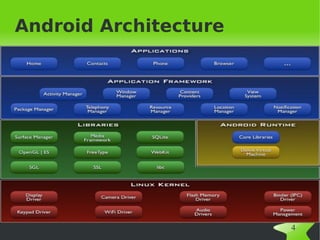
Android Architecture


                       4
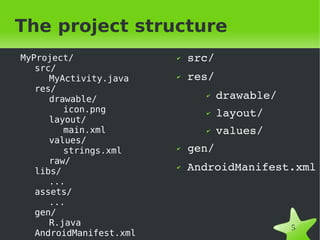
The project structure
MyProject/                   ✔   src/
   src/
      MyActivity.java        ✔   res/
   res/
      drawable/
                                   ✔    drawable/
         icon.png                  ✔    layout/
      layout/
         main.xml                  ✔    values/
      values/
         strings.xml         ✔   gen/
      raw/
   libs/
                             ✔   AndroidManifest.xml
      ...
   assets/
      ...
   gen/
      R.java                                        5
   AndroidManifest.xml    
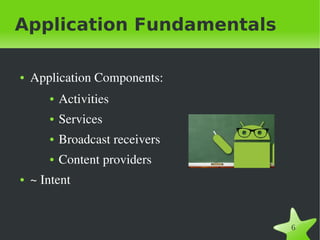
Application Fundamentals

●   Application Components:
       ●   Activities
       ●   Services
       ●   Broadcast receivers
       ●   Content providers
●   ~ Intent


                                   6
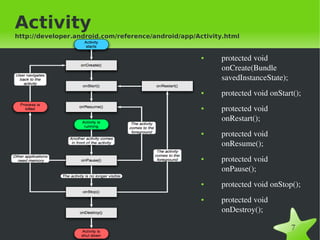
Activity
http://developer.android.com/reference/android/app/Activity.html


                                                     ●        protected void 
                                                              onCreate(Bundle 
                                                              savedInstanceState);
                                                     ●        protected void onStart();
                                                     ●        protected void 
                                                              onRestart();
                                                     ●        protected void 
                                                              onResume();
                                                     ●        protected void 
                                                              onPause();
                                                     ●        protected void onStop();
                                                     ●        protected void 
                                                              onDestroy();

                                          
                                                                                     7
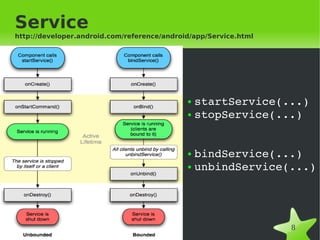
Service
http://developer.android.com/reference/android/app/Service.html


                                             ● startService(...)
                                             ● stopService(...)


                                             ● bindService(...)
                                             ● unbindService(...)


                                                                  8
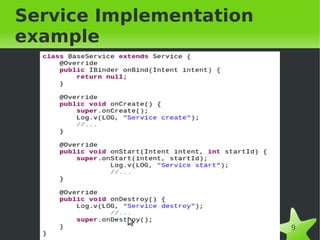
Service Implementation
example


                         9
BroadcastReceiver
http://developer.android.com/reference/android/content/BroadcastReceiver.ht
ml


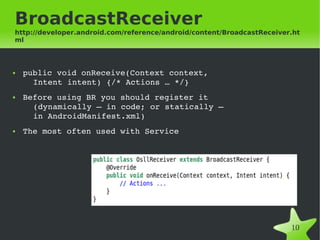
●   public void onReceive(Context context, 
      Intent intent) {/* Actions … */}
●   Before using BR you should register it 
      (dynamically – in code; or statically – 
      in AndroidManifest.xml)
●   The most often used with Service


                                                                        10
ContentProvider
http://developer.android.com/reference/android/content/ContentProvider.html


    The primary methods that need to be implemented are:
●   onCreate() which is called to initialize the provider
●   query(Uri, String[], String, String[], String) which returns data to the 
       caller
●   insert(Uri, ContentValues) which inserts new data into the content 
       provider
●   update(Uri, ContentValues, String, String[]) which updates existing data 
       in the content provider
●   delete(Uri, String, String[]) which deletes data from the content 
       provider


       ● Why is it need?
       ● See also ContentResolver, SQLiteOpenHanhler,

       SQLiteDatabase, SQLiteQueryBuilder, Cursor,
       ManagedCursor.
                                         
                                                                          11
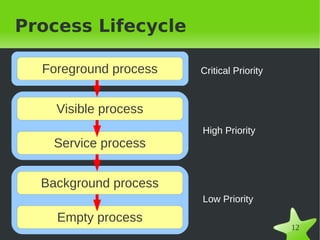
Process Lifecycle

  Foreground process       Critical Priority


    Visible process
                           High Priority
   Service process


  Background process
                           Low Priority

    Empty process
                        
                                               12
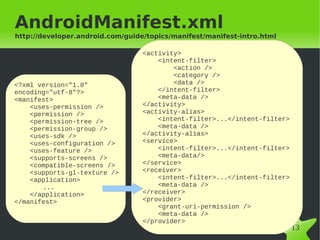
AndroidManifest.xml
http://developer.android.com/guide/topics/manifest/manifest-intro.html

                                  <activity>
                                      <intent-filter>
                                          <action />
                                          <category />
<?xml version="1.0"                       <data />
encoding="utf-8"?>                    </intent-filter>
<manifest>                            <meta-data />
    <uses-permission />           </activity>
    <permission />                <activity-alias>
    <permission-tree />               <intent-filter>...</intent-filter>
    <permission-group />              <meta-data />
    <uses-sdk />                  </activity-alias>
    <uses-configuration />        <service>
    <uses-feature />                  <intent-filter>...</intent-filter>
    <supports-screens />              <meta-data/>
    <compatible-screens />        </service>
    <supports-gl-texture />       <receiver>
    <application>                     <intent-filter>...</intent-filter>
       ...                            <meta-data />
    </application>                </receiver>
</manifest>                       <provider>
                                      <grant-uri-permission />
                                      <meta-data />
                                  </provider>
                                       
                                                                           13
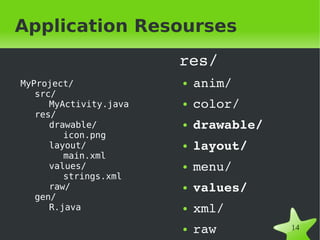
Application Resourses
                            res/
MyProject/                  ●   anim/
   src/
      MyActivity.java       ●   color/
   res/
      drawable/             ●   drawable/
         icon.png
      layout/               ●   layout/
         main.xml
      values/               ●   menu/
         strings.xml
      raw/                  ●   values/
   gen/
      R.java                ●   xml/
                            ●   raw         14
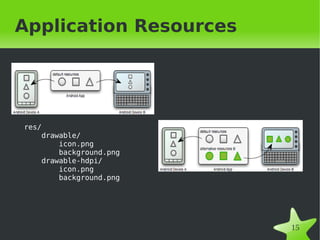
Application Resources


res/
    drawable/
        icon.png
        background.png
    drawable-hdpi/
        icon.png
        background.png


                             15
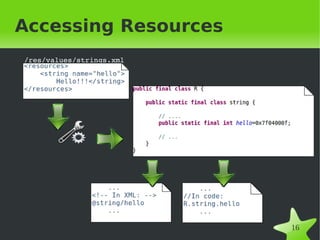
Accessing Resources
/res/values/strings.xml


                              16
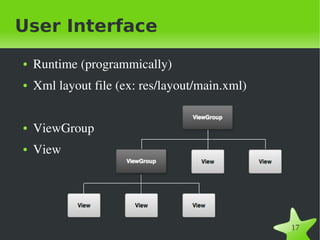
User Interface
●   Runtime (programmically)
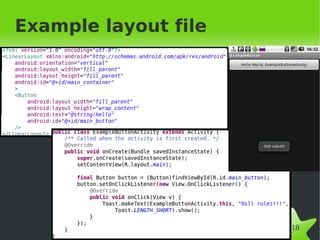
●   Xml layout file (ex: res/layout/main.xml)


●   ViewGroup
●   View


                                                17
Example layout file


                      18
DDMS

DDMS (Dalvik Debug Monitoring Service) provides: 
● thread and heap information on the device


●   logcat
●   process
●   radio state information
●   incoming call and SMS spoofing 
●   location data spoofing
●   screen capture on the device and more.
                               
                                             19
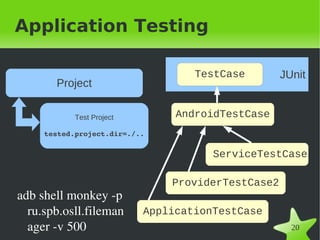
Application Testing

                                      TestCase         JUnit
       Project

            Test Project           AndroidTestCase
     tested.project.dir=./..

                                         ServiceTestCase

                                   ProviderTestCase2
adb shell monkey ­p 
  ru.spb.osll.fileman      ApplicationTestCase
  ager ­v 500                   
                                                         20
Required software
●   JDK  >= 1.5 
●   Android SDK 
             (http://developer.android.com/sdk/index.html)

         ●   Adding Platforms and Other Components
●   Android NDK (http://developer.android.com/sdk/ndk/index.html)
●   Ant >= 1.7
   Eclipse (http://www.eclipse.org/downloads/)
   ADT (http://developer.android.com/sdk/eclipse­adt.html)
                                              
                                                                    21
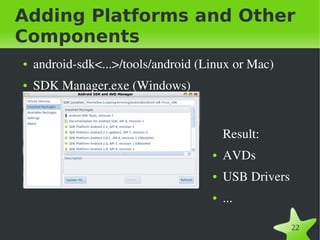
Adding Platforms and Other
Components
●   android­sdk<...>/tools/android (Linux or Mac)
●   SDK Manager.exe (Windows)


                                         Result:
                                     ●   AVDs
                                     ●   USB Drivers
                                     ●   ...

                            
                                                       22
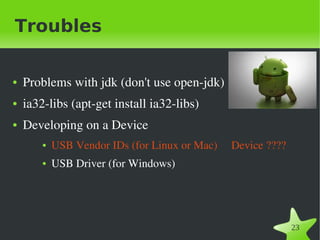
Troubles

●   Problems with jdk (don't use open­jdk)
●   ia32­libs (apt­get install ia32­libs)
●   Developing on a Device
        ●   USB Vendor IDs (for Linux or Mac)     Device ????
        ●   USB Driver (for Windows)


                                                                23
Practice
●   ExampleButton
●   ExampleButtonExt
●   ExStackActivity
●   ExService
●   ExBroadcastReceiver


                              24
What is remained...

●   Storage data 
       ●   Internal, External Storage
       ●   DB
       ●   SharedPreferences


●   Designing for Performance 


                                        25
●   Questions... ???
     ●   Thanks!


                       26

Hello android

  • 1.
    OSLL Hello Android Vasily Romanikhin 1 vasily.romanikhin@gmail.com  
  • 2.
    Table of content ● About Android ● Android Architecture ● Application Fundamentals ● Activity, Service,  ContentProvider,  BroadcastReceiver, Intent classes  ● Application Resources ● User Interface ● Software for developing ● Practice   2
  • 3.
    What is Android? ● Android Inc. ● Open Handset Alliance  (OHA) ● September 23, 2008 ● October 21, 2008   3
  • 4.
  • 5.
    The project structure MyProject/ ✔ src/ src/ MyActivity.java ✔ res/ res/ drawable/ ✔ drawable/ icon.png ✔ layout/ layout/ main.xml ✔ values/ values/ strings.xml ✔ gen/ raw/ libs/ ✔ AndroidManifest.xml ... assets/ ... gen/ R.java 5 AndroidManifest.xml  
  • 6.
    Application Fundamentals ● Application Components: ● Activities ● Services ● Broadcast receivers ● Content providers ● ~ Intent   6
  • 7.
    Activity http://developer.android.com/reference/android/app/Activity.html ●      protected void  onCreate(Bundle  savedInstanceState); ●      protected void onStart(); ●      protected void  onRestart(); ●      protected void  onResume(); ●      protected void  onPause(); ●      protected void onStop(); ●      protected void  onDestroy();   7
  • 8.
    Service http://developer.android.com/reference/android/app/Service.html ● startService(...) ● stopService(...) ● bindService(...) ● unbindService(...)   8
  • 9.
  • 10.
    BroadcastReceiver http://developer.android.com/reference/android/content/BroadcastReceiver.ht ml ● public void onReceive(Context context,  Intent intent) {/* Actions … */} ● Before using BR you should register it  (dynamically – in code; or statically –  in AndroidManifest.xml) ● The most often used with Service   10
  • 11.
    ContentProvider http://developer.android.com/reference/android/content/ContentProvider.html The primary methods that need to be implemented are: ● onCreate() which is called to initialize the provider ● query(Uri, String[], String, String[], String) which returns data to the  caller ● insert(Uri, ContentValues) which inserts new data into the content  provider ● update(Uri, ContentValues, String, String[]) which updates existing data  in the content provider ● delete(Uri, String, String[]) which deletes data from the content  provider ● Why is it need? ● See also ContentResolver, SQLiteOpenHanhler, SQLiteDatabase, SQLiteQueryBuilder, Cursor, ManagedCursor.   11
  • 12.
    Process Lifecycle Foreground process Critical Priority Visible process High Priority Service process Background process Low Priority Empty process   12
  • 13.
    AndroidManifest.xml http://developer.android.com/guide/topics/manifest/manifest-intro.html <activity> <intent-filter> <action /> <category /> <?xml version="1.0" <data /> encoding="utf-8"?> </intent-filter> <manifest> <meta-data /> <uses-permission /> </activity> <permission /> <activity-alias> <permission-tree /> <intent-filter>...</intent-filter> <permission-group /> <meta-data /> <uses-sdk /> </activity-alias> <uses-configuration /> <service> <uses-feature /> <intent-filter>...</intent-filter> <supports-screens /> <meta-data/> <compatible-screens /> </service> <supports-gl-texture /> <receiver> <application> <intent-filter>...</intent-filter> ... <meta-data /> </application> </receiver> </manifest> <provider> <grant-uri-permission /> <meta-data /> </provider>   13
  • 14.
    Application Resourses res/ MyProject/ ● anim/ src/ MyActivity.java ● color/ res/ drawable/ ● drawable/ icon.png layout/ ● layout/ main.xml values/ ● menu/ strings.xml raw/ ● values/ gen/ R.java ● xml/   ● raw 14
  • 15.
    Application Resources res/ drawable/ icon.png background.png drawable-hdpi/ icon.png background.png   15
  • 16.
  • 17.
    User Interface ● Runtime (programmically) ● Xml layout file (ex: res/layout/main.xml) ● ViewGroup ● View   17
  • 18.
  • 19.
    DDMS DDMS (Dalvik Debug Monitoring Service) provides:  ● thread and heap information on the device ● logcat ● process ● radio state information ● incoming call and SMS spoofing  ● location data spoofing ● screen capture on the device and more.   19
  • 20.
    Application Testing TestCase JUnit Project Test Project AndroidTestCase tested.project.dir=./.. ServiceTestCase ProviderTestCase2 adb shell monkey ­p  ru.spb.osll.fileman ApplicationTestCase ager ­v 500   20
  • 21.
    Required software ● JDK  >= 1.5  ● Android SDK  (http://developer.android.com/sdk/index.html) ● Adding Platforms and Other Components ● Android NDK (http://developer.android.com/sdk/ndk/index.html) ● Ant >= 1.7  Eclipse (http://www.eclipse.org/downloads/)  ADT (http://developer.android.com/sdk/eclipse­adt.html)   21
  • 22.
    Adding Platforms andOther Components ● android­sdk<...>/tools/android (Linux or Mac) ● SDK Manager.exe (Windows) Result: ● AVDs ● USB Drivers ● ...   22
  • 23.
    Troubles ● Problems with jdk (don't use open­jdk) ● ia32­libs (apt­get install ia32­libs) ● Developing on a Device ● USB Vendor IDs (for Linux or Mac)     Device ???? ● USB Driver (for Windows)   23
  • 24.
    Practice ● ExampleButton ● ExampleButtonExt ● ExStackActivity ● ExService ● ExBroadcastReceiver   24
  • 25.
    What is remained... ● Storage data  ● Internal, External Storage ● DB ● SharedPreferences ● Designing for Performance    25
  • 26.
    Questions... ??? ● Thanks!   26