

WordPress
Introduction to create your own theme


                                        CC:BY-NC
Info.
Name: Sitdhibong Laokok
Contact: sitdhibong@gmail.com
Class Name: WordPress Theme Dev.
Office Hours: 24/7 (for e-mail)
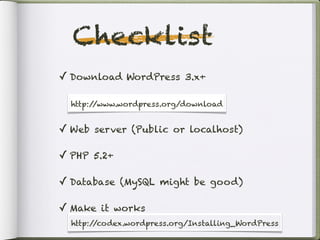
Checklist
✓ Download WordPress 3.x+

  http:/ /www.wordpress.org/
  http://www.wordpress.org/download


✓ Web server (Public or localhost)

✓ PHP 5.2+

✓ Database (MySQL might be good)

✓ Make it works
  http://codex.wordpress.org/Installing_WordPress
Serf the Web
               http://we.in.th
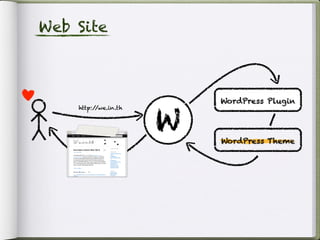
Web Site


                          WordPress Plugin


                      W
    http://we.in.th


                          WordPress Theme
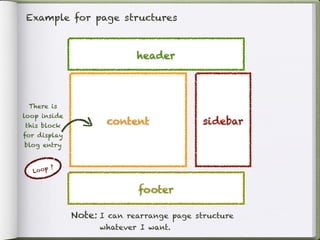
Example for page structures


                             header


 There is
loop inside
this block
                      content               sidebar
for display
blog entry


           ?
  Lo o p


                             footer

               Note: I can rearrange page structure
                     whatever I want.
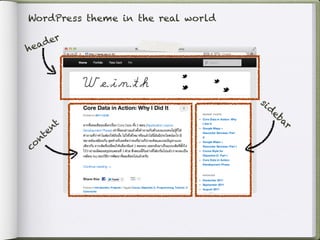
WordPress theme in the real world

     er
head


                                    si
                                         d
                                             eb
         t                                     ar
       en
     nt
co
Example for Template


         *A lot more at http://wordpress.org/extend/themes
Theme
Hierarchy:
The
template
files are
called to
generate a
WordPress
page
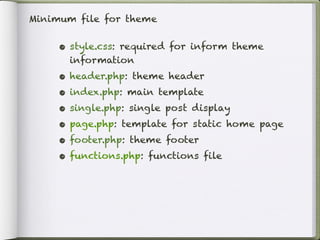
Minimum file for theme


     • style.css: required for inform theme
         information
     •   header.php: theme header
     •   index.php: main template
     •   single.php: single post display
     •   page.php: template for static home page
     •   footer.php: theme footer
     •   functions.php: functions file
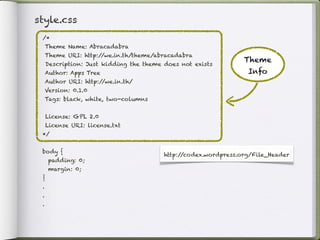
style.css
 /*
     Theme Name: Abracadabra
     Theme URI: http://we.in.th/theme/abracadabra
                                                                 Theme
     Description: Just kidding the theme does not exists
     Author: Apps Tree                                            Info
     Author URI: http://we.in.th/
     Version: 0.1.0
     Tags: black, white, two-columns


     License: GPL 2.0
     License URI: license.txt
 */


 body {
                                         http://codex.wordpress.org/File_Header
      padding: 0;
      margin: 0;
 }
 .
 .
 .
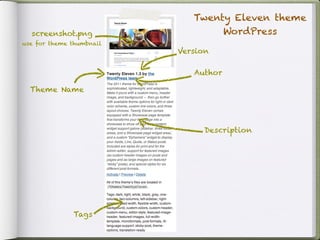
Twenty Eleven theme
  screenshot.png                  WordPress
use for theme thumbnail
                          Version

                             Author

  Theme Name


                                Description


              Tags
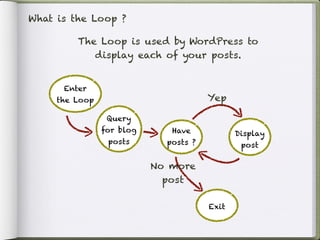
What is the Loop ?

         The Loop is used by WordPress to
            display each of your posts.


      Enter
     the Loop                          Yep

                 Query
                for blog      Have            Display
                 posts       posts ?           post

                           No more
                             post

                                       Exit
Here’s the Loop
01: <?php
02: / index.php
     /
03: get_header(); / get content from ‘header.php’ ?>
                   /
04:
                                                              Loop start here (07-15)
05: <div id=”sl-content-wrap”>
06: <?php if ( have_posts() ) : ?>
07:   <?php while( have_posts() ) : the_post(); ?>
08:     <div id=”post-<?php the_ID(); ?>” <?php post_class(); ?>
09:          <a href=”<?php the_permalink(); ?>” title=”<?php the_title(); ?>”>
10:            <h1><?php the_title(); ?></h1>
11:          </a>
12:          <p><?php the_content(); ?></p>
13:          <p><?php the_tags(‘Tag: ‘, ‘,’, ‘.’); ?></p>   have_posts, the_post,
14:     </div>                                              the_ID, post_class,
15:   <?php endwhile; ?>                                    the_permalink, the_title,
16: <?php endif; ?>                                         the_content, the_tags are
17: </div>                                                  not PHP’s func.
18:
19: <?php get_sidebar(); / display content from ‘sidebar.php’ ?>
                          /
20:
21: <?php get_footer(); / display content from ‘footer.php’ ?>
                         /
the things we’ve get from loop

                                                            Loop result
                                                             (04-10)
  01: <!-- Header HTML - above -->
  02: <!-- In this case: there is only one blog entry -->
  03: <div id=”sl-content-wrap”>
  04:   <div id=”post-1” class=”blog-post text ...”>
  05:     <a href=”http://www.we.in.th/lorem-ipsum” title=”Lorem Ipsum”>
  06:          <h1>Lorem Ipsum</h1>
  07:     </a>
  08:     <p>Lorem ipsum dolor sit amet, consectetuer adipiscing elit, sed
               diam nonummy nibh euismod tincidunt ut laoreet magna aliquam
               eret volutpat.</p>
  09:     <p>Tag: dummy, WP, Template.</p>
  10:   </div>
  11: </div>
  12:
  13: <!-- Sidebar HTML -->
  14:
  15: <!-- Footer HTML - below -->
What are tags from previous code ?

- It’s called ‘template tags’, here
  the often use template tags

 •   the_content()             •   the_meta()
 •   the_title()               •   the_ID()
 •   the_permalik()            •   the_post_thumbnail()
 •   the_category()            •   the_author()
 •   the_tags()                •   the_shortlink()
 •   the_date()                •   edit_post_link()
 •   the_time()           http://codex.wordpress.org/Template_Tags

 •   the_excerpt()
More Info.
• WordPress Codex

• WordPress Theme and Design
 Presentation - Menn Chris

Introduction to WordPress Theme Development

  • 1.
    WordPress Introduction to createyour own theme CC:BY-NC
  • 2.
    Info. Name: Sitdhibong Laokok Contact:sitdhibong@gmail.com Class Name: WordPress Theme Dev. Office Hours: 24/7 (for e-mail)
  • 3.
    Checklist ✓ Download WordPress3.x+ http:/ /www.wordpress.org/ http://www.wordpress.org/download ✓ Web server (Public or localhost) ✓ PHP 5.2+ ✓ Database (MySQL might be good) ✓ Make it works http://codex.wordpress.org/Installing_WordPress
  • 4.
    Serf the Web http://we.in.th
  • 5.
    Web Site WordPress Plugin W http://we.in.th WordPress Theme
  • 6.
    Example for pagestructures header There is loop inside this block content sidebar for display blog entry ? Lo o p footer Note: I can rearrange page structure whatever I want.
  • 7.
    WordPress theme inthe real world er head si d eb t ar en nt co
  • 8.
    Example for Template *A lot more at http://wordpress.org/extend/themes
  • 9.
  • 10.
    Minimum file fortheme • style.css: required for inform theme information • header.php: theme header • index.php: main template • single.php: single post display • page.php: template for static home page • footer.php: theme footer • functions.php: functions file
  • 11.
    style.css /* Theme Name: Abracadabra Theme URI: http://we.in.th/theme/abracadabra Theme Description: Just kidding the theme does not exists Author: Apps Tree Info Author URI: http://we.in.th/ Version: 0.1.0 Tags: black, white, two-columns License: GPL 2.0 License URI: license.txt */ body { http://codex.wordpress.org/File_Header padding: 0; margin: 0; } . . .
  • 12.
    Twenty Eleven theme screenshot.png WordPress use for theme thumbnail Version Author Theme Name Description Tags
  • 13.
    What is theLoop ? The Loop is used by WordPress to display each of your posts. Enter the Loop Yep Query for blog Have Display posts posts ? post No more post Exit
  • 14.
    Here’s the Loop 01:<?php 02: / index.php / 03: get_header(); / get content from ‘header.php’ ?> / 04: Loop start here (07-15) 05: <div id=”sl-content-wrap”> 06: <?php if ( have_posts() ) : ?> 07: <?php while( have_posts() ) : the_post(); ?> 08: <div id=”post-<?php the_ID(); ?>” <?php post_class(); ?> 09: <a href=”<?php the_permalink(); ?>” title=”<?php the_title(); ?>”> 10: <h1><?php the_title(); ?></h1> 11: </a> 12: <p><?php the_content(); ?></p> 13: <p><?php the_tags(‘Tag: ‘, ‘,’, ‘.’); ?></p> have_posts, the_post, 14: </div> the_ID, post_class, 15: <?php endwhile; ?> the_permalink, the_title, 16: <?php endif; ?> the_content, the_tags are 17: </div> not PHP’s func. 18: 19: <?php get_sidebar(); / display content from ‘sidebar.php’ ?> / 20: 21: <?php get_footer(); / display content from ‘footer.php’ ?> /
  • 15.
    the things we’veget from loop Loop result (04-10) 01: <!-- Header HTML - above --> 02: <!-- In this case: there is only one blog entry --> 03: <div id=”sl-content-wrap”> 04: <div id=”post-1” class=”blog-post text ...”> 05: <a href=”http://www.we.in.th/lorem-ipsum” title=”Lorem Ipsum”> 06: <h1>Lorem Ipsum</h1> 07: </a> 08: <p>Lorem ipsum dolor sit amet, consectetuer adipiscing elit, sed diam nonummy nibh euismod tincidunt ut laoreet magna aliquam eret volutpat.</p> 09: <p>Tag: dummy, WP, Template.</p> 10: </div> 11: </div> 12: 13: <!-- Sidebar HTML --> 14: 15: <!-- Footer HTML - below -->
  • 16.
    What are tagsfrom previous code ? - It’s called ‘template tags’, here the often use template tags • the_content() • the_meta() • the_title() • the_ID() • the_permalik() • the_post_thumbnail() • the_category() • the_author() • the_tags() • the_shortlink() • the_date() • edit_post_link() • the_time() http://codex.wordpress.org/Template_Tags • the_excerpt()
  • 17.
    More Info. • WordPressCodex • WordPress Theme and Design Presentation - Menn Chris