




WordPress Theme
Development
By Ankita Raikundalia
About Myself
Developer | Photographer |
Learner
What is WordPress??
Basic Components of WordPress
Main Components of WordPress
Plugins Themes
Main Components of WordPress
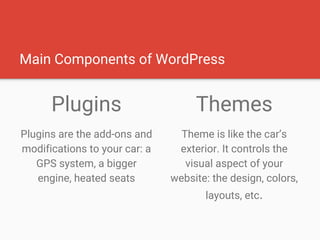
Plugins
Plugins are the add-ons and
modifications to your car: a
GPS system, a bigger
engine, heated seats
Themes
Theme is like the car’s
exterior. It controls the
visual aspect of your
website: the design, colors,
layouts, etc.
WordPress Themes
WordPress Themes are files that work together
to create the design and functionality of a
WordPress site.
Why build a WordPress Theme?
● For Your Own Use/Website
● For a client’s project
● To submit it to the WordPress Theme Directory
● To sell it on marketplaces
Why build a WordPress Theme?
Finalised the Scope & Design of
the theme? Let's start with
Development
Coding Standards
● Error Free PHP Code
● Valid HTML
● Clean & Valid CSS
● Design Guidelines ( https://codex.wordpress.
org/Site_Design_and_Layout )
Anatomy of a Theme
● Is placed inside the wp-content/themes folder
● Holds all the theme’s stylesheet, template files, PHP
files, javascript files and assets
Tip: Avoid using numbers for the theme name
Main Types of files in a theme
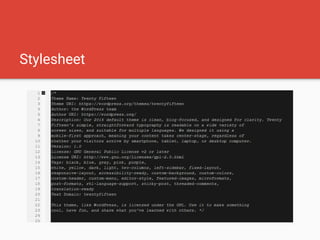
1. The Stylesheet i.e style.css
2. Template Files
3. Optional functions file i.e functions.php
Stylesheet
Functions File
● Optional File
● Acts like a plugin
● Is loaded automatically for both, admin and front-end
Suggested Uses of Functions File
● Enqueue scripts and stylesheets
● Enable theme features like - Post thumbnails, Post
formats, Sidebars, Navigation Menus, etc.
● Defining functions to be used in template files
● Setting up Customizing options
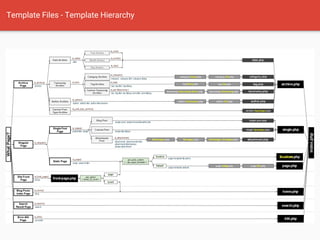
Template Files - Template Hierarchy
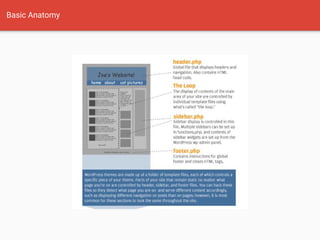
Basic Anatomy
Final Touch - Theme Screenshot
● Should be named screenshot.png
● Recommended size - 880 px * 660 px
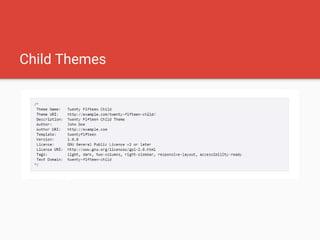
Child Themes
If not Scratch Theme Development, Then
What?
● Child Themes of Existing themes
● Frameworks - _s, Genesis, Unyson
Thank You..

WordPress Theme Development

  • 1.
  • 2.
    About Myself Developer |Photographer | Learner
  • 3.
  • 4.
  • 5.
    Main Components ofWordPress Plugins Themes
  • 6.
    Main Components ofWordPress Plugins Plugins are the add-ons and modifications to your car: a GPS system, a bigger engine, heated seats Themes Theme is like the car’s exterior. It controls the visual aspect of your website: the design, colors, layouts, etc.
  • 7.
    WordPress Themes WordPress Themesare files that work together to create the design and functionality of a WordPress site.
  • 8.
    Why build aWordPress Theme?
  • 9.
    ● For YourOwn Use/Website ● For a client’s project ● To submit it to the WordPress Theme Directory ● To sell it on marketplaces Why build a WordPress Theme?
  • 10.
    Finalised the Scope& Design of the theme? Let's start with Development
  • 11.
    Coding Standards ● ErrorFree PHP Code ● Valid HTML ● Clean & Valid CSS ● Design Guidelines ( https://codex.wordpress. org/Site_Design_and_Layout )
  • 12.
    Anatomy of aTheme ● Is placed inside the wp-content/themes folder ● Holds all the theme’s stylesheet, template files, PHP files, javascript files and assets Tip: Avoid using numbers for the theme name
  • 13.
    Main Types offiles in a theme 1. The Stylesheet i.e style.css 2. Template Files 3. Optional functions file i.e functions.php
  • 14.
  • 15.
    Functions File ● OptionalFile ● Acts like a plugin ● Is loaded automatically for both, admin and front-end
  • 16.
    Suggested Uses ofFunctions File ● Enqueue scripts and stylesheets ● Enable theme features like - Post thumbnails, Post formats, Sidebars, Navigation Menus, etc. ● Defining functions to be used in template files ● Setting up Customizing options
  • 17.
    Template Files -Template Hierarchy
  • 18.
  • 19.
    Final Touch -Theme Screenshot ● Should be named screenshot.png ● Recommended size - 880 px * 660 px
  • 20.
  • 21.
    If not ScratchTheme Development, Then What? ● Child Themes of Existing themes ● Frameworks - _s, Genesis, Unyson
  • 22.