WordPress
Design to Development
Jason Yingling
@jason_yingling
Objectives
• Review the tools needed to design and
develop WordPress sites
• Briefly cover some common steps for
designing WordPress themes
• Overview of WordPress template hierarchy
• Introduce common WordPress functions
• Convert HTML into a WordPress template
What You Will Need
• Design Software
– Photoshop
– Sketch
– Illustrator
– WebFlow
What You Will Need
• Text Editor
– Coda (Mac - Paid)
– Sublime Text (Mac - Free and Paid )
– Atom by Github (Mac - Free)
– Notepad++ (Windows - Free)
Theme Template
• Underscores (_s)
• Bones
• What are these?
– Stripped down WordPress themes with just the
basics you need to start building your own theme.
Languages
• HTML
• CSS
• PHP
• Javascript
Dev Environment
• MAMP Pro OR Vagrant
• phpMyAdmin
• Sequel Pro
Optional (but recommended)
• SASS
• Compiler / Task Runner
– Grunt (Free)
– Gulp (Free)
– Codekit (Paid)
• Grid System
– Bourbon (neat.buorbon.io)
– Bootstrap (getbootstrap.com)
Designing a Site
• Researching
• Planning
• Wireframing
• Designing
Researching
• Always be researching
• Resources
– Dribbble
– Behance
– Awwwards
– ThemeForest (top sellers)
Project Description
Define what is being built.
Create a simple layout for showing some basic
WordPress development practices.
Project Goals
Set a few goals for the project based on your
project description.
1. Use The Loop to pull in recent posts
2. Register and pull in a WordPress menu
3. Pull in a sidebar and footer
4. Pull in a template part for the post content
Audience
Who will this project be for?
Designers and developers looking to gain basic
insight into building a WordPress theme.
Final Planning
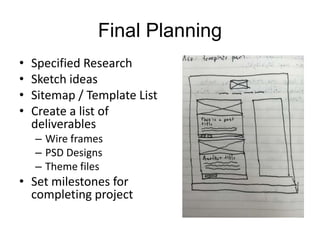
• Specified Research
• Sketch ideas
• Sitemap / Template List
• Create a list of
deliverables
– Wire frames
– PSD Designs
– Theme files
• Set milestones for
completing project
Wireframing
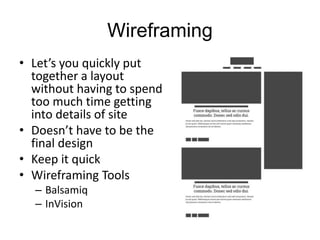
• Let’s you quickly put
together a layout
without having to spend
too much time getting
into details of site
• Doesn’t have to be the
final design
• Keep it quick
• Wireframing Tools
– Balsamiq
– InVision
Designing
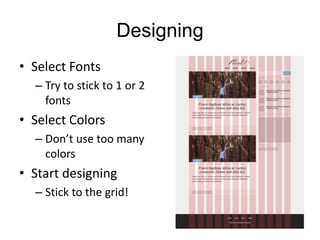
• Select Fonts
– Try to stick to 1 or 2
fonts
• Select Colors
– Don’t use too many
colors
• Start designing
– Stick to the grid!
Developing for WordPress
Custom Theme
• Best when building a completely custom
theme when using a boilerplate
– i.e. underscores (_s) or Bones
Child Theme
• Best when building on top of an existing
theme
Template Hierarchy
• index.php
– The main template file. It is required in all themes. Commonly
used for the main loop. Fallback for other templates.
• header.php
– The header template file usually contains your site’s document
type, meta information, links to style sheets, and other data.
• footer.php
– Used for generating the footer of the site. Typically includes the
wp_footer() option.
• sidebar.php
– Used for generating site’s sidebars.
Template Hierarchy
• single.php
– The single post template is used when a visitor
requests a single post.
• archive.php
– Template used for displaying categories, post
types, etc. unless otherwise specified.
• archive-news.php
– Template used for displaying the news post type
(if that post type exists)
Template Hierarchy
• functions.php
– Used for adding feature and functionality to sites.
– i.e. register sidebars and menu locations
• style.css
– The main stylesheet. It is required in all themes
and contains the information header for your
theme.
Common WordPress Page
• Typically consists of 3-4 parts
– Header
– Content
– Sidebar
– Footer
The Loop
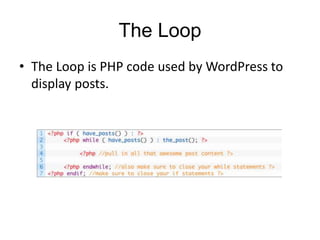
• The Loop is PHP code used by WordPress to
display posts.
Breaking Down The Loop
• if ( have_posts() ) :
– Checks with WordPress to see if we even have any posts to
return.
• while ( have_posts() ) :
– Now that we have posts we need to know what to do with
them while we’ve got them.
• the_post();
– This function iterates the post index and grabs the next
post, sets up the post data, and let’s WordPress know that
we are within The Loop.
• More information
– https://jasonyingling.me/loop-there-it-is/
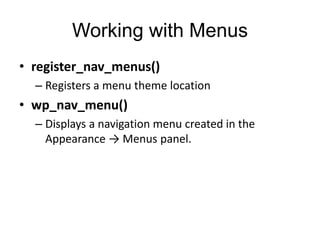
Working with Menus
• register_nav_menus()
– Registers a menu theme location
• wp_nav_menu()
– Displays a navigation menu created in the
Appearance → Menus panel.
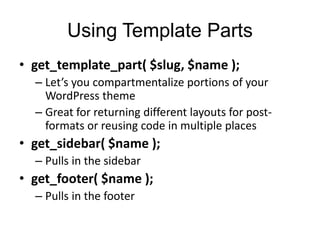
Using Template Parts
• get_template_part( $slug, $name );
– Let’s you compartmentalize portions of your
WordPress theme
– Great for returning different layouts for post-
formats or reusing code in multiple places
• get_sidebar( $name );
– Pulls in the sidebar
• get_footer( $name );
– Pulls in the footer
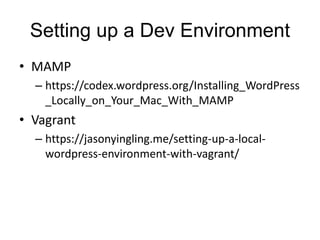
Setting up a Dev Environment
• MAMP
– https://codex.wordpress.org/Installing_WordPress
_Locally_on_Your_Mac_With_MAMP
• Vagrant
– https://jasonyingling.me/setting-up-a-local-
wordpress-environment-with-vagrant/
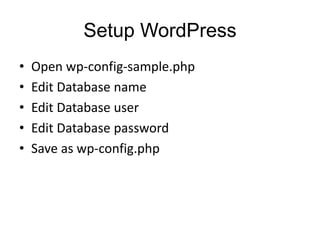
Setup WordPress
• Open wp-config-sample.php
• Edit Database name
• Edit Database user
• Edit Database password
• Save as wp-config.php
Additional Resources
• Smashing WordPress
• Up and Running WP
• The Essential Web Design Handbook
• WP Beginner
• Tuts+

Design todevelop

  • 1.
    WordPress Design to Development JasonYingling @jason_yingling
  • 2.
    Objectives • Review thetools needed to design and develop WordPress sites • Briefly cover some common steps for designing WordPress themes • Overview of WordPress template hierarchy • Introduce common WordPress functions • Convert HTML into a WordPress template
  • 3.
    What You WillNeed • Design Software – Photoshop – Sketch – Illustrator – WebFlow
  • 4.
    What You WillNeed • Text Editor – Coda (Mac - Paid) – Sublime Text (Mac - Free and Paid ) – Atom by Github (Mac - Free) – Notepad++ (Windows - Free)
  • 5.
    Theme Template • Underscores(_s) • Bones • What are these? – Stripped down WordPress themes with just the basics you need to start building your own theme.
  • 6.
  • 7.
    Dev Environment • MAMPPro OR Vagrant • phpMyAdmin • Sequel Pro
  • 8.
    Optional (but recommended) •SASS • Compiler / Task Runner – Grunt (Free) – Gulp (Free) – Codekit (Paid) • Grid System – Bourbon (neat.buorbon.io) – Bootstrap (getbootstrap.com)
  • 9.
    Designing a Site •Researching • Planning • Wireframing • Designing
  • 10.
    Researching • Always beresearching • Resources – Dribbble – Behance – Awwwards – ThemeForest (top sellers)
  • 11.
    Project Description Define whatis being built. Create a simple layout for showing some basic WordPress development practices.
  • 12.
    Project Goals Set afew goals for the project based on your project description. 1. Use The Loop to pull in recent posts 2. Register and pull in a WordPress menu 3. Pull in a sidebar and footer 4. Pull in a template part for the post content
  • 13.
    Audience Who will thisproject be for? Designers and developers looking to gain basic insight into building a WordPress theme.
  • 14.
    Final Planning • SpecifiedResearch • Sketch ideas • Sitemap / Template List • Create a list of deliverables – Wire frames – PSD Designs – Theme files • Set milestones for completing project
  • 15.
    Wireframing • Let’s youquickly put together a layout without having to spend too much time getting into details of site • Doesn’t have to be the final design • Keep it quick • Wireframing Tools – Balsamiq – InVision
  • 16.
    Designing • Select Fonts –Try to stick to 1 or 2 fonts • Select Colors – Don’t use too many colors • Start designing – Stick to the grid!
  • 17.
    Developing for WordPress CustomTheme • Best when building a completely custom theme when using a boilerplate – i.e. underscores (_s) or Bones Child Theme • Best when building on top of an existing theme
  • 18.
    Template Hierarchy • index.php –The main template file. It is required in all themes. Commonly used for the main loop. Fallback for other templates. • header.php – The header template file usually contains your site’s document type, meta information, links to style sheets, and other data. • footer.php – Used for generating the footer of the site. Typically includes the wp_footer() option. • sidebar.php – Used for generating site’s sidebars.
  • 19.
    Template Hierarchy • single.php –The single post template is used when a visitor requests a single post. • archive.php – Template used for displaying categories, post types, etc. unless otherwise specified. • archive-news.php – Template used for displaying the news post type (if that post type exists)
  • 20.
    Template Hierarchy • functions.php –Used for adding feature and functionality to sites. – i.e. register sidebars and menu locations • style.css – The main stylesheet. It is required in all themes and contains the information header for your theme.
  • 21.
    Common WordPress Page •Typically consists of 3-4 parts – Header – Content – Sidebar – Footer
  • 22.
    The Loop • TheLoop is PHP code used by WordPress to display posts.
  • 23.
    Breaking Down TheLoop • if ( have_posts() ) : – Checks with WordPress to see if we even have any posts to return. • while ( have_posts() ) : – Now that we have posts we need to know what to do with them while we’ve got them. • the_post(); – This function iterates the post index and grabs the next post, sets up the post data, and let’s WordPress know that we are within The Loop. • More information – https://jasonyingling.me/loop-there-it-is/
  • 24.
    Working with Menus •register_nav_menus() – Registers a menu theme location • wp_nav_menu() – Displays a navigation menu created in the Appearance → Menus panel.
  • 25.
    Using Template Parts •get_template_part( $slug, $name ); – Let’s you compartmentalize portions of your WordPress theme – Great for returning different layouts for post- formats or reusing code in multiple places • get_sidebar( $name ); – Pulls in the sidebar • get_footer( $name ); – Pulls in the footer
  • 26.
    Setting up aDev Environment • MAMP – https://codex.wordpress.org/Installing_WordPress _Locally_on_Your_Mac_With_MAMP • Vagrant – https://jasonyingling.me/setting-up-a-local- wordpress-environment-with-vagrant/
  • 27.
    Setup WordPress • Openwp-config-sample.php • Edit Database name • Edit Database user • Edit Database password • Save as wp-config.php
  • 28.
    Additional Resources • SmashingWordPress • Up and Running WP • The Essential Web Design Handbook • WP Beginner • Tuts+

Editor's Notes

  • #5 You’ll want a text editor. There’s a variety of free and paid choices each with their own strengths. I’ve used Coda for the most part, but have recently been testing Atom.
  • #7 You can get away without knowing a lot of PHP, but a general idea of IF statements and WHILE loops will really help. Javascript is optional
  • #8 -You’ll need an environment that can run PHP code and a MySQL database -MAMP has a free and pro version -Vagrant is free but requires a little more setup
  • #10 4 main steps in designing a site
  • #12 Write out your project description. This will get you thinking about what this project is going to be, and help you focus.
  • #13 Further specify by defining a few specific goals.
  • #14 Then you’ll want to set your audience for the theme. You could also specify the end user of the site as well here.
  • #16 Next step is wireframing
  • #18 There’s two methods for creating custom themes. Custom theme – is a completely custom build using a theme boilerplate Child theme – is creating a second theme on top of an existing theme to make use of the existing (parent) theme’s functionality. We’re going to focus on custom builds.
  • #19 Before we start let’s cover some of the basic templates within a WordPress theme.
  • #26 We’re also going to look at using template parts. Basically template parts let you compartmentalize your code. So it can be reused throughout the site where possible, and helps keep your code clean and readable.
  • #27 WordPress requires a connection to a database
  • #28 Jump out at this point.