Hello                              9.00 - 9.15

1   An introduction to WordPress       09.15 - 09.30
2   The core components of a theme     09.30 - 10.00
3   Using WordPress as a proper CMS    10.00 - 10.30
    Morning tea                        10.30 - 11.00

4   A portfolio powered by WordPress   11.00 - 11.30
5   Building a brand new theme         11.30 - 12.00
    Q&A / discussion                   12.00 - 12.30
An introduction to WordPress
Setting up WordPress
on your local machine
MAMP (OSX)
mamp.info


XAMPP (Windows)
apachefriends.org/en/xampp.html
(or WAMP at wampserver.com)
Dummy content
Dummy content on the Starkers demo elliotjaystocks.com/starkers/demo/
themeshaper.com/wordpress-theme-development-tools-tutorial/
The basics of WordPress
The dashboard on a fresh WordPress installation
The core components
     of a theme
The template files in the ‘default’ theme
The only files you actually need in a theme
index.php
The ‘loop’
Use WordPress to power
    your entire site
Utilise the simple stuff
Built-in elements you can use
Post title
Category title / description
Use naming conventions to avoid repeating yourself
Custom fields
Custom fields for content (to call in images, etc.)
Custom fields for definitions
(should this be featured on the home page? etc.)
Conditional tags
Template tags
Basic if/else statements
Say it in English
What am I trying to accomplish?
If a certain situation occurs, do X;
if it doesn’t occur, do Y
What’s the easiest way to accomplish this?
START.

If the page slug is 'design-network',
  use the word ‘Design’ as my network name;

but if the page slug is 'photography-network',
  use the word ‘Photography’ as my network name;

or, if it’s neither of those,
  just use the word ‘Default’ as my network name.

END.


Think of things in plain English
<?php

if (is_page('design-network')) {
  $network="Design";

} elseif (is_page('photography-network')) {
  $network="Photography";

} else { // default
  $network="Default";

}
?>


Set up a variable you can use later on
<h2>
   Fusion Ads delivered <strong>17,737,824</strong>
   ad impressions in July across its dedicated
   <strong>Design</strong> network
</h2>


Set up a variable you can use later on
<h2>
   Fusion Ads delivered <strong>17,737,824</strong>
   ad impressions in July across its dedicated
   <strong>PUT_THE_NETWORK_NAME_HERE</strong> network
</h2>


Set up a variable you can use later on
<h2>
   Fusion Ads delivered <strong>17,737,824</strong>
   ad impressions in July across its dedicated
   <strong><?php echo $network; ?></strong> network
</h2>


Set up a variable you can use later on
START.

If the page is the ‘home’ page,
  use the word ‘home’ as my body’s classname;

but if it’s in the ‘portfolio’ category,
  use the word ‘portfolio’ as my body’s classname;

unless it’s in the ‘speaking’ category,
  then use the word ‘speaking’ as my body’s classname;

or if it’s the ‘publication’ page,
  use the word ‘publication’ as my body’s classname;

but if it’s a 404 or search results page,
  use the word ‘results’ as my body’s classname;

or if it’s none of the above,
  just use the word ‘default’ as my body’s classname.

END.


Set up a variable you can use later on
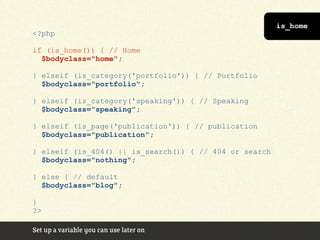
<?php

if (is_home()) { // Home
  $bodyclass="home";

} elseif (is_category('portfolio')) { // Portfolio
  $bodyclass="portfolio";

} elseif (is_category('speaking')) { // Speaking
  $bodyclass="speaking";

} elseif (is_page('publication')) { // publication
  $bodyclass="publication";

} elseif (is_404() || is_search()) { // 404 or search
  $bodyclass="nothing";

} else { // default
  $bodyclass="blog";

}
?>

Set up a variable you can use later on
is_home
<?php

if (is_home()) { // Home
  $bodyclass="home";

} elseif (is_category('portfolio')) { // Portfolio
  $bodyclass="portfolio";

} elseif (is_category('speaking')) { // Speaking
  $bodyclass="speaking";

} elseif (is_page('publication')) { // publication
  $bodyclass="publication";

} elseif (is_404() || is_search()) { // 404 or search
  $bodyclass="nothing";

} else { // default
  $bodyclass="blog";

}
?>

Set up a variable you can use later on
is_category
<?php

if (is_home()) { // Home
  $bodyclass="home";

} elseif (is_category('portfolio')) { // Portfolio
  $bodyclass="portfolio";

} elseif (is_category('speaking')) { // Speaking
  $bodyclass="speaking";

} elseif (is_page('publication')) { // publication
  $bodyclass="publication";

} elseif (is_404() || is_search()) { // 404 or search
  $bodyclass="nothing";

} else { // default
  $bodyclass="blog";

}
?>

Set up a variable you can use later on
is_page
<?php

if (is_home()) { // Home
  $bodyclass="home";

} elseif (is_category('portfolio')) { // Portfolio
  $bodyclass="portfolio";

} elseif (is_category('speaking')) { // Speaking
  $bodyclass="speaking";

} elseif (is_page('publication')) { // publication
  $bodyclass="publication";

} elseif (is_404() || is_search()) { // 404 or search
  $bodyclass="nothing";

} else { // default
  $bodyclass="blog";

}
?>

Set up a variable you can use later on
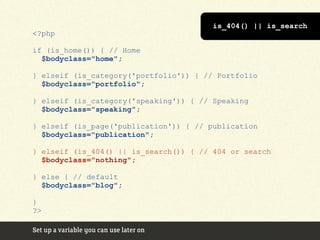
is_404() || is_search
<?php

if (is_home()) { // Home
  $bodyclass="home";

} elseif (is_category('portfolio')) { // Portfolio
  $bodyclass="portfolio";

} elseif (is_category('speaking')) { // Speaking
  $bodyclass="speaking";

} elseif (is_page('publication')) { // publication
  $bodyclass="publication";

} elseif (is_404() || is_search()) { // 404 or search
  $bodyclass="nothing";

} else { // default
  $bodyclass="blog";

}
?>

Set up a variable you can use later on
<body>


Set up a variable you can use later on
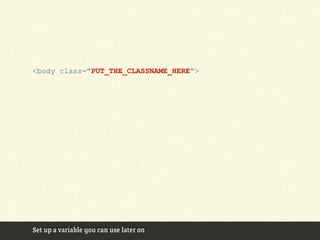
<body class="PUT_THE_CLASSNAME_HERE">


Set up a variable you can use later on
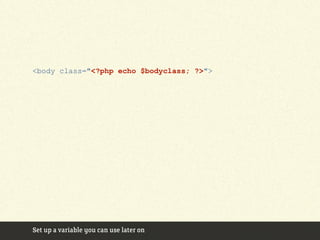
<body class="<?php echo $bodyclass; ?>">


Set up a variable you can use later on
WP Candy Template hierarchy diagram j.mp/wphierarchy
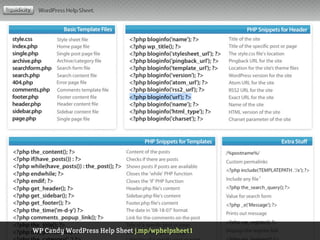
WP Candy WordPress Help Sheet j.mp/wphelpsheet1
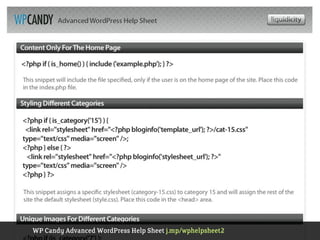
WP Candy Advanced WordPress Help Sheet j.mp/wphelpsheet2
<li class="blog">
  <a href="http://elliotjaystocks.com/blog/">
    Blog
  </a>
</li>

<li class="portfolio">
  <a href="http://elliotjaystocks.com/portfolio/">
    Portfolio
  </a>
</li>

<li class="speaking">
  <a href="http://elliotjaystocks.com/speaking/">
    Speaking
  </a>
</li>


Set up a variable you can use later on
<li class="blog">
  <a href="<?php bloginfo('url'); ?>/blog/">
    Blog
  </a>
</li>

<li class="portfolio">
  <a href="<?php bloginfo('url'); ?>/portfolio/">
    Portfolio
  </a>
</li>

<li class="speaking">
  <a href="<?php bloginfo('url'); ?>/speaking/">
    Speaking
  </a>
</li>


Set up a variable you can use later on
Custom page templates
category-X.php
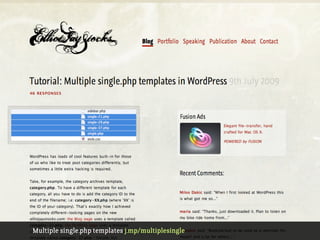
Multiple single.php templates
Multiple single.php templates j.mp/multiplesingle
Essential plugins
Plugins for basic use
Akismet
Author Highlight
Comment Timeout
Google XML Sitemaps
Maintenance Mode
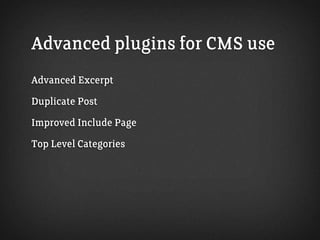
Advanced plugins for CMS use
Advanced Excerpt
Duplicate Post
Improved Include Page
Top Level Categories
Start with an existing theme
(starting from scratch = scary)
Integrating scripts
  & stylesheets
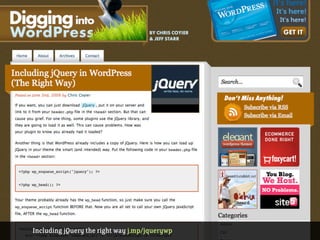
Including jQuery the right way j.mp/jquerywp
A quick word
on child themes
A portfolio powered
   by WordPress
Building
a brand new theme
If you liked this,
   you’ll love...
The ultimate tutorial themeshaper.com/wordpress-themes-templates-tutorial/
Shameless plug!
Sexy Web Design
by Elliot Jay Stocks
Expert reviewers: Jina Bolton & Dan Rubin


Published by SitePoint
Thank you!

elliotjaystocks.com | twitter.com/elliotjaystocks

Pin-ups image by Mauren Veras - flickr.com/photos/mauren/2298724158/
Paint textures from The Stock Exchange - sxc.hu
Set in FS Clerkenwell - fontsmith.com/font_details.php?font_num=251

WordPress Theme Development for Designers

  • 2.
    Hello 9.00 - 9.15 1 An introduction to WordPress 09.15 - 09.30 2 The core components of a theme 09.30 - 10.00 3 Using WordPress as a proper CMS 10.00 - 10.30 Morning tea 10.30 - 11.00 4 A portfolio powered by WordPress 11.00 - 11.30 5 Building a brand new theme 11.30 - 12.00 Q&A / discussion 12.00 - 12.30
  • 3.
  • 5.
    Setting up WordPress onyour local machine
  • 6.
  • 7.
  • 8.
    Dummy content onthe Starkers demo elliotjaystocks.com/starkers/demo/
  • 9.
  • 10.
    The basics ofWordPress
  • 11.
    The dashboard ona fresh WordPress installation
  • 12.
  • 13.
    The template filesin the ‘default’ theme
  • 14.
    The only filesyou actually need in a theme
  • 15.
  • 16.
  • 17.
    Use WordPress topower your entire site
  • 18.
  • 19.
    Built-in elements youcan use Post title Category title / description Use naming conventions to avoid repeating yourself
  • 20.
    Custom fields Custom fieldsfor content (to call in images, etc.) Custom fields for definitions (should this be featured on the home page? etc.)
  • 21.
  • 22.
  • 23.
  • 24.
    Say it inEnglish What am I trying to accomplish? If a certain situation occurs, do X; if it doesn’t occur, do Y What’s the easiest way to accomplish this?
  • 25.
    START. If the pageslug is 'design-network', use the word ‘Design’ as my network name; but if the page slug is 'photography-network', use the word ‘Photography’ as my network name; or, if it’s neither of those, just use the word ‘Default’ as my network name. END. Think of things in plain English
  • 26.
    <?php if (is_page('design-network')) { $network="Design"; } elseif (is_page('photography-network')) { $network="Photography"; } else { // default $network="Default"; } ?> Set up a variable you can use later on
  • 27.
    <h2> Fusion Ads delivered <strong>17,737,824</strong> ad impressions in July across its dedicated <strong>Design</strong> network </h2> Set up a variable you can use later on
  • 28.
    <h2> Fusion Ads delivered <strong>17,737,824</strong> ad impressions in July across its dedicated <strong>PUT_THE_NETWORK_NAME_HERE</strong> network </h2> Set up a variable you can use later on
  • 29.
    <h2> Fusion Ads delivered <strong>17,737,824</strong> ad impressions in July across its dedicated <strong><?php echo $network; ?></strong> network </h2> Set up a variable you can use later on
  • 30.
    START. If the pageis the ‘home’ page, use the word ‘home’ as my body’s classname; but if it’s in the ‘portfolio’ category, use the word ‘portfolio’ as my body’s classname; unless it’s in the ‘speaking’ category, then use the word ‘speaking’ as my body’s classname; or if it’s the ‘publication’ page, use the word ‘publication’ as my body’s classname; but if it’s a 404 or search results page, use the word ‘results’ as my body’s classname; or if it’s none of the above, just use the word ‘default’ as my body’s classname. END. Set up a variable you can use later on
  • 31.
    <?php if (is_home()) {// Home $bodyclass="home"; } elseif (is_category('portfolio')) { // Portfolio $bodyclass="portfolio"; } elseif (is_category('speaking')) { // Speaking $bodyclass="speaking"; } elseif (is_page('publication')) { // publication $bodyclass="publication"; } elseif (is_404() || is_search()) { // 404 or search $bodyclass="nothing"; } else { // default $bodyclass="blog"; } ?> Set up a variable you can use later on
  • 32.
    is_home <?php if (is_home()) {// Home $bodyclass="home"; } elseif (is_category('portfolio')) { // Portfolio $bodyclass="portfolio"; } elseif (is_category('speaking')) { // Speaking $bodyclass="speaking"; } elseif (is_page('publication')) { // publication $bodyclass="publication"; } elseif (is_404() || is_search()) { // 404 or search $bodyclass="nothing"; } else { // default $bodyclass="blog"; } ?> Set up a variable you can use later on
  • 33.
    is_category <?php if (is_home()) {// Home $bodyclass="home"; } elseif (is_category('portfolio')) { // Portfolio $bodyclass="portfolio"; } elseif (is_category('speaking')) { // Speaking $bodyclass="speaking"; } elseif (is_page('publication')) { // publication $bodyclass="publication"; } elseif (is_404() || is_search()) { // 404 or search $bodyclass="nothing"; } else { // default $bodyclass="blog"; } ?> Set up a variable you can use later on
  • 34.
    is_page <?php if (is_home()) {// Home $bodyclass="home"; } elseif (is_category('portfolio')) { // Portfolio $bodyclass="portfolio"; } elseif (is_category('speaking')) { // Speaking $bodyclass="speaking"; } elseif (is_page('publication')) { // publication $bodyclass="publication"; } elseif (is_404() || is_search()) { // 404 or search $bodyclass="nothing"; } else { // default $bodyclass="blog"; } ?> Set up a variable you can use later on
  • 35.
    is_404() || is_search <?php if(is_home()) { // Home $bodyclass="home"; } elseif (is_category('portfolio')) { // Portfolio $bodyclass="portfolio"; } elseif (is_category('speaking')) { // Speaking $bodyclass="speaking"; } elseif (is_page('publication')) { // publication $bodyclass="publication"; } elseif (is_404() || is_search()) { // 404 or search $bodyclass="nothing"; } else { // default $bodyclass="blog"; } ?> Set up a variable you can use later on
  • 36.
    <body> Set up avariable you can use later on
  • 37.
    <body class="PUT_THE_CLASSNAME_HERE"> Set upa variable you can use later on
  • 38.
    <body class="<?php echo$bodyclass; ?>"> Set up a variable you can use later on
  • 39.
    WP Candy Templatehierarchy diagram j.mp/wphierarchy
  • 40.
    WP Candy WordPressHelp Sheet j.mp/wphelpsheet1
  • 41.
    WP Candy AdvancedWordPress Help Sheet j.mp/wphelpsheet2
  • 42.
    <li class="blog"> <a href="http://elliotjaystocks.com/blog/"> Blog </a> </li> <li class="portfolio"> <a href="http://elliotjaystocks.com/portfolio/"> Portfolio </a> </li> <li class="speaking"> <a href="http://elliotjaystocks.com/speaking/"> Speaking </a> </li> Set up a variable you can use later on
  • 43.
    <li class="blog"> <a href="<?php bloginfo('url'); ?>/blog/"> Blog </a> </li> <li class="portfolio"> <a href="<?php bloginfo('url'); ?>/portfolio/"> Portfolio </a> </li> <li class="speaking"> <a href="<?php bloginfo('url'); ?>/speaking/"> Speaking </a> </li> Set up a variable you can use later on
  • 44.
  • 45.
  • 46.
  • 47.
    Multiple single.php templatesj.mp/multiplesingle
  • 48.
  • 49.
    Plugins for basicuse Akismet Author Highlight Comment Timeout Google XML Sitemaps Maintenance Mode
  • 50.
    Advanced plugins forCMS use Advanced Excerpt Duplicate Post Improved Include Page Top Level Categories
  • 51.
    Start with anexisting theme (starting from scratch = scary)
  • 52.
    Integrating scripts & stylesheets
  • 53.
    Including jQuery theright way j.mp/jquerywp
  • 54.
    A quick word onchild themes
  • 55.
  • 56.
  • 57.
    If you likedthis, you’ll love...
  • 58.
    The ultimate tutorialthemeshaper.com/wordpress-themes-templates-tutorial/
  • 60.
    Shameless plug! Sexy WebDesign by Elliot Jay Stocks Expert reviewers: Jina Bolton & Dan Rubin Published by SitePoint
  • 63.
    Thank you! elliotjaystocks.com |twitter.com/elliotjaystocks Pin-ups image by Mauren Veras - flickr.com/photos/mauren/2298724158/ Paint textures from The Stock Exchange - sxc.hu Set in FS Clerkenwell - fontsmith.com/font_details.php?font_num=251