Custom WORDPRESS THEMEDevelopmentTech Mixer University 2011
Intro to Theme DevelopmentCrash course
What is a WordPress theme?A group of templates and a stylesheet that displays content entered into the database via the WordPress admin.At a minimum, you need:index.phpstyle.css
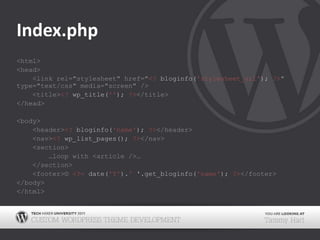
Index.php<html><head><link rel="stylesheet" href="<?bloginfo('stylesheet_url');?>" type="text/css" media="screen" /><title><?wp_title('');?></title></head><body>	<header><?bloginfo('name');?></header><nav><?wp_list_pages(); ?></nav><section>	…loop with <article />…</section><footer>© <?=date('Y').' '.get_bloginfo('name');?></footer></body></html>
Style.css/* Theme Name: Twenty Ten Theme URI: http://wordpress.org/ Description: The 2010 default theme for WordPress. Author: wordpressdotorg Author URI: http://wordpress.org/ Version: 1.0 Tags: black, blue, white, two-columns, fixed-width, custom-header, custom-background, threaded-comments, sticky-post, translation-ready, microformats, rtl-language-support, editor-style, custom-menu (optional) License: License URI: General comments (optional). */
What is the Loop?PHP that uses the prefetched query of the current page to loop through the posts and displays the data as outlined in the current page’s template.
Basic Loop<? if (have_posts()) : while(have_posts()) : the_post(); ?><h2><a href="<?the_permalink(); ?>"><?the_title(); ?></a></h2><?the_content(); ?><p class="postmetadata"><?the_date('F j, Y');?>Posted in: <?the_category(', ');?></p><?endwhile; else: ?><p>No Posts Found</p><?endif;?>
Custom Loop<? $args =array('post_type'=> 'movie','numberposts'=>10,'meta_key'=>'production_year','meta_value'=>'1983','orderby'	=>'meta_value');$loop =newWP_query($args);if ($loop->have_posts()) : while($loop->have_posts()) : $loop->the_post(); ?>… stuff …<?endwhile; else: ?><p>No Posts Found</p><?endif;?>
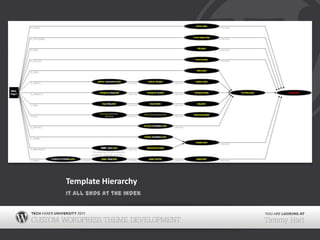
Template HierarchyDifferent kinds of WordPress magic happens on templates depending on what the template name is.
Common PagesArchive PagesHomepagehome.phpindex.phpSingle Post displaysingle-{post_type}.phpsingle.phpindex.phpPage displaycustom templatepage-{slug}.phppage-{id}.phppage.phpindex.phpSearch Result displaysearch.phpindex.php404 (Not Found) display404.phpindex.phpAttachment displayMIME_type.phpattachment.phpsingle.phpindex.phpCategory displaycategory-{slug}.phpcategory-{id}.phpcategory.phparchive.phpindex.phpTag displaytag-{slug}.phptag-{id}.phptag.phparchive.phpindex.phpCustom Taxonomiestaxonomy-{taxonomy}-{term}.php taxonomy-{taxonomy}.phptaxonomy.phparchive.phpindex.phpCustom Post Types displayarchive-{post_type}.php archive.phpindex.phpAuthor displayauthor-{nicename}.phpauthor-{id}.phpauthor.phparchive.phpindex.phpDate displaydate.phparchive.phpindex.php
Template HierarchyIt all ends at the index
A Basic Theme404.php 			- Custom “not found” pagearchive.php		- Overall template for archived contentattachment.php- Overall template for attachments of any mime typecomments.php	- The template called with comments_template()footer.php		- The template called with get_footer()functions.php		- A place to create custom functions, register sidebars, and other settingsheader.php		- The template called with get_header()index.php		- The basic home templatepage.php		- Overall template for pagessearch.php		- Search results templatesearchform.php	- The template called with get_search_form()sidebar.php		- The template called with get_sidebar()single.php		- Overall template for single postsstyle.css			- The main stylesheet
Bonus Template FunctionsCall alternate comment, sidebar, header, and footer templatesshort-comments.php	- comments_template('/short-comments.php')sidebar-simple.php		- get_sidebar('simple');header-simple.php		- get_header('simple');footer-simple.php		- get_footer('simple');
CustomPost Types & TaxonomiesMake your own stuff
What is a Post Type?Content entered into the database goes into the posts tableand is assigned a post_type.
Default Post TypesMain ContentPost 	- blog style contentPage		- static contentOtherAttachment		- any images or other files uploaded to a post (of any type)Revision			- an archive of version of a particular postNav Menu Item	- used in the menu system
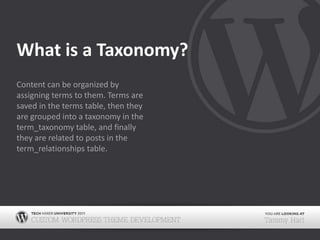
What is a Taxonomy?Content can be organized by assigning terms to them. Terms are saved in the terms table, then they are grouped into a taxonomy in the term_taxonomy table, and finally they are related to posts in the term_relationships table.
Default TaxonomiesPost TaxonomiesCategory	- hierarchicalPost Tag	- non-hierarchicalOtherLink Category	- for the links systemNav menu	- used in the menu system
Custom ExamplesPost Type: MovieTaxonomy: ActorTerm: Debbie ReynoldsTerm: Angeline JolieTerm: Clark GableTerm: Ewan McGregorTaxonomy: DirectorTerm: Ron HowardTerm: Steven SpielbergPost Type: BookTaxonomy: AuthorTerm: Frank PerettiTerm: James PattersonTerm: Seth GodinTerm: Lynn AustinTaxonomy: PublisherTerm: Atlas PressTerm: Hay HouseTerm: O’Reilly MediaTaxonomy: SubjectTerm: Arts & PhotographyTerm: Suspense & HorrorTerm: ReferencePost Type: PhotoTaxonomy: AlbumTerm: SummerChild Term: Fourth of JulyChild Term: First Day of SchoolTerm: ChristmasTerm: SportsTaxonomy: YearTerm: 2001Term: 2002Term: 2003Post Type: ProjectTaxonomy: TypeTerm: DesignChild Term: LogoChild Term: BrochureChild Term: WebsiteTerm: DevelopmentTaxonomy: ToolsTerm: PhotoshopTerm: HTML5Term: JavaScriptTerm: WordPress
Useful PluginsLike most things in WordPress, there are plugins that help create and manage Custom Post Types and Taxonomies.
CreateManageCustom Post Type UICreates BothTONS of labeling optionsWP Post Type UICreates BothBuggyAllows a custom iconMore Types & More TaxonomiesSeparate plugins for eachAllows you to override built in types and taxonomiesAllows a custom iconWorks seamlessly with the More Fields Plugin (stay tuned for more)Custom Post Type OrderDrag and drop orderingPost Type SwitcherChange the post type one item at a timeConvert Post TypesBulk edit post typesTerm Management ToolsMerge - combine two or more terms into oneSet parent - set the parent for one or more terms (for hierarchical taxonomies)Change taxonomy - convert terms from one taxonomy to another
Registration CodeThe best method for creating Custom Post Types and taxonomies for is to register them yourself without a plugin.
register_post_type()add_action( 'init', 'register_cpt_project');functionregister_cpt_project()  {$labels = array('name‘		=> _x('Projects','project'),'singular_name' => _x('Project','project' ),'add_new‘		=> _x( 'Add New','project' ),'add_new_item' => _x('Add New Project','project'),'edit_item' => _x( 'Edit Project','project' ),'new_item' => _x('New Project', 'project'),'view_item'		 => _x( 'View Project','project'),'search_items‘	 => _x('Search Projects', 'project'),'not_found' 	=> _x('No projects found', 'project'),'not_found_in_trash' => _x('No projects found in Trash','project'),'parent_item_colon' => _x('Parent Project:','project'),'menu_name' => _x('Projects ','project'));$args = array(	'labels' =>$labels,	'hierarchical' =>false,        	'supports‘		=>array('title','editor','thumbnail' ), 	'public' =>true,	'show_ui' =>true,	'show_in_menu' 	=>true,'show_in_nav_menus' =>false,	'publicly_queryable' =>true,	'exclude_from_search' =>false,	'has_archive' =>true,	'query_var' =>true,	'can_export' =>true,	'rewrite' =>true,	'capability_type' 	=>'post');register_post_type('project',$args );}
register_taxonomy()add_action( 'init', 'register_taxonomy_type');functionregister_taxonomy_type() {$labels = array( 'name' => _x( 'Types', 'type'),'singular_name' => _x( 'Type', 'type'),'search_items‘	=> _x( 'Search Types', 'type' ),'popular_items' => _x( 'Popular Types', 'type'),'all_items‘	=> _x( 'All Types', 'type'),'parent_item' => _x( 'Parent Type', 'type'),'parent_item_colon' => _x( 'Parent Type:', 'type'),'edit_item' => _x( 'Edit Type', 'type'),'update_item' => _x( 'Update Type', 'type'),'add_new_item' => _x( 'Add New Type', 'type'),'new_item_name' => _x( 'New Type Name', 'type'),'add_or_remove_items' => _x( 'Add or remove types', 'type'),'menu_name' => _x( 'Types', 'type'),);$args = array( 'labels' => $labels,'public‘		=> true,'show_in_nav_menus' => true,'show_ui' => true,'show_tagcloud' => false,'hierarchical‘	 => true,'rewrite' => true,'query_var' => true);register_taxonomy( 'type', 'project', $args );}
There’s still an easy way outDon’t get too worried about memorizing all of this. Just memorize the web address where you can find two amazing generators:Themergency.com/generators
CustomMeta BoxesNeed more input
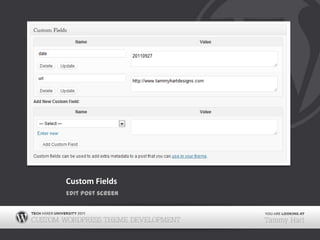
What are Custom Fields?The postmeta table holds extra data and options attached to each post. Custom fields can be used by theme and plugin developers to save extra pieces of information that you can use in templates and other places.
How Custom fields workThe data is saved in the postmeta tablemeta_id	- the ID of the item being savedpost_id	- the ID of the post it belongs tometa_key	- the name of the data being collectedmeta_value	- the entered valueUse the data in a template or functionget_post_meta()	- returns the values of the specified keythe_meta()		- outputs a simple list of all custom fields and their valuesget_post_custom()- returns a multidimensional array with all custom fields of a particular post or page
Code ExamplesExample 1:$my_key = get_post_meta($post->ID, 'my_key', true);if ($my_key != '')echo'<p>' . $my_key . '</p>';Example 2:<? $my_meta = get_post_custom(); ?><ul class="my_meta">	<li><b>Nice Label 1:</b> <?=$meta['my_key_1'][0]; ?></li>	<li><b>Nice Label 2:</b> <?=$meta['my_key_2'][0]; ?></li>	<li><b>Nice Label 3:</b> <?=$meta['my_key_3'][0]; ?></li></ul>
Custom FieldsEdit post screen
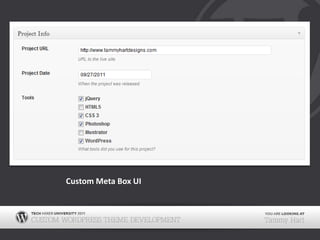
Create Your Own UIAdding a meta box for entering in values for custom fields can make it so much easier for the user to add things like dates or select from a premade list of values.
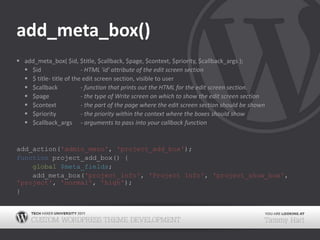
add_meta_box()add_meta_box( $id, $title, $callback, $page, $context, $priority, $callback_args );$id		- HTML 'id' attribute of the edit screen section$ title	- title of the edit screen section, visible to user$callback	- function that prints out the HTML for the edit screen section.$page	- the type of Write screen on which to show the edit screen section$context	- the part of the page where the edit screen section should be shown$priority	- the priority within the context where the boxes should show$callback_args- arguments to pass into your callback functionadd_action('admin_menu', 'project_add_box');function project_add_box() {global$meta_fields;    add_meta_box('project_info', 'Project Info', 'project_show_box', 'project', 'normal', 'high');}
Array of Fields$meta_fields =array( array(		'name'	=> 'Project URL',		'desc'	=>'URL to the live site.',		'id'	=> 'url',		'type'	=>'text',		'value'	=> 'http://'), array(		'name'	=> 'Project Date',		'desc'	=>'When the project was released.',		'id'	=>'date','type‘	=> 'date'), array(		'name'	=> 'Tools',		'desc'	=>'What tools did you use for this project?',		'id'	=>'tools',		'type'	=>'checkbox_group',		'options'	=>array( 'jQuery', 'HTML5', 'CSS 3', 'Photoshop', 'Illustrator', 'WordPress')	));
Callbackfunction project_show_box() {	global$meta_fields, $post;	// Use nonce for verification	echo'<input type="hidden" name="project_meta_box_nonce" value="', wp_create_nonce(basename(__FILE__)), '" />';// start a table	echo'<table class="form-table">';// start a loop through the fields	foreach ($meta_fields as $field) {	// get current post meta data$meta = get_post_meta($post->ID, $field['id'], true);// start a table rowecho'<tr> <th style="width:20%"><label for="', $field['id'], '">', $field['name'], '</label></th>','<td>';
Switch Case		switch($field['type']) {// textcase'text':echo'<input type="text" name="', $field['id'], '" id="', $field['id'], '" value="', $meta ? $meta : $field['value'], '" size="30" style="width:97%" /> <br /><span class="desc">', $field['desc'], '</span>';break;		… continue with other field types …} // end switchecho'<td>', '</tr>';	} // end foreachecho'</table>';}
Save Postadd_action('save_post', 'project_save_data');// Save data from meta boxfunction project_save_data($post_id) {global$meta_fields;// verify nonceif(!wp_verify_nonce($_POST['project_meta_box_nonce'], basename(__FILE__))) return$post_id;// check autosaveif(defined('DOING_AUTOSAVE') && DOING_AUTOSAVE)return$post_id;// check permissionsif ('page' == $_POST['post_type']) {if (!current_user_can('edit_page', $post_id))			return $post_id;		} elseif (!current_user_can('edit_post', $post_id)) {return$post_id;	}foreach($meta_fieldsas$field) {// get the current value$old = get_post_meta($post_id, $field['id'], true);// get the new value$new = $_POST[$field['id']];// update if there’s a new valueif($new && $new != $old) {			update_post_meta($post_id, $field['id'], $new);// delete if the new value is empty		} elseif ('' == $new && $old) {			delete_post_meta($post_id, $field['id'], $old);		}	}}
Custom Meta Box UI
Output the DataUsing the functions we discussed before, we can now use this data in our template.
The Bad and the UglyThe Bad:$url = get_post_meta($post->ID, ‘url', true);if ($my_key != '')echo'<a href="' . $my_key . '“>Visit Site &rarr;</p>';The Ugly:the_meta();
The Good<? $meta = get_post_custom();// url$url = $meta['url'][0];// date$date = $meta['date'][0];$date = strtotime($date);$date = date('F j, Y', $date);// tools$tools = $meta['tools'][0];$tools = unserialize($tools);$tools = implode(', ', $tools);?><ul class="post-meta"><li><a href="<?=$url;?>">Visit Site &rarr;</a></li><li><b>Release Date:</b> <?=$date;?></li><li><b>Tools Used:</b> <?=$tools;?></li></ul>
CustomTheme OptionsEven more stuff
Why is this useful?You can create an easy way to input additional data that can be used in a variety of ways in your theme.
Example UsagesSocial NetworksThe user can insert their twitter, facebook, etc. handles onceThe template outputs these in the necessary places of the themeOn/Off switchesShow secondary navigation?Are you available for live chat?Use Breadcrumbs?Custom layout optionsTwo column featured posts3 Category PostsFeatured slider with recent posts listed below
Create Your OwnThis is almost as simple as adding a custom meta box, except the data isn’t limited to just a post, it can be used site wide.
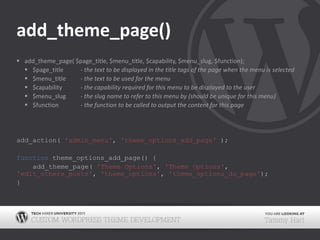
add_theme_page()add_theme_page( $page_title, $menu_title, $capability, $menu_slug, $function);$page_title	- the text to be displayed in the title tags of the page when the menu is selected$menu_title	- the text to be used for the menu$capability	- the capability required for this menu to be displayed to the user$menu_slug	- the slug name to refer to this menu by (should be unique for this menu)$function	- the function to be called to output the content for this pageadd_action( 'admin_menu', 'theme_options_add_page');functiontheme_options_add_page() {add_theme_page( 'Theme Options','Theme Options','edit_others_posts','theme_options', 'theme_options_do_page');}
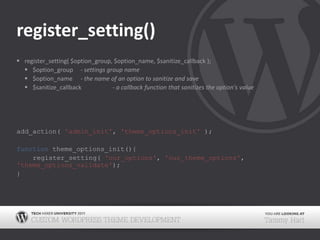
register_setting()register_setting( $option_group, $option_name, $sanitize_callback );$option_group	- settings group name$option_name	- the name of an option to sanitize and save $sanitize_callback	- a callback function that sanitizes the option's valueadd_action( 'admin_init', 'theme_options_init' );function theme_options_init(){		register_setting( 'our_options', 'our_theme_options', 'theme_options_validate');}
Array of Fields$fields = array(array('label'	=> 'Social Media','type'	=> 'section'	),array('label' => 'Facebook','id' => 'facebook','type' => 'text','desc' => 'Facebook URL'	),array('label'	=> 'Youtube','id'	=> 'youtube','type' => 'text','desc' => 'Youtube URL'),array('label'	=> 'Twitter','id' => 'twitter','type' => 'text','desc' => 'Twitter URL'	),array('label' => 'Miscellaneous','type' => 'section'	),array('label' => 'Featured Video','id' => 'featvideo','type' => 'text','desc' => 'Youtube URL for video to be featured on the homepage.'	));
Callbackfunction theme_options_do_page() {global$fields;if(!isset( $_REQUEST['settings-updated']))$_REQUEST['settings-updated'] = false;// the page headingecho'<div class="wrap">';screen_icon();echo'<h2>Theme Options</h2>';// notifies on load if options were savedif(false!== $_REQUEST['settings-updated'])echo'<div class="updated fade"><p><strong>Options saved</strong></p></div>';// start formecho'<form method="post" action="options.php">';	settings_fields( 'our_options' );// get the settings$options = get_option('our_theme_options');// start a tableecho'<table id="options" class="form-table">';// start a loop through the fieldsforeach($fields as$field) {// section rowsif($field['type'] == 'section') {echo'<tr><td colspan="2"><h3>', $field['label'], '</h3></td></tr>';}// field rowselse{// start a table rowecho'<tr valign="top"><th scope="row">', $field['label'], '</th>','<td>';
Switch Case		switch ($field['type']) {// textcase'text':echo'<input type="text" name="our_the_options[', $field['id'], ']" id="', $field['id'], '" value="', $meta ? $meta : $field['value'], '" size="30" style="width:97%" /> <br /><span class="desc">', $field['desc'], '</span>';break;			… continue with other field types …} // end switchecho'<td>', '</tr>';	} // end foreachecho'</table>';// close out the containerecho'<p class="submit"><input type="submit" class="button-primary" value="Save Options" /></p></form></div>';}
Save Datafunction theme_options_validate( $input ) {global$fields;foreach ($fieldsas$field) {switch ($field['type']) {//textcase'text':// Say our text option must be safe text with no HTML tags$input[$field['id']] = wp_filter_nohtml_kses( $input[$field['id']] );break;			… continue with other field types …} // end switch	} // end foreachreturn$input;}
Theme OptionsOur custom fields
Output the DataCreate a function to call the data from the setting and use it in your templates.
Custom Functions// get the value we savedfunction get_our_options($field) {$options = get_option('our_theme_options');return$options[$field];}// print the valuefunction our_options($field) {print get_our_options($field);}
OutputSocial Links:<ul class="social-links">	<li><a href="<?our_options('facebook');?>">Facebook</a></li>	<li><a href="<?our_options('youtube');?>">Youtube</a></li>	<li><a href="<?our_options('twitter');?>">Twitter</a></li></ul>Miscellaneous:<div class="featured-video"><?=apply_filters('the_content',get_our_options('featvideo'));?></div>
DownloadSee these slides and get all of the code we covered today:bit.ly/tmu_wp
Thank You! Questions?Tammy Hart@tammyharttammy@tammyhartdesigns.comTammyHartDesigns.com

Custom WordPress theme development

  • 1.
  • 2.
    Intro to ThemeDevelopmentCrash course
  • 3.
    What is aWordPress theme?A group of templates and a stylesheet that displays content entered into the database via the WordPress admin.At a minimum, you need:index.phpstyle.css
  • 4.
    Index.php<html><head><link rel="stylesheet" href="<?bloginfo('stylesheet_url');?>"type="text/css" media="screen" /><title><?wp_title('');?></title></head><body> <header><?bloginfo('name');?></header><nav><?wp_list_pages(); ?></nav><section> …loop with <article />…</section><footer>© <?=date('Y').' '.get_bloginfo('name');?></footer></body></html>
  • 5.
    Style.css/* Theme Name:Twenty Ten Theme URI: http://wordpress.org/ Description: The 2010 default theme for WordPress. Author: wordpressdotorg Author URI: http://wordpress.org/ Version: 1.0 Tags: black, blue, white, two-columns, fixed-width, custom-header, custom-background, threaded-comments, sticky-post, translation-ready, microformats, rtl-language-support, editor-style, custom-menu (optional) License: License URI: General comments (optional). */
  • 6.
    What is theLoop?PHP that uses the prefetched query of the current page to loop through the posts and displays the data as outlined in the current page’s template.
  • 7.
    Basic Loop<? if(have_posts()) : while(have_posts()) : the_post(); ?><h2><a href="<?the_permalink(); ?>"><?the_title(); ?></a></h2><?the_content(); ?><p class="postmetadata"><?the_date('F j, Y');?>Posted in: <?the_category(', ');?></p><?endwhile; else: ?><p>No Posts Found</p><?endif;?>
  • 8.
    Custom Loop<? $args=array('post_type'=> 'movie','numberposts'=>10,'meta_key'=>'production_year','meta_value'=>'1983','orderby' =>'meta_value');$loop =newWP_query($args);if ($loop->have_posts()) : while($loop->have_posts()) : $loop->the_post(); ?>… stuff …<?endwhile; else: ?><p>No Posts Found</p><?endif;?>
  • 9.
    Template HierarchyDifferent kindsof WordPress magic happens on templates depending on what the template name is.
  • 10.
    Common PagesArchive PagesHomepagehome.phpindex.phpSinglePost displaysingle-{post_type}.phpsingle.phpindex.phpPage displaycustom templatepage-{slug}.phppage-{id}.phppage.phpindex.phpSearch Result displaysearch.phpindex.php404 (Not Found) display404.phpindex.phpAttachment displayMIME_type.phpattachment.phpsingle.phpindex.phpCategory displaycategory-{slug}.phpcategory-{id}.phpcategory.phparchive.phpindex.phpTag displaytag-{slug}.phptag-{id}.phptag.phparchive.phpindex.phpCustom Taxonomiestaxonomy-{taxonomy}-{term}.php taxonomy-{taxonomy}.phptaxonomy.phparchive.phpindex.phpCustom Post Types displayarchive-{post_type}.php archive.phpindex.phpAuthor displayauthor-{nicename}.phpauthor-{id}.phpauthor.phparchive.phpindex.phpDate displaydate.phparchive.phpindex.php
  • 11.
    Template HierarchyIt allends at the index
  • 12.
    A Basic Theme404.php - Custom “not found” pagearchive.php - Overall template for archived contentattachment.php- Overall template for attachments of any mime typecomments.php - The template called with comments_template()footer.php - The template called with get_footer()functions.php - A place to create custom functions, register sidebars, and other settingsheader.php - The template called with get_header()index.php - The basic home templatepage.php - Overall template for pagessearch.php - Search results templatesearchform.php - The template called with get_search_form()sidebar.php - The template called with get_sidebar()single.php - Overall template for single postsstyle.css - The main stylesheet
  • 13.
    Bonus Template FunctionsCallalternate comment, sidebar, header, and footer templatesshort-comments.php - comments_template('/short-comments.php')sidebar-simple.php - get_sidebar('simple');header-simple.php - get_header('simple');footer-simple.php - get_footer('simple');
  • 14.
    CustomPost Types &TaxonomiesMake your own stuff
  • 15.
    What is aPost Type?Content entered into the database goes into the posts tableand is assigned a post_type.
  • 16.
    Default Post TypesMainContentPost - blog style contentPage - static contentOtherAttachment - any images or other files uploaded to a post (of any type)Revision - an archive of version of a particular postNav Menu Item - used in the menu system
  • 17.
    What is aTaxonomy?Content can be organized by assigning terms to them. Terms are saved in the terms table, then they are grouped into a taxonomy in the term_taxonomy table, and finally they are related to posts in the term_relationships table.
  • 18.
    Default TaxonomiesPost TaxonomiesCategory -hierarchicalPost Tag - non-hierarchicalOtherLink Category - for the links systemNav menu - used in the menu system
  • 19.
    Custom ExamplesPost Type:MovieTaxonomy: ActorTerm: Debbie ReynoldsTerm: Angeline JolieTerm: Clark GableTerm: Ewan McGregorTaxonomy: DirectorTerm: Ron HowardTerm: Steven SpielbergPost Type: BookTaxonomy: AuthorTerm: Frank PerettiTerm: James PattersonTerm: Seth GodinTerm: Lynn AustinTaxonomy: PublisherTerm: Atlas PressTerm: Hay HouseTerm: O’Reilly MediaTaxonomy: SubjectTerm: Arts & PhotographyTerm: Suspense & HorrorTerm: ReferencePost Type: PhotoTaxonomy: AlbumTerm: SummerChild Term: Fourth of JulyChild Term: First Day of SchoolTerm: ChristmasTerm: SportsTaxonomy: YearTerm: 2001Term: 2002Term: 2003Post Type: ProjectTaxonomy: TypeTerm: DesignChild Term: LogoChild Term: BrochureChild Term: WebsiteTerm: DevelopmentTaxonomy: ToolsTerm: PhotoshopTerm: HTML5Term: JavaScriptTerm: WordPress
  • 20.
    Useful PluginsLike mostthings in WordPress, there are plugins that help create and manage Custom Post Types and Taxonomies.
  • 21.
    CreateManageCustom Post TypeUICreates BothTONS of labeling optionsWP Post Type UICreates BothBuggyAllows a custom iconMore Types & More TaxonomiesSeparate plugins for eachAllows you to override built in types and taxonomiesAllows a custom iconWorks seamlessly with the More Fields Plugin (stay tuned for more)Custom Post Type OrderDrag and drop orderingPost Type SwitcherChange the post type one item at a timeConvert Post TypesBulk edit post typesTerm Management ToolsMerge - combine two or more terms into oneSet parent - set the parent for one or more terms (for hierarchical taxonomies)Change taxonomy - convert terms from one taxonomy to another
  • 22.
    Registration CodeThe bestmethod for creating Custom Post Types and taxonomies for is to register them yourself without a plugin.
  • 23.
    register_post_type()add_action( 'init', 'register_cpt_project');functionregister_cpt_project() {$labels = array('name‘ => _x('Projects','project'),'singular_name' => _x('Project','project' ),'add_new‘ => _x( 'Add New','project' ),'add_new_item' => _x('Add New Project','project'),'edit_item' => _x( 'Edit Project','project' ),'new_item' => _x('New Project', 'project'),'view_item' => _x( 'View Project','project'),'search_items‘ => _x('Search Projects', 'project'),'not_found' => _x('No projects found', 'project'),'not_found_in_trash' => _x('No projects found in Trash','project'),'parent_item_colon' => _x('Parent Project:','project'),'menu_name' => _x('Projects ','project'));$args = array( 'labels' =>$labels, 'hierarchical' =>false, 'supports‘ =>array('title','editor','thumbnail' ), 'public' =>true, 'show_ui' =>true, 'show_in_menu' =>true,'show_in_nav_menus' =>false, 'publicly_queryable' =>true, 'exclude_from_search' =>false, 'has_archive' =>true, 'query_var' =>true, 'can_export' =>true, 'rewrite' =>true, 'capability_type' =>'post');register_post_type('project',$args );}
  • 24.
    register_taxonomy()add_action( 'init', 'register_taxonomy_type');functionregister_taxonomy_type(){$labels = array( 'name' => _x( 'Types', 'type'),'singular_name' => _x( 'Type', 'type'),'search_items‘ => _x( 'Search Types', 'type' ),'popular_items' => _x( 'Popular Types', 'type'),'all_items‘ => _x( 'All Types', 'type'),'parent_item' => _x( 'Parent Type', 'type'),'parent_item_colon' => _x( 'Parent Type:', 'type'),'edit_item' => _x( 'Edit Type', 'type'),'update_item' => _x( 'Update Type', 'type'),'add_new_item' => _x( 'Add New Type', 'type'),'new_item_name' => _x( 'New Type Name', 'type'),'add_or_remove_items' => _x( 'Add or remove types', 'type'),'menu_name' => _x( 'Types', 'type'),);$args = array( 'labels' => $labels,'public‘ => true,'show_in_nav_menus' => true,'show_ui' => true,'show_tagcloud' => false,'hierarchical‘ => true,'rewrite' => true,'query_var' => true);register_taxonomy( 'type', 'project', $args );}
  • 25.
    There’s still aneasy way outDon’t get too worried about memorizing all of this. Just memorize the web address where you can find two amazing generators:Themergency.com/generators
  • 26.
  • 27.
    What are CustomFields?The postmeta table holds extra data and options attached to each post. Custom fields can be used by theme and plugin developers to save extra pieces of information that you can use in templates and other places.
  • 28.
    How Custom fieldsworkThe data is saved in the postmeta tablemeta_id - the ID of the item being savedpost_id - the ID of the post it belongs tometa_key - the name of the data being collectedmeta_value - the entered valueUse the data in a template or functionget_post_meta() - returns the values of the specified keythe_meta() - outputs a simple list of all custom fields and their valuesget_post_custom()- returns a multidimensional array with all custom fields of a particular post or page
  • 29.
    Code ExamplesExample 1:$my_key= get_post_meta($post->ID, 'my_key', true);if ($my_key != '')echo'<p>' . $my_key . '</p>';Example 2:<? $my_meta = get_post_custom(); ?><ul class="my_meta"> <li><b>Nice Label 1:</b> <?=$meta['my_key_1'][0]; ?></li> <li><b>Nice Label 2:</b> <?=$meta['my_key_2'][0]; ?></li> <li><b>Nice Label 3:</b> <?=$meta['my_key_3'][0]; ?></li></ul>
  • 30.
  • 31.
    Create Your OwnUIAdding a meta box for entering in values for custom fields can make it so much easier for the user to add things like dates or select from a premade list of values.
  • 32.
    add_meta_box()add_meta_box( $id, $title, $callback, $page, $context, $priority, $callback_args );$id - HTML 'id'attribute of the edit screen section$ title - title of the edit screen section, visible to user$callback - function that prints out the HTML for the edit screen section.$page - the type of Write screen on which to show the edit screen section$context - the part of the page where the edit screen section should be shown$priority - the priority within the context where the boxes should show$callback_args- arguments to pass into your callback functionadd_action('admin_menu', 'project_add_box');function project_add_box() {global$meta_fields; add_meta_box('project_info', 'Project Info', 'project_show_box', 'project', 'normal', 'high');}
  • 33.
    Array of Fields$meta_fields=array( array( 'name' => 'Project URL', 'desc' =>'URL to the live site.', 'id' => 'url', 'type' =>'text', 'value' => 'http://'), array( 'name' => 'Project Date', 'desc' =>'When the project was released.', 'id' =>'date','type‘ => 'date'), array( 'name' => 'Tools', 'desc' =>'What tools did you use for this project?', 'id' =>'tools', 'type' =>'checkbox_group', 'options' =>array( 'jQuery', 'HTML5', 'CSS 3', 'Photoshop', 'Illustrator', 'WordPress') ));
  • 34.
    Callbackfunction project_show_box() { global$meta_fields,$post; // Use nonce for verification echo'<input type="hidden" name="project_meta_box_nonce" value="', wp_create_nonce(basename(__FILE__)), '" />';// start a table echo'<table class="form-table">';// start a loop through the fields foreach ($meta_fields as $field) { // get current post meta data$meta = get_post_meta($post->ID, $field['id'], true);// start a table rowecho'<tr> <th style="width:20%"><label for="', $field['id'], '">', $field['name'], '</label></th>','<td>';
  • 35.
    Switch Case switch($field['type']) {//textcase'text':echo'<input type="text" name="', $field['id'], '" id="', $field['id'], '" value="', $meta ? $meta : $field['value'], '" size="30" style="width:97%" /> <br /><span class="desc">', $field['desc'], '</span>';break; … continue with other field types …} // end switchecho'<td>', '</tr>'; } // end foreachecho'</table>';}
  • 36.
    Save Postadd_action('save_post', 'project_save_data');//Save data from meta boxfunction project_save_data($post_id) {global$meta_fields;// verify nonceif(!wp_verify_nonce($_POST['project_meta_box_nonce'], basename(__FILE__))) return$post_id;// check autosaveif(defined('DOING_AUTOSAVE') && DOING_AUTOSAVE)return$post_id;// check permissionsif ('page' == $_POST['post_type']) {if (!current_user_can('edit_page', $post_id)) return $post_id; } elseif (!current_user_can('edit_post', $post_id)) {return$post_id; }foreach($meta_fieldsas$field) {// get the current value$old = get_post_meta($post_id, $field['id'], true);// get the new value$new = $_POST[$field['id']];// update if there’s a new valueif($new && $new != $old) { update_post_meta($post_id, $field['id'], $new);// delete if the new value is empty } elseif ('' == $new && $old) { delete_post_meta($post_id, $field['id'], $old); } }}
  • 37.
  • 38.
    Output the DataUsingthe functions we discussed before, we can now use this data in our template.
  • 39.
    The Bad andthe UglyThe Bad:$url = get_post_meta($post->ID, ‘url', true);if ($my_key != '')echo'<a href="' . $my_key . '“>Visit Site &rarr;</p>';The Ugly:the_meta();
  • 40.
    The Good<? $meta= get_post_custom();// url$url = $meta['url'][0];// date$date = $meta['date'][0];$date = strtotime($date);$date = date('F j, Y', $date);// tools$tools = $meta['tools'][0];$tools = unserialize($tools);$tools = implode(', ', $tools);?><ul class="post-meta"><li><a href="<?=$url;?>">Visit Site &rarr;</a></li><li><b>Release Date:</b> <?=$date;?></li><li><b>Tools Used:</b> <?=$tools;?></li></ul>
  • 41.
  • 42.
    Why is thisuseful?You can create an easy way to input additional data that can be used in a variety of ways in your theme.
  • 43.
    Example UsagesSocial NetworksTheuser can insert their twitter, facebook, etc. handles onceThe template outputs these in the necessary places of the themeOn/Off switchesShow secondary navigation?Are you available for live chat?Use Breadcrumbs?Custom layout optionsTwo column featured posts3 Category PostsFeatured slider with recent posts listed below
  • 44.
    Create Your OwnThisis almost as simple as adding a custom meta box, except the data isn’t limited to just a post, it can be used site wide.
  • 45.
    add_theme_page()add_theme_page( $page_title, $menu_title, $capability, $menu_slug, $function);$page_title - the textto be displayed in the title tags of the page when the menu is selected$menu_title - the text to be used for the menu$capability - the capability required for this menu to be displayed to the user$menu_slug - the slug name to refer to this menu by (should be unique for this menu)$function - the function to be called to output the content for this pageadd_action( 'admin_menu', 'theme_options_add_page');functiontheme_options_add_page() {add_theme_page( 'Theme Options','Theme Options','edit_others_posts','theme_options', 'theme_options_do_page');}
  • 46.
    register_setting()register_setting( $option_group, $option_name, $sanitize_callback );$option_group - settings groupname$option_name - the name of an option to sanitize and save $sanitize_callback - a callback function that sanitizes the option's valueadd_action( 'admin_init', 'theme_options_init' );function theme_options_init(){ register_setting( 'our_options', 'our_theme_options', 'theme_options_validate');}
  • 47.
    Array of Fields$fields= array(array('label' => 'Social Media','type' => 'section' ),array('label' => 'Facebook','id' => 'facebook','type' => 'text','desc' => 'Facebook URL' ),array('label' => 'Youtube','id' => 'youtube','type' => 'text','desc' => 'Youtube URL'),array('label' => 'Twitter','id' => 'twitter','type' => 'text','desc' => 'Twitter URL' ),array('label' => 'Miscellaneous','type' => 'section' ),array('label' => 'Featured Video','id' => 'featvideo','type' => 'text','desc' => 'Youtube URL for video to be featured on the homepage.' ));
  • 48.
    Callbackfunction theme_options_do_page() {global$fields;if(!isset($_REQUEST['settings-updated']))$_REQUEST['settings-updated'] = false;// the page headingecho'<div class="wrap">';screen_icon();echo'<h2>Theme Options</h2>';// notifies on load if options were savedif(false!== $_REQUEST['settings-updated'])echo'<div class="updated fade"><p><strong>Options saved</strong></p></div>';// start formecho'<form method="post" action="options.php">'; settings_fields( 'our_options' );// get the settings$options = get_option('our_theme_options');// start a tableecho'<table id="options" class="form-table">';// start a loop through the fieldsforeach($fields as$field) {// section rowsif($field['type'] == 'section') {echo'<tr><td colspan="2"><h3>', $field['label'], '</h3></td></tr>';}// field rowselse{// start a table rowecho'<tr valign="top"><th scope="row">', $field['label'], '</th>','<td>';
  • 49.
    Switch Case switch ($field['type']){// textcase'text':echo'<input type="text" name="our_the_options[', $field['id'], ']" id="', $field['id'], '" value="', $meta ? $meta : $field['value'], '" size="30" style="width:97%" /> <br /><span class="desc">', $field['desc'], '</span>';break; … continue with other field types …} // end switchecho'<td>', '</tr>'; } // end foreachecho'</table>';// close out the containerecho'<p class="submit"><input type="submit" class="button-primary" value="Save Options" /></p></form></div>';}
  • 50.
    Save Datafunction theme_options_validate($input ) {global$fields;foreach ($fieldsas$field) {switch ($field['type']) {//textcase'text':// Say our text option must be safe text with no HTML tags$input[$field['id']] = wp_filter_nohtml_kses( $input[$field['id']] );break; … continue with other field types …} // end switch } // end foreachreturn$input;}
  • 51.
  • 52.
    Output the DataCreatea function to call the data from the setting and use it in your templates.
  • 53.
    Custom Functions// getthe value we savedfunction get_our_options($field) {$options = get_option('our_theme_options');return$options[$field];}// print the valuefunction our_options($field) {print get_our_options($field);}
  • 54.
    OutputSocial Links:<ul class="social-links"> <li><ahref="<?our_options('facebook');?>">Facebook</a></li> <li><a href="<?our_options('youtube');?>">Youtube</a></li> <li><a href="<?our_options('twitter');?>">Twitter</a></li></ul>Miscellaneous:<div class="featured-video"><?=apply_filters('the_content',get_our_options('featvideo'));?></div>
  • 55.
    DownloadSee these slidesand get all of the code we covered today:bit.ly/tmu_wp
  • 56.
    Thank You! Questions?TammyHart@tammyharttammy@tammyhartdesigns.comTammyHartDesigns.com