C U S T O M
T H E M E I N G
I N W O R D P R E S S
@ J A M I E S C H M I D
W O R D C A M P K A N S A S C I T Y 2 0 1 7
J A M I E S C H M I D
I ’ M A W O R D P R E S S D E V E L O P E R
I N P O R T L A N D , O R
H I ! I ’ M
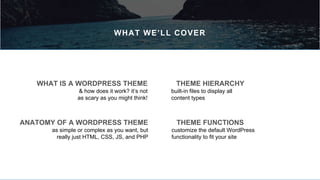
THEME FUNCTIONS
customize the default WordPress
functionality to fit your site
THEME HIERARCHY
built-in files to display all
content types
ANATOMY OF A WORDPRESS THEME
as simple or complex as you want, but
really just HTML, CSS, JS, and PHP
WHAT IS A WORDPRESS THEME
& how does it work? it’s not
as scary as you might think!
WHAT WE’LL COVER
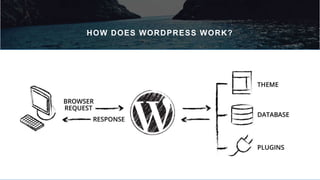
HOW DOES WORDPRESS WORK?
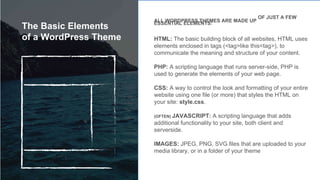
ALL WORDPRESS THEMES ARE MADE UP
OF JUST A FEW
ESSENTIAL ELEMENTS:
HTML: The basic building block of all websites, HTML uses
elements enclosed in tags (<tag>like this<tag>), to
communicate the meaning and structure of your content.
PHP: A scripting language that runs server-side, PHP is
used to generate the elements of your web page.
CSS: A way to control the look and formatting of your entire
website using one file (or more) that styles the HTML on
your site: style.css.
(OFTEN) JAVASCRIPT: A scripting language that adds
additional functionality to your site, both client and
serverside.
IMAGES: JPEG, PNG, SVG files that are uploaded to your
media library, or in a folder of your theme
The Basic Elements
of a WordPress Theme
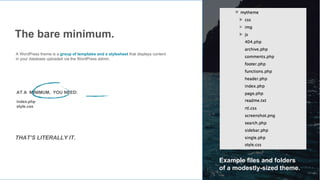
The bare minimum.
A WordPress theme is a group of templates and a stylesheet that displays content
in your database uploaded via the WordPress admin.
AT A MINIMUM, YOU NEED:
index.php
style.css
Example files and folders
of a modestly-sized theme.
THAT’S LITERALLY IT.
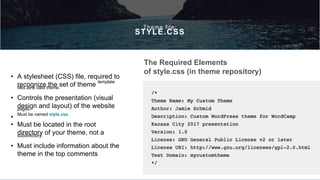
Theme file:
STYLE.CSS
• A stylesheet (CSS) file, required to
recognize the set of theme
template
files as a valid theme.
• Controls the presentation (visual
design and layout) of the websitepages.
•
Must be named style.css.
• Must be located in the root
directory of your theme, not asubdirectory.
• Must include information about the
theme in the top comments
The Required Elements
of style.css (in theme repository)
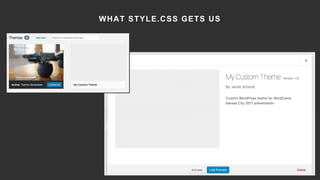
WHAT STYLE.CSS GETS US
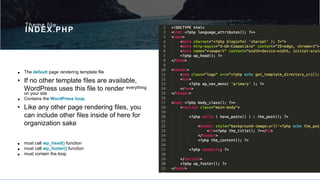
Theme file:
INDEX.PHP
• The default page rendering template file
• If no other template files are available,
WordPress uses this file to render everything
on your site
• Contains the WordPress loop.
• Like any other page rendering files, you
can include other files inside of here for
organization sake
• must call wp_head() function
• must call wp_footer() function
• must contain the loop
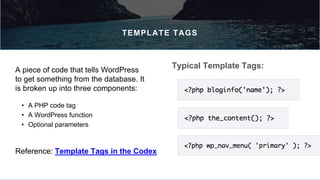
TEMPLATE TAGS
• A PHP code tag
• A WordPress function
• Optional parameters
Typical Template Tags:A piece of code that tells WordPress
to get something from the database. It
is broken up into three components:
Reference: Template Tags in the Codex
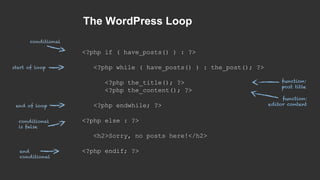
The WordPress Loop
<?php if ( have_posts() ) : ?>
<?php while ( have_posts() ) : the_post(); ?>
<?php the_title(); ?>
<?php the_content(); ?>
<?php endwhile; ?>
<?php else : ?>
<h2>Sorry, no posts here!</h2>
<?php endif; ?>
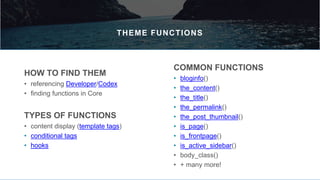
THEME FUNCTIONS
HOW TO FIND THEM
• referencing Developer/Codex
• finding functions in Core
COMMON FUNCTIONS
• bloginfo()
• the_content()
• the_title()
• the_permalink()
• the_post_thumbnail()
• is_page()
• is_frontpage()
• is_active_sidebar()
• body_class()
• + many more!
TYPES OF FUNCTIONS
• content display (template tags)
• conditional tags
• hooks
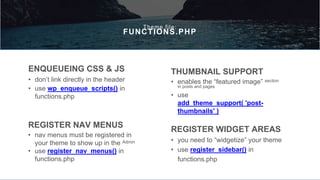
Theme file:
FUNCTIONS.PHP
ENQUEUEING CSS & JS
• don’t link directly in the header
• use wp_enqueue_scripts() in
functions.php
REGISTER NAV MENUS
• nav menus must be registered in
your theme to show up in the Admin
• use register_nav_menus() in
functions.php
THUMBNAIL SUPPORT
• enables the “featured image” section
in posts and pages
• use
add_theme_support( 'post-
thumbnails' )
REGISTER WIDGET AREAS
• you need to “widgetize” your theme
• use register_sidebar() in
functions.php
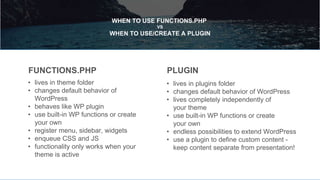
WHEN TO USE FUNCTIONS.PHP
VS
WHEN TO USE/CREATE A PLUGIN
• lives in theme folder
• changes default behavior of
WordPress
• behaves like WP plugin
• use built-in WP functions or create
your own
• register menu, sidebar, widgets
• enqueue CSS and JS
• functionality only works when your
theme is active
FUNCTIONS.PHP
• lives in plugins folder
• changes default behavior of WordPress
• lives completely independently of
your theme
• use built-in WP functions or create
your own
• endless possibilities to extend WordPress
• use a plugin to define custom content -
keep content separate from presentation!
PLUGIN
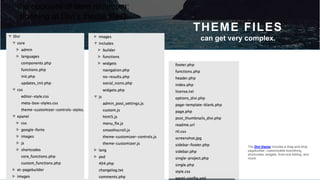
THEME FILES
can get very complex.
the opposite of bare minimum:
(looking at Divi’s theme files)
The Divi theme includes a drag-and-drop
pagebuilder, customizable everything,
shortcodes, widgets, front-end editing, and
more!
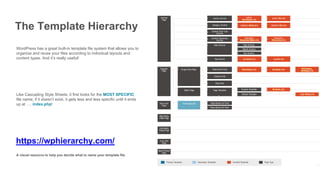
WordPress has a great built-in template file system that allows you to
organize and reuse your files according to individual layouts and
content types. And it’s really useful!
The Template Hierarchy
Like Cascading Style Sheets, it first looks for the MOST SPECIFIC
file name; if it doesn’t exist, it gets less and less specific until it ends
up at …. index.php!
https://wphierarchy.com/
A visual resource to help you decide what to name your template file
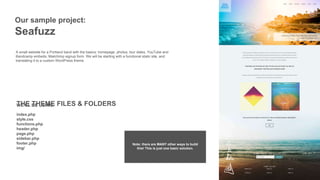
Our sample project:
Seafuzz
A small website for a Portland band with the basics: homepage, photos, tour dates, YouTube and
Bandcamp embeds, Mailchimp signup form. We will be starting with a functional static site, and
translating it to a custom WordPress theme.
THE THEME FILES & FOLDERSWE’LL BE USING:
index.php
style.css
functions.php
header.php
page.php
sidebar.php
footer.php
img/
Note: there are MANY other ways to build
this! This is just one basic solution.
THINGS TO DO BEFORE YOUR THEME
• Create your pages. Use loremipsum if you need to.
• Set your homepage and blogpage (if applicable).
•
Set your permalinks.
•
Configure your plugins.
You’re going to need content to style. WordPress keeps all
content inside the database. To wp-admin we go!
• Wait on menus - you define thesein your theme
• Wait on widgets - you define these
in your theme
Let’s build a WordPress theme!
DEMO TIME!
As you do more and more themes…
you will find yourself reusing certain code…
even certain pages…
maybe even a whole default theme you build off of each time.
This is called a starter theme.
And some people have built some great ones for you to use!
I know what you’re thinking.
And you’re right.
STARTER THEMES
• A group of theme files, HTML, CSS and theme functions madeto act as a starting point for custom theme development
• NOT a framework! NOT a commercial theme! NOT meant fora child theme!
• Takes out the “busy work” and lets you get right down to
building your theme
EXAMPLES:
• _s (Underscores)
• FoundationPress • Understrap (bootstrap & _s)
• Sage (advanced!)
RESOURCES
• lynda.com: Custom Themeing
• WP Beginner
• the Codex: Theme Development
• the Codex: Functions
• the Developers Guidebook
• the Template Hierarchy
• _s (underscores)
• these slides
T H A N K Y O U !
Q U E S T I O N S ?
@ J A M I E S C H M I D
W O R D C A M P K A N S A S C I T Y 2 0 1 7

Introduction to Custom WordPress Themeing

  • 1.
    C U ST O M T H E M E I N G I N W O R D P R E S S @ J A M I E S C H M I D W O R D C A M P K A N S A S C I T Y 2 0 1 7
  • 2.
    J A MI E S C H M I D I ’ M A W O R D P R E S S D E V E L O P E R I N P O R T L A N D , O R H I ! I ’ M
  • 3.
    THEME FUNCTIONS customize thedefault WordPress functionality to fit your site THEME HIERARCHY built-in files to display all content types ANATOMY OF A WORDPRESS THEME as simple or complex as you want, but really just HTML, CSS, JS, and PHP WHAT IS A WORDPRESS THEME & how does it work? it’s not as scary as you might think! WHAT WE’LL COVER
  • 4.
  • 5.
    ALL WORDPRESS THEMESARE MADE UP OF JUST A FEW ESSENTIAL ELEMENTS: HTML: The basic building block of all websites, HTML uses elements enclosed in tags (<tag>like this<tag>), to communicate the meaning and structure of your content. PHP: A scripting language that runs server-side, PHP is used to generate the elements of your web page. CSS: A way to control the look and formatting of your entire website using one file (or more) that styles the HTML on your site: style.css. (OFTEN) JAVASCRIPT: A scripting language that adds additional functionality to your site, both client and serverside. IMAGES: JPEG, PNG, SVG files that are uploaded to your media library, or in a folder of your theme The Basic Elements of a WordPress Theme
  • 6.
    The bare minimum. AWordPress theme is a group of templates and a stylesheet that displays content in your database uploaded via the WordPress admin. AT A MINIMUM, YOU NEED: index.php style.css Example files and folders of a modestly-sized theme. THAT’S LITERALLY IT.
  • 7.
    Theme file: STYLE.CSS • Astylesheet (CSS) file, required to recognize the set of theme template files as a valid theme. • Controls the presentation (visual design and layout) of the websitepages. • Must be named style.css. • Must be located in the root directory of your theme, not asubdirectory. • Must include information about the theme in the top comments The Required Elements of style.css (in theme repository)
  • 8.
  • 9.
    Theme file: INDEX.PHP • Thedefault page rendering template file • If no other template files are available, WordPress uses this file to render everything on your site • Contains the WordPress loop. • Like any other page rendering files, you can include other files inside of here for organization sake • must call wp_head() function • must call wp_footer() function • must contain the loop
  • 10.
    TEMPLATE TAGS • APHP code tag • A WordPress function • Optional parameters Typical Template Tags:A piece of code that tells WordPress to get something from the database. It is broken up into three components: Reference: Template Tags in the Codex
  • 11.
    The WordPress Loop <?phpif ( have_posts() ) : ?> <?php while ( have_posts() ) : the_post(); ?> <?php the_title(); ?> <?php the_content(); ?> <?php endwhile; ?> <?php else : ?> <h2>Sorry, no posts here!</h2> <?php endif; ?>
  • 12.
    THEME FUNCTIONS HOW TOFIND THEM • referencing Developer/Codex • finding functions in Core COMMON FUNCTIONS • bloginfo() • the_content() • the_title() • the_permalink() • the_post_thumbnail() • is_page() • is_frontpage() • is_active_sidebar() • body_class() • + many more! TYPES OF FUNCTIONS • content display (template tags) • conditional tags • hooks
  • 13.
    Theme file: FUNCTIONS.PHP ENQUEUEING CSS& JS • don’t link directly in the header • use wp_enqueue_scripts() in functions.php REGISTER NAV MENUS • nav menus must be registered in your theme to show up in the Admin • use register_nav_menus() in functions.php THUMBNAIL SUPPORT • enables the “featured image” section in posts and pages • use add_theme_support( 'post- thumbnails' ) REGISTER WIDGET AREAS • you need to “widgetize” your theme • use register_sidebar() in functions.php
  • 14.
    WHEN TO USEFUNCTIONS.PHP VS WHEN TO USE/CREATE A PLUGIN • lives in theme folder • changes default behavior of WordPress • behaves like WP plugin • use built-in WP functions or create your own • register menu, sidebar, widgets • enqueue CSS and JS • functionality only works when your theme is active FUNCTIONS.PHP • lives in plugins folder • changes default behavior of WordPress • lives completely independently of your theme • use built-in WP functions or create your own • endless possibilities to extend WordPress • use a plugin to define custom content - keep content separate from presentation! PLUGIN
  • 15.
    THEME FILES can getvery complex. the opposite of bare minimum: (looking at Divi’s theme files) The Divi theme includes a drag-and-drop pagebuilder, customizable everything, shortcodes, widgets, front-end editing, and more!
  • 16.
    WordPress has agreat built-in template file system that allows you to organize and reuse your files according to individual layouts and content types. And it’s really useful! The Template Hierarchy Like Cascading Style Sheets, it first looks for the MOST SPECIFIC file name; if it doesn’t exist, it gets less and less specific until it ends up at …. index.php! https://wphierarchy.com/ A visual resource to help you decide what to name your template file
  • 17.
    Our sample project: Seafuzz Asmall website for a Portland band with the basics: homepage, photos, tour dates, YouTube and Bandcamp embeds, Mailchimp signup form. We will be starting with a functional static site, and translating it to a custom WordPress theme. THE THEME FILES & FOLDERSWE’LL BE USING: index.php style.css functions.php header.php page.php sidebar.php footer.php img/ Note: there are MANY other ways to build this! This is just one basic solution.
  • 18.
    THINGS TO DOBEFORE YOUR THEME • Create your pages. Use loremipsum if you need to. • Set your homepage and blogpage (if applicable). • Set your permalinks. • Configure your plugins. You’re going to need content to style. WordPress keeps all content inside the database. To wp-admin we go! • Wait on menus - you define thesein your theme • Wait on widgets - you define these in your theme
  • 19.
    Let’s build aWordPress theme! DEMO TIME!
  • 20.
    As you domore and more themes… you will find yourself reusing certain code… even certain pages… maybe even a whole default theme you build off of each time. This is called a starter theme. And some people have built some great ones for you to use! I know what you’re thinking. And you’re right.
  • 21.
    STARTER THEMES • Agroup of theme files, HTML, CSS and theme functions madeto act as a starting point for custom theme development • NOT a framework! NOT a commercial theme! NOT meant fora child theme! • Takes out the “busy work” and lets you get right down to building your theme EXAMPLES: • _s (Underscores) • FoundationPress • Understrap (bootstrap & _s) • Sage (advanced!)
  • 22.
    RESOURCES • lynda.com: CustomThemeing • WP Beginner • the Codex: Theme Development • the Codex: Functions • the Developers Guidebook • the Template Hierarchy • _s (underscores) • these slides
  • 23.
    T H AN K Y O U ! Q U E S T I O N S ? @ J A M I E S C H M I D W O R D C A M P K A N S A S C I T Y 2 0 1 7

Editor's Notes

  • #22 WordPress starter theme that includes most of the default functions you will need free to download SASS version bare bones styling organized theme files reusable HTML sections