GIT WORKSHOP
ISMET OZOZTURK - SONY
GIT WORKSHOP
ABOUT ME
▸ GWT since Jan 2016
▸ Developer for +4 years
▸ Experienced on Java, Scala
▸ Using GIT for 4 years - with 💙
GIT WORKSHOP
ABOUT ME
GIT WORKSHOP
WHAT YOU WILL LEARN
▸ What is Version Control System (VCS)
▸ What is GIT (not an abbr.)
▸ Typical GIT Workflow
▸ GIT Basics
GIT WORKSHOP
VERSION CONTROL SYSTEMS
▸ Keeps track of your changes on your data
▸ Logs the history of who did what on which files/folders
and when
▸ Provides time traveling to a snapshot of the project on a
specific date/version
▸ Keep/Synchronize files between people in the project
GIT WORKSHOP
WHAT IS GIT?
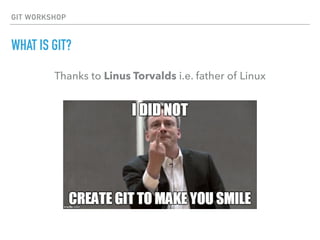
Thanks to Linus Torvalds i.e. father of Linux
GIT WORKSHOP
WHAT IS GIT?
Harder, Better, Faster, Stronger
GIT WORKSHOP
WHAT IS GIT?
▸ Distributed
▸ Hosted versions: Github, Bitbucket
▸ Download: http://www.git-scm.com
▸ GUI? Sourcetree
GIT WORKSHOP
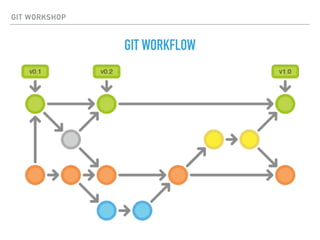
GIT WORKFLOW
GIT WORKSHOP
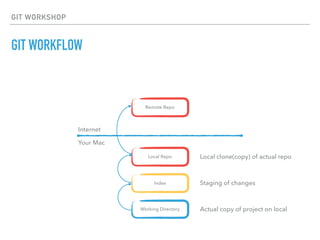
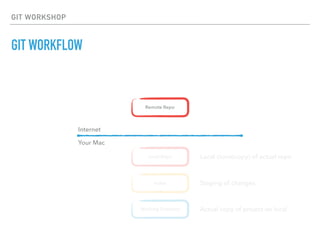
GIT WORKFLOW
Working Directory
Index
Local Repo
Remote Repo
Local clone(copy) of actual repo
Staging of changes
Actual copy of project on local
Internet
Your Mac
GIT WORKSHOP
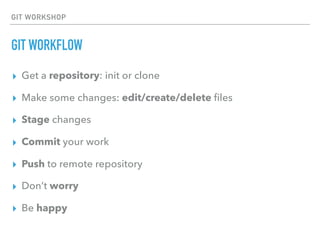
GIT WORKFLOW
▸ Get a repository: init or clone
▸ Make some changes: edit/create/delete files
▸ Stage changes
▸ Commit your work
▸ Push to remote repository
▸ Don’t worry
▸ Be happy
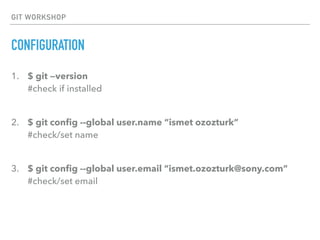
1. $ git —version

#check if installed

2. $ git config --global user.name “ismet ozozturk”

#check/set name

3. $ git config --global user.email “ismet.ozozturk@sony.com”

#check/set email
GIT WORKSHOP
CONFIGURATION
GIT WORKSHOP
GITHUB
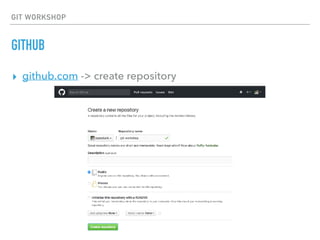
▸ github.com -> create repository
GIT WORKSHOP
GIT WORKFLOW
Working Directory
Index
Local Repo
Remote Repo
Local clone(copy) of actual repo
Staging of changes
Actual copy of project on local
Internet
Your Mac
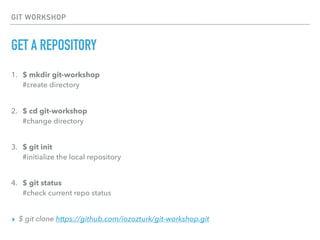
1. $ mkdir git-workshop

#create directory

2. $ cd git-workshop 

#change directory

3. $ git init

#initialize the local repository

4. $ git status

#check current repo status

▸ $ git clone https://github.com/iozozturk/git-workshop.git
GIT WORKSHOP
GET A REPOSITORY
GIT WORKSHOP
DO SOME WORK
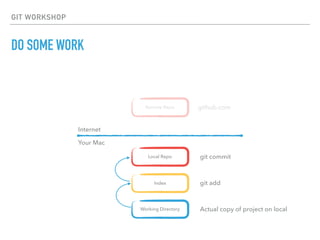
Working Directory
Index
Local Repo
Remote Repo
git commit
git add
Actual copy of project on local
Internet
Your Mac
github.com
GIT WORKSHOP
DO SOME WORK
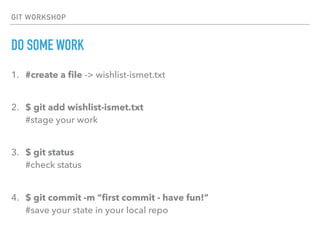
1. #create a file -> wishlist-ismet.txt

2. $ git add wishlist-ismet.txt 

#stage your work

3. $ git status

#check status

4. $ git commit -m “first commit - have fun!”

#save your state in your local repo
GIT WORKSHOP
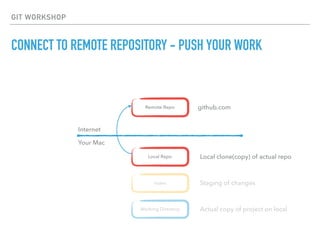
CONNECT TO REMOTE REPOSITORY - PUSH YOUR WORK
Working Directory
Index
Local Repo
Remote Repo
Local clone(copy) of actual repo
Staging of changes
Actual copy of project on local
Internet
Your Mac
github.com
GIT WORKSHOP
CONNECT TO REMOTE REPOSITORY - PUSH YOUR WORK
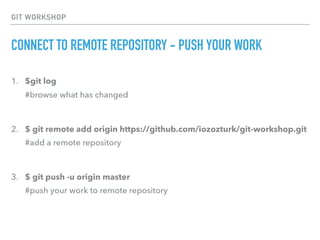
1. $git log

#browse what has changed

2. $ git remote add origin https://github.com/iozozturk/git-workshop.git

#add a remote repository

3. $ git push -u origin master

#push your work to remote repository

GIT WORKSHOP
LET’S PAIR
GIT WORKSHOP
LET’S PAIR
GIT WORKSHOP
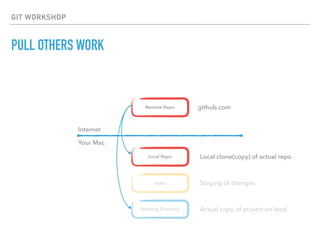
PULL OTHERS WORK
Working Directory
Index
Local Repo
Remote Repo
Local clone(copy) of actual repo
Staging of changes
Actual copy of project on local
Internet
Your Mac
github.com
GIT WORKSHOP
PULL OTHERS WORK
1. $ git pull origin master

#check changes and pull them to your working directory

GIT WORKSHOP
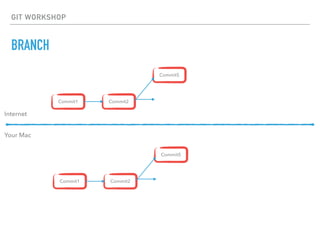
BRANCH
▸ Try out an idea, experiment, isolate
▸ Keep long running tasks separate
▸ Share your work with others w/o changing master
▸ Carry unfinished work between machines
GIT WORKSHOP
BRANCH
Commit1
Internet
Your Mac
Commit2
Commit5
Commit1 Commit2
Commit5
GIT WORKSHOP
BRANCH
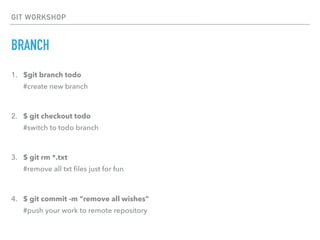
1. $git branch todo

#create new branch

2. $ git checkout todo

#switch to todo branch

3. $ git rm *.txt

#remove all txt files just for fun

4. $ git commit -m “remove all wishes”

#push your work to remote repository
GIT WORKSHOP
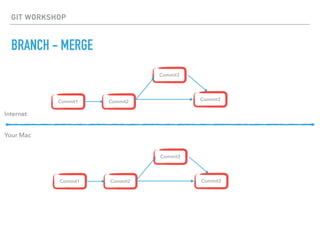
BRANCH - MERGE
Commit1
Internet
Your Mac
Commit2
Commit3
Commit1 Commit2
Commit3
Commit3
Commit3
GIT WORKSHOP
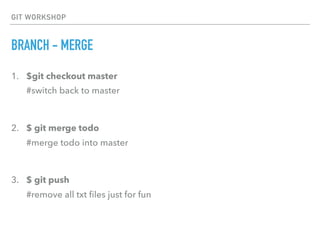
BRANCH - MERGE
1. $git checkout master

#switch back to master

2. $ git merge todo

#merge todo into master

3. $ git push

#remove all txt files just for fun

GIT WORKSHOP
RECAP
🗄 Version Control
GIT & GitHub
📸 Commit your work
⬆ Pushing your work
⬇ Pulling others work
🔀 Branching
ISMET.OZOZTURK@SONY.COM

Introduction to Version Control with GIT

  • 1.
  • 2.
    GIT WORKSHOP ABOUT ME ▸GWT since Jan 2016 ▸ Developer for +4 years ▸ Experienced on Java, Scala ▸ Using GIT for 4 years - with 💙
  • 3.
  • 4.
    GIT WORKSHOP WHAT YOUWILL LEARN ▸ What is Version Control System (VCS) ▸ What is GIT (not an abbr.) ▸ Typical GIT Workflow ▸ GIT Basics
  • 5.
    GIT WORKSHOP VERSION CONTROLSYSTEMS ▸ Keeps track of your changes on your data ▸ Logs the history of who did what on which files/folders and when ▸ Provides time traveling to a snapshot of the project on a specific date/version ▸ Keep/Synchronize files between people in the project
  • 6.
    GIT WORKSHOP WHAT ISGIT? Thanks to Linus Torvalds i.e. father of Linux
  • 7.
    GIT WORKSHOP WHAT ISGIT? Harder, Better, Faster, Stronger
  • 8.
    GIT WORKSHOP WHAT ISGIT? ▸ Distributed ▸ Hosted versions: Github, Bitbucket ▸ Download: http://www.git-scm.com ▸ GUI? Sourcetree
  • 9.
  • 10.
    GIT WORKSHOP GIT WORKFLOW WorkingDirectory Index Local Repo Remote Repo Local clone(copy) of actual repo Staging of changes Actual copy of project on local Internet Your Mac
  • 11.
    GIT WORKSHOP GIT WORKFLOW ▸Get a repository: init or clone ▸ Make some changes: edit/create/delete files ▸ Stage changes ▸ Commit your work ▸ Push to remote repository ▸ Don’t worry ▸ Be happy
  • 12.
    1. $ git—version
 #check if installed
 2. $ git config --global user.name “ismet ozozturk”
 #check/set name
 3. $ git config --global user.email “ismet.ozozturk@sony.com”
 #check/set email GIT WORKSHOP CONFIGURATION
  • 13.
  • 14.
    GIT WORKSHOP GIT WORKFLOW WorkingDirectory Index Local Repo Remote Repo Local clone(copy) of actual repo Staging of changes Actual copy of project on local Internet Your Mac
  • 15.
    1. $ mkdirgit-workshop
 #create directory
 2. $ cd git-workshop 
 #change directory
 3. $ git init
 #initialize the local repository
 4. $ git status
 #check current repo status
 ▸ $ git clone https://github.com/iozozturk/git-workshop.git GIT WORKSHOP GET A REPOSITORY
  • 16.
    GIT WORKSHOP DO SOMEWORK Working Directory Index Local Repo Remote Repo git commit git add Actual copy of project on local Internet Your Mac github.com
  • 17.
    GIT WORKSHOP DO SOMEWORK 1. #create a file -> wishlist-ismet.txt
 2. $ git add wishlist-ismet.txt 
 #stage your work
 3. $ git status
 #check status
 4. $ git commit -m “first commit - have fun!”
 #save your state in your local repo
  • 18.
    GIT WORKSHOP CONNECT TOREMOTE REPOSITORY - PUSH YOUR WORK Working Directory Index Local Repo Remote Repo Local clone(copy) of actual repo Staging of changes Actual copy of project on local Internet Your Mac github.com
  • 19.
    GIT WORKSHOP CONNECT TOREMOTE REPOSITORY - PUSH YOUR WORK 1. $git log
 #browse what has changed
 2. $ git remote add origin https://github.com/iozozturk/git-workshop.git
 #add a remote repository
 3. $ git push -u origin master
 #push your work to remote repository

  • 20.
  • 21.
  • 22.
    GIT WORKSHOP PULL OTHERSWORK Working Directory Index Local Repo Remote Repo Local clone(copy) of actual repo Staging of changes Actual copy of project on local Internet Your Mac github.com
  • 23.
    GIT WORKSHOP PULL OTHERSWORK 1. $ git pull origin master
 #check changes and pull them to your working directory

  • 24.
    GIT WORKSHOP BRANCH ▸ Tryout an idea, experiment, isolate ▸ Keep long running tasks separate ▸ Share your work with others w/o changing master ▸ Carry unfinished work between machines
  • 25.
  • 26.
    GIT WORKSHOP BRANCH 1. $gitbranch todo
 #create new branch
 2. $ git checkout todo
 #switch to todo branch
 3. $ git rm *.txt
 #remove all txt files just for fun
 4. $ git commit -m “remove all wishes”
 #push your work to remote repository
  • 27.
    GIT WORKSHOP BRANCH -MERGE Commit1 Internet Your Mac Commit2 Commit3 Commit1 Commit2 Commit3 Commit3 Commit3
  • 28.
    GIT WORKSHOP BRANCH -MERGE 1. $git checkout master
 #switch back to master
 2. $ git merge todo
 #merge todo into master
 3. $ git push
 #remove all txt files just for fun

  • 29.
    GIT WORKSHOP RECAP 🗄 VersionControl GIT & GitHub 📸 Commit your work ⬆ Pushing your work ⬇ Pulling others work 🔀 Branching
  • 30.