Basics of GIT
Ashwin Date
Durgesh Sonawane
DO GIT like a BOSS !!
Fear
कडून
confidence
कडे
Why GIT ?
Ashwin
edited
my files !!
Github/Gitlab - Ab Bitbucket kidhar se aya ?
- Github and Bitbucket are cloud based repository
hosting services. Similar to web servers, GIT servers
store your repository and allow SSH & HTTP
connection
- Gitlab is a self hosted service. We’re hosting it on
Amazon
- A “REMOTE” GIT repository can live anywhere -
Remember it used to be on our old 192.168.1.200
server ?
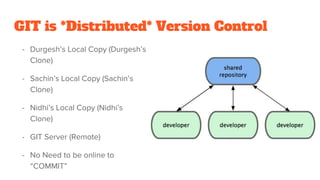
GIT is *Distributed* Version Control
- Durgesh’s Local Copy (Durgesh’s
Clone)
- Sachin’s Local Copy (Sachin’s
Clone)
- Nidhi’s Local Copy (Nidhi’s
Clone)
- GIT Server (Remote)
- No Need to be online to
“COMMIT”
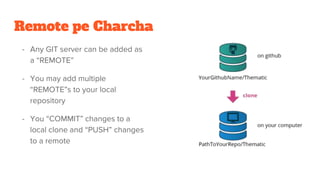
Remote pe Charcha
- Any GIT server can be added as
a “REMOTE”
- You may add multiple
“REMOTE”s to your local
repository
- You “COMMIT” changes to a
local clone and “PUSH” changes
to a remote
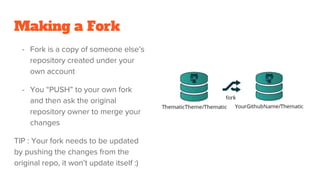
Making a Fork
- Fork is a copy of someone else’s
repository created under your
own account
- You “PUSH” to your own fork
and then ask the original
repository owner to merge your
changes
TIP : Your fork needs to be updated
by pushing the changes from the
original repo, it won’t update itself :)
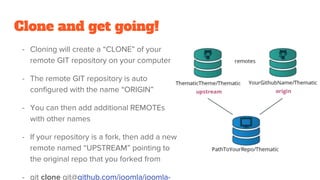
Clone and get going!
- Cloning will create a “CLONE” of your
remote GIT repository on your computer
- The remote GIT repository is auto
configured with the name “ORIGIN”
- You can then add additional REMOTEs
with other names
- If your repository is a fork, then add a new
remote named “UPSTREAM” pointing to
the original repo that you forked from
- git clone git@github.com/joomla/joomla-
Getting started with development
- Once you clone start making changes to your files
- git add <file path>
- git rm <file path>
- This adds your new and changed files to the list of files that will be committed
- You haven’t committed yet
- Deleted files *also* need to be committed
- You haven’t committed yet
- This adds your changes to the list of files that will be committed
तुका म्हणे
|| commit म्हणजे push नव्हे ||
- git push origin master
- This will push your files to
the remote GIT repo
named origin (your fork)
Getting other people’s changes
- You’re not the only one making commits
and pushing
- Remember Sachin and Nidhi also cloned
- They also saw this and pushed
- To get their changes
- git pull origin master
- What if they changed the
same files that I worked on
तुका म्हणे
|| conflict ला भिऊ नकोस ||
|| file बघून करशील merge ||
Merge conflicts will happen when
you edit the same piece of code in
the same file that someone else has
worked on
You simply need to open the file
and manually merge the conflicts
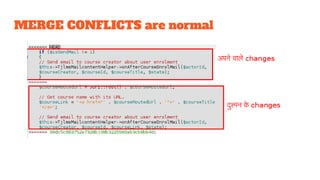
MERGE CONFLICTS are normal
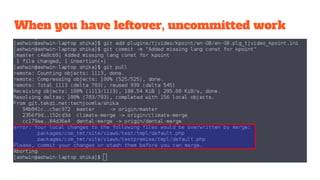
When you have leftover, uncommitted work
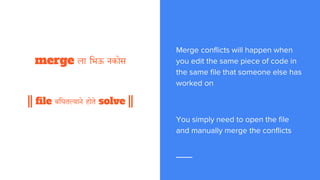
तुका म्हणे
|| conflict ला भिऊ नकोस ||
|| file बघून करशील merge ||
Merge conflicts will happen when
you edit the same piece of code in
the same file that someone else has
worked on
You simply need to open the file
and manually merge the conflicts
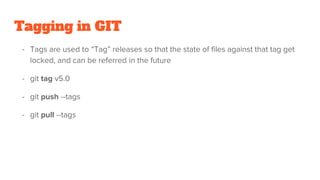
Tagging in GIT
- Tags are used to “Tag” releases so that the state of files against that tag get
locked, and can be referred in the future
- git tag v5.0
- git push --tags
- git pull --tags
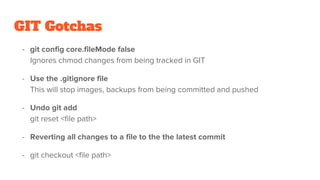
GIT Gotchas
- git config core.fileMode false
Ignores chmod changes from being tracked in GIT
- Use the .gitignore file
This will stop images, backups from being committed and pushed
- Undo git add
git reset <file path>
- Reverting all changes to a file to the the latest commit
- git checkout <file path>
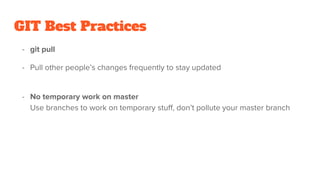
GIT Best Practices
- git pull
- Pull other people’s changes frequently to stay updated
- No temporary work on master
Use branches to work on temporary stuff, don’t pollute your master branch
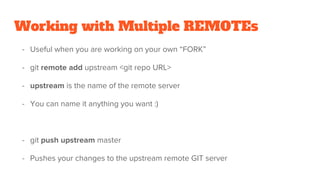
Working with Multiple REMOTEs
- Useful when you are working on your own “FORK”
- git remote add upstream <git repo URL>
- upstream is the name of the remote server
- You can name it anything you want :)
- git push upstream master
- Pushes your changes to the upstream remote GIT server
Any Questions ???

Git basics

  • 1.
    Basics of GIT AshwinDate Durgesh Sonawane
  • 2.
    DO GIT likea BOSS !! Fear कडून confidence कडे
  • 3.
  • 4.
    Github/Gitlab - AbBitbucket kidhar se aya ? - Github and Bitbucket are cloud based repository hosting services. Similar to web servers, GIT servers store your repository and allow SSH & HTTP connection - Gitlab is a self hosted service. We’re hosting it on Amazon - A “REMOTE” GIT repository can live anywhere - Remember it used to be on our old 192.168.1.200 server ?
  • 5.
    GIT is *Distributed*Version Control - Durgesh’s Local Copy (Durgesh’s Clone) - Sachin’s Local Copy (Sachin’s Clone) - Nidhi’s Local Copy (Nidhi’s Clone) - GIT Server (Remote) - No Need to be online to “COMMIT”
  • 6.
    Remote pe Charcha -Any GIT server can be added as a “REMOTE” - You may add multiple “REMOTE”s to your local repository - You “COMMIT” changes to a local clone and “PUSH” changes to a remote
  • 7.
    Making a Fork -Fork is a copy of someone else’s repository created under your own account - You “PUSH” to your own fork and then ask the original repository owner to merge your changes TIP : Your fork needs to be updated by pushing the changes from the original repo, it won’t update itself :)
  • 8.
    Clone and getgoing! - Cloning will create a “CLONE” of your remote GIT repository on your computer - The remote GIT repository is auto configured with the name “ORIGIN” - You can then add additional REMOTEs with other names - If your repository is a fork, then add a new remote named “UPSTREAM” pointing to the original repo that you forked from - git clone git@github.com/joomla/joomla-
  • 9.
    Getting started withdevelopment - Once you clone start making changes to your files - git add <file path> - git rm <file path> - This adds your new and changed files to the list of files that will be committed - You haven’t committed yet - Deleted files *also* need to be committed - You haven’t committed yet - This adds your changes to the list of files that will be committed
  • 10.
    तुका म्हणे || commitम्हणजे push नव्हे || - git push origin master - This will push your files to the remote GIT repo named origin (your fork)
  • 11.
    Getting other people’schanges - You’re not the only one making commits and pushing - Remember Sachin and Nidhi also cloned - They also saw this and pushed - To get their changes - git pull origin master - What if they changed the same files that I worked on
  • 12.
    तुका म्हणे || conflictला भिऊ नकोस || || file बघून करशील merge || Merge conflicts will happen when you edit the same piece of code in the same file that someone else has worked on You simply need to open the file and manually merge the conflicts
  • 13.
  • 14.
    When you haveleftover, uncommitted work
  • 15.
    तुका म्हणे || conflictला भिऊ नकोस || || file बघून करशील merge || Merge conflicts will happen when you edit the same piece of code in the same file that someone else has worked on You simply need to open the file and manually merge the conflicts
  • 16.
    Tagging in GIT -Tags are used to “Tag” releases so that the state of files against that tag get locked, and can be referred in the future - git tag v5.0 - git push --tags - git pull --tags
  • 17.
    GIT Gotchas - gitconfig core.fileMode false Ignores chmod changes from being tracked in GIT - Use the .gitignore file This will stop images, backups from being committed and pushed - Undo git add git reset <file path> - Reverting all changes to a file to the the latest commit - git checkout <file path>
  • 18.
    GIT Best Practices -git pull - Pull other people’s changes frequently to stay updated - No temporary work on master Use branches to work on temporary stuff, don’t pollute your master branch
  • 19.
    Working with MultipleREMOTEs - Useful when you are working on your own “FORK” - git remote add upstream <git repo URL> - upstream is the name of the remote server - You can name it anything you want :) - git push upstream master - Pushes your changes to the upstream remote GIT server
  • 20.