Pranav Kulkarni
Theoretical Neuroscience Lab, IISER Pune
pranavcode@gmail.com
Tutorial
1. Introduction
2. Installation
3. Configuration & First repo
4. File Status Lifecycle
5. Staging
6. Undo
7. Log
8. Remote
9. Branching
10. Tagging
Everything Git!
1. Introduction
● Applications
– Backups, Collaboration, Organization
● Benefits
– Speed
– Simple design
– Parallel branches
– Fully distributed
● Example project using Git.
● Found at – git-scm.com
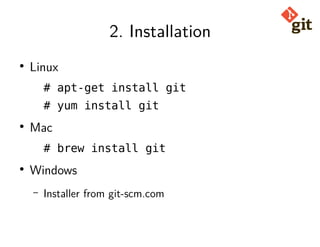
2. Installation
● Linux
# apt-get install git
# yum install git
● Mac
# brew install git
● Windows
– Installer from git-scm.com
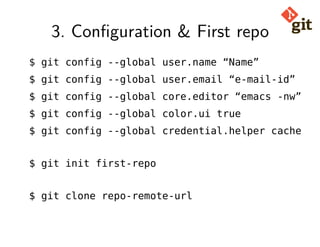
3. Configuration & First repo
$ git config --global user.name “Name”
$ git config --global user.email “e-mail-id”
$ git config --global core.editor “emacs -nw”
$ git config --global color.ui true
$ git config --global credential.helper cache
$ git init first-repo
$ git clone repo-remote-url
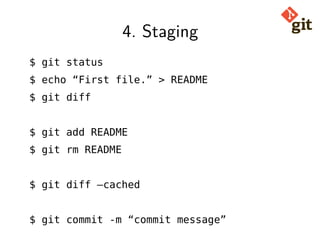
4. Staging
$ git status
$ echo “First file.” > README
$ git diff
$ git add README
$ git rm README
$ git diff –cached
$ git commit -m “commit message”
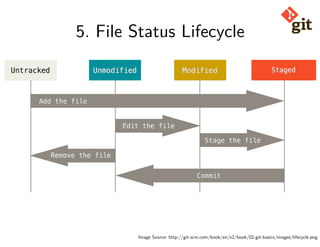
5. File Status Lifecycle
Image Source: http://git-scm.com/book/en/v2/book/02-git-basics/images/lifecycle.png
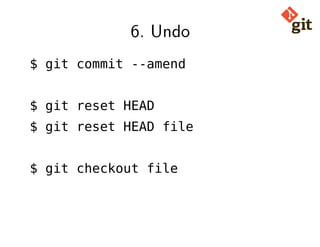
6. Undo
$ git commit --amend
$ git reset HEAD
$ git reset HEAD file
$ git checkout file
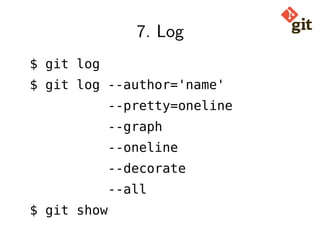
7. Log
$ git log
$ git log --author='name'
--pretty=oneline
--graph
--oneline
--decorate
--all
$ git show
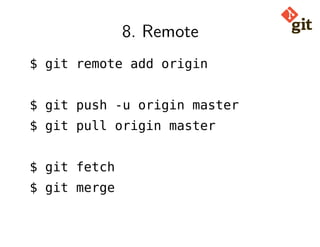
8. Remote
$ git remote add origin
$ git push -u origin master
$ git pull origin master
$ git fetch
$ git merge
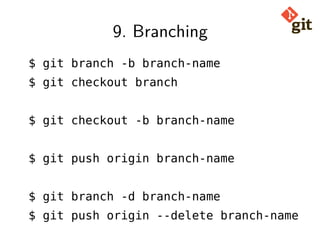
9. Branching
$ git branch -b branch-name
$ git checkout branch
$ git checkout -b branch-name
$ git push origin branch-name
$ git branch -d branch-name
$ git push origin --delete branch-name
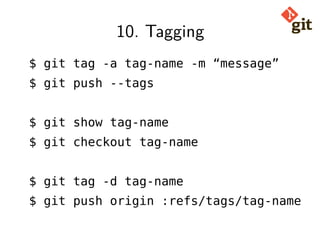
10. Tagging
$ git tag -a tag-name -m “message”
$ git push --tags
$ git show tag-name
$ git checkout tag-name
$ git tag -d tag-name
$ git push origin :refs/tags/tag-name
Thank you!

Git Tutorial

  • 1.
    Pranav Kulkarni Theoretical NeuroscienceLab, IISER Pune pranavcode@gmail.com Tutorial
  • 2.
    1. Introduction 2. Installation 3.Configuration & First repo 4. File Status Lifecycle 5. Staging 6. Undo 7. Log 8. Remote 9. Branching 10. Tagging Everything Git!
  • 3.
    1. Introduction ● Applications –Backups, Collaboration, Organization ● Benefits – Speed – Simple design – Parallel branches – Fully distributed ● Example project using Git. ● Found at – git-scm.com
  • 4.
    2. Installation ● Linux #apt-get install git # yum install git ● Mac # brew install git ● Windows – Installer from git-scm.com
  • 5.
    3. Configuration &First repo $ git config --global user.name “Name” $ git config --global user.email “e-mail-id” $ git config --global core.editor “emacs -nw” $ git config --global color.ui true $ git config --global credential.helper cache $ git init first-repo $ git clone repo-remote-url
  • 6.
    4. Staging $ gitstatus $ echo “First file.” > README $ git diff $ git add README $ git rm README $ git diff –cached $ git commit -m “commit message”
  • 7.
    5. File StatusLifecycle Image Source: http://git-scm.com/book/en/v2/book/02-git-basics/images/lifecycle.png
  • 8.
    6. Undo $ gitcommit --amend $ git reset HEAD $ git reset HEAD file $ git checkout file
  • 9.
    7. Log $ gitlog $ git log --author='name' --pretty=oneline --graph --oneline --decorate --all $ git show
  • 10.
    8. Remote $ gitremote add origin $ git push -u origin master $ git pull origin master $ git fetch $ git merge
  • 11.
    9. Branching $ gitbranch -b branch-name $ git checkout branch $ git checkout -b branch-name $ git push origin branch-name $ git branch -d branch-name $ git push origin --delete branch-name
  • 12.
    10. Tagging $ gittag -a tag-name -m “message” $ git push --tags $ git show tag-name $ git checkout tag-name $ git tag -d tag-name $ git push origin :refs/tags/tag-name
  • 13.