Introduction to Programming with 
Scratch 
By Darren Cank and Patrick McGee 
Introduction to Programming with Scratch ©Darren Cank & Patrick McGee 1
Introductions 
Darren Cank 
Computer Scientist 
PGDE Student 
Patrick McGee 
Web Development & Big Data Specialist 
PGDE Student 
2 
Introduction to Programming with Scratch ©Darren Cank & Patrick McGee
Overview 
Computers follow instructions that programmers 
create to perform a specific task 
Programmers can either: 
Hand code the programs 
Use a Graphical Interface or an 
integrated development environment 
(IDE) 
Introduction to Programming with Scratch ©Darren Cank & Patrick McGee 
3
The Scratch IDE 
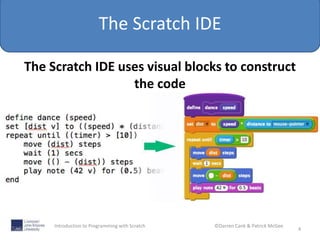
The Scratch IDE uses visual blocks to construct 
the code 
4 
Introduction to Programming with Scratch ©Darren Cank & Patrick McGee
The Scratch IDE 
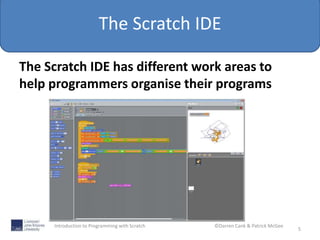
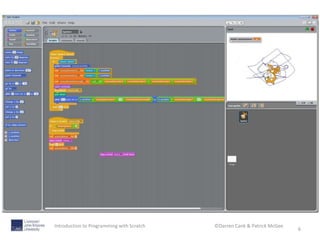
The Scratch IDE has different work areas to 
help programmers organise their programs 
5 
Introduction to Programming with Scratch ©Darren Cank & Patrick McGee
The Scratch IDE 
6 
Introduction to Programming with Scratch ©Darren Cank & Patrick McGee
The hello World Program 
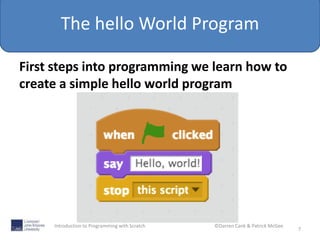
First steps into programming we learn how to 
create a simple hello world program 
7 
Introduction to Programming with Scratch ©Darren Cank & Patrick McGee
Recap 
So to recap what we have learnt that: 
Programmers have choices 
About the Scratch interface 
And we have created a 
hello world program 
8 
Introduction to Programming with Scratch ©Darren Cank & Patrick McGee
Building a Game using Scratch 
In this next section we are going to create a 
game from scratch. 
Bat and Ball 
9 
Introduction to Programming with Scratch ©Darren Cank & Patrick McGee
Can we Extend or modify the program 
We now what to add additional features to our 
game. 
Spend about 7 mins to see if you can add 
to the game. 
• Maybe you want to change the colours 
• Increase the angle of the rebound 
---- > let your imagination decide 
10 
Introduction to Programming with Scratch ©Darren Cank & Patrick McGee
Showcase your work 
11 
Introduction to Programming with Scratch ©Darren Cank & Patrick McGee
Summary 
Introduced the Scratch IDE and developed 
an understanding of the interface and 
tools. 
• Created a simple hello world program 
• Replicated the bat and ball game 
• Modify the bat and ball game to extend 
its capabilities 
12 
Introduction to Programming with Scratch ©Darren Cank & Patrick McGee
End 
Thank you for taking part in the lesson 
13 
Introduction to Programming with Scratch ©Darren Cank & Patrick McGee

Introduction to scratch programming

  • 1.
    Introduction to Programmingwith Scratch By Darren Cank and Patrick McGee Introduction to Programming with Scratch ©Darren Cank & Patrick McGee 1
  • 2.
    Introductions Darren Cank Computer Scientist PGDE Student Patrick McGee Web Development & Big Data Specialist PGDE Student 2 Introduction to Programming with Scratch ©Darren Cank & Patrick McGee
  • 3.
    Overview Computers followinstructions that programmers create to perform a specific task Programmers can either: Hand code the programs Use a Graphical Interface or an integrated development environment (IDE) Introduction to Programming with Scratch ©Darren Cank & Patrick McGee 3
  • 4.
    The Scratch IDE The Scratch IDE uses visual blocks to construct the code 4 Introduction to Programming with Scratch ©Darren Cank & Patrick McGee
  • 5.
    The Scratch IDE The Scratch IDE has different work areas to help programmers organise their programs 5 Introduction to Programming with Scratch ©Darren Cank & Patrick McGee
  • 6.
    The Scratch IDE 6 Introduction to Programming with Scratch ©Darren Cank & Patrick McGee
  • 7.
    The hello WorldProgram First steps into programming we learn how to create a simple hello world program 7 Introduction to Programming with Scratch ©Darren Cank & Patrick McGee
  • 8.
    Recap So torecap what we have learnt that: Programmers have choices About the Scratch interface And we have created a hello world program 8 Introduction to Programming with Scratch ©Darren Cank & Patrick McGee
  • 9.
    Building a Gameusing Scratch In this next section we are going to create a game from scratch. Bat and Ball 9 Introduction to Programming with Scratch ©Darren Cank & Patrick McGee
  • 10.
    Can we Extendor modify the program We now what to add additional features to our game. Spend about 7 mins to see if you can add to the game. • Maybe you want to change the colours • Increase the angle of the rebound ---- > let your imagination decide 10 Introduction to Programming with Scratch ©Darren Cank & Patrick McGee
  • 11.
    Showcase your work 11 Introduction to Programming with Scratch ©Darren Cank & Patrick McGee
  • 12.
    Summary Introduced theScratch IDE and developed an understanding of the interface and tools. • Created a simple hello world program • Replicated the bat and ball game • Modify the bat and ball game to extend its capabilities 12 Introduction to Programming with Scratch ©Darren Cank & Patrick McGee
  • 13.
    End Thank youfor taking part in the lesson 13 Introduction to Programming with Scratch ©Darren Cank & Patrick McGee