This work is licensed under the Apache 2.0 License
Ground Rules !
Please mute yourself
Use chat box for any queries
Feel free to turn off your video, we don't mind
Please don't spam
Let us know if you are having issues with audio/video
You got questions, shoot them at AMA session
This work is licensed under the Apache 2.0 License
Agenda:📊
● What is Android Study Jams?
● Why Kotlin?
● Why to participate in Android Study Jams?
● What Students have to do?
● Programming Tracks
● Developer’s Profile and Badges
● System Requirements.
● AMA Session.
This work is licensed under the Apache 2.0 License
What are Android Study Jams?
Android Study Jams are community-organized study groups
for people to learn how to build Android apps
using an online training course*
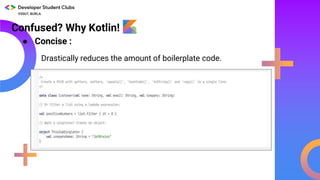
Confused? Why Kotlin!
● Concise :
Drastically reduces the amount of boilerplate code.
This work is licensed under the Apache 2.0 License
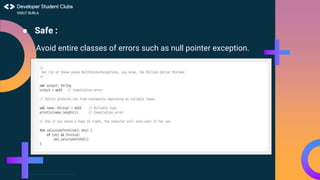
● Safe :
Avoid entire classes of errors such as null pointer exception.
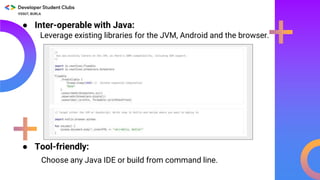
● Tool-friendly:
● Inter-operable with Java:
Leverage existing libraries for the JVM, Android and the browser.
Choose any Java IDE or build from command line.
This work is licensed under the Apache 2.0 License
What’s in it for students participating in the
Android Study Jams? 🏅🏅🏅
● Virtual badges on Google Developers profile on
completion of each unit of the course.
● Certificate of completion after completion of Prior
Programming Experience Track ONLY.
● A chance to showcase your app on official Google
Platforms!
● The skills learnt enable you to build even more compelling
projects for the Google Solution Challenge 2021.
What students have to do?👷👷
♀️ ● Pick either New to Programming Track or Prior Programming
Experience Track as per your current knowledge.
● Complete all pathways of that track and proceed to another track
(in case of those starting with New to Programming Track first).
● Earn digital badges on Google Developers profile and certificate of
completion.
● Submit Course Completion Form - you will receive this towards the
program deadline or after the deadline. You will need to submit
following details in the form:
● Screenshot of your Google Developers profile showing your name
and completion of both the tracks https://google.dev/ .
● Link of the android app (uploaded on Play store or Google Drive)
and one app screenshot made by you during this android study
jams.
This work is licensed under the Apache 2.0 License
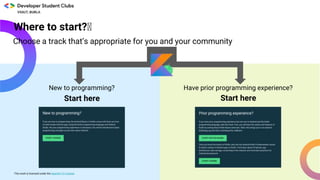
Where to start?🏅
Choose a track that’s appropriate for you and your community
New to programming? Have prior programming experience?
Start hereStart here
This work is licensed under the Apache 2.0 License
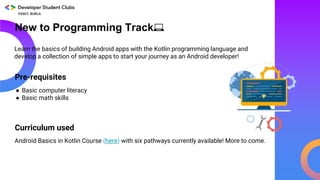
New to Programming Track💻
Pre-requisites
Android Basics in Kotlin Course (here) with six pathways currently available! More to come.
Learn the basics of building Android apps with the Kotlin programming language and
develop a collection of simple apps to start your journey as an Android developer!
● Basic computer literacy
● Basic math skills
Curriculum used
This work is licensed under the Apache 2.0 License
What will you learn?
2
3
4
1 Introduction to Kotlin
Create your first
Android app
Build a basic layout
Add a button to an app (3 hours)
(1 hour)
(1 hour)
(1 hour)
Learn to code in Kotlin, a modern programming
language that helps developers be more productive.
Learn to create and run your first Android app in
Android Studio.
Learn the basics of layouts in Android by creating your
very own birthday card app!
Learn how to use classes, objects, and conditionals to
create an interactive dice roller app.
Badges
Earn badges
at the end of each
pathway!
New to Programming Track👨💻
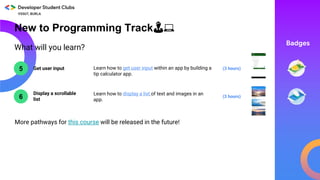
What will you learn?
6
5 Get user input
Display a scrollable
list
(3 hours)
(3 hours)Learn how to get user input within an app by building a
tip calculator app.
Learn how to display a list of text and images in an
app.
Badges
More pathways for this course will be released in the future!
New to Programming Track👨💻
This work is licensed under the Apache 2.0 License
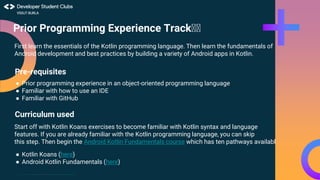
First learn the essentials of the Kotlin programming language. Then learn the fundamentals of
Android development and best practices by building a variety of Android apps in Kotlin.
Pre-requisites
● Prior programming experience in an object-oriented programming language
● Familiar with how to use an IDE
● Familiar with GitHub
Curriculum used
● Kotlin Koans (here)
● Android Kotlin Fundamentals (here)
Prior Programming Experience Track🏅🏅
Start off with Kotlin Koans exercises to become familiar with Kotlin syntax and language
features. If you are already familiar with the Kotlin programming language, you can skip
this step. Then begin the Android Kotlin Fundamentals course which has ten pathways available.
This work is licensed under the Apache 2.0 License
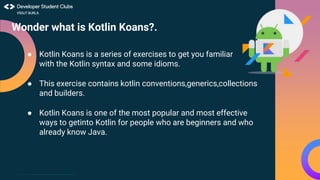
Wonder what is Kotlin Koans?.
● Kotlin Koans is a series of exercises to get you familiar
with the Kotlin syntax and some idioms.
● This exercise contains kotlin conventions,generics,collections
and builders.
● Kotlin Koans is one of the most popular and most effective
ways to getinto Kotlin for people who are beginners and who
already know Java.
1
2
3
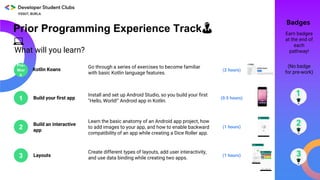
What will you learn?
Kotlin Koans (2 hours)
Go through a series of exercises to become familiar
with basic Kotlin language features.
Build your first app
Install and set up Android Studio, so you build your first
"Hello, World!" Android app in Kotlin.
(0.5 hours)
Layouts
Create different types of layouts, add user interactivity,
and use data binding while creating two apps.
(1 hours)
Build an interactive
app
Learn the basic anatomy of an Android app project, how
to add images to your app, and how to enable backward
compatibility of an app while creating a Dice Roller app.
(1 hours)
(No badge
for pre-work)
Badges
Earn badges
at the end of
each
pathway!
Prior Programming Experience Track👨
💻
Pre-
Wor
k
This work is licensed under the Apache 2.0 License
4
5
6
7
What will you learn?
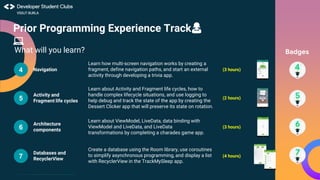
Navigation (3 hours)
Learn how multi-screen navigation works by creating a
fragment, define navigation paths, and start an external
activity through developing a trivia app.
Activity and
Fragment life cycles
Learn about Activity and Fragment life cycles, how to
handle complex lifecycle situations, and use logging to
help debug and track the state of the app by creating the
Dessert Clicker app that will preserve its state on rotation.
(2 hours)
Architecture
components
Learn about ViewModel, LiveData, data binding with
ViewModel and LiveData, and LiveData
transformations by completing a charades game app.
(3 hours)
Databases and
RecyclerView
Create a database using the Room library, use coroutines
to simplify asynchronous programming, and display a list
with RecyclerView in the TrackMySleep app.
(4 hours)
Badges
Prior Programming Experience Track👩
💻
8
9
10
What will you learn?
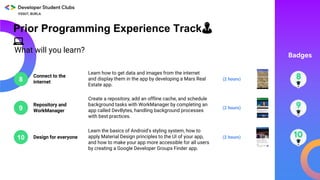
Connect to the
internet
(2 hours)
Learn how to get data and images from the internet
and display them in the app by developing a Mars Real
Estate app.
Repository and
WorkManager
Create a repository, add an offline cache, and schedule
background tasks with WorkManager by completing an
app called DevBytes, handling background processes
with best practices.
(2 hours)
Design for everyone
Learn the basics of Android's styling system, how to
apply Material Design principles to the UI of your app,
and how to make your app more accessible for all users
by creating a Google Developer Groups Finder app.
(2 hours)
Prior Programming Experience Track👨
💻
Badges
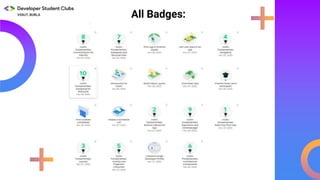
All Badges:
This work is licensed under the Apache 2.0 License
●Computer
○ 4 GB RAM minimum, 8GB RAM recommended
○ 2 GB of available disk space minimum, 4 GB recommended
(500 MB for IDE + 1.5 GB for Android SDK & emulator system image)
○ 64-bit Operating system
○ With Android Studio installed
●Internet connection
●(Optional) Android device & USB cable
Equipment needed for each Student ⚙️
This work is licensed under the Apache 2.0 License
THANK YOU
Any Queries?
Do not forget to
mention them in the
chat-box.
and have fun helping your communities
become Android developers!

Android Study Jam - Info Session

  • 1.
    This work islicensed under the Apache 2.0 License Ground Rules ! Please mute yourself Use chat box for any queries Feel free to turn off your video, we don't mind Please don't spam Let us know if you are having issues with audio/video You got questions, shoot them at AMA session
  • 2.
    This work islicensed under the Apache 2.0 License Agenda:📊 ● What is Android Study Jams? ● Why Kotlin? ● Why to participate in Android Study Jams? ● What Students have to do? ● Programming Tracks ● Developer’s Profile and Badges ● System Requirements. ● AMA Session.
  • 3.
    This work islicensed under the Apache 2.0 License What are Android Study Jams? Android Study Jams are community-organized study groups for people to learn how to build Android apps using an online training course*
  • 4.
    Confused? Why Kotlin! ●Concise : Drastically reduces the amount of boilerplate code.
  • 5.
    This work islicensed under the Apache 2.0 License ● Safe : Avoid entire classes of errors such as null pointer exception.
  • 6.
    ● Tool-friendly: ● Inter-operablewith Java: Leverage existing libraries for the JVM, Android and the browser. Choose any Java IDE or build from command line.
  • 7.
    This work islicensed under the Apache 2.0 License What’s in it for students participating in the Android Study Jams? 🏅🏅🏅 ● Virtual badges on Google Developers profile on completion of each unit of the course. ● Certificate of completion after completion of Prior Programming Experience Track ONLY. ● A chance to showcase your app on official Google Platforms! ● The skills learnt enable you to build even more compelling projects for the Google Solution Challenge 2021.
  • 8.
    What students haveto do?👷👷 ♀️ ● Pick either New to Programming Track or Prior Programming Experience Track as per your current knowledge. ● Complete all pathways of that track and proceed to another track (in case of those starting with New to Programming Track first). ● Earn digital badges on Google Developers profile and certificate of completion. ● Submit Course Completion Form - you will receive this towards the program deadline or after the deadline. You will need to submit following details in the form: ● Screenshot of your Google Developers profile showing your name and completion of both the tracks https://google.dev/ . ● Link of the android app (uploaded on Play store or Google Drive) and one app screenshot made by you during this android study jams.
  • 9.
    This work islicensed under the Apache 2.0 License Where to start?🏅 Choose a track that’s appropriate for you and your community New to programming? Have prior programming experience? Start hereStart here This work is licensed under the Apache 2.0 License
  • 10.
    New to ProgrammingTrack💻 Pre-requisites Android Basics in Kotlin Course (here) with six pathways currently available! More to come. Learn the basics of building Android apps with the Kotlin programming language and develop a collection of simple apps to start your journey as an Android developer! ● Basic computer literacy ● Basic math skills Curriculum used
  • 11.
    This work islicensed under the Apache 2.0 License What will you learn? 2 3 4 1 Introduction to Kotlin Create your first Android app Build a basic layout Add a button to an app (3 hours) (1 hour) (1 hour) (1 hour) Learn to code in Kotlin, a modern programming language that helps developers be more productive. Learn to create and run your first Android app in Android Studio. Learn the basics of layouts in Android by creating your very own birthday card app! Learn how to use classes, objects, and conditionals to create an interactive dice roller app. Badges Earn badges at the end of each pathway! New to Programming Track👨💻
  • 12.
    What will youlearn? 6 5 Get user input Display a scrollable list (3 hours) (3 hours)Learn how to get user input within an app by building a tip calculator app. Learn how to display a list of text and images in an app. Badges More pathways for this course will be released in the future! New to Programming Track👨💻
  • 13.
    This work islicensed under the Apache 2.0 License First learn the essentials of the Kotlin programming language. Then learn the fundamentals of Android development and best practices by building a variety of Android apps in Kotlin. Pre-requisites ● Prior programming experience in an object-oriented programming language ● Familiar with how to use an IDE ● Familiar with GitHub Curriculum used ● Kotlin Koans (here) ● Android Kotlin Fundamentals (here) Prior Programming Experience Track🏅🏅 Start off with Kotlin Koans exercises to become familiar with Kotlin syntax and language features. If you are already familiar with the Kotlin programming language, you can skip this step. Then begin the Android Kotlin Fundamentals course which has ten pathways available.
  • 14.
    This work islicensed under the Apache 2.0 License Wonder what is Kotlin Koans?. ● Kotlin Koans is a series of exercises to get you familiar with the Kotlin syntax and some idioms. ● This exercise contains kotlin conventions,generics,collections and builders. ● Kotlin Koans is one of the most popular and most effective ways to getinto Kotlin for people who are beginners and who already know Java.
  • 15.
    1 2 3 What will youlearn? Kotlin Koans (2 hours) Go through a series of exercises to become familiar with basic Kotlin language features. Build your first app Install and set up Android Studio, so you build your first "Hello, World!" Android app in Kotlin. (0.5 hours) Layouts Create different types of layouts, add user interactivity, and use data binding while creating two apps. (1 hours) Build an interactive app Learn the basic anatomy of an Android app project, how to add images to your app, and how to enable backward compatibility of an app while creating a Dice Roller app. (1 hours) (No badge for pre-work) Badges Earn badges at the end of each pathway! Prior Programming Experience Track👨 💻 Pre- Wor k
  • 16.
    This work islicensed under the Apache 2.0 License 4 5 6 7 What will you learn? Navigation (3 hours) Learn how multi-screen navigation works by creating a fragment, define navigation paths, and start an external activity through developing a trivia app. Activity and Fragment life cycles Learn about Activity and Fragment life cycles, how to handle complex lifecycle situations, and use logging to help debug and track the state of the app by creating the Dessert Clicker app that will preserve its state on rotation. (2 hours) Architecture components Learn about ViewModel, LiveData, data binding with ViewModel and LiveData, and LiveData transformations by completing a charades game app. (3 hours) Databases and RecyclerView Create a database using the Room library, use coroutines to simplify asynchronous programming, and display a list with RecyclerView in the TrackMySleep app. (4 hours) Badges Prior Programming Experience Track👩 💻
  • 17.
    8 9 10 What will youlearn? Connect to the internet (2 hours) Learn how to get data and images from the internet and display them in the app by developing a Mars Real Estate app. Repository and WorkManager Create a repository, add an offline cache, and schedule background tasks with WorkManager by completing an app called DevBytes, handling background processes with best practices. (2 hours) Design for everyone Learn the basics of Android's styling system, how to apply Material Design principles to the UI of your app, and how to make your app more accessible for all users by creating a Google Developer Groups Finder app. (2 hours) Prior Programming Experience Track👨 💻 Badges
  • 18.
  • 19.
    This work islicensed under the Apache 2.0 License ●Computer ○ 4 GB RAM minimum, 8GB RAM recommended ○ 2 GB of available disk space minimum, 4 GB recommended (500 MB for IDE + 1.5 GB for Android SDK & emulator system image) ○ 64-bit Operating system ○ With Android Studio installed ●Internet connection ●(Optional) Android device & USB cable Equipment needed for each Student ⚙️
  • 20.
    This work islicensed under the Apache 2.0 License THANK YOU Any Queries? Do not forget to mention them in the chat-box. and have fun helping your communities become Android developers!

Editor's Notes

  • #20 The decision to have attendees install Android Studio on their computers beforehand is up to your preference. Option 1: You can have attendees install Android Studio as part of the hands-on codelabs. There are instructions within the two tracks for students to install Android Studio. This will take up more time during your session, but will allow them to ask questions if they need help with the install and set up process. Option 2: You could ask attendees to install Android Studio on their own before attending a session. Just be sure to let them know that this is expected of them prior to the session. These instructions may be useful.