Data Representation
Lesson 8
1
Starter
I need six volunteers –
Three pupils will be dragons who have 100 million
pounds to invest
Three will be developers asking for support of their
new exciting app
The dragons will award the money and the rest of
the class will debate if this is a correct decision.
2
None of the developers should have
been awarded the money
• None of the developers actually demonstrated
their app or even talked about it.
• One issue is that developers do not have the
funds to create a complete app so we need to
develop a prototype
• In this lesson we will use excel to create logic
that will encrypt a message.
3
Objective of the lesson
• To be able to encrypt and decrypt messages using
Microsoft Excel
• All of you will:
– to discover how encryption works
• Most of you will:
• use Microsoft Excel to encrypt the alphabet.
• Some of you will:
• provide the lookup function to decrypt the alphabet
4
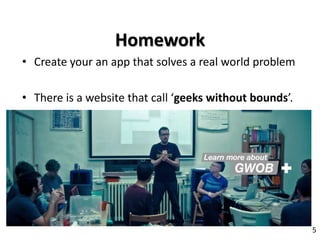
• Create your an app that solves a real world problem
• There is a website that call ‘geeks without bounds’.
5
Homework
Encryption
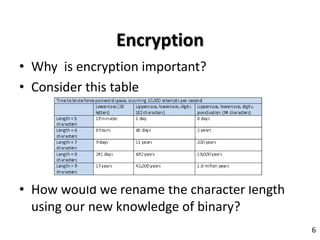
• Why is encryption important?
• Consider this table
• How would we rename the character length
using our new knowledge of binary?
6
Websites and encryption
• Is a password encrypted?
• Why?
• How can we tell if a website has been
encrypted?
• Hackers however can bypass all this security
by mounting the website system into their
computer system file structure.
7
Using Excel to build logic
• Download the Excel sheet marked Encryption
from Ilearn.
• In the left hand column the pupils will write in the
letters of the alphabet. In the right hand column
the pupils will write in their key from the previous
homework.
• We need to use a VLookup function to convert
the text entered in the cells above.
8
Encryption and decryption
• Allan Turing created the first computer capable of
decrypting German messages, does anyone know
how he did it?
• Which part of the message provide a key to
perform the decryption?
• Do we need to decrypt?
• Give examples and reasons behind your
thoughts?
• Can you know create a decryption lookup in
excel?
9
Plenary
• What is encryption?
• Why do we need to use it?
• What are the benefits of using excel in this
way?
10
• Create a sentence to describe your app and the
problem it is trying to solve?
• One paragraph should be enough to explain the idea.
• Extension task is to create a sketch of the app
11
Homework

Lesson 8 Encryption

  • 1.
  • 2.
    Starter I need sixvolunteers – Three pupils will be dragons who have 100 million pounds to invest Three will be developers asking for support of their new exciting app The dragons will award the money and the rest of the class will debate if this is a correct decision. 2
  • 3.
    None of thedevelopers should have been awarded the money • None of the developers actually demonstrated their app or even talked about it. • One issue is that developers do not have the funds to create a complete app so we need to develop a prototype • In this lesson we will use excel to create logic that will encrypt a message. 3
  • 4.
    Objective of thelesson • To be able to encrypt and decrypt messages using Microsoft Excel • All of you will: – to discover how encryption works • Most of you will: • use Microsoft Excel to encrypt the alphabet. • Some of you will: • provide the lookup function to decrypt the alphabet 4
  • 5.
    • Create youran app that solves a real world problem • There is a website that call ‘geeks without bounds’. 5 Homework
  • 6.
    Encryption • Why isencryption important? • Consider this table • How would we rename the character length using our new knowledge of binary? 6
  • 7.
    Websites and encryption •Is a password encrypted? • Why? • How can we tell if a website has been encrypted? • Hackers however can bypass all this security by mounting the website system into their computer system file structure. 7
  • 8.
    Using Excel tobuild logic • Download the Excel sheet marked Encryption from Ilearn. • In the left hand column the pupils will write in the letters of the alphabet. In the right hand column the pupils will write in their key from the previous homework. • We need to use a VLookup function to convert the text entered in the cells above. 8
  • 9.
    Encryption and decryption •Allan Turing created the first computer capable of decrypting German messages, does anyone know how he did it? • Which part of the message provide a key to perform the decryption? • Do we need to decrypt? • Give examples and reasons behind your thoughts? • Can you know create a decryption lookup in excel? 9
  • 10.
    Plenary • What isencryption? • Why do we need to use it? • What are the benefits of using excel in this way? 10
  • 11.
    • Create asentence to describe your app and the problem it is trying to solve? • One paragraph should be enough to explain the idea. • Extension task is to create a sketch of the app 11 Homework