Interactive
Media
and Gaming
Creative Media BTEC Level 2
WebSite
Conventions
Teacher: Mr. McGee
Class: Year 10 IMG
WebSite Conventions
• Building a website takes a lot of consideration and planning.
• During the pre-production phase a draft website needs to
be outlined and clearly defined.
• One quick way to ensure the plan is successful is to apply
conventions.
• Conventions are used to communicate ideas to people
involved who may not necessarily know technical details of
building a website.
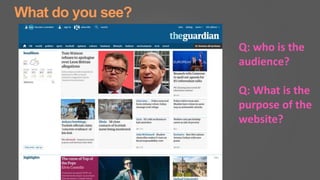
What do you see?
Q: who is the
audience?
Q: What is the
purpose of the
website?
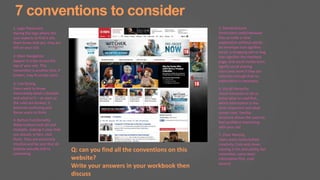
7 conventions to consider
1. Logo Placement
Having the logo where the
user expects to find it lets
them know that yes, they are
still on your site.
2. Main Navigation
Appear in a bar across the
top of your site. This
convention is another that, if
broken, may frustrate users.
3. Link Styling
Users want to know
instinctively what’s clickable
and what isn’t – as soon as
the rules are broken, it
becomes confusing and
forces users to think.
4. Button Functionality
Make buttons look 3D and
clickable, making it clear that
you should, in fact, click
them. They are extremely
intuitive and be sure that all
buttons actually link to
something.
5. Standard Icons
Particularly useful because
they provide a clear
explanation without words.
An envelope icon signifies
email, a shopping cart or bag
icon signifies the checkout
page, and social media icons
signify social sharing.
Icons only work if they are
common enough that no
explanation is necessary.
6. Visual Hierarchy
Visual hierarchy to let us
know what to read first,
which information is the
most important and what
comes next. familiar
structure allows the users to
feel confident interacting
with your site
7. Clear Naming
Users want clarity before
creativity. Cute and clever
naming is fun and catchy, but
remember, users want
information first, cute
second.
Q: can you find all the conventions on this
website?
Write your answers in your workbook then
discuss
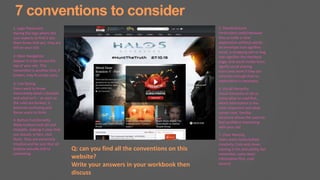
7 conventions to consider
1. Logo Placement
Having the logo where the
user expects to find it lets
them know that yes, they are
still on your site.
2. Main Navigation
Appear in a bar across the
top of your site. This
convention is another that, if
broken, may frustrate users.
3. Link Styling
Users want to know
instinctively what’s clickable
and what isn’t – as soon as
the rules are broken, it
becomes confusing and
forces users to think.
4. Button Functionality
Make buttons look 3D and
clickable, making it clear that
you should, in fact, click
them. They are extremely
intuitive and be sure that all
buttons actually link to
something.
5. Standard Icons
Particularly useful because
they provide a clear
explanation without words.
An envelope icon signifies
email, a shopping cart or bag
icon signifies the checkout
page, and social media icons
signify social sharing.
Icons only work if they are
common enough that no
explanation is necessary.
6. Visual Hierarchy
Visual hierarchy to let us
know what to read first,
which information is the
most important and what
comes next. familiar
structure allows the users to
feel confident interacting
with your site
7. Clear Naming
Users want clarity before
creativity. Cute and clever
naming is fun and catchy, but
remember, users want
information first, cute
second.
Q: can you find all the conventions on this
website?
Write your answers in your workbook then
discuss
Your turn!
Create a draft website for your game
• Using the conventions talked about in this lesson
• Create a draft website for your project brief
• Think about the conventions used within other media platforms
• What conventions were used for magazines?
Plenary

Website convention

  • 1.
    Interactive Media and Gaming Creative MediaBTEC Level 2 WebSite Conventions Teacher: Mr. McGee Class: Year 10 IMG
  • 2.
    WebSite Conventions • Buildinga website takes a lot of consideration and planning. • During the pre-production phase a draft website needs to be outlined and clearly defined. • One quick way to ensure the plan is successful is to apply conventions. • Conventions are used to communicate ideas to people involved who may not necessarily know technical details of building a website.
  • 3.
    What do yousee? Q: who is the audience? Q: What is the purpose of the website?
  • 4.
    7 conventions toconsider 1. Logo Placement Having the logo where the user expects to find it lets them know that yes, they are still on your site. 2. Main Navigation Appear in a bar across the top of your site. This convention is another that, if broken, may frustrate users. 3. Link Styling Users want to know instinctively what’s clickable and what isn’t – as soon as the rules are broken, it becomes confusing and forces users to think. 4. Button Functionality Make buttons look 3D and clickable, making it clear that you should, in fact, click them. They are extremely intuitive and be sure that all buttons actually link to something. 5. Standard Icons Particularly useful because they provide a clear explanation without words. An envelope icon signifies email, a shopping cart or bag icon signifies the checkout page, and social media icons signify social sharing. Icons only work if they are common enough that no explanation is necessary. 6. Visual Hierarchy Visual hierarchy to let us know what to read first, which information is the most important and what comes next. familiar structure allows the users to feel confident interacting with your site 7. Clear Naming Users want clarity before creativity. Cute and clever naming is fun and catchy, but remember, users want information first, cute second. Q: can you find all the conventions on this website? Write your answers in your workbook then discuss
  • 5.
    7 conventions toconsider 1. Logo Placement Having the logo where the user expects to find it lets them know that yes, they are still on your site. 2. Main Navigation Appear in a bar across the top of your site. This convention is another that, if broken, may frustrate users. 3. Link Styling Users want to know instinctively what’s clickable and what isn’t – as soon as the rules are broken, it becomes confusing and forces users to think. 4. Button Functionality Make buttons look 3D and clickable, making it clear that you should, in fact, click them. They are extremely intuitive and be sure that all buttons actually link to something. 5. Standard Icons Particularly useful because they provide a clear explanation without words. An envelope icon signifies email, a shopping cart or bag icon signifies the checkout page, and social media icons signify social sharing. Icons only work if they are common enough that no explanation is necessary. 6. Visual Hierarchy Visual hierarchy to let us know what to read first, which information is the most important and what comes next. familiar structure allows the users to feel confident interacting with your site 7. Clear Naming Users want clarity before creativity. Cute and clever naming is fun and catchy, but remember, users want information first, cute second. Q: can you find all the conventions on this website? Write your answers in your workbook then discuss
  • 6.
    Your turn! Create adraft website for your game • Using the conventions talked about in this lesson • Create a draft website for your project brief • Think about the conventions used within other media platforms • What conventions were used for magazines?
  • 7.