Chapter 1: Introduction
Chapter 1: Introduction 
 What Operating Systems Do 
 Computer-System Organization 
 Computer-System Architecture 
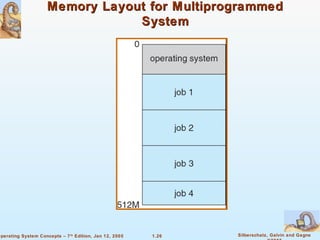
 Operating-System Structure 
 Operating-System Operations 
 Process Management 
 Memory Management 
 Storage Management 
 Protection and Security 
 Distributed Systems 
 Special-Purpose Systems 
 Computing Environments 
1.2 Silberschatz, Galvin and Gagne 
©2005 
Operating System Concepts – 7th Edition, Jan 12, 2005
1.3 Silberschatz, Galvin and Gagne 
©2005 
Operating System Concepts – 7th Edition, Jan 12, 2005 
Objectives 
 To provide a grand tour of the major operating systems 
components 
 To provide coverage of basic computer system organization
What is an Operating System? 
 A program that acts as an intermediary between a user of a 
computer and the computer hardware. 
 Execute user programs and make solving user problems 
 Make the computer system convenient to use. 
 Use the computer hardware in an efficient manner. 
1.4 Silberschatz, Galvin and Gagne 
©2005 
 Operating system goals: 
easier. 
Operating System Concepts – 7th Edition, Jan 12, 2005
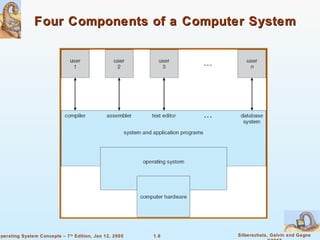
Computer System Structure 
 Computer system can be divided into four components 
 Hardware – provides basic computing resources 
 CPU, memory, I/O devices 
 Controls and coordinates use of hardware among various 
applications and users 
 Application programs – define the ways in which the system 
resources are used to solve the computing problems of the 
users 
 Word processors, compilers, web browsers, database 
 People, machines, other computers 
1.5 Silberschatz, Galvin and Gagne 
©2005 
 Operating system 
systems, video games 
 Users 
Operating System Concepts – 7th Edition, Jan 12, 2005
Four Components of a Computer System 
1.6 Silberschatz, Galvin and Gagne 
©2005 
Operating System Concepts – 7th Edition, Jan 12, 2005
Operating System Definition 
 Manages all resources 
 Decides between conflicting requests for efficient and fair 
 Controls execution of programs to prevent errors and improper 
1.7 Silberschatz, Galvin and Gagne 
©2005 
 OS is a resource allocator 
resource use 
 OS is a control program 
use of the computer 
Operating System Concepts – 7th Edition, Jan 12, 2005
Operating System Definition (Cont.) 
 No universally accepted definition 
 “Everything a vendor ships when you order an operating system” 
 “The one program running at all times on the computer” is the 
kernel. Everything else is either a system program (ships with 
the operating system) or an application program 
1.8 Silberschatz, Galvin and Gagne 
©2005 
is good approximation 
 But varies wildly 
Operating System Concepts – 7th Edition, Jan 12, 2005
Computer Startup 
 bootstrap program is loaded at power-up or reboot 
 Typically stored in ROM or EPROM, generally known as 
 Initializates all aspects of system 
 Loads operating system kernel and starts execution 
1.9 Silberschatz, Galvin and Gagne 
©2005 
firmware 
Operating System Concepts – 7th Edition, Jan 12, 2005
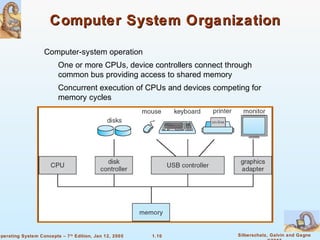
Computer System Organization 
 One or more CPUs, device controllers connect through 
common bus providing access to shared memory 
 Concurrent execution of CPUs and devices competing for 
1.10 Silberschatz, Galvin and Gagne 
©2005 
 Computer-system operation 
memory cycles 
Operating System Concepts – 7th Edition, Jan 12, 2005
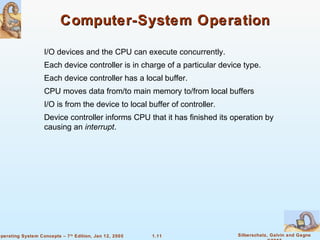
Computer-System Operation 
 I/O devices and the CPU can execute concurrently. 
 Each device controller is in charge of a particular device type. 
 Each device controller has a local buffer. 
 CPU moves data from/to main memory to/from local buffers 
 I/O is from the device to local buffer of controller. 
 Device controller informs CPU that it has finished its operation by 
1.11 Silberschatz, Galvin and Gagne 
©2005 
causing an interrupt. 
Operating System Concepts – 7th Edition, Jan 12, 2005
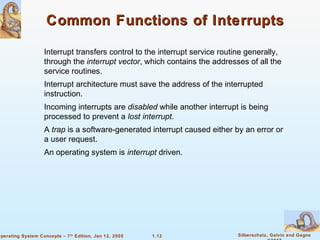
Common Functions of Interrupts 
 Interrupt transfers control to the interrupt service routine generally, 
through the interrupt vector, which contains the addresses of all the 
service routines. 
 Interrupt architecture must save the address of the interrupted 
 Incoming interrupts are disabled while another interrupt is being 
processed to prevent a lost interrupt. 
 A trap is a software-generated interrupt caused either by an error or 
 An operating system is interrupt driven. 
1.12 Silberschatz, Galvin and Gagne 
©2005 
instruction. 
a user request. 
Operating System Concepts – 7th Edition, Jan 12, 2005
Interrupt Handling 
 The operating system preserves the state of the CPU by storing 
registers and the program counter. 
 Determines which type of interrupt has occurred: 
 Separate segments of code determine what action should be taken 
1.13 Silberschatz, Galvin and Gagne 
©2005 
 polling 
 vectored interrupt system 
for each type of interrupt 
Operating System Concepts – 7th Edition, Jan 12, 2005
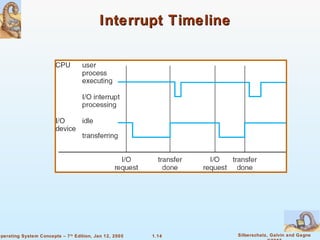
Interrupt Timeline 
1.14 Silberschatz, Galvin and Gagne 
©2005 
Operating System Concepts – 7th Edition, Jan 12, 2005
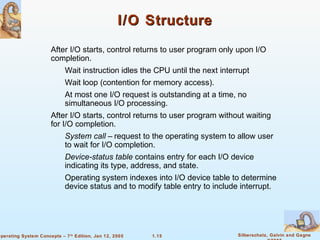
I/O Structure 
 After I/O starts, control returns to user program only upon I/O 
completion. 
 Wait instruction idles the CPU until the next interrupt 
 Wait loop (contention for memory access). 
 At most one I/O request is outstanding at a time, no 
simultaneous I/O processing. 
 After I/O starts, control returns to user program without waiting 
for I/O completion. 
 System call – request to the operating system to allow user 
to wait for I/O completion. 
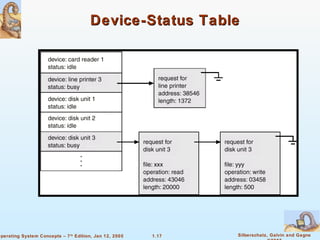
 Device-status table contains entry for each I/O device 
indicating its type, address, and state. 
 Operating system indexes into I/O device table to determine 
device status and to modify table entry to include interrupt. 
1.15 Silberschatz, Galvin and Gagne 
©2005 
Operating System Concepts – 7th Edition, Jan 12, 2005
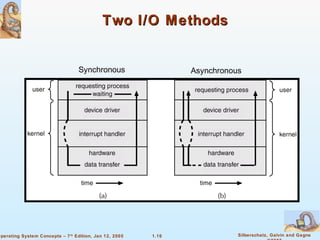
Two I/O Methods 
Synchronous Asynchronous 
1.16 Silberschatz, Galvin and Gagne 
©2005 
Operating System Concepts – 7th Edition, Jan 12, 2005
Device-Status Table 
1.17 Silberschatz, Galvin and Gagne 
©2005 
Operating System Concepts – 7th Edition, Jan 12, 2005
Direct Memory Access Structure 
 Used for high-speed I/O devices able to transmit information at 
 Device controller transfers blocks of data from buffer storage 
directly to main memory without CPU intervention. 
 Only one interrupt is generated per block, rather than the one 
1.18 Silberschatz, Galvin and Gagne 
©2005 
close to memory speeds. 
interrupt per byte. 
Operating System Concepts – 7th Edition, Jan 12, 2005
Storage Structure 
 Main memory – only large storage media that the CPU can access 
 Secondary storage – extension of main memory that provides large 
 Magnetic disks – rigid metal or glass platters covered with magnetic 
recording material 
 Disk surface is logically divided into tracks, which are 
 The disk controller determines the logical interaction between 
the device and the computer. 
1.19 Silberschatz, Galvin and Gagne 
©2005 
directly. 
nonvolatile storage capacity. 
subdivided into sectors. 
Operating System Concepts – 7th Edition, Jan 12, 2005
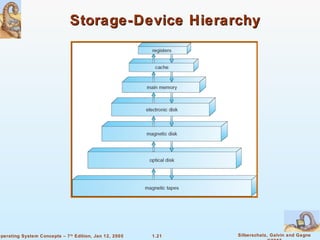
Storage Hierarchy 
 Storage systems organized in hierarchy. 
 Caching – copying information into faster storage system; main 
memory can be viewed as a last cache for secondary storage. 
1.20 Silberschatz, Galvin and Gagne 
©2005 
 Speed 
 Cost 
 Volatility 
Operating System Concepts – 7th Edition, Jan 12, 2005
Storage-Device Hierarchy 
1.21 Silberschatz, Galvin and Gagne 
©2005 
Operating System Concepts – 7th Edition, Jan 12, 2005
1.22 Silberschatz, Galvin and Gagne 
©2005 
Operating System Concepts – 7th Edition, Jan 12, 2005 
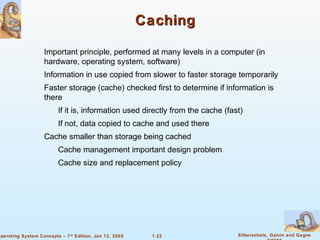
Caching 
 Important principle, performed at many levels in a computer (in 
hardware, operating system, software) 
 Information in use copied from slower to faster storage temporarily 
 Faster storage (cache) checked first to determine if information is 
there 
 If it is, information used directly from the cache (fast) 
 If not, data copied to cache and used there 
 Cache smaller than storage being cached 
 Cache management important design problem 
 Cache size and replacement policy
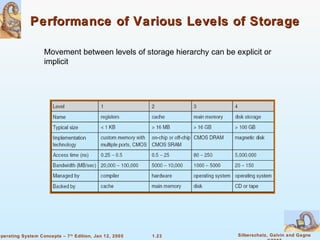
Performance of Various Levels of Storage 
 Movement between levels of storage hierarchy can be explicit or 
1.23 Silberschatz, Galvin and Gagne 
©2005 
implicit 
Operating System Concepts – 7th Edition, Jan 12, 2005
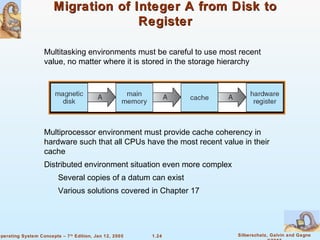
Migration of Integer A from Disk to 
1.24 Silberschatz, Galvin and Gagne 
©2005 
Operating System Concepts – 7th Edition, Jan 12, 2005 
Register 
 Multitasking environments must be careful to use most recent 
value, no matter where it is stored in the storage hierarchy 
 Multiprocessor environment must provide cache coherency in 
hardware such that all CPUs have the most recent value in their 
cache 
 Distributed environment situation even more complex 
 Several copies of a datum can exist 
 Various solutions covered in Chapter 17
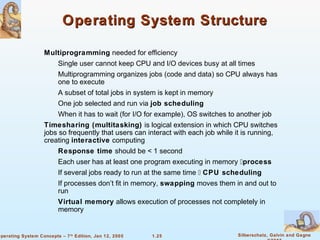
Operating System Structure 
 Multiprogramming needed for efficiency 
 Single user cannot keep CPU and I/O devices busy at all times 
 Multiprogramming organizes jobs (code and data) so CPU always has 
 A subset of total jobs in system is kept in memory 
 One job selected and run via job scheduling 
 When it has to wait (for I/O for example), OS switches to another job 
 Timesharing (multitasking) is logical extension in which CPU switches 
jobs so frequently that users can interact with each job while it is running, 
creating interactive computing 
 Response time should be  1 second 
 Each user has at least one program executing in memory process 
 If several jobs ready to run at the same time  CPU scheduling 
 If processes don’t fit in memory, swapping moves them in and out to 
 Virtual memory allows execution of processes not completely in 
1.25 Silberschatz, Galvin and Gagne 
©2005 
one to execute 
run 
memory 
Operating System Concepts – 7th Edition, Jan 12, 2005
Memory Layout for Multiprogrammed 
1.26 Silberschatz, Galvin and Gagne 
©2005 
Operating System Concepts – 7th Edition, Jan 12, 2005 
System
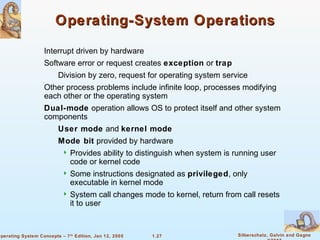
Operating-System Operations 
 Interrupt driven by hardware 
 Software error or request creates exception or trap 
 Division by zero, request for operating system service 
 Other process problems include infinite loop, processes modifying 
each other or the operating system 
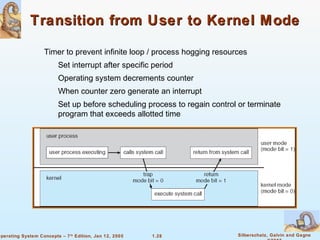
 Dual-mode operation allows OS to protect itself and other system 
components 
 User mode and kernel mode 
 Mode bit provided by hardware 
 Provides ability to distinguish when system is running user 
code or kernel code 
 Some instructions designated as privileged, only 
executable in kernel mode 
 System call changes mode to kernel, return from call resets 
it to user 
1.27 Silberschatz, Galvin and Gagne 
©2005 
Operating System Concepts – 7th Edition, Jan 12, 2005
Transition from User to Kernel Mode 
 Timer to prevent infinite loop / process hogging resources 
 Set interrupt after specific period 
 Operating system decrements counter 
 When counter zero generate an interrupt 
 Set up before scheduling process to regain control or terminate 
program that exceeds allotted time 
1.28 Silberschatz, Galvin and Gagne 
©2005 
Operating System Concepts – 7th Edition, Jan 12, 2005
Process Management 
 A process is a program in execution. It is a unit of work within the system. 
Program is a passive entity, process is an active entity. 
 Process needs resources to accomplish its task 
 Process termination requires reclaim of any reusable resources 
 Single-threaded process has one program counter specifying location of 
next instruction to execute 
 Process executes instructions sequentially, one at a time, until 
 Multi-threaded process has one program counter per thread 
 Typically system has many processes, some user, some operating system 
running concurrently on one or more CPUs 
 Concurrency by multiplexing the CPUs among the processes / threads 
1.29 Silberschatz, Galvin and Gagne 
©2005 
 CPU, memory, I/O, files 
 Initialization data 
completion 
Operating System Concepts – 7th Edition, Jan 12, 2005
Process Management Activities 
The operating system is responsible for the following activities in 
connection with process management: 
 Creating and deleting both user and system processes 
 Suspending and resuming processes 
 Providing mechanisms for process synchronization 
 Providing mechanisms for process communication 
 Providing mechanisms for deadlock handling 
1.30 Silberschatz, Galvin and Gagne 
©2005 
Operating System Concepts – 7th Edition, Jan 12, 2005
Memory Management 
 All data in memory before and after processing 
 All instructions in memory in order to execute 
 Memory management determines what is in memory when 
 Optimizing CPU utilization and computer response to users 
 Memory management activities 
 Keeping track of which parts of memory are currently being 
 Deciding which processes (or parts thereof) and data to move 
 Allocating and deallocating memory space as needed 
1.31 Silberschatz, Galvin and Gagne 
©2005 
used and by whom 
into and out of memory 
Operating System Concepts – 7th Edition, Jan 12, 2005
Storage Management 
 OS provides uniform, logical view of information storage 
 Abstracts physical properties to logical storage unit - file 
 Each medium is controlled by device (i.e., disk drive, tape drive) 
 Varying properties include access speed, capacity, data-transfer 
rate, access method (sequential or random) 
 Files usually organized into directories 
 Access control on most systems to determine who can access 
 Creating and deleting files and directories 
 Primitives to manipulate files and dirs 
 Mapping files onto secondary storage 
 Backup files onto stable (non-volatile) storage media 
1.32 Silberschatz, Galvin and Gagne 
©2005 
 File-System management 
what 
 OS activities include 
Operating System Concepts – 7th Edition, Jan 12, 2005
Mass-Storage Management 
 Usually disks used to store data that does not fit in main memory or data 
that must be kept for a “long” period of time. 
 Proper management is of central importance 
 Entire speed of computer operation hinges on disk subsystem and its 
 Tertiary storage includes optical storage, magnetic tape 
 Still must be managed 
 Varies between WORM (write-once, read-many-times) and RW (read-write) 
1.33 Silberschatz, Galvin and Gagne 
©2005 
algorithms 
 OS activities 
 Free-space management 
 Storage allocation 
 Disk scheduling 
 Some storage need not be fast 
Operating System Concepts – 7th Edition, Jan 12, 2005
I/O Subsystem 
 One purpose of OS is to hide peculiarities of hardware devices from 
 Memory management of I/O including buffering (storing data 
temporarily while it is being transferred), caching (storing parts 
of data in faster storage for performance), spooling (the 
overlapping of output of one job with input of other jobs) 
 General device-driver interface 
 Drivers for specific hardware devices 
1.34 Silberschatz, Galvin and Gagne 
©2005 
the user 
 I/O subsystem responsible for 
Operating System Concepts – 7th Edition, Jan 12, 2005
Protection and Security 
 Protection – any mechanism for controlling access of processes 
or users to resources defined by the OS 
 Security – defense of the system against internal and external 
attacks 
 Huge range, including denial-of-service, worms, viruses, 
identity theft, theft of service 
 Systems generally first distinguish among users, to determine who 
can do what 
 User identities (user IDs, security IDs) include name and 
associated number, one per user 
 User ID then associated with all files, processes of that user to 
 Group identifier (group ID) allows set of users to be defined 
and controls managed, then also associated with each process, 
file 
 Privilege escalation allows user to change to effective ID 
1.35 Silberschatz, Galvin and Gagne 
©2005 
determine access control 
with more rights 
Operating System Concepts – 7th Edition, Jan 12, 2005
Computing Environments 
 PCs connected to a network, terminals attached to 
mainframe or minicomputers providing batch and 
timesharing 
 Now portals allowing networked and remote systems 
access to same resources 
 Used to be single system, then modems 
 Now firewalled, networked 
1.36 Silberschatz, Galvin and Gagne 
©2005 
 Traditional computer 
 Blurring over time 
 Office environment 
 Home networks 
Operating System Concepts – 7th Edition, Jan 12, 2005
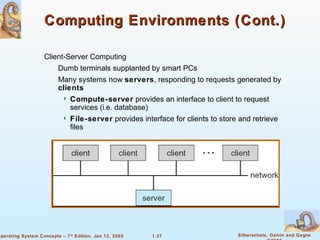
Computing Environments (Cont.) 
 Dumb terminals supplanted by smart PCs 
 Many systems now servers, responding to requests generated by 
clients 
 Compute-server provides an interface to client to request 
 File-server provides interface for clients to store and retrieve 
files 
1.37 Silberschatz, Galvin and Gagne 
©2005 
 Client-Server Computing 
services (i.e. database) 
Operating System Concepts – 7th Edition, Jan 12, 2005
Peer-to-Peer Computing 
 Another model of distributed system 
 P2P does not distinguish clients and servers 
 Instead all nodes are considered peers 
 May each act as client, server or both 
 Node must join P2P network 
 Registers its service with central lookup service on network, 
or 
 Broadcast request for service and respond to requests for 
service via discovery protocol 
 Examples include Napster and Gnutella 
1.38 Silberschatz, Galvin and Gagne 
©2005 
Operating System Concepts – 7th Edition, Jan 12, 2005
Web-Based Computing 
 Web has become ubiquitous 
 PCs most prevalent devices 
 More devices becoming networked to allow web access 
 New category of devices to manage web traffic among similar 
 Use of operating systems like Windows 95, client-side, have 
evolved into Linux and Windows XP, which can be clients and 
servers 
1.39 Silberschatz, Galvin and Gagne 
©2005 
servers: load balancers 
Operating System Concepts – 7th Edition, Jan 12, 2005
End of Chapter 1

Operating system concepts

  • 1.
  • 2.
    Chapter 1: Introduction What Operating Systems Do Computer-System Organization Computer-System Architecture Operating-System Structure Operating-System Operations Process Management Memory Management Storage Management Protection and Security Distributed Systems Special-Purpose Systems Computing Environments 1.2 Silberschatz, Galvin and Gagne ©2005 Operating System Concepts – 7th Edition, Jan 12, 2005
  • 3.
    1.3 Silberschatz, Galvinand Gagne ©2005 Operating System Concepts – 7th Edition, Jan 12, 2005 Objectives To provide a grand tour of the major operating systems components To provide coverage of basic computer system organization
  • 4.
    What is anOperating System? A program that acts as an intermediary between a user of a computer and the computer hardware. Execute user programs and make solving user problems Make the computer system convenient to use. Use the computer hardware in an efficient manner. 1.4 Silberschatz, Galvin and Gagne ©2005 Operating system goals: easier. Operating System Concepts – 7th Edition, Jan 12, 2005
  • 5.
    Computer System Structure Computer system can be divided into four components Hardware – provides basic computing resources  CPU, memory, I/O devices  Controls and coordinates use of hardware among various applications and users Application programs – define the ways in which the system resources are used to solve the computing problems of the users  Word processors, compilers, web browsers, database  People, machines, other computers 1.5 Silberschatz, Galvin and Gagne ©2005 Operating system systems, video games Users Operating System Concepts – 7th Edition, Jan 12, 2005
  • 6.
    Four Components ofa Computer System 1.6 Silberschatz, Galvin and Gagne ©2005 Operating System Concepts – 7th Edition, Jan 12, 2005
  • 7.
    Operating System Definition Manages all resources Decides between conflicting requests for efficient and fair Controls execution of programs to prevent errors and improper 1.7 Silberschatz, Galvin and Gagne ©2005 OS is a resource allocator resource use OS is a control program use of the computer Operating System Concepts – 7th Edition, Jan 12, 2005
  • 8.
    Operating System Definition(Cont.) No universally accepted definition “Everything a vendor ships when you order an operating system” “The one program running at all times on the computer” is the kernel. Everything else is either a system program (ships with the operating system) or an application program 1.8 Silberschatz, Galvin and Gagne ©2005 is good approximation But varies wildly Operating System Concepts – 7th Edition, Jan 12, 2005
  • 9.
    Computer Startup bootstrap program is loaded at power-up or reboot Typically stored in ROM or EPROM, generally known as Initializates all aspects of system Loads operating system kernel and starts execution 1.9 Silberschatz, Galvin and Gagne ©2005 firmware Operating System Concepts – 7th Edition, Jan 12, 2005
  • 10.
    Computer System Organization One or more CPUs, device controllers connect through common bus providing access to shared memory Concurrent execution of CPUs and devices competing for 1.10 Silberschatz, Galvin and Gagne ©2005 Computer-system operation memory cycles Operating System Concepts – 7th Edition, Jan 12, 2005
  • 11.
    Computer-System Operation I/O devices and the CPU can execute concurrently. Each device controller is in charge of a particular device type. Each device controller has a local buffer. CPU moves data from/to main memory to/from local buffers I/O is from the device to local buffer of controller. Device controller informs CPU that it has finished its operation by 1.11 Silberschatz, Galvin and Gagne ©2005 causing an interrupt. Operating System Concepts – 7th Edition, Jan 12, 2005
  • 12.
    Common Functions ofInterrupts Interrupt transfers control to the interrupt service routine generally, through the interrupt vector, which contains the addresses of all the service routines. Interrupt architecture must save the address of the interrupted Incoming interrupts are disabled while another interrupt is being processed to prevent a lost interrupt. A trap is a software-generated interrupt caused either by an error or An operating system is interrupt driven. 1.12 Silberschatz, Galvin and Gagne ©2005 instruction. a user request. Operating System Concepts – 7th Edition, Jan 12, 2005
  • 13.
    Interrupt Handling The operating system preserves the state of the CPU by storing registers and the program counter. Determines which type of interrupt has occurred: Separate segments of code determine what action should be taken 1.13 Silberschatz, Galvin and Gagne ©2005 polling vectored interrupt system for each type of interrupt Operating System Concepts – 7th Edition, Jan 12, 2005
  • 14.
    Interrupt Timeline 1.14Silberschatz, Galvin and Gagne ©2005 Operating System Concepts – 7th Edition, Jan 12, 2005
  • 15.
    I/O Structure After I/O starts, control returns to user program only upon I/O completion. Wait instruction idles the CPU until the next interrupt Wait loop (contention for memory access). At most one I/O request is outstanding at a time, no simultaneous I/O processing. After I/O starts, control returns to user program without waiting for I/O completion. System call – request to the operating system to allow user to wait for I/O completion. Device-status table contains entry for each I/O device indicating its type, address, and state. Operating system indexes into I/O device table to determine device status and to modify table entry to include interrupt. 1.15 Silberschatz, Galvin and Gagne ©2005 Operating System Concepts – 7th Edition, Jan 12, 2005
  • 16.
    Two I/O Methods Synchronous Asynchronous 1.16 Silberschatz, Galvin and Gagne ©2005 Operating System Concepts – 7th Edition, Jan 12, 2005
  • 17.
    Device-Status Table 1.17Silberschatz, Galvin and Gagne ©2005 Operating System Concepts – 7th Edition, Jan 12, 2005
  • 18.
    Direct Memory AccessStructure Used for high-speed I/O devices able to transmit information at Device controller transfers blocks of data from buffer storage directly to main memory without CPU intervention. Only one interrupt is generated per block, rather than the one 1.18 Silberschatz, Galvin and Gagne ©2005 close to memory speeds. interrupt per byte. Operating System Concepts – 7th Edition, Jan 12, 2005
  • 19.
    Storage Structure Main memory – only large storage media that the CPU can access Secondary storage – extension of main memory that provides large Magnetic disks – rigid metal or glass platters covered with magnetic recording material Disk surface is logically divided into tracks, which are The disk controller determines the logical interaction between the device and the computer. 1.19 Silberschatz, Galvin and Gagne ©2005 directly. nonvolatile storage capacity. subdivided into sectors. Operating System Concepts – 7th Edition, Jan 12, 2005
  • 20.
    Storage Hierarchy Storage systems organized in hierarchy. Caching – copying information into faster storage system; main memory can be viewed as a last cache for secondary storage. 1.20 Silberschatz, Galvin and Gagne ©2005 Speed Cost Volatility Operating System Concepts – 7th Edition, Jan 12, 2005
  • 21.
    Storage-Device Hierarchy 1.21Silberschatz, Galvin and Gagne ©2005 Operating System Concepts – 7th Edition, Jan 12, 2005
  • 22.
    1.22 Silberschatz, Galvinand Gagne ©2005 Operating System Concepts – 7th Edition, Jan 12, 2005 Caching Important principle, performed at many levels in a computer (in hardware, operating system, software) Information in use copied from slower to faster storage temporarily Faster storage (cache) checked first to determine if information is there If it is, information used directly from the cache (fast) If not, data copied to cache and used there Cache smaller than storage being cached Cache management important design problem Cache size and replacement policy
  • 23.
    Performance of VariousLevels of Storage Movement between levels of storage hierarchy can be explicit or 1.23 Silberschatz, Galvin and Gagne ©2005 implicit Operating System Concepts – 7th Edition, Jan 12, 2005
  • 24.
    Migration of IntegerA from Disk to 1.24 Silberschatz, Galvin and Gagne ©2005 Operating System Concepts – 7th Edition, Jan 12, 2005 Register Multitasking environments must be careful to use most recent value, no matter where it is stored in the storage hierarchy Multiprocessor environment must provide cache coherency in hardware such that all CPUs have the most recent value in their cache Distributed environment situation even more complex Several copies of a datum can exist Various solutions covered in Chapter 17
  • 25.
    Operating System Structure Multiprogramming needed for efficiency Single user cannot keep CPU and I/O devices busy at all times Multiprogramming organizes jobs (code and data) so CPU always has A subset of total jobs in system is kept in memory One job selected and run via job scheduling When it has to wait (for I/O for example), OS switches to another job Timesharing (multitasking) is logical extension in which CPU switches jobs so frequently that users can interact with each job while it is running, creating interactive computing Response time should be 1 second Each user has at least one program executing in memory process If several jobs ready to run at the same time  CPU scheduling If processes don’t fit in memory, swapping moves them in and out to Virtual memory allows execution of processes not completely in 1.25 Silberschatz, Galvin and Gagne ©2005 one to execute run memory Operating System Concepts – 7th Edition, Jan 12, 2005
  • 26.
    Memory Layout forMultiprogrammed 1.26 Silberschatz, Galvin and Gagne ©2005 Operating System Concepts – 7th Edition, Jan 12, 2005 System
  • 27.
    Operating-System Operations Interrupt driven by hardware Software error or request creates exception or trap Division by zero, request for operating system service Other process problems include infinite loop, processes modifying each other or the operating system Dual-mode operation allows OS to protect itself and other system components User mode and kernel mode Mode bit provided by hardware  Provides ability to distinguish when system is running user code or kernel code  Some instructions designated as privileged, only executable in kernel mode  System call changes mode to kernel, return from call resets it to user 1.27 Silberschatz, Galvin and Gagne ©2005 Operating System Concepts – 7th Edition, Jan 12, 2005
  • 28.
    Transition from Userto Kernel Mode Timer to prevent infinite loop / process hogging resources Set interrupt after specific period Operating system decrements counter When counter zero generate an interrupt Set up before scheduling process to regain control or terminate program that exceeds allotted time 1.28 Silberschatz, Galvin and Gagne ©2005 Operating System Concepts – 7th Edition, Jan 12, 2005
  • 29.
    Process Management A process is a program in execution. It is a unit of work within the system. Program is a passive entity, process is an active entity. Process needs resources to accomplish its task Process termination requires reclaim of any reusable resources Single-threaded process has one program counter specifying location of next instruction to execute Process executes instructions sequentially, one at a time, until Multi-threaded process has one program counter per thread Typically system has many processes, some user, some operating system running concurrently on one or more CPUs Concurrency by multiplexing the CPUs among the processes / threads 1.29 Silberschatz, Galvin and Gagne ©2005 CPU, memory, I/O, files Initialization data completion Operating System Concepts – 7th Edition, Jan 12, 2005
  • 30.
    Process Management Activities The operating system is responsible for the following activities in connection with process management: Creating and deleting both user and system processes Suspending and resuming processes Providing mechanisms for process synchronization Providing mechanisms for process communication Providing mechanisms for deadlock handling 1.30 Silberschatz, Galvin and Gagne ©2005 Operating System Concepts – 7th Edition, Jan 12, 2005
  • 31.
    Memory Management All data in memory before and after processing All instructions in memory in order to execute Memory management determines what is in memory when Optimizing CPU utilization and computer response to users Memory management activities Keeping track of which parts of memory are currently being Deciding which processes (or parts thereof) and data to move Allocating and deallocating memory space as needed 1.31 Silberschatz, Galvin and Gagne ©2005 used and by whom into and out of memory Operating System Concepts – 7th Edition, Jan 12, 2005
  • 32.
    Storage Management OS provides uniform, logical view of information storage Abstracts physical properties to logical storage unit - file Each medium is controlled by device (i.e., disk drive, tape drive)  Varying properties include access speed, capacity, data-transfer rate, access method (sequential or random) Files usually organized into directories Access control on most systems to determine who can access  Creating and deleting files and directories  Primitives to manipulate files and dirs  Mapping files onto secondary storage  Backup files onto stable (non-volatile) storage media 1.32 Silberschatz, Galvin and Gagne ©2005 File-System management what OS activities include Operating System Concepts – 7th Edition, Jan 12, 2005
  • 33.
    Mass-Storage Management Usually disks used to store data that does not fit in main memory or data that must be kept for a “long” period of time. Proper management is of central importance Entire speed of computer operation hinges on disk subsystem and its Tertiary storage includes optical storage, magnetic tape Still must be managed Varies between WORM (write-once, read-many-times) and RW (read-write) 1.33 Silberschatz, Galvin and Gagne ©2005 algorithms OS activities Free-space management Storage allocation Disk scheduling Some storage need not be fast Operating System Concepts – 7th Edition, Jan 12, 2005
  • 34.
    I/O Subsystem One purpose of OS is to hide peculiarities of hardware devices from Memory management of I/O including buffering (storing data temporarily while it is being transferred), caching (storing parts of data in faster storage for performance), spooling (the overlapping of output of one job with input of other jobs) General device-driver interface Drivers for specific hardware devices 1.34 Silberschatz, Galvin and Gagne ©2005 the user I/O subsystem responsible for Operating System Concepts – 7th Edition, Jan 12, 2005
  • 35.
    Protection and Security Protection – any mechanism for controlling access of processes or users to resources defined by the OS Security – defense of the system against internal and external attacks Huge range, including denial-of-service, worms, viruses, identity theft, theft of service Systems generally first distinguish among users, to determine who can do what User identities (user IDs, security IDs) include name and associated number, one per user User ID then associated with all files, processes of that user to Group identifier (group ID) allows set of users to be defined and controls managed, then also associated with each process, file Privilege escalation allows user to change to effective ID 1.35 Silberschatz, Galvin and Gagne ©2005 determine access control with more rights Operating System Concepts – 7th Edition, Jan 12, 2005
  • 36.
    Computing Environments PCs connected to a network, terminals attached to mainframe or minicomputers providing batch and timesharing  Now portals allowing networked and remote systems access to same resources  Used to be single system, then modems  Now firewalled, networked 1.36 Silberschatz, Galvin and Gagne ©2005 Traditional computer Blurring over time Office environment Home networks Operating System Concepts – 7th Edition, Jan 12, 2005
  • 37.
    Computing Environments (Cont.) Dumb terminals supplanted by smart PCs Many systems now servers, responding to requests generated by clients  Compute-server provides an interface to client to request  File-server provides interface for clients to store and retrieve files 1.37 Silberschatz, Galvin and Gagne ©2005 Client-Server Computing services (i.e. database) Operating System Concepts – 7th Edition, Jan 12, 2005
  • 38.
    Peer-to-Peer Computing Another model of distributed system P2P does not distinguish clients and servers Instead all nodes are considered peers May each act as client, server or both Node must join P2P network  Registers its service with central lookup service on network, or  Broadcast request for service and respond to requests for service via discovery protocol Examples include Napster and Gnutella 1.38 Silberschatz, Galvin and Gagne ©2005 Operating System Concepts – 7th Edition, Jan 12, 2005
  • 39.
    Web-Based Computing Web has become ubiquitous PCs most prevalent devices More devices becoming networked to allow web access New category of devices to manage web traffic among similar Use of operating systems like Windows 95, client-side, have evolved into Linux and Windows XP, which can be clients and servers 1.39 Silberschatz, Galvin and Gagne ©2005 servers: load balancers Operating System Concepts – 7th Edition, Jan 12, 2005
  • 40.