WELCOME TO
COMPUTER CLASS
CHAPTER #05
HTML
2
3
INTRODUCTION
What is HTML?
• HTML stands for Hyper Text Markup Language
• HTML is the standard markup language for creating Web pages
• HTML describes the structure of a Web page
• HTML consists of a series of elements
• HTML elements tell the browser how to display the content
• HTML elements label pieces of content such as "this is a heading", "this is a paragraph",
"this is a link", etc.
4
STEPS TO CREATE HTML DOCUMENT
 Step 1: Open Notepad (PC) Windows 8 or later: ...
 Step 1: Open TextEdit (Mac) Open Finder > Applications > TextEdit. ...
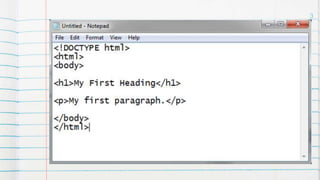
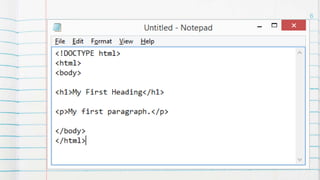
 Step 2: Write Some HTML. Write or copy the following HTML code into
Notepad: ...
 Step 3: Save the HTML Page. Save the file on your computer. ...
 Step 4: View the HTML Page in Your Browser.
6
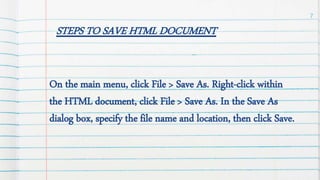
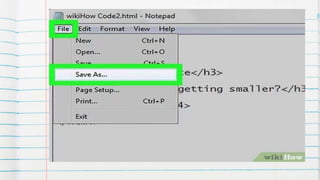
STEPS TO SAVE HTML DOCUMENT
On the main menu, click File > Save As. Right-click within
the HTML document, click File > Save As. In the Save As
dialog box, specify the file name and location, then click Save.
7
8
Want big impact?
Use big image.
9
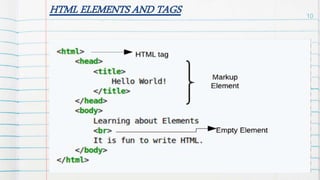
HTML ELEMENTS AND TAGS 10
Lorem
ipsum
congue
tempus
Lorem
ipsum
tempus
A B C
Yellow 10 20 7
Blue 30 15 10
Orange 5 24 16
11
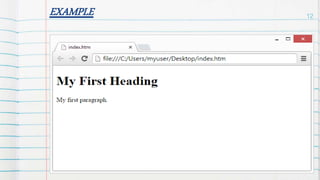
EXAMPLE
our
office
12
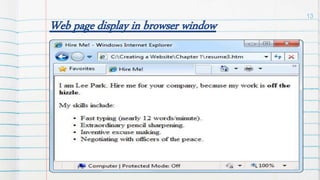
Web page display in browser window
A complex idea can be
conveyed with just a
single still image, namely
making it possible to
absorb large amounts of
data quickly.
13
LETS WATCH A TUTORIAL
14
https://youtu.be/RLt
RGVxuGQU
HOME WORK
Do question in your notebook.
o Write the steps how HTML code can be use to
create a web page.
o Write a short note on ordered list in HTML.
From chapter 5 HTML:
Do exercise A,B, C and F
from chapter #4 MORE ON QBASIC.
15
16
PRACTICE AT
HOME
17
Thanks!
Any questions?

HTML (presentation)

  • 1.
  • 2.
  • 3.
  • 4.
    INTRODUCTION What is HTML? •HTML stands for Hyper Text Markup Language • HTML is the standard markup language for creating Web pages • HTML describes the structure of a Web page • HTML consists of a series of elements • HTML elements tell the browser how to display the content • HTML elements label pieces of content such as "this is a heading", "this is a paragraph", "this is a link", etc. 4
  • 5.
    STEPS TO CREATEHTML DOCUMENT  Step 1: Open Notepad (PC) Windows 8 or later: ...  Step 1: Open TextEdit (Mac) Open Finder > Applications > TextEdit. ...  Step 2: Write Some HTML. Write or copy the following HTML code into Notepad: ...  Step 3: Save the HTML Page. Save the file on your computer. ...  Step 4: View the HTML Page in Your Browser.
  • 6.
  • 7.
    STEPS TO SAVEHTML DOCUMENT On the main menu, click File > Save As. Right-click within the HTML document, click File > Save As. In the Save As dialog box, specify the file name and location, then click Save. 7
  • 8.
  • 9.
  • 10.
    HTML ELEMENTS ANDTAGS 10 Lorem ipsum congue tempus Lorem ipsum tempus
  • 11.
    A B C Yellow10 20 7 Blue 30 15 10 Orange 5 24 16 11
  • 12.
  • 13.
    Web page displayin browser window A complex idea can be conveyed with just a single still image, namely making it possible to absorb large amounts of data quickly. 13
  • 14.
    LETS WATCH ATUTORIAL 14 https://youtu.be/RLt RGVxuGQU
  • 15.
    HOME WORK Do questionin your notebook. o Write the steps how HTML code can be use to create a web page. o Write a short note on ordered list in HTML. From chapter 5 HTML: Do exercise A,B, C and F from chapter #4 MORE ON QBASIC. 15
  • 16.
  • 17.