Introduction to ggplot2
                              Elegant Graphics for Data Analysis
                                      Maik Röder
                                      15.12.2011
                            RUGBCN and Barcelona Code Meetup


vendredi 16 décembre 2011                                          1
Data Analysis Steps
       • Prepare data
        • e.g. using the reshape framework for restructuring
                    data
       • Plot data
        • e.g. using ggplot2 instead of base graphics and
                    lattice
       • Summarize the data and refine the plots
        • Iterative process
vendredi 16 décembre 2011                                      2
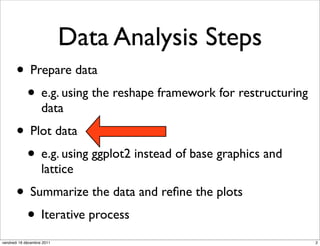
ggplot2
                 grammar of graphics


vendredi 16 décembre 2011              3
Grammar
                •       Oxford English Dictionary:

                      •     The fundamental principles or rules of an art or
                            science

                      •     A book presenting these in methodical form.
                            (Now rare; formerly common in the titles of
                            books.)

                •       System of rules underlying a given language

                •       An abstraction which facilitates thinking, reasoning
                        and communicating


vendredi 16 décembre 2011                                                      4
The grammar of graphics
               •      Move beyond named graphics (e.g. “scatterplot”)

                    •       gain insight into the deep structure that underlies
                            statistical graphics

               •      Powerful and flexible system for

                    •       constructing abstract graphs (set of points)
                            mathematically

                    •       Realizing physical representations as graphics by
                            mapping aesthetic attributes (size, colour) to graphs

               •      Lacking openly available implementation

vendredi 16 décembre 2011                                                           5
Specification
               Concise description of components of a graphic

           • DATA - data operations that create variables
                   from datasets. Reshaping using an Algebra with
                   operations
           • TRANS - variable transformations
           • SCALE - scale transformations
           • ELEMENT - graphs and their aesthetic attributes
           • COORD - a coordinate system
           • GUIDE - one or more guides
vendredi 16 décembre 2011                                           6
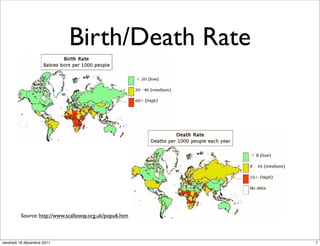
Birth/Death Rate


         Source: http://www.scalloway.org.uk/popu6.htm


vendredi 16 décembre 2011                                7
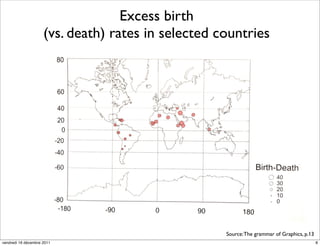
Excess birth
                     (vs. death) rates in selected countries


                                                    Source: The grammar of Graphics, p.13
vendredi 16 décembre 2011                                                                   8
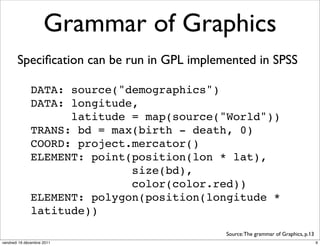
Grammar of Graphics
       Specification can be run in GPL implemented in SPSS

              DATA: source("demographics")
              DATA: longitude,
                    latitude = map(source("World"))
              TRANS: bd = max(birth - death, 0)
              COORD: project.mercator()
              ELEMENT: point(position(lon * lat),
                             size(bd),
                             color(color.red))
              ELEMENT: polygon(position(longitude *
              latitude))
                                            Source: The grammar of Graphics, p.13
vendredi 16 décembre 2011                                                           9
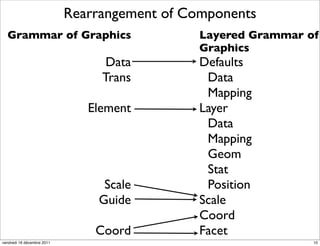
Rearrangement of Components
  Grammar of Graphics                          Layered Grammar of
                                               Graphics
                                  Data         Defaults
                                 Trans          Data
                                                Mapping
                               Element         Layer
                                                Data
                                                Mapping
                                                Geom
                                                Stat
                                 Scale          Position
                                Guide          Scale
                                               Coord
                                Coord          Facet
vendredi 16 décembre 2011                                       10
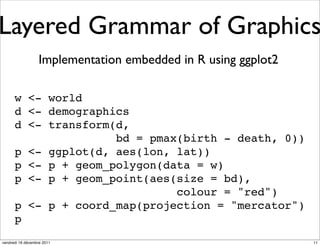
Layered Grammar of Graphics
                  Implementation embedded in R using ggplot2

      w <- world
      d <- demographics
      d <- transform(d,
                     bd = pmax(birth - death, 0))
      p <- ggplot(d, aes(lon, lat))
      p <- p + geom_polygon(data = w)
      p <- p + geom_point(aes(size = bd),
                              colour = "red")
      p <- p + coord_map(projection = "mercator")
      p
vendredi 16 décembre 2011                                      11
ggplot2
                   •        Author: Hadley Wickham

                   •        Open Source implementation of the layered
                            grammar of graphics

                   •        High-level R package for creating publication-
                            quality statistical graphics

                            •   Carefully chosen defaults following basic
                                graphical design rules

                   •        Flexible set of components for creating any type of
                            graphics
vendredi 16 décembre 2011                                                         12
ggplot2 installation
           • In R console:
                   install.packages("ggplot2")
                   library(ggplot2)


vendredi 16 décembre 2011                          13
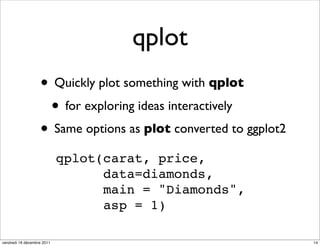
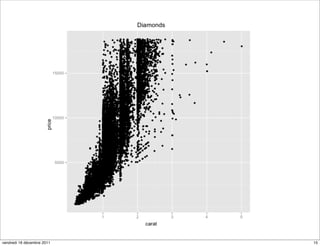
qplot
                   • Quickly plot something with qplot
                    • for exploring ideas interactively
                   • Same options as plot converted to ggplot2
                            qplot(carat, price,
                                  data=diamonds,
                                  main = "Diamonds",
                                  asp = 1)

vendredi 16 décembre 2011                                        14
vendredi 16 décembre 2011   15
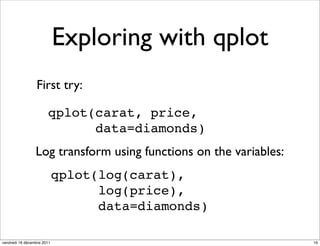
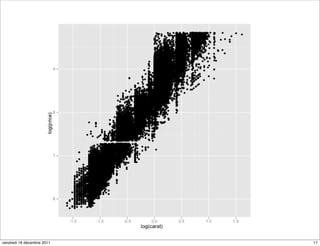
Exploring with qplot
                 First try:

                       qplot(carat, price,
                             data=diamonds)
                 Log transform using functions on the variables:
                            qplot(log(carat),
                                  log(price),
                                  data=diamonds)

vendredi 16 décembre 2011                                          16
vendredi 16 décembre 2011   17
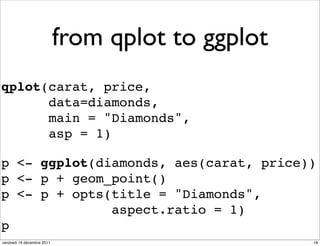
from qplot to ggplot
qplot(carat, price,
      data=diamonds,
      main = "Diamonds",
      asp = 1)

p <- ggplot(diamonds, aes(carat, price))
p <- p + geom_point()
p <- p + opts(title = "Diamonds",
              aspect.ratio = 1)
p
vendredi 16 décembre 2011                          18
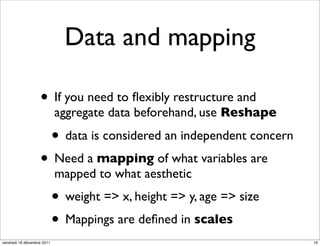
Data and mapping

                   • If you need to flexibly restructure and
                            aggregate data beforehand, use Reshape

                            • data is considered an independent concern
                   • Need a mapping of what variables are
                            mapped to what aesthetic
                            • weight => x, height => y, age => size
                            • Mappings are defined in scales
vendredi 16 décembre 2011                                                 19
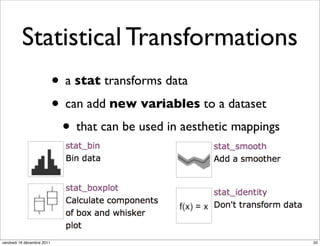
Statistical Transformations
                            • a stat transforms data
                            • can add new variables to a dataset
                             • that can be used in aesthetic mappings


vendredi 16 décembre 2011                                               20
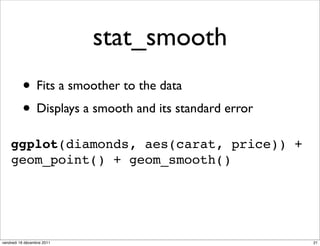
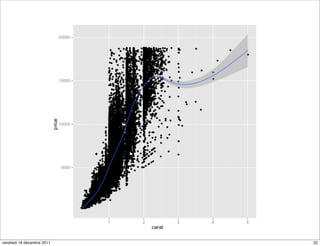
stat_smooth
          • Fits a smoother to the data
          • Displays a smooth and its standard error
    ggplot(diamonds, aes(carat, price)) +
    geom_point() + geom_smooth()


vendredi 16 décembre 2011                              21
vendredi 16 décembre 2011   22
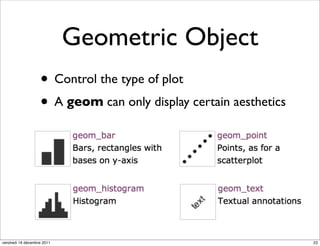
Geometric Object
                   • Control the type of plot
                   • A geom can only display certain aesthetics


vendredi 16 décembre 2011                                         23
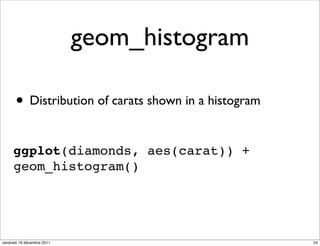
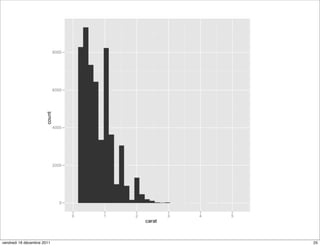
geom_histogram

      • Distribution of carats shown in a histogram

     ggplot(diamonds, aes(carat)) +
     geom_histogram()


vendredi 16 décembre 2011                             24
vendredi 16 décembre 2011   25
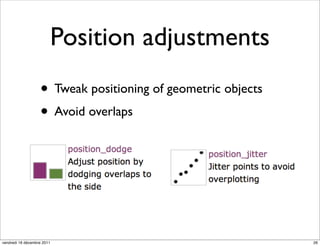
Position adjustments
                   • Tweak positioning of geometric objects
                   • Avoid overlaps


vendredi 16 décembre 2011                                     26
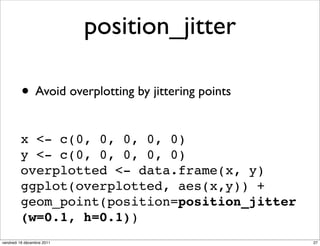
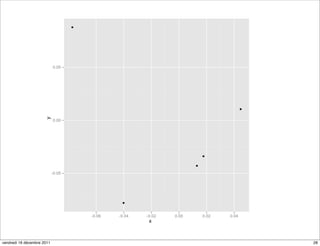
position_jitter

         • Avoid overplotting by jittering points
         x <- c(0, 0, 0, 0, 0)
         y <- c(0, 0, 0, 0, 0)
         overplotted <- data.frame(x, y)
         ggplot(overplotted, aes(x,y)) +
         geom_point(position=position_jitter
         (w=0.1, h=0.1))
vendredi 16 décembre 2011                           27
vendredi 16 décembre 2011   28
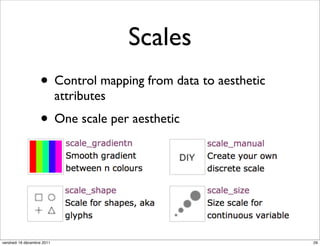
Scales
                   • Control mapping from data to aesthetic
                            attributes
                   • One scale per aesthetic


vendredi 16 décembre 2011                                     29
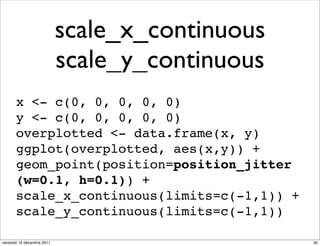
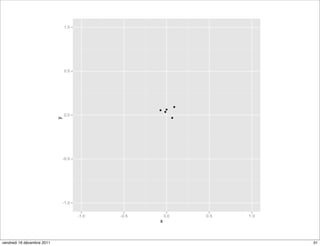
scale_x_continuous
                            scale_y_continuous
       x <- c(0, 0, 0, 0, 0)
       y <- c(0, 0, 0, 0, 0)
       overplotted <- data.frame(x, y)
       ggplot(overplotted, aes(x,y)) +
       geom_point(position=position_jitter
       (w=0.1, h=0.1)) +
       scale_x_continuous(limits=c(-1,1)) +
       scale_y_continuous(limits=c(-1,1))

vendredi 16 décembre 2011                        30
vendredi 16 décembre 2011   31
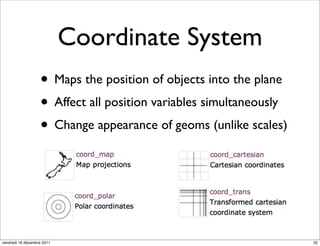
Coordinate System
                   • Maps the position of objects into the plane
                   • Affect all position variables simultaneously
                   • Change appearance of geoms (unlike scales)


vendredi 16 décembre 2011                                           32
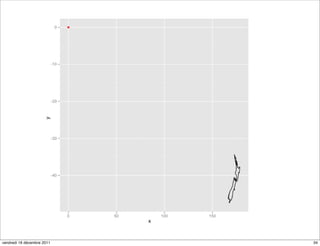
coord_map
library("maps")
map <- map("nz", plot=FALSE)[c("x","y")]
m <- data.frame(map)
n <- qplot(x, y, data=m, geom="path")
n
d <- data.frame(c(0), c(0))
n + geom_point(data = d, colour = "red")

vendredi 16 décembre 2011               33
vendredi 16 décembre 2011   34
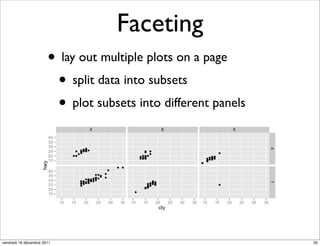
Faceting
                       • lay out multiple plots on a page
                        • split data into subsets
                        • plot subsets into different panels


vendredi 16 décembre 2011                                      35
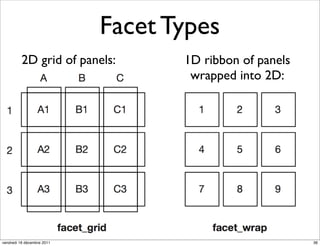
Facet Types
          2D grid of panels:       1D ribbon of panels
                                    wrapped into 2D:


vendredi 16 décembre 2011                                36
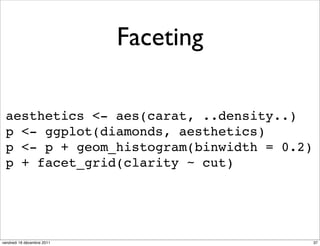
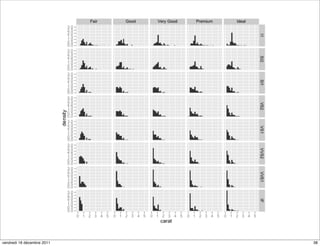
Faceting

 aesthetics <- aes(carat, ..density..)
 p <- ggplot(diamonds, aesthetics)
 p <- p + geom_histogram(binwidth = 0.2)
 p + facet_grid(clarity ~ cut)


vendredi 16 décembre 2011                  37
vendredi 16 décembre 2011   38
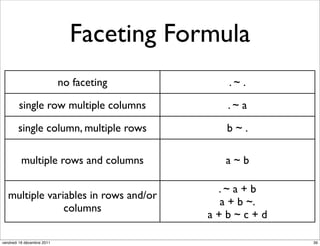
Faceting Formula
                            no faceting      .~ .

        single row multiple columns          .~ a

        single column, multiple rows        b~.

         multiple rows and columns          a~b

                                           .~ a + b
   multiple variables in rows and/or
                                           a + b ~.
                columns
                                          a+b~c+d

vendredi 16 décembre 2011                             39
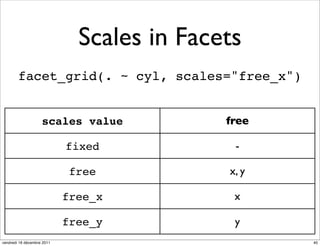
Scales in Facets
        facet_grid(. ~ cyl, scales="free_x")


                    scales value            free

                            fixed            -

                             free           x, y

                            free_x           x

                            free_y           y
vendredi 16 décembre 2011                          40
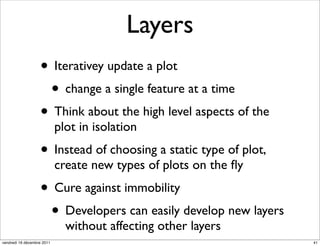
Layers
                   • Iterativey update a plot
                    • change a single feature at a time
                   • Think about the high level aspects of the
                            plot in isolation
                   • Instead of choosing a static type of plot,
                            create new types of plots on the fly
                   • Cure against immobility
                    • Developers can easily develop new layers
                              without affecting other layers
vendredi 16 décembre 2011                                         41
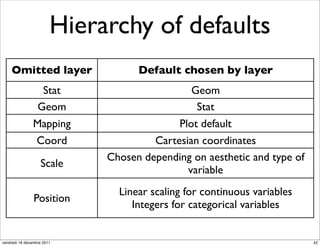
Hierarchy of defaults
    Omitted layer                  Default chosen by layer
                  Stat                        Geom
                 Geom                          Stat
                Mapping                    Plot default
                Coord                 Cartesian coordinates
                             Chosen depending on aesthetic and type of
                   Scale
                                             variable
                               Linear scaling for continuous variables
                Position
                                  Integers for categorical variables


vendredi 16 décembre 2011                                                42
Thanks!
                   • Visit the ggplot2 homepage:
                    • http://had.co.nz/ggplot2/
                   • Get the ggplot2 book:
                    • http://amzn.com/0387981403
                   • Get the Grammar of Graphics book from
                            Leland Wilkinson:
                            • http://amzn.com/0387245448
vendredi 16 décembre 2011                                    43

Introduction to ggplot2

  • 1.
    Introduction to ggplot2 Elegant Graphics for Data Analysis Maik Röder 15.12.2011 RUGBCN and Barcelona Code Meetup vendredi 16 décembre 2011 1
  • 2.
    Data Analysis Steps • Prepare data • e.g. using the reshape framework for restructuring data • Plot data • e.g. using ggplot2 instead of base graphics and lattice • Summarize the data and refine the plots • Iterative process vendredi 16 décembre 2011 2
  • 3.
    ggplot2 grammar of graphics vendredi 16 décembre 2011 3
  • 4.
    Grammar • Oxford English Dictionary: • The fundamental principles or rules of an art or science • A book presenting these in methodical form. (Now rare; formerly common in the titles of books.) • System of rules underlying a given language • An abstraction which facilitates thinking, reasoning and communicating vendredi 16 décembre 2011 4
  • 5.
    The grammar ofgraphics • Move beyond named graphics (e.g. “scatterplot”) • gain insight into the deep structure that underlies statistical graphics • Powerful and flexible system for • constructing abstract graphs (set of points) mathematically • Realizing physical representations as graphics by mapping aesthetic attributes (size, colour) to graphs • Lacking openly available implementation vendredi 16 décembre 2011 5
  • 6.
    Specification Concise description of components of a graphic • DATA - data operations that create variables from datasets. Reshaping using an Algebra with operations • TRANS - variable transformations • SCALE - scale transformations • ELEMENT - graphs and their aesthetic attributes • COORD - a coordinate system • GUIDE - one or more guides vendredi 16 décembre 2011 6
  • 7.
    Birth/Death Rate Source: http://www.scalloway.org.uk/popu6.htm vendredi 16 décembre 2011 7
  • 8.
    Excess birth (vs. death) rates in selected countries Source: The grammar of Graphics, p.13 vendredi 16 décembre 2011 8
  • 9.
    Grammar of Graphics Specification can be run in GPL implemented in SPSS DATA: source("demographics") DATA: longitude, latitude = map(source("World")) TRANS: bd = max(birth - death, 0) COORD: project.mercator() ELEMENT: point(position(lon * lat), size(bd), color(color.red)) ELEMENT: polygon(position(longitude * latitude)) Source: The grammar of Graphics, p.13 vendredi 16 décembre 2011 9
  • 10.
    Rearrangement of Components Grammar of Graphics Layered Grammar of Graphics Data Defaults Trans Data Mapping Element Layer Data Mapping Geom Stat Scale Position Guide Scale Coord Coord Facet vendredi 16 décembre 2011 10
  • 11.
    Layered Grammar ofGraphics Implementation embedded in R using ggplot2 w <- world d <- demographics d <- transform(d, bd = pmax(birth - death, 0)) p <- ggplot(d, aes(lon, lat)) p <- p + geom_polygon(data = w) p <- p + geom_point(aes(size = bd), colour = "red") p <- p + coord_map(projection = "mercator") p vendredi 16 décembre 2011 11
  • 12.
    ggplot2 • Author: Hadley Wickham • Open Source implementation of the layered grammar of graphics • High-level R package for creating publication- quality statistical graphics • Carefully chosen defaults following basic graphical design rules • Flexible set of components for creating any type of graphics vendredi 16 décembre 2011 12
  • 13.
    ggplot2 installation • In R console: install.packages("ggplot2") library(ggplot2) vendredi 16 décembre 2011 13
  • 14.
    qplot • Quickly plot something with qplot • for exploring ideas interactively • Same options as plot converted to ggplot2 qplot(carat, price, data=diamonds, main = "Diamonds", asp = 1) vendredi 16 décembre 2011 14
  • 15.
  • 16.
    Exploring with qplot First try: qplot(carat, price, data=diamonds) Log transform using functions on the variables: qplot(log(carat), log(price), data=diamonds) vendredi 16 décembre 2011 16
  • 17.
  • 18.
    from qplot toggplot qplot(carat, price, data=diamonds, main = "Diamonds", asp = 1) p <- ggplot(diamonds, aes(carat, price)) p <- p + geom_point() p <- p + opts(title = "Diamonds", aspect.ratio = 1) p vendredi 16 décembre 2011 18
  • 19.
    Data and mapping • If you need to flexibly restructure and aggregate data beforehand, use Reshape • data is considered an independent concern • Need a mapping of what variables are mapped to what aesthetic • weight => x, height => y, age => size • Mappings are defined in scales vendredi 16 décembre 2011 19
  • 20.
    Statistical Transformations • a stat transforms data • can add new variables to a dataset • that can be used in aesthetic mappings vendredi 16 décembre 2011 20
  • 21.
    stat_smooth • Fits a smoother to the data • Displays a smooth and its standard error ggplot(diamonds, aes(carat, price)) + geom_point() + geom_smooth() vendredi 16 décembre 2011 21
  • 22.
  • 23.
    Geometric Object • Control the type of plot • A geom can only display certain aesthetics vendredi 16 décembre 2011 23
  • 24.
    geom_histogram • Distribution of carats shown in a histogram ggplot(diamonds, aes(carat)) + geom_histogram() vendredi 16 décembre 2011 24
  • 25.
  • 26.
    Position adjustments • Tweak positioning of geometric objects • Avoid overlaps vendredi 16 décembre 2011 26
  • 27.
    position_jitter • Avoid overplotting by jittering points x <- c(0, 0, 0, 0, 0) y <- c(0, 0, 0, 0, 0) overplotted <- data.frame(x, y) ggplot(overplotted, aes(x,y)) + geom_point(position=position_jitter (w=0.1, h=0.1)) vendredi 16 décembre 2011 27
  • 28.
  • 29.
    Scales • Control mapping from data to aesthetic attributes • One scale per aesthetic vendredi 16 décembre 2011 29
  • 30.
    scale_x_continuous scale_y_continuous x <- c(0, 0, 0, 0, 0) y <- c(0, 0, 0, 0, 0) overplotted <- data.frame(x, y) ggplot(overplotted, aes(x,y)) + geom_point(position=position_jitter (w=0.1, h=0.1)) + scale_x_continuous(limits=c(-1,1)) + scale_y_continuous(limits=c(-1,1)) vendredi 16 décembre 2011 30
  • 31.
  • 32.
    Coordinate System • Maps the position of objects into the plane • Affect all position variables simultaneously • Change appearance of geoms (unlike scales) vendredi 16 décembre 2011 32
  • 33.
    coord_map library("maps") map <- map("nz",plot=FALSE)[c("x","y")] m <- data.frame(map) n <- qplot(x, y, data=m, geom="path") n d <- data.frame(c(0), c(0)) n + geom_point(data = d, colour = "red") vendredi 16 décembre 2011 33
  • 34.
  • 35.
    Faceting • lay out multiple plots on a page • split data into subsets • plot subsets into different panels vendredi 16 décembre 2011 35
  • 36.
    Facet Types 2D grid of panels: 1D ribbon of panels wrapped into 2D: vendredi 16 décembre 2011 36
  • 37.
    Faceting aesthetics <-aes(carat, ..density..) p <- ggplot(diamonds, aesthetics) p <- p + geom_histogram(binwidth = 0.2) p + facet_grid(clarity ~ cut) vendredi 16 décembre 2011 37
  • 38.
  • 39.
    Faceting Formula no faceting .~ . single row multiple columns .~ a single column, multiple rows b~. multiple rows and columns a~b .~ a + b multiple variables in rows and/or a + b ~. columns a+b~c+d vendredi 16 décembre 2011 39
  • 40.
    Scales in Facets facet_grid(. ~ cyl, scales="free_x") scales value free fixed - free x, y free_x x free_y y vendredi 16 décembre 2011 40
  • 41.
    Layers • Iterativey update a plot • change a single feature at a time • Think about the high level aspects of the plot in isolation • Instead of choosing a static type of plot, create new types of plots on the fly • Cure against immobility • Developers can easily develop new layers without affecting other layers vendredi 16 décembre 2011 41
  • 42.
    Hierarchy of defaults Omitted layer Default chosen by layer Stat Geom Geom Stat Mapping Plot default Coord Cartesian coordinates Chosen depending on aesthetic and type of Scale variable Linear scaling for continuous variables Position Integers for categorical variables vendredi 16 décembre 2011 42
  • 43.
    Thanks! • Visit the ggplot2 homepage: • http://had.co.nz/ggplot2/ • Get the ggplot2 book: • http://amzn.com/0387981403 • Get the Grammar of Graphics book from Leland Wilkinson: • http://amzn.com/0387245448 vendredi 16 décembre 2011 43