

Introduction to
Cosmos DB
Presenter Name: Divyansh Devrani & Rahul Khowal
Lack of etiquette and manners is a huge turn off.
KnolX Etiquettes
▪ Punctuality
Join the session 5 minutes prior to the session start time. We start on
time and conclude on time!
▪ Feedback
Make sure to submit a constructive feedback for all sessions as it is very
helpful for the presenter.
▪ Silent Mode
Keep your mobile devices in silent mode, feel free to move out of session
in case you need to attend an urgent call.
▪ Avoid Disturbance
Avoid unwanted chit chat during the session.
Agenda
1. Introduction
▪ Azure
▪ Data & Database
▪ Types of Database
▪ Multi-Model Database
2. Azure Cosmos DB
▪ Azure Cosmos DB
▪ API in Cosmos DB
▪ Provision of Cosmos DB
▪ Hierarchy of Cosmos DB
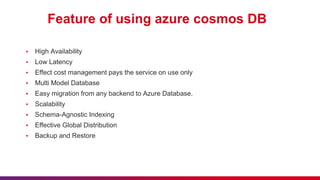
▪ Feature of using azure Cosmos DB
▪ Create Azure Cosmos DB
3. Demo
▪ Setting up an Azure Cosmos DB account
Introduction
• Microsoft Azure is one of the widely used cloud computing platform.
• Designed by Microsoft in 2010.
• Azure can be described as the managed data centers that are used to
build, deploy, manage the applications and provide services through a
global network.
• Azure provides a wide variety of services such as cloud storage,
compute services, network services, cognitive services, databases,
analytics etc.
Data & Database
• Data is statically raw
and unprocessed information.
• In computer language, a piece
of information that can be
translated into a form for
efficient movement and
processing is called data.
• Data is interchangeable
information.
What is Data ?
• A database is a collection of data
that is organized, which is also
called structured data
• Database refers to related
data in a structured form.
• Example – MongoDB, PSQL etc
▪
What is Database ?
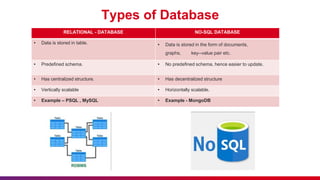
Types of Database
RELATIONAL - DATABASE NO-SQL DATABASE
• Data is stored in table. • Data is stored in the form of documents,
graphs, key--value pair etc.
• Predefined schema. • No predefined schema, hence easier to update.
• Has centralized structure. • Has decentralized structure
• Vertically scalable • Horizontally scalable.
• Example – PSQL , MySQL • Example - MongoDB
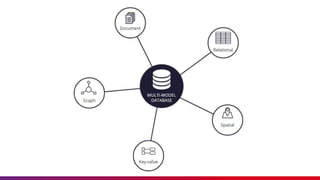
Multi-Model Database
▪ A multi-model database is a single, integrated data platform that can
store, access, and process different types of data to carry out multiple
tasks. With a multi-model database, you can unify various data types
and models into a single solution, without having individual
technologies for each specific purpose.
▪ Multi-Model Database can supports both SQL and No-SQL Database.
In simple words it can store data in the form of tables, documentation,
graphs, key-value pair etc.
▪ Example - Cosmos DB, MarkLogic, Arango DB etc.
AZURE COSMOS DB
- Cosmos database is a Paas (Platform as a service) and cloud-
based database
- It is a multi-model database service in Microsoft Azure.
- It allows users to build and distribute their applications across an
Azure data centre automatically without any need for prior
configuration.
- It is available in all regions where Azure is available, and it
replicates its data across various data centres in the network.
- We can create a maximum of 50 Azure Cosmos DB accounts
under an Azure subscription. This limitation is a soft limit that can
be increased via support request.
API in cosmos DB
▪ Azure Cosmos DB offers multiple database APIs, which include
NoSQL, MongoDB, PostgreSQL, Cassandra, Gremlin, and Table.
▪ By using these APIs, you can model real world data using
documents, key-value, graph, and column-family data models.
▪ These APIs allow your applications to treat Azure Cosmos DB as if it
were various other databases technologies, without the overhead of
management, and scaling approaches.
▪ Azure Cosmos DB helps you to use the ecosystems, tools, and
skills you already have for data modeling and querying with its
various APIs.
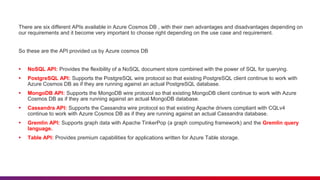
There are six different APIs available in Azure Cosmos DB , with their own advantages and disadvantages depending on
our requirements and it become very important to choose right depending on the use case and requirement.
So these are the API provided us by Azure cosmos DB
▪ NoSQL API: Provides the flexibility of a NoSQL document store combined with the power of SQL for querying.
▪ PostgreSQL API: Supports the PostgreSQL wire protocol so that existing PostgreSQL client continue to work with
Azure Cosmos DB as if they are running against an actual PostgreSQL database.
▪ MongoDB API: Supports the MongoDB wire protocol so that existing MongoDB client continue to work with Azure
Cosmos DB as if they are running against an actual MongoDB database.
▪ Cassandra API: Supports the Cassandra wire protocol so that existing Apache drivers compliant with CQLv4
continue to work with Azure Cosmos DB as if they are running against an actual Cassandra database.
▪ Gremlin API: Supports graph data with Apache TinkerPop (a graph computing framework) and the Gremlin query
language.
▪ Table API: Provides premium capabilities for applications written for Azure Table storage.
Provision of Cosmos DB
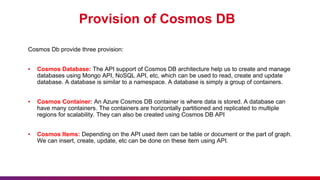
Cosmos Db provide three provision:
▪ Cosmos Database: The API support of Cosmos DB architecture help us to create and manage
databases using Mongo API, NoSQL API, etc, which can be used to read, create and update
database. A database is similar to a namespace. A database is simply a group of containers.
▪ Cosmos Container: An Azure Cosmos DB container is where data is stored. A database can
have many containers. The containers are horizontally partitioned and replicated to multiple
regions for scalability. They can also be created using Cosmos DB API
▪ Cosmos Items: Depending on the API used item can be table or document or the part of graph.
We can insert, create, update, etc can be done on these item using API.
Hierarchy of Cosmos DB
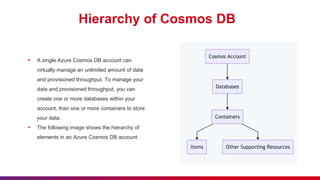
▪ A single Azure Cosmos DB account can
virtually manage an unlimited amount of data
and provisioned throughput. To manage your
data and provisioned throughput, you can
create one or more databases within your
account, than one or more containers to store
your data.
▪ The following image shows the hierarchy of
elements in an Azure Cosmos DB account:
Feature of using azure cosmos DB
▪ High Availability
▪ Low Latency
▪ Effect cost management pays the service on use only
▪ Multi Model Database
▪ Easy migration from any backend to Azure Database.
▪ Scalability
▪ Schema-Agnostic Indexing
▪ Effective Global Distribution
▪ Backup and Restore
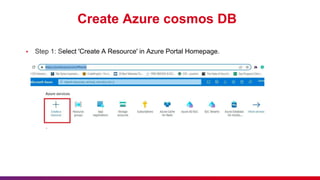
Create Azure cosmos DB
▪ Step 1: Select 'Create A Resource' in Azure Portal Homepage.
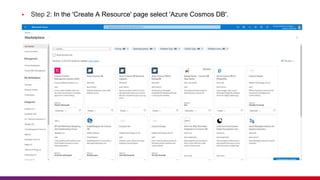
▪ Step 2: In the 'Create A Resource' page select 'Azure Cosmos DB'.
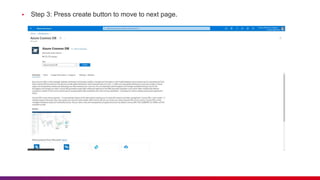
▪ Step 3: Press create button to move to next page.
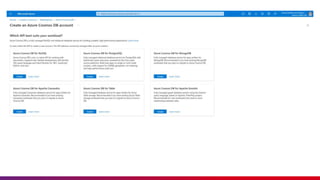
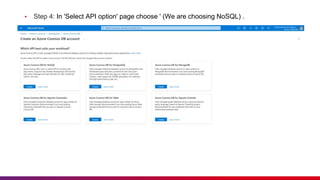
▪ Step 4: In 'Select API option' page choose ' (We are choosing NoSQL) .
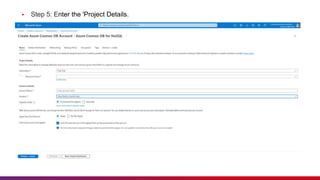
▪ Step 5: Enter the 'Project Details.
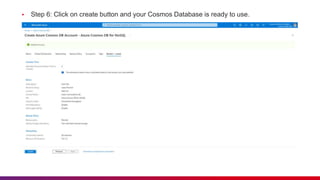
▪ Step 6: Click on create button and your Cosmos Database is ready to use.
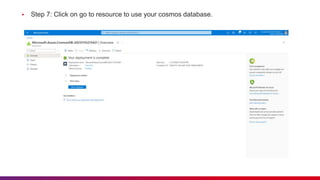
▪ Step 7: Click on go to resource to use your cosmos database.
DEMO
Thank you

Introduction to Cosmos DB Presentation.pptx

  • 1.
    Introduction to Cosmos DB PresenterName: Divyansh Devrani & Rahul Khowal
  • 2.
    Lack of etiquetteand manners is a huge turn off. KnolX Etiquettes ▪ Punctuality Join the session 5 minutes prior to the session start time. We start on time and conclude on time! ▪ Feedback Make sure to submit a constructive feedback for all sessions as it is very helpful for the presenter. ▪ Silent Mode Keep your mobile devices in silent mode, feel free to move out of session in case you need to attend an urgent call. ▪ Avoid Disturbance Avoid unwanted chit chat during the session.
  • 3.
    Agenda 1. Introduction ▪ Azure ▪Data & Database ▪ Types of Database ▪ Multi-Model Database 2. Azure Cosmos DB ▪ Azure Cosmos DB ▪ API in Cosmos DB ▪ Provision of Cosmos DB ▪ Hierarchy of Cosmos DB ▪ Feature of using azure Cosmos DB ▪ Create Azure Cosmos DB 3. Demo ▪ Setting up an Azure Cosmos DB account
  • 4.
  • 5.
    • Microsoft Azureis one of the widely used cloud computing platform. • Designed by Microsoft in 2010. • Azure can be described as the managed data centers that are used to build, deploy, manage the applications and provide services through a global network. • Azure provides a wide variety of services such as cloud storage, compute services, network services, cognitive services, databases, analytics etc.
  • 6.
    Data & Database •Data is statically raw and unprocessed information. • In computer language, a piece of information that can be translated into a form for efficient movement and processing is called data. • Data is interchangeable information. What is Data ? • A database is a collection of data that is organized, which is also called structured data • Database refers to related data in a structured form. • Example – MongoDB, PSQL etc ▪ What is Database ?
  • 7.
    Types of Database RELATIONAL- DATABASE NO-SQL DATABASE • Data is stored in table. • Data is stored in the form of documents, graphs, key--value pair etc. • Predefined schema. • No predefined schema, hence easier to update. • Has centralized structure. • Has decentralized structure • Vertically scalable • Horizontally scalable. • Example – PSQL , MySQL • Example - MongoDB
  • 8.
    Multi-Model Database ▪ Amulti-model database is a single, integrated data platform that can store, access, and process different types of data to carry out multiple tasks. With a multi-model database, you can unify various data types and models into a single solution, without having individual technologies for each specific purpose. ▪ Multi-Model Database can supports both SQL and No-SQL Database. In simple words it can store data in the form of tables, documentation, graphs, key-value pair etc. ▪ Example - Cosmos DB, MarkLogic, Arango DB etc.
  • 10.
  • 11.
    - Cosmos databaseis a Paas (Platform as a service) and cloud- based database - It is a multi-model database service in Microsoft Azure. - It allows users to build and distribute their applications across an Azure data centre automatically without any need for prior configuration. - It is available in all regions where Azure is available, and it replicates its data across various data centres in the network. - We can create a maximum of 50 Azure Cosmos DB accounts under an Azure subscription. This limitation is a soft limit that can be increased via support request.
  • 12.
    API in cosmosDB ▪ Azure Cosmos DB offers multiple database APIs, which include NoSQL, MongoDB, PostgreSQL, Cassandra, Gremlin, and Table. ▪ By using these APIs, you can model real world data using documents, key-value, graph, and column-family data models. ▪ These APIs allow your applications to treat Azure Cosmos DB as if it were various other databases technologies, without the overhead of management, and scaling approaches. ▪ Azure Cosmos DB helps you to use the ecosystems, tools, and skills you already have for data modeling and querying with its various APIs.
  • 13.
    There are sixdifferent APIs available in Azure Cosmos DB , with their own advantages and disadvantages depending on our requirements and it become very important to choose right depending on the use case and requirement. So these are the API provided us by Azure cosmos DB ▪ NoSQL API: Provides the flexibility of a NoSQL document store combined with the power of SQL for querying. ▪ PostgreSQL API: Supports the PostgreSQL wire protocol so that existing PostgreSQL client continue to work with Azure Cosmos DB as if they are running against an actual PostgreSQL database. ▪ MongoDB API: Supports the MongoDB wire protocol so that existing MongoDB client continue to work with Azure Cosmos DB as if they are running against an actual MongoDB database. ▪ Cassandra API: Supports the Cassandra wire protocol so that existing Apache drivers compliant with CQLv4 continue to work with Azure Cosmos DB as if they are running against an actual Cassandra database. ▪ Gremlin API: Supports graph data with Apache TinkerPop (a graph computing framework) and the Gremlin query language. ▪ Table API: Provides premium capabilities for applications written for Azure Table storage.
  • 15.
    Provision of CosmosDB Cosmos Db provide three provision: ▪ Cosmos Database: The API support of Cosmos DB architecture help us to create and manage databases using Mongo API, NoSQL API, etc, which can be used to read, create and update database. A database is similar to a namespace. A database is simply a group of containers. ▪ Cosmos Container: An Azure Cosmos DB container is where data is stored. A database can have many containers. The containers are horizontally partitioned and replicated to multiple regions for scalability. They can also be created using Cosmos DB API ▪ Cosmos Items: Depending on the API used item can be table or document or the part of graph. We can insert, create, update, etc can be done on these item using API.
  • 16.
    Hierarchy of CosmosDB ▪ A single Azure Cosmos DB account can virtually manage an unlimited amount of data and provisioned throughput. To manage your data and provisioned throughput, you can create one or more databases within your account, than one or more containers to store your data. ▪ The following image shows the hierarchy of elements in an Azure Cosmos DB account:
  • 17.
    Feature of usingazure cosmos DB ▪ High Availability ▪ Low Latency ▪ Effect cost management pays the service on use only ▪ Multi Model Database ▪ Easy migration from any backend to Azure Database. ▪ Scalability ▪ Schema-Agnostic Indexing ▪ Effective Global Distribution ▪ Backup and Restore
  • 18.
    Create Azure cosmosDB ▪ Step 1: Select 'Create A Resource' in Azure Portal Homepage.
  • 19.
    ▪ Step 2:In the 'Create A Resource' page select 'Azure Cosmos DB'.
  • 20.
    ▪ Step 3:Press create button to move to next page.
  • 21.
    ▪ Step 4:In 'Select API option' page choose ' (We are choosing NoSQL) .
  • 22.
    ▪ Step 5:Enter the 'Project Details.
  • 23.
    ▪ Step 6:Click on create button and your Cosmos Database is ready to use.
  • 24.
    ▪ Step 7:Click on go to resource to use your cosmos database.
  • 25.
  • 26.