


Introduction to Azure
Service Bus
Anshuman Shukla
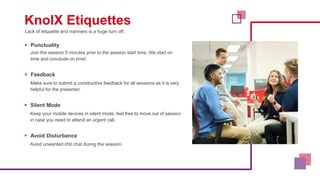
Lack of etiquette and manners is a huge turn off.
KnolX Etiquettes
 Punctuality
Join the session 5 minutes prior to the session start time. We start on
time and conclude on time!
 Feedback
Make sure to submit a constructive feedback for all sessions as it is very
helpful for the presenter.
 Silent Mode
Keep your mobile devices in silent mode, feel free to move out of session
in case you need to attend an urgent call.
 Avoid Disturbance
Avoid unwanted chit chat during the session.
1. What is Azure Service Bus?
2. Benefits of Azure Service Bus.
3. When to use Azure Service Bus?
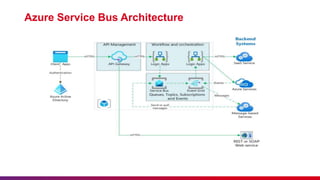
4. Azure Service Bus Architecture.
5. Demo
What is Azure Service Bus?
Azure Service Bus is a fully managed enterprise message broker with
message queues and publish-subscribe topics (in a namespace). Service
Bus is used to decouple applications and services from each other,
providing the following benefits:
 Load-balancing work across competing workers
 Safely routing and transferring data and control across service and
application boundaries
 Coordinating transactional work that requires a high-degree of reliability
02
Benefits of Azure Service Bus.
Azure Service Bus offers several benefits that make it a popular choice for building reliable and scalable
messaging solutions in the cloud. Here are some key benefits of using Azure Service Bus:
 Reliable Message Delivery: Azure Service Bus ensures reliable delivery of messages even in the
presence of network failures, crashes, or other transient errors. Messages are stored durably and can
be retried until they are successfully delivered.
 Decoupled Communication: Service Bus allows you to decouple different components and services
in your architecture. This separation enables more flexible and maintainable systems, as changes in
one component do not directly affect others.
 Scalability: Service Bus supports partitioning, which allows for distributing message loads across
multiple partitions. This enables horizontal scalability, ensuring that your messaging system can handle
increased workloads as your application grows.
 Support for Multiple Messaging Patterns:
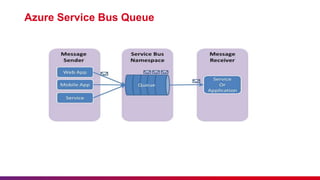
− Message Queues: Facilitates point-to-point communication, where a sender sends messages to a queue, and a single
receiver processes them.
− Topics and Subscriptions: Supports a publish-subscribe model, allowing messages to be broadcast to multiple
subscribers based on their interests.
Benefits of Azure Service Bus.
 Dead-Letter Queue: When messages cannot be processed successfully after multiple
attempts, they are moved to a dead-letter queue. This feature helps with identifying and
handling problematic messages
 Ordered Messaging: Service Bus supports message sessions, which enable ordered
processing of related messages. This is essential for scenarios where message order
matters, such as processing orders or maintaining workflows.
 Session Handling: Messages can be grouped into sessions, ensuring that messages with
the same session ID are processed by the same consumer. This is useful for maintaining
stateful communication.
 Scheduled Messages: Allows you to schedule messages to be sent at a specific time in the
future. This feature is beneficial for sending notifications, reminders, or executing time-
sensitive tasks.
 Integration with Azure Services: Service Bus can be easily integrated with other Azure
services like Azure Functions, Logic Apps, and Web Apps. This integration helps build end-
to-end solutions.
 Security: Azure Service Bus provides authentication, authorization, and encryption
mechanisms to ensure the security and privacy of messages.
03
When to use Azure Service Bus?
Azure Service Bus is a powerful messaging service that can be used in various scenarios where
reliable communication and decoupling between components or services are essential. Here are
some common use cases and scenarios where you should consider using Azure Service Bus:
 Micro services Communication.
 Event-Driven Architectures.
 Workflow Orchestration.
 Reliable Data Ingestion.
 Asynchronous Processing.
 Order Processing.
 Scalability.
 Publish-Subscribe Patterns.
 Scheduled Tasks and Reminders.
 Global Data Distribution.
 Hybrid Solutions.
 Dead-Letter Queue for Error Handling.
.
04
Azure Service Bus Architecture
Azure Service Bus Queue
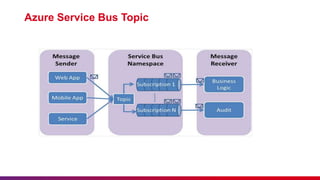
Azure Service Bus Topic
05
Introduction to Azure Service Bus Presentation

Introduction to Azure Service Bus Presentation

  • 1.
    Introduction to Azure ServiceBus Anshuman Shukla
  • 2.
    Lack of etiquetteand manners is a huge turn off. KnolX Etiquettes  Punctuality Join the session 5 minutes prior to the session start time. We start on time and conclude on time!  Feedback Make sure to submit a constructive feedback for all sessions as it is very helpful for the presenter.  Silent Mode Keep your mobile devices in silent mode, feel free to move out of session in case you need to attend an urgent call.  Avoid Disturbance Avoid unwanted chit chat during the session.
  • 3.
    1. What isAzure Service Bus? 2. Benefits of Azure Service Bus. 3. When to use Azure Service Bus? 4. Azure Service Bus Architecture. 5. Demo
  • 5.
    What is AzureService Bus? Azure Service Bus is a fully managed enterprise message broker with message queues and publish-subscribe topics (in a namespace). Service Bus is used to decouple applications and services from each other, providing the following benefits:  Load-balancing work across competing workers  Safely routing and transferring data and control across service and application boundaries  Coordinating transactional work that requires a high-degree of reliability
  • 6.
  • 7.
    Benefits of AzureService Bus. Azure Service Bus offers several benefits that make it a popular choice for building reliable and scalable messaging solutions in the cloud. Here are some key benefits of using Azure Service Bus:  Reliable Message Delivery: Azure Service Bus ensures reliable delivery of messages even in the presence of network failures, crashes, or other transient errors. Messages are stored durably and can be retried until they are successfully delivered.  Decoupled Communication: Service Bus allows you to decouple different components and services in your architecture. This separation enables more flexible and maintainable systems, as changes in one component do not directly affect others.  Scalability: Service Bus supports partitioning, which allows for distributing message loads across multiple partitions. This enables horizontal scalability, ensuring that your messaging system can handle increased workloads as your application grows.  Support for Multiple Messaging Patterns: − Message Queues: Facilitates point-to-point communication, where a sender sends messages to a queue, and a single receiver processes them. − Topics and Subscriptions: Supports a publish-subscribe model, allowing messages to be broadcast to multiple subscribers based on their interests.
  • 8.
    Benefits of AzureService Bus.  Dead-Letter Queue: When messages cannot be processed successfully after multiple attempts, they are moved to a dead-letter queue. This feature helps with identifying and handling problematic messages  Ordered Messaging: Service Bus supports message sessions, which enable ordered processing of related messages. This is essential for scenarios where message order matters, such as processing orders or maintaining workflows.  Session Handling: Messages can be grouped into sessions, ensuring that messages with the same session ID are processed by the same consumer. This is useful for maintaining stateful communication.  Scheduled Messages: Allows you to schedule messages to be sent at a specific time in the future. This feature is beneficial for sending notifications, reminders, or executing time- sensitive tasks.  Integration with Azure Services: Service Bus can be easily integrated with other Azure services like Azure Functions, Logic Apps, and Web Apps. This integration helps build end- to-end solutions.  Security: Azure Service Bus provides authentication, authorization, and encryption mechanisms to ensure the security and privacy of messages.
  • 9.
  • 10.
    When to useAzure Service Bus? Azure Service Bus is a powerful messaging service that can be used in various scenarios where reliable communication and decoupling between components or services are essential. Here are some common use cases and scenarios where you should consider using Azure Service Bus:  Micro services Communication.  Event-Driven Architectures.  Workflow Orchestration.  Reliable Data Ingestion.  Asynchronous Processing.  Order Processing.  Scalability.  Publish-Subscribe Patterns.  Scheduled Tasks and Reminders.  Global Data Distribution.  Hybrid Solutions.  Dead-Letter Queue for Error Handling. .
  • 11.
  • 12.
    Azure Service BusArchitecture
  • 13.
  • 14.
  • 15.