Introduction to Citations
Why do we Cite?
• Give credit to those whose work we have used
• Show how new ideas build on previous knowledge
• Helps you share valuable information
• Shows professional responsibility & ethical behaviour
• Citing strengthens your argument by providing sources for facts
• Shows you have done your research well
• Helps avoid plagiarism!
What is Plagiarism?
When you copy, quote, summarize or paraphrase
any information, facts or ideas from another source
without acknowledging the source
Information comes from many sources
You must cite all your sources.
Books, Articles, Videos, Websites
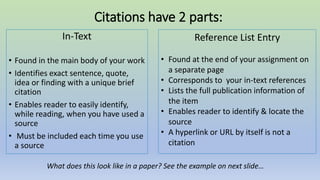
Citations have 2 parts:
In-Text
• Found in the main body of your work​
• Identifies exact sentence, quote,
idea or finding with a unique brief
citation​
• Enables reader to easily identify,
while reading, when you have used a
source​
• Must be included each time you use
a source
Reference List Entry
• Found at the end of your assignment on
a separate page
• Corresponds to your in-text references
• Lists the full publication information of
the item​​
• Enables reader to identify & locate the
source​
• A hyperlink or URL by itself is not a
citation
What does this look like in a paper? See the example on next slide…
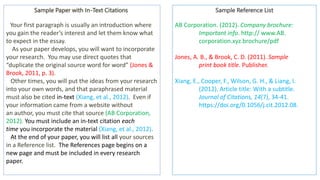
Sample Paper with In-Text Citations
Your first paragraph is usually an introduction where
you gain the reader’s interest and let them know what
to expect in the essay.
As your paper develops, you will want to incorporate
your research. You may use direct quotes that
“duplicate the original source word for word” (Jones &
Brook, 2011, p. 3).
Other times, you will put the ideas from your research
into your own words, and that paraphrased material
must also be cited in-text (Xiang, et al., 2012). Even if
your information came from a website without
an author, you must cite that source (AB Corporation,
2012). You must include an in-text citation each
time you incorporate the material (Xiang, et al., 2012).
At the end of your paper, you will list all your sources
in a Reference list. The References page begins on a
new page and must be included in every research
paper.
Sample Reference List
AB Corporation. (2012). Company brochure:
Important info. http:// www.AB.
corporation.xyz.brochure/pdf
Jones, A. B., & Brook, C. D. (2011). Sample
print book title. Publisher.
Xiang, E., Cooper, F., Wilson, G. H., & Liang, I.
(2012). Article title: With a subtitle.
Journal of Citations, 14(7), 34-41.
https://doi.org/0.1056/j.cit.2012.08.
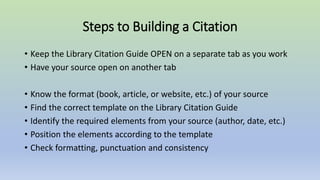
Steps to Building a Citation
• Keep the Library Citation Guide OPEN on a separate tab as you work
• Have your source open on another tab
• Know the format (book, article, or website, etc.) of your source
• Find the correct template on the Library Citation Guide
• Identify the required elements from your source (author, date, etc.)
• Position the elements according to the template
• Check formatting, punctuation and consistency
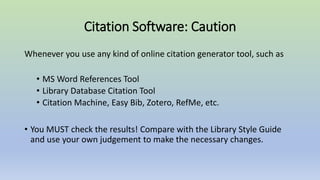
Citation Software: Caution
Whenever you use any kind of online citation generator tool, such as
• MS Word References Tool
• Library Database Citation Tool
• Citation Machine, Easy Bib, Zotero, RefMe, etc.
• You MUST check the results! Compare with the Library Style Guide
and use your own judgement to make the necessary changes.
Remember!
• You don’t have to memorize details about citation styles
• You must understand how citations work and how to use the Library
Citation Guide
• Everything in our Guide is deliberate (punctuation, italics, etc.), so pay
close attention when checking your citations
• Contact the Library for help with building citations

Introduction to Citations

  • 1.
  • 2.
    Why do weCite? • Give credit to those whose work we have used • Show how new ideas build on previous knowledge • Helps you share valuable information • Shows professional responsibility & ethical behaviour • Citing strengthens your argument by providing sources for facts • Shows you have done your research well • Helps avoid plagiarism!
  • 3.
    What is Plagiarism? Whenyou copy, quote, summarize or paraphrase any information, facts or ideas from another source without acknowledging the source Information comes from many sources You must cite all your sources. Books, Articles, Videos, Websites
  • 4.
    Citations have 2parts: In-Text • Found in the main body of your work​ • Identifies exact sentence, quote, idea or finding with a unique brief citation​ • Enables reader to easily identify, while reading, when you have used a source​ • Must be included each time you use a source Reference List Entry • Found at the end of your assignment on a separate page • Corresponds to your in-text references • Lists the full publication information of the item​​ • Enables reader to identify & locate the source​ • A hyperlink or URL by itself is not a citation What does this look like in a paper? See the example on next slide…
  • 5.
    Sample Paper withIn-Text Citations Your first paragraph is usually an introduction where you gain the reader’s interest and let them know what to expect in the essay. As your paper develops, you will want to incorporate your research. You may use direct quotes that “duplicate the original source word for word” (Jones & Brook, 2011, p. 3). Other times, you will put the ideas from your research into your own words, and that paraphrased material must also be cited in-text (Xiang, et al., 2012). Even if your information came from a website without an author, you must cite that source (AB Corporation, 2012). You must include an in-text citation each time you incorporate the material (Xiang, et al., 2012). At the end of your paper, you will list all your sources in a Reference list. The References page begins on a new page and must be included in every research paper. Sample Reference List AB Corporation. (2012). Company brochure: Important info. http:// www.AB. corporation.xyz.brochure/pdf Jones, A. B., & Brook, C. D. (2011). Sample print book title. Publisher. Xiang, E., Cooper, F., Wilson, G. H., & Liang, I. (2012). Article title: With a subtitle. Journal of Citations, 14(7), 34-41. https://doi.org/0.1056/j.cit.2012.08.
  • 6.
    Steps to Buildinga Citation • Keep the Library Citation Guide OPEN on a separate tab as you work • Have your source open on another tab • Know the format (book, article, or website, etc.) of your source • Find the correct template on the Library Citation Guide • Identify the required elements from your source (author, date, etc.) • Position the elements according to the template • Check formatting, punctuation and consistency
  • 7.
    Citation Software: Caution Wheneveryou use any kind of online citation generator tool, such as • MS Word References Tool • Library Database Citation Tool • Citation Machine, Easy Bib, Zotero, RefMe, etc. • You MUST check the results! Compare with the Library Style Guide and use your own judgement to make the necessary changes.
  • 8.
    Remember! • You don’thave to memorize details about citation styles • You must understand how citations work and how to use the Library Citation Guide • Everything in our Guide is deliberate (punctuation, italics, etc.), so pay close attention when checking your citations • Contact the Library for help with building citations