9160010302
7
INTERNET AND SECURITIES
What is Internet?
• The internet is a network of computers linking
many different types of computers all over the
world.
• It is a very large wide area network (WAN)
connecting computers and networks around the
world.
• It makes it possible for millions of users to
connect to one another via telephone lines,
cable lines and satellites.
Internet
How did the Internet developed?
• Internet was born in late 1960’s
• The internet has its root in the ARPANET
system of the Advanced Research Project
Agency of U.S. Department of Defense which
linked together mainframe computers to form
a communication networks.
• ARPANET is known as the forefather of
internet.
Brief History of the Internet
• 1968 - DARPA (Defense Advanced Research Projects Agency) contracts
with BBN (Bolt, Beranek & Newman) to create ARPAnet
• 1970 - First five nodes:
– UCLA
– Stanford
– UC Santa Barbara
– U of Utah, and
– BBN
• 1974 - TCP specification by Vint Cerf
• 1984 – On January 1, the Internet with its 1000 hosts
converts en masse to using TCP/IP for its messaging
A Brief Summary of the
Evolution of the Internet
1945 1995
Memex
Conceived
1945
WWW
Created
1989
Mosaic
Created
1993
A
Mathematical
Theory of
Communication
1948
Packet
Switching
Invented
1964
Silicon
Chip
1958
First Vast
Computer
Network
Envisioned
1962
ARPANET
1969
TCP/IP
Created
1972
Internet
Named
and
Goes
TCP/IP
1984
Hypertext
Invented
1965
Age of
eCommerce
Begins
1995
The Creation of the Internet
• The creation of the Internet solved the following challenges:
– Basically inventing digital networking as we know it
– Survivability of an infrastructure to send / receive high-speed electronic
messages
– Reliability of computer messaging
Basic services of internet
• Electronic mail
• FTP
• Telnet
• Usenet news
• The World Wide Web
Electronic mail
• It is also known as e-mail
in short
• It enables to send and
receive a mail (message).
• It is Faster than paper
mail.
• Images, audio, video can
be sent along with text.
File transfer Protocol (FTP)
• It enables users to move a file from one
computer to another computer.
• A file may contain:
– Text document
– Image
– Artwork
– Movie
– Sound
– Software
Telnet
• Telnet service enables users to login to
another computer on internet from their local
computer for using:
– Computing power of remote computer
– Software on remote computer
– Database of remote computer
• This action is called ‘remote login’.
Usenet News
• Usenet news service enables a group of internet
users to exchange their views, ideas, information
on some common topic of internet.
• A newsgroup is like a large notice board
accessible to all members belonging to the group.
• 2 types of newsgroups:
– Moderated
– Non-moderated
The World Wide Web
• It is a most popular method of accessing
internet.
• It uses a concept called hypertext.
• Hypertext documents on internet are known
as web pages.
• Web pages are created by using a special
language called Hyper Text Markup Language
(html)
Uses of the Internet ?
• On-line communication
• Software sharing
• Exchange of views on topics of common interest
• Posting of information of general interest
• Product promotion
• Feedback about product
• Customer support service
• On-line journals and magazines
Internet Growth Trends
• 1977: 111 hosts on Internet
• 1981: 213 hosts
• 1983: 562 hosts
• 1984: 1,000 hosts
• 1986: 5,000 hosts
• 1987: 10,000 hosts
• 1989: 100,000 hosts
• 1992: 1,000,000 hosts
• 2001: 150 – 175 million hosts
• 2002: over 200 million hosts
• By 2010, about 80% of the planet will be on the Internet
CYBER CRIME
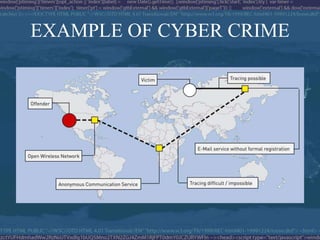
• Cybercrime is any illegal act committed using a computer network
(especially the Internet).
• Criminal activities that take place in cyberspace (the Internet).
• Computer used to commit a crime
– Child porn, threatening email, assuming someone’s identity, sexual
harassment, defamation, spam, phishing
• Computer as a target of a crime
– Viruses, worms, industrial espionage, software piracy, hacking
EXAMPLE OF CYBER CRIME
Classification OF CYBER CRIME
• Cybercrime includes a wide variety of crime
• Offences under cyber crime:
– Offences against the confidentiality integrity and availability of
computer data and systems
– Content-related offences
– Copyright-related offences
TYPES OF CYBER CRIME
Viruses
Worms
Trojans
Mail bombs
Threats
Harassment
DOS
 Fraud
 Theft
 Piracy
 Break-ins
 Terrorism.
CYBER LAW
• Law governing cyber space
• Cyber law encompasses laws relating to:
– Cyber Crimes
– Electronic and Digital Signatures
– Intellectual Property
– Data Protection and Privacy
NEED OF CYBER LAW
Cybercriminals + computer technology = difficulties to apply the law.
not only real-world crimes by using computers…
NEED FOR CYBER LAWS
• TACKLING CYBER
CRIMES
• INTELLECTUAL
PROPERTY RIGHTS AND
COPYRIGHTS
PROTECTION ACT
CYBER LAWS IN INDIA
• IT-ACT PASSED
IN 2000
IT ACT PROVISIONS
• email would now be a valid and legal form of
communication in our country that can be duly
produced and approved in a court of law.
• Companies shall now be able to carry out electronic
commerce using the legal infrastructure provided by
the Act.
• Digital signatures have been given legal validity and
sanction in the Act.
IT ACT PROVISIONS
• The Act now allows Government to issue
notification on the web thus heralding e-
governance
• statutory remedy in case if anyone breaks
into companies computer systems or
network and causes damages or copies data
National & International Efforts
• First Wave (privacy)
– Sweden (1973) ; USA (1974); Federal Republic of German
(1977); Austria, Denmark, France and Norway (1978), etc.
• Second Wave (property)
– Italy (1978); UK (1981,1990); USA (1980s); Canada and
Denmark (1985), etc.
• Third Wave (intellectual property)
• Convention on Cybercrime
– Ensuring that countries adopt procedural laws.
– Harmonizing national cybercrime law.
PROTECT YOUR SYSTEM
• Use anti-virus software and firewalls - keep them up to date
• Keep your operating system up to date with critical security updates
and patches
• Don't open emails or attachments from unknown sources
• Use hard-to-guess passwords. Don’t use words found in a dictionary.
Remember that password cracking tools exist
• Back-up your computer data on disks or CDs often
• Don't share access to your computers with strangers
• If you have a Wi-Fi network, password protect it
• Disconnect from the Internet when not in use
• Reevaluate your security on a regular basis
• Make sure your employees and family members know this info too!
• Treat your password like you treat
your toothbrush. Never give it to
anyone else to use, and change it every
few months.
THANKS
????

Internet and Securities

  • 1.
  • 2.
    What is Internet? •The internet is a network of computers linking many different types of computers all over the world. • It is a very large wide area network (WAN) connecting computers and networks around the world. • It makes it possible for millions of users to connect to one another via telephone lines, cable lines and satellites.
  • 3.
  • 4.
    How did theInternet developed? • Internet was born in late 1960’s • The internet has its root in the ARPANET system of the Advanced Research Project Agency of U.S. Department of Defense which linked together mainframe computers to form a communication networks. • ARPANET is known as the forefather of internet.
  • 5.
    Brief History ofthe Internet • 1968 - DARPA (Defense Advanced Research Projects Agency) contracts with BBN (Bolt, Beranek & Newman) to create ARPAnet • 1970 - First five nodes: – UCLA – Stanford – UC Santa Barbara – U of Utah, and – BBN • 1974 - TCP specification by Vint Cerf • 1984 – On January 1, the Internet with its 1000 hosts converts en masse to using TCP/IP for its messaging
  • 6.
    A Brief Summaryof the Evolution of the Internet 1945 1995 Memex Conceived 1945 WWW Created 1989 Mosaic Created 1993 A Mathematical Theory of Communication 1948 Packet Switching Invented 1964 Silicon Chip 1958 First Vast Computer Network Envisioned 1962 ARPANET 1969 TCP/IP Created 1972 Internet Named and Goes TCP/IP 1984 Hypertext Invented 1965 Age of eCommerce Begins 1995
  • 7.
    The Creation ofthe Internet • The creation of the Internet solved the following challenges: – Basically inventing digital networking as we know it – Survivability of an infrastructure to send / receive high-speed electronic messages – Reliability of computer messaging
  • 8.
    Basic services ofinternet • Electronic mail • FTP • Telnet • Usenet news • The World Wide Web
  • 9.
    Electronic mail • Itis also known as e-mail in short • It enables to send and receive a mail (message). • It is Faster than paper mail. • Images, audio, video can be sent along with text.
  • 10.
    File transfer Protocol(FTP) • It enables users to move a file from one computer to another computer. • A file may contain: – Text document – Image – Artwork – Movie – Sound – Software
  • 11.
    Telnet • Telnet serviceenables users to login to another computer on internet from their local computer for using: – Computing power of remote computer – Software on remote computer – Database of remote computer • This action is called ‘remote login’.
  • 12.
    Usenet News • Usenetnews service enables a group of internet users to exchange their views, ideas, information on some common topic of internet. • A newsgroup is like a large notice board accessible to all members belonging to the group. • 2 types of newsgroups: – Moderated – Non-moderated
  • 13.
    The World WideWeb • It is a most popular method of accessing internet. • It uses a concept called hypertext. • Hypertext documents on internet are known as web pages. • Web pages are created by using a special language called Hyper Text Markup Language (html)
  • 14.
    Uses of theInternet ? • On-line communication • Software sharing • Exchange of views on topics of common interest • Posting of information of general interest • Product promotion • Feedback about product • Customer support service • On-line journals and magazines
  • 15.
  • 16.
    Internet Growth Trends •1977: 111 hosts on Internet • 1981: 213 hosts • 1983: 562 hosts • 1984: 1,000 hosts • 1986: 5,000 hosts • 1987: 10,000 hosts • 1989: 100,000 hosts • 1992: 1,000,000 hosts • 2001: 150 – 175 million hosts • 2002: over 200 million hosts • By 2010, about 80% of the planet will be on the Internet
  • 17.
    CYBER CRIME • Cybercrimeis any illegal act committed using a computer network (especially the Internet). • Criminal activities that take place in cyberspace (the Internet). • Computer used to commit a crime – Child porn, threatening email, assuming someone’s identity, sexual harassment, defamation, spam, phishing • Computer as a target of a crime – Viruses, worms, industrial espionage, software piracy, hacking
  • 18.
  • 19.
    Classification OF CYBERCRIME • Cybercrime includes a wide variety of crime • Offences under cyber crime: – Offences against the confidentiality integrity and availability of computer data and systems – Content-related offences – Copyright-related offences
  • 20.
    TYPES OF CYBERCRIME Viruses Worms Trojans Mail bombs Threats Harassment DOS  Fraud  Theft  Piracy  Break-ins  Terrorism.
  • 21.
    CYBER LAW • Lawgoverning cyber space • Cyber law encompasses laws relating to: – Cyber Crimes – Electronic and Digital Signatures – Intellectual Property – Data Protection and Privacy
  • 22.
    NEED OF CYBERLAW Cybercriminals + computer technology = difficulties to apply the law. not only real-world crimes by using computers…
  • 23.
    NEED FOR CYBERLAWS • TACKLING CYBER CRIMES • INTELLECTUAL PROPERTY RIGHTS AND COPYRIGHTS PROTECTION ACT
  • 24.
    CYBER LAWS ININDIA • IT-ACT PASSED IN 2000
  • 25.
    IT ACT PROVISIONS •email would now be a valid and legal form of communication in our country that can be duly produced and approved in a court of law. • Companies shall now be able to carry out electronic commerce using the legal infrastructure provided by the Act. • Digital signatures have been given legal validity and sanction in the Act.
  • 26.
    IT ACT PROVISIONS •The Act now allows Government to issue notification on the web thus heralding e- governance • statutory remedy in case if anyone breaks into companies computer systems or network and causes damages or copies data
  • 27.
    National & InternationalEfforts • First Wave (privacy) – Sweden (1973) ; USA (1974); Federal Republic of German (1977); Austria, Denmark, France and Norway (1978), etc. • Second Wave (property) – Italy (1978); UK (1981,1990); USA (1980s); Canada and Denmark (1985), etc. • Third Wave (intellectual property) • Convention on Cybercrime – Ensuring that countries adopt procedural laws. – Harmonizing national cybercrime law.
  • 28.
    PROTECT YOUR SYSTEM •Use anti-virus software and firewalls - keep them up to date • Keep your operating system up to date with critical security updates and patches • Don't open emails or attachments from unknown sources • Use hard-to-guess passwords. Don’t use words found in a dictionary. Remember that password cracking tools exist • Back-up your computer data on disks or CDs often
  • 29.
    • Don't shareaccess to your computers with strangers • If you have a Wi-Fi network, password protect it • Disconnect from the Internet when not in use • Reevaluate your security on a regular basis • Make sure your employees and family members know this info too!
  • 30.
    • Treat yourpassword like you treat your toothbrush. Never give it to anyone else to use, and change it every few months. THANKS ????