Computer Networking 
• A computer network or data network is 
a telecommunications network that 
allows computers to exchange data. 
• In computer networks, networked computing 
devices pass data to each other along data 
connections. 
• Data is transferred in the form of packets. The 
connections (network links) between nodes are 
established using either cable media or wireless 
media. 
• The best-known computer network is the Internet.
Making devices talk to each other for the 
purposes of communication is nothing new. Early 
forays into telephony such as the telegraph and 
telephone have since evolved 
into more complicated devices, and now a 
computer can be networked to the Internet, another 
PC, or even a home stereo. 
In the early 1960s, individual computers had 
to be physically shared, making the sharing of data 
and other information difficult. Seeing this was 
impractical, researchers developed a way to 
“connect” the computers so they could share their 
resources more efficiently. Hence, the early 
computer network was born.
Brief History 
of Networking
History: Networking 
• 1961: Kleinrock - queuing theory shows 
effectiveness of packet-switching 
• 1964: Baran - packet-switching in military 
applications for survivable networks 
• 1967: ARPAnet conceived by Advanced Research 
Projects Agency
History: Networking 
• 1969: First ARPAnet node operational 
– Prof.Kleinrock sends a message across from 
UCLA to Stanford 
• 1972: 
–ARPAnet demonstrated publicly 
–NCP (Network Control Protocol) first host-host 
protocol 
– First e-mail program 
–ARPAnet has 15 nodes
History: Networking 
• Time sharing became difficult since different machines 
had different operating systems, versions and programs 
–however, these led to development of Internet 
• Vinton Cerf. Bob Kahn, Bob Braden and Jon Pestel 
developed TCP/IP 
• Cerf and Kahn’s internetworking principles: 
– minimalism, autonomy - no internal changes required 
to interconnect networks 
– best effort service model 
– stateless routers 
– decentralized control define today’s Internet 
architecture
History: Networking 
• 1978: TCP/IP v4 was released 
– Aimed to interconnect different kinds of networks 
• 1979: ARPAnet has 200 nodes 
• 1983: deployment of TCP/IP in ARPAnet 
• 1983: SMTP e-mail protocol defined 
• 1983: DNS defined for name-to-IP-address 
translation 
• 1985: FTP protocol defined 
• 1988: TCP congestion control 
100,000 hosts connected to confederation of networks
History: Networking 
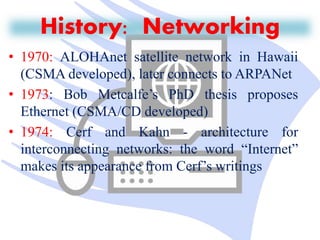
• 1970: ALOHAnet satellite network in Hawaii 
(CSMA developed), later connects to ARPANet 
• 1973: Bob Metcalfe’s PhD thesis proposes 
Ethernet (CSMA/CD developed) 
• 1974: Cerf and Kahn - architecture for 
interconnecting networks: the word “Internet” 
makes its appearance from Cerf’s writings
History: Networking 
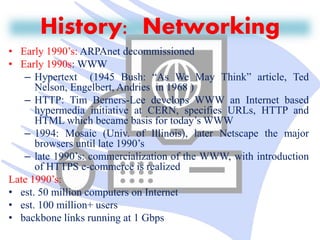
• Early 1990’s: ARPAnet decommissioned 
• Early 1990s:WWW 
– Hypertext (1945 Bush: “As We May Think” article, Ted 
Nelson, Engelbert, Andries in 1968 ) 
– HTTP: Tim Berners-Lee develops WWW an Internet based 
hypermedia initiative at CERN, specifies URLs, HTTP and 
HTML which became basis for today’sWWW 
– 1994: Mosaic (Univ. of Illinois), later Netscape the major 
browsers until late 1990’s 
– late 1990’s: commercialization of the WWW, with introduction 
of HTTPS e-commerce is realized 
Late 1990’s: 
• est. 50 million computers on Internet 
• est. 100 million+ users 
• backbone links running at 1 Gbps
What is Internet? 
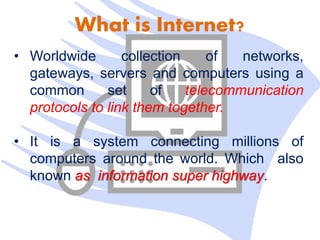
• Worldwide collection of networks, 
gateways, servers and computers using a 
common set of telecommunication 
protocols to link them together. 
• It is a system connecting millions of 
computers around the world. Which also 
known as information super highway.
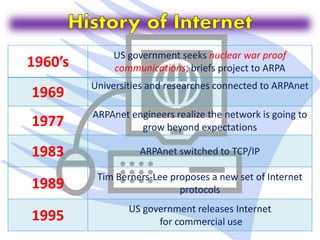
1960’s US government seeks nuclear war proof 
communications, briefs project to ARPA 
1969 Universities and researches connected to ARPAnet 
1977 ARPAnet engineers realize the network is going to 
grow beyond expectations 
1983 ARPAnet switched to TCP/IP 
1989 Tim Berners-Lee proposes a new set of Internet 
protocols 
1995 US government releases Internet 
for commercial use
Ethical rules for Computer Users 
Some of the rules that individuals should 
follow while using a computer are listed 
below: 
o Do not use computers to harm other 
users 
o Do not use computers to steal others 
information 
o Do not access files without the 
permission of the owner
o Do not copy copyrighted software 
without the author’s permission. 
o Always respect copyright laws and 
policies.
o Complain about illegal communication and activities, 
if found, to Internet service Providers and local law 
enforcement authorities 
o Users are responsible for safeguarding their User ID 
and Passwords. They should not write them on 
paper or anywhere else for remembrance 
o Users should not intentionally use the computers to 
retrieve or modify the information of others, which 
may include password information, files, etc..
o Respect the privacy of others, just as you expect 
the same from others 
o Do not use other user's computer resources 
without their permission 
o Use Internet ethically
Internet Ethics 
Internet Ethics - means acceptable behavior for 
using internet. We should be honest, respect the 
rights and property of others on the internet. 
Acceptance 
One has to accept that Internet is not a value free-zone 
.It means World Wide Web is a place where values 
are considered in the broadest sense so we must 
take care while shaping content and services and we 
should recognize that internet is not apart from universal 
society but it is a primary component of it.
Sensitivity to National and Local Cultures 
It belongs to all and there is no barrier of national 
and local cultures. It cannot be subject to one set of 
values like the local TV channel or the local 
newspaper We have to accommodate multiplicity of 
usage. 
While using e-Mail and chatting 
Internet must be used for communication with family 
and friends. Avoid chatting with strangers and 
forwarding e-mails from unknown people /strangers. And 
we must teach children about risks involved in chatting 
and forwarding e-mails to strangers.
Pretending to be someone else 
We must not use internet to fool others by pretending 
to be someone else. Hiding our own identity to fool 
others in the Internet world is a crime and may also be a 
risk to others. It’s our responsibility to teach 
children the same. 
Avoid Bad language 
We must not use rude or bad language while using e-mail, 
chatting, blogging and social networking, We need 
to respect their views and should not criticize anyone 
on the internet and the same should be taught to 
children.
Hide personal information 
We should teach children not to give personal details 
like home address, phone numbers, interests, passwords. No 
photographs should be sent to strangers and they should be 
asked to hide their personal details from strangers because it 
might be misused and shared with others without their 
knowledge. 
While Downloading 
Internet is used to listen and learn about music , It is also 
used to watch videos and play games We must not use it 
to download them or share copyrighted material. The same 
should be taught to children, and they must be aware of the 
importance of copyrights and issues of copyright.
Supervision 
You should know what children are doing on the 
internet and the sites they visit on the internet and 
should check with whom they are communicating. 
Restrict them browsing inappropriate sites. Parental 
involvement is essential when a child is using the 
internet in order to make him follow the rules. 
Encourage children to use Internet 
We must encourage children, students and 
others to gain the knowledge from the internet and use 
it wisely. Internet is a great tool where we can gather 
information which can be used for learning.
Access to Internet 
The internet is a time-efficient tool for everyone that 
enlarges the possibilities for curriculum growth. 
Learning depends on the ability to find relevant and 
reliable information quickly and easily, and to select, understand 
and assess that information. Searching for information on the 
internet can help to develop these skills. 
Classroom exercises and take-home assessment tasks, 
where students are required to compare website content, are 
ideal for alerting students to the requirements of writing for 
different audiences, the purpose of particular content, 
identifying and judging accuracy and reliability. 
Since many sites adopt particular views about issues, the 
internet is a useful tool for developing the skills of distinguishing 
fact from opinion and exploring subjectivity and objectivity.
Internet, Intranet and 
Extranets
What is Internet ? 
• It is a Global network of computers, (servers or clients). 
to exchange information. 
• It is a "network of networks" that includes millions of 
private and public, academic, business, and government 
networks (local or Global), 
linked by copper wires, wireless connections, and other 
technologies.
Hardware and Software of Internet 
Variety of hardware and software are used to make 
Internet functional. 
• Modem 
Device that enables computers to communicate 
through phone lines. 
When we start internet the our modem communicates 
to modem of ISP.
• Computer 
Continued… 
In addition to a modem, you need a client capable of 
handling multiple data types. 
• Software 
Two types of software’s required to enable your PC as an 
Internet PC. 
• Communication software to establish connection 
• Client software for browsing, e-mail, news. 
these software’s are provided with windows itself.
Applications Of Internet 
• Download programs and files 
• E-Mail 
• Voice and Video Conferencing 
• E-Commerce 
• File Sharing 
• Information browsing 
• Search the web addresses for access through search engine 
• Chatting and many more…
Disadvantages of Internet 
• Theft of personal information such as name, address, credit card 
number etc. 
• Virus threats nothing but a program which disrupts the normal 
functioning of your system. 
• Spamming refers to receiving unwanted e-mails in bulk, which 
provide no purpose and needlessly obstruct the entire system. 
• Pornography This is perhaps the biggest threat related to children’s 
healthy mental life. A very serious issue concerning the Internet. 
Though, internet can also create havoc, destruction and 
its misuse can be very fatal, 
the advantages of it outweigh its disadvantages.
Intranet
What is Intranet ? 
• Internal company network that uses Internet standards 
(HTML, HTTP & TCP/IP protocols) & software. 
• Accessed only by authorized persons, especially members or 
employees of the organization
Intranet Security 
Two levels of Security required: 
• Internal 
It can be imposed by Public Key Security & Encryption Key. 
• External 
Through Firewall.
What is Firewall ? 
• Security device located between firm’s internal network 
(intranet) & external network (internet). 
• Regulates access into & out of a company’s network based on 
a set of rules. 
Note : needs to be upgraded from time to time to check latest potential 
security problems.
Applications of Intranet 
• Sharing of company policies/rules & regulations 
• Access employee database 
• Distribution of circulars/Office Orders 
• Access product & customer data 
• Sharing of information of common interest 
• Launching of personal/departmental home pages 
• Submission of reports 
• Corporate telephone directories
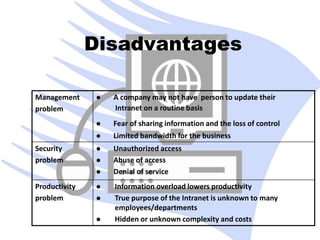
Disadvantages 
Management 
problem Intranet on a routine basis 
 Information overload lowers productivity 
 True purpose of the Intranet is unknown to many 
employees/departments 
 Hidden or unknown complexity and costs 
Productivity 
problem 
 Unauthorized access 
 Abuse of access 
 Denial of service 
Security 
problem 
 A company may not have person to update their 
 Fear of sharing information and the loss of control 
 Limited bandwidth for the business
Extranet
What is Extranet ? 
• Extranet is an Intranet for outside authorized users using 
same internet technology. 
• Inter-organizational information system. 
• Enable outsiders to work together with company’s 
employees. 
• Open to selected suppliers, customers & other business 
partners
Examples.. 
• Dealers/distributors have access to 
product files such as :- 
1. product specification, 
2. pictures, 
3. images, etc. 
to answer the queries of the customer.
Benefits of Extranet 
• Improved quality. 
• lower travel costs. 
• lower administrative & other overhead costs. 
• reduction in paperwork. 
• delivery of accurate information on time. 
• improved customer service. 
• better communication. 
• overall improvement in business 
effectiveness.
Disadvantages 
• The suppliers & customer who don’t 
have technical knowledge feel problem. 
• Faceless contact. 
• Information can be misused by other competitors. 
• Fraud may be possible. 
• Technical Employees are required.
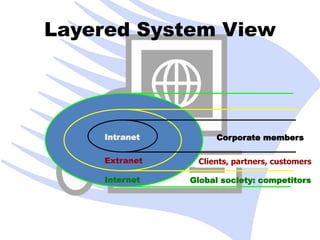
Layered System View 
Clients, partners, customers 
Intranet 
Extranet 
Internet 
Corporate members 
Global society: competitors
THE END 
Thank You

Internet tech lessons

  • 2.
    Computer Networking •A computer network or data network is a telecommunications network that allows computers to exchange data. • In computer networks, networked computing devices pass data to each other along data connections. • Data is transferred in the form of packets. The connections (network links) between nodes are established using either cable media or wireless media. • The best-known computer network is the Internet.
  • 3.
    Making devices talkto each other for the purposes of communication is nothing new. Early forays into telephony such as the telegraph and telephone have since evolved into more complicated devices, and now a computer can be networked to the Internet, another PC, or even a home stereo. In the early 1960s, individual computers had to be physically shared, making the sharing of data and other information difficult. Seeing this was impractical, researchers developed a way to “connect” the computers so they could share their resources more efficiently. Hence, the early computer network was born.
  • 4.
    Brief History ofNetworking
  • 5.
    History: Networking •1961: Kleinrock - queuing theory shows effectiveness of packet-switching • 1964: Baran - packet-switching in military applications for survivable networks • 1967: ARPAnet conceived by Advanced Research Projects Agency
  • 6.
    History: Networking •1969: First ARPAnet node operational – Prof.Kleinrock sends a message across from UCLA to Stanford • 1972: –ARPAnet demonstrated publicly –NCP (Network Control Protocol) first host-host protocol – First e-mail program –ARPAnet has 15 nodes
  • 7.
    History: Networking •Time sharing became difficult since different machines had different operating systems, versions and programs –however, these led to development of Internet • Vinton Cerf. Bob Kahn, Bob Braden and Jon Pestel developed TCP/IP • Cerf and Kahn’s internetworking principles: – minimalism, autonomy - no internal changes required to interconnect networks – best effort service model – stateless routers – decentralized control define today’s Internet architecture
  • 8.
    History: Networking •1978: TCP/IP v4 was released – Aimed to interconnect different kinds of networks • 1979: ARPAnet has 200 nodes • 1983: deployment of TCP/IP in ARPAnet • 1983: SMTP e-mail protocol defined • 1983: DNS defined for name-to-IP-address translation • 1985: FTP protocol defined • 1988: TCP congestion control 100,000 hosts connected to confederation of networks
  • 9.
    History: Networking •1970: ALOHAnet satellite network in Hawaii (CSMA developed), later connects to ARPANet • 1973: Bob Metcalfe’s PhD thesis proposes Ethernet (CSMA/CD developed) • 1974: Cerf and Kahn - architecture for interconnecting networks: the word “Internet” makes its appearance from Cerf’s writings
  • 10.
    History: Networking •Early 1990’s: ARPAnet decommissioned • Early 1990s:WWW – Hypertext (1945 Bush: “As We May Think” article, Ted Nelson, Engelbert, Andries in 1968 ) – HTTP: Tim Berners-Lee develops WWW an Internet based hypermedia initiative at CERN, specifies URLs, HTTP and HTML which became basis for today’sWWW – 1994: Mosaic (Univ. of Illinois), later Netscape the major browsers until late 1990’s – late 1990’s: commercialization of the WWW, with introduction of HTTPS e-commerce is realized Late 1990’s: • est. 50 million computers on Internet • est. 100 million+ users • backbone links running at 1 Gbps
  • 11.
    What is Internet? • Worldwide collection of networks, gateways, servers and computers using a common set of telecommunication protocols to link them together. • It is a system connecting millions of computers around the world. Which also known as information super highway.
  • 12.
    1960’s US governmentseeks nuclear war proof communications, briefs project to ARPA 1969 Universities and researches connected to ARPAnet 1977 ARPAnet engineers realize the network is going to grow beyond expectations 1983 ARPAnet switched to TCP/IP 1989 Tim Berners-Lee proposes a new set of Internet protocols 1995 US government releases Internet for commercial use
  • 13.
    Ethical rules forComputer Users Some of the rules that individuals should follow while using a computer are listed below: o Do not use computers to harm other users o Do not use computers to steal others information o Do not access files without the permission of the owner
  • 14.
    o Do notcopy copyrighted software without the author’s permission. o Always respect copyright laws and policies.
  • 15.
    o Complain aboutillegal communication and activities, if found, to Internet service Providers and local law enforcement authorities o Users are responsible for safeguarding their User ID and Passwords. They should not write them on paper or anywhere else for remembrance o Users should not intentionally use the computers to retrieve or modify the information of others, which may include password information, files, etc..
  • 16.
    o Respect theprivacy of others, just as you expect the same from others o Do not use other user's computer resources without their permission o Use Internet ethically
  • 17.
    Internet Ethics InternetEthics - means acceptable behavior for using internet. We should be honest, respect the rights and property of others on the internet. Acceptance One has to accept that Internet is not a value free-zone .It means World Wide Web is a place where values are considered in the broadest sense so we must take care while shaping content and services and we should recognize that internet is not apart from universal society but it is a primary component of it.
  • 18.
    Sensitivity to Nationaland Local Cultures It belongs to all and there is no barrier of national and local cultures. It cannot be subject to one set of values like the local TV channel or the local newspaper We have to accommodate multiplicity of usage. While using e-Mail and chatting Internet must be used for communication with family and friends. Avoid chatting with strangers and forwarding e-mails from unknown people /strangers. And we must teach children about risks involved in chatting and forwarding e-mails to strangers.
  • 19.
    Pretending to besomeone else We must not use internet to fool others by pretending to be someone else. Hiding our own identity to fool others in the Internet world is a crime and may also be a risk to others. It’s our responsibility to teach children the same. Avoid Bad language We must not use rude or bad language while using e-mail, chatting, blogging and social networking, We need to respect their views and should not criticize anyone on the internet and the same should be taught to children.
  • 20.
    Hide personal information We should teach children not to give personal details like home address, phone numbers, interests, passwords. No photographs should be sent to strangers and they should be asked to hide their personal details from strangers because it might be misused and shared with others without their knowledge. While Downloading Internet is used to listen and learn about music , It is also used to watch videos and play games We must not use it to download them or share copyrighted material. The same should be taught to children, and they must be aware of the importance of copyrights and issues of copyright.
  • 21.
    Supervision You shouldknow what children are doing on the internet and the sites they visit on the internet and should check with whom they are communicating. Restrict them browsing inappropriate sites. Parental involvement is essential when a child is using the internet in order to make him follow the rules. Encourage children to use Internet We must encourage children, students and others to gain the knowledge from the internet and use it wisely. Internet is a great tool where we can gather information which can be used for learning.
  • 22.
    Access to Internet The internet is a time-efficient tool for everyone that enlarges the possibilities for curriculum growth. Learning depends on the ability to find relevant and reliable information quickly and easily, and to select, understand and assess that information. Searching for information on the internet can help to develop these skills. Classroom exercises and take-home assessment tasks, where students are required to compare website content, are ideal for alerting students to the requirements of writing for different audiences, the purpose of particular content, identifying and judging accuracy and reliability. Since many sites adopt particular views about issues, the internet is a useful tool for developing the skills of distinguishing fact from opinion and exploring subjectivity and objectivity.
  • 23.
  • 24.
    What is Internet? • It is a Global network of computers, (servers or clients). to exchange information. • It is a "network of networks" that includes millions of private and public, academic, business, and government networks (local or Global), linked by copper wires, wireless connections, and other technologies.
  • 25.
    Hardware and Softwareof Internet Variety of hardware and software are used to make Internet functional. • Modem Device that enables computers to communicate through phone lines. When we start internet the our modem communicates to modem of ISP.
  • 26.
    • Computer Continued… In addition to a modem, you need a client capable of handling multiple data types. • Software Two types of software’s required to enable your PC as an Internet PC. • Communication software to establish connection • Client software for browsing, e-mail, news. these software’s are provided with windows itself.
  • 27.
    Applications Of Internet • Download programs and files • E-Mail • Voice and Video Conferencing • E-Commerce • File Sharing • Information browsing • Search the web addresses for access through search engine • Chatting and many more…
  • 28.
    Disadvantages of Internet • Theft of personal information such as name, address, credit card number etc. • Virus threats nothing but a program which disrupts the normal functioning of your system. • Spamming refers to receiving unwanted e-mails in bulk, which provide no purpose and needlessly obstruct the entire system. • Pornography This is perhaps the biggest threat related to children’s healthy mental life. A very serious issue concerning the Internet. Though, internet can also create havoc, destruction and its misuse can be very fatal, the advantages of it outweigh its disadvantages.
  • 29.
  • 30.
    What is Intranet? • Internal company network that uses Internet standards (HTML, HTTP & TCP/IP protocols) & software. • Accessed only by authorized persons, especially members or employees of the organization
  • 31.
    Intranet Security Twolevels of Security required: • Internal It can be imposed by Public Key Security & Encryption Key. • External Through Firewall.
  • 32.
    What is Firewall? • Security device located between firm’s internal network (intranet) & external network (internet). • Regulates access into & out of a company’s network based on a set of rules. Note : needs to be upgraded from time to time to check latest potential security problems.
  • 33.
    Applications of Intranet • Sharing of company policies/rules & regulations • Access employee database • Distribution of circulars/Office Orders • Access product & customer data • Sharing of information of common interest • Launching of personal/departmental home pages • Submission of reports • Corporate telephone directories
  • 34.
    Disadvantages Management problemIntranet on a routine basis  Information overload lowers productivity  True purpose of the Intranet is unknown to many employees/departments  Hidden or unknown complexity and costs Productivity problem  Unauthorized access  Abuse of access  Denial of service Security problem  A company may not have person to update their  Fear of sharing information and the loss of control  Limited bandwidth for the business
  • 35.
  • 36.
    What is Extranet? • Extranet is an Intranet for outside authorized users using same internet technology. • Inter-organizational information system. • Enable outsiders to work together with company’s employees. • Open to selected suppliers, customers & other business partners
  • 37.
    Examples.. • Dealers/distributorshave access to product files such as :- 1. product specification, 2. pictures, 3. images, etc. to answer the queries of the customer.
  • 38.
    Benefits of Extranet • Improved quality. • lower travel costs. • lower administrative & other overhead costs. • reduction in paperwork. • delivery of accurate information on time. • improved customer service. • better communication. • overall improvement in business effectiveness.
  • 39.
    Disadvantages • Thesuppliers & customer who don’t have technical knowledge feel problem. • Faceless contact. • Information can be misused by other competitors. • Fraud may be possible. • Technical Employees are required.
  • 40.
    Layered System View Clients, partners, customers Intranet Extranet Internet Corporate members Global society: competitors
  • 41.