Int 2 Computing Mr Arthur
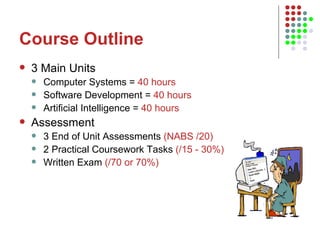
Course Outline 3 Main Units Computer Systems =  40 hours Software Development =  40 hours Artificial Intelligence =  40 hours Assessment 3 End of Unit Assessments  (NABS /20) 2 Practical Coursework Tasks  (/15 - 30%) Written Exam  (/70 or 70%)
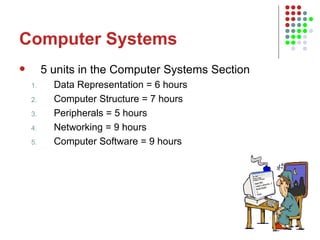
Computer Systems 5 units in the Computer Systems Section Data Representation = 6 hours Computer Structure = 7 hours Peripherals = 5 hours Networking = 9 hours Computer Software = 9 hours
Aims of Lesson 1 How are numbers, text and images represented inside the computer system? Discussing the 2 state computer system Converting positive whole numbers to binary and vice versa Playing Binary Bingo
Data Representation 100 billion  switches  per sq. cm
Data Storage Numbers, Text, and Images are all stored as a series of 1s and 0s inside the computer system. These series of 1s and 0s are made up of pulses of electricity from 1 volt to 5 volts
Decimal Counting System When we represent numbers we use the decimal counting system, for example 123,000 100,000 10,000 1,000 100 10 1 1 2 3 0 0 0 Since the computer is 2 state, the binary counting system goes up by the power 2, rather than 10 i.e 256 128 64 32 16 8 4 2 1
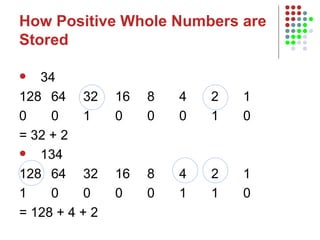
How Positive Whole Numbers are Stored 34 128 64 32 16 8 4 2 1 0 0 1 0 0 0 1 0 = 32 + 2 134 128 64 32 16 8 4 2 1 1 0 0 0 0 1 1 0 = 128 + 4 + 2
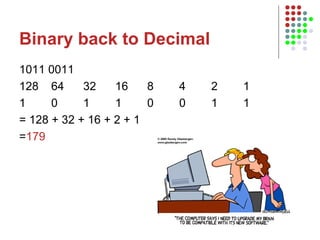
Binary back to Decimal 1011 0011 128 64 32 16 8 4 2 1 1 0 1 1 0 0 1 1 = 128 + 32 + 16 + 2 + 1 = 179
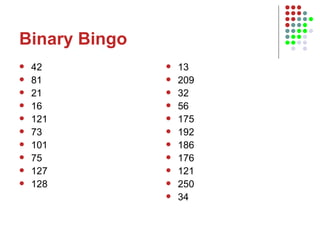
Binary Bingo 42 81 21 16 121 73 101 75 127 128 13 209 32 56 175 192 186 176 121 250 34
Aims of Lesson 2 Data Units Bits/Bytes etc Floating Point Representation
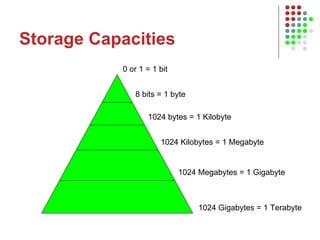
Storage Capacities 0 or 1 = 1 bit 8 bits = 1 byte 1024 bytes = 1 Kilobyte 1024 Kilobytes = 1 Megabyte 1024 Megabytes = 1 Gigabyte 1024 Gigabytes = 1 Terabyte
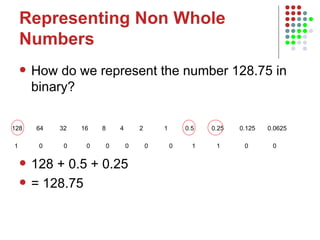
Representing Non Whole Numbers How do we represent the number 128.75 in binary? 128 + 0.5 + 0.25  = 128.75 128  64   32   16  8   4  2  1  0.5  0.25  0.125  0.0625  1  0  0  0  0  0  0  0  1  1  0  0
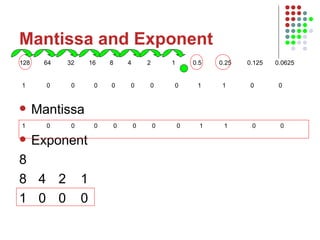
Mantissa and Exponent Mantissa Exponent 8 8   4   2  1 1   0   0  0 128  64   32   16  8   4  2  1  0.5  0.25  0.125  0.0625  1  0  0  0  0  0  0  0  1  1  0  0  1  0  0  0  0  0  0  0  1  1  0  0
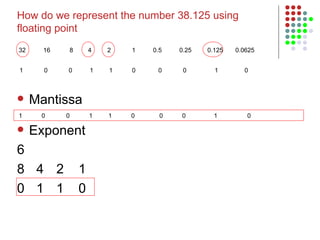
Mantissa Exponent 6 8   4   2  1 0   1   1  0 1  0  0  1  1  0  0  0  1  0  1  0  0  1  1  0  0  0  1  0  How do we represent the number 38.125 using floating point 32  16  8   4  2  1  0.5  0.25  0.125  0.0625
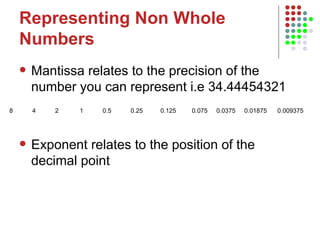
Representing Non Whole Numbers Mantissa relates to the precision of the number you can represent i.e 34.44454321 Exponent relates to the position of the decimal point 8  4  2  1  0.5  0.25  0.125  0.075  0.0375  0.01875  0.009375
Aims of Lesson 3 Representing Graphics Pixels Resolution Graphics Calculations
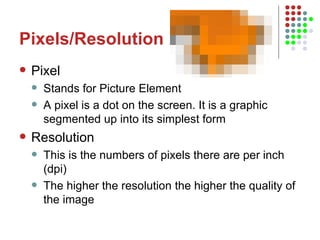
Pixels/Resolution Pixel Stands for Picture Element A pixel is a dot on the screen. It is a graphic segmented up into its simplest form Resolution This is the numbers of pixels there are per inch (dpi) The higher the resolution the higher the quality of the image
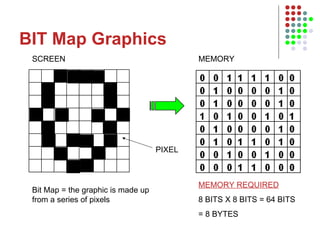
BIT Map Graphics SCREEN MEMORY PIXEL MEMORY REQUIRED 8 BITS X 8 BITS = 64 BITS = 8 BYTES Bit Map = the graphic is made up from a series of pixels
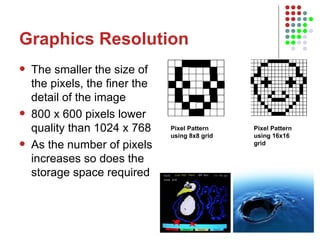
Graphics Resolution The smaller the size of the pixels, the finer the detail of the image 800 x 600 pixels lower quality than 1024 x 768 As the number of pixels increases so does the storage space required Pixel Pattern using 8x8 grid  Pixel Pattern using 16x16 grid
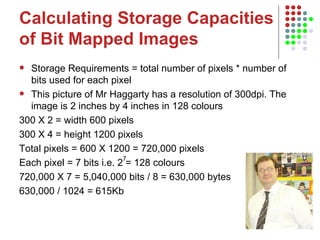
Calculating Storage Capacities of Bit Mapped Images Storage Requirements = total number of pixels * number of bits used for each pixel This picture of Mr Haggarty has a resolution of 300dpi. The image is 2 inches by 4 inches in 128 colours 300 X 2 = width 600 pixels  300 X 4 = height 1200 pixels  Total pixels = 600 X 1200 = 720,000 pixels Each pixel = 7 bits i.e. 2 = 128 colours 720,000 X 7 = 5,040,000 bits / 8 = 630,000 bytes  630,000 / 1024 = 615Kb 7
Aims of Lesson 4 Last Lessons Representing whole numbers Decimal to Binary Binary to Decimal Non-whole numbers Floating Point Data Units Representing Graphics Pixels Resolution Graphics Calculations Today’s Lesson   Representing Text Advantages of using binary
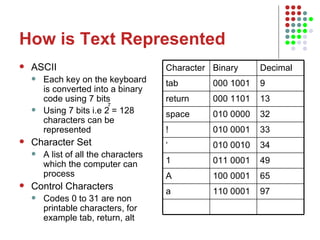
How is Text Represented ASCII Each key on the keyboard is converted into a binary code using 7 bits Using 7 bits i.e 2 = 128 characters can be represented Character Set A list of all the characters which the computer can process Control Characters Codes 0 to 31 are non printable characters, for example tab, return, alt 7 Character Binary Decimal tab 000 1001 9 return 000 1101 13 space 010 0000 32 ! 010 0001 33 ‘ 010 0010 34 1 011 0001 49 A 100 0001 65 a 110 0001 97
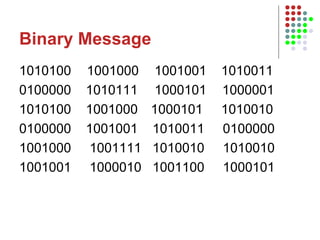
Binary Message 1010100  1001000   1001001  1010011 0100000  1010111   1000101   1000001  1010100  1001000  1000101  1010010   0100000  1001001  1010011  0100000   1001000  1001111  1010010  1010010  1001001  1000010  1001100  1000101
Advantages of Using Binary Computers are 2 state e.g. on and off and Binary is a 2 state counting system e.g. 1010 If there is any drop in voltage (degradation) the pixel etc is still represented as a 1 (black)

Int 2 data representation 2010

  • 1.
    Int 2 ComputingMr Arthur
  • 2.
    Course Outline 3Main Units Computer Systems = 40 hours Software Development = 40 hours Artificial Intelligence = 40 hours Assessment 3 End of Unit Assessments (NABS /20) 2 Practical Coursework Tasks (/15 - 30%) Written Exam (/70 or 70%)
  • 3.
    Computer Systems 5units in the Computer Systems Section Data Representation = 6 hours Computer Structure = 7 hours Peripherals = 5 hours Networking = 9 hours Computer Software = 9 hours
  • 4.
    Aims of Lesson1 How are numbers, text and images represented inside the computer system? Discussing the 2 state computer system Converting positive whole numbers to binary and vice versa Playing Binary Bingo
  • 5.
    Data Representation 100billion switches per sq. cm
  • 6.
    Data Storage Numbers,Text, and Images are all stored as a series of 1s and 0s inside the computer system. These series of 1s and 0s are made up of pulses of electricity from 1 volt to 5 volts
  • 7.
    Decimal Counting SystemWhen we represent numbers we use the decimal counting system, for example 123,000 100,000 10,000 1,000 100 10 1 1 2 3 0 0 0 Since the computer is 2 state, the binary counting system goes up by the power 2, rather than 10 i.e 256 128 64 32 16 8 4 2 1
  • 8.
    How Positive WholeNumbers are Stored 34 128 64 32 16 8 4 2 1 0 0 1 0 0 0 1 0 = 32 + 2 134 128 64 32 16 8 4 2 1 1 0 0 0 0 1 1 0 = 128 + 4 + 2
  • 9.
    Binary back toDecimal 1011 0011 128 64 32 16 8 4 2 1 1 0 1 1 0 0 1 1 = 128 + 32 + 16 + 2 + 1 = 179
  • 10.
    Binary Bingo 4281 21 16 121 73 101 75 127 128 13 209 32 56 175 192 186 176 121 250 34
  • 11.
    Aims of Lesson2 Data Units Bits/Bytes etc Floating Point Representation
  • 12.
    Storage Capacities 0or 1 = 1 bit 8 bits = 1 byte 1024 bytes = 1 Kilobyte 1024 Kilobytes = 1 Megabyte 1024 Megabytes = 1 Gigabyte 1024 Gigabytes = 1 Terabyte
  • 13.
    Representing Non WholeNumbers How do we represent the number 128.75 in binary? 128 + 0.5 + 0.25 = 128.75 128 64 32 16 8 4 2 1 0.5 0.25 0.125 0.0625 1 0 0 0 0 0 0 0 1 1 0 0
  • 14.
    Mantissa and ExponentMantissa Exponent 8 8 4 2 1 1 0 0 0 128 64 32 16 8 4 2 1 0.5 0.25 0.125 0.0625 1 0 0 0 0 0 0 0 1 1 0 0 1 0 0 0 0 0 0 0 1 1 0 0
  • 15.
    Mantissa Exponent 68 4 2 1 0 1 1 0 1 0 0 1 1 0 0 0 1 0 1 0 0 1 1 0 0 0 1 0 How do we represent the number 38.125 using floating point 32 16 8 4 2 1 0.5 0.25 0.125 0.0625
  • 16.
    Representing Non WholeNumbers Mantissa relates to the precision of the number you can represent i.e 34.44454321 Exponent relates to the position of the decimal point 8 4 2 1 0.5 0.25 0.125 0.075 0.0375 0.01875 0.009375
  • 17.
    Aims of Lesson3 Representing Graphics Pixels Resolution Graphics Calculations
  • 18.
    Pixels/Resolution Pixel Standsfor Picture Element A pixel is a dot on the screen. It is a graphic segmented up into its simplest form Resolution This is the numbers of pixels there are per inch (dpi) The higher the resolution the higher the quality of the image
  • 19.
    BIT Map GraphicsSCREEN MEMORY PIXEL MEMORY REQUIRED 8 BITS X 8 BITS = 64 BITS = 8 BYTES Bit Map = the graphic is made up from a series of pixels
  • 20.
    Graphics Resolution Thesmaller the size of the pixels, the finer the detail of the image 800 x 600 pixels lower quality than 1024 x 768 As the number of pixels increases so does the storage space required Pixel Pattern using 8x8 grid Pixel Pattern using 16x16 grid
  • 21.
    Calculating Storage Capacitiesof Bit Mapped Images Storage Requirements = total number of pixels * number of bits used for each pixel This picture of Mr Haggarty has a resolution of 300dpi. The image is 2 inches by 4 inches in 128 colours 300 X 2 = width 600 pixels 300 X 4 = height 1200 pixels Total pixels = 600 X 1200 = 720,000 pixels Each pixel = 7 bits i.e. 2 = 128 colours 720,000 X 7 = 5,040,000 bits / 8 = 630,000 bytes 630,000 / 1024 = 615Kb 7
  • 22.
    Aims of Lesson4 Last Lessons Representing whole numbers Decimal to Binary Binary to Decimal Non-whole numbers Floating Point Data Units Representing Graphics Pixels Resolution Graphics Calculations Today’s Lesson Representing Text Advantages of using binary
  • 23.
    How is TextRepresented ASCII Each key on the keyboard is converted into a binary code using 7 bits Using 7 bits i.e 2 = 128 characters can be represented Character Set A list of all the characters which the computer can process Control Characters Codes 0 to 31 are non printable characters, for example tab, return, alt 7 Character Binary Decimal tab 000 1001 9 return 000 1101 13 space 010 0000 32 ! 010 0001 33 ‘ 010 0010 34 1 011 0001 49 A 100 0001 65 a 110 0001 97
  • 24.
    Binary Message 1010100 1001000 1001001 1010011 0100000 1010111 1000101 1000001 1010100 1001000 1000101 1010010 0100000 1001001 1010011 0100000 1001000 1001111 1010010 1010010 1001001 1000010 1001100 1000101
  • 25.
    Advantages of UsingBinary Computers are 2 state e.g. on and off and Binary is a 2 state counting system e.g. 1010 If there is any drop in voltage (degradation) the pixel etc is still represented as a 1 (black)