INPLANT TRAINING REPORT
REHAN FAZAL (1171110180)
UTSAV GAMI (1171110175)
SIDDHANTH CHAKRABORTY
(1171110174)
DOORDARSHAN
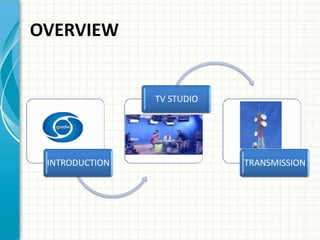
OVERVIEW
INTRODUCTION
TV STUDIO
TRANSMISSION
INTRODUCTION
 LARGEST BOARDCASTING
ORGANISATION
 1ST SERVICE STARTED ON 15TH
SEP,1959
 Doordarshan = Distant + Show.
 Doordarshan is an Indian public service
broadcaster.
 One of the largest broadcasting
organizations in India in terms of the
infrastructure of studios and transmitters.
 Terrestrial television in India
started in Delhi on 15
September 1959.
 The regular daily transmission
started in 1965 as a part of All
India Radio.
 Television services were
separated from radio in 1976.
 In 1982 color TV was
introduced in the Indian market.
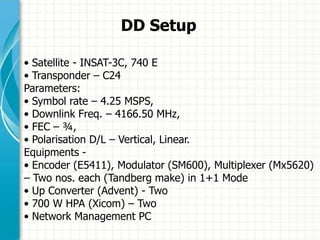
DD Setup
• Satellite - INSAT-3C, 740 E
• Transponder – C24
Parameters:
• Symbol rate – 4.25 MSPS,
• Downlink Freq. – 4166.50 MHz,
• FEC – ¾,
• Polarisation D/L – Vertical, Linear.
Equipments -
• Encoder (E5411), Modulator (SM600), Multiplexer (Mx5620)
– Two nos. each (Tandberg make) in 1+1 Mode
• Up Converter (Advent) - Two
• 700 W HPA (Xicom) – Two
• Network Management PC
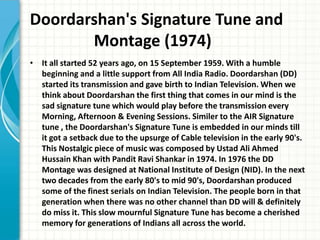
Doordarshan's Signature Tune and
Montage (1974)
• It all started 52 years ago, on 15 September 1959. With a humble
beginning and a little support from All India Radio. Doordarshan (DD)
started its transmission and gave birth to Indian Television. When we
think about Doordarshan the first thing that comes in our mind is the
sad signature tune which would play before the transmission every
Morning, Afternoon & Evening Sessions. Similer to the AIR Signature
tune , the Doordarshan's Signature Tune is embedded in our minds till
it got a setback due to the upsurge of Cable television in the early 90's.
This Nostalgic piece of music was composed by Ustad Ali Ahmed
Hussain Khan with Pandit Ravi Shankar in 1974. In 1976 the DD
Montage was designed at National Institute of Design (NID). In the next
two decades from the early 80's to mid 90's, Doordarshan produced
some of the finest serials on Indian Television. The people born in that
generation when there was no other channel than DD will & definitely
do miss it. This slow mournful Signature Tune has become a cherished
memory for generations of Indians all across the world.
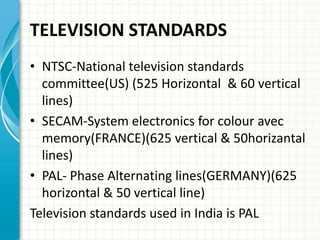
TELEVISION STANDARDS
• NTSC-National television standards
committee(US) (525 Horizontal & 60 vertical
lines)
• SECAM-System electronics for colour avec
memory(FRANCE)(625 vertical & 50horizantal
lines)
• PAL- Phase Alternating lines(GERMANY)(625
horizontal & 50 vertical line)
Television standards used in India is PAL
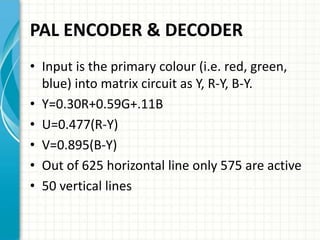
PAL ENCODER & DECODER
• Input is the primary colour (i.e. red, green,
blue) into matrix circuit as Y, R-Y, B-Y.
• Y=0.30R+0.59G+.11B
• U=0.477(R-Y)
• V=0.895(B-Y)
• Out of 625 horizontal line only 575 are active
• 50 vertical lines
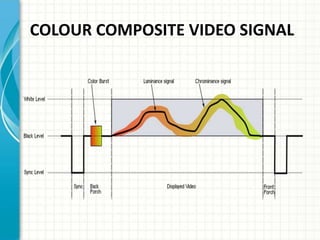
COLOUR COMPOSITE VIDEO SIGNAL
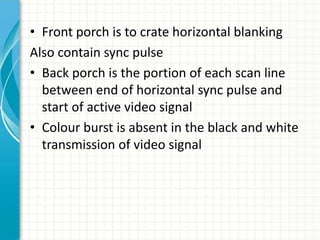
• Front porch is to crate horizontal blanking
Also contain sync pulse
• Back porch is the portion of each scan line
between end of horizontal sync pulse and
start of active video signal
• Colour burst is absent in the black and white
transmission of video signal
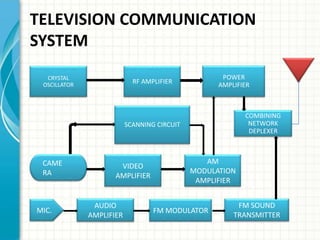
TELEVISION COMMUNICATION
SYSTEM
AUDIO
AMPLIFIER
FM MODULATOR
FM SOUND
TRANSMITTER
MIC.
CRYSTAL
OSCILLATOR RF AMPLIFIER
POWER
AMPLIFIER
SCANNING CIRCUIT
COMBINING
NETWORK
DEPLEXER
CAME
RA
VIDEO
AMPLIFIER
AM
MODULATION
AMPLIFIER
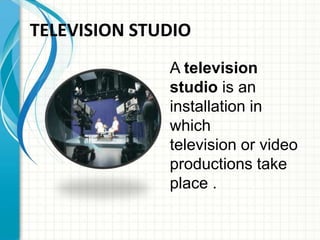
A television
studio is an
installation in
which
television or video
productions take
place .
TELEVISION STUDIO
COMPONENTS OF TV STUDIO
• Camera
• Lighting
• Microphones
• Vision mixer and Audio consoles
• MSR
• VTR
• Acoustics
• Post production and video effects
• Supporting services like AC, UPS
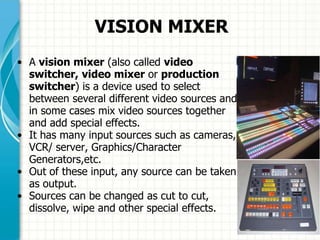
VISION MIXER
• A vision mixer (also called video
switcher, video mixer or production
switcher) is a device used to select
between several different video sources and
in some cases mix video sources together
and add special effects.
• It has many input sources such as cameras,
VCR/ server, Graphics/Character
Generators,etc.
• Out of these input, any source can be taken
as output.
• Sources can be changed as cut to cut,
dissolve, wipe and other special effects.
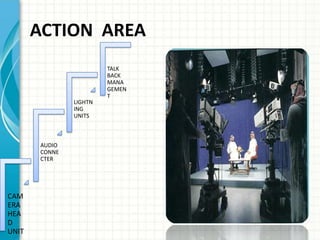
ACTION AREA
CAM
ERA
HEA
D
UNIT
AUDIO
CONNE
CTER
LIGHTN
ING
UNITS
TALK
BACK
MANA
GEMEN
T
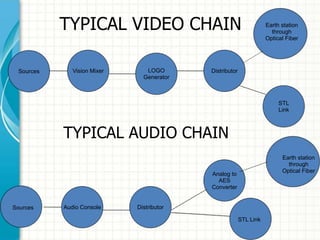
TYPICAL VIDEO CHAIN
TYPICAL AUDIO CHAIN
DistributorVision Mixer LOGO
Generator
Earth station
through
Optical Fiber
STL
Link
Sources
DistributorAudio Console
Analog to
AES
Converter
Earth station
through
Optical Fiber
Sources
STL Link
MSR
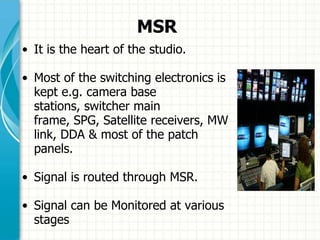
• It is the heart of the studio.
• Most of the switching electronics is
kept e.g. camera base
stations, switcher main
frame, SPG, Satellite receivers, MW
link, DDA & most of the patch
panels.
• Signal is routed through MSR.
• Signal can be Monitored at various
stages
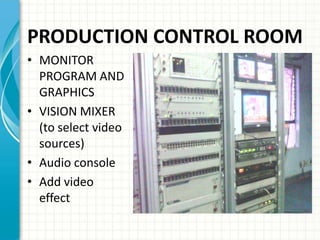
PRODUCTION CONTROL ROOM
• MONITOR
PROGRAM AND
GRAPHICS
• VISION MIXER
(to select video
sources)
• Audio console
• Add video
effect
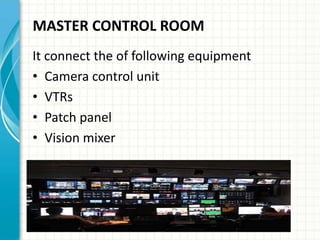
MASTER CONTROL ROOM
It connect the of following equipment
• Camera control unit
• VTRs
• Patch panel
• Vision mixer
• CHARCTER GENERATORS
Names and graphics inserted into programs
• CONTROL APPARATUS ROOM
Includes the power supply unit
UPS room
Generator
• VIDEO TAPE RECORDER
Consists of recorded materials i.e. v.c.r
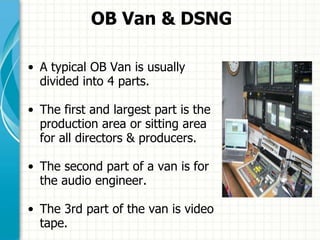
OB Van & DSNG
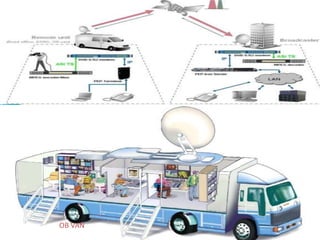
• A typical OB Van is usually
divided into 4 parts.
• The first and largest part is the
production area or sitting area
for all directors & producers.
• The second part of a van is for
the audio engineer.
• The 3rd part of the van is video
tape.
OB VAN
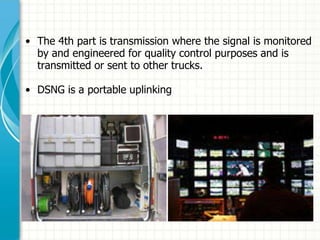
• The 4th part is transmission where the signal is monitored
by and engineered for quality control purposes and is
transmitted or sent to other trucks.
• DSNG is a portable uplinking centre.
EARTH STATION
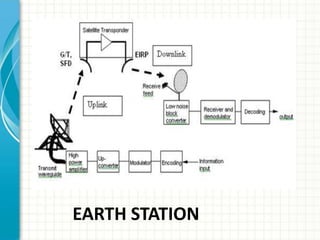
• Earth Station is a very important part of satellite
communication system for broadcasting of signals.
• It is an uplink center from which the signals are fed to
Satellite for distribution in a specified area covered by the
Satellite.
• The signal is up-linked from the Earth Station and
received by many down link centers in TV broad casting
via PDA.
• Two Types: 1) Analog, 2) Digital
• Digital Earth Stations are widely used because of various
advantages over analog.
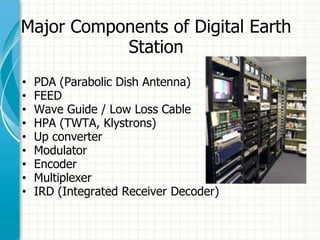
Major Components of Digital Earth
Station
• PDA (Parabolic Dish Antenna)
• FEED
• Wave Guide / Low Loss Cable
• HPA (TWTA, Klystrons)
• Up converter
• Modulator
• Encoder
• Multiplexer
• IRD (Integrated Receiver Decoder)
EARTH STATION
TRANSMITTER
 Aid of antenna
 Produces radio wave
 Connect earth station
to satellites
 Also connect
television
Types of TV Transmitters
VLPT’s, LPT’s & HPT’s
• A 10 KW HPT is only 10-20%
efficient.
• It has beamwidth of 360
deg, hence can cover upto 65
kms of area around it.
• It has various other supporting
units with it to maintain the
quality of s/g to be Txd. Like-
Monitoring section, blower
section, amplification section
ANTENNA & SATELLITE
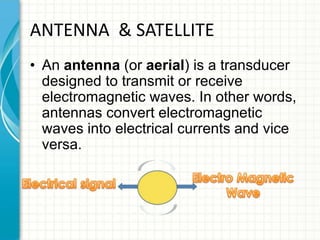
• An antenna (or aerial) is a transducer
designed to transmit or receive
electromagnetic waves. In other words,
antennas convert electromagnetic
waves into electrical currents and vice
versa.
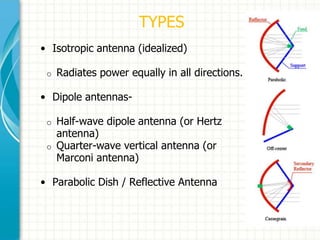
TYPES
• Isotropic antenna (idealized)
o Radiates power equally in all directions.
• Dipole antennas-
o Half-wave dipole antenna (or Hertz
antenna)
o Quarter-wave vertical antenna (or
Marconi antenna)
• Parabolic Dish / Reflective Antenna
RESOURCES
• http://inventors.about.com/od/tstartinventions/
a/Television.htm
• http://en.wikipedia.org/wiki/Broadcast_televisio
n_systems
• http://www.althos.com/tutorial/TV-advertising-
tutorial-broadcast-television-system.html
• http://www.scribd.com/doc/44694977/Modern-
Communication-Systems-PART-1-TELEVISION
• http://www.danalee.ca/ttt/transmission.htm
Doordarshan Implant Training Report

Doordarshan Implant Training Report

  • 1.
    INPLANT TRAINING REPORT REHANFAZAL (1171110180) UTSAV GAMI (1171110175) SIDDHANTH CHAKRABORTY (1171110174) DOORDARSHAN
  • 2.
  • 3.
    INTRODUCTION  LARGEST BOARDCASTING ORGANISATION 1ST SERVICE STARTED ON 15TH SEP,1959  Doordarshan = Distant + Show.  Doordarshan is an Indian public service broadcaster.  One of the largest broadcasting organizations in India in terms of the infrastructure of studios and transmitters.
  • 4.
     Terrestrial televisionin India started in Delhi on 15 September 1959.  The regular daily transmission started in 1965 as a part of All India Radio.  Television services were separated from radio in 1976.  In 1982 color TV was introduced in the Indian market.
  • 5.
    DD Setup • Satellite- INSAT-3C, 740 E • Transponder – C24 Parameters: • Symbol rate – 4.25 MSPS, • Downlink Freq. – 4166.50 MHz, • FEC – ¾, • Polarisation D/L – Vertical, Linear. Equipments - • Encoder (E5411), Modulator (SM600), Multiplexer (Mx5620) – Two nos. each (Tandberg make) in 1+1 Mode • Up Converter (Advent) - Two • 700 W HPA (Xicom) – Two • Network Management PC
  • 6.
    Doordarshan's Signature Tuneand Montage (1974) • It all started 52 years ago, on 15 September 1959. With a humble beginning and a little support from All India Radio. Doordarshan (DD) started its transmission and gave birth to Indian Television. When we think about Doordarshan the first thing that comes in our mind is the sad signature tune which would play before the transmission every Morning, Afternoon & Evening Sessions. Similer to the AIR Signature tune , the Doordarshan's Signature Tune is embedded in our minds till it got a setback due to the upsurge of Cable television in the early 90's. This Nostalgic piece of music was composed by Ustad Ali Ahmed Hussain Khan with Pandit Ravi Shankar in 1974. In 1976 the DD Montage was designed at National Institute of Design (NID). In the next two decades from the early 80's to mid 90's, Doordarshan produced some of the finest serials on Indian Television. The people born in that generation when there was no other channel than DD will & definitely do miss it. This slow mournful Signature Tune has become a cherished memory for generations of Indians all across the world.
  • 8.
    TELEVISION STANDARDS • NTSC-Nationaltelevision standards committee(US) (525 Horizontal & 60 vertical lines) • SECAM-System electronics for colour avec memory(FRANCE)(625 vertical & 50horizantal lines) • PAL- Phase Alternating lines(GERMANY)(625 horizontal & 50 vertical line) Television standards used in India is PAL
  • 9.
    PAL ENCODER &DECODER • Input is the primary colour (i.e. red, green, blue) into matrix circuit as Y, R-Y, B-Y. • Y=0.30R+0.59G+.11B • U=0.477(R-Y) • V=0.895(B-Y) • Out of 625 horizontal line only 575 are active • 50 vertical lines
  • 10.
  • 11.
    • Front porchis to crate horizontal blanking Also contain sync pulse • Back porch is the portion of each scan line between end of horizontal sync pulse and start of active video signal • Colour burst is absent in the black and white transmission of video signal
  • 12.
    TELEVISION COMMUNICATION SYSTEM AUDIO AMPLIFIER FM MODULATOR FMSOUND TRANSMITTER MIC. CRYSTAL OSCILLATOR RF AMPLIFIER POWER AMPLIFIER SCANNING CIRCUIT COMBINING NETWORK DEPLEXER CAME RA VIDEO AMPLIFIER AM MODULATION AMPLIFIER
  • 13.
    A television studio isan installation in which television or video productions take place . TELEVISION STUDIO
  • 14.
    COMPONENTS OF TVSTUDIO • Camera • Lighting • Microphones • Vision mixer and Audio consoles • MSR • VTR • Acoustics • Post production and video effects • Supporting services like AC, UPS
  • 15.
    VISION MIXER • Avision mixer (also called video switcher, video mixer or production switcher) is a device used to select between several different video sources and in some cases mix video sources together and add special effects. • It has many input sources such as cameras, VCR/ server, Graphics/Character Generators,etc. • Out of these input, any source can be taken as output. • Sources can be changed as cut to cut, dissolve, wipe and other special effects.
  • 17.
  • 18.
    TYPICAL VIDEO CHAIN TYPICALAUDIO CHAIN DistributorVision Mixer LOGO Generator Earth station through Optical Fiber STL Link Sources DistributorAudio Console Analog to AES Converter Earth station through Optical Fiber Sources STL Link
  • 19.
    MSR • It isthe heart of the studio. • Most of the switching electronics is kept e.g. camera base stations, switcher main frame, SPG, Satellite receivers, MW link, DDA & most of the patch panels. • Signal is routed through MSR. • Signal can be Monitored at various stages
  • 20.
    PRODUCTION CONTROL ROOM •MONITOR PROGRAM AND GRAPHICS • VISION MIXER (to select video sources) • Audio console • Add video effect
  • 21.
    MASTER CONTROL ROOM Itconnect the of following equipment • Camera control unit • VTRs • Patch panel • Vision mixer
  • 22.
    • CHARCTER GENERATORS Namesand graphics inserted into programs • CONTROL APPARATUS ROOM Includes the power supply unit UPS room Generator • VIDEO TAPE RECORDER Consists of recorded materials i.e. v.c.r
  • 23.
    OB Van &DSNG • A typical OB Van is usually divided into 4 parts. • The first and largest part is the production area or sitting area for all directors & producers. • The second part of a van is for the audio engineer. • The 3rd part of the van is video tape.
  • 24.
  • 25.
    • The 4thpart is transmission where the signal is monitored by and engineered for quality control purposes and is transmitted or sent to other trucks. • DSNG is a portable uplinking centre.
  • 26.
    EARTH STATION • EarthStation is a very important part of satellite communication system for broadcasting of signals. • It is an uplink center from which the signals are fed to Satellite for distribution in a specified area covered by the Satellite. • The signal is up-linked from the Earth Station and received by many down link centers in TV broad casting via PDA. • Two Types: 1) Analog, 2) Digital • Digital Earth Stations are widely used because of various advantages over analog.
  • 27.
    Major Components ofDigital Earth Station • PDA (Parabolic Dish Antenna) • FEED • Wave Guide / Low Loss Cable • HPA (TWTA, Klystrons) • Up converter • Modulator • Encoder • Multiplexer • IRD (Integrated Receiver Decoder)
  • 28.
  • 29.
    TRANSMITTER  Aid ofantenna  Produces radio wave  Connect earth station to satellites  Also connect television
  • 30.
    Types of TVTransmitters VLPT’s, LPT’s & HPT’s • A 10 KW HPT is only 10-20% efficient. • It has beamwidth of 360 deg, hence can cover upto 65 kms of area around it. • It has various other supporting units with it to maintain the quality of s/g to be Txd. Like- Monitoring section, blower section, amplification section
  • 31.
    ANTENNA & SATELLITE •An antenna (or aerial) is a transducer designed to transmit or receive electromagnetic waves. In other words, antennas convert electromagnetic waves into electrical currents and vice versa.
  • 32.
    TYPES • Isotropic antenna(idealized) o Radiates power equally in all directions. • Dipole antennas- o Half-wave dipole antenna (or Hertz antenna) o Quarter-wave vertical antenna (or Marconi antenna) • Parabolic Dish / Reflective Antenna
  • 34.
    RESOURCES • http://inventors.about.com/od/tstartinventions/ a/Television.htm • http://en.wikipedia.org/wiki/Broadcast_televisio n_systems •http://www.althos.com/tutorial/TV-advertising- tutorial-broadcast-television-system.html • http://www.scribd.com/doc/44694977/Modern- Communication-Systems-PART-1-TELEVISION • http://www.danalee.ca/ttt/transmission.htm

Editor's Notes

  • #2 This template can be used as a starter file for presenting training materials in a group setting.SectionsRight-click on a slide to add sections. Sections can help to organize your slides or facilitate collaboration between multiple authors.NotesUse the Notes section for delivery notes or to provide additional details for the audience. View these notes in Presentation View during your presentation. Keep in mind the font size (important for accessibility, visibility, videotaping, and online production)Coordinated colors Pay particular attention to the graphs, charts, and text boxes.Consider that attendees will print in black and white or grayscale. Run a test print to make sure your colors work when printed in pure black and white and grayscale.Graphics, tables, and graphsKeep it simple: If possible, use consistent, non-distracting styles and colors.Label all graphs and tables.
  • #3 Give a brief overview of the presentation. Describe the major focus of the presentation and why it is important.Introduce each of the major topics.To provide a road map for the audience, you can repeat this Overview slide throughout the presentation, highlighting the particular topic you will discuss next.
  • #4 This is another option for an Overview slides using transitions.
  • #18 What will the audience be able to do after this training is complete? Briefly describe each objective how the audiencewill benefit from this presentation.
  • #21 Use a section header for each of the topics, so there is a clear transition to the audience.
  • #22 Add slides to each topic section as necessary, including slides with tables, graphs, and images. See next section for sampletable, graph, image, and video layouts.
  • #23 Keep it brief. Make your text as brief as possible to maintain a larger font size.
  • #29 Add a case study or class simulation to encourage discussion and apply lessons.
  • #30 Discuss outcomes of the case study or class simulation.Cover best practices.
  • #35 Summarize presentation content by restating the important points from the lessons.What do you want the audience to remember when they leave your presentation?Save your presentation to a video for easy distribution (To create a video, click the File tab, and then click Share.  Under File Types, click Create a Video.)