INHERITANCE
INHERITANCE
• When creating a class, instead of writing completely new data
members and member functions, the programmer can designate
that the new class should inherit the members of an existing
class. This existing class is called the base class, and the new
class is referred to as the derived class.
• The idea of inheritance implements the is a relationship. For
example, mammal IS-A animal, dog IS-A mammal hence dog
IS-A animal as well and so on.
Base & Derived Classes:
• A class can be derived from more than one classes, which
means it can inherit data and functions from multiple base
classes.
• . A class derivation list names one or more base classes and has
the form:
class derived-class: access-specifier base-class
• Where access-specifier is one of public, protected, or private,
and base-class is the name of a previously defined class. If the
access-specifier is not used, then it is private by default.
• Consider a base class Shape and its derived class Rectangle as
follows:
#include <iostream>
// Base class
class Shape
{
public:
void setWidth(int w)
{
width = w;
}
void setHeight(int h)
{
height = h;
}
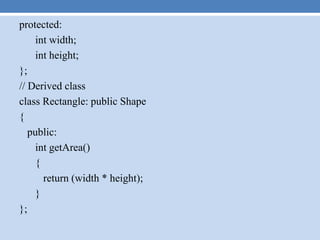
protected:
int width;
int height;
};
// Derived class
class Rectangle: public Shape
{
public:
int getArea()
{
return (width * height);
}
};
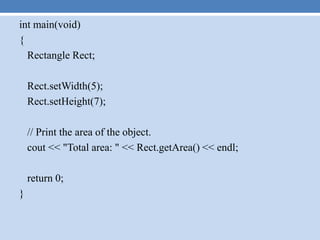
int main(void)
{
Rectangle Rect;
Rect.setWidth(5);
Rect.setHeight(7);
// Print the area of the object.
cout << "Total area: " << Rect.getArea() << endl;
return 0;
}
Limitations of derived class
A derived class inherits all base class methods with the following
exceptions:
• Constructors, destructors and copy constructors of the base
class.
• Overloaded operators of the base class.
• The friend functions of the base class.
Types of Inheritance
• Forms of Inheritance
• Single Inheritance: It is the inheritance hierarchy wherein one
derived class inherits from one base class.
Multiple Inheritance: It is the inheritance hierarchy wherein
one derived class inherits from multiple base class(es)
Hierarchical Inheritance: It is the inheritance hierarchy
wherein multiple subclasses inherit from one base class.
Multilevel Inheritance: It is the inheritance hierarchy wherein
subclass acts as a base class for other classes.
Hybrid Inheritance: The inheritance hierarchy that reflects any
legal combination of other four types of inheritance.
Multiple Inheritances
• A C++ class can inherit members from more than one class and
here is the extended syntax:
class derived-class: access baseA, access baseB....
Where access is one of public, protected, or private and would
be given for every base class and they will be separated by
comma as shown above. Let us try the following example:
Example
#include <iostream>
// Base class Shape
class Shape
{
public:
void setWidth(int w)
{
width = w;
}
void setHeight(int h)
{
height = h;
}
protected:
int width;
int height;
};
// Base class PaintCost
class PaintCost
{
public:
int getCost(int area)
{
return area * 70;
}
};
// Derived class
class Rectangle: public Shape, public PaintCost
{
public:
int getArea()
{
return (width * height);
}
};
int main(void)
{
Rectangle Rect;
int area;
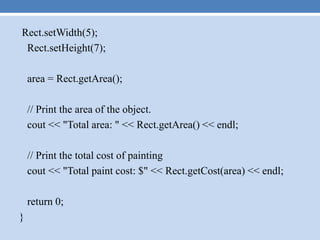
Rect.setWidth(5);
Rect.setHeight(7);
area = Rect.getArea();
// Print the area of the object.
cout << "Total area: " << Rect.getArea() << endl;
// Print the total cost of painting
cout << "Total paint cost: $" << Rect.getCost(area) << endl;
return 0;
}
Output
Total area: 35
Total paint cost: $2450
C++ Overloading
• C++ allows you to specify more than one definition for a
function name or an operator in the same scope, which is
called function overloading and operator overloading
respectively.
• When you call an overloaded function or operator, the
compiler determines the most appropriate definition to use by
comparing the argument types you used to call the function or
operator with the parameter types specified in the definitions.
The process of selecting the most appropriate overloaded
function or operator is called overload resolution.
Function overloading in C++:
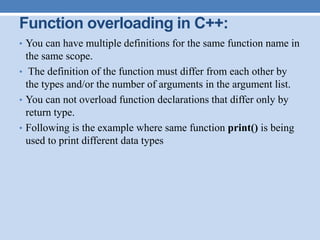
• You can have multiple definitions for the same function name in
the same scope.
• The definition of the function must differ from each other by
the types and/or the number of arguments in the argument list.
• You can not overload function declarations that differ only by
return type.
• Following is the example where same function print() is being
used to print different data types
#include <iostream>
using namespace std;
class printData
{
public:
void print(int i) {
cout << "Printing int: " << i << endl;
}
void print(double f) {
cout << "Printing float: " << f << endl;
}
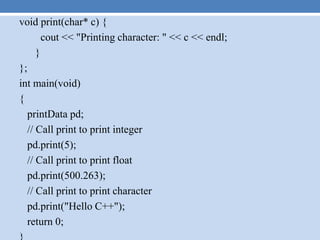
void print(char* c) {
cout << "Printing character: " << c << endl;
}
};
int main(void)
{
printData pd;
// Call print to print integer
pd.print(5);
// Call print to print float
pd.print(500.263);
// Call print to print character
pd.print("Hello C++");
return 0;
Output
Printing int: 5
Printing float: 500.263
Printing character: Hello C++
Operators overloading in C++:
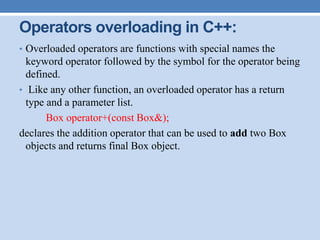
• Overloaded operators are functions with special names the
keyword operator followed by the symbol for the operator being
defined.
• Like any other function, an overloaded operator has a return
type and a parameter list.
Box operator+(const Box&);
declares the addition operator that can be used to add two Box
objects and returns final Box object.
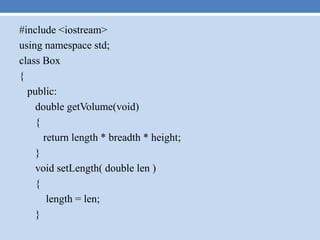
#include <iostream>
using namespace std;
class Box
{
public:
double getVolume(void)
{
return length * breadth * height;
}
void setLength( double len )
{
length = len;
}
void setBreadth( double bre )
{
breadth = bre;
}
void setHeight( double hei )
{
height = hei;
}
// Overload + operator to add two Box objects.
Box operator+(const Box& b)
{
Box box;
box.length = this->length + b.length;
void setBreadth( double bre )
{
breadth = bre;
}
void setHeight( double hei )
{
height = hei;
}
// Overload + operator to add two Box objects.
Box operator+(const Box& b)
{
Box box;
box.length = this->length + b.length;
box.breadth = this->breadth + b.breadth;
box.height = this->height + b.height;
return box;
}
private:
double length; // Length of a box
double breadth; // Breadth of a box
double height; // Height of a box
};
// Main function for the program
int main( )
{
Box Box1; // Declare Box1 of type Box
Box Box2; // Declare Box2 of type Box
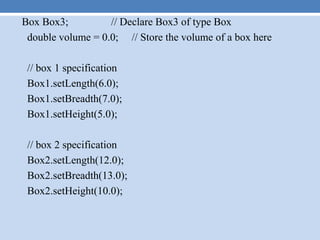
Box Box3; // Declare Box3 of type Box
double volume = 0.0; // Store the volume of a box here
// box 1 specification
Box1.setLength(6.0);
Box1.setBreadth(7.0);
Box1.setHeight(5.0);
// box 2 specification
Box2.setLength(12.0);
Box2.setBreadth(13.0);
Box2.setHeight(10.0);
// volume of box 1
volume = Box1.getVolume();
cout << "Volume of Box1 : " << volume <<endl;
// volume of box 2
volume = Box2.getVolume();
cout << "Volume of Box2 : " << volume <<endl;
// Add two object as follows:
Box3 = Box1 + Box2;
// volume of box 3
volume = Box3.getVolume();
cout << "Volume of Box3 : " << volume <<endl;
return 0;
}
Output
Volume of Box1 : 210
Volume of Box2 : 1560
Volume of Box3 : 5400

Inheritance

  • 1.
  • 2.
    INHERITANCE • When creatinga class, instead of writing completely new data members and member functions, the programmer can designate that the new class should inherit the members of an existing class. This existing class is called the base class, and the new class is referred to as the derived class. • The idea of inheritance implements the is a relationship. For example, mammal IS-A animal, dog IS-A mammal hence dog IS-A animal as well and so on.
  • 3.
    Base & DerivedClasses: • A class can be derived from more than one classes, which means it can inherit data and functions from multiple base classes. • . A class derivation list names one or more base classes and has the form: class derived-class: access-specifier base-class • Where access-specifier is one of public, protected, or private, and base-class is the name of a previously defined class. If the access-specifier is not used, then it is private by default. • Consider a base class Shape and its derived class Rectangle as follows:
  • 4.
    #include <iostream> // Baseclass class Shape { public: void setWidth(int w) { width = w; } void setHeight(int h) { height = h; }
  • 5.
    protected: int width; int height; }; //Derived class class Rectangle: public Shape { public: int getArea() { return (width * height); } };
  • 6.
    int main(void) { Rectangle Rect; Rect.setWidth(5); Rect.setHeight(7); //Print the area of the object. cout << "Total area: " << Rect.getArea() << endl; return 0; }
  • 7.
    Limitations of derivedclass A derived class inherits all base class methods with the following exceptions: • Constructors, destructors and copy constructors of the base class. • Overloaded operators of the base class. • The friend functions of the base class.
  • 8.
    Types of Inheritance •Forms of Inheritance • Single Inheritance: It is the inheritance hierarchy wherein one derived class inherits from one base class. Multiple Inheritance: It is the inheritance hierarchy wherein one derived class inherits from multiple base class(es) Hierarchical Inheritance: It is the inheritance hierarchy wherein multiple subclasses inherit from one base class. Multilevel Inheritance: It is the inheritance hierarchy wherein subclass acts as a base class for other classes. Hybrid Inheritance: The inheritance hierarchy that reflects any legal combination of other four types of inheritance.
  • 10.
    Multiple Inheritances • AC++ class can inherit members from more than one class and here is the extended syntax: class derived-class: access baseA, access baseB.... Where access is one of public, protected, or private and would be given for every base class and they will be separated by comma as shown above. Let us try the following example:
  • 11.
    Example #include <iostream> // Baseclass Shape class Shape { public: void setWidth(int w) { width = w; } void setHeight(int h) { height = h; }
  • 12.
    protected: int width; int height; }; //Base class PaintCost class PaintCost { public: int getCost(int area) { return area * 70; } };
  • 13.
    // Derived class classRectangle: public Shape, public PaintCost { public: int getArea() { return (width * height); } }; int main(void) { Rectangle Rect; int area;
  • 14.
    Rect.setWidth(5); Rect.setHeight(7); area = Rect.getArea(); //Print the area of the object. cout << "Total area: " << Rect.getArea() << endl; // Print the total cost of painting cout << "Total paint cost: $" << Rect.getCost(area) << endl; return 0; }
  • 15.
    Output Total area: 35 Totalpaint cost: $2450
  • 16.
    C++ Overloading • C++allows you to specify more than one definition for a function name or an operator in the same scope, which is called function overloading and operator overloading respectively. • When you call an overloaded function or operator, the compiler determines the most appropriate definition to use by comparing the argument types you used to call the function or operator with the parameter types specified in the definitions. The process of selecting the most appropriate overloaded function or operator is called overload resolution.
  • 17.
    Function overloading inC++: • You can have multiple definitions for the same function name in the same scope. • The definition of the function must differ from each other by the types and/or the number of arguments in the argument list. • You can not overload function declarations that differ only by return type. • Following is the example where same function print() is being used to print different data types
  • 18.
    #include <iostream> using namespacestd; class printData { public: void print(int i) { cout << "Printing int: " << i << endl; } void print(double f) { cout << "Printing float: " << f << endl; }
  • 19.
    void print(char* c){ cout << "Printing character: " << c << endl; } }; int main(void) { printData pd; // Call print to print integer pd.print(5); // Call print to print float pd.print(500.263); // Call print to print character pd.print("Hello C++"); return 0;
  • 20.
    Output Printing int: 5 Printingfloat: 500.263 Printing character: Hello C++
  • 21.
    Operators overloading inC++: • Overloaded operators are functions with special names the keyword operator followed by the symbol for the operator being defined. • Like any other function, an overloaded operator has a return type and a parameter list. Box operator+(const Box&); declares the addition operator that can be used to add two Box objects and returns final Box object.
  • 22.
    #include <iostream> using namespacestd; class Box { public: double getVolume(void) { return length * breadth * height; } void setLength( double len ) { length = len; }
  • 23.
    void setBreadth( doublebre ) { breadth = bre; } void setHeight( double hei ) { height = hei; } // Overload + operator to add two Box objects. Box operator+(const Box& b) { Box box; box.length = this->length + b.length;
  • 24.
    void setBreadth( doublebre ) { breadth = bre; } void setHeight( double hei ) { height = hei; } // Overload + operator to add two Box objects. Box operator+(const Box& b) { Box box; box.length = this->length + b.length; box.breadth = this->breadth + b.breadth;
  • 25.
    box.height = this->height+ b.height; return box; } private: double length; // Length of a box double breadth; // Breadth of a box double height; // Height of a box }; // Main function for the program int main( ) { Box Box1; // Declare Box1 of type Box Box Box2; // Declare Box2 of type Box
  • 26.
    Box Box3; //Declare Box3 of type Box double volume = 0.0; // Store the volume of a box here // box 1 specification Box1.setLength(6.0); Box1.setBreadth(7.0); Box1.setHeight(5.0); // box 2 specification Box2.setLength(12.0); Box2.setBreadth(13.0); Box2.setHeight(10.0);
  • 27.
    // volume ofbox 1 volume = Box1.getVolume(); cout << "Volume of Box1 : " << volume <<endl; // volume of box 2 volume = Box2.getVolume(); cout << "Volume of Box2 : " << volume <<endl; // Add two object as follows: Box3 = Box1 + Box2; // volume of box 3 volume = Box3.getVolume(); cout << "Volume of Box3 : " << volume <<endl; return 0; }
  • 28.
    Output Volume of Box1: 210 Volume of Box2 : 1560 Volume of Box3 : 5400