Infrastructure InitiativesInfrastructure Initiatives
By : Rob JonesBy : Rob Jones
AgendaAgenda
• 2008 Infrastructure Assessment
• Implementation Time Frames
• Implementation Goals
2008 Infrastructure2008 Infrastructure
AssessmentAssessment
• 2008IA Summary of Assessment
• 2008IA Technology Improvements
• 2008IA Best Practices (Governance)
2008IA Summary of Assessment2008IA Summary of Assessment
Emerging Technologies (Virtualization Technologies & Server Consolidation)
• Enterprise Architecture Reference Models: Recommend the development of an enterprise
assessment process and technology frameworks. This will allow FHLBank-Pittsburgh to evaluate the
strategic value of enterprise technologies that support multiple products and solutions. These
technologies include virtualization, server consolidation, SOA, Identity Management, etc.
• Enterprise Interoperability Specifications: Recommend the development of additional
infrastructure technology assessment criteria to determine the potential value and risks of integrating
new technologies and solutions.
• Emerging Technology Projects: Recommend the implementation of virtualization technology layers
to provide the current data center with more agility and infrastructure on demand capabilities.
High Level Management Best Practices
• Business Process Analysis: Recommend the implementation of business intelligence tools to
create data-driven executive and business analyst dashboards that depict the direct relationship
between processes and the supporting infrastructure.
• Enhancement of Enterprise Architecture Governance: Recommend an increase in enterprise
infrastructure oversight to provide strategic alignment and governance. (i.e., avoid server proliferation
by implementing into virtualization and consolidation).
• Creation of a Business Computing Architecture Team (bISComp): We recommend the change in
name and structure to bISComp. This will provide business and technology strategic alignment.
bISComp will have executive sponsorship and IT management leadership to establish a strategic
balance between enterprise projects and infrastructure technology.
2008IA TECHNOLOGY2008IA TECHNOLOGY
IMPROVEMENTSIMPROVEMENTS
Summary of Proposed Virtualization Projects
Virtualization Projects Business Imperatives Success Indicators
Virtual Tape Library (VTL)
Project scope (high level):
•Finalize requirements for Backup &
Recovery.
•Analyze Backup & Recovery processes and
policies for potential modification.
•Test synchronization of Grant Street and
Vista sites.
Virtual SANs (vSANs)
Project scope (high level):
•Finalize storage requirements for Production,
Test/Dev and DR.
•Establish process and procedures for storage
partitioning, access and management as a shared
resource.
•Test synchronization between Grant Street and
Vista sites.
Virtual Servers - Consolidation
Project scope (high level):
•Finalize requirements for Production, Test/Dev and
DR server environments.
•Establish process and procedures for server
acquisitions and application verification before
virtualization.
•Test synchronization between Grant Street and Vista
sites.
Virtual Desktop Infrastructure (VDI)
Project scope (high level):
•Determine target operating systems and
analyze PC/Laptop refresh process.
•Test streaming application and desktop
internally and remotely (DR included).
•Implement as needed.
• Reduce manual backup & recovery
(infrastructure on demand).
• Identify the risks and rewards of records
retention compliancy.
• Establish a process and solution for
Information Lifecycle Management.
• Reduce the time and effort involved with
physical tape backup.
• Implement better storage allocation and
management to support the dynamic
needs of test/dev, production and DR
areas (infrastructure on demand).
• Address business continuity risks of
decentralized storage.
• Provide automated and faster data
replication between Grant St. and Vista.
• Provide dynamically allocated resources
for business applications (infrastructure
on demand).
• Mitigate the risk of uncontrolled server
growth.
• Reduce the complexity and risks of
decentralized server management and
support.
• Provide business applications on
demand (infrastructure on demand).
• Provide data compliancy and risk
mitigation by centralized desktop
management.
• Reduce purchase and support costs of
desktop and laptops.
• Reduction in time and effort of backup &
recovery operations.
• Reduction in risk of data loss due to
physical tape malfunctions and device
failures.
• Reduce the physical amount of required
storage for backup & recovery
operations.
• Faster response to archived data
requests.
• Faster fulfillment of storage requests.
• More continuity between test/dev and
production deployments.
• More efficient and cost effective use of
storage resources.
• Faster response to increasing business
application demands.
• Near zero system downtime.
• Faster and more efficient migration of
applications from test/dev to production.
• Reduction in data loss and compromise
risk events.
• Reduction in the time and effort needed
to support desktops and laptops.
• More security of desktop and laptop
resources and data.
Agreed Acceptance of Proposed Virtualization Projects
Proposed Virtualization Projects Agreed Acceptance Equivalent Success
Virtual Tape Library (VTL)
Project scope (high level):
•Finalize requirements for Backup &
Recovery.
•Analyze Backup & Recovery processes and
policies for potential modification.
•Test synchronization of Grant Street and
Vista sites.
Virtual SANs (vSANs)
Project scope (high level):
•Finalize storage requirements for Production,
Test/Dev and DR.
•Establish process and procedures for storage
partitioning, access and management as a shared
resource.
•Test synchronization between Grant Street and
Vista sites.
Virtual Servers - Consolidation
Project scope (high level):
•Finalize requirements for Production, Test/Dev and
DR server environments.
•Establish process and procedures for server
acquisitions and application verification before
virtualization.
•Test synchronization between Grant Street and Vista
sites.
Virtual Desktop Infrastructure (VDI)
Project scope (high level):
•Determine target operating systems and
analyze PC/Laptop refresh process.
•Test streaming application and desktop
internally and remotely (DR included).
•Implement as needed.
Backup-to-Disk
• Determination made not to limit capability
to virtual tape only - by project team.
• Backup/Recovery Requirements Finalized.
• Storage Management Team created to
review processes and manage changes.
• Backup-to-Disk evaluation includes
replication to recovery site.
SAN Expansion
• Virtual SAN cost prohibitive at this time.
• Implement storage framework and
management to support the dynamic needs of
various environments.
• Purchase and Install large amount of
commodity disk to complete framework.
• Current replication matches SAN replication.
Virtual Servers - Consolidation
• Provide dynamically allocated resources for
business applications (infrastructure on
demand).
• Server life cycle has been changed to
evaluate virtual allocation first.
• High Availability is part of new architecture.
• Phase 2 will focus on recovery site needs
MS Windows Upgrade & VDI
• MS Windows determined as target PC
operating system.
• Using Microsoft Virtual PC for desktops
allows modular environment.
• Use of Citrix has lightened desktop
environment and will simplify refresh.
• Reduction in time and effort of backup &
recovery operations.
• Reduction in risk of data loss due to
physical tape malfunctions and device
failures.
• Reduce the physical amount of required
storage for backup & recovery
operations.
• Faster response to archived data
requests.
• Faster fulfillment of storage requests.
• More continuity between test/dev and
production deployments.
• More efficient and cost effective use of
storage resources.
• Faster response to increasing business
application demands.
• Near zero system downtime.
• Faster and more efficient migration of
applications from test/dev to production.
• Better server resource management.
• Reduction in data loss and compromise
risk events.
• Reduction in the time and effort needed
to support desktops and laptops.
• More security of desktop and laptop
resources and data.
Network Bandwidth Assessment - WANNetwork Bandwidth Assessment - WAN
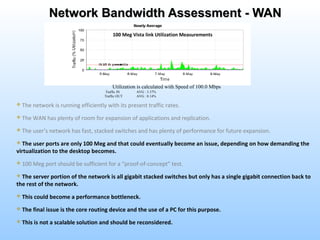
 The network is running efficiently with its present traffic rates.
 The WAN has plenty of room for expansion of applications and replication.
 The user’s network has fast, stacked switches and has plenty of performance for future expansion.
 The user ports are only 100 Meg and that could eventually become an issue, depending on how demanding the
virtualization to the desktop becomes.
 100 Meg port should be sufficient for a “proof-of-concept” test.
 The server portion of the network is all gigabit stacked switches but only has a single gigabit connection back to
the rest of the network.
 This could become a performance bottleneck.
 The final issue is the core routing device and the use of a PC for this purpose.
 This is not a scalable solution and should be reconsidered.
Utilization is calculated with Speed of 100.0 Mbps
Traffic IN AVG : 3.37%
Traffic OUT AVG : 0.14%
100 Meg Vista link Utilization Measurements
Our Acceptance of Network BandwidthOur Acceptance of Network Bandwidth
AssessmentAssessment
 The network is running efficiently with its present traffic rates.
 The WAN has plenty of room for expansion of applications and replication.
 The user’s network has fast, stacked switches and has plenty of performance for future expansion.
We Agree with Following Points:We Agree with Following Points:
2008IA BEST PRACTICES2008IA BEST PRACTICES
(GOVERNANCE)(GOVERNANCE)
Recommended Governance ModelRecommended Governance Model
Business / Technology DomainsBusiness / Technology Domains
Domain Teams
Systems Mgmt Domain Access Domain
Application Domain Integration Domain
Security Domain Privacy Domain
Network Domain Platform Domain
Information Domain
Enterprise Projects
Methodology Cost Analysis
Risk Mitigation Business Requirements
Business Processes
Business Drivers
Business Applications
bISCOMP
Drive-IT
Enterprise Architecture
PMO
Portfolio Management
Recommended Business and IT AlignmentRecommended Business and IT Alignment
When, Why and How?When, Why and How?
Current State Future State
 Current technology inhibits
faster response to business
changes.
 Technical complexities
reduces application integration
opportunities.
 ‘Silo’ solutions increase total
cost of ownership and risk.
 Rigid technical infrastructure
reduces capability for dynamic
change and adjustments for
business purposes.
2009 2010 2011
Application Environment
Infrastructure
Desktop
Upgrade
Server
Virtualization
Modular HVAC
Business
Analysts
Analytics &
Reporting
Executive
Dashboard
Application
Upgrades
Shared
Architecture
Application
Integration
Data & Information
 Support Dynamic Business
Change – Faster time to market
with new applications.
 Leverage Shared
Architecture - Develop once,
service many.
 Cost Containment -
Infrastructure consolidation
reduces total cost of ownership.
 Self-service Reporting -
Implement Ad hoc reporting and
predictive dashboards to support
analytical processing and
performance reporting.
Business Transformation
Implementation Time FramesImplementation Time Frames
Implementation GoalsImplementation Goals
Controlled
Staging
True Server Staging
Area
HVAC
Upgrade System and
Increase Efficiency
Server Room
Secure,
Segregated, &
Dust Free
Operations
Center
Secure and
Segregated
Optimized Data Center EnvironmentOptimized Data Center Environment
RAMP
PDU
STAGING AREA UPS ROOM
SEGREGATED SERVER ROOM
(NOC)
OPERATIONS CENTER
11Th
FLOOR CONFERENCE
ROOM
Secure
Electrical Door
PHAC
N3 N2 N1
Operator
Cubes
Column
Secure
Door
Secure Door
PH
HP SAN & Server Racks
SUN Server Racks
Test
Rack
HP1 HP2 HP3 HP4
OF
Network Racks & OF
New Liebert AC
(2010)
SUN
1
SUN
2
SUN
3
SUN
4
SUN
5
New Liebert AC
(2010)
New Liebert AC
(2009)
SUN
6
SUN
7
SUN
8
HP5 HP6 HP7
Phone System
Secure Electrical Door &
Keypad
Secure
Door
TP
Secure Door &
Keypad
Window
Optimized Data CenterOptimized Data Center
SAN Expansion - Before & AfterSAN Expansion - Before & After
Production
New Non-
Prod
Fiber Channel
Fiber Channel FATA
7.3 TB 1 TB Free
4.5 TB + 7.5 TB 16.8 TB1 TB
29.8 TB
(Usable)
1 TB Free
Fiber Channel
Non-Prod
New
Production
Fiber Channel
32.6 TB
(Usable)
16.8 TB
FATA
7.3 TB + 7.5 TB1 TB 16.8 TB
4.5 TB
VMWare Cluster and HAVMWare Cluster and HA
SQL Server
Yes
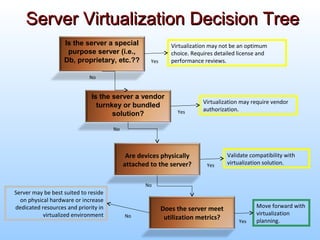
Move forward with
virtualization
planning.
Does the server meet
utilization metrics?
Server may be best suited to reside
on physical hardware or increase
dedicated resources and priority in
virtualized environment
Validate compatibility with
virtualization solution.
Are devices physically
attached to the server?
Yes
No
No
Is the server a vendor
turnkey or bundled
solution?
Virtualization may require vendor
authorization.Yes
No
Is the server a special
purpose server (i.e.,
Db, proprietary, etc.??
Virtualization may not be an optimum
choice. Requires detailed license and
performance reviews.
No
Yes
Server Virtualization Decision TreeServer Virtualization Decision Tree
““Light” PC System OverviewLight” PC System Overview
• Limited Processing Needs
• Simplified & Modular
• Appliance-Like
• Quick to Repair
• Basic Management
• Quick to Upgrade
Hardware
MS Windows Host OS
Limited Software & Data Storage
Virtual Desktop Infrastructure
Vista OS, Firewall & Antivirus Software
Launch Point for Local or Data Center Software
CURRENT – Personal Computer
300 “Thick” Clients
FUTURE – Personal Computer
DATA CENTER
“Light” Clients
Goal - 90% of
Applications Will
Run in Data Center
Simplified PC EnvironmentSimplified PC Environment
Basic Home PC UseBasic Home PC Use
Clear Trust
Proxy
Citrix
Server
FarmRemote
Business
User
Citrix Access Path to FHLB
Citrix Proxy

Infrastructure Strategy

  • 1.
  • 2.
    AgendaAgenda • 2008 InfrastructureAssessment • Implementation Time Frames • Implementation Goals
  • 3.
    2008 Infrastructure2008 Infrastructure AssessmentAssessment •2008IA Summary of Assessment • 2008IA Technology Improvements • 2008IA Best Practices (Governance)
  • 4.
    2008IA Summary ofAssessment2008IA Summary of Assessment Emerging Technologies (Virtualization Technologies & Server Consolidation) • Enterprise Architecture Reference Models: Recommend the development of an enterprise assessment process and technology frameworks. This will allow FHLBank-Pittsburgh to evaluate the strategic value of enterprise technologies that support multiple products and solutions. These technologies include virtualization, server consolidation, SOA, Identity Management, etc. • Enterprise Interoperability Specifications: Recommend the development of additional infrastructure technology assessment criteria to determine the potential value and risks of integrating new technologies and solutions. • Emerging Technology Projects: Recommend the implementation of virtualization technology layers to provide the current data center with more agility and infrastructure on demand capabilities. High Level Management Best Practices • Business Process Analysis: Recommend the implementation of business intelligence tools to create data-driven executive and business analyst dashboards that depict the direct relationship between processes and the supporting infrastructure. • Enhancement of Enterprise Architecture Governance: Recommend an increase in enterprise infrastructure oversight to provide strategic alignment and governance. (i.e., avoid server proliferation by implementing into virtualization and consolidation). • Creation of a Business Computing Architecture Team (bISComp): We recommend the change in name and structure to bISComp. This will provide business and technology strategic alignment. bISComp will have executive sponsorship and IT management leadership to establish a strategic balance between enterprise projects and infrastructure technology.
  • 5.
  • 6.
    Summary of ProposedVirtualization Projects Virtualization Projects Business Imperatives Success Indicators Virtual Tape Library (VTL) Project scope (high level): •Finalize requirements for Backup & Recovery. •Analyze Backup & Recovery processes and policies for potential modification. •Test synchronization of Grant Street and Vista sites. Virtual SANs (vSANs) Project scope (high level): •Finalize storage requirements for Production, Test/Dev and DR. •Establish process and procedures for storage partitioning, access and management as a shared resource. •Test synchronization between Grant Street and Vista sites. Virtual Servers - Consolidation Project scope (high level): •Finalize requirements for Production, Test/Dev and DR server environments. •Establish process and procedures for server acquisitions and application verification before virtualization. •Test synchronization between Grant Street and Vista sites. Virtual Desktop Infrastructure (VDI) Project scope (high level): •Determine target operating systems and analyze PC/Laptop refresh process. •Test streaming application and desktop internally and remotely (DR included). •Implement as needed. • Reduce manual backup & recovery (infrastructure on demand). • Identify the risks and rewards of records retention compliancy. • Establish a process and solution for Information Lifecycle Management. • Reduce the time and effort involved with physical tape backup. • Implement better storage allocation and management to support the dynamic needs of test/dev, production and DR areas (infrastructure on demand). • Address business continuity risks of decentralized storage. • Provide automated and faster data replication between Grant St. and Vista. • Provide dynamically allocated resources for business applications (infrastructure on demand). • Mitigate the risk of uncontrolled server growth. • Reduce the complexity and risks of decentralized server management and support. • Provide business applications on demand (infrastructure on demand). • Provide data compliancy and risk mitigation by centralized desktop management. • Reduce purchase and support costs of desktop and laptops. • Reduction in time and effort of backup & recovery operations. • Reduction in risk of data loss due to physical tape malfunctions and device failures. • Reduce the physical amount of required storage for backup & recovery operations. • Faster response to archived data requests. • Faster fulfillment of storage requests. • More continuity between test/dev and production deployments. • More efficient and cost effective use of storage resources. • Faster response to increasing business application demands. • Near zero system downtime. • Faster and more efficient migration of applications from test/dev to production. • Reduction in data loss and compromise risk events. • Reduction in the time and effort needed to support desktops and laptops. • More security of desktop and laptop resources and data.
  • 7.
    Agreed Acceptance ofProposed Virtualization Projects Proposed Virtualization Projects Agreed Acceptance Equivalent Success Virtual Tape Library (VTL) Project scope (high level): •Finalize requirements for Backup & Recovery. •Analyze Backup & Recovery processes and policies for potential modification. •Test synchronization of Grant Street and Vista sites. Virtual SANs (vSANs) Project scope (high level): •Finalize storage requirements for Production, Test/Dev and DR. •Establish process and procedures for storage partitioning, access and management as a shared resource. •Test synchronization between Grant Street and Vista sites. Virtual Servers - Consolidation Project scope (high level): •Finalize requirements for Production, Test/Dev and DR server environments. •Establish process and procedures for server acquisitions and application verification before virtualization. •Test synchronization between Grant Street and Vista sites. Virtual Desktop Infrastructure (VDI) Project scope (high level): •Determine target operating systems and analyze PC/Laptop refresh process. •Test streaming application and desktop internally and remotely (DR included). •Implement as needed. Backup-to-Disk • Determination made not to limit capability to virtual tape only - by project team. • Backup/Recovery Requirements Finalized. • Storage Management Team created to review processes and manage changes. • Backup-to-Disk evaluation includes replication to recovery site. SAN Expansion • Virtual SAN cost prohibitive at this time. • Implement storage framework and management to support the dynamic needs of various environments. • Purchase and Install large amount of commodity disk to complete framework. • Current replication matches SAN replication. Virtual Servers - Consolidation • Provide dynamically allocated resources for business applications (infrastructure on demand). • Server life cycle has been changed to evaluate virtual allocation first. • High Availability is part of new architecture. • Phase 2 will focus on recovery site needs MS Windows Upgrade & VDI • MS Windows determined as target PC operating system. • Using Microsoft Virtual PC for desktops allows modular environment. • Use of Citrix has lightened desktop environment and will simplify refresh. • Reduction in time and effort of backup & recovery operations. • Reduction in risk of data loss due to physical tape malfunctions and device failures. • Reduce the physical amount of required storage for backup & recovery operations. • Faster response to archived data requests. • Faster fulfillment of storage requests. • More continuity between test/dev and production deployments. • More efficient and cost effective use of storage resources. • Faster response to increasing business application demands. • Near zero system downtime. • Faster and more efficient migration of applications from test/dev to production. • Better server resource management. • Reduction in data loss and compromise risk events. • Reduction in the time and effort needed to support desktops and laptops. • More security of desktop and laptop resources and data.
  • 8.
    Network Bandwidth Assessment- WANNetwork Bandwidth Assessment - WAN  The network is running efficiently with its present traffic rates.  The WAN has plenty of room for expansion of applications and replication.  The user’s network has fast, stacked switches and has plenty of performance for future expansion.  The user ports are only 100 Meg and that could eventually become an issue, depending on how demanding the virtualization to the desktop becomes.  100 Meg port should be sufficient for a “proof-of-concept” test.  The server portion of the network is all gigabit stacked switches but only has a single gigabit connection back to the rest of the network.  This could become a performance bottleneck.  The final issue is the core routing device and the use of a PC for this purpose.  This is not a scalable solution and should be reconsidered. Utilization is calculated with Speed of 100.0 Mbps Traffic IN AVG : 3.37% Traffic OUT AVG : 0.14% 100 Meg Vista link Utilization Measurements
  • 9.
    Our Acceptance ofNetwork BandwidthOur Acceptance of Network Bandwidth AssessmentAssessment  The network is running efficiently with its present traffic rates.  The WAN has plenty of room for expansion of applications and replication.  The user’s network has fast, stacked switches and has plenty of performance for future expansion. We Agree with Following Points:We Agree with Following Points:
  • 10.
    2008IA BEST PRACTICES2008IABEST PRACTICES (GOVERNANCE)(GOVERNANCE)
  • 11.
    Recommended Governance ModelRecommendedGovernance Model Business / Technology DomainsBusiness / Technology Domains Domain Teams Systems Mgmt Domain Access Domain Application Domain Integration Domain Security Domain Privacy Domain Network Domain Platform Domain Information Domain Enterprise Projects Methodology Cost Analysis Risk Mitigation Business Requirements Business Processes Business Drivers Business Applications bISCOMP Drive-IT Enterprise Architecture PMO Portfolio Management
  • 12.
    Recommended Business andIT AlignmentRecommended Business and IT Alignment When, Why and How?When, Why and How? Current State Future State  Current technology inhibits faster response to business changes.  Technical complexities reduces application integration opportunities.  ‘Silo’ solutions increase total cost of ownership and risk.  Rigid technical infrastructure reduces capability for dynamic change and adjustments for business purposes. 2009 2010 2011 Application Environment Infrastructure Desktop Upgrade Server Virtualization Modular HVAC Business Analysts Analytics & Reporting Executive Dashboard Application Upgrades Shared Architecture Application Integration Data & Information  Support Dynamic Business Change – Faster time to market with new applications.  Leverage Shared Architecture - Develop once, service many.  Cost Containment - Infrastructure consolidation reduces total cost of ownership.  Self-service Reporting - Implement Ad hoc reporting and predictive dashboards to support analytical processing and performance reporting. Business Transformation
  • 13.
  • 16.
  • 17.
    Controlled Staging True Server Staging Area HVAC UpgradeSystem and Increase Efficiency Server Room Secure, Segregated, & Dust Free Operations Center Secure and Segregated Optimized Data Center EnvironmentOptimized Data Center Environment
  • 18.
    RAMP PDU STAGING AREA UPSROOM SEGREGATED SERVER ROOM (NOC) OPERATIONS CENTER 11Th FLOOR CONFERENCE ROOM Secure Electrical Door PHAC N3 N2 N1 Operator Cubes Column Secure Door Secure Door PH HP SAN & Server Racks SUN Server Racks Test Rack HP1 HP2 HP3 HP4 OF Network Racks & OF New Liebert AC (2010) SUN 1 SUN 2 SUN 3 SUN 4 SUN 5 New Liebert AC (2010) New Liebert AC (2009) SUN 6 SUN 7 SUN 8 HP5 HP6 HP7 Phone System Secure Electrical Door & Keypad Secure Door TP Secure Door & Keypad Window Optimized Data CenterOptimized Data Center
  • 19.
    SAN Expansion -Before & AfterSAN Expansion - Before & After Production New Non- Prod Fiber Channel Fiber Channel FATA 7.3 TB 1 TB Free 4.5 TB + 7.5 TB 16.8 TB1 TB 29.8 TB (Usable) 1 TB Free Fiber Channel Non-Prod New Production Fiber Channel 32.6 TB (Usable) 16.8 TB FATA 7.3 TB + 7.5 TB1 TB 16.8 TB 4.5 TB
  • 20.
    VMWare Cluster andHAVMWare Cluster and HA SQL Server
  • 21.
    Yes Move forward with virtualization planning. Doesthe server meet utilization metrics? Server may be best suited to reside on physical hardware or increase dedicated resources and priority in virtualized environment Validate compatibility with virtualization solution. Are devices physically attached to the server? Yes No No Is the server a vendor turnkey or bundled solution? Virtualization may require vendor authorization.Yes No Is the server a special purpose server (i.e., Db, proprietary, etc.?? Virtualization may not be an optimum choice. Requires detailed license and performance reviews. No Yes Server Virtualization Decision TreeServer Virtualization Decision Tree
  • 22.
    ““Light” PC SystemOverviewLight” PC System Overview • Limited Processing Needs • Simplified & Modular • Appliance-Like • Quick to Repair • Basic Management • Quick to Upgrade Hardware MS Windows Host OS Limited Software & Data Storage Virtual Desktop Infrastructure Vista OS, Firewall & Antivirus Software Launch Point for Local or Data Center Software
  • 23.
    CURRENT – PersonalComputer 300 “Thick” Clients FUTURE – Personal Computer DATA CENTER “Light” Clients Goal - 90% of Applications Will Run in Data Center Simplified PC EnvironmentSimplified PC Environment
  • 24.
    Basic Home PCUseBasic Home PC Use Clear Trust Proxy Citrix Server FarmRemote Business User Citrix Access Path to FHLB Citrix Proxy

Editor's Notes

  • #2 Use same background and color throughout
  • #5 Go thru this slide quickl
  • #9 Additional network notes – maybe have bob comment on this???? Or maybe we should just exclude this one altogether????
  • #10 Additional network notes – maybe have bob comment on this???? Or maybe we should just exclude this one altogether????
  • #21 Will we review this slide in detail?