TeamShare Solutions and Big Data Micro-Innovation Team Collaboration Intelligent Processing Normalization Transformation Analysis
Project Overview Proof of Concept Develop Data/Doc Migration Programs  Test Migration (T1,T2,R1,R2,R2a) Migrate Archive Data (R3, R3a) Migrate Live Data Validate Data Create PDFs for Legacy ECOs
P2 ECOs P3 LCS P1 Attach P7abc Zip P4 Rev #s P5 QA Rev P6 Load Rem Pb Con Re P8 Scripts P9 RetRec ECO Process P10 Renum Dupes P11 Fix Bad Filetypes Li Remote Affected Docs SQL Server Support Docs Cor Og Ir WC De Affected Docs Library Docs Flat File Extracts ECO Proc. Archive 2009 ECO Process Archive 2009
Migration Data Statistics 23,700 ECOs 61,700 unique Affected documents 345,000 files (Affected, Support, Long, etc.) 200+ gigabytes of data 3 ECO databases 20 Document databases 12 months completed in 7 months
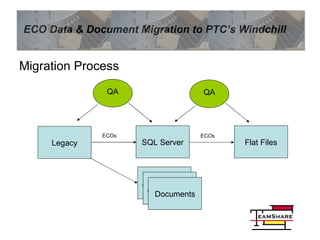
Migration Process Legacy SQL Server Flat Files Attachments Attachments Documents QA QA ECOs ECOs
Step 1: Proof of Concept Identify ECO & file data to migrate, according to Windchill data needs Map Legacy data to Windchill flat files Develop draft agents to export ECO & file data Identify issues to resolve and research solutions to confirm issues can be resolved
Step 2: Develop Migration Programs Finalize Data Dictionary and Mapping Develop programs to export ECO & file data to Intermediate SQL db and flat files Develop program to renumber dupes Develop Rules Engine to map data Test agents for accuracy and performance Develop QA application to ensure data quality
Step 3: Test Migration (T1,T2,R1,R2,R2a) Run series of data extractions to test programs, mapping, transformations, etc. 2x Test Runs (1K ECOs/14K Docs) 3x Rehearsals (full data) Export data to normalized SQL database and verify data in SQL Export data from SQL to flat files then QA data (Compare Legacy & Windchill)
Step 4: Migrate Archive Data (R3, R3a) Archive Data is data that will not change and represents 95% of the data Caution: some Life Cycle States will change Run data extraction like tests/rehearsals Verify data (Compare Legacy & SQL) Export data from SQL to flat files Resolve issues
Step 5: Migrate Live Data (GoLive) Connect to production for read-only Full data must be included in renumbering and mapping for consistency but flagged for exclusion from migration Run data extraction like Archive Migration More extensive data verification required Resolve issues and iterate Export data from SQL to flat files
Step 6: Validate Data Formal Process FDA Requirement Process should begin before GoLive and continue through post-GoLive Check for consistency and migration accuracy Bonus: identify legacy issues if done before GoLive
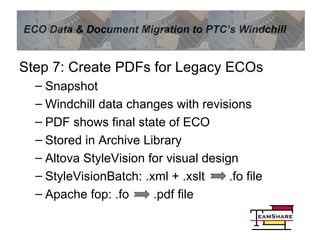
Step 7: Create PDFs for Legacy ECOs Snapshot Windchill data changes with revisions PDF shows final state of ECO Stored in Archive Library Altova StyleVision for visual design StyleVisionBatch: .xml + .xslt  .fo file Apache fop: .fo  .pdf file
Recommendations Maintain cross-team communication and don’t assume someone doesn’t “need to know” Identify, track, resolve issues proactively Develop comprehensive QA test plans and execute plans throughout project Carefully review & approve field map early Begin data mapping early and don’t underestimate the complexity
Summary of Contributions 12 month project in 8 months Micro-Innovation & Team Collaboration Migration Process Design & Development Issue Discovery, Tracking, Resolution Data Normalization & Transformation Rules Engine & Intelligent Processing Data Analysis, Organization, Presentation

Windchill Migration Overview

  • 1.
    TeamShare Solutions andBig Data Micro-Innovation Team Collaboration Intelligent Processing Normalization Transformation Analysis
  • 2.
    Project Overview Proofof Concept Develop Data/Doc Migration Programs Test Migration (T1,T2,R1,R2,R2a) Migrate Archive Data (R3, R3a) Migrate Live Data Validate Data Create PDFs for Legacy ECOs
  • 3.
    P2 ECOs P3LCS P1 Attach P7abc Zip P4 Rev #s P5 QA Rev P6 Load Rem Pb Con Re P8 Scripts P9 RetRec ECO Process P10 Renum Dupes P11 Fix Bad Filetypes Li Remote Affected Docs SQL Server Support Docs Cor Og Ir WC De Affected Docs Library Docs Flat File Extracts ECO Proc. Archive 2009 ECO Process Archive 2009
  • 4.
    Migration Data Statistics23,700 ECOs 61,700 unique Affected documents 345,000 files (Affected, Support, Long, etc.) 200+ gigabytes of data 3 ECO databases 20 Document databases 12 months completed in 7 months
  • 5.
    Migration Process LegacySQL Server Flat Files Attachments Attachments Documents QA QA ECOs ECOs
  • 6.
    Step 1: Proofof Concept Identify ECO & file data to migrate, according to Windchill data needs Map Legacy data to Windchill flat files Develop draft agents to export ECO & file data Identify issues to resolve and research solutions to confirm issues can be resolved
  • 7.
    Step 2: DevelopMigration Programs Finalize Data Dictionary and Mapping Develop programs to export ECO & file data to Intermediate SQL db and flat files Develop program to renumber dupes Develop Rules Engine to map data Test agents for accuracy and performance Develop QA application to ensure data quality
  • 8.
    Step 3: TestMigration (T1,T2,R1,R2,R2a) Run series of data extractions to test programs, mapping, transformations, etc. 2x Test Runs (1K ECOs/14K Docs) 3x Rehearsals (full data) Export data to normalized SQL database and verify data in SQL Export data from SQL to flat files then QA data (Compare Legacy & Windchill)
  • 9.
    Step 4: MigrateArchive Data (R3, R3a) Archive Data is data that will not change and represents 95% of the data Caution: some Life Cycle States will change Run data extraction like tests/rehearsals Verify data (Compare Legacy & SQL) Export data from SQL to flat files Resolve issues
  • 10.
    Step 5: MigrateLive Data (GoLive) Connect to production for read-only Full data must be included in renumbering and mapping for consistency but flagged for exclusion from migration Run data extraction like Archive Migration More extensive data verification required Resolve issues and iterate Export data from SQL to flat files
  • 11.
    Step 6: ValidateData Formal Process FDA Requirement Process should begin before GoLive and continue through post-GoLive Check for consistency and migration accuracy Bonus: identify legacy issues if done before GoLive
  • 12.
    Step 7: CreatePDFs for Legacy ECOs Snapshot Windchill data changes with revisions PDF shows final state of ECO Stored in Archive Library Altova StyleVision for visual design StyleVisionBatch: .xml + .xslt .fo file Apache fop: .fo .pdf file
  • 13.
    Recommendations Maintain cross-teamcommunication and don’t assume someone doesn’t “need to know” Identify, track, resolve issues proactively Develop comprehensive QA test plans and execute plans throughout project Carefully review & approve field map early Begin data mapping early and don’t underestimate the complexity
  • 14.
    Summary of Contributions12 month project in 8 months Micro-Innovation & Team Collaboration Migration Process Design & Development Issue Discovery, Tracking, Resolution Data Normalization & Transformation Rules Engine & Intelligent Processing Data Analysis, Organization, Presentation