INFORMATION TECHNOLOGY,
THE INTERNET, AND YOU
OBJECTIVES After you have read this chapter, you should be able to:
1
Explain the five parts of an information system: people, procedures, software, hardware, and data.
2
Distinguish between system software and application software.
3
Discuss the four kinds of system software programs.
4
Distinguish between special-purpose and general-purpose application software.
5
Identify the four types of computers and the three types of microcomputers.
6
Describe the different types of computer hardware including the system unit, input, output, storage, and
communication devices.
7
Define data and describe document, worksheet, database, and presentation files.
8
Explain computer connectivity, the wireless revolution, and the Internet.
Copyright©2004byTheMcGraw-HillCompanies,Inc.Allrightsreserved
ole65985_ch01_web.qxd 9/12/03 2:08 PM Page 2
CHAPTER 1
2
3
4
5
6
7
8
9
10
11
12
13
14
15
16
Information Technology (IT): Just as the Internet
and the Web have affected all of us, they have af-
fected computer technology as well. Today, com-
munication links to the Internet are a common
feature of almost all computer systems. Informa-
tion technology is a modern term that describes
this combination of traditional computer and com-
munication technologies.
The purpose of this book is to help you use and
understand information technology. This involves
two aspects: computer competency and computer
knowledge. Computer competency refers to acquir-
ing computer-related skills. These skills are indis-
pensable tools for today. They include how to
efficiently and effectively use popular application
packages and the Internet. Computer knowledge is
a deeper understanding of how technology works.
It provides a foundation for you to understand
how technology is being used today and how you
might use technology in the future. For example,
knowing how the Internet works provides the
foundation for you to understand the potential of
electronic commerce and to understand how infor-
mation about you can be collected and dispensed
without your consent.
In this chapter, we first present an overview of
an information system: people, procedures, soft-
ware, hardware, and data. It is essential to under-
stand these basic parts and how connectivity
through the Internet and the Web expands the role
of information technology in our lives. In subse-
quent chapters, we will describe these parts of an
information system in detail.
Fifteen years ago, most people had little to do
with computers, at least directly. Of course, they
filled out computerized forms, took computerized
tests, and paid computerized bills. But the real
work with computers was handled by specialists—
programmers, data entry clerks, and computer
operators.
Then microcomputers came along and changed
everything. Today it is easy for nearly everybody to
use a computer. Now:
• Microcomputers are common tools in all areas of
life. Writers write, artists draw, engineers and
scientists calculate—all on microcomputers. Stu-
dents and businesspeople do all this, and more.
• New forms of learning have developed. People
who are homebound, who work odd hours, or
who travel frequently may take courses on the
Web. A college course need not fit within the
usual time of a quarter or a semester.
• New ways to communicate, to find people with
similar interests, and to buy goods are available.
All kinds of people are using electronic mail,
electronic commerce, and the Internet to meet
and to share ideas and products.
What about you? How are you using informa-
tion technology? Many interesting and practical
uses have recently surfaced to make our personal
lives richer and more entertaining. These applica-
tions range from recording digital video clips to
creating personalized Web sites.
To be competent and knowledgeable with IT, you
need to know the five parts of an information sys-
tem: people, procedures, software, hardware, and
data. Additionally, you need to understand connec-
tivity, the wireless revolution, the Internet, and the
Web and to recognize the role of information tech-
nology in your personal and professional life.
Copyright©2004byTheMcGraw-HillCompanies,Inc.Allrightsreserved
ole65985_ch01_web.qxd 9/12/03 2:08 PM Page 3
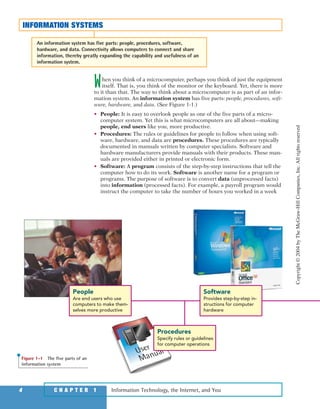
When you think of a microcomputer, perhaps you think of just the equipment
itself. That is, you think of the monitor or the keyboard. Yet, there is more
to it than that. The way to think about a microcomputer is as part of an infor-
mation system. An information system has five parts: people, procedures, soft-
ware, hardware, and data. (See Figure 1-1.)
• People: It is easy to overlook people as one of the five parts of a micro-
computer system. Yet this is what microcomputers are all about—making
people, end users like you, more productive.
• Procedures: The rules or guidelines for people to follow when using soft-
ware, hardware, and data are procedures. These procedures are typically
documented in manuals written by computer specialists. Software and
hardware manufacturers provide manuals with their products. These man-
uals are provided either in printed or electronic form.
• Software: A program consists of the step-by-step instructions that tell the
computer how to do its work. Software is another name for a program or
programs. The purpose of software is to convert data (unprocessed facts)
into information (processed facts). For example, a payroll program would
instruct the computer to take the number of hours you worked in a week
Information Technology, the Internet, and You4 C H A P T E R 1
INFORMATION SYSTEMS
An information system has five parts: people, procedures, software,
hardware, and data. Connectivity allows computers to connect and share
information, thereby greatly expanding the capability and usefulness of an
information system.
People
Are end users who use
computers to make them-
selves more productive
Software
Provides step-by-step in-
structions for computer
hardware
Procedures
Specify rules or guidelines
for computer operations
Figure 1-1 The five parts of an
information system
Copyright©2004byTheMcGraw-HillCompanies,Inc.Allrightsreserved
ole65985_ch01_web.qxd 9/12/03 2:08 PM Page 4
(data) and multiply it by your pay rate (data) to determine how much you
are paid for the week (information).
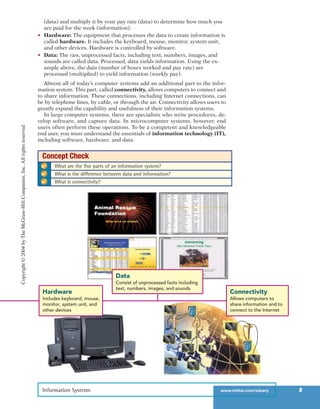
• Hardware: The equipment that processes the data to create information is
called hardware. It includes the keyboard, mouse, monitor, system unit,
and other devices. Hardware is controlled by software.
• Data: The raw, unprocessed facts, including text, numbers, images, and
sounds are called data. Processed, data yields information. Using the ex-
ample above, the data (number of hours worked and pay rate) are
processed (multiplied) to yield information (weekly pay).
Almost all of today’s computer systems add an additional part to the infor-
mation system. This part, called connectivity, allows computers to connect and
to share information. These connections, including Internet connections, can
be by telephone lines, by cable, or through the air. Connectivity allows users to
greatly expand the capability and usefulness of their information systems.
In large computer systems, there are specialists who write procedures, de-
velop software, and capture data. In microcomputer systems, however, end
users often perform these operations. To be a competent and knowledgeable
end user, you must understand the essentials of information technology (IT),
including software, hardware, and data.
Information Systems www.mhhe.com/oleary 5
Connectivity
Allows computers to
share information and to
connect to the Internet
Hardware
Includes keyboard, mouse,
monitor, system unit, and
other devices
Connectivity
Allows computers to
share information and to
connect to the Internet
Data
Consist of unprocessed facts including
text, numbers, images, and sounds
✔ What are the five parts of an information system?
✔ What is the difference between data and information?
✔ What is connectivity?
Concept Check
Copyright©2004byTheMcGraw-HillCompanies,Inc.Allrightsreserved
ole65985_ch01_web.qxd 9/12/03 2:08 PM Page 5
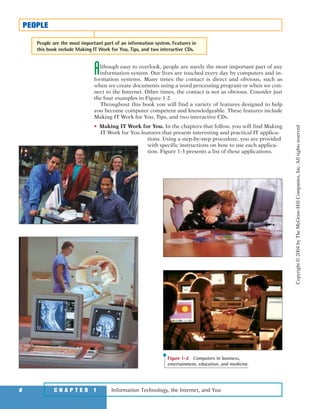
Although easy to overlook, people are surely the most important part of any
information system. Our lives are touched every day by computers and in-
formation systems. Many times the contact is direct and obvious, such as
when we create documents using a word processing program or when we con-
nect to the Internet. Other times, the contact is not as obvious. Consider just
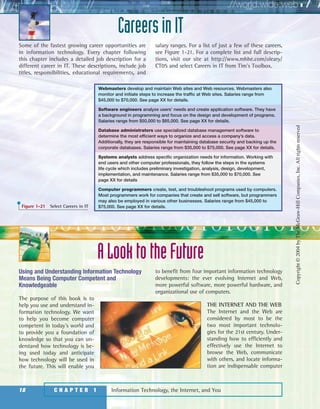
the four examples in Figure 1-2.
Throughout this book you will find a variety of features designed to help
you become computer competent and knowledgeable. These features include
Making IT Work for You, Tips, and two interactive CDs.
• Making IT Work for You. In the chapters that follow, you will find Making
IT Work for You features that present interesting and practical IT applica-
tions. Using a step-by-step procedure, you are provided
with specific instructions on how to use each applica-
tion. Figure 1-3 presents a list of these applications.
Information Technology, the Internet, and You6 C H A P T E R 1
PEOPLE
People are the most important part of an information system. Features in
this book include Making IT Work for You, Tips, and two interactive CDs.
Figure 1-2 Computers in business,
entertainment, education, and medicine
Copyright©2004byTheMcGraw-HillCompanies,Inc.Allrightsreserved
ole65985_ch01_web.qxd 9/12/03 2:08 PM Page 6
7
M A K I N G IT W O R K F O R YO U
INFORMATION TECHNOLOGY TOPICS
Information technology touches our lives every day in a personal way. Many
interesting and practical uses of IT have recently surfaced to make our lives
richer and more entertaining. In the following chapters, you will find these
applications presented in detail.
Instant Messaging Do you enjoy chatting
with your friends? Have you ever worked on a
group project and had problems getting every-
one together for a meeting? Perhaps instant
messaging is just what you’re looking for. See
page XX.
Web-based Applications Would you like ac-
cess to free general-purpose applications from
anywhere in the world? Would you like to be
able to access to your data files from almost
any computer? You can have it all with Web-
based applications. See page XX.
Personal Web Site Do you have anything to
share with the world? Would you like to create
a personal Web without having to learn any
special Web publishing programs? Would you
like to put your personal Web site on the Web
without having to pay for server time? Many
services are available to get you started for
FREE! See page XX.
Virus Protection Has your computer ever
been attacked by a computer virus? If not,
chances are that it will be in the near future.
Fortunately, special software is available to
protect you against computer viruses . . . some
of the software is even free! See page XX.
TV Tuner Cards and Video Clips Want to
watch your favorite television program while
you work? Perhaps you would like to include a
video clip from a television program or from a
VHS tape in a class presentation. It’s easy using
a TV tuner card. See page XX.
Digital Photography Want to edit your photos
on your computer? Would you like to share your
photos with family and friends over the Web?
Digital photography makes it easy to do. See
page XX.
Internet Telephony Would you like to make
long distance calls at little or no cost? You can
use your computer to make long distance calls
to almost any telephone in the world. All you
need is the right software and an Internet con-
nection to get started. See page XX.
Music from the Internet Did you know that
you can use the Internet to locate music, down-
load it to your computer, and create your own
compact discs? All it takes is the right soft-
ware, hardware, and a connection to the Inter-
net. See page XX.
Home Networking Computer networks are
not just for corporations and schools anymore.
If you have more than one computer, you can
use a wireless home network to share files and
printers, to allow multiple users access to the
Internet at the same time, and to play interac-
tive computer games. See page XX.
Spyware Are you concerned about maintain-
ing your privacy while you are surfing the Web?
Did you know that programs known as spy-
ware could be monitoring your every move?
Fortunately, these programs are relatively easy
to detect and remove. See page XX.
Job Opportunities Did you know that you can
use the Internet to find a job? You can browse
through job openings, post your resume, and
even use special programs that will search for
the job that’s just right for you. See page XX.
Figure 1-3 Making IT Work for
You topics
Copyright©2004byTheMcGraw-HillCompanies,Inc.Allrightsreserved
ole65985_ch01_web.qxd 9/12/03 2:08 PM Page 7
• Tips. We all can benefit from a few tips or suggestions. Throughout this
book you will find numerous Tips ranging from the basics of keeping your
computer system running smoothly to how to protect your privacy while
surfing the Web. For a partial list of the Tips presented in the following
chapters, see Figure 1-4. For a complete list, go to http://www.mhhe.com/
oleary/CT05 and select Tips from Tim’s Toolbox.
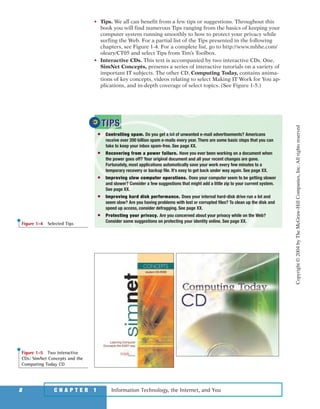
• Interactive CDs. This text is accompanied by two interactive CDs. One,
SimNet Concepts, presents a series of interactive tutorials on a variety of
important IT subjects. The other CD, Computing Today, contains anima-
tions of key concepts, videos relating to select Making IT Work for You ap-
plications, and in-depth coverage of select topics. (See Figure 1-5.)
Information Technology, the Internet, and You8 C H A P T E R 1
● Controlling spam. Do you get a lot of unwanted e-mail advertisements? Americans
receive over 200 billion spam e-mails every year. There are some basic steps that you can
take to keep your inbox spam-free. See page XX.
● Recovering from a power failure. Have you ever been working on a document when
the power goes off? Your original document and all your recent changes are gone.
Fortunately, most applications automatically save your work every few minutes to a
temporary recovery or backup file. It’s easy to get back under way again. See page XX.
● Improving slow computer operations. Does your computer seem to be getting slower
and slower? Consider a few suggestions that might add a little zip to your current system.
See page XX.
● Improving hard disk performance. Does your internal hard-disk drive run a lot and
seem slow? Are you having problems with lost or corrupted files? To clean up the disk and
speed up access, consider defragging. See page XX.
● Protecting your privacy. Are you concerned about your privacy while on the Web?
Consider some suggestions on protecting your identity online. See page XX.
TIPSTIPS
Figure 1-4 Selected Tips
Figure 1-5 Two interactive
CDs: SimNet Concepts and the
Computing Today CD
Copyright©2004byTheMcGraw-HillCompanies,Inc.Allrightsreserved
ole65985_ch01_web.qxd 9/12/03 2:08 PM Page 8
Software, as we mentioned, is another name for programs. Programs are the
instructions that tell the computer how to process data into the form you
want. In most cases, the words software and programs are interchangeable.
There are two major kinds of software—system software and application soft-
ware. You can think of application software as the kind you use. Think of sys-
tem software as the kind the computer uses.
SYSTEM SOFTWARE
The user interacts primarily with applica-
tion software. System software enables the
application software to interact with the
computer hardware. System software is
“background” software that helps the com-
puter manage its own internal resources.
System software is not a single program.
Rather it is a collection of programs:
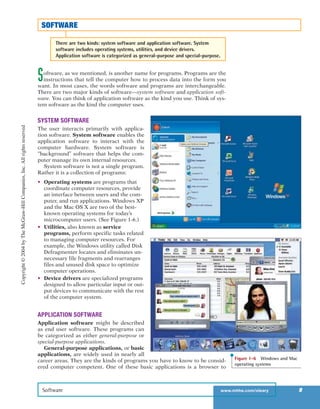
• Operating systems are programs that
coordinate computer resources, provide
an interface between users and the com-
puter, and run applications. Windows XP
and the Mac OS X are two of the best-
known operating systems for today’s
microcomputer users. (See Figure 1-6.)
• Utilities, also known as service
programs, perform specific tasks related
to managing computer resources. For
example, the Windows utility called Disk
Defragmenter locates and eliminates un-
necessary file fragments and rearranges
files and unused disk space to optimize
computer operations.
• Device drivers are specialized programs
designed to allow particular input or out-
put devices to communicate with the rest
of the computer system.
APPLICATION SOFTWARE
Application software might be described
as end user software. These programs can
be categorized as either general-purpose or
special-purpose applications.
General-purpose applications, or basic
applications, are widely used in nearly all
career areas. They are the kinds of programs you have to know to be consid-
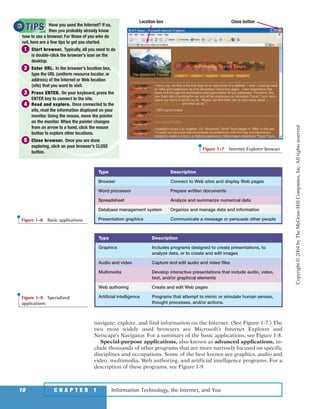
ered computer competent. One of these basic applications is a browser to
Software www.mhhe.com/oleary 9
SOFTWARE
There are two kinds: system software and application software. System
software includes operating systems, utilities, and device drivers.
Application software is categorized as general-purpose and special-purpose.
Figure 1-6 Windows and Mac
operating systems
Copyright©2004byTheMcGraw-HillCompanies,Inc.Allrightsreserved
ole65985_ch01_web.qxd 9/12/03 2:08 PM Page 9
navigate, explore, and find information on the Internet. (See Figure 1-7.) The
two most widely used browsers are Microsoft’s Internet Explorer and
Netscape’s Navigator. For a summary of the basic applications, see Figure 1-8.
Special-purpose applications, also known as advanced applications, in-
clude thousands of other programs that are more narrowly focused on specific
disciplines and occupations. Some of the best known are graphics, audio and
video, multimedia, Web authoring, and artificial intelligence programs. For a
description of these programs, see Figure 1-9.
Information Technology, the Internet, and You10 C H A P T E R 1
Have you used the Internet? If so,
then you probably already know
how to use a browser. For those of you who do
not, here are a few tips to get you started.
1 Start browser. Typically, all you need to do
is double-click the browser’s icon on the
desktop.
2 Enter URL. In the browser’s location box,
type the URL (uniform resource locator, or
address) of the Internet or Web location
(site) that you want to visit.
3 Press ENTER. On your keyboard, press the
ENTER key to connect to the site.
4 Read and explore. Once connected to the
site, read the information displayed on your
monitor. Using the mouse, move the pointer
on the monitor. When the pointer changes
from an arrow to a hand, click the mouse
button to explore other locations.
5 Close browser. Once you are done
exploring, click on your browser’s CLOSE
button.
TIPSTIPS
Location box Close button
Figure 1-7 Internet Explorer browser
Type Description
Graphics Includes programs designed to create presentations, to
analyze data, or to create and edit images
Audio and video Capture and edit audio and video files
Multimedia Develop interactive presentations that include audio, video,
text, and/or graphical elements
Web authoring Create and edit Web pages
Artificial intelligence Programs that attempt to mimic or simulate human senses,
thought processes, and/or actions.
Figure 1-9 Specialized
applications
Type Description
Browser Connect to Web sites and display Web pages
Word processor Prepare written documents
Spreadsheet Analyze and summarize numerical data
Database management system Organize and manage data and information
Presentation graphics Communicate a message or persuade other peopleFigure 1-8 Basic applications
Copyright©2004byTheMcGraw-HillCompanies,Inc.Allrightsreserved
ole65985_ch01_web.qxd 9/12/03 2:08 PM Page 10
Computers are electronic devices that can follow instructions to accept input,
process that input, and produce information. This book focuses principally
on microcomputers. However, it is almost certain that you will come in con-
tact, at least indirectly, with other types of computers.
TYPES OF COMPUTERS
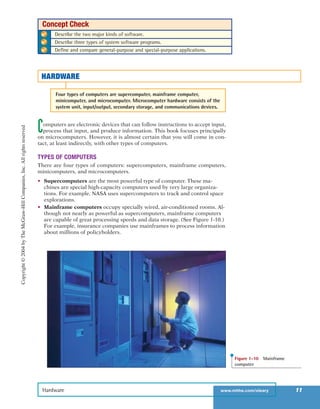
There are four types of computers: supercomputers, mainframe computers,
minicomputers, and microcomputers.
• Supercomputers are the most powerful type of computer. These ma-
chines are special high-capacity computers used by very large organiza-
tions. For example, NASA uses supercomputers to track and control space
explorations.
• Mainframe computers occupy specially wired, air-conditioned rooms. Al-
though not nearly as powerful as supercomputers, mainframe computers
are capable of great processing speeds and data storage. (See Figure 1-10.)
For example, insurance companies use mainframes to process information
about millions of policyholders.
Hardware www.mhhe.com/oleary 11
✔ Describe the two major kinds of software.
✔ Describe three types of system software programs.
✔ Define and compare general-purpose and special-purpose applications.
Concept Check
HARDWARE
Four types of computers are supercomputer, mainframe computer,
minicomputer, and microcomputer. Microcomputer hardware consists of the
system unit, input/output, secondary storage, and communications devices.
Figure 1-10 Mainframe
computer
Copyright©2004byTheMcGraw-HillCompanies,Inc.Allrightsreserved
ole65985_ch01_web.qxd 9/12/03 2:08 PM Page 11
• Minicomputers, also known as midrange computers, are refrigerator-
sized machines. Medium-sized companies or departments of large compa-
nies typically use them for specific purposes. For example, production
departments use minicomputers to monitor certain manufacturing
processes and assembly line operations.
• Microcomputers are the least powerful, yet the most widely used
and fastest-growing, type of computer. There are four types of micro-
computers: desktop, notebook, tablet PC, and handheld computers. (See
Figure 1-11.) Desktop computers are small enough to fit on top of or
alongside a desk yet are too big to carry around. Notebook computers,
also known as laptop computers, are portable, weigh between 4 and 10
pounds, and fit into most briefcases. A tablet PC is a type of notebook com-
puter that accepts your handwriting. This input is digitized and converted
to standard text that can be further processed by programs such as a word
processor. Handheld computers are the smallest and are designed to fit
into the palm of one hand. Also known as palm computers, these systems
typically combine pen input, writing recognition, personal organizational
tools, and communications capabilities in a very small package. Personal
digital assistants (PDA) are the most widely used handheld computer.
Information Technology, the Internet, and You12 C H A P T E R 1
Figure 1-11 Microcomputers
Desktop
Notebook
Tablet PC
Handheld
Copyright©2004byTheMcGraw-HillCompanies,Inc.Allrightsreserved
ole65985_ch01_web.qxd 9/12/03 2:08 PM Page 12
MICROCOMPUTER HARDWARE
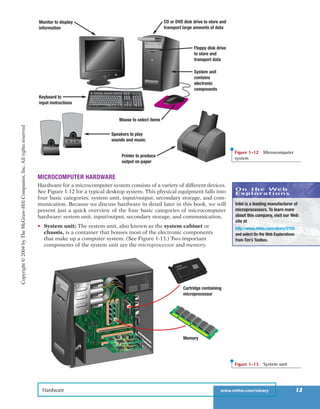
Hardware for a microcomputer system consists of a variety of different devices.
See Figure 1-12 for a typical desktop system. This physical equipment falls into
four basic categories: system unit, input/output, secondary storage, and com-
munication. Because we discuss hardware in detail later in this book, we will
present just a quick overview of the four basic categories of microcomputer
hardware: system unit, input/output, secondary storage, and communication.
• System unit: The system unit, also known as the system cabinet or
chassis, is a container that houses most of the electronic components
that make up a computer system. (See Figure 1-13.) Two important
components of the system unit are the microprocessor and memory.
Hardware www.mhhe.com/oleary 13
CD or DVD disk drive to store and
transport large amounts of data
Keyboard to
input instructions
Monitor to display
information
Floppy disk drive
to store and
transport data
System unit
contains
electronic
components
Mouse to select items
Speakers to play
sounds and music
Printer to produce
output on paper
Figure 1-12 Microcomputer
system
Cartridge containing
microprocessor
Memory
Figure 1-13 System unit
On the Web
Explorations
Intel is a leading manufacturer of
microprocessors. To learn more
about this company, visit our Web
site at
http://www.mhhe.com/oleary/CT05
and select On the Web Explorations
from Tim’s Toolbox.
Copyright©2004byTheMcGraw-HillCompanies,Inc.Allrightsreserved
ole65985_ch01_web.qxd 9/12/03 2:08 PM Page 13
The microprocessor controls and manipulates data to produce informa-
tion. Many times the microprocessor is contained within a protective car-
tridge. Memory, also known as primary storage or random access
memory (RAM), holds data and program instructions for processing the
data. It also holds the processed information before it is output. Memory is
sometimes referred to as temporary storage because its contents will typ-
ically be lost if the electrical power to the computer is disrupted.
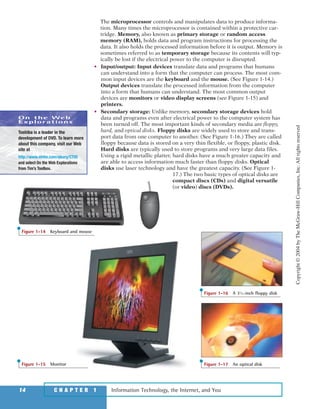
• Input/output: Input devices translate data and programs that humans
can understand into a form that the computer can process. The most com-
mon input devices are the keyboard and the mouse. (See Figure 1-14.)
Output devices translate the processed information from the computer
into a form that humans can understand. The most common output
devices are monitors or video display screens (see Figure 1-15) and
printers.
• Secondary storage: Unlike memory, secondary storage devices hold
data and programs even after electrical power to the computer system has
been turned off. The most important kinds of secondary media are floppy,
hard, and optical disks. Floppy disks are widely used to store and trans-
port data from one computer to another. (See Figure 1-16.) They are called
floppy because data is stored on a very thin flexible, or floppy, plastic disk.
Hard disks are typically used to store programs and very large data files.
Using a rigid metallic platter, hard disks have a much greater capacity and
are able to access information much faster than floppy disks. Optical
disks use laser technology and have the greatest capacity. (See Figure 1-
17.) The two basic types of optical disks are
compact discs (CDs) and digital versatile
(or video) discs (DVDs).
Information Technology, the Internet, and You14 C H A P T E R 1
Figure 1-15 Monitor
Figure 1-16 A 31
⁄2-inch floppy disk
Figure 1-17 An optical disk
Figure 1-14 Keyboard and mouse
On the Web
Explorations
Toshiba is a leader in the
development of DVD. To learn more
about this company, visit our Web
site at
http://www.mhhe.com/oleary/CT05
and select On the Web Explorations
from Tim’s Toolbox.
Copyright©2004byTheMcGraw-HillCompanies,Inc.Allrightsreserved
ole65985_ch01_web.qxd 9/12/03 2:08 PM Page 14
• Communication: At one time, it was uncommon for a microcomputer sys-
tem to communicate with other computer systems. Now, using communi-
cation devices, a microcomputer can communicate with other computer
systems located as near as the next office or as far as halfway around the
world using the Internet. The most widely used communication device is a
modem, which modifies telephone communications into a form that can
be processed by a computer. Modems also modify computer output into a
form that can be transmitted across standard telephone lines.
Data www.mhhe.com/oleary 15
✔ What are the four types of computers?
✔ Describe the four types of microcomputers.
✔ Describe the four basic categories of microcomputer hardware.
Concept Check
DATA
Data are unprocessed facts. Processing data creates information. Four
common file types are document, worksheet, database, and presentation.
Data are raw, unprocessed facts, including text, numbers, images, and sounds.
As we have mentioned earlier, processed data becomes information. When
stored electronically in files, data can be used directly as input for the infor-
mation system.
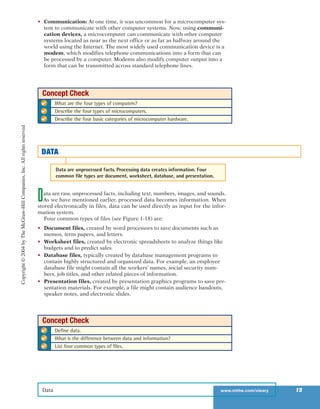
Four common types of files (see Figure 1-18) are:
• Document files, created by word processors to save documents such as
memos, term papers, and letters.
• Worksheet files, created by electronic spreadsheets to analyze things like
budgets and to predict sales.
• Database files, typically created by database management programs to
contain highly structured and organized data. For example, an employee
database file might contain all the workers’ names, social security num-
bers, job titles, and other related pieces of information.
• Presentation files, created by presentation graphics programs to save pre-
sentation materials. For example, a file might contain audience handouts,
speaker notes, and electronic slides.
✔ Define data.
✔ What is the difference between data and information?
✔ List four common types of files.
Concept Check
Copyright©2004byTheMcGraw-HillCompanies,Inc.Allrightsreserved
ole65985_ch01_web.qxd 9/12/03 2:08 PM Page 15
Connectivity is the capability of your microcomputer to share information
with other computers. Data and information can be sent over telephone
lines or cable and through the air. Thus, your microcomputer can be con-
nected to other computers, to the Internet, and to many computerized data
banks and other sources of information worldwide.
The single most dramatic change in connectivity in the past five years has
been the widespread use of mobile or wireless communication devices. Once
used exclusively for telephone communications, these devices are now widely
used to connect people and computers located almost anywhere in the world.
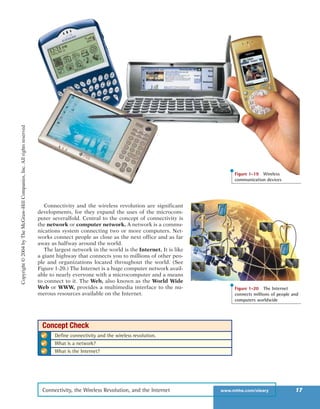
For just a few of these devices, see Figure 1-19. Many experts predict that these
wireless applications are just the beginning of the wireless revolution, a rev-
olution that is expected to dramatically affect the way we communicate and
use computer technology.
Information Technology, the Internet, and You16 C H A P T E R 1
Document
Worksheet
Database
Presentation
Figure 1-18 Four types of
files: document, worksheet,
database, and presentation
CONNECTIVITY, THE WIRELESS REVOLUTION, AND THE INTERNET
Connectivity allows sharing of information worldwide. The wireless
revolution is expected to alter communications and computer systems. The
Internet is the largest network in the world.
Copyright©2004byTheMcGraw-HillCompanies,Inc.Allrightsreserved
ole65985_ch01_web.qxd 9/12/03 2:08 PM Page 16
Connectivity and the wireless revolution are significant
developments, for they expand the uses of the microcom-
puter severalfold. Central to the concept of connectivity is
the network or computer network. A network is a commu-
nications system connecting two or more computers. Net-
works connect people as close as the next office and as far
away as halfway around the world.
The largest network in the world is the Internet. It is like
a giant highway that connects you to millions of other peo-
ple and organizations located throughout the world. (See
Figure 1-20.) The Internet is a huge computer network avail-
able to nearly everyone with a microcomputer and a means
to connect to it. The Web, also known as the World Wide
Web or WWW, provides a multimedia interface to the nu-
merous resources available on the Internet.
Connectivity, the Wireless Revolution, and the Internet www.mhhe.com/oleary 17
Figure 1-19 Wireless
communication devices
Figure 1-20 The Internet
connects millions of people and
computers worldwide
✔ Define connectivity and the wireless revolution.
✔ What is a network?
✔ What is the Internet?
Concept Check
Copyright©2004byTheMcGraw-HillCompanies,Inc.Allrightsreserved
ole65985_ch01_web.qxd 9/12/03 2:08 PM Page 17
Some of the fastest growing career opportunities are
in information technology. Every chapter following
this chapter includes a detailed job description for a
different career in IT. These descriptions, include job
titles, responsibilities, educational requirements, and
salary ranges. For a list of just a few of these careers,
see Figure 1-21. For a complete list and full descrip-
tions, visit our site at http://www.mhhe.com/oleary/
CT05 and select Careers in IT from Tim’s Toolbox.
CareersinIT
Information Technology, the Internet, and You18 C H A P T E R 1
Webmasters develop and maintain Web sites and Web resources. Webmasters also
monitor and initiate steps to increase the traffic at Web sites. Salaries range from
$45,000 to $70,000. See page XX for details.
Software engineers analyze users’ needs and create application software. They have
a background in programming and focus on the design and development of programs.
Salaries range from $50,000 to $85,000. See page XX for details.
Database administrators use specialized database management software to
determine the most efficient ways to organize and access a company’s data.
Additionally, they are responsible for maintaining database security and backing up the
corporate databases. Salaries range from $35,000 to $75,000. See page XX for details.
Systems analysts address specific organization needs for information. Working with
end users and other computer professionals, they follow the steps in the systems
life cycle which includes preliminary investigation, analysis, design, development,
implementation, and maintenance. Salaries range from $35,000 to $70,000. See
page XX for details
Computer programmers create, test, and troubleshoot programs used by computers.
Most programmers work for companies that create and sell software, but programmers
may also be employed in various other businesses. Salaries range from $45,000 to
$75,000. See page XX for details.Figure 1-21 Select Careers in IT
Using and Understanding Information Technology
Means Being Computer Competent and
Knowledgeable
The purpose of this book is to
help you use and understand in-
formation technology. We want
to help you become computer
competent in today’s world and
to provide you a foundation of
knowledge so that you can un-
derstand how technology is be-
ing used today and anticipate
how technology will be used in
the future. This will enable you
to benefit from four important information technology
developments: the ever evolving Internet and Web,
more powerful software, more powerful hardware, and
organizational use of computers.
THE INTERNET AND THE WEB
The Internet and the Web are
considered by most to be the
two most important technolo-
gies for the 21st century. Under-
standing how to efficiently and
effectively use the Internet to
browse the Web, communicate
with others, and locate informa-
tion are indispensable computer
ALooktotheFuture
Copyright©2004byTheMcGraw-HillCompanies,Inc.Allrightsreserved
ole65985_ch01_web.qxd 9/12/03 2:08 PM Page 18
A Look into the Future www.mhhe.com/oleary 19
competencies. Understanding how the Internet and the
Web work provides a foundation to appreciate their
positive aspects such as the enormous potential of elec-
tronic commerce. These issues are presented in Chapter
2, The Internet, the Web, and Electronic Commerce.
POWERFUL SOFTWARE
The software now available can do an extraordinary
number of tasks and help you in an endless number of
ways. You can create professional looking documents,
analyze massive amounts of data, create dynamic mul-
timedia Web pages, and much more. Today’s employers
are expecting the people they hire to be able to effec-
tively and efficiently use a variety of different types of
software. General-purpose and special-purpose appli-
cations are presented in Chapters 3 and 4. System soft-
ware is presented in Chapter 5.
POWERFUL HARDWARE
Microcomputers are now much more powerful than
they used to be. Indeed, the newer models have the
speed and power of room-size computers of only a few
years ago. New communication technologies such as
wireless networks are dramatically changing the ways
to connect to other computers, networks, and the In-
ternet. However, despite the rapid change of specific
equipment, their essential features remain unchanged.
Thus, the competent and knowledgeable end user
should focus on these features. Chapters 6 through 10
explain what you need to know about hardware: the
central processing unit, input, output, secondary stor-
age, and communication. A Buyer’s Guide and an Up-
grader’s Guide are presented at the end of this book
for those considering the purchase or upgrade of a mi-
crocomputer system.
SECURITY AND PRIVACY
What about people? Is there a downside to all these
technological advances? Experts agree that we as a so-
ciety must be careful about the potential of technol-
ogy to negatively impact our personal privacy and
security. Additionally, we need to be aware of potential
physical and mental health risks associated with using
technology. Finally, we need to be aware of negative
effects on our environment caused by the manufacture
of computer-related products. Thus, Chapter 11 ex-
plores each of these critical issues in detail.
ORGANIZATIONS
Almost all organizations rely on the quality and flexi-
bility of their information systems to stay competitive.
As a member or employee of an organization, you will
undoubtedly be involved in these information systems.
Therefore, you need to be knowledgeable about the
different types of organizational information systems
and how they are used. Accordingly, we devote Chap-
ters 12 through 15 to detail what you need to know
about information systems and how to develop, mod-
ify, and maintain these systems.
CHANGING TIMES
Are the times changing any faster now than they ever
have? Most people think so. Those who were alive
when radios, cars, and airplanes were being introduced
certainly lived through some dramatic changes. Has
technology made our own times even more dynamic?
Whatever the answer, it is clear we live in a fast-paced
age. The Evolution of the Computer Age section pre-
sented at the end of this book tracks the major devel-
opments since computers were first introduced.
Most people and businesses have become aware
that they must adapt to changing technology or be
left behind. Almost all major organizations have plans
to keep track of technology and to use it in their com-
petitive strategies. Nearly every corporation in the
world has a presence on the Internet. Delivery services
such as Federal Express and UPS provide customers
with the ability to personally track the delivery of their
packages. Retail stores such as JCPenney and Wal-
Mart provide catalog support and sales. Banks such as
Wells Fargo and Citibank support home banking and
electronic commerce. You can even purchase tickets to
music, theater, and sporting events on the Internet.
Clearly, such changes do away with some jobs—
those of many bank tellers and cashiers, for example.
However, they create opportunities for other people.
New technology requires people who are truly capable
of working with it. These are not the people who think
every piece of equipment is so simple they can just
turn it on and use it. Nor are they those who think
each new machine is a potential disaster. In other
words, new technology needs people who are not
afraid to learn about it and who are able to manage it.
The real issue, then, is not how to make technology
better. Rather, it is how to integrate the technology
with people. In Chapter 16 we discuss these issues,
your future, and information technology.
After reading this book, you will be in a very favor-
able position compared with many other people in in-
dustry today. You will learn not only the basics of
hardware, software, connectivity, the Internet, and the
Web—you will also learn the most current technology.
You will be able to use these tools to your advantage—
to be a winner.
Copyright©2004byTheMcGraw-HillCompanies,Inc.Allrightsreserved
ole65985_ch01_web.qxd 9/12/03 2:08 PM Page 19
Information Technology, the Internet, and You20 C H A P T E R 1
INFORMATION SYSTEMS
The way to think about a microcomputer is to re-
alize that it is one part of an information
system. Five parts of an information system:
1. People are obviously the essential part of the
system! The purpose of information systems
is to make people, or end users like you,
more productive.
2. Procedures are rules or guidelines to follow
when using software, hardware, and data.
They are typically documented in manuals
written by computer professionals.
3. Software (programs) provides step-by-step
instructions to control the computer to con-
vert data into information.
4. Hardware consists of the physical equip-
ment. It is controlled by software and
processes data to create information.
5. Data consists of unprocessed facts including
text, numbers, images, and sound. Informa-
tion is data that has been processed by the
computer.
Connectivity is an additional part to today’s in-
formation systems. It allows computers to con-
nect and share information. To be computer
competent and knowledgeable, end users need
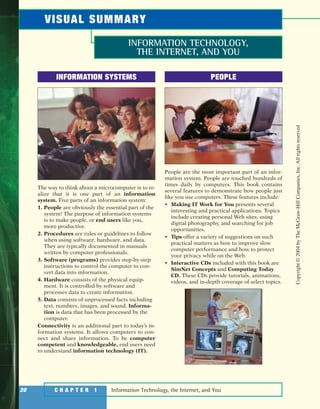
to understand information technology (IT).
PEOPLE
People are the most important part of an infor-
mation system. People are touched hundreds of
times daily by computers. This book contains
several features to demonstrate how people just
like you use computers. These features include:
• Making IT Work for You presents several
interesting and practical applications. Topics
include creating personal Web sites, using
digital photography, and searching for job
opportunities.
• Tips offer a variety of suggestions on such
practical matters as how to improve slow
computer performance and how to protect
your privacy while on the Web.
• Interactive CDs included with this book are
SimNet Concepts and Computing Today
CD. These CDs provide tutorials, animations,
videos, and in-depth coverage of select topics.
INFORMATION TECHNOLOGY,
THE INTERNET, AND YOU
VISUAL SUMMARY
Copyright©2004byTheMcGraw-HillCompanies,Inc.Allrightsreserved
ole65985_ch01_web.qxd 9/12/03 2:08 PM Page 20
Visual Summary www.mhhe.com/oleary 21
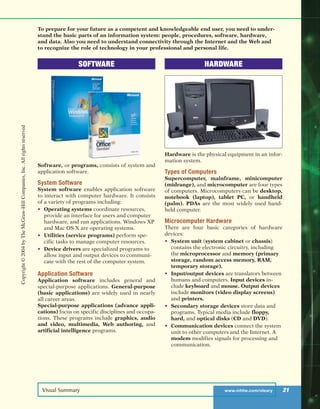
SOFTWARE
Software, or programs, consists of system and
application software.
System Software
System software enables application software
to interact with computer hardware. It consists
of a variety of programs including:
• Operating systems coordinate resources,
provide an interface for users and computer
hardware, and run applications. Windows XP
and Mac OS X are operating systems.
• Utilities (service programs) perform spe-
cific tasks to manage computer resources.
• Device drivers are specialized programs to
allow input and output devices to communi-
cate with the rest of the computer system.
Application Software
Application software includes general and
special-purpose applications. General-purpose
(basic applications) are widely used in nearly
all career areas.
Special-purpose applications (advance appli-
cations) focus on specific disciplines and occupa-
tions. These programs include graphics, audio
and video, multimedia, Web authoring, and
artificial intelligence programs.
HARDWARE
Hardware is the physical equipment in an infor-
mation system.
Types of Computers
Supercomputer, mainframe, minicomputer
(midrange), and microcomputer are four types
of computers. Microcomputers can be desktop,
notebook (laptop), tablet PC, or handheld
(palm). PDAs are the most widely used hand-
held computer.
Microcomputer Hardware
There are four basic categories of hardware
devices:
• System unit (system cabinet or chassis)
contains the electronic circuitry, including
the microprocessor and memory (primary
storage, random access memory, RAM,
temporary storage).
• Input/output devices are translators between
humans and computers. Input devices in-
clude keyboard and mouse. Output devices
include monitors (video display screens)
and printers.
• Secondary storage devices store data and
programs. Typical media include floppy,
hard, and optical disks (CD and DVD).
• Communication devices connect the system
unit to other computers and the Internet. A
modem modifies signals for processing and
communication.
To prepare for your future as a competent and knowledgeable end user, you need to under-
stand the basic parts of an information system: people, procedures, software, hardware,
and data. Also you need to understand connectivity through the Internet and the Web and
to recognize the role of technology in your professional and personal life.
Copyright©2004byTheMcGraw-HillCompanies,Inc.Allrightsreserved
ole65985_ch01_web.qxd 9/12/03 2:08 PM Page 21
Information Technology, the Internet, and You22 C H A P T E R 1
DATA
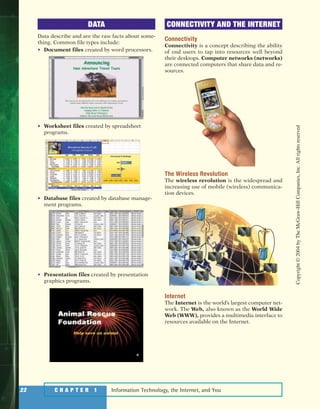
Data describe and are the raw facts about some-
thing. Common file types include:
• Document files created by word processors.
• Worksheet files created by spreadsheet
programs.
• Database files created by database manage-
ment programs.
• Presentation files created by presentation
graphics programs.
CONNECTIVITY AND THE INTERNET
Connectivity
Connectivity is a concept describing the ability
of end users to tap into resources well beyond
their desktops. Computer networks (networks)
are connected computers that share data and re-
sources.
The Wireless Revolution
The wireless revolution is the widespread and
increasing use of mobile (wireless) communica-
tion devices.
Internet
The Internet is the world’s largest computer net-
work. The Web, also known as the World Wide
Web (WWW), provides a multimedia interface to
resources available on the Internet.
Copyright©2004byTheMcGraw-HillCompanies,Inc.Allrightsreserved
ole65985_ch01_web.qxd 9/12/03 2:08 PM Page 22
Key Terms www.mhhe.com/oleary 23
KEY TERMS
advanced application (10)
application software (9)
basic application (9)
chassis (13)
communication device (15)
compact disc (CD) (14)
computer competency (3)
computer knowledge (3)
computer network (17)
Computing Today CD (8)
connectivity (5)
data (5)
database file (15)
device driver (9)
desktop computer (12)
digital versatile disc (DVD) (14)
digital video disc (DVD) (14)
document file (15)
end user (4)
floppy disk (14)
general-purpose application (9)
handheld computer (12)
hard disk (14)
hardware (5)
information (4)
information system (4)
information technology (IT) (5)
input device (14)
Internet (17)
keyboard (14)
laptop computer (12)
mainframe computer (11)
memory (14)
microcomputer (12)
microprocessor (14)
midrange computer (12)
minicomputer (12)
modem (15)
monitor (14)
mouse (14)
network (17)
notebook computer (12)
operating system (9)
optical disk (14)
output device (14)
palm computer (12)
people (4)
personal digital assistant (PDA) (12)
presentation file (15)
primary storage (14)
printer (14)
procedures (4)
program (4)
random access memory (RAM) (14)
secondary storage device (14)
service program (9)
software (4)
special-purpose application (10)
supercomputer (11)
SimNet Concepts (8)
system cabinet (13)
system software (9)
system unit (13)
tablet PC (12)
temporary storage (14)
utility (9)
video display screen (14)
Web (17)
wireless revolution (16)
worksheet file (15)
World Wide Web (WWW) (17)
To test your knowledge of these key terms with animated flash cards, select Flash Cards from Tim’s
Toolbox at http://www.mhhe.com/oleary/CT05.
Copyright©2004byTheMcGraw-HillCompanies,Inc.Allrightsreserved
ole65985_ch01_web.qxd 9/12/03 2:08 PM Page 23
Information Technology, the Internet, and You24 C H A P T E R 1
ACROSS
4 Displays data processed by the computer
6 Also known as handheld computers
8 Another word for program
10 A huge computer network available to
nearly everyone with a microcomputer
11 CPU of a microcomputer
14 Also known as laptop computers
15 End users
16 Small, low-cost computer for individual
users
17 Is a type of
notebook
computer that
accepts
handwritten input
18 Computer systems
large or micro that
provide
understanding to
the end user
19 Data that has been
processed by a
computer system
20 Holding area for data instructions
and information
21 A service providing multimedia
interface to resources on the
Internet
22 Computers that are designed to fit
into the palm
24 Input device
25 Internet service using hypertext
DOWN
1 Computer that is portable and fits into most
briefcases
2 Also known as a service program, manages
computer resources
3 Instructions for the computer to follow in
order to process data
5 Device that rolls and directs the cursor
7 Can process several million program
instructions per second
8 Fastest calculating device
9 Desk-sized computer between micro and
mainframe
11 Short for modulator-demodulator
12 Also known as minicomputer
13 Volatile temporary storage
14 Arrangement in which various
communications channels are connected
15 Device that produces printed-paper output
22 The equipment that processes the data to
create information
23 Raw unprocessed facts
20
18
15
11
12
13
16
19
21 22
25
23 24
17
14
9
5
2 3
4
10
876
1
CHAPTER REVIEW
CROSSWORD
Interactive crossword puzzles are available by selecting Crosswords from Tim’s Toolbox at
http://www.mhhe.com/oleary/CT05.
Copyright©2004byTheMcGraw-HillCompanies,Inc.Allrightsreserved
ole65985_ch01_web.qxd 9/12/03 2:08 PM Page 24
Chapter Review www.mhhe.com/oleary 25
MULTIPLE CHOICE
Circle the letter or fill in the correct answer.
1. Computer refers to acquiring computer related skills.
a. competency d. networked
b. aware e. active
c. connectivity
2. The consist(s) of the equipment: keyboard, mouse, monitor, system unit, and other
devices.
a. people d. system unit
b. procedures e. information
c. hardware
3. The is one of the system software programs.
a. word processor d. application software
b. database management system e. information system
c. operating system
4. Browsers, word processors, and spreadsheets are applications.
a. special-purpose d. artificial intelligence
b. general-purpose e. multimedia
c. advanced
5. A computer is another name for a notebook computer.
a. PDA d. DVD
b. laptop e. handheld
c. midrange
6. is sometimes referred to as temporary storage.
a. PDA d. DVD
b. CD e. Secondary storage
c. RAM
7. The type of disk that uses laser technology:
a. concentric d. floppy
b. layered e. optical
c. hard
8. A file might contain audience handouts, speaker notes, and electronic slides.
a. document d. presentation
b. database e. floppy disk
c. worksheet
9. The term refers to the widespread use of mobile communication devices.
a. IT d. RAM
b. wireless revolution e. WWW
c. PDA
10. The largest network in the world is called the .
a. Internet d. Web
b. WWW e. all of the above
c. World Wide Web
To test your knowledge of this chapter, select Self Test from Tim’s Toolbox at
http://www.mhhe.com/oleary/CT05.
Copyright©2004byTheMcGraw-HillCompanies,Inc.Allrightsreserved
ole65985_ch01_web.qxd 9/12/03 2:08 PM Page 25
Information Technology, the Internet, and You26 C H A P T E R 1
MATCHING
Match each numbered item with the most closely related lettered item. Write your answers in the
spaces provided.
a. application
software
b. computer
network
c. connectivity
d. database files
e. document file
f. hard disks
g. information
h. input device
i. mainframe
computer
j. microcomputers
k. optical disks
l. output device
m. primary storage
n. procedures
o. program
p. secondary
storage device
q. supercomputers
r. system software
s. system unit
t. the Internet
1. Guidelines for people to follow when using software, hardware, and
data. _____
2. Consists of the step-by-step instructions that tell the computer how to
do its work.
3. Although not the most powerful, this type of computer is capable of
great processing speeds and data storage.
4. The capability of a microcomputer to share information with other
computers.
5. Software that enables the application software to interact with the
computer hardware.
6. End user software.
7. The most powerful type of computer.
8. Data that has been processed through the computer.
9. Translates processed information from the computer into a form that
humans can understand.
10. Container that houses most of the electronic components that make up
a computer system.
11. The least powerful and most widely used type of computer.
12. Translates data and programs that humans can understand into a form
that the computer can process.
13. Created by database management programs.
14. Holds data and programs even after electrical power to the system has
been turned off.
15. Typically used to store programs and very large data files.
16. Use laser technology and have the greatest capacity of all secondary
storage.
17. Created by word processors to save documents.
18. Holds data and program instructions for processing data.
19. Communications system connecting two or more computers.
20. The largest network in the world.
OPEN-ENDED
On a separate sheet of paper, respond to each question or statement.
1. Explain the five parts of an information system. What part do people play in this system?
2. What is system software? What kinds of programs are included in system software? What is the
difference between system software and application software? What are the most common ba-
sic applications?
3. Define and compare general-purpose and special-purpose application software. Describe
some different types of general-purpose applications. Describe some types of special-purpose
applications.
4. Describe the different types of computers. What is the most common type? What are the types
of microcomputers?
5. What is connectivity? How are the wireless revolution and connectivity related? What is a
computer network? What are the Internet and the Web?
Copyright©2004byTheMcGraw-HillCompanies,Inc.Allrightsreserved
ole65985_ch01_web.qxd 9/12/03 2:08 PM Page 26
USING TECHNOLOGY
Using Technology www.mhhe.com/oleary 27
Making a habit of keeping current with technology trends is a key to
your success with information technology. In each of this
book’s chapters, the Using Technology feature will pre-
sent four questions designed to help you gain a better
understanding of how technology is being used today.
The first question in Using Technology typically relates
to one of the Making IT Work for You topics. Some of
these topics are listed below. Select the two that you find the
most interesting and then describe why they are of interest to
you and how you might use (or, are using) those applications.
• Instant Messaging Do you enjoy chatting with your friends? Have you ever worked on a group
project and had problems getting everyone together for a meeting? Perhaps instant messaging is
just what you’re looking for. See page X.
• TV Tuner Cards and Video Clips Want
to watch your favorite television program
while you work? Perhaps you would like
to include a video clip from a television
program or from a VHS tape in a class
presentation. It’s easy using a TV tuner
card. See page XX.
• Digital Photography Want to edit your
photos on your computer? Would you
like to share your photos with family and
friends over the Web? Digital photogra-
phy makes it easy to do. See page XX.
• Home Networking Computer networks are not just for corporations and schools anymore. If you
have more than one computer, you can use a wireless home network to share files and printers, to
allow multiple users access to the Internet at the same time, and to play interactive computer
games. See page XX.
• Job Opportunities Did you know that you can use the Internet to find a job? You can browse
through job openings, post your resume, and even use special programs that will search for the job
that’s just right for you. See page XX.
1
Copyright©2004byTheMcGraw-HillCompanies,Inc.Allrightsreserved
ole65985_ch01_web.qxd 9/12/03 2:08 PM Page 27
Information Technology, the Internet, and You28 C H A P T E R 1 Information Technology, the Internet, and You
In each of the following chapters, questions in Using Technology focus on interesting applications of
technology that relate directly to you. Some of those applications are listed below. Select the two that you
find the most interesting and then describe why they are of interest to you and how you might use (or,
are using) those applications.
• Online Auctions Have you ever participated in an online auction? You can purchase or sell all
types of goods from baseball cards to used and new automobiles. What are some of the pros and
cons? How can you protect yourself as a buyer and as a seller? See page X.
• Online Personal Information Manager Do you have a PDA? Many people do and they have be-
come very dependent on them to record personal schedules, addresses, telephone numbers, e-mail
addresses, and much more. What
if the PDA gets lost? One way to
protect yourself is to back up
the information onto another
computer. Or, you could use
an online personal information
manager. See page X.
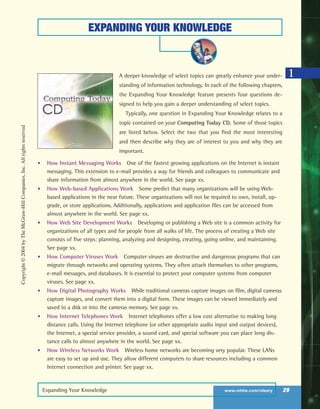
• Utility Suites Are you con-
cerned about keeping your com-
puter tuned up and safe from
computer viruses? Most of us are
and all of us should be. One way
to keep your system operating
smoothly and safely is to use a
utility suite. McAfee and Symantec are producers of two well-known utility suites. See page X.
• Desktop and Notebook Computers Are you thinking about buying a new computer? Would you
prefer a desktop or notebook? Perhaps you are considering a tablet PC or a handheld computer.
The Web is an excellent resource for reviewing, comparing, and purchasing computers. See page X.
• TiVo Would you like to avoid the hassles and limitations of your video tape recorder? TiVo is a
device that automatically will record television programs digitally. It allows you to pause a live tele-
vision broadcast, view slow motion, and much more. See page X.
• Anonymous Web Browsing Have you ever wanted to send an e-mail message to someone with-
out them knowing where it came from? Did you know that your activities on the Web can be
traced? The Anonymizer can change all that and more. See page X.
USING TECHNOLOGY
2
Copyright©2004byTheMcGraw-HillCompanies,Inc.Allrightsreserved
ole65985_ch01_web.qxd 9/12/03 2:08 PM Page 28
Expanding Your Knowledge www.mhhe.com/oleary 29
EXPANDING YOUR KNOWLEDGE
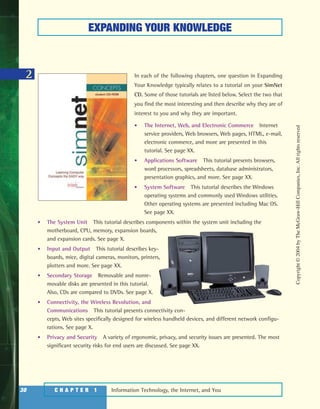
A deeper knowledge of select topics can greatly enhance your under-
standing of information technology. In each of the following chapters,
the Expanding Your Knowledge feature presents four questions de-
signed to help you gain a deeper understanding of select topics.
Typically, one question in Expanding Your Knowledge relates to a
topic contained on your Computing Today CD. Some of those topics
are listed below. Select the two that you find the most interesting
and then describe why they are of interest to you and why they are
important.
• How Instant Messaging Works One of the fastest growing applications on the Internet is instant
messaging. This extension to e-mail provides a way for friends and colleagues to communicate and
share information from almost anywhere in the world. See page xx.
• How Web-based Applications Work Some predict that many organizations will be using Web-
based applications in the near future. These organizations will not be required to own, install, up-
grade, or store applications. Additionally, applications and application files can be accessed from
almost anywhere in the world. See page xx.
• How Web Site Development Works Developing or publishing a Web site is a common activity for
organizations of all types and for people from all walks of life. The process of creating a Web site
consists of five steps: planning, analyzing and designing, creating, going online, and maintaining.
See page xx.
• How Computer Viruses Work Computer viruses are destructive and dangerous programs that can
migrate through networks and operating systems. They often attach themselves to other programs,
e-mail messages, and databases. It is essential to protect your computer systems from computer
viruses. See page xx.
• How Digital Photography Works While traditional cameras capture images on film, digital cameras
capture images, and convert them into a digital form. These images can be viewed immediately and
saved to a disk or into the cameras memory. See page xx.
• How Internet Telephones Work Internet telephones offer a low cost alternative to making long
distance calls. Using the Internet telephone (or other appropriate audio input and output devices),
the Internet, a special service provider, a sound card, and special software you can place long dis-
tance calls to almost anywhere in the world. See page xx.
• How Wireless Networks Work Wireless home networks are becoming very popular. These LANs
are easy to set up and use. They allow different computers to share resources including a common
Internet connection and printer. See page xx.
1
Copyright©2004byTheMcGraw-HillCompanies,Inc.Allrightsreserved
ole65985_ch01_web.qxd 9/12/03 2:08 PM Page 29
Information Technology, the Internet, and You30 C H A P T E R 1
2
EXPANDING YOUR KNOWLEDGE
In each of the following chapters, one question in Expanding
Your Knowledge typically relates to a tutorial on your SimNet
CD. Some of those tutorials are listed below. Select the two that
you find the most interesting and then describe why they are of
interest to you and why they are important.
• The Internet, Web, and Electronic Commerce Internet
service providers, Web browsers, Web pages, HTML, e-mail,
electronic commerce, and more are presented in this
tutorial. See page XX.
• Applications Software This tutorial presents browsers,
word processors, spreadsheets, database administrators,
presentation graphics, and more. See page XX.
• System Software This tutorial describes the Windows
operating systems and commonly used Windows utilities.
Other operating systems are presented including Mac OS.
See page XX.
• The System Unit This tutorial describes components within the system unit including the
motherboard, CPU, memory, expansion boards,
and expansion cards. See page X.
• Input and Output This tutorial describes key-
boards, mice, digital cameras, monitors, printers,
plotters and more. See page XX.
• Secondary Storage Removable and nonre-
movable disks are presented in this tutorial.
Also, CDs are compared to DVDs. See page X.
• Connectivity, the Wireless Revolution, and
Communications This tutorial presents connectivity con-
cepts, Web sites specifically designed for wireless handheld devices, and different network configu-
rations. See page X.
• Privacy and Security A variety of ergonomic, privacy, and security issues are presented. The most
significant security risks for end users are discussed. See page XX.
Copyright©2004byTheMcGraw-HillCompanies,Inc.Allrightsreserved
ole65985_ch01_web.qxd 9/12/03 2:08 PM Page 30
BUILDING YOUR PORTFOLIO
Building Your Portfolio www.mhhe.com/oleary 31
1A portfolio typically consists of printed material that documents an in-
dividual’s skills and knowledge. The process of creating a portfolio
helps individuals to recognize and to organize their accomplishments.
A well-designed and complete portfolio can be an essential tool for
landing that perfect job. In the following chapters, the Building Your
Portfolio feature presents four questions designed to help you create a
portfolio to document your computer competency and knowledge.
Two questions in Building Your Portfolio typically relate to key tech-
nologies. Some of these technologies are listed below. Select the two
that you find the most interesting and then describe why they are of
interest to you and why a prospective employer would be impressed
with this knowledge.
• Electronic Commerce Electronic commerce is one of the most exciting Web applications. Different
types include businesses to consumer (B2C), consumer to consumer (C2C), and business to business
(B2B). Each of these has significant economic potential for nearly all organizations. See page X.
• Artificial Intelligence A technology that promises widespread implications is artificial intelligence.
This technology attempts to simulate human senses, thought processes, and actions. Many software
manufacturing companies are producing programs with built-in artificial intelligence. See page X.
• Linux Linux is a powerful operating system
used by many computer professionals today.
Some experts project that it will replace Win-
dows as the most widely used operating system
for powerful microcomputers and servers on
the Web. See page X.
• Microprocessors One of the most important
components of any microcomputer systems is
the microprocessor. For the past several years,
microprocessor speeds have doubled every year
and a half. Many manufacturers including Intel,
AMD, and Cyrix expect this trend to continue. See page X.
• Digital Input Before any type of data or information can be processed by a computer, it must be
in digital form. The capability of input devices to convert handwriting, sketches, and images into a
digital form has greatly expanded computer capabilities. See page X.
Copyright©2004byTheMcGraw-HillCompanies,Inc.Allrightsreserved
ole65985_ch01_web.qxd 9/12/03 2:08 PM Page 31
Information Technology, the Internet, and You32 C H A P T E R 1
BUILDING YOUR PORTFOLIO
2 In each of the following chapters, two questions in Building Your Portfolio typically relate to security,
privacy, and ethical issues. Some of these issues are listed below. Select the two that you find the most
interesting and then describe why they are of interest to you and why they are important issues.
• HTML Source Code A common way to create interesting and
dynamic Web pages is to examine how professionals create
their sites. Once connected to most Web sites, you can
display the HTML source code used to create that site.
Additionally, you can make a copy of the code and
save it on your computer system. Some argue that
this is unethical and illegal. Others argue that this
is an acceptable way to create personal and profes-
sional sites. See page X.
• Antitrust Microsoft Corporation has been in-
volved with extensive antitrust legal battles over the
past few years. The issue has been that Microsoft’s
Windows operating system has been tailored to use
Microsoft application software. The suite claims that this
provides Microsoft an unfair advantage over other companies that
produce competing application software. While many support this view, others contend that all
corporations use whatever they can to improve their competitive positions. See page X.
• Processor Serial Numbers When the Intel Pentium III microprocessor was released, each unit
originally contained a unique Processor Serial Number, or PSN. This PSN could be used by online
e-commerce sites to identify and track individuals by the computer they used. This tracking would
be similar to keeping track of car owners by their license plate numbers. Intel anticipated that the
PSN would help electronic commerce and add security to Internet sales. Others argued that the
tracking capabilities were an invasion of personal privacy. Soon after introduction, the PSNs were
discontinued. See page X.
• CD-R and Music Files For the past few years, one of the most popular Web activities has been
to share or download music from the Web to create custom CDs. Even though recent legal rulings
support the illegality of reproducing music that has been copyrighted, sharing music continues to
be a widely practiced Web activity. While some suggest that stronger enforcement is needed,
others suggest that enforcement is impossible and not needed. See page X.
• Electronic Monitoring Surveillance of individuals is greater today than ever before. For example,
the FBI has proposed the widespread use of a technology known as Carnivore to help them track
terrorists. This technology supports widespread monitoring of individual Internet activity and
e-mail. Privacy advocates claim that this would be an unnecessary and unneeded invasion of
personal privacy. See page X.
Copyright©2004byTheMcGraw-HillCompanies,Inc.Allrightsreserved
ole65985_ch01_web.qxd 9/12/03 2:08 PM Page 32
NOTES
Notes www.mhhe.com/oleary 33
Copyright©2004byTheMcGraw-HillCompanies,Inc.Allrightsreserved
ole65985_ch01_web.qxd 9/12/03 2:08 PM Page 33

Information Technology, The Internet, and You

  • 1.
    INFORMATION TECHNOLOGY, THE INTERNET,AND YOU OBJECTIVES After you have read this chapter, you should be able to: 1 Explain the five parts of an information system: people, procedures, software, hardware, and data. 2 Distinguish between system software and application software. 3 Discuss the four kinds of system software programs. 4 Distinguish between special-purpose and general-purpose application software. 5 Identify the four types of computers and the three types of microcomputers. 6 Describe the different types of computer hardware including the system unit, input, output, storage, and communication devices. 7 Define data and describe document, worksheet, database, and presentation files. 8 Explain computer connectivity, the wireless revolution, and the Internet. Copyright©2004byTheMcGraw-HillCompanies,Inc.Allrightsreserved ole65985_ch01_web.qxd 9/12/03 2:08 PM Page 2
  • 2.
    CHAPTER 1 2 3 4 5 6 7 8 9 10 11 12 13 14 15 16 Information Technology(IT): Just as the Internet and the Web have affected all of us, they have af- fected computer technology as well. Today, com- munication links to the Internet are a common feature of almost all computer systems. Informa- tion technology is a modern term that describes this combination of traditional computer and com- munication technologies. The purpose of this book is to help you use and understand information technology. This involves two aspects: computer competency and computer knowledge. Computer competency refers to acquir- ing computer-related skills. These skills are indis- pensable tools for today. They include how to efficiently and effectively use popular application packages and the Internet. Computer knowledge is a deeper understanding of how technology works. It provides a foundation for you to understand how technology is being used today and how you might use technology in the future. For example, knowing how the Internet works provides the foundation for you to understand the potential of electronic commerce and to understand how infor- mation about you can be collected and dispensed without your consent. In this chapter, we first present an overview of an information system: people, procedures, soft- ware, hardware, and data. It is essential to under- stand these basic parts and how connectivity through the Internet and the Web expands the role of information technology in our lives. In subse- quent chapters, we will describe these parts of an information system in detail. Fifteen years ago, most people had little to do with computers, at least directly. Of course, they filled out computerized forms, took computerized tests, and paid computerized bills. But the real work with computers was handled by specialists— programmers, data entry clerks, and computer operators. Then microcomputers came along and changed everything. Today it is easy for nearly everybody to use a computer. Now: • Microcomputers are common tools in all areas of life. Writers write, artists draw, engineers and scientists calculate—all on microcomputers. Stu- dents and businesspeople do all this, and more. • New forms of learning have developed. People who are homebound, who work odd hours, or who travel frequently may take courses on the Web. A college course need not fit within the usual time of a quarter or a semester. • New ways to communicate, to find people with similar interests, and to buy goods are available. All kinds of people are using electronic mail, electronic commerce, and the Internet to meet and to share ideas and products. What about you? How are you using informa- tion technology? Many interesting and practical uses have recently surfaced to make our personal lives richer and more entertaining. These applica- tions range from recording digital video clips to creating personalized Web sites. To be competent and knowledgeable with IT, you need to know the five parts of an information sys- tem: people, procedures, software, hardware, and data. Additionally, you need to understand connec- tivity, the wireless revolution, the Internet, and the Web and to recognize the role of information tech- nology in your personal and professional life. Copyright©2004byTheMcGraw-HillCompanies,Inc.Allrightsreserved ole65985_ch01_web.qxd 9/12/03 2:08 PM Page 3
  • 3.
    When you thinkof a microcomputer, perhaps you think of just the equipment itself. That is, you think of the monitor or the keyboard. Yet, there is more to it than that. The way to think about a microcomputer is as part of an infor- mation system. An information system has five parts: people, procedures, soft- ware, hardware, and data. (See Figure 1-1.) • People: It is easy to overlook people as one of the five parts of a micro- computer system. Yet this is what microcomputers are all about—making people, end users like you, more productive. • Procedures: The rules or guidelines for people to follow when using soft- ware, hardware, and data are procedures. These procedures are typically documented in manuals written by computer specialists. Software and hardware manufacturers provide manuals with their products. These man- uals are provided either in printed or electronic form. • Software: A program consists of the step-by-step instructions that tell the computer how to do its work. Software is another name for a program or programs. The purpose of software is to convert data (unprocessed facts) into information (processed facts). For example, a payroll program would instruct the computer to take the number of hours you worked in a week Information Technology, the Internet, and You4 C H A P T E R 1 INFORMATION SYSTEMS An information system has five parts: people, procedures, software, hardware, and data. Connectivity allows computers to connect and share information, thereby greatly expanding the capability and usefulness of an information system. People Are end users who use computers to make them- selves more productive Software Provides step-by-step in- structions for computer hardware Procedures Specify rules or guidelines for computer operations Figure 1-1 The five parts of an information system Copyright©2004byTheMcGraw-HillCompanies,Inc.Allrightsreserved ole65985_ch01_web.qxd 9/12/03 2:08 PM Page 4
  • 4.
    (data) and multiplyit by your pay rate (data) to determine how much you are paid for the week (information). • Hardware: The equipment that processes the data to create information is called hardware. It includes the keyboard, mouse, monitor, system unit, and other devices. Hardware is controlled by software. • Data: The raw, unprocessed facts, including text, numbers, images, and sounds are called data. Processed, data yields information. Using the ex- ample above, the data (number of hours worked and pay rate) are processed (multiplied) to yield information (weekly pay). Almost all of today’s computer systems add an additional part to the infor- mation system. This part, called connectivity, allows computers to connect and to share information. These connections, including Internet connections, can be by telephone lines, by cable, or through the air. Connectivity allows users to greatly expand the capability and usefulness of their information systems. In large computer systems, there are specialists who write procedures, de- velop software, and capture data. In microcomputer systems, however, end users often perform these operations. To be a competent and knowledgeable end user, you must understand the essentials of information technology (IT), including software, hardware, and data. Information Systems www.mhhe.com/oleary 5 Connectivity Allows computers to share information and to connect to the Internet Hardware Includes keyboard, mouse, monitor, system unit, and other devices Connectivity Allows computers to share information and to connect to the Internet Data Consist of unprocessed facts including text, numbers, images, and sounds ✔ What are the five parts of an information system? ✔ What is the difference between data and information? ✔ What is connectivity? Concept Check Copyright©2004byTheMcGraw-HillCompanies,Inc.Allrightsreserved ole65985_ch01_web.qxd 9/12/03 2:08 PM Page 5
  • 5.
    Although easy tooverlook, people are surely the most important part of any information system. Our lives are touched every day by computers and in- formation systems. Many times the contact is direct and obvious, such as when we create documents using a word processing program or when we con- nect to the Internet. Other times, the contact is not as obvious. Consider just the four examples in Figure 1-2. Throughout this book you will find a variety of features designed to help you become computer competent and knowledgeable. These features include Making IT Work for You, Tips, and two interactive CDs. • Making IT Work for You. In the chapters that follow, you will find Making IT Work for You features that present interesting and practical IT applica- tions. Using a step-by-step procedure, you are provided with specific instructions on how to use each applica- tion. Figure 1-3 presents a list of these applications. Information Technology, the Internet, and You6 C H A P T E R 1 PEOPLE People are the most important part of an information system. Features in this book include Making IT Work for You, Tips, and two interactive CDs. Figure 1-2 Computers in business, entertainment, education, and medicine Copyright©2004byTheMcGraw-HillCompanies,Inc.Allrightsreserved ole65985_ch01_web.qxd 9/12/03 2:08 PM Page 6
  • 6.
    7 M A KI N G IT W O R K F O R YO U INFORMATION TECHNOLOGY TOPICS Information technology touches our lives every day in a personal way. Many interesting and practical uses of IT have recently surfaced to make our lives richer and more entertaining. In the following chapters, you will find these applications presented in detail. Instant Messaging Do you enjoy chatting with your friends? Have you ever worked on a group project and had problems getting every- one together for a meeting? Perhaps instant messaging is just what you’re looking for. See page XX. Web-based Applications Would you like ac- cess to free general-purpose applications from anywhere in the world? Would you like to be able to access to your data files from almost any computer? You can have it all with Web- based applications. See page XX. Personal Web Site Do you have anything to share with the world? Would you like to create a personal Web without having to learn any special Web publishing programs? Would you like to put your personal Web site on the Web without having to pay for server time? Many services are available to get you started for FREE! See page XX. Virus Protection Has your computer ever been attacked by a computer virus? If not, chances are that it will be in the near future. Fortunately, special software is available to protect you against computer viruses . . . some of the software is even free! See page XX. TV Tuner Cards and Video Clips Want to watch your favorite television program while you work? Perhaps you would like to include a video clip from a television program or from a VHS tape in a class presentation. It’s easy using a TV tuner card. See page XX. Digital Photography Want to edit your photos on your computer? Would you like to share your photos with family and friends over the Web? Digital photography makes it easy to do. See page XX. Internet Telephony Would you like to make long distance calls at little or no cost? You can use your computer to make long distance calls to almost any telephone in the world. All you need is the right software and an Internet con- nection to get started. See page XX. Music from the Internet Did you know that you can use the Internet to locate music, down- load it to your computer, and create your own compact discs? All it takes is the right soft- ware, hardware, and a connection to the Inter- net. See page XX. Home Networking Computer networks are not just for corporations and schools anymore. If you have more than one computer, you can use a wireless home network to share files and printers, to allow multiple users access to the Internet at the same time, and to play interac- tive computer games. See page XX. Spyware Are you concerned about maintain- ing your privacy while you are surfing the Web? Did you know that programs known as spy- ware could be monitoring your every move? Fortunately, these programs are relatively easy to detect and remove. See page XX. Job Opportunities Did you know that you can use the Internet to find a job? You can browse through job openings, post your resume, and even use special programs that will search for the job that’s just right for you. See page XX. Figure 1-3 Making IT Work for You topics Copyright©2004byTheMcGraw-HillCompanies,Inc.Allrightsreserved ole65985_ch01_web.qxd 9/12/03 2:08 PM Page 7
  • 7.
    • Tips. Weall can benefit from a few tips or suggestions. Throughout this book you will find numerous Tips ranging from the basics of keeping your computer system running smoothly to how to protect your privacy while surfing the Web. For a partial list of the Tips presented in the following chapters, see Figure 1-4. For a complete list, go to http://www.mhhe.com/ oleary/CT05 and select Tips from Tim’s Toolbox. • Interactive CDs. This text is accompanied by two interactive CDs. One, SimNet Concepts, presents a series of interactive tutorials on a variety of important IT subjects. The other CD, Computing Today, contains anima- tions of key concepts, videos relating to select Making IT Work for You ap- plications, and in-depth coverage of select topics. (See Figure 1-5.) Information Technology, the Internet, and You8 C H A P T E R 1 ● Controlling spam. Do you get a lot of unwanted e-mail advertisements? Americans receive over 200 billion spam e-mails every year. There are some basic steps that you can take to keep your inbox spam-free. See page XX. ● Recovering from a power failure. Have you ever been working on a document when the power goes off? Your original document and all your recent changes are gone. Fortunately, most applications automatically save your work every few minutes to a temporary recovery or backup file. It’s easy to get back under way again. See page XX. ● Improving slow computer operations. Does your computer seem to be getting slower and slower? Consider a few suggestions that might add a little zip to your current system. See page XX. ● Improving hard disk performance. Does your internal hard-disk drive run a lot and seem slow? Are you having problems with lost or corrupted files? To clean up the disk and speed up access, consider defragging. See page XX. ● Protecting your privacy. Are you concerned about your privacy while on the Web? Consider some suggestions on protecting your identity online. See page XX. TIPSTIPS Figure 1-4 Selected Tips Figure 1-5 Two interactive CDs: SimNet Concepts and the Computing Today CD Copyright©2004byTheMcGraw-HillCompanies,Inc.Allrightsreserved ole65985_ch01_web.qxd 9/12/03 2:08 PM Page 8
  • 8.
    Software, as wementioned, is another name for programs. Programs are the instructions that tell the computer how to process data into the form you want. In most cases, the words software and programs are interchangeable. There are two major kinds of software—system software and application soft- ware. You can think of application software as the kind you use. Think of sys- tem software as the kind the computer uses. SYSTEM SOFTWARE The user interacts primarily with applica- tion software. System software enables the application software to interact with the computer hardware. System software is “background” software that helps the com- puter manage its own internal resources. System software is not a single program. Rather it is a collection of programs: • Operating systems are programs that coordinate computer resources, provide an interface between users and the com- puter, and run applications. Windows XP and the Mac OS X are two of the best- known operating systems for today’s microcomputer users. (See Figure 1-6.) • Utilities, also known as service programs, perform specific tasks related to managing computer resources. For example, the Windows utility called Disk Defragmenter locates and eliminates un- necessary file fragments and rearranges files and unused disk space to optimize computer operations. • Device drivers are specialized programs designed to allow particular input or out- put devices to communicate with the rest of the computer system. APPLICATION SOFTWARE Application software might be described as end user software. These programs can be categorized as either general-purpose or special-purpose applications. General-purpose applications, or basic applications, are widely used in nearly all career areas. They are the kinds of programs you have to know to be consid- ered computer competent. One of these basic applications is a browser to Software www.mhhe.com/oleary 9 SOFTWARE There are two kinds: system software and application software. System software includes operating systems, utilities, and device drivers. Application software is categorized as general-purpose and special-purpose. Figure 1-6 Windows and Mac operating systems Copyright©2004byTheMcGraw-HillCompanies,Inc.Allrightsreserved ole65985_ch01_web.qxd 9/12/03 2:08 PM Page 9
  • 9.
    navigate, explore, andfind information on the Internet. (See Figure 1-7.) The two most widely used browsers are Microsoft’s Internet Explorer and Netscape’s Navigator. For a summary of the basic applications, see Figure 1-8. Special-purpose applications, also known as advanced applications, in- clude thousands of other programs that are more narrowly focused on specific disciplines and occupations. Some of the best known are graphics, audio and video, multimedia, Web authoring, and artificial intelligence programs. For a description of these programs, see Figure 1-9. Information Technology, the Internet, and You10 C H A P T E R 1 Have you used the Internet? If so, then you probably already know how to use a browser. For those of you who do not, here are a few tips to get you started. 1 Start browser. Typically, all you need to do is double-click the browser’s icon on the desktop. 2 Enter URL. In the browser’s location box, type the URL (uniform resource locator, or address) of the Internet or Web location (site) that you want to visit. 3 Press ENTER. On your keyboard, press the ENTER key to connect to the site. 4 Read and explore. Once connected to the site, read the information displayed on your monitor. Using the mouse, move the pointer on the monitor. When the pointer changes from an arrow to a hand, click the mouse button to explore other locations. 5 Close browser. Once you are done exploring, click on your browser’s CLOSE button. TIPSTIPS Location box Close button Figure 1-7 Internet Explorer browser Type Description Graphics Includes programs designed to create presentations, to analyze data, or to create and edit images Audio and video Capture and edit audio and video files Multimedia Develop interactive presentations that include audio, video, text, and/or graphical elements Web authoring Create and edit Web pages Artificial intelligence Programs that attempt to mimic or simulate human senses, thought processes, and/or actions. Figure 1-9 Specialized applications Type Description Browser Connect to Web sites and display Web pages Word processor Prepare written documents Spreadsheet Analyze and summarize numerical data Database management system Organize and manage data and information Presentation graphics Communicate a message or persuade other peopleFigure 1-8 Basic applications Copyright©2004byTheMcGraw-HillCompanies,Inc.Allrightsreserved ole65985_ch01_web.qxd 9/12/03 2:08 PM Page 10
  • 10.
    Computers are electronicdevices that can follow instructions to accept input, process that input, and produce information. This book focuses principally on microcomputers. However, it is almost certain that you will come in con- tact, at least indirectly, with other types of computers. TYPES OF COMPUTERS There are four types of computers: supercomputers, mainframe computers, minicomputers, and microcomputers. • Supercomputers are the most powerful type of computer. These ma- chines are special high-capacity computers used by very large organiza- tions. For example, NASA uses supercomputers to track and control space explorations. • Mainframe computers occupy specially wired, air-conditioned rooms. Al- though not nearly as powerful as supercomputers, mainframe computers are capable of great processing speeds and data storage. (See Figure 1-10.) For example, insurance companies use mainframes to process information about millions of policyholders. Hardware www.mhhe.com/oleary 11 ✔ Describe the two major kinds of software. ✔ Describe three types of system software programs. ✔ Define and compare general-purpose and special-purpose applications. Concept Check HARDWARE Four types of computers are supercomputer, mainframe computer, minicomputer, and microcomputer. Microcomputer hardware consists of the system unit, input/output, secondary storage, and communications devices. Figure 1-10 Mainframe computer Copyright©2004byTheMcGraw-HillCompanies,Inc.Allrightsreserved ole65985_ch01_web.qxd 9/12/03 2:08 PM Page 11
  • 11.
    • Minicomputers, alsoknown as midrange computers, are refrigerator- sized machines. Medium-sized companies or departments of large compa- nies typically use them for specific purposes. For example, production departments use minicomputers to monitor certain manufacturing processes and assembly line operations. • Microcomputers are the least powerful, yet the most widely used and fastest-growing, type of computer. There are four types of micro- computers: desktop, notebook, tablet PC, and handheld computers. (See Figure 1-11.) Desktop computers are small enough to fit on top of or alongside a desk yet are too big to carry around. Notebook computers, also known as laptop computers, are portable, weigh between 4 and 10 pounds, and fit into most briefcases. A tablet PC is a type of notebook com- puter that accepts your handwriting. This input is digitized and converted to standard text that can be further processed by programs such as a word processor. Handheld computers are the smallest and are designed to fit into the palm of one hand. Also known as palm computers, these systems typically combine pen input, writing recognition, personal organizational tools, and communications capabilities in a very small package. Personal digital assistants (PDA) are the most widely used handheld computer. Information Technology, the Internet, and You12 C H A P T E R 1 Figure 1-11 Microcomputers Desktop Notebook Tablet PC Handheld Copyright©2004byTheMcGraw-HillCompanies,Inc.Allrightsreserved ole65985_ch01_web.qxd 9/12/03 2:08 PM Page 12
  • 12.
    MICROCOMPUTER HARDWARE Hardware fora microcomputer system consists of a variety of different devices. See Figure 1-12 for a typical desktop system. This physical equipment falls into four basic categories: system unit, input/output, secondary storage, and com- munication. Because we discuss hardware in detail later in this book, we will present just a quick overview of the four basic categories of microcomputer hardware: system unit, input/output, secondary storage, and communication. • System unit: The system unit, also known as the system cabinet or chassis, is a container that houses most of the electronic components that make up a computer system. (See Figure 1-13.) Two important components of the system unit are the microprocessor and memory. Hardware www.mhhe.com/oleary 13 CD or DVD disk drive to store and transport large amounts of data Keyboard to input instructions Monitor to display information Floppy disk drive to store and transport data System unit contains electronic components Mouse to select items Speakers to play sounds and music Printer to produce output on paper Figure 1-12 Microcomputer system Cartridge containing microprocessor Memory Figure 1-13 System unit On the Web Explorations Intel is a leading manufacturer of microprocessors. To learn more about this company, visit our Web site at http://www.mhhe.com/oleary/CT05 and select On the Web Explorations from Tim’s Toolbox. Copyright©2004byTheMcGraw-HillCompanies,Inc.Allrightsreserved ole65985_ch01_web.qxd 9/12/03 2:08 PM Page 13
  • 13.
    The microprocessor controlsand manipulates data to produce informa- tion. Many times the microprocessor is contained within a protective car- tridge. Memory, also known as primary storage or random access memory (RAM), holds data and program instructions for processing the data. It also holds the processed information before it is output. Memory is sometimes referred to as temporary storage because its contents will typ- ically be lost if the electrical power to the computer is disrupted. • Input/output: Input devices translate data and programs that humans can understand into a form that the computer can process. The most com- mon input devices are the keyboard and the mouse. (See Figure 1-14.) Output devices translate the processed information from the computer into a form that humans can understand. The most common output devices are monitors or video display screens (see Figure 1-15) and printers. • Secondary storage: Unlike memory, secondary storage devices hold data and programs even after electrical power to the computer system has been turned off. The most important kinds of secondary media are floppy, hard, and optical disks. Floppy disks are widely used to store and trans- port data from one computer to another. (See Figure 1-16.) They are called floppy because data is stored on a very thin flexible, or floppy, plastic disk. Hard disks are typically used to store programs and very large data files. Using a rigid metallic platter, hard disks have a much greater capacity and are able to access information much faster than floppy disks. Optical disks use laser technology and have the greatest capacity. (See Figure 1- 17.) The two basic types of optical disks are compact discs (CDs) and digital versatile (or video) discs (DVDs). Information Technology, the Internet, and You14 C H A P T E R 1 Figure 1-15 Monitor Figure 1-16 A 31 ⁄2-inch floppy disk Figure 1-17 An optical disk Figure 1-14 Keyboard and mouse On the Web Explorations Toshiba is a leader in the development of DVD. To learn more about this company, visit our Web site at http://www.mhhe.com/oleary/CT05 and select On the Web Explorations from Tim’s Toolbox. Copyright©2004byTheMcGraw-HillCompanies,Inc.Allrightsreserved ole65985_ch01_web.qxd 9/12/03 2:08 PM Page 14
  • 14.
    • Communication: Atone time, it was uncommon for a microcomputer sys- tem to communicate with other computer systems. Now, using communi- cation devices, a microcomputer can communicate with other computer systems located as near as the next office or as far as halfway around the world using the Internet. The most widely used communication device is a modem, which modifies telephone communications into a form that can be processed by a computer. Modems also modify computer output into a form that can be transmitted across standard telephone lines. Data www.mhhe.com/oleary 15 ✔ What are the four types of computers? ✔ Describe the four types of microcomputers. ✔ Describe the four basic categories of microcomputer hardware. Concept Check DATA Data are unprocessed facts. Processing data creates information. Four common file types are document, worksheet, database, and presentation. Data are raw, unprocessed facts, including text, numbers, images, and sounds. As we have mentioned earlier, processed data becomes information. When stored electronically in files, data can be used directly as input for the infor- mation system. Four common types of files (see Figure 1-18) are: • Document files, created by word processors to save documents such as memos, term papers, and letters. • Worksheet files, created by electronic spreadsheets to analyze things like budgets and to predict sales. • Database files, typically created by database management programs to contain highly structured and organized data. For example, an employee database file might contain all the workers’ names, social security num- bers, job titles, and other related pieces of information. • Presentation files, created by presentation graphics programs to save pre- sentation materials. For example, a file might contain audience handouts, speaker notes, and electronic slides. ✔ Define data. ✔ What is the difference between data and information? ✔ List four common types of files. Concept Check Copyright©2004byTheMcGraw-HillCompanies,Inc.Allrightsreserved ole65985_ch01_web.qxd 9/12/03 2:08 PM Page 15
  • 15.
    Connectivity is thecapability of your microcomputer to share information with other computers. Data and information can be sent over telephone lines or cable and through the air. Thus, your microcomputer can be con- nected to other computers, to the Internet, and to many computerized data banks and other sources of information worldwide. The single most dramatic change in connectivity in the past five years has been the widespread use of mobile or wireless communication devices. Once used exclusively for telephone communications, these devices are now widely used to connect people and computers located almost anywhere in the world. For just a few of these devices, see Figure 1-19. Many experts predict that these wireless applications are just the beginning of the wireless revolution, a rev- olution that is expected to dramatically affect the way we communicate and use computer technology. Information Technology, the Internet, and You16 C H A P T E R 1 Document Worksheet Database Presentation Figure 1-18 Four types of files: document, worksheet, database, and presentation CONNECTIVITY, THE WIRELESS REVOLUTION, AND THE INTERNET Connectivity allows sharing of information worldwide. The wireless revolution is expected to alter communications and computer systems. The Internet is the largest network in the world. Copyright©2004byTheMcGraw-HillCompanies,Inc.Allrightsreserved ole65985_ch01_web.qxd 9/12/03 2:08 PM Page 16
  • 16.
    Connectivity and thewireless revolution are significant developments, for they expand the uses of the microcom- puter severalfold. Central to the concept of connectivity is the network or computer network. A network is a commu- nications system connecting two or more computers. Net- works connect people as close as the next office and as far away as halfway around the world. The largest network in the world is the Internet. It is like a giant highway that connects you to millions of other peo- ple and organizations located throughout the world. (See Figure 1-20.) The Internet is a huge computer network avail- able to nearly everyone with a microcomputer and a means to connect to it. The Web, also known as the World Wide Web or WWW, provides a multimedia interface to the nu- merous resources available on the Internet. Connectivity, the Wireless Revolution, and the Internet www.mhhe.com/oleary 17 Figure 1-19 Wireless communication devices Figure 1-20 The Internet connects millions of people and computers worldwide ✔ Define connectivity and the wireless revolution. ✔ What is a network? ✔ What is the Internet? Concept Check Copyright©2004byTheMcGraw-HillCompanies,Inc.Allrightsreserved ole65985_ch01_web.qxd 9/12/03 2:08 PM Page 17
  • 17.
    Some of thefastest growing career opportunities are in information technology. Every chapter following this chapter includes a detailed job description for a different career in IT. These descriptions, include job titles, responsibilities, educational requirements, and salary ranges. For a list of just a few of these careers, see Figure 1-21. For a complete list and full descrip- tions, visit our site at http://www.mhhe.com/oleary/ CT05 and select Careers in IT from Tim’s Toolbox. CareersinIT Information Technology, the Internet, and You18 C H A P T E R 1 Webmasters develop and maintain Web sites and Web resources. Webmasters also monitor and initiate steps to increase the traffic at Web sites. Salaries range from $45,000 to $70,000. See page XX for details. Software engineers analyze users’ needs and create application software. They have a background in programming and focus on the design and development of programs. Salaries range from $50,000 to $85,000. See page XX for details. Database administrators use specialized database management software to determine the most efficient ways to organize and access a company’s data. Additionally, they are responsible for maintaining database security and backing up the corporate databases. Salaries range from $35,000 to $75,000. See page XX for details. Systems analysts address specific organization needs for information. Working with end users and other computer professionals, they follow the steps in the systems life cycle which includes preliminary investigation, analysis, design, development, implementation, and maintenance. Salaries range from $35,000 to $70,000. See page XX for details Computer programmers create, test, and troubleshoot programs used by computers. Most programmers work for companies that create and sell software, but programmers may also be employed in various other businesses. Salaries range from $45,000 to $75,000. See page XX for details.Figure 1-21 Select Careers in IT Using and Understanding Information Technology Means Being Computer Competent and Knowledgeable The purpose of this book is to help you use and understand in- formation technology. We want to help you become computer competent in today’s world and to provide you a foundation of knowledge so that you can un- derstand how technology is be- ing used today and anticipate how technology will be used in the future. This will enable you to benefit from four important information technology developments: the ever evolving Internet and Web, more powerful software, more powerful hardware, and organizational use of computers. THE INTERNET AND THE WEB The Internet and the Web are considered by most to be the two most important technolo- gies for the 21st century. Under- standing how to efficiently and effectively use the Internet to browse the Web, communicate with others, and locate informa- tion are indispensable computer ALooktotheFuture Copyright©2004byTheMcGraw-HillCompanies,Inc.Allrightsreserved ole65985_ch01_web.qxd 9/12/03 2:08 PM Page 18
  • 18.
    A Look intothe Future www.mhhe.com/oleary 19 competencies. Understanding how the Internet and the Web work provides a foundation to appreciate their positive aspects such as the enormous potential of elec- tronic commerce. These issues are presented in Chapter 2, The Internet, the Web, and Electronic Commerce. POWERFUL SOFTWARE The software now available can do an extraordinary number of tasks and help you in an endless number of ways. You can create professional looking documents, analyze massive amounts of data, create dynamic mul- timedia Web pages, and much more. Today’s employers are expecting the people they hire to be able to effec- tively and efficiently use a variety of different types of software. General-purpose and special-purpose appli- cations are presented in Chapters 3 and 4. System soft- ware is presented in Chapter 5. POWERFUL HARDWARE Microcomputers are now much more powerful than they used to be. Indeed, the newer models have the speed and power of room-size computers of only a few years ago. New communication technologies such as wireless networks are dramatically changing the ways to connect to other computers, networks, and the In- ternet. However, despite the rapid change of specific equipment, their essential features remain unchanged. Thus, the competent and knowledgeable end user should focus on these features. Chapters 6 through 10 explain what you need to know about hardware: the central processing unit, input, output, secondary stor- age, and communication. A Buyer’s Guide and an Up- grader’s Guide are presented at the end of this book for those considering the purchase or upgrade of a mi- crocomputer system. SECURITY AND PRIVACY What about people? Is there a downside to all these technological advances? Experts agree that we as a so- ciety must be careful about the potential of technol- ogy to negatively impact our personal privacy and security. Additionally, we need to be aware of potential physical and mental health risks associated with using technology. Finally, we need to be aware of negative effects on our environment caused by the manufacture of computer-related products. Thus, Chapter 11 ex- plores each of these critical issues in detail. ORGANIZATIONS Almost all organizations rely on the quality and flexi- bility of their information systems to stay competitive. As a member or employee of an organization, you will undoubtedly be involved in these information systems. Therefore, you need to be knowledgeable about the different types of organizational information systems and how they are used. Accordingly, we devote Chap- ters 12 through 15 to detail what you need to know about information systems and how to develop, mod- ify, and maintain these systems. CHANGING TIMES Are the times changing any faster now than they ever have? Most people think so. Those who were alive when radios, cars, and airplanes were being introduced certainly lived through some dramatic changes. Has technology made our own times even more dynamic? Whatever the answer, it is clear we live in a fast-paced age. The Evolution of the Computer Age section pre- sented at the end of this book tracks the major devel- opments since computers were first introduced. Most people and businesses have become aware that they must adapt to changing technology or be left behind. Almost all major organizations have plans to keep track of technology and to use it in their com- petitive strategies. Nearly every corporation in the world has a presence on the Internet. Delivery services such as Federal Express and UPS provide customers with the ability to personally track the delivery of their packages. Retail stores such as JCPenney and Wal- Mart provide catalog support and sales. Banks such as Wells Fargo and Citibank support home banking and electronic commerce. You can even purchase tickets to music, theater, and sporting events on the Internet. Clearly, such changes do away with some jobs— those of many bank tellers and cashiers, for example. However, they create opportunities for other people. New technology requires people who are truly capable of working with it. These are not the people who think every piece of equipment is so simple they can just turn it on and use it. Nor are they those who think each new machine is a potential disaster. In other words, new technology needs people who are not afraid to learn about it and who are able to manage it. The real issue, then, is not how to make technology better. Rather, it is how to integrate the technology with people. In Chapter 16 we discuss these issues, your future, and information technology. After reading this book, you will be in a very favor- able position compared with many other people in in- dustry today. You will learn not only the basics of hardware, software, connectivity, the Internet, and the Web—you will also learn the most current technology. You will be able to use these tools to your advantage— to be a winner. Copyright©2004byTheMcGraw-HillCompanies,Inc.Allrightsreserved ole65985_ch01_web.qxd 9/12/03 2:08 PM Page 19
  • 19.
    Information Technology, theInternet, and You20 C H A P T E R 1 INFORMATION SYSTEMS The way to think about a microcomputer is to re- alize that it is one part of an information system. Five parts of an information system: 1. People are obviously the essential part of the system! The purpose of information systems is to make people, or end users like you, more productive. 2. Procedures are rules or guidelines to follow when using software, hardware, and data. They are typically documented in manuals written by computer professionals. 3. Software (programs) provides step-by-step instructions to control the computer to con- vert data into information. 4. Hardware consists of the physical equip- ment. It is controlled by software and processes data to create information. 5. Data consists of unprocessed facts including text, numbers, images, and sound. Informa- tion is data that has been processed by the computer. Connectivity is an additional part to today’s in- formation systems. It allows computers to con- nect and share information. To be computer competent and knowledgeable, end users need to understand information technology (IT). PEOPLE People are the most important part of an infor- mation system. People are touched hundreds of times daily by computers. This book contains several features to demonstrate how people just like you use computers. These features include: • Making IT Work for You presents several interesting and practical applications. Topics include creating personal Web sites, using digital photography, and searching for job opportunities. • Tips offer a variety of suggestions on such practical matters as how to improve slow computer performance and how to protect your privacy while on the Web. • Interactive CDs included with this book are SimNet Concepts and Computing Today CD. These CDs provide tutorials, animations, videos, and in-depth coverage of select topics. INFORMATION TECHNOLOGY, THE INTERNET, AND YOU VISUAL SUMMARY Copyright©2004byTheMcGraw-HillCompanies,Inc.Allrightsreserved ole65985_ch01_web.qxd 9/12/03 2:08 PM Page 20
  • 20.
    Visual Summary www.mhhe.com/oleary21 SOFTWARE Software, or programs, consists of system and application software. System Software System software enables application software to interact with computer hardware. It consists of a variety of programs including: • Operating systems coordinate resources, provide an interface for users and computer hardware, and run applications. Windows XP and Mac OS X are operating systems. • Utilities (service programs) perform spe- cific tasks to manage computer resources. • Device drivers are specialized programs to allow input and output devices to communi- cate with the rest of the computer system. Application Software Application software includes general and special-purpose applications. General-purpose (basic applications) are widely used in nearly all career areas. Special-purpose applications (advance appli- cations) focus on specific disciplines and occupa- tions. These programs include graphics, audio and video, multimedia, Web authoring, and artificial intelligence programs. HARDWARE Hardware is the physical equipment in an infor- mation system. Types of Computers Supercomputer, mainframe, minicomputer (midrange), and microcomputer are four types of computers. Microcomputers can be desktop, notebook (laptop), tablet PC, or handheld (palm). PDAs are the most widely used hand- held computer. Microcomputer Hardware There are four basic categories of hardware devices: • System unit (system cabinet or chassis) contains the electronic circuitry, including the microprocessor and memory (primary storage, random access memory, RAM, temporary storage). • Input/output devices are translators between humans and computers. Input devices in- clude keyboard and mouse. Output devices include monitors (video display screens) and printers. • Secondary storage devices store data and programs. Typical media include floppy, hard, and optical disks (CD and DVD). • Communication devices connect the system unit to other computers and the Internet. A modem modifies signals for processing and communication. To prepare for your future as a competent and knowledgeable end user, you need to under- stand the basic parts of an information system: people, procedures, software, hardware, and data. Also you need to understand connectivity through the Internet and the Web and to recognize the role of technology in your professional and personal life. Copyright©2004byTheMcGraw-HillCompanies,Inc.Allrightsreserved ole65985_ch01_web.qxd 9/12/03 2:08 PM Page 21
  • 21.
    Information Technology, theInternet, and You22 C H A P T E R 1 DATA Data describe and are the raw facts about some- thing. Common file types include: • Document files created by word processors. • Worksheet files created by spreadsheet programs. • Database files created by database manage- ment programs. • Presentation files created by presentation graphics programs. CONNECTIVITY AND THE INTERNET Connectivity Connectivity is a concept describing the ability of end users to tap into resources well beyond their desktops. Computer networks (networks) are connected computers that share data and re- sources. The Wireless Revolution The wireless revolution is the widespread and increasing use of mobile (wireless) communica- tion devices. Internet The Internet is the world’s largest computer net- work. The Web, also known as the World Wide Web (WWW), provides a multimedia interface to resources available on the Internet. Copyright©2004byTheMcGraw-HillCompanies,Inc.Allrightsreserved ole65985_ch01_web.qxd 9/12/03 2:08 PM Page 22
  • 22.
    Key Terms www.mhhe.com/oleary23 KEY TERMS advanced application (10) application software (9) basic application (9) chassis (13) communication device (15) compact disc (CD) (14) computer competency (3) computer knowledge (3) computer network (17) Computing Today CD (8) connectivity (5) data (5) database file (15) device driver (9) desktop computer (12) digital versatile disc (DVD) (14) digital video disc (DVD) (14) document file (15) end user (4) floppy disk (14) general-purpose application (9) handheld computer (12) hard disk (14) hardware (5) information (4) information system (4) information technology (IT) (5) input device (14) Internet (17) keyboard (14) laptop computer (12) mainframe computer (11) memory (14) microcomputer (12) microprocessor (14) midrange computer (12) minicomputer (12) modem (15) monitor (14) mouse (14) network (17) notebook computer (12) operating system (9) optical disk (14) output device (14) palm computer (12) people (4) personal digital assistant (PDA) (12) presentation file (15) primary storage (14) printer (14) procedures (4) program (4) random access memory (RAM) (14) secondary storage device (14) service program (9) software (4) special-purpose application (10) supercomputer (11) SimNet Concepts (8) system cabinet (13) system software (9) system unit (13) tablet PC (12) temporary storage (14) utility (9) video display screen (14) Web (17) wireless revolution (16) worksheet file (15) World Wide Web (WWW) (17) To test your knowledge of these key terms with animated flash cards, select Flash Cards from Tim’s Toolbox at http://www.mhhe.com/oleary/CT05. Copyright©2004byTheMcGraw-HillCompanies,Inc.Allrightsreserved ole65985_ch01_web.qxd 9/12/03 2:08 PM Page 23
  • 23.
    Information Technology, theInternet, and You24 C H A P T E R 1 ACROSS 4 Displays data processed by the computer 6 Also known as handheld computers 8 Another word for program 10 A huge computer network available to nearly everyone with a microcomputer 11 CPU of a microcomputer 14 Also known as laptop computers 15 End users 16 Small, low-cost computer for individual users 17 Is a type of notebook computer that accepts handwritten input 18 Computer systems large or micro that provide understanding to the end user 19 Data that has been processed by a computer system 20 Holding area for data instructions and information 21 A service providing multimedia interface to resources on the Internet 22 Computers that are designed to fit into the palm 24 Input device 25 Internet service using hypertext DOWN 1 Computer that is portable and fits into most briefcases 2 Also known as a service program, manages computer resources 3 Instructions for the computer to follow in order to process data 5 Device that rolls and directs the cursor 7 Can process several million program instructions per second 8 Fastest calculating device 9 Desk-sized computer between micro and mainframe 11 Short for modulator-demodulator 12 Also known as minicomputer 13 Volatile temporary storage 14 Arrangement in which various communications channels are connected 15 Device that produces printed-paper output 22 The equipment that processes the data to create information 23 Raw unprocessed facts 20 18 15 11 12 13 16 19 21 22 25 23 24 17 14 9 5 2 3 4 10 876 1 CHAPTER REVIEW CROSSWORD Interactive crossword puzzles are available by selecting Crosswords from Tim’s Toolbox at http://www.mhhe.com/oleary/CT05. Copyright©2004byTheMcGraw-HillCompanies,Inc.Allrightsreserved ole65985_ch01_web.qxd 9/12/03 2:08 PM Page 24
  • 24.
    Chapter Review www.mhhe.com/oleary25 MULTIPLE CHOICE Circle the letter or fill in the correct answer. 1. Computer refers to acquiring computer related skills. a. competency d. networked b. aware e. active c. connectivity 2. The consist(s) of the equipment: keyboard, mouse, monitor, system unit, and other devices. a. people d. system unit b. procedures e. information c. hardware 3. The is one of the system software programs. a. word processor d. application software b. database management system e. information system c. operating system 4. Browsers, word processors, and spreadsheets are applications. a. special-purpose d. artificial intelligence b. general-purpose e. multimedia c. advanced 5. A computer is another name for a notebook computer. a. PDA d. DVD b. laptop e. handheld c. midrange 6. is sometimes referred to as temporary storage. a. PDA d. DVD b. CD e. Secondary storage c. RAM 7. The type of disk that uses laser technology: a. concentric d. floppy b. layered e. optical c. hard 8. A file might contain audience handouts, speaker notes, and electronic slides. a. document d. presentation b. database e. floppy disk c. worksheet 9. The term refers to the widespread use of mobile communication devices. a. IT d. RAM b. wireless revolution e. WWW c. PDA 10. The largest network in the world is called the . a. Internet d. Web b. WWW e. all of the above c. World Wide Web To test your knowledge of this chapter, select Self Test from Tim’s Toolbox at http://www.mhhe.com/oleary/CT05. Copyright©2004byTheMcGraw-HillCompanies,Inc.Allrightsreserved ole65985_ch01_web.qxd 9/12/03 2:08 PM Page 25
  • 25.
    Information Technology, theInternet, and You26 C H A P T E R 1 MATCHING Match each numbered item with the most closely related lettered item. Write your answers in the spaces provided. a. application software b. computer network c. connectivity d. database files e. document file f. hard disks g. information h. input device i. mainframe computer j. microcomputers k. optical disks l. output device m. primary storage n. procedures o. program p. secondary storage device q. supercomputers r. system software s. system unit t. the Internet 1. Guidelines for people to follow when using software, hardware, and data. _____ 2. Consists of the step-by-step instructions that tell the computer how to do its work. 3. Although not the most powerful, this type of computer is capable of great processing speeds and data storage. 4. The capability of a microcomputer to share information with other computers. 5. Software that enables the application software to interact with the computer hardware. 6. End user software. 7. The most powerful type of computer. 8. Data that has been processed through the computer. 9. Translates processed information from the computer into a form that humans can understand. 10. Container that houses most of the electronic components that make up a computer system. 11. The least powerful and most widely used type of computer. 12. Translates data and programs that humans can understand into a form that the computer can process. 13. Created by database management programs. 14. Holds data and programs even after electrical power to the system has been turned off. 15. Typically used to store programs and very large data files. 16. Use laser technology and have the greatest capacity of all secondary storage. 17. Created by word processors to save documents. 18. Holds data and program instructions for processing data. 19. Communications system connecting two or more computers. 20. The largest network in the world. OPEN-ENDED On a separate sheet of paper, respond to each question or statement. 1. Explain the five parts of an information system. What part do people play in this system? 2. What is system software? What kinds of programs are included in system software? What is the difference between system software and application software? What are the most common ba- sic applications? 3. Define and compare general-purpose and special-purpose application software. Describe some different types of general-purpose applications. Describe some types of special-purpose applications. 4. Describe the different types of computers. What is the most common type? What are the types of microcomputers? 5. What is connectivity? How are the wireless revolution and connectivity related? What is a computer network? What are the Internet and the Web? Copyright©2004byTheMcGraw-HillCompanies,Inc.Allrightsreserved ole65985_ch01_web.qxd 9/12/03 2:08 PM Page 26
  • 26.
    USING TECHNOLOGY Using Technologywww.mhhe.com/oleary 27 Making a habit of keeping current with technology trends is a key to your success with information technology. In each of this book’s chapters, the Using Technology feature will pre- sent four questions designed to help you gain a better understanding of how technology is being used today. The first question in Using Technology typically relates to one of the Making IT Work for You topics. Some of these topics are listed below. Select the two that you find the most interesting and then describe why they are of interest to you and how you might use (or, are using) those applications. • Instant Messaging Do you enjoy chatting with your friends? Have you ever worked on a group project and had problems getting everyone together for a meeting? Perhaps instant messaging is just what you’re looking for. See page X. • TV Tuner Cards and Video Clips Want to watch your favorite television program while you work? Perhaps you would like to include a video clip from a television program or from a VHS tape in a class presentation. It’s easy using a TV tuner card. See page XX. • Digital Photography Want to edit your photos on your computer? Would you like to share your photos with family and friends over the Web? Digital photogra- phy makes it easy to do. See page XX. • Home Networking Computer networks are not just for corporations and schools anymore. If you have more than one computer, you can use a wireless home network to share files and printers, to allow multiple users access to the Internet at the same time, and to play interactive computer games. See page XX. • Job Opportunities Did you know that you can use the Internet to find a job? You can browse through job openings, post your resume, and even use special programs that will search for the job that’s just right for you. See page XX. 1 Copyright©2004byTheMcGraw-HillCompanies,Inc.Allrightsreserved ole65985_ch01_web.qxd 9/12/03 2:08 PM Page 27
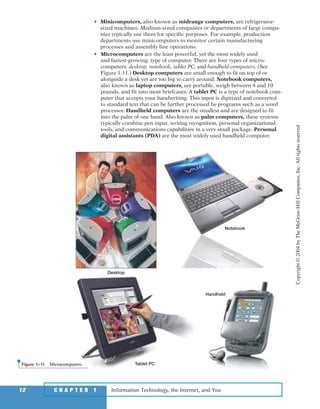
  • 27.
    Information Technology, theInternet, and You28 C H A P T E R 1 Information Technology, the Internet, and You In each of the following chapters, questions in Using Technology focus on interesting applications of technology that relate directly to you. Some of those applications are listed below. Select the two that you find the most interesting and then describe why they are of interest to you and how you might use (or, are using) those applications. • Online Auctions Have you ever participated in an online auction? You can purchase or sell all types of goods from baseball cards to used and new automobiles. What are some of the pros and cons? How can you protect yourself as a buyer and as a seller? See page X. • Online Personal Information Manager Do you have a PDA? Many people do and they have be- come very dependent on them to record personal schedules, addresses, telephone numbers, e-mail addresses, and much more. What if the PDA gets lost? One way to protect yourself is to back up the information onto another computer. Or, you could use an online personal information manager. See page X. • Utility Suites Are you con- cerned about keeping your com- puter tuned up and safe from computer viruses? Most of us are and all of us should be. One way to keep your system operating smoothly and safely is to use a utility suite. McAfee and Symantec are producers of two well-known utility suites. See page X. • Desktop and Notebook Computers Are you thinking about buying a new computer? Would you prefer a desktop or notebook? Perhaps you are considering a tablet PC or a handheld computer. The Web is an excellent resource for reviewing, comparing, and purchasing computers. See page X. • TiVo Would you like to avoid the hassles and limitations of your video tape recorder? TiVo is a device that automatically will record television programs digitally. It allows you to pause a live tele- vision broadcast, view slow motion, and much more. See page X. • Anonymous Web Browsing Have you ever wanted to send an e-mail message to someone with- out them knowing where it came from? Did you know that your activities on the Web can be traced? The Anonymizer can change all that and more. See page X. USING TECHNOLOGY 2 Copyright©2004byTheMcGraw-HillCompanies,Inc.Allrightsreserved ole65985_ch01_web.qxd 9/12/03 2:08 PM Page 28
  • 28.
    Expanding Your Knowledgewww.mhhe.com/oleary 29 EXPANDING YOUR KNOWLEDGE A deeper knowledge of select topics can greatly enhance your under- standing of information technology. In each of the following chapters, the Expanding Your Knowledge feature presents four questions de- signed to help you gain a deeper understanding of select topics. Typically, one question in Expanding Your Knowledge relates to a topic contained on your Computing Today CD. Some of those topics are listed below. Select the two that you find the most interesting and then describe why they are of interest to you and why they are important. • How Instant Messaging Works One of the fastest growing applications on the Internet is instant messaging. This extension to e-mail provides a way for friends and colleagues to communicate and share information from almost anywhere in the world. See page xx. • How Web-based Applications Work Some predict that many organizations will be using Web- based applications in the near future. These organizations will not be required to own, install, up- grade, or store applications. Additionally, applications and application files can be accessed from almost anywhere in the world. See page xx. • How Web Site Development Works Developing or publishing a Web site is a common activity for organizations of all types and for people from all walks of life. The process of creating a Web site consists of five steps: planning, analyzing and designing, creating, going online, and maintaining. See page xx. • How Computer Viruses Work Computer viruses are destructive and dangerous programs that can migrate through networks and operating systems. They often attach themselves to other programs, e-mail messages, and databases. It is essential to protect your computer systems from computer viruses. See page xx. • How Digital Photography Works While traditional cameras capture images on film, digital cameras capture images, and convert them into a digital form. These images can be viewed immediately and saved to a disk or into the cameras memory. See page xx. • How Internet Telephones Work Internet telephones offer a low cost alternative to making long distance calls. Using the Internet telephone (or other appropriate audio input and output devices), the Internet, a special service provider, a sound card, and special software you can place long dis- tance calls to almost anywhere in the world. See page xx. • How Wireless Networks Work Wireless home networks are becoming very popular. These LANs are easy to set up and use. They allow different computers to share resources including a common Internet connection and printer. See page xx. 1 Copyright©2004byTheMcGraw-HillCompanies,Inc.Allrightsreserved ole65985_ch01_web.qxd 9/12/03 2:08 PM Page 29
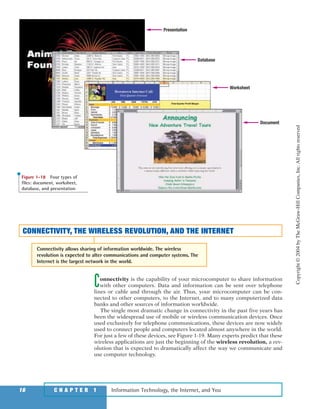
  • 29.
    Information Technology, theInternet, and You30 C H A P T E R 1 2 EXPANDING YOUR KNOWLEDGE In each of the following chapters, one question in Expanding Your Knowledge typically relates to a tutorial on your SimNet CD. Some of those tutorials are listed below. Select the two that you find the most interesting and then describe why they are of interest to you and why they are important. • The Internet, Web, and Electronic Commerce Internet service providers, Web browsers, Web pages, HTML, e-mail, electronic commerce, and more are presented in this tutorial. See page XX. • Applications Software This tutorial presents browsers, word processors, spreadsheets, database administrators, presentation graphics, and more. See page XX. • System Software This tutorial describes the Windows operating systems and commonly used Windows utilities. Other operating systems are presented including Mac OS. See page XX. • The System Unit This tutorial describes components within the system unit including the motherboard, CPU, memory, expansion boards, and expansion cards. See page X. • Input and Output This tutorial describes key- boards, mice, digital cameras, monitors, printers, plotters and more. See page XX. • Secondary Storage Removable and nonre- movable disks are presented in this tutorial. Also, CDs are compared to DVDs. See page X. • Connectivity, the Wireless Revolution, and Communications This tutorial presents connectivity con- cepts, Web sites specifically designed for wireless handheld devices, and different network configu- rations. See page X. • Privacy and Security A variety of ergonomic, privacy, and security issues are presented. The most significant security risks for end users are discussed. See page XX. Copyright©2004byTheMcGraw-HillCompanies,Inc.Allrightsreserved ole65985_ch01_web.qxd 9/12/03 2:08 PM Page 30
  • 30.
    BUILDING YOUR PORTFOLIO BuildingYour Portfolio www.mhhe.com/oleary 31 1A portfolio typically consists of printed material that documents an in- dividual’s skills and knowledge. The process of creating a portfolio helps individuals to recognize and to organize their accomplishments. A well-designed and complete portfolio can be an essential tool for landing that perfect job. In the following chapters, the Building Your Portfolio feature presents four questions designed to help you create a portfolio to document your computer competency and knowledge. Two questions in Building Your Portfolio typically relate to key tech- nologies. Some of these technologies are listed below. Select the two that you find the most interesting and then describe why they are of interest to you and why a prospective employer would be impressed with this knowledge. • Electronic Commerce Electronic commerce is one of the most exciting Web applications. Different types include businesses to consumer (B2C), consumer to consumer (C2C), and business to business (B2B). Each of these has significant economic potential for nearly all organizations. See page X. • Artificial Intelligence A technology that promises widespread implications is artificial intelligence. This technology attempts to simulate human senses, thought processes, and actions. Many software manufacturing companies are producing programs with built-in artificial intelligence. See page X. • Linux Linux is a powerful operating system used by many computer professionals today. Some experts project that it will replace Win- dows as the most widely used operating system for powerful microcomputers and servers on the Web. See page X. • Microprocessors One of the most important components of any microcomputer systems is the microprocessor. For the past several years, microprocessor speeds have doubled every year and a half. Many manufacturers including Intel, AMD, and Cyrix expect this trend to continue. See page X. • Digital Input Before any type of data or information can be processed by a computer, it must be in digital form. The capability of input devices to convert handwriting, sketches, and images into a digital form has greatly expanded computer capabilities. See page X. Copyright©2004byTheMcGraw-HillCompanies,Inc.Allrightsreserved ole65985_ch01_web.qxd 9/12/03 2:08 PM Page 31
  • 31.
    Information Technology, theInternet, and You32 C H A P T E R 1 BUILDING YOUR PORTFOLIO 2 In each of the following chapters, two questions in Building Your Portfolio typically relate to security, privacy, and ethical issues. Some of these issues are listed below. Select the two that you find the most interesting and then describe why they are of interest to you and why they are important issues. • HTML Source Code A common way to create interesting and dynamic Web pages is to examine how professionals create their sites. Once connected to most Web sites, you can display the HTML source code used to create that site. Additionally, you can make a copy of the code and save it on your computer system. Some argue that this is unethical and illegal. Others argue that this is an acceptable way to create personal and profes- sional sites. See page X. • Antitrust Microsoft Corporation has been in- volved with extensive antitrust legal battles over the past few years. The issue has been that Microsoft’s Windows operating system has been tailored to use Microsoft application software. The suite claims that this provides Microsoft an unfair advantage over other companies that produce competing application software. While many support this view, others contend that all corporations use whatever they can to improve their competitive positions. See page X. • Processor Serial Numbers When the Intel Pentium III microprocessor was released, each unit originally contained a unique Processor Serial Number, or PSN. This PSN could be used by online e-commerce sites to identify and track individuals by the computer they used. This tracking would be similar to keeping track of car owners by their license plate numbers. Intel anticipated that the PSN would help electronic commerce and add security to Internet sales. Others argued that the tracking capabilities were an invasion of personal privacy. Soon after introduction, the PSNs were discontinued. See page X. • CD-R and Music Files For the past few years, one of the most popular Web activities has been to share or download music from the Web to create custom CDs. Even though recent legal rulings support the illegality of reproducing music that has been copyrighted, sharing music continues to be a widely practiced Web activity. While some suggest that stronger enforcement is needed, others suggest that enforcement is impossible and not needed. See page X. • Electronic Monitoring Surveillance of individuals is greater today than ever before. For example, the FBI has proposed the widespread use of a technology known as Carnivore to help them track terrorists. This technology supports widespread monitoring of individual Internet activity and e-mail. Privacy advocates claim that this would be an unnecessary and unneeded invasion of personal privacy. See page X. Copyright©2004byTheMcGraw-HillCompanies,Inc.Allrightsreserved ole65985_ch01_web.qxd 9/12/03 2:08 PM Page 32
  • 32.