
By - Leesha leshi.
table of contents
Introduction to ICT

………………………………………..

01

Present role of ICT in the Society

………………………………………..

02

Introduction to Computers

………………………………………..

03

Basic Parts of the Computer

………………………………………..

04

Data processing

………………………………………..

05

Basic Anatomy of a Computer

………………………………………..

06

The Characteristics of a Computer

………………………………………..

07

How Computer Works

…………………………………….....

08
<<<previous
1. Introduction to ICT
 The present age is referred to as the information age as most people’s

lives depend on information technology. A lot of people work on
computer related fields and computers affect everybody in one way or
the other. Communication too is becoming an integral part of
information technology. Information technology (IT) is now being
replaced by Information Communication Technology. (ICT)

 ICT mean almost anything that new and relevant to communication.

This includes the Internet, Mobile technology, Satellite
Communications and digital Television over cable or areal.

 ICT is a broad subject that will

store, retrieve, manipulate, transmit, or receive information
electronically in a digital form.

<<<previous
2. Present role of ICT in the Society
 Today Computer has become an important part of day-to-

day life. Most human activities take place with aid of ICT. It
gives more effective and speedy solutions to real life
problems. People lead complex lifestyles that that need
most suitable solutions within short time.
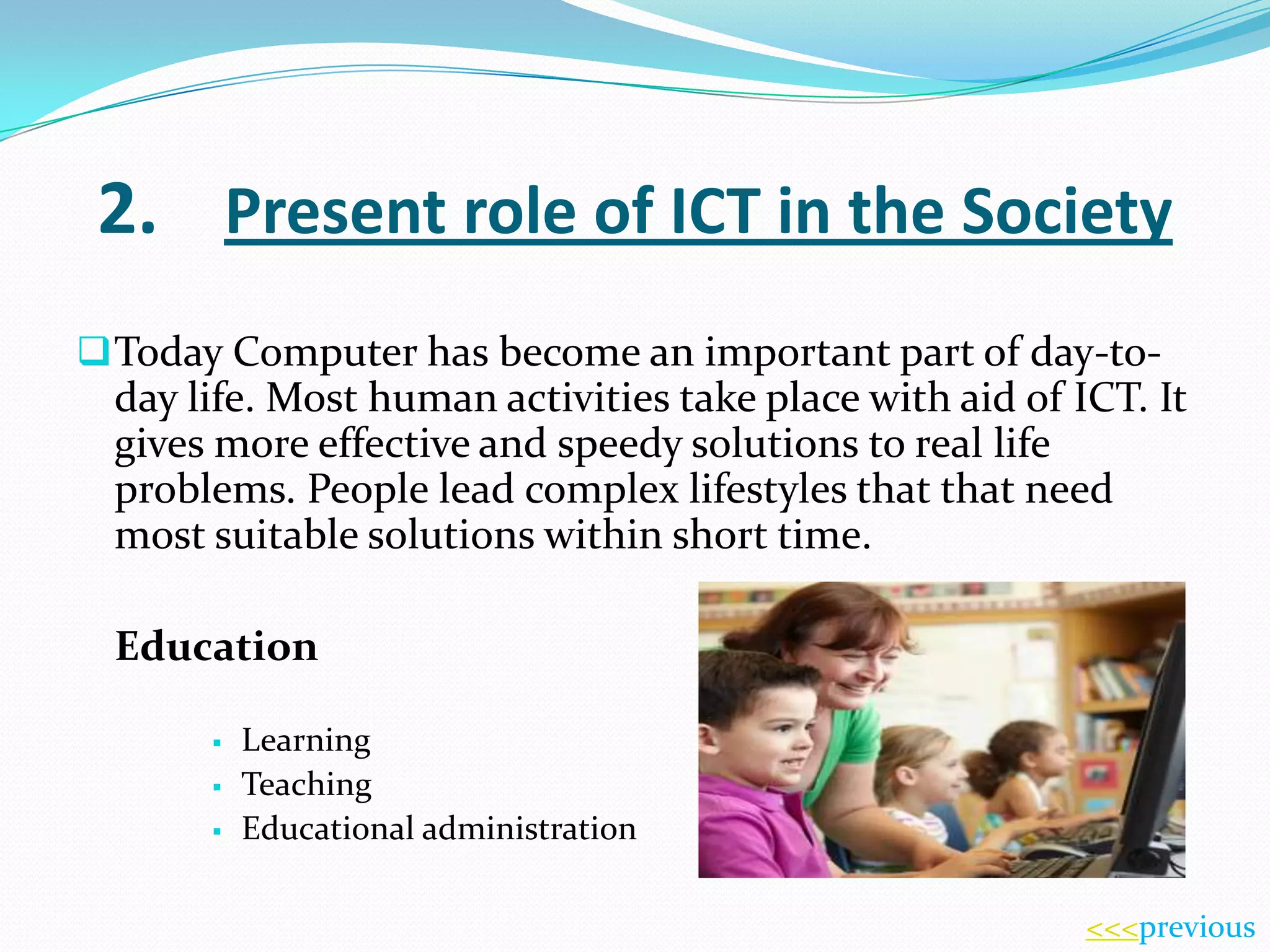
Education




Learning
Teaching
Educational administration
<<<previous
Eg:
Computer Assisted Learning (CAL)
Computer Assisted School Administration
This involves the use of IT to automate activities in
school administration such as keeping records of
students, examination results, normal office work,
communication with other schools via e-mail etc.

<<<previous
Accounting and Banking
IT is used automate manual accounting systems such
as general ledger, sales and purchases, stock control
(with point of sales terminal connected to stock data
base) In banking the use Automatic Teller Machine is a
useful application of IT.

<<<previous
Transportation
IT is used in transportation by railways and airlines for
reservation of seats, control of traffic and maintaining
time-tables of vehicles and duties of crew. It is in all
fields of air traffic. Every air craft has a small computer
fitted to help pilots in various ways.

<<<previous
Medicine
In hospitals special computer are built inside different
equipment. For example CAT scanners (Computer
Axial Tomography) Further maintenance of patient’s
records in electronic databases enhances service
provided to them.

<<<previous
Engineering
Engineers use IT to prepares drawings of
machines, tools, bridges, buildings etc. (Computer
Assisted Drawing- CAD). Also computers are used to
control manufacturing of items (Computer Assisted
Manufacture). The use of Robots in industries is
another example.

<<<previous
Defense & Security
IT is very useful in tracking down of criminals by
maintenance of their databases. In warfare computers
are used to guide missiles.

<<<previous
Entertainment
This basically covers video games, music and movies
played back by computer with multimedia facilities.
Special purpose computer are used in modern hold
appliances like washing machines, microwave
ovens, television sets and video cassette payers etc.

<<<previous
3. Introduction to Computer
COMPUTER is one of the most powerful too ever

designed by man to solve his problems that involve
Computing and Processing Data. A Computer is an
Electronic device designed to accept and store
data, process them and produce meaningful result
under the direction of detailed step by step
instructions. Simply put, a computer is an electronic
machine that helps us solve problems. They can be
problems relating to
Industry, Medicine, Education, Scientific
Research, Law, etc.
<<<previous
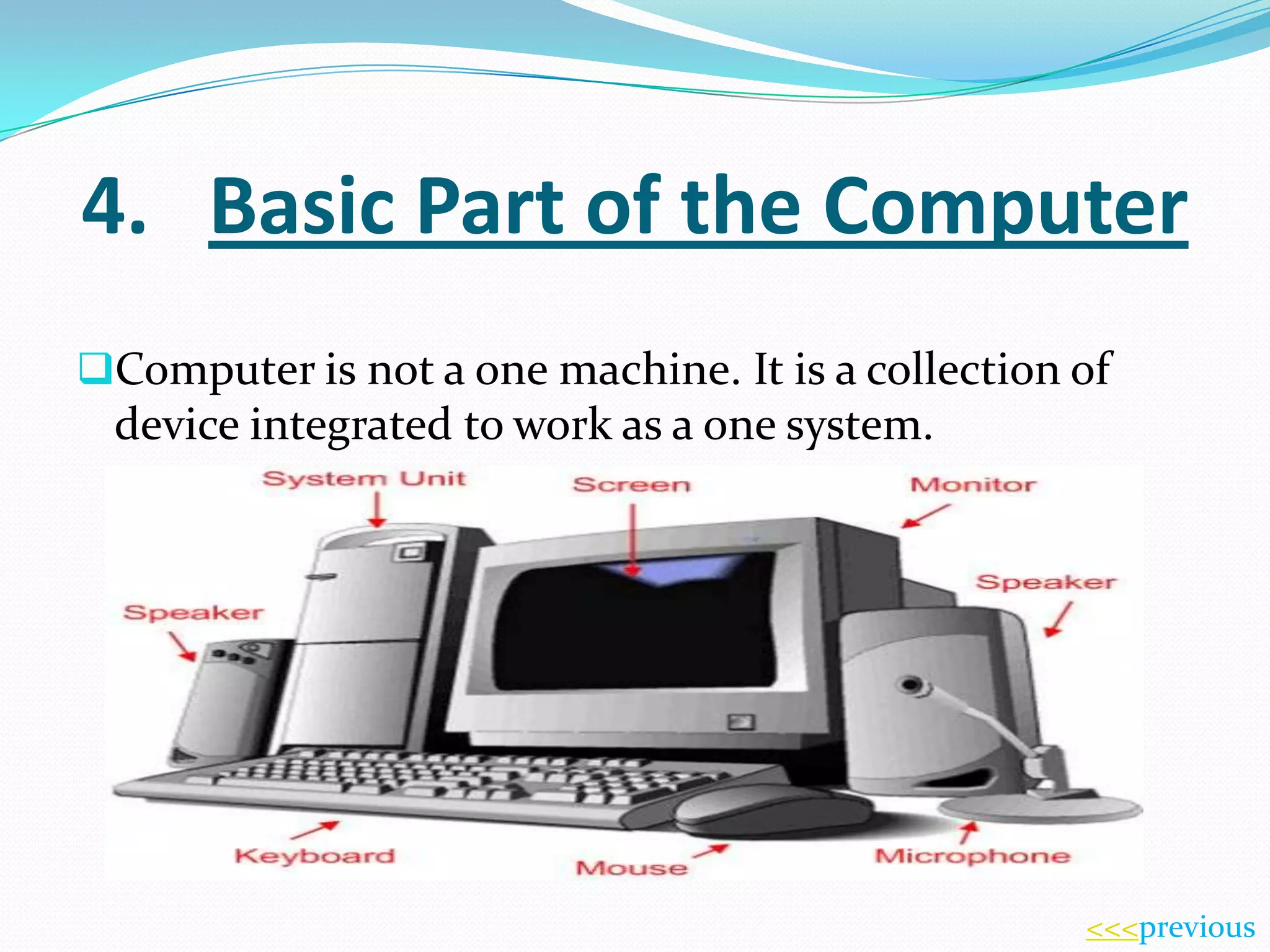
4. Basic Part of the Computer
Computer is not a one machine. It is a collection of

device integrated to work as a one system.

<<<previous
5. Data Processing
The primary purpose of Computer Systems in most

businesses today is to transform data in to information
that can be used by people to make decision, se
products, and perform a variety of other activities.
Data can be considered the raw materials. Whether in

paper, electronic, or other form that is processed by
the Computer. In other words, data consists of the raw
facts and figures that are processed in to information.
<<<previous
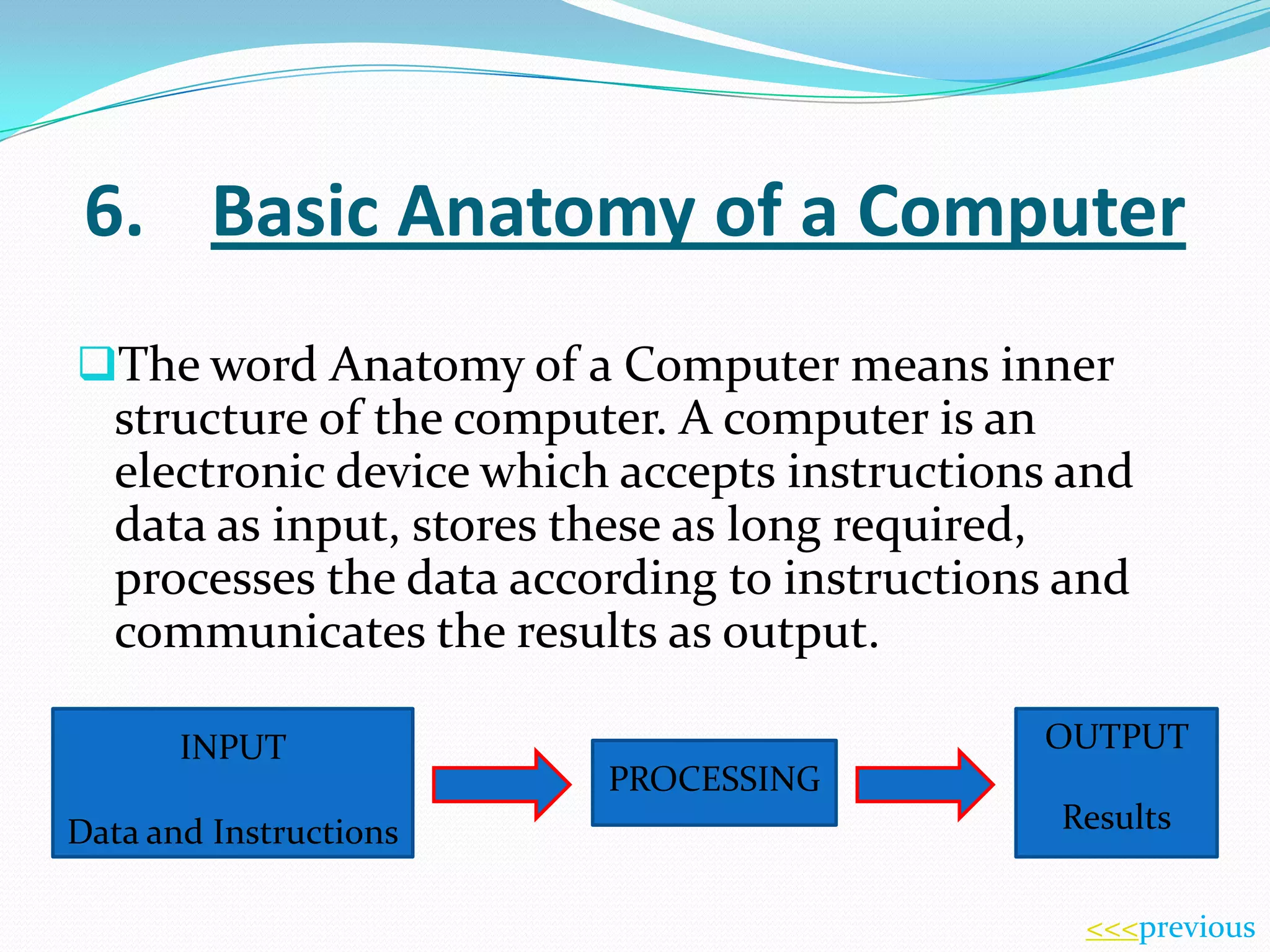
6. Basic Anatomy of a Computer
The word Anatomy of a Computer means inner
structure of the computer. A computer is an
electronic device which accepts instructions and

data as input, stores these as long required,
processes the data according to instructions and
communicates the results as output.
INPUT
Data and Instructions

OUTPUT
PROCESSING
Results
<<<previous
7.

The Characteristics of a Computer

Speed

Computer have tremendous processing speed.
The speed of the computer is measured in terms
of instructions processed per second. Their speed
is so high that special units are used to speed
determination.

<<<previous
Volume

The computer with a high degree of
efficiency can handle large volume of data.

<<<previous
Accuracy

The accuracy of a computer is consistently high.
While in the case of human, one could commit
approximately one error 500 – 1000 calculations. A
computer commits no error and has the same
efficiency and reliability with amount of data.

<<<previous
Timeline

Information is of no relevance unless received at
the right time. Computers with capabilities of
speed and accuracy have to great extent improved
the timeliness if information.

<<<previous
Diligence

Computers do not suffer from stress and strain
and don’t get tried.

<<<previous
Storage

Computers today have huge storage capacity that
is of no imit. Data or information can be
permanently stored. The data stored can be
retrieved for use whenever required.

<<<previous
8. How Computer works
A Computer by itself can not do any manipulation, as

it does not have “Brain” or Thinking Power. It has
to therefore be instructed to perform a task and supply
with the necessary information in detailed from in a
“language” which computer can understand. The
instruction that we feed to the computer is the basic
input. This input can be give to the computer through
the input device. These instructions are sent to the
processor sends the result, known as the output. To do
any thing with the computer, we need.
<<<previous
 Hard ware

This is the actual machine that includes the
mechanical, electrical and electronic equipment
for example, Key board, Monitor, System unit, etc.

<<<previous
 Soft ware

The software of the computer constitutions of
the program and instruction to be executed.

<<<previous
 Live ware

All input specifications are given by people.
Every output is sent is people. People do switching
on a computer.

<<<previous
 Firm ware

This is the name given to in-built programs
inside.

<<<previous
Thanks for watching…

<<<previous
Contents ©
first page ***

Fundamentals of ict n krishantha

  • 1.
  • 2.
    table of contents Introductionto ICT ……………………………………….. 01 Present role of ICT in the Society ……………………………………….. 02 Introduction to Computers ……………………………………….. 03 Basic Parts of the Computer ……………………………………….. 04 Data processing ……………………………………….. 05 Basic Anatomy of a Computer ……………………………………….. 06 The Characteristics of a Computer ……………………………………….. 07 How Computer Works ……………………………………..... 08 <<<previous
  • 3.
    1. Introduction toICT  The present age is referred to as the information age as most people’s lives depend on information technology. A lot of people work on computer related fields and computers affect everybody in one way or the other. Communication too is becoming an integral part of information technology. Information technology (IT) is now being replaced by Information Communication Technology. (ICT)  ICT mean almost anything that new and relevant to communication. This includes the Internet, Mobile technology, Satellite Communications and digital Television over cable or areal.  ICT is a broad subject that will store, retrieve, manipulate, transmit, or receive information electronically in a digital form. <<<previous
  • 4.
    2. Present roleof ICT in the Society  Today Computer has become an important part of day-to- day life. Most human activities take place with aid of ICT. It gives more effective and speedy solutions to real life problems. People lead complex lifestyles that that need most suitable solutions within short time. Education    Learning Teaching Educational administration <<<previous
  • 5.
    Eg: Computer Assisted Learning(CAL) Computer Assisted School Administration This involves the use of IT to automate activities in school administration such as keeping records of students, examination results, normal office work, communication with other schools via e-mail etc. <<<previous
  • 6.
    Accounting and Banking ITis used automate manual accounting systems such as general ledger, sales and purchases, stock control (with point of sales terminal connected to stock data base) In banking the use Automatic Teller Machine is a useful application of IT. <<<previous
  • 7.
    Transportation IT is usedin transportation by railways and airlines for reservation of seats, control of traffic and maintaining time-tables of vehicles and duties of crew. It is in all fields of air traffic. Every air craft has a small computer fitted to help pilots in various ways. <<<previous
  • 8.
    Medicine In hospitals specialcomputer are built inside different equipment. For example CAT scanners (Computer Axial Tomography) Further maintenance of patient’s records in electronic databases enhances service provided to them. <<<previous
  • 9.
    Engineering Engineers use ITto prepares drawings of machines, tools, bridges, buildings etc. (Computer Assisted Drawing- CAD). Also computers are used to control manufacturing of items (Computer Assisted Manufacture). The use of Robots in industries is another example. <<<previous
  • 10.
    Defense & Security ITis very useful in tracking down of criminals by maintenance of their databases. In warfare computers are used to guide missiles. <<<previous
  • 11.
    Entertainment This basically coversvideo games, music and movies played back by computer with multimedia facilities. Special purpose computer are used in modern hold appliances like washing machines, microwave ovens, television sets and video cassette payers etc. <<<previous
  • 12.
    3. Introduction toComputer COMPUTER is one of the most powerful too ever designed by man to solve his problems that involve Computing and Processing Data. A Computer is an Electronic device designed to accept and store data, process them and produce meaningful result under the direction of detailed step by step instructions. Simply put, a computer is an electronic machine that helps us solve problems. They can be problems relating to Industry, Medicine, Education, Scientific Research, Law, etc. <<<previous
  • 13.
    4. Basic Partof the Computer Computer is not a one machine. It is a collection of device integrated to work as a one system. <<<previous
  • 14.
    5. Data Processing Theprimary purpose of Computer Systems in most businesses today is to transform data in to information that can be used by people to make decision, se products, and perform a variety of other activities. Data can be considered the raw materials. Whether in paper, electronic, or other form that is processed by the Computer. In other words, data consists of the raw facts and figures that are processed in to information. <<<previous
  • 15.
    6. Basic Anatomyof a Computer The word Anatomy of a Computer means inner structure of the computer. A computer is an electronic device which accepts instructions and data as input, stores these as long required, processes the data according to instructions and communicates the results as output. INPUT Data and Instructions OUTPUT PROCESSING Results <<<previous
  • 16.
    7. The Characteristics ofa Computer Speed Computer have tremendous processing speed. The speed of the computer is measured in terms of instructions processed per second. Their speed is so high that special units are used to speed determination. <<<previous
  • 17.
    Volume The computer witha high degree of efficiency can handle large volume of data. <<<previous
  • 18.
    Accuracy The accuracy ofa computer is consistently high. While in the case of human, one could commit approximately one error 500 – 1000 calculations. A computer commits no error and has the same efficiency and reliability with amount of data. <<<previous
  • 19.
    Timeline Information is ofno relevance unless received at the right time. Computers with capabilities of speed and accuracy have to great extent improved the timeliness if information. <<<previous
  • 20.
    Diligence Computers do notsuffer from stress and strain and don’t get tried. <<<previous
  • 21.
    Storage Computers today havehuge storage capacity that is of no imit. Data or information can be permanently stored. The data stored can be retrieved for use whenever required. <<<previous
  • 22.
    8. How Computerworks A Computer by itself can not do any manipulation, as it does not have “Brain” or Thinking Power. It has to therefore be instructed to perform a task and supply with the necessary information in detailed from in a “language” which computer can understand. The instruction that we feed to the computer is the basic input. This input can be give to the computer through the input device. These instructions are sent to the processor sends the result, known as the output. To do any thing with the computer, we need. <<<previous
  • 23.
     Hard ware Thisis the actual machine that includes the mechanical, electrical and electronic equipment for example, Key board, Monitor, System unit, etc. <<<previous
  • 24.
     Soft ware Thesoftware of the computer constitutions of the program and instruction to be executed. <<<previous
  • 25.
     Live ware Allinput specifications are given by people. Every output is sent is people. People do switching on a computer. <<<previous
  • 26.
     Firm ware Thisis the name given to in-built programs inside. <<<previous
  • 27.