IMAGE PROCESSING  -PRESENTATION OF IMAGES  FOR THE BLIND -” A VISION FOR THE BLIND’” BY K.PARKAVI DEPARTMENT OF COMPUTER SCIENCE  AND ENGINEERING, JEPPIAAR ENGINEERING COLLEGE, CHENNAI-119.
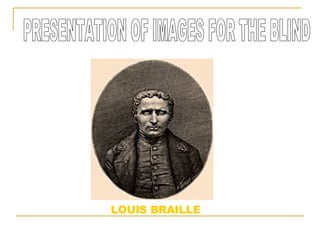
LOUIS BRAILLE PRESENTATION OF IMAGES FOR THE BLIND
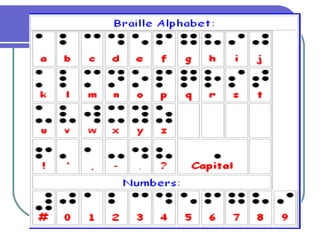
ABSTRACT This explains about how to present natural colour photographs or scenes to the blind. In this method original photograhs or scenes are taken into computer’s memory through image scanner or video camera as digital images. They are image processed and translated intotactile images on braille paper,which are easy tounderstand for the blind.
INTRODUCTION How can the blind recognize the contents of photographs or scenes? original images are broken down into simple images to represent one or more attributes. These simple images would be easier to understand by tactile sensation for the blind. To implement this process, image-processes would be effective.
Let us see how to develop a prototype system and to find out an effective way for image presentation for the blind.
INPUT DEVICE: Image scanner(CANON PIXEL JET),video  Camera. MAIN PROCESSOR: Indy personal computer(PC) OUTPUT DEVICE: Braille printer plotter(New ESA721),image Printer(CANON PIXEL JET). SYSTEM CONFIGURATION
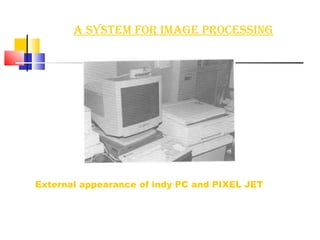
A System for image processing External appearance of indy PC and PIXEL JET
We applied the following standard image-processes to original images to Translate them into simple tactile images : Crop/add margin Negation Colour to gray scale conversion Edge detection Thresholding Image editing Rotation Scale Flip flop
RESOLUTION The difference of effective resolution between image screen and Braille Printer plotter is very large as shown below: 1.The resolution of original image  horizontal :<1280 vertical:<1024 2.The resolution of the Braille printer plotter. plotter step size is about 0.34mm,so the resolution is  as follows:  793*600 for 10”11inch Braille paper 726*480 for 8”10inch Braille paper 3.The effective resolution of Braille image for 8*10inch  Braille paper  horizontal:145-242 vertical:96-160
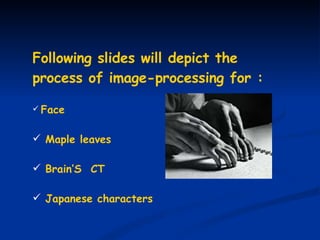
Following slides will depict the process of image-processing for : Face Maple leaves Brain’S  CT Japanese characters
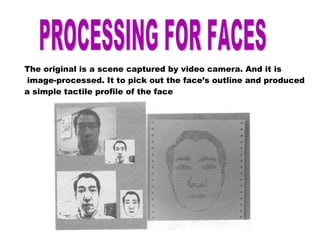
PROCESSING FOR FACES The original is a scene captured by video camera. And it is image-processed. It to pick out the face’s outline and produced  a simple tactile profile of the face
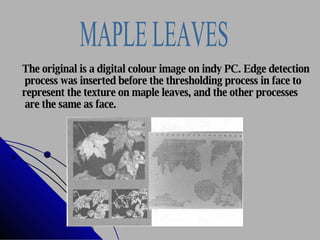
MAPLE LEAVES The original is a digital colour image on indy PC. Edge detection process was inserted before the thresholding process in face to  represent the texture on maple leaves, and the other processes are the same as face.
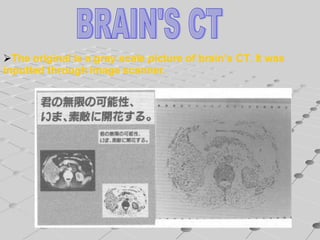
BRAIN'S CT The original is a gray scale picture of brain’s CT. It was  inputted through image scanner.
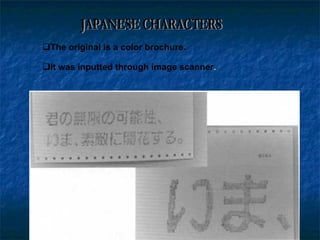
The original is a color brochure. It was inputted through image scanner . JAPANESE CHARACTERS
 
 
RESULTS AND DISCUSSION We discussed how to present tactile images to the blind  and found a prototype system to create and present easy  tactile images to the blind. All though these tactile images are too rough to distinguish the details of original photographs they are supposed to be easy to catch the points of original image by tactile  sensation.
Only a few important attributes of the image are  reserved tactile without the extra complicated  information. We would be able to make a number of tactile images  that present different attributes from an original image. From these facts, we can say that the blind is able to understand the photographs or scenes by tactile sensation with help of image processes on computer. In this paper,we only pointed out and showed the  effectiveness of image processing method on  creating tactile images.
BUT WE ARE NOW TRYING TO IMPLEMENT A SYSTEM IN WHICH A BLIND CAN EASILY IMAGE-PROCESS ORIGINAL IMAGES AND  UNDERSTAND THEM AS TACTILE IMAGES BY THEIR OWN EFFORT IN THEIR FIATURE.
 
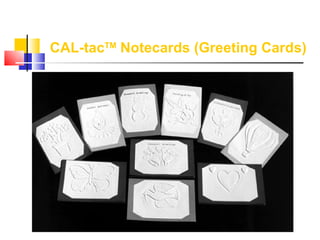
CAL-tac TM  Notecards (Greeting Cards)                                                                                                                                                                                                                          
 
.  ...  ... .  ..  . . . ..  ....  . ..  .  ...  ..... . .  . . .. .  ... ..  . .  .  .  ... .... ..  . ....... . . ..  ... . .. .. . . .  .. .  . ... . .  .  ... . .  .  . . .  .  . ..  ..  .  ...  ... .  .... . .. .  ... ...  ... . .. .  ..  . . .  .
Queries ? ? ?
THANK  YOU………

Image Processing (General Topic)

  • 1.
    IMAGE PROCESSING -PRESENTATION OF IMAGES FOR THE BLIND -” A VISION FOR THE BLIND’” BY K.PARKAVI DEPARTMENT OF COMPUTER SCIENCE AND ENGINEERING, JEPPIAAR ENGINEERING COLLEGE, CHENNAI-119.
  • 2.
    LOUIS BRAILLE PRESENTATIONOF IMAGES FOR THE BLIND
  • 3.
    ABSTRACT This explainsabout how to present natural colour photographs or scenes to the blind. In this method original photograhs or scenes are taken into computer’s memory through image scanner or video camera as digital images. They are image processed and translated intotactile images on braille paper,which are easy tounderstand for the blind.
  • 4.
    INTRODUCTION How canthe blind recognize the contents of photographs or scenes? original images are broken down into simple images to represent one or more attributes. These simple images would be easier to understand by tactile sensation for the blind. To implement this process, image-processes would be effective.
  • 5.
    Let us seehow to develop a prototype system and to find out an effective way for image presentation for the blind.
  • 6.
    INPUT DEVICE: Imagescanner(CANON PIXEL JET),video Camera. MAIN PROCESSOR: Indy personal computer(PC) OUTPUT DEVICE: Braille printer plotter(New ESA721),image Printer(CANON PIXEL JET). SYSTEM CONFIGURATION
  • 7.
    A System forimage processing External appearance of indy PC and PIXEL JET
  • 8.
    We applied thefollowing standard image-processes to original images to Translate them into simple tactile images : Crop/add margin Negation Colour to gray scale conversion Edge detection Thresholding Image editing Rotation Scale Flip flop
  • 9.
    RESOLUTION The differenceof effective resolution between image screen and Braille Printer plotter is very large as shown below: 1.The resolution of original image horizontal :<1280 vertical:<1024 2.The resolution of the Braille printer plotter. plotter step size is about 0.34mm,so the resolution is as follows: 793*600 for 10”11inch Braille paper 726*480 for 8”10inch Braille paper 3.The effective resolution of Braille image for 8*10inch Braille paper horizontal:145-242 vertical:96-160
  • 10.
    Following slides willdepict the process of image-processing for : Face Maple leaves Brain’S CT Japanese characters
  • 11.
    PROCESSING FOR FACESThe original is a scene captured by video camera. And it is image-processed. It to pick out the face’s outline and produced a simple tactile profile of the face
  • 12.
    MAPLE LEAVES Theoriginal is a digital colour image on indy PC. Edge detection process was inserted before the thresholding process in face to represent the texture on maple leaves, and the other processes are the same as face.
  • 13.
    BRAIN'S CT Theoriginal is a gray scale picture of brain’s CT. It was inputted through image scanner.
  • 14.
    The original isa color brochure. It was inputted through image scanner . JAPANESE CHARACTERS
  • 15.
  • 16.
  • 17.
    RESULTS AND DISCUSSIONWe discussed how to present tactile images to the blind and found a prototype system to create and present easy tactile images to the blind. All though these tactile images are too rough to distinguish the details of original photographs they are supposed to be easy to catch the points of original image by tactile sensation.
  • 18.
    Only a fewimportant attributes of the image are reserved tactile without the extra complicated information. We would be able to make a number of tactile images that present different attributes from an original image. From these facts, we can say that the blind is able to understand the photographs or scenes by tactile sensation with help of image processes on computer. In this paper,we only pointed out and showed the effectiveness of image processing method on creating tactile images.
  • 19.
    BUT WE ARENOW TRYING TO IMPLEMENT A SYSTEM IN WHICH A BLIND CAN EASILY IMAGE-PROCESS ORIGINAL IMAGES AND UNDERSTAND THEM AS TACTILE IMAGES BY THEIR OWN EFFORT IN THEIR FIATURE.
  • 20.
  • 21.
    CAL-tac TM Notecards (Greeting Cards)                                                                                                                                                                                                                          
  • 22.
  • 23.
    . ... ... . .. . . . .. .... . .. . ... ..... . . . . .. . ... .. . . . . ... .... .. . ....... . . .. ... . .. .. . . . .. . . ... . . . ... . . . . . . . . .. .. . ... ... . .... . .. . ... ... ... . .. . .. . . . .
  • 24.
  • 25.