


DIGITAL
IMAGE
PROCESSING
Presented by:-
S. Sushma(11MD1A0466)
P. Harish Reddy(11MD1A0496)
V. Manikanta(11MD1A04B1)
DIGITAL IMAGE
PROCESSING
Presented by:-
S. Sushma(11MD1A0466)
P. Harish Reddy(11MD1A0496)
V. Manikanta(11MD1A04B1)
INTRODUCTION
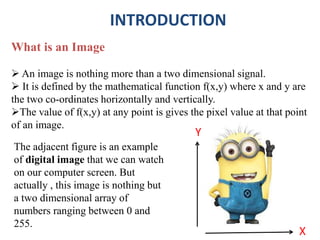
What is an Image
 An image is nothing more than a two dimensional signal.
 It is defined by the mathematical function f(x,y) where x and y are
the two co-ordinates horizontally and vertically.
The value of f(x,y) at any point is gives the pixel value at that point
of an image.
X
Y
The adjacent figure is an example
of digital image that we can watch
on our computer screen. But
actually , this image is nothing but
a two dimensional array of
numbers ranging between 0 and
255.
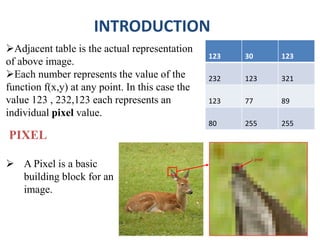
Adjacent table is the actual representation
of above image.
Each number represents the value of the
function f(x,y) at any point. In this case the
value 123 , 232,123 each represents an
individual pixel value.
INTRODUCTION
123 30 123
232 123 321
123 77 89
80 255 255
PIXEL
 A Pixel is a basic
building block for an
image.
1 pixel
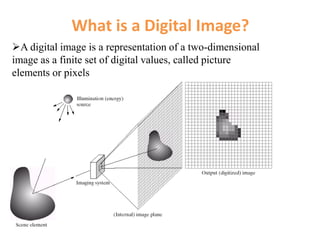
What is a Digital Image?
A digital image is a representation of a two-dimensional
image as a finite set of digital values, called picture
elements or pixels
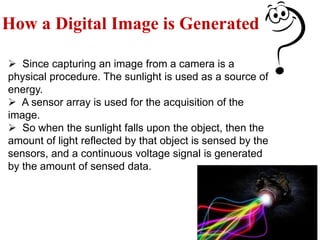
How a Digital Image is Generated
 Since capturing an image from a camera is a
physical procedure. The sunlight is used as a source of
energy.
 A sensor array is used for the acquisition of the
image.
 So when the sunlight falls upon the object, then the
amount of light reflected by that object is sensed by the
sensors, and a continuous voltage signal is generated
by the amount of sensed data.
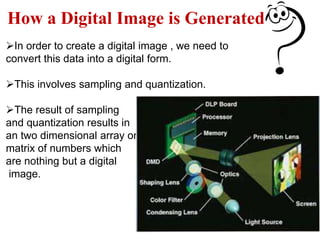
In order to create a digital image , we need to
convert this data into a digital form.
This involves sampling and quantization.
The result of sampling
and quantization results in
an two dimensional array or
matrix of numbers which
are nothing but a digital
image.
How a Digital Image is Generated
Meaning of digital image processing
 Digital :
Information represented in discrete (digits) form.
 Image :
A reproduction of the form of a person or object .
 Processing :
Performing a series of actions or operations on data
to convert into information
 DIP:
The Digital image processing is the use of computer
algorithms to perform image processing (or) manipulation on
digital images.
HISTORY OF DIP
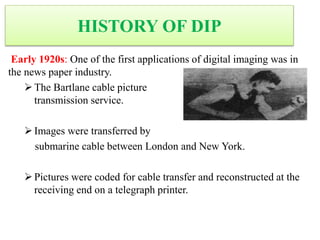
Early 1920s: One of the first applications of digital imaging was in
the news paper industry.
The Bartlane cable picture
transmission service.
Images were transferred by
submarine cable between London and New York.
Pictures were coded for cable transfer and reconstructed at the
receiving end on a telegraph printer.
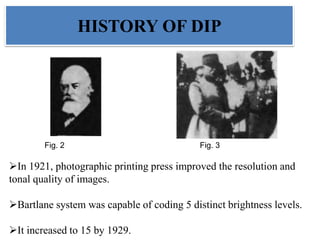
Fig. 2 Fig. 3
In 1921, photographic printing press improved the resolution and
tonal quality of images.
Bartlane system was capable of coding 5 distinct brightness levels.
It increased to 15 by 1929.
HISTORY OF DIP
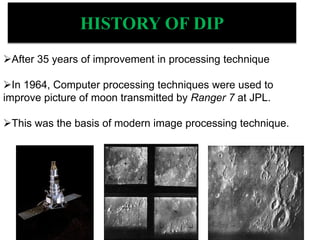
After 35 years of improvement in processing technique
In 1964, Computer processing techniques were used to
improve picture of moon transmitted by Ranger 7 at JPL.
This was the basis of modern image processing technique.
HISTORY OF DIP
 Many of the techniques of digital image processing, were developed
in the 1960s at the Jet Propulsion Laboratory, Massachusetts Institute of
Technology, Bell Laboratories, University of Maryland, and a few other
research facilities, with application to satellite imagery, wire-
photo standards conversion,
 Medical imaging, Videophone, Character recognition, and
photograph enhancement.
 In 2002 Raanan Fattal introduced Gradient domain image
processing, a new way to process images in which the differences
between pixels are manipulated rather than the pixel values
themselves.
HISTORY OF DIP
HISTORY OF DIP
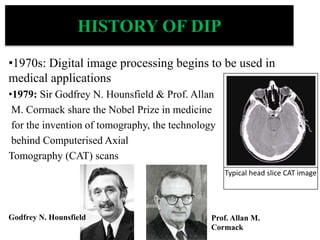
•1970s: Digital image processing begins to be used in
medical applications
•1979: Sir Godfrey N. Hounsfield & Prof. Allan
M. Cormack share the Nobel Prize in medicine
for the invention of tomography, the technology
behind Computerised Axial
Tomography (CAT) scans
Typical head slice CAT image
Godfrey N. Hounsfield Prof. Allan M.
Cormack
Image processing is used for two somewhat different purposes:
 Improving the visual appearance of images (pictorial information)
to a human viewer, and
 Preparing (processing) images for measurement of the features
and structures present.
 For efficient storage and transmission of images.
The techniques that are appropriate for each of these tasks are not
always the same, but there is considerable overlap.
DIGITAL IMAGE PROCESSING
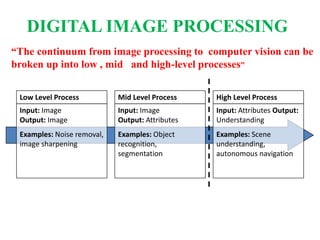
Low Level Process
Input: Image
Output: Image
Examples: Noise removal,
image sharpening
Mid Level Process
Input: Image
Output: Attributes
Examples: Object
recognition,
segmentation
High Level Process
Input: Attributes Output:
Understanding
Examples: Scene
understanding,
autonomous navigation
“The continuum from image processing to computer vision can be
broken up into low , mid and high-level processes”
DIGITAL IMAGE PROCESSING
Low-level process: (DIP)
Primitive operations where inputs and outputs are images
Major functions: image pre-processing like noise reduction,
contrast enhancement, image sharpening, etc.
Mid-level process (DIP and Computer Vision and Pattern
Recognition)
Inputs are images, outputs are attributes (e.g., edges).
Major functions: segmentation, description, classification /
recognition of objects
High-level process (Computer Vision)
Make sense of an ensemble of recognized objects; perform the
cognitive functions normally associated with vision
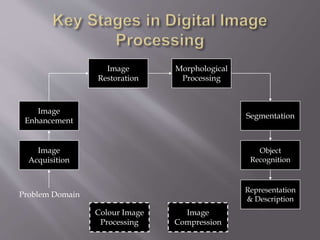
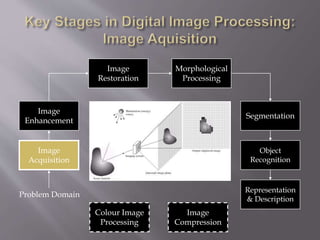
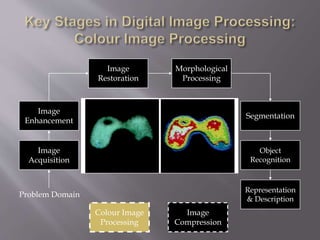
Image
Acquisition
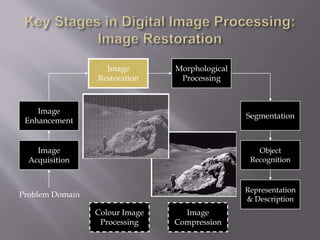
Image
Restoration
Morphological
Processing
Segmentation
Representation
& Description
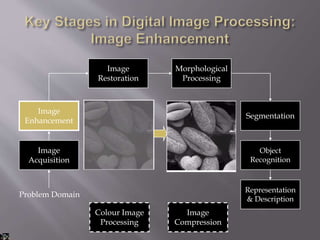
Image
Enhancement
Object
Recognition
Problem Domain
Colour Image
Processing
Image
Compression
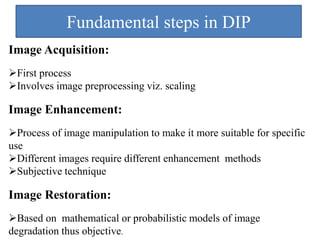
Fundamental steps in DIP
Image Acquisition:
First process
Involves image preprocessing viz. scaling
Image Enhancement:
Process of image manipulation to make it more suitable for specific
use
Different images require different enhancement methods
Subjective technique
Image Restoration:
Based on mathematical or probabilistic models of image
degradation thus objective.
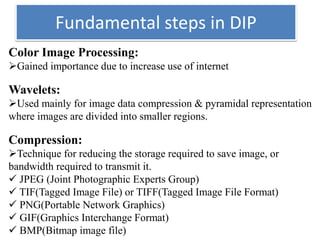
Fundamental steps in DIP
Color Image Processing:
Gained importance due to increase use of internet
Wavelets:
Used mainly for image data compression & pyramidal representation
where images are divided into smaller regions.
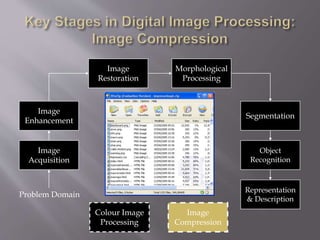
Compression:
Technique for reducing the storage required to save image, or
bandwidth required to transmit it.
 JPEG (Joint Photographic Experts Group)
 TIF(Tagged Image File) or TIFF(Tagged Image File Format)
 PNG(Portable Network Graphics)
 GIF(Graphics Interchange Format)
 BMP(Bitmap image file)
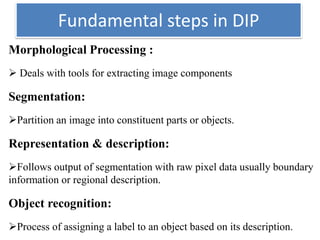
Fundamental steps in DIP
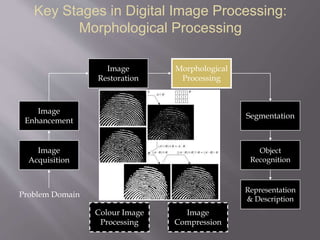
Morphological Processing :
 Deals with tools for extracting image components
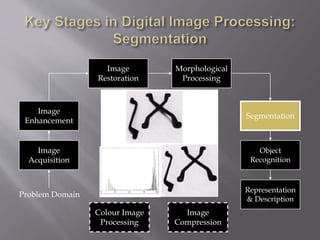
Segmentation:
Partition an image into constituent parts or objects.
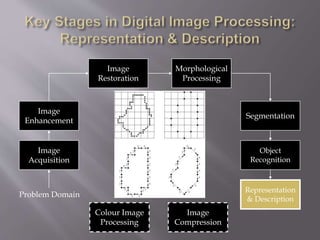
Representation & description:
Follows output of segmentation with raw pixel data usually boundary
information or regional description.
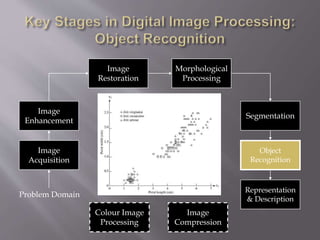
Object recognition:
Process of assigning a label to an object based on its description.
Image
Acquisition
Image
Restoration
Morphological
Processing
Segmentation
Representation
& Description
Image
Enhancement
Object
Recognition
Problem Domain
Colour Image
Processing
Image
Compression
Image
Acquisition
Image
Restoration
Morphological
Processing
Segmentation
Representation
& Description
Image
Enhancement
Object
Recognition
Problem Domain
Colour Image
Processing
Image
Compression
Image
Acquisition
Image
Restoration
Morphological
Processing
Segmentation
Representation
& Description
Image
Enhancement
Object
Recognition
Problem Domain
Colour Image
Processing
Image
Compression
Key Stages in Digital Image Processing:
Morphological Processing
Image
Acquisition
Image
Restoration
Morphological
Processing
Segmentation
Representation
& Description
Image
Enhancement
Object
Recognition
Problem Domain
Colour Image
Processing
Image
Compression
Image
Acquisition
Image
Restoration
Morphological
Processing
Segmentation
Representation
& Description
Image
Enhancement
Object
Recognition
Problem Domain
Colour Image
Processing
Image
Compression
Image
Acquisition
Image
Restoration
Morphological
Processing
Segmentation
Representation
& Description
Image
Enhancement
Object
Recognition
Problem Domain
Colour Image
Processing
Image
Compression
Image
Acquisition
Image
Restoration
Morphological
Processing
Segmentation
Representation
& Description
Image
Enhancement
Object
Recognition
Problem Domain
Colour Image
Processing
Image
Compression
Image
Acquisition
Image
Restoration
Morphological
Processing
Segmentation
Representation
& Description
Image
Enhancement
Object
Recognition
Problem Domain
Colour Image
Processing
Image
Compression
Image
Acquisition
Image
Restoration
Morphological
Processing
Segmentation
Representation
& Description
Image
Enhancement
Object
Recognition
Problem Domain
Colour Image
Processing
Image
Compression
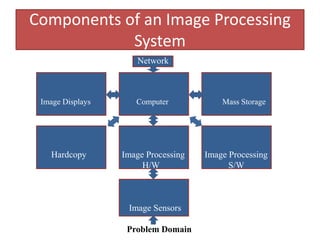
Components of an Image Processing
System
Network
Image Displays Computer Mass Storage
Hardcopy Image Processing Image Processing
H/W S/W
Image Sensors
Problem Domain
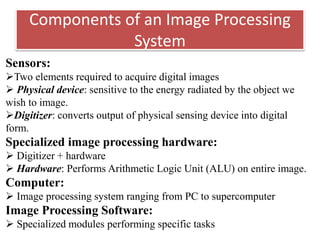
Components of an Image Processing
System
Sensors:
Two elements required to acquire digital images
 Physical device: sensitive to the energy radiated by the object we
wish to image.
Digitizer: converts output of physical sensing device into digital
form.
Specialized image processing hardware:
 Digitizer + hardware
 Hardware: Performs Arithmetic Logic Unit (ALU) on entire image.
Computer:
 Image processing system ranging from PC to supercomputer
Image Processing Software:
 Specialized modules performing specific tasks
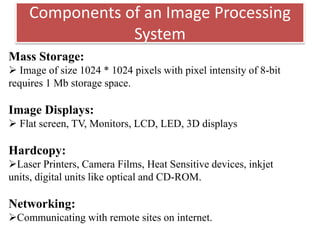
Components of an Image Processing
System
Mass Storage:
 Image of size 1024 * 1024 pixels with pixel intensity of 8-bit
requires 1 Mb storage space.
Image Displays:
 Flat screen, TV, Monitors, LCD, LED, 3D displays
Hardcopy:
Laser Printers, Camera Films, Heat Sensitive devices, inkjet
units, digital units like optical and CD-ROM.
Networking:
Communicating with remote sites on internet.
1)Biological Research:
 DNA typing and matching;
Automatic counting and classification of cell structures in bone and tissue.
2) Defence and Intelligence:
Reconnaissance photo-interpretation of objects in
 Satellite images;
Target acquisition and
Missile guidance.
3) Document Processing:
 Scanning,
Archiving and transmission (fax);
Automatic detection and recognition of printed text (postal sorting
office, tax return processing, banking cheques).
4) Law Enforcement Forensics:
 Photo-ID kits,
criminal photo-search,
 automatic fingerprint matching,
DNA matching and fibre analysis
5) Photography:
 Altering colours,
Zooming;
Adding and subtracting objects to a scene;
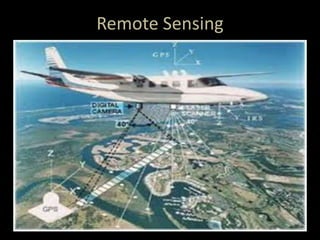
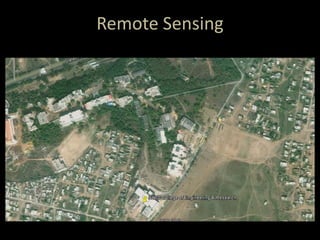
6) Remote Sensing:
Land cover analysis (water, roads, cities and cultivation),
vegetation features (water content and temperature) and crop yield
analysis;
3-D terrain rendering from satellite or aircraft data (road and dam
planning); fire and smoke detection.
7) Space exploration and Astronomy:
Satellite navigation and altitude control using star positions.
8) Video and Film Special Effects:
 Animation, and
Special effects (Star Wars).
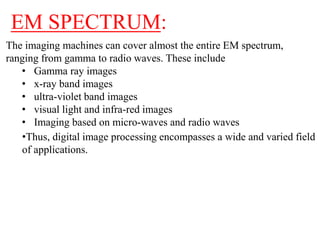
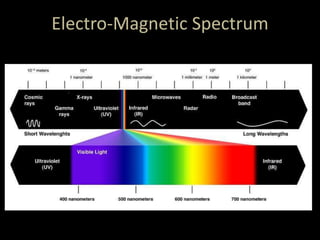
The imaging machines can cover almost the entire EM spectrum,
ranging from gamma to radio waves. These include
• Gamma ray images
• x-ray band images
• ultra-violet band images
• visual light and infra-red images
• Imaging based on micro-waves and radio waves
•Thus, digital image processing encompasses a wide and varied field
of applications.
EM SPECTRUM:
Electro-Magnetic Spectrum
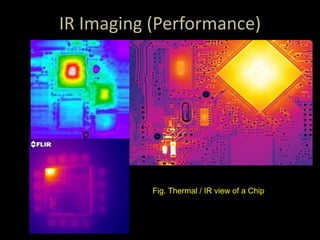
IR Imaging (Performance)
Fig. Thermal / IR view of a Chip
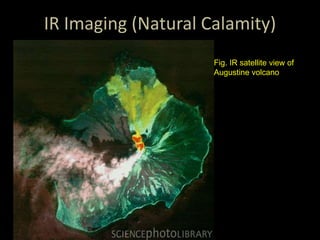
IR Imaging (Natural Calamity)
Fig. IR satellite view of
Augustine volcano
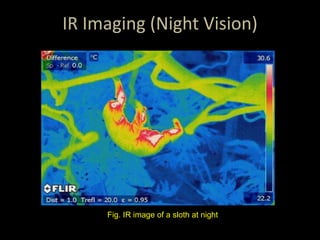
IR Imaging (Night Vision)
Fig. IR image of a sloth at night
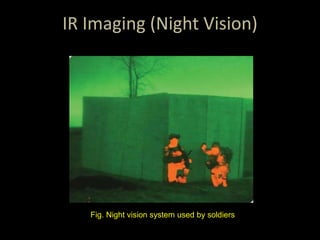
IR Imaging (Night Vision)
Fig. Night vision system used by soldiers
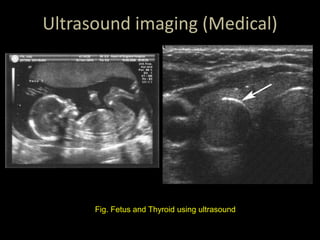
Ultrasound imaging (Medical)
Fig. Fetus and Thyroid using ultrasound
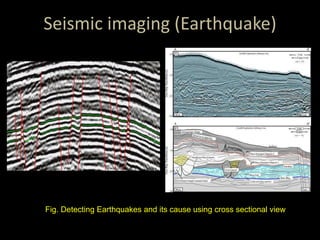
Seismic imaging (Earthquake)
Fig. Detecting Earthquakes and its cause using cross sectional view
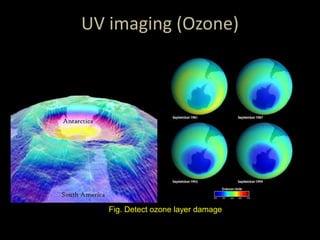
UV imaging (Ozone)
Fig. Detect ozone layer damage
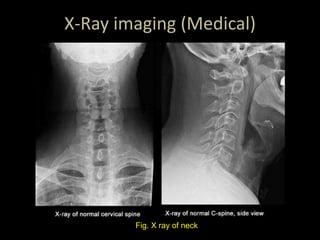
X-Ray imaging (Medical)
Fig. X ray of neck
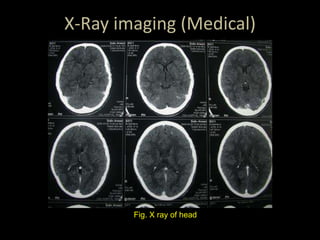
X-Ray imaging (Medical)
Fig. X ray of head
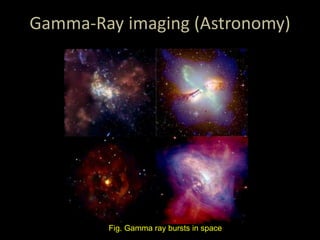
Gamma-Ray imaging (Astronomy)
Fig. Gamma ray bursts in space
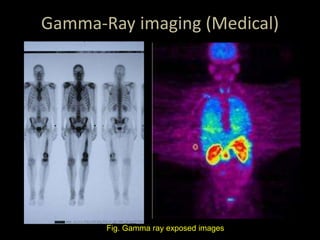
Gamma-Ray imaging (Medical)
Fig. Gamma ray exposed images
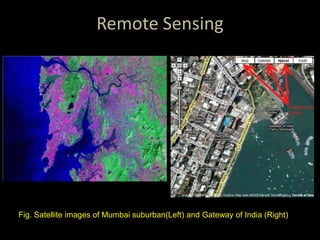
Remote Sensing
Fig. Satellite images of Mumbai suburban(Left) and Gateway of India (Right)
Remote Sensing
Remote Sensing
Advantages
 Digital image processing made digital image can be noise
free
 It can be made available in any desired format. (X-rays, photo
negatives, improved image, etc)
 Digital imaging is the ability of the operator to post-process
the image .It means manipulate the pixel shades to correct
image density and contrast .
 Images can be stored in the computer memory and easily
retrieved on the same computer screen .
 Digital imaging allows the electronic transmission of images
to third-party providers
CONCLUSION
1.Dip is used to give effective images.
2.It is used to edit image and manipulate as user desired.
3.It is used in satellites ,medical, movies fields e.t.c.
4.Colour images styles, animation so on…
5.User understand any thing easy way.
Dip review
Dip review
Dip review

Dip review

  • 1.
    DIGITAL IMAGE PROCESSING Presented by:- S. Sushma(11MD1A0466) P.Harish Reddy(11MD1A0496) V. Manikanta(11MD1A04B1)
  • 2.
    DIGITAL IMAGE PROCESSING Presented by:- S.Sushma(11MD1A0466) P. Harish Reddy(11MD1A0496) V. Manikanta(11MD1A04B1)
  • 3.
    INTRODUCTION What is anImage  An image is nothing more than a two dimensional signal.  It is defined by the mathematical function f(x,y) where x and y are the two co-ordinates horizontally and vertically. The value of f(x,y) at any point is gives the pixel value at that point of an image. X Y The adjacent figure is an example of digital image that we can watch on our computer screen. But actually , this image is nothing but a two dimensional array of numbers ranging between 0 and 255.
  • 4.
    Adjacent table isthe actual representation of above image. Each number represents the value of the function f(x,y) at any point. In this case the value 123 , 232,123 each represents an individual pixel value. INTRODUCTION 123 30 123 232 123 321 123 77 89 80 255 255 PIXEL  A Pixel is a basic building block for an image. 1 pixel
  • 5.
    What is aDigital Image? A digital image is a representation of a two-dimensional image as a finite set of digital values, called picture elements or pixels
  • 6.
    How a DigitalImage is Generated  Since capturing an image from a camera is a physical procedure. The sunlight is used as a source of energy.  A sensor array is used for the acquisition of the image.  So when the sunlight falls upon the object, then the amount of light reflected by that object is sensed by the sensors, and a continuous voltage signal is generated by the amount of sensed data.
  • 7.
    In order tocreate a digital image , we need to convert this data into a digital form. This involves sampling and quantization. The result of sampling and quantization results in an two dimensional array or matrix of numbers which are nothing but a digital image. How a Digital Image is Generated
  • 8.
    Meaning of digitalimage processing  Digital : Information represented in discrete (digits) form.  Image : A reproduction of the form of a person or object .  Processing : Performing a series of actions or operations on data to convert into information  DIP: The Digital image processing is the use of computer algorithms to perform image processing (or) manipulation on digital images.
  • 9.
    HISTORY OF DIP Early1920s: One of the first applications of digital imaging was in the news paper industry. The Bartlane cable picture transmission service. Images were transferred by submarine cable between London and New York. Pictures were coded for cable transfer and reconstructed at the receiving end on a telegraph printer.
  • 10.
    Fig. 2 Fig.3 In 1921, photographic printing press improved the resolution and tonal quality of images. Bartlane system was capable of coding 5 distinct brightness levels. It increased to 15 by 1929. HISTORY OF DIP
  • 11.
    After 35 yearsof improvement in processing technique In 1964, Computer processing techniques were used to improve picture of moon transmitted by Ranger 7 at JPL. This was the basis of modern image processing technique. HISTORY OF DIP
  • 12.
     Many ofthe techniques of digital image processing, were developed in the 1960s at the Jet Propulsion Laboratory, Massachusetts Institute of Technology, Bell Laboratories, University of Maryland, and a few other research facilities, with application to satellite imagery, wire- photo standards conversion,  Medical imaging, Videophone, Character recognition, and photograph enhancement.  In 2002 Raanan Fattal introduced Gradient domain image processing, a new way to process images in which the differences between pixels are manipulated rather than the pixel values themselves. HISTORY OF DIP
  • 13.
    HISTORY OF DIP •1970s:Digital image processing begins to be used in medical applications •1979: Sir Godfrey N. Hounsfield & Prof. Allan M. Cormack share the Nobel Prize in medicine for the invention of tomography, the technology behind Computerised Axial Tomography (CAT) scans Typical head slice CAT image Godfrey N. Hounsfield Prof. Allan M. Cormack
  • 14.
    Image processing isused for two somewhat different purposes:  Improving the visual appearance of images (pictorial information) to a human viewer, and  Preparing (processing) images for measurement of the features and structures present.  For efficient storage and transmission of images. The techniques that are appropriate for each of these tasks are not always the same, but there is considerable overlap. DIGITAL IMAGE PROCESSING
  • 15.
    Low Level Process Input:Image Output: Image Examples: Noise removal, image sharpening Mid Level Process Input: Image Output: Attributes Examples: Object recognition, segmentation High Level Process Input: Attributes Output: Understanding Examples: Scene understanding, autonomous navigation “The continuum from image processing to computer vision can be broken up into low , mid and high-level processes” DIGITAL IMAGE PROCESSING
  • 16.
    Low-level process: (DIP) Primitiveoperations where inputs and outputs are images Major functions: image pre-processing like noise reduction, contrast enhancement, image sharpening, etc. Mid-level process (DIP and Computer Vision and Pattern Recognition) Inputs are images, outputs are attributes (e.g., edges). Major functions: segmentation, description, classification / recognition of objects High-level process (Computer Vision) Make sense of an ensemble of recognized objects; perform the cognitive functions normally associated with vision
  • 17.
  • 18.
    Fundamental steps inDIP Image Acquisition: First process Involves image preprocessing viz. scaling Image Enhancement: Process of image manipulation to make it more suitable for specific use Different images require different enhancement methods Subjective technique Image Restoration: Based on mathematical or probabilistic models of image degradation thus objective.
  • 19.
    Fundamental steps inDIP Color Image Processing: Gained importance due to increase use of internet Wavelets: Used mainly for image data compression & pyramidal representation where images are divided into smaller regions. Compression: Technique for reducing the storage required to save image, or bandwidth required to transmit it.  JPEG (Joint Photographic Experts Group)  TIF(Tagged Image File) or TIFF(Tagged Image File Format)  PNG(Portable Network Graphics)  GIF(Graphics Interchange Format)  BMP(Bitmap image file)
  • 20.
    Fundamental steps inDIP Morphological Processing :  Deals with tools for extracting image components Segmentation: Partition an image into constituent parts or objects. Representation & description: Follows output of segmentation with raw pixel data usually boundary information or regional description. Object recognition: Process of assigning a label to an object based on its description.
  • 21.
  • 22.
  • 23.
  • 24.
    Key Stages inDigital Image Processing: Morphological Processing Image Acquisition Image Restoration Morphological Processing Segmentation Representation & Description Image Enhancement Object Recognition Problem Domain Colour Image Processing Image Compression
  • 25.
  • 26.
  • 27.
  • 28.
  • 29.
  • 30.
    Components of anImage Processing System Network Image Displays Computer Mass Storage Hardcopy Image Processing Image Processing H/W S/W Image Sensors Problem Domain
  • 31.
    Components of anImage Processing System Sensors: Two elements required to acquire digital images  Physical device: sensitive to the energy radiated by the object we wish to image. Digitizer: converts output of physical sensing device into digital form. Specialized image processing hardware:  Digitizer + hardware  Hardware: Performs Arithmetic Logic Unit (ALU) on entire image. Computer:  Image processing system ranging from PC to supercomputer Image Processing Software:  Specialized modules performing specific tasks
  • 32.
    Components of anImage Processing System Mass Storage:  Image of size 1024 * 1024 pixels with pixel intensity of 8-bit requires 1 Mb storage space. Image Displays:  Flat screen, TV, Monitors, LCD, LED, 3D displays Hardcopy: Laser Printers, Camera Films, Heat Sensitive devices, inkjet units, digital units like optical and CD-ROM. Networking: Communicating with remote sites on internet.
  • 33.
    1)Biological Research:  DNAtyping and matching; Automatic counting and classification of cell structures in bone and tissue. 2) Defence and Intelligence: Reconnaissance photo-interpretation of objects in  Satellite images; Target acquisition and Missile guidance.
  • 34.
    3) Document Processing: Scanning, Archiving and transmission (fax); Automatic detection and recognition of printed text (postal sorting office, tax return processing, banking cheques). 4) Law Enforcement Forensics:  Photo-ID kits, criminal photo-search,  automatic fingerprint matching, DNA matching and fibre analysis
  • 35.
    5) Photography:  Alteringcolours, Zooming; Adding and subtracting objects to a scene; 6) Remote Sensing: Land cover analysis (water, roads, cities and cultivation), vegetation features (water content and temperature) and crop yield analysis; 3-D terrain rendering from satellite or aircraft data (road and dam planning); fire and smoke detection.
  • 36.
    7) Space explorationand Astronomy: Satellite navigation and altitude control using star positions. 8) Video and Film Special Effects:  Animation, and Special effects (Star Wars).
  • 37.
    The imaging machinescan cover almost the entire EM spectrum, ranging from gamma to radio waves. These include • Gamma ray images • x-ray band images • ultra-violet band images • visual light and infra-red images • Imaging based on micro-waves and radio waves •Thus, digital image processing encompasses a wide and varied field of applications. EM SPECTRUM:
  • 38.
  • 39.
    IR Imaging (Performance) Fig.Thermal / IR view of a Chip
  • 40.
    IR Imaging (NaturalCalamity) Fig. IR satellite view of Augustine volcano
  • 41.
    IR Imaging (NightVision) Fig. IR image of a sloth at night
  • 42.
    IR Imaging (NightVision) Fig. Night vision system used by soldiers
  • 43.
    Ultrasound imaging (Medical) Fig.Fetus and Thyroid using ultrasound
  • 44.
    Seismic imaging (Earthquake) Fig.Detecting Earthquakes and its cause using cross sectional view
  • 45.
    UV imaging (Ozone) Fig.Detect ozone layer damage
  • 46.
  • 47.
  • 48.
    Gamma-Ray imaging (Astronomy) Fig.Gamma ray bursts in space
  • 49.
    Gamma-Ray imaging (Medical) Fig.Gamma ray exposed images
  • 50.
    Remote Sensing Fig. Satelliteimages of Mumbai suburban(Left) and Gateway of India (Right)
  • 51.
  • 52.
  • 53.
    Advantages  Digital imageprocessing made digital image can be noise free  It can be made available in any desired format. (X-rays, photo negatives, improved image, etc)  Digital imaging is the ability of the operator to post-process the image .It means manipulate the pixel shades to correct image density and contrast .  Images can be stored in the computer memory and easily retrieved on the same computer screen .  Digital imaging allows the electronic transmission of images to third-party providers
  • 54.
    CONCLUSION 1.Dip is usedto give effective images. 2.It is used to edit image and manipulate as user desired. 3.It is used in satellites ,medical, movies fields e.t.c. 4.Colour images styles, animation so on… 5.User understand any thing easy way.