IMAGE
    PROCESSING
         Presented By :-
           Lovely Soni
Chartered Institute of Technology,
            aburoad.
WHAT IS IMAGE ?
    Image is an Artifact that reproduce the likeness
of some subjects usually a physical object.
IMAGE ENHANCEMENT
   Improving Quality of Image
   Two types of Work Area:
        I) Special Domain
        II)Frequency Domain
   In Special Domain enhancement achieved by
    processing on the actual pixels of image.
   In Frequency Domain it is achieved by processing on a
    frequency or intensity.
HISTOGRAM
       HISTOGRAM is graph of color intensity value
    v/s no. of pixels with that intensity in image.
       HISTOGRAM is Blueprint of image.
   How to construct HISTOGRAM?
       Working with RGB image of 24 bit image ,
    HISTOGRAM is prepared for each color .
       Working with Grayscale image of 8 bit
    maximum 256 shades ,single HISTOGRAM is
    prepared.
FILTERS
FILTERS FOR IMAGE PROCESSING:
 Brightness Filter
 Smoothing Filter
 Noise Reduction Filter
 Contrast Filter
Brightness Filter
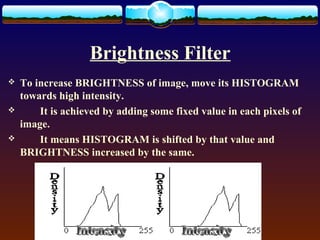
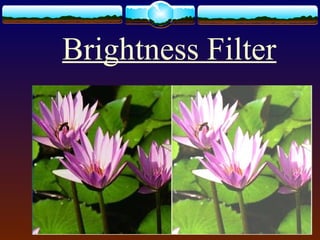
   To increase BRIGHTNESS of image, move its HISTOGRAM
    towards high intensity.
       It is achieved by adding some fixed value in each pixels of
    image.
       It means HISTOGRAM is shifted by that value and
    BRIGHTNESS increased by the same.
BRIGHTNESS FILTER
   For eg.
              To increase BRIGHTNESS in RGB image, we have to
    add K value in each color that is, RED, GREEN & BLUE.
   Processed pixel= source pixel + Brightness constant
Brightness Filter
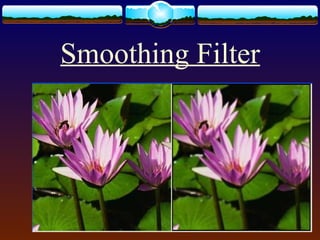
Smoothing Filter
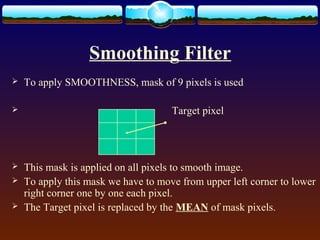
   To apply SMOOTHNESS, mask of 9 pixels is used

                                    Target pixel


   This mask is applied on all pixels to smooth image.
   To apply this mask we have to move from upper left corner to lower
    right corner one by one each pixel.
   The Target pixel is replaced by the MEAN of mask pixels.
Smoothing Filter
Noise Reduction Filter
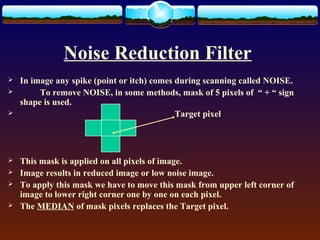
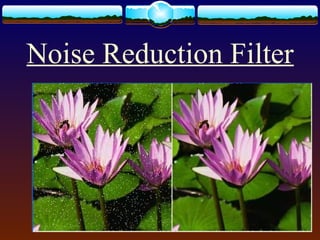
   In image any spike (point or itch) comes during scanning called NOISE.
        To remove NOISE, in some methods, mask of 5 pixels of “ + “ sign
    shape is used.
                                            Target pixel


   This mask is applied on all pixels of image.
   Image results in reduced image or low noise image.
   To apply this mask we have to move this mask from upper left corner of
    image to lower right corner one by one on each pixel.
   The MEDIAN of mask pixels replaces the Target pixel.
Noise Reduction Filter
Contrast Filter
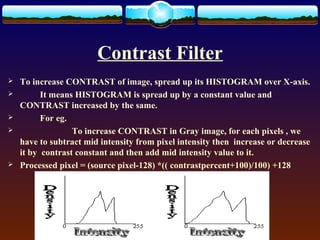
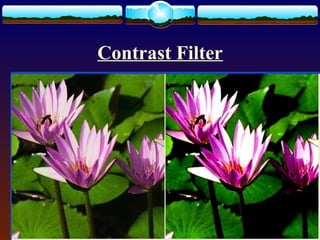
   To increase CONTRAST of image, spread up its HISTOGRAM over X-axis.
         It means HISTOGRAM is spread up by a constant value and
    CONTRAST increased by the same.
         For eg.
                 To increase CONTRAST in Gray image, for each pixels , we
    have to subtract mid intensity from pixel intensity then increase or decrease
    it by contrast constant and then add mid intensity value to it.
   Processed pixel = (source pixel-128) *(( contrastpercent+100)/100) +128
Contrast Filter
Operations
• Euclidean geometry transformation
• Color correctness
• Digital compositing
• Image registration
• Image recognition
• etc…
Applications
• Computer Vision
• Face Detection
• Feature Detection
• Medical Image Processing
• Remote Sensing
• etc…
Thank You….

Image processing

  • 1.
    IMAGE PROCESSING Presented By :- Lovely Soni Chartered Institute of Technology, aburoad.
  • 2.
    WHAT IS IMAGE? Image is an Artifact that reproduce the likeness of some subjects usually a physical object.
  • 3.
    IMAGE ENHANCEMENT  Improving Quality of Image  Two types of Work Area: I) Special Domain II)Frequency Domain  In Special Domain enhancement achieved by processing on the actual pixels of image.  In Frequency Domain it is achieved by processing on a frequency or intensity.
  • 4.
    HISTOGRAM  HISTOGRAM is graph of color intensity value v/s no. of pixels with that intensity in image.  HISTOGRAM is Blueprint of image.  How to construct HISTOGRAM?  Working with RGB image of 24 bit image , HISTOGRAM is prepared for each color .  Working with Grayscale image of 8 bit maximum 256 shades ,single HISTOGRAM is prepared.
  • 5.
    FILTERS FILTERS FOR IMAGEPROCESSING:  Brightness Filter  Smoothing Filter  Noise Reduction Filter  Contrast Filter
  • 6.
    Brightness Filter  To increase BRIGHTNESS of image, move its HISTOGRAM towards high intensity.  It is achieved by adding some fixed value in each pixels of image.  It means HISTOGRAM is shifted by that value and BRIGHTNESS increased by the same.
  • 7.
    BRIGHTNESS FILTER  For eg.  To increase BRIGHTNESS in RGB image, we have to add K value in each color that is, RED, GREEN & BLUE.  Processed pixel= source pixel + Brightness constant
  • 8.
  • 9.
    Smoothing Filter  To apply SMOOTHNESS, mask of 9 pixels is used  Target pixel  This mask is applied on all pixels to smooth image.  To apply this mask we have to move from upper left corner to lower right corner one by one each pixel.  The Target pixel is replaced by the MEAN of mask pixels.
  • 10.
  • 11.
    Noise Reduction Filter  In image any spike (point or itch) comes during scanning called NOISE.  To remove NOISE, in some methods, mask of 5 pixels of “ + “ sign shape is used.  Target pixel  This mask is applied on all pixels of image.  Image results in reduced image or low noise image.  To apply this mask we have to move this mask from upper left corner of image to lower right corner one by one on each pixel.  The MEDIAN of mask pixels replaces the Target pixel.
  • 12.
  • 13.
    Contrast Filter  To increase CONTRAST of image, spread up its HISTOGRAM over X-axis.  It means HISTOGRAM is spread up by a constant value and CONTRAST increased by the same.  For eg.  To increase CONTRAST in Gray image, for each pixels , we have to subtract mid intensity from pixel intensity then increase or decrease it by contrast constant and then add mid intensity value to it.  Processed pixel = (source pixel-128) *(( contrastpercent+100)/100) +128
  • 14.
  • 15.
    Operations • Euclidean geometrytransformation • Color correctness • Digital compositing • Image registration • Image recognition • etc…
  • 16.
    Applications • Computer Vision •Face Detection • Feature Detection • Medical Image Processing • Remote Sensing • etc…
  • 17.