TCP/IP Protocol Suite 1
Chapter 10
Upon completion you will be able to:
Internet Group
Management Protocol
• Know the purpose of IGMP
• Know the types of IGMP messages
• Understand how a member joins a group and leaves a group
• Understand membership monitoring
• Understand how an IGMP message is encapsulated
• Understand the interactions of the modules of an IGMP package
Objectives
TCP/IP Protocol Suite 2
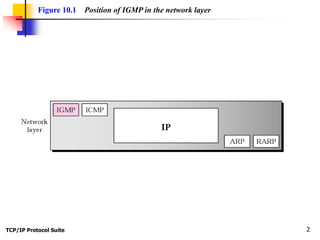
Figure 10.1 Position of IGMP in the network layer
TCP/IP Protocol Suite 3
10.1 GROUP MANAGEMENT
IGMP is a protocol that manages group membership. The IGMP
protocol gives the multicast routers information about the membership
status of hosts (routers) connected to the network. .
TCP/IP Protocol Suite 4
IGMP is a group management
protocol. It helps a multicast router
create and update a list of loyal
members related to each router
interface.
Note:
TCP/IP Protocol Suite 5
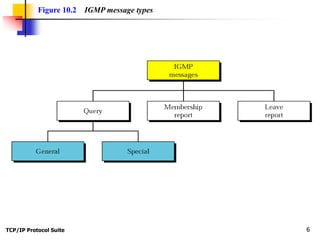
10.2 IGMP MESSAGES
IGMP has three types of messages: the query, the membership report,
and the leave report. There are two types of query messages, general and
special.
The topics discussed in this section include:
Message Format
TCP/IP Protocol Suite 6
Figure 10.2 IGMP message types
TCP/IP Protocol Suite 7
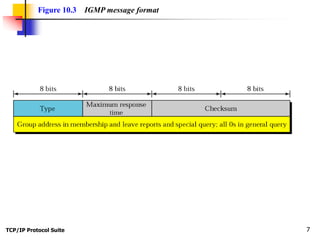
Figure 10.3 IGMP message format
TCP/IP Protocol Suite 8
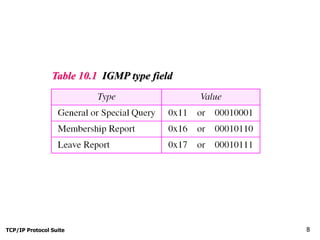
Table 10.1 IGMP type field
TCP/IP Protocol Suite 9
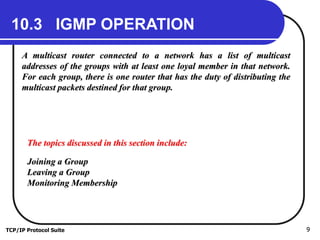
10.3 IGMP OPERATION
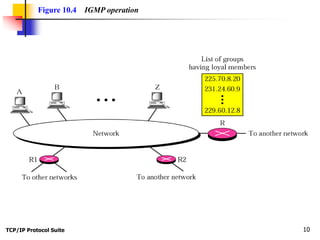
A multicast router connected to a network has a list of multicast
addresses of the groups with at least one loyal member in that network.
For each group, there is one router that has the duty of distributing the
multicast packets destined for that group.
The topics discussed in this section include:
Joining a Group
Leaving a Group
Monitoring Membership
TCP/IP Protocol Suite 10
Figure 10.4 IGMP operation
TCP/IP Protocol Suite 11
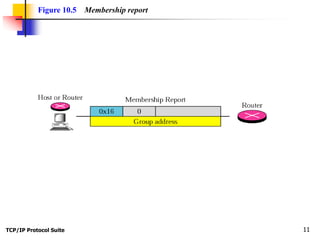
Figure 10.5 Membership report
TCP/IP Protocol Suite 12
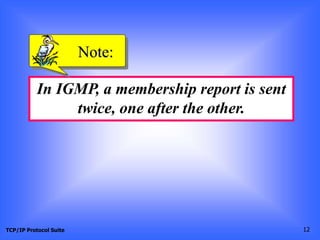
In IGMP, a membership report is sent
twice, one after the other.
Note:
TCP/IP Protocol Suite 13
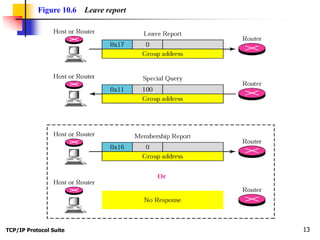
Figure 10.6 Leave report
TCP/IP Protocol Suite 14
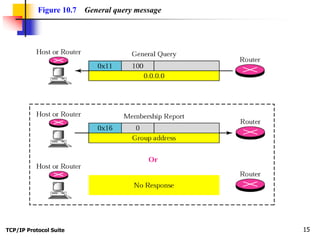
The general query message does not
define a particular group.
Note:
TCP/IP Protocol Suite 15
Figure 10.7 General query message
TCP/IP Protocol Suite 16
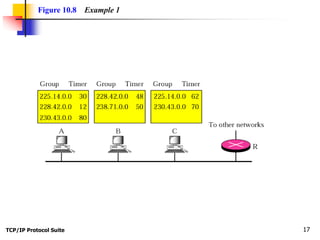
Imagine there are three hosts in a network as shown in Figure
10.8.
Example 1
See Next Slide
A query message was received at time 0; the random delay time
(in tenths of seconds) for each group is shown next to the
group address. Show the sequence of report messages.
TCP/IP Protocol Suite 17
Figure 10.8 Example 1
TCP/IP Protocol Suite 18
Solution
The events occur in this sequence:
Example 1 (Continued)
a. Time 12: The timer for 228.42.0.0 in host A expires and a
membership report is sent, which is received by the router and every
host including host B which cancels its timer for 228.42.0.0.
b. Time 30: The timer for 225.14.0.0 in host A expires and a
membership report is sent, which is received by the router and every
host including host C which cancels its timer for 225.14.0.0.
c. Time 50: The timer for 238.71.0.0 in host B expires and a
membership report is sent, which is received by the router and every
host.
See Next Slide
TCP/IP Protocol Suite 19
Example 1 (Continued)
d. Time 70: The timer for 230.43.0.0 in host C expires and a
membership report is sent, which is received by the router and every
host including host A which cancels its timerfor 230.43.0.0.
Note that if each host had sent a report for every group in its
list, there would have been seven reports; with this strategy
only four reports are sent.
TCP/IP Protocol Suite 20
10.4 ENCAPSULATION
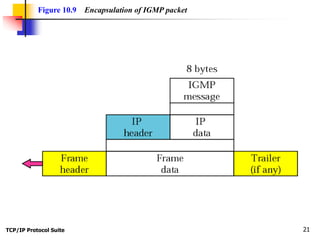
The IGMP message is encapsulated in an IP datagram, which is itself
encapsulated in a frame.
The topics discussed in this section include:
IP Layer
Data Link Layer
Netstat Utility
TCP/IP Protocol Suite 21
Figure 10.9 Encapsulation of IGMP packet
TCP/IP Protocol Suite 22
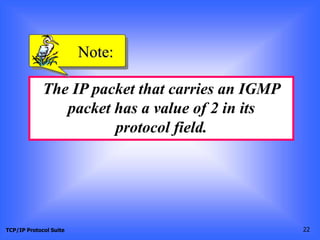
The IP packet that carries an IGMP
packet has a value of 2 in its
protocol field.
Note:
TCP/IP Protocol Suite 23
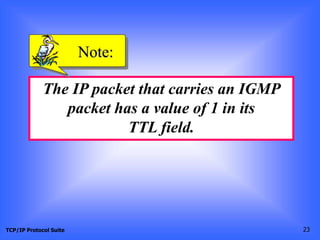
The IP packet that carries an IGMP
packet has a value of 1 in its
TTL field.
Note:
TCP/IP Protocol Suite 24
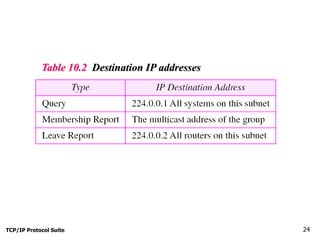
Table 10.2 Destination IP addresses
TCP/IP Protocol Suite 25
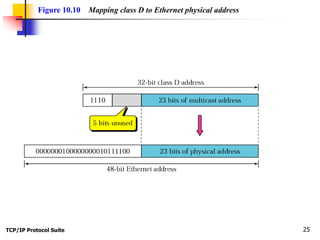
Figure 10.10 Mapping class D to Ethernet physical address
TCP/IP Protocol Suite 26
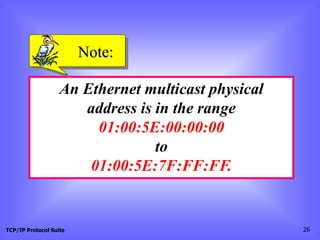
An Ethernet multicast physical
address is in the range
01:00:5E:00:00:00
to
01:00:5E:7F:FF:FF.
Note:
TCP/IP Protocol Suite 27
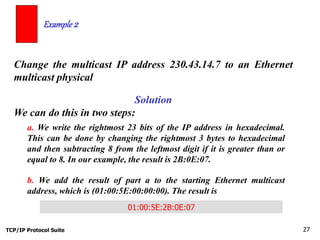
Change the multicast IP address 230.43.14.7 to an Ethernet
multicast physical
Example 2
Solution
We can do this in two steps:
a. We write the rightmost 23 bits of the IP address in hexadecimal.
This can be done by changing the rightmost 3 bytes to hexadecimal
and then subtracting 8 from the leftmost digit if it is greater than or
equal to 8. In our example, the result is 2B:0E:07.
b. We add the result of part a to the starting Ethernet multicast
address, which is (01:00:5E:00:00:00). The result is
01:00:5E:2B:0E:07
TCP/IP Protocol Suite 28
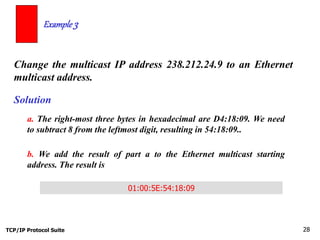
Change the multicast IP address 238.212.24.9 to an Ethernet
multicast address.
Example 3
Solution
a. The right-most three bytes in hexadecimal are D4:18:09. We need
to subtract 8 from the leftmost digit, resulting in 54:18:09..
b. We add the result of part a to the Ethernet multicast starting
address. The result is
01:00:5E:54:18:09
TCP/IP Protocol Suite 29
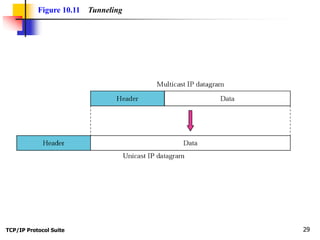
Figure 10.11 Tunneling
TCP/IP Protocol Suite 30
We use netstat with three options, -n, -r, and -a. The -n option gives the
numeric versions of IP addresses, the -r option gives the routing table, and
the -a option gives all addresses (unicast and multicast). Note that we show
only the fields relative to our discussion.
Example 4
$ netstat -nra
Kernel IP routing table
Destination Gateway Mask Flags Iface
153.18.16.0 0.0.0.0 255.255.240.0 U eth0
169.254.0.0 0.0.0.0 255.255.0.0 U eth0
127.0.0.0 0.0.0.0 255.0.0.0 U lo
224.0.0.0 0.0.0.0 224.0.0.0 U eth0
0.0.0.0 153.18.31.254 0.0.0.0 UG eth0
Any packet with a multicast address from 224.0.0.0 to 239.255.255.255 is
masked and delivered to the Ethernet interface.
TCP/IP Protocol Suite 31
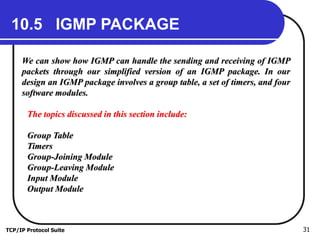
10.5 IGMP PACKAGE
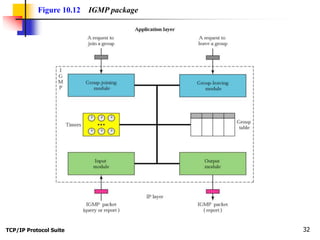
We can show how IGMP can handle the sending and receiving of IGMP
packets through our simplified version of an IGMP package. In our
design an IGMP package involves a group table, a set of timers, and four
software modules.
The topics discussed in this section include:
Group Table
Timers
Group-Joining Module
Group-Leaving Module
Input Module
Output Module
TCP/IP Protocol Suite 32
Figure 10.12 IGMP package
TCP/IP Protocol Suite 33
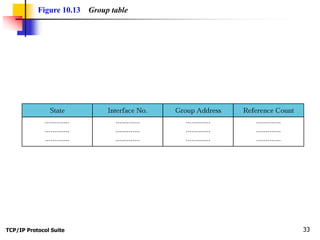
Figure 10.13 Group table

IGMP.ppt

  • 1.
    TCP/IP Protocol Suite1 Chapter 10 Upon completion you will be able to: Internet Group Management Protocol • Know the purpose of IGMP • Know the types of IGMP messages • Understand how a member joins a group and leaves a group • Understand membership monitoring • Understand how an IGMP message is encapsulated • Understand the interactions of the modules of an IGMP package Objectives
  • 2.
    TCP/IP Protocol Suite2 Figure 10.1 Position of IGMP in the network layer
  • 3.
    TCP/IP Protocol Suite3 10.1 GROUP MANAGEMENT IGMP is a protocol that manages group membership. The IGMP protocol gives the multicast routers information about the membership status of hosts (routers) connected to the network. .
  • 4.
    TCP/IP Protocol Suite4 IGMP is a group management protocol. It helps a multicast router create and update a list of loyal members related to each router interface. Note:
  • 5.
    TCP/IP Protocol Suite5 10.2 IGMP MESSAGES IGMP has three types of messages: the query, the membership report, and the leave report. There are two types of query messages, general and special. The topics discussed in this section include: Message Format
  • 6.
    TCP/IP Protocol Suite6 Figure 10.2 IGMP message types
  • 7.
    TCP/IP Protocol Suite7 Figure 10.3 IGMP message format
  • 8.
    TCP/IP Protocol Suite8 Table 10.1 IGMP type field
  • 9.
    TCP/IP Protocol Suite9 10.3 IGMP OPERATION A multicast router connected to a network has a list of multicast addresses of the groups with at least one loyal member in that network. For each group, there is one router that has the duty of distributing the multicast packets destined for that group. The topics discussed in this section include: Joining a Group Leaving a Group Monitoring Membership
  • 10.
    TCP/IP Protocol Suite10 Figure 10.4 IGMP operation
  • 11.
    TCP/IP Protocol Suite11 Figure 10.5 Membership report
  • 12.
    TCP/IP Protocol Suite12 In IGMP, a membership report is sent twice, one after the other. Note:
  • 13.
    TCP/IP Protocol Suite13 Figure 10.6 Leave report
  • 14.
    TCP/IP Protocol Suite14 The general query message does not define a particular group. Note:
  • 15.
    TCP/IP Protocol Suite15 Figure 10.7 General query message
  • 16.
    TCP/IP Protocol Suite16 Imagine there are three hosts in a network as shown in Figure 10.8. Example 1 See Next Slide A query message was received at time 0; the random delay time (in tenths of seconds) for each group is shown next to the group address. Show the sequence of report messages.
  • 17.
    TCP/IP Protocol Suite17 Figure 10.8 Example 1
  • 18.
    TCP/IP Protocol Suite18 Solution The events occur in this sequence: Example 1 (Continued) a. Time 12: The timer for 228.42.0.0 in host A expires and a membership report is sent, which is received by the router and every host including host B which cancels its timer for 228.42.0.0. b. Time 30: The timer for 225.14.0.0 in host A expires and a membership report is sent, which is received by the router and every host including host C which cancels its timer for 225.14.0.0. c. Time 50: The timer for 238.71.0.0 in host B expires and a membership report is sent, which is received by the router and every host. See Next Slide
  • 19.
    TCP/IP Protocol Suite19 Example 1 (Continued) d. Time 70: The timer for 230.43.0.0 in host C expires and a membership report is sent, which is received by the router and every host including host A which cancels its timerfor 230.43.0.0. Note that if each host had sent a report for every group in its list, there would have been seven reports; with this strategy only four reports are sent.
  • 20.
    TCP/IP Protocol Suite20 10.4 ENCAPSULATION The IGMP message is encapsulated in an IP datagram, which is itself encapsulated in a frame. The topics discussed in this section include: IP Layer Data Link Layer Netstat Utility
  • 21.
    TCP/IP Protocol Suite21 Figure 10.9 Encapsulation of IGMP packet
  • 22.
    TCP/IP Protocol Suite22 The IP packet that carries an IGMP packet has a value of 2 in its protocol field. Note:
  • 23.
    TCP/IP Protocol Suite23 The IP packet that carries an IGMP packet has a value of 1 in its TTL field. Note:
  • 24.
    TCP/IP Protocol Suite24 Table 10.2 Destination IP addresses
  • 25.
    TCP/IP Protocol Suite25 Figure 10.10 Mapping class D to Ethernet physical address
  • 26.
    TCP/IP Protocol Suite26 An Ethernet multicast physical address is in the range 01:00:5E:00:00:00 to 01:00:5E:7F:FF:FF. Note:
  • 27.
    TCP/IP Protocol Suite27 Change the multicast IP address 230.43.14.7 to an Ethernet multicast physical Example 2 Solution We can do this in two steps: a. We write the rightmost 23 bits of the IP address in hexadecimal. This can be done by changing the rightmost 3 bytes to hexadecimal and then subtracting 8 from the leftmost digit if it is greater than or equal to 8. In our example, the result is 2B:0E:07. b. We add the result of part a to the starting Ethernet multicast address, which is (01:00:5E:00:00:00). The result is 01:00:5E:2B:0E:07
  • 28.
    TCP/IP Protocol Suite28 Change the multicast IP address 238.212.24.9 to an Ethernet multicast address. Example 3 Solution a. The right-most three bytes in hexadecimal are D4:18:09. We need to subtract 8 from the leftmost digit, resulting in 54:18:09.. b. We add the result of part a to the Ethernet multicast starting address. The result is 01:00:5E:54:18:09
  • 29.
    TCP/IP Protocol Suite29 Figure 10.11 Tunneling
  • 30.
    TCP/IP Protocol Suite30 We use netstat with three options, -n, -r, and -a. The -n option gives the numeric versions of IP addresses, the -r option gives the routing table, and the -a option gives all addresses (unicast and multicast). Note that we show only the fields relative to our discussion. Example 4 $ netstat -nra Kernel IP routing table Destination Gateway Mask Flags Iface 153.18.16.0 0.0.0.0 255.255.240.0 U eth0 169.254.0.0 0.0.0.0 255.255.0.0 U eth0 127.0.0.0 0.0.0.0 255.0.0.0 U lo 224.0.0.0 0.0.0.0 224.0.0.0 U eth0 0.0.0.0 153.18.31.254 0.0.0.0 UG eth0 Any packet with a multicast address from 224.0.0.0 to 239.255.255.255 is masked and delivered to the Ethernet interface.
  • 31.
    TCP/IP Protocol Suite31 10.5 IGMP PACKAGE We can show how IGMP can handle the sending and receiving of IGMP packets through our simplified version of an IGMP package. In our design an IGMP package involves a group table, a set of timers, and four software modules. The topics discussed in this section include: Group Table Timers Group-Joining Module Group-Leaving Module Input Module Output Module
  • 32.
    TCP/IP Protocol Suite32 Figure 10.12 IGMP package
  • 33.
    TCP/IP Protocol Suite33 Figure 10.13 Group table